brakes INFINITI M 2010 User Guide
[x] Cancel search | Manufacturer: INFINITI, Model Year: 2010, Model line: M, Model: INFINITI M 2010Pages: 445, PDF Size: 6.15 MB
Page 334 of 445

3. To help prevent the vehicle from rollinginto the street when parked on a sloping
drive way, it is a good practice to turn the
wheels as illustrated.
cHEADED DOWNHILL WITH CURB:s1
Turn the wheels into the curb and move
the vehicle forward until the curb side
wheel gently touches the curb.
c HEADED UPHILL WITH CURB:
s2
Turn the wheels away from the curb and
move the vehicle back until the curb side
wheel gently touches the curb.
c HEADED UPHILL OR DOWNHILL, NO CURB:
s3
Turn the wheels toward the side of the
road so the vehicle will move away from
the center of the road if it moves.
4. Push the ignition switch to the LOCK
position.
WARNING
If the engine is not running or is turned off while
driving, the power assist for the steering will
not work. Steering will be harder to operate.
The power assisted steering uses a hydraulic
pump, driven by the engine, to assist steering.
If the engine stops or the drive belt breaks, you
will still have control of the vehicle. However,
much greater steering effort is needed, espe-
cially in sharp turns and at low speeds.
BRAKING PRECAUTIONS
The brake system has two separate hydraulic
circuits. If one circuit malfunctions, you will still
have braking at two wheels.
You may feel a small click and hear a sound
when the brake pedal is fully depressed slowly.
This is not a malfunction and indicates that the
brake assist mechanism is operating properly.
Vacuum assisted brakes
The brake booster aids braking by using engine
vacuum. If the engine stops, you can stop the
vehicle by depressing the brake pedal. How-
ever, greater foot pressure on the brake pedal
will be required to stop the vehicle and the
stopping distance will be longer.
Wet brakes
When the vehicle is washed or driven through
water, the brakes may get wet. As a result, your
braking distance will be longer and the vehicle
may pull to one side during braking.
To dry brakes, drive the vehicle at a safe speed
while lightly tapping the brake pedal to heat-up
the brakes. Do this until the brakes return to
normal. Avoid driving the vehicle at high speeds
until the brakes function correctly.
POWER STEERING BRAKE SYSTEM
Starting and driving5-49
wÐ
Ð
05/19/09Ðtbrooks
X
Page 335 of 445

Using the brakes
Avoid resting your foot on the brake pedal while
driving. This will cause overheating of the
brakes, wearing out the brake and pads faster
and reduce gas mileage.
To help reduce brake wear and to prevent the
brakes from overheating, reduce speed and
downshift to a lower gear before going down a
slope or long grade. Overheated brakes may
reduce braking performance and could result in
loss of vehicle control.
WARNING
cWhile driving on a slippery surface, be care-
ful when braking, accelerating or downshift-
ing. Abrupt braking or accelerating could
cause the wheels to skid and result in an
accident.
c If the engine is not running or is turned off
while driving, the power assist for the
brakes will not work. Braking will be harder.
PARKING BRAKE BREAK-IN
Break in the parking brake shoes whenever the
stopping effect of the parking brake is weak-
ened or whenever the parking brake shoes
and/or drums/rotors are replaced, in order to
assure the best braking performance.
This procedure is described in the vehicle ser-
vice manual and can be performed by an
INFINITI retailer.
BRAKE ASSIST
When the force applied to the brake pedal
exceeds a certain level, the Brake Assist is
activated generating greater braking force than
a conventional brake booster even with light
pedal force.
WARNING
The Brake Assist is only an aid to assist braking
operation and is not a collision warning or
avoidance device. It is the driver's responsibil-
ity to stay alert, drive safely and be in control of
the vehicle at all times.
PREVIEW FUNCTION (for Intelligent
Cruise Control (ICC) system equipped
models)
When the Preview Function identifies the need
to apply emergency braking by sensing a ve-
hicle ahead in the same lane and the distance
and relative speed from it, it applies the brake
pre-pressure before the driver depresses the
brake pedal and helps improve brake response
by reducing pedal free play.
c This system will not operate when the ve-
hicle is moving at approximately 20 MPH
(32 km/h) or less.
BRAKE ASSIST
5-50Starting and driving
wÐ
Ð
05/15/09Ðpattie
X
Page 338 of 445

ANTI-LOCK BRAKING SYSTEM (ABS)
WARNING
cThe Anti-lock Braking System (ABS) is a so-
phisticated device, but it cannot prevent ac-
cidents resulting from careless or dangerous
driving techniques. It can help maintain ve-
hicle control during braking on slippery sur-
faces. Remember that stopping distances on
slippery surfaces will be longer than on nor-
mal surfaces even with ABS. Stopping dis-
tances may also be longer on rough, gravel
or snow covered roads, or if you are using
tire chains. Always maintain a safe distance
from the vehicle in front of you. Ultimately,
the driver is responsible for safety.
c Tire type and condition may also affect brak-
ing effectiveness.
± When replacing tires, install the specified size of tires on all four wheels.
± When installing a spare tire, make sure that it is the proper size and type as speci-
fied on the Tire and Loading Information
label. See ªTIRE AND LOADING INFORMA-
TION LABELº in the ª9. Technical and con-
sumer informationº section of this
manual. ± For detailed information, see ªWHEELS
AND TIRESº in the ª8. Maintenance and
do-it-yourselfº section of this manual.
The Anti-lock Braking System (ABS) controls the
brakes so the wheels do not lock during hard
braking or when braking on slippery surfaces.
The system detects the rotation speed at each
wheel and varies the brake fluid pressure to
prevent each wheel from locking and sliding. By
preventing each wheel from locking, the system
helps the driver maintain steering control and
helps to minimize swerving and spinning on
slippery surfaces.
Using the system
Depress the brake pedal and hold it down.
Depress the brake pedal with firm steady pres-
sure, but do not pump the brakes. The ABS will
operate to prevent the wheels from locking up.
Steer the vehicle to avoid obstacles.
WARNING
Do not pump the brake pedal. Doing so may
result in increased stopping distances.
Self-test feature
The ABS includes electronic sensors, electric
pumps, hydraulic solenoids and a computer.
The computer has a built-in diagnostic feature
that tests the system each time you start the
engine and move the vehicle at a low speed in
forward or reverse. When the self-test occurs,
you may hear a ªclunkº noise and/or feel a
pulsation in the brake pedal. This is normal and
does not indicate a malfunction. If the computer
senses a malfunction, it switches the ABS off
and illuminates the ABS warning light on the
instrument panel. The brake system then oper-
ates normally, but without anti-lock assistance.
If the ABS warning light illuminates during the
self-test or while driving, have the vehicle
checked by an INFINITI retailer.
Starting and driving5-53
wÐ
Ð
05/15/09Ðpattie
X
Page 339 of 445

Normal operation
The ABS operates at speeds above 3 to 6 MPH
(5 to 10 km/h). The speed varies according to
road conditions.
When the ABS senses that one or more wheels
are close to locking up, the actuator rapidly
applies and releases hydraulic pressure. This
action is similar to pumping the brakes very
quickly. You may feel a pulsation in the brake
pedal and hear a noise from under the hood or
feel a vibration from the actuator when it is
operating. This is normal and indicates that the
ABS is operating properly. However, the pulsa-
tion may indicate that road conditions are haz-
ardous and extra care is required while driving.When accelerating or driving on slippery sur-
faces, the tires may spin or slide. With the
Vehicle Dynamic Control (VDC) system, sensors
detect these movements and control the brak-
ing and engine output to help improve vehicle
stability.
c
When the VDC system is operating, the
ªSLIPº indicator in the instrument panel
blinks.
c If the ªSLIPº indicator blinks, the road con-
ditions are slippery. Be sure to adjust your
speed and driving to these conditions. Be
sure to drive carefully. (See ªSlip indicator
lightº in the ª2. Instruments and controlsº
section, and ªVehicle Dynamic Control (VDC)
off indicator lightº in the ª2. Instruments
and controlsº section.)
c Indicator light
If a malfunction occurs in the system, the
ªSLIPº and ªVDC OFFº indicator lights illumi-
nate in the instrument panel. As long as
these indicators are illuminated, the VDC
system function is canceled.
The VDC system uses an Active Brake Limited
Slip (ABLS) function to improve vehicle traction.
The ABLS system works when one of the driving
wheels is spinning on a slippery surface. The
ABLS system brakes the spinning wheel, which
distributes the driving power to the other drive wheel. If the vehicle is operated with the VDC
OFF switch pushed and the VDC system turned
off, all VDC systems will be turned off. The ABLS
system and ABS will still operate with the VDC
system off. If the ABLS system is activated, the
ªSLIPº indicator will blink and you may hear a
clunk noise and/or feel a pulsation in the brake
pedal. This is normal and is not an indication of
a malfunction.
While the VDC system is operating, you may feel
a pulsation in the brake pedal and hear a noise
or feel a vibration from under the hood. This is
normal and indicates that the VDC system is
working properly.
The VDC system computer has a built-in diag-
nostic feature that tests the system each time
you start the engine and move the vehicle at a
low speed forward or backward. When the
self-test occurs, you may hear a ªclunkº noise
and/or feel a pulsation in the brake pedal. This
is normal and is not an indication of a
malfunction.
VEHICLE DYNAMIC CONTROL (VDC)
SYSTEM
5-54Starting and driving
wÐ
Ð
05/15/09Ðpattie
X
Page 366 of 445

8 Maintenance and do-it-yourself
Maintenance requirement.......................... 8-2
Scheduled maintenance ........................ 8-2
General maintenance ........................... 8-2
Where to go for service ......................... 8-2
General maintenance .............................. 8-2
Explanation of maintenance items ............... 8-2
Maintenance precautions .......................... 8-5
Engine compartment check locations ................ 8-6
VK45DE engine ................................. 8-6
VQ35HR engine ................................ 8-8
Engine cooling system ............................ 8-10
Checking engine coolant level ...................8-11
Changing engine coolant ........................ 8-11
Engine oil ....................................... 8-12
Checking engine oil level ......................8-12
Changing engine oil and filter ..................8-12
Automatic transmission fluid ......................8-15
5-speed automatic transmission ................8-15
7-speed automatic transmission ................8-15
Power steering fluid .............................. 8-16
Brake fluid ...................................... 8-16
Brake fluid ................................... 8-16
Window washer fluid ............................. 8-17
Battery .......................................... 8-17
Jump starting ................................. 8-19Variable voltage control system (if so equipped)
....8-19
Drive belts ....................................... 8-19
Spark plugs ..................................... 8-20
Replacing spark plugs ......................... 8-21
Air cleaner ....................................... 8-21
Windshield wiper blades .......................... 8-22
Cleaning ...................................... 8-22
Replacing ..................................... 8-23
Brakes .......................................... 8-24
Self-adjusting brakes .......................... 8-24
Brake pad wear warnings ......................8-24
Fuses ........................................... 8-25
Engine compartment ........................... 8-25
Passenger compartment ....................... 8-27
Battery replacement .............................. 8-28
Intelligent Key ................................ 8-28
Lights ........................................... 8-30
Headlights .................................... 8-31
Exterior and interior lights .....................8-32
Wheels and tires ................................. 8-34
Tire pressure .................................. 8-34
Tire labeling .................................. 8-38
Types of tires ................................. 8-40
Tire chains ................................... 8-41
Changing wheels and tires..................... 8-41
wÐ
Ð
05/15/09Ðpattie
X
Page 368 of 445

When driving in areas using road salt or other
corrosive materials, check lubrication fre-
quently.
Lights*:Clean the headlights on a regular
basis. Make sure that the headlights, stop
lights, tail lights, turn signal lights, and other
lights are all operating properly and installed
securely. Also check headlight aim.
Road wheel nuts (lug nuts)*: When checking the
tires, make sure no wheel nuts are missing, and
check for any loose wheel nuts. Tighten if
necessary.
Tire rotation*: Tires should be rotated every
7,500 miles (12,000 km).
Tires*: Check the pressure with a gauge often
and always prior to long distance trips. If nec-
essary, adjust the pressure in all tires, includ-
ing the spare, to the pressure specified. Check
carefully for damage, cuts or excessive wear.
Tire Pressure Monitoring System (TPMS) trans-
mitter components: Replace the TPMS transmit-
ter grommet seal, valve core and cap when the
tires are replaced due to wear or age.
Wheel alignment and balance: If the vehicle
should pull to either side while driving on a
straight and level road, or if you detect uneven
or abnormal tire wear, there may be a need for
wheel alignment. If the steering wheel or seat vibrates at normal
highway speeds, wheel balancing may be
needed.
For additional information regarding tires, refer
to ªImportant Tire Safety Informationº (US) or
ªTire Safety Informationº (Canada) in the
INFINITI Warranty Information Booklet.
Windshield:
Clean the windshield on a regular
basis. Check the windshield at least every six
months for cracks or other damage. Have a
damaged windshield repaired by a qualified
repair facility.
Windshield wiper blades*: Check for cracks or
wear if they do not wipe properly.
Inside the vehicle
The maintenance items listed here should be
checked on a regular basis, such as when
performing scheduled maintenance, cleaning
the vehicle, etc.
Accelerator pedal: Check the pedal for smooth
operation and make sure the pedal does not
catch or require uneven effort. Keep the floor
mat away from the pedal.
Automatic transmission P (Park) position
mechanism: On a fairly steep hill, check that the vehicle is held securely with the selector
lever in the P (Park) position without applying
any brakes.
Brake pedal:
Check the pedal for smooth opera-
tion. If the brake pedal suddenly goes down
further than normal, the pedal feels spongy or
the vehicle seems to take longer to stop, see an
INFINITI retailer immediately. Keep the floor mat
away from the pedal.
Brakes: Check that the brakes do not pull the
vehicle to one side when applied.
Parking brake: Check the parking brake opera-
tion regularly. The vehicle should be securely
held on a fairly steep hill with only the parking
brake applied. If the parking brake needs ad-
justment, see an INFINITI retailer.
Seat belts: Check that all parts of the seat belt
system (for example, buckles, anchors, adjust-
ers and retractors) operate properly and
smoothly, and are installed securely. Check the
belt webbing for cuts, fraying, wear or damage.
Seats: Check seat position controls such as
seat adjusters, seatback recliner, etc. to ensure
they operate smoothly and that all latches lock
securely in every position. Check that the head
restraints move up and down smoothly and that
the locks (if so equipped) hold securely in all
latched positions.
Maintenance and do-it-yourself8-3
wÐ
Ð
05/15/09Ðpattie
X
Page 389 of 445
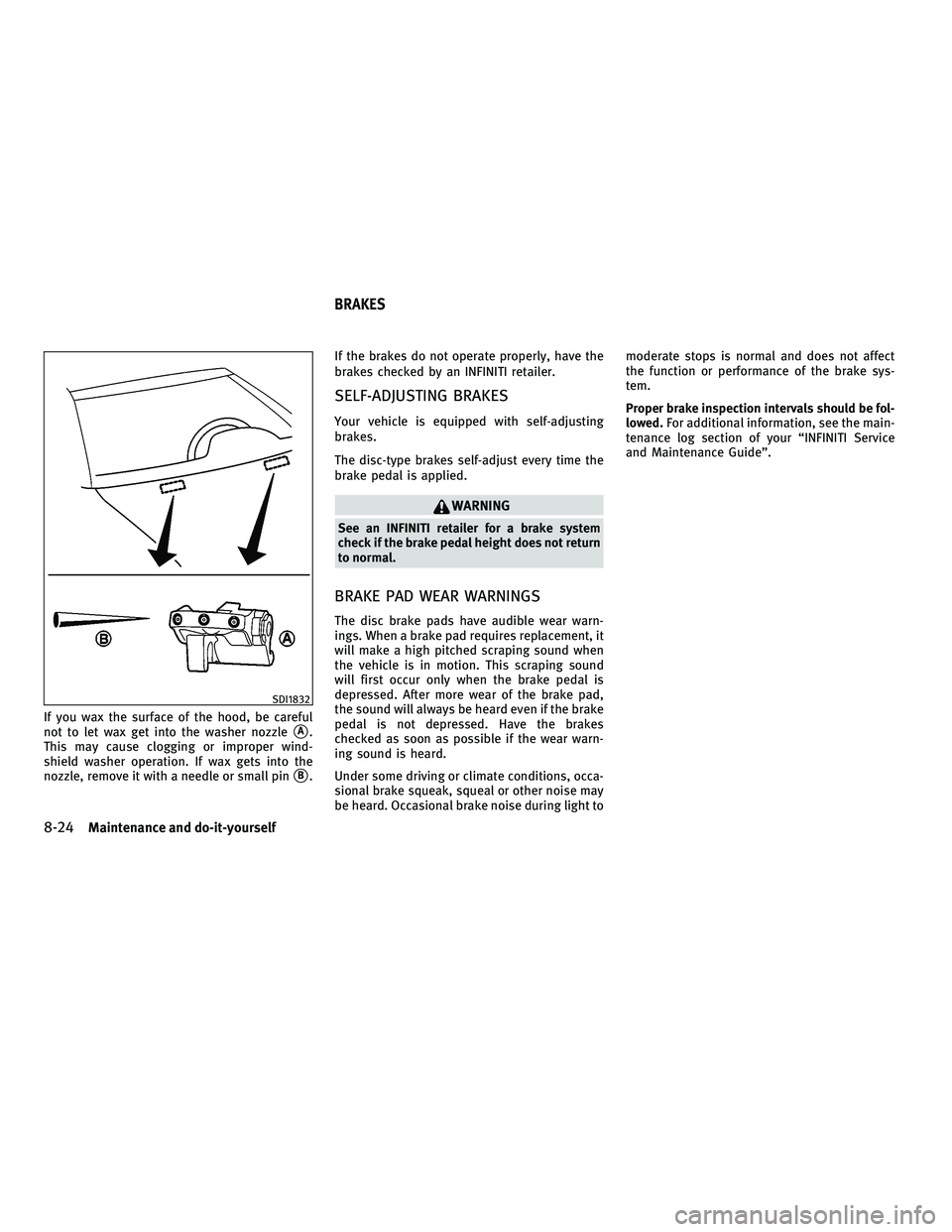
If you wax the surface of the hood, be careful
not to let wax get into the washer nozzle
sA.
This may cause clogging or improper wind-
shield washer operation. If wax gets into the
nozzle, remove it with a needle or small pin
sB. If the brakes do not operate properly, have the
brakes checked by an INFINITI retailer.
SELF-ADJUSTING BRAKES
Your vehicle is equipped with self-adjusting
brakes.
The disc-type brakes self-adjust every time the
brake pedal is applied.
WARNING
See an INFINITI retailer for a brake system
check if the brake pedal height does not return
to normal.
BRAKE PAD WEAR WARNINGS
The disc brake pads have audible wear warn-
ings. When a brake pad requires replacement, it
will make a high pitched scraping sound when
the vehicle is in motion. This scraping sound
will first occur only when the brake pedal is
depressed. After more wear of the brake pad,
the sound will always be heard even if the brake
pedal is not depressed. Have the brakes
checked as soon as possible if the wear warn-
ing sound is heard.
Under some driving or climate conditions, occa-
sional brake squeak, squeal or other noise may
be heard. Occasional brake noise during light to moderate stops is normal and does not affect
the function or performance of the brake sys-
tem.
Proper brake inspection intervals should be fol-
lowed.
For additional information, see the main-
tenance log section of your ªINFINITI Service
and Maintenance Guideº.
SDI1832
BRAKES
8-24Maintenance and do-it-yourself
wÐ
Ð
05/15/09Ðpattie
X