fog light INFINITI M 2010 Owners Manual
[x] Cancel search | Manufacturer: INFINITI, Model Year: 2010, Model line: M, Model: INFINITI M 2010Pages: 445, PDF Size: 6.15 MB
Page 10 of 445
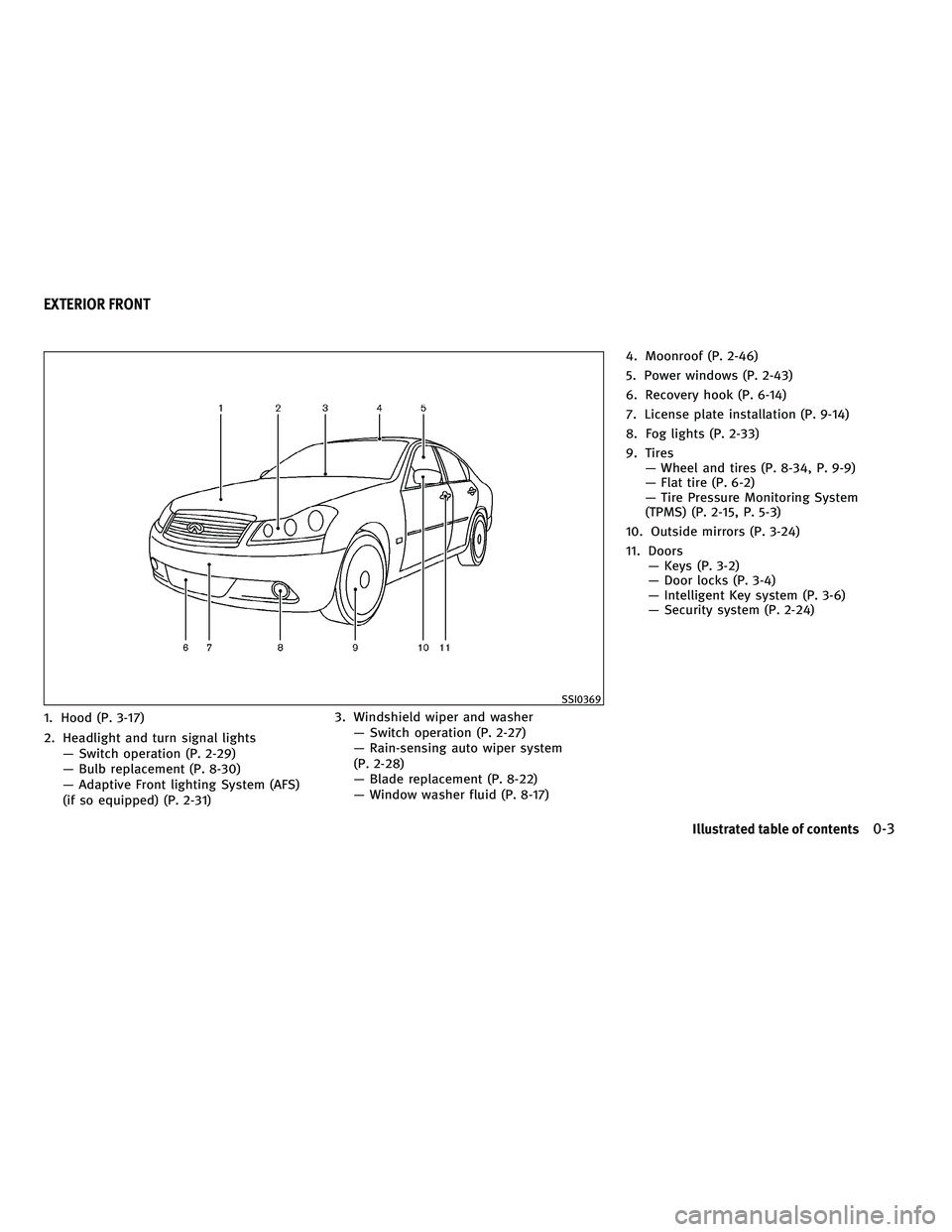
1. Hood (P. 3-17)
2. Headlight and turn signal lightsÐ Switch operation (P. 2-29)
Ð Bulb replacement (P. 8-30)
Ð Adaptive Front lighting System (AFS)
(if so equipped) (P. 2-31) 3. Windshield wiper and washer
Ð Switch operation (P. 2-27)
Ð Rain-sensing auto wiper system
(P. 2-28)
Ð Blade replacement (P. 8-22)
Ð Window washer fluid (P. 8-17) 4. Moonroof (P. 2-46)
5. Power windows (P. 2-43)
6. Recovery hook (P. 6-14)
7. License plate installation (P. 9-14)
8. Fog lights (P. 2-33)
9. Tires
Ð Wheel and tires (P. 8-34, P. 9-9)
Ð Flat tire (P. 6-2)
Ð Tire Pressure Monitoring System
(TPMS) (P. 2-15, P. 5-3)
10. Outside mirrors (P. 3-24)
11. Doors Ð Keys (P. 3-2)
Ð Door locks (P. 3-4)
Ð Intelligent Key system (P. 3-6)
Ð Security system (P. 2-24)
SSI0369
EXTERIOR FRONT
Illustrated table of contents0-3
wÐ
Ð
05/19/09Ðtbrooks
X
Page 14 of 445

1. Instrument brightness control switch(P. 2-32)
2. Outside mirror remote control switch (P. 3-24)
3. Adaptive Front lighting System (AFS) switch (P. 2-31) 4. Vehicle Dynamic Control (VDC) OFF switch
(P. 2-37)
5. Headlight, fog light and turn signal switch (P. 2-29)
6. Steering-wheel-mounted controls (left side) Ð ENTER switch (if so equipped)
(P. 4-6, P. 4-58)
Ð For audio system (P. 4-58)
Ð For phone system (P. 4-74, P. 4-84)
Ð For voice recognition system
(if so equipped) (P. 4-98)
7. Windshield wiper and washer switch (P. 2-27)
8. Steering-wheel-mounted controls (right side)
Ð Cruise control switches (P. 5-23)
Ð Intelligent Cruise Control (ICC) switches
(if so equipped) (P. 5-25)
Ð Lane Departure Prevention (LDP) switch
(if so equipped) (P. 5-16)
9. Hood release handle (P. 3-17)
10. Trunk lid release switch (P. 3-18)
11. Lane Departure Warning (LDW) switch (if so equipped) (P. 2-36, P. 5-16)
12. Intelligent Key port (P. 5-9)
13. Tilting/telescopic steering wheel switch (P. 3-22)
14. Steering wheel Ð Horn (P. 2-34)
Ð Driver supplemental air bag (P. 1-40)
15. Automatic Transmission (AT) selector lever (P. 5-11)
SIC3601
COCKPIT
Illustrated table of contents0-7
wÐ
Ð
05/19/09Ðtbrooks
X
Page 77 of 445
2 Instruments and controls
Cockpit........................................... 2-2
Instrument panel .................................. 2-3
Meters and gauges ................................ 2-5
Speedometer and odometer ..................... 2-6
Tachometer .................................... 2-6
Engine coolant temperature gauge ............... 2-7
Fuel gauge ..................................... 2-7
Meter/ring illumination and needle sweep ........ 2-8
Compass (if so equipped) .......................... 2-9
Zone variation change procedure ...............2-10
Warning/indicator lights and audible reminders .....2-12
Checking bulbs ............................... 2-13
Warning lights ................................ 2-13
Indicator lights ................................ 2-18
Audible reminders ............................. 2-20
Dot matrix liquid crystal display ...................2-21
Indicators for operation ........................ 2-22
Security systems ................................. 2-24
Vehicle security system ........................ 2-24
INFINITI Vehicle Immobilizer System ............2-25
Windshield wiper and washer switch ...............2-27
Rain-sensing auto wiper system ................2-28
Rear window and outside mirror defroster switch . . . 2-28 Headlight and turn signal switch
..................2-29
Xenon headlights ............................. 2-29
Headlight switch .............................. 2-29
Turn signal switch ............................. 2-33
Fog light switch ............................... 2-33
Hazard warning flasher switch .....................2-33
Horn ............................................ 2-34
Heated seats (rear seats) (if so equipped) ..........2-34
Climate controlled seats (front seats) ..............2-35
Lane Departure Warning (LDW) switch
(if so equipped) .................................. 2-36
SNOW mode switch (if so equipped) ...............2-37
Vehicle Dynamic Control (VDC) OFF switch ..........2-37
Clock ............................................ 2-38
Adjusting the time ............................. 2-38
Power outlets .................................... 2-38
Cigarette lighter and ashtrays .....................2-39
Front ......................................... 2-39
Rear ......................................... 2-39
Storage ......................................... 2-40
Cup holders .................................. 2-40
Sunglasses holder ............................. 2-41
Glove box .................................... 2-41
wÐ
Ð
05/19/09Ðtbrooks
X
Page 79 of 445

1. Instrument brightness control switch(P. 2-32)
2. Outside mirror remote control switch (P. 3-24)
3. Adaptive Front lighting System (AFS) switch (P. 2-31) 4. Vehicle Dynamic Control (VDC) OFF switch
(P. 2-37)
5. Headlight, fog light and turn signal switch (P. 2-29)
6. Steering-wheel-mounted controls (left side) Ð ENTER switch (if so equipped)
(P. 4-6, P. 4-58)
Ð For audio system (P. 4-58)
Ð For phone system (P. 4-74, P. 4-84)
Ð For voice recognition system
(if so equipped) (P. 4-98)
7. Windshield wiper and washer switch (P. 2-27)
8. Steering-wheel-mounted controls (right side)
Ð Cruise control switches (P. 5-23)
Ð Intelligent Cruise Control (ICC) switches
(if so equipped) (P. 5-25)
Ð Lane Departure Prevention (LDP) switch
(if so equipped) (P. 5-16)
9. Hood release handle (P. 3-17)
10. Trunk lid release switch (P. 3-18)
11. Lane Departure Warning (LDW) switch (if so equipped) (P. 2-36, P. 5-16)
12. Intelligent Key port (P. 5-9)
13. Tilting/telescopic steering wheel switch (P. 3-22)
14. Steering wheel Ð Horn (P. 2-34)
Ð Driver supplemental air bag (P. 1-40)
15. Automatic Transmission (AT) selector lever (P. 5-11)
SIC3601
COCKPIT
2-2Instruments and controls
wÐ
Ð
05/19/09Ðtbrooks
X
Page 105 of 445

RAIN-SENSING AUTO WIPER SYSTEM
The rain-sensing auto wiper system can auto-
matically turn on the wipers and adjust the
wiper speed depending on the rainfall and the
vehicle speed by using the rain sensor located
on the upper part of the windshield.
To set the rain-sensing auto wiper system, push
the lever down to the INT (intermittent) position
s1. The wiper will sweep once while the ignition
switch is in the ON position.
The rain sensor sensitivity level can be adjusted
by turning the knob toward the front
s2(High)
or toward the rear
s3(Low).
c High Ð High sensitive operation
c Low Ð Low sensitive operation To turn the rain-sensing auto wiper system off,
push up the lever to the OFF position, or pull
down the lever to the LO or HI position.
CAUTION
Do not touch the rain sensor and around it when
the wiper switch is in the INT position and the
ignition switch is in the ON position. The wipers
may operate unexpectedly and cause to an in-
jury or a wiper damage.
c The rain-sensing auto wipers are intended for
use during rain. If the switch is left in the INT
position, the wipers may operate unexpect-
edly when dirt, fingerprints, oil film or insects
are stuck on or around the sensor. The wipers
may also operate when exhaust gas or mois-
ture affect the rain sensor.
c The rain-sensing auto wipers may not oper-
ate if rain does not hit the rain sensor even if
it is raining. To defog/defrost the rear window glass and
outside mirrors (if so equipped with defroster),
start the engine and push the switch on. The
indicator light
s1will come on. Push the switch
again to turn the defroster off.
It will automatically turn off in approximately 15
minutes.
CAUTION
When cleaning the inner side of the rear win-
dow, be careful not to scratch or damage the
rear window defroster.
SIC3887SIC2767B
REAR WINDOW AND OUTSIDE MIRROR
DEFROSTER SWITCH
2-28Instruments and controls
wÐ
Ð
05/14/09Ðpattie
X
Page 110 of 445

TURN SIGNAL SWITCH
s1Turn signal
Move the lever up or down to signal the turning
direction. When the turn is completed, the turn
signals cancel automatically.
s2Lane change signal
To indicate a lane change, move the lever up or
down to the point where lights begin flashing.
FOG LIGHT SWITCH
To turn the fog lights on, turn the headlight
switch to the
position, then turn the
switch to the
position. To turn them off,
turn the switch to the OFF position.
The headlights must be on for the fog lights to
operate. Push the switch on to warn other drivers when
you must stop or park under emergency condi-
tions. All turn signal lights will flash.WARNING
c
If stopping for an emergency, be sure to
move the vehicle well off the road.
c Do not use the hazard warning flashers while
moving on the highway unless unusual cir-
cumstances force you to drive so slowly that
your vehicle might become a hazard to other
traffic.
c Turn signals do not work when the hazard
warning flasher lights are on.
SIC2231SIC2465SIC2574
HAZARD WARNING FLASHER SWITCH
Instruments and controls2-33
wÐ
Ð
05/14/09Ðpattie
X
Page 194 of 445

A visible mist may be seen coming from the
ventilators in hot, humid conditions as the air is
cooled rapidly. This does not indicate a mal-
function.
Heating (A/C OFF) :
The air conditioner does not activate in this
mode. When you need to heat only, use this
mode.
1. Push the ªA/Cº button. (The A/C indicatorwill turn off.)
2. Push the temperature control button to set the desired temperature.
cThe temperature of the passenger compart-
ment will be maintained automatically. Air
flow distribution and fan speed are also
controlled automatically.
c Do not set the temperature lower than the
outside air temperature. Otherwise the sys-
tem may not work properly.
c Not recommended if windows fog up.
Dehumidified defrosting or defogging:
1. Push the ªº front defroster button.
(The indicator light on the button will
come on.)
2. Push the temperature control button to set the desired temperature.
cTo quickly remove ice from the outside of the
windows, push the fan speed increase but-
ton ª
º and set it to the maximum
position.
c As soon as possible after the windshield is
clean, push the ªAUTOº button to return to
the AUTO mode.
c When the ª
º front defroster button is
pushed, the air conditioner will automati-
cally be turned on at outside temperatures
above 23ÉF ( 25ÉC) to defog the windshield,
and the air recirculate mode will automati-
cally be turned off.
Outside air is drawn into the passenger
compartment to improve the defogging per-
formance.
To turn the system off :
Push the ªOFFº button.
Manual operation
Fan speed control :
Push the fan speed increase ª
ºorde-
crease ª
º buttons to manually control the
fan speed.
Push the ªAUTOº button to return to automatic
control of the fan speed. Air recirculation :
Push the intake air control button
ª
º to recirculate interior air inside
the vehicle. The indicator light on the ª
º
side will come on.
The air recirculation mode cannot be activated
when the air conditioner is in the front defrost-
ing mode ª
º.
Outside air circulation :
Push the intake air control button
ª
º to draw outside air into the
passenger compartment. The indicator light on
the ª
º side will come on.
Automatic intake air control :
In the AUTO mode, the intake air will be con-
trolled automatically. To manually control the
intake air, push the intake air control button
ª
º. To return to the automatic con-
trol mode, push the intake air control button
ª
º for about 2 seconds. The indi-
cator lights (both air recirculation and outside
air circulation sides) will flash twice, and then
the intake air will be controlled automatically.
Monitor, climate, audio, phone and voice recognition systems4-31
wÐ
Ð
05/14/09Ðpattie
X
Page 305 of 445

cThe LDP system will not operate at speeds
below approximately 45 MPH 72 km/h) or if it
cannot detect lane markers.
c The LDP system may not function properly
under the following conditions, and do not
use the LDP system:
± During bad weather (rain, fog, snow, wind, etc.).
± When driving on slippery roads, such as on ice or snow, etc.
± When driving on winding or uneven roads.
± When there is a lane closure due to road repairs.
± When driving in a makeshift lane.
± When driving on roads where the lane width is too narrow.
± When driving without normal tire condi- tions (for example, tire wear, low tire
pressure, installation of spare tire, tire
chains, non-standard wheels).
± When the vehicle is equipped with non- original brake parts or suspension parts. c
If the LDP system malfunctions, it will cancel
automatically. The lane departure warning
light (orange) on the instrument panel will
illuminate.
c If the lane departure warning light (orange)
illuminates, pull off the road to a safe loca-
tion and stop the vehicle. Turn the engine off
and restart the engine. If the warning light
(orange) continues to illuminate, have the
LDP system checked by an INFINITI retailer.
c Excessive noise will interfere with the warn-
ing chime sound, and the chime may not be
heard.
The functions of the LDP system (warning and
brake control assist) may or may not operate
properly under the following conditions:
c On roads where there are multiple parallel
lane markers; lane markers that are faded or
not painted clearly; yellow painted lane
markers; non-standard lane markers; or lane
markers covered with water, dirt, snow, etc.
c On roads where discontinued lane markers
are still detectable.
c On roads where there are sharp curves.
c On roads where there are sharply contrast-
ing objects, such as shadows, snow, water, wheel ruts, seams or lines remaining after
road repairs. (The LDP system could detect
these items as lane markers.)
c On roads where the traveling lane merges or
separates.
c When the vehicle's traveling direction does
not align with the lane marker.
c When traveling close to the vehicle in front
of you, which obstructs the lane camera unit
detection range.
c When rain, snow or dirt adheres to the
windshield in front of the lane camera unit.
c When the headlights are not bright due to
dirt on the lens or if the aiming is not
adjusted properly.
c When strong light enters the lane camera
unit. (For example, the light directly shines
on the front of the vehicle at sunrise or
sunset.)
c When a sudden change in brightness occurs.
(For example, when the vehicle enters or
exits a tunnel or under a bridge.)
While the LDP system is operating, you may
hear a sound of brake operation. This is normal
and indicates that the LDP system is operating
properly.
5-20Starting and driving
wÐ
Ð
05/15/09Ðpattie
X
Page 313 of 445

cThis system will not adapt automatically to
road conditions. This system should be used
in evenly flowing traffic. Do not use the sys-
tem on roads with sharp curves, or on icy
roads, in heavy rain or in fog.
The distance sensor will not detect under most
conditions:
c Stationary and slow moving vehicles
c Pedestrians or objects in the roadway
c Oncoming vehicles in the same lane
c Motorcycles traveling offset in the travel
lane
This system will not automatically brake the ve-
hicle to a stop.WARNING
c As there is a performance limit to the dis-
tance control function, never rely solely on
the Intelligent Cruise Control system. This
system does not correct careless, inatten-
tive or absent-minded driving, or overcome
poor visibility in rain, fog, or other bad
weather. Decelerate the vehicle speed by de-
pressing the brake pedal, depending on the
distance to the vehicle ahead and the sur-
rounding circumstances in order to maintain
a safe distance between vehicles.
c Although the brake operation is controlled
by the system, the system does not auto-
matically stop the vehicle. If the vehicle
speed falls below approximately 20 MPH (32
km/h), the Intelligent Cruise Control system
is automatically canceled and a warning
chime sounds. (The brake control is also
canceled.)
c The system may not detect the vehicle in
front of you in certain road or weather condi-
tions. To avoid accidents, never use the In-
telligent Cruise Control system under the
following conditions:
± On roads where the traffic is heavy or there are sharp curves ± On slippery road surfaces such as on ice
or snow, etc.
± During bad weather (rain, fog, snow, etc.)
± When the windshield wiper is operated at the low speed (LO) or high speed (HI) po-
sition, the Intelligent Cruise Control sys-
tem is automatically canceled.
± When strong light (for example, at sun- rise or sunset) is directly shining on the
front of the vehicle
± When rain, snow or dirt adhere to the sys- tem sensor
± On steep downhill roads (the vehicle may go beyond the set vehicle speed and fre-
quent braking may result in overheating
the brakes)
± On repeated uphill and downhill roads
± When traffic conditions make it difficult to keep a proper distance between vehicles
because of frequent acceleration or
deceleration
c Do not use the Intelligent Cruise Control sys-
tem if you are towing a trailer. The system
may not detect a vehicle ahead.
5-28Starting and driving
wÐ
Ð
05/15/09Ðpattie
X
Page 336 of 445

cThe pre-pressure function ceases when the
following conditions are met:
a) When the driver depresses the accelera- tor pedal or the brake pedal.
b) If the driver does not operate the accel- erator or brake pedal within approxi-
mately 1 second.
cThe sensor will not detect:
a) Pedestrians or objects in the roadway
b) Oncoming vehicles in the same lane
c) Motorcycles traveling offset in the travel lane as illustrated
WARNING
cThis system is only an aid to assist braking
operation and is not a collision warning or
avoidance device. It is the driver's responsi-
bility to stay alert, drive safely and be in
control of the vehicle at all times. c
As there is a performance limit to the Pre-
view Function, never rely solely on this sys-
tem. This system does not correct careless
inattentive or absent-minded driving, or
overcome poor visibility in rain, fog, or other
bad weather. Reduce vehicle speed by de-
pressing the brake pedal, in order to main-
tain a safe distance between vehicles.
c The system may not detect the vehicle in
front of you in certain road or weather condi-
tions. The Preview Function may not operate
properly under the following conditions. The
vehicle is still driveable under normal condi-
tions and the Brake Assist will operate.
± When rain, snow or dirt adhere to the sys- tem sensor
± When strong light (for example, at sun- rise or sunset) is directly shining on the
front of the vehicle
± Winding or hilly roads may cause the sen- sor to temporarily not detect a vehicle in
the same lane or may detect objects or
vehicles in other lanes.
± Vehicle position in the lane may cause the sensor to temporarily not detect a vehicle
in the same lane or may detect objects or
vehicles in other lanes.
SSD0338
Starting and driving5-51
wÐ
Ð
05/15/09Ðpattie
X