AUX INFINITI M 2012 User Guide
[x] Cancel search | Manufacturer: INFINITI, Model Year: 2012, Model line: M, Model: INFINITI M 2012Pages: 522, PDF Size: 3.8 MB
Page 250 of 522
PLAY:
When the DISC·AUX button is pushed with
the system off and the iPod
®connected,
the system will turn on. If another audio
source is playing and the iPod
®is con-
nected, push the DISC·AUX button repeat-
edly until the center display changes to the
iPod
®mode.
Interface:
The interface for iPod
®operation shown on
the vehicle center display is similar to the
iPod
®interface. Use the INFINITI controller
and the ENTER or BACK button to play the
iPod
®with your favorite settings.
The following items can be chosen from the
menu list screen. For further information
about each item, see the iPod
®Owner ’s
Manual.
. Now Playing
. Playlists
. Artists
. Albums
. Songs
. Podcasts
. Genres
. Composers .
Audiobooks
. Shuffle Songs
The following touch-panel buttons shown
on the screen are also available:
.
: returns to the previous screen.
.
: plays/pauses the music selected.
Next/Previous Track and Fast For-
ward/Rewind:
When the
orbutton is pushed for
more than 1.5 seconds while the iPod®is
playing, the iPod®will play while fast
forwarding or rewinding. When the button
is released, the iPod
®will return to the
normal play speed.
When the
orbutton is pushed for
less than 1.5 seconds while the iPod®is
playing, the next track or the beginning of
the current track on the iPod
®will be
played.
The INFINITI controller can also be used to
select tracks when the iPod
®is playing.
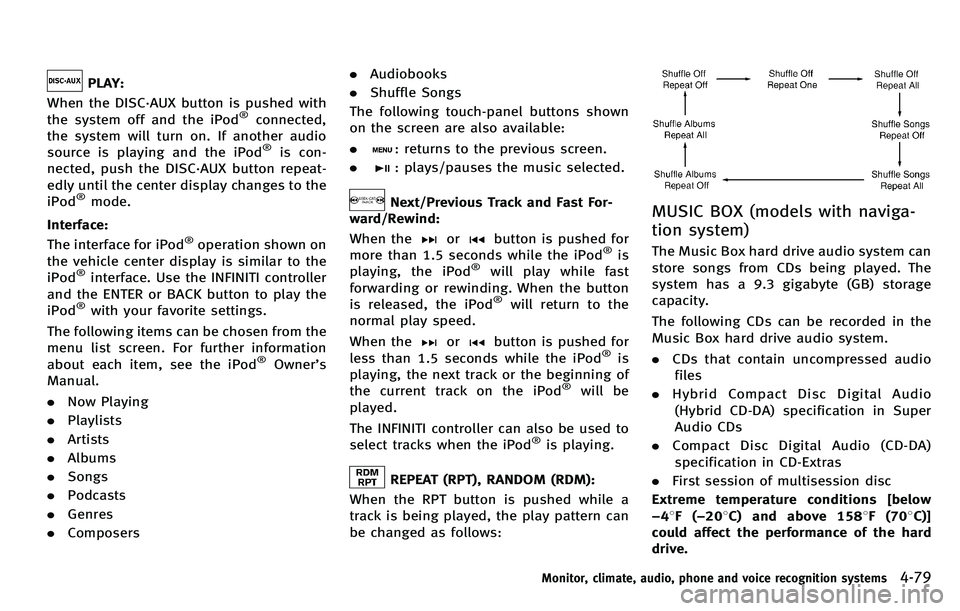
REPEAT (RPT), RANDOM (RDM):
When the RPT button is pushed while a
track is being played, the play pattern can
be changed as follows:
MUSIC BOX (models with naviga-
tion system)
The Music Box hard drive audio system can
store songs from CDs being played. The
system has a 9.3 gigabyte (GB) storage
capacity.
The following CDs can be recorded in the
Music Box hard drive audio system.
. CDs that contain uncompressed audio
files
. Hybrid Compact Disc Digital Audio
(Hybrid CD-DA) specification in Super
Audio CDs
. Compact Disc Digital Audio (CD-DA)
specification in CD-Extras
. First session of multisession disc
Extreme temperature conditions [below
− 48F( −20 8C) and above 158 8F(70 8C)]
could affect the performance of the hard
drive.
Monitor, climate, audio, phone and voice recognition systems4-79
Page 252 of 522

SAA2514
If the title information of the track being
recorded is stored either in the hard drive
or in the CD, the title is automatically
displayed on the screen. For title acquisi-
tion from the hard drive, music recognition
technology and related data are provided
by Gracenote
®.
If a track is not recorded successfully due
to skipping sounds, the
mark is
displayed behind the track number.
The Music Box hard drive cannot perform
recording under the following conditions.
. There is not enough space in the hard
drive. .
The number of albums reaches the
maximum of 500.
. The number of tracks reaches the
maximum of 3,000.
Automatic recording:
If the “Automatic Recording ”function is
turned to ON, recording starts when a CD is
inserted. (See “Music Box settings ”later in
this section.)
Stopping recording:
To stop the recording, select the “Stop
REC ”key button by touching the screen or
using the INFINITI controller.
If the CD is ejected, the audio system is
turned off or the ignition switch is pushed
to the OFF position, the recording also
stops.
SAA2515
Playing recorded songs
Select the Music Box audio system by
using one of the following methods.
. Push the audio source switch on the
steering wheel r epeatedly until the
center display changes to the Music
Box mode. (See “Steering-wheel-
mounted controls for audio ”later in
this section.)
. Push the DISC·AUX button repeatedly
until the center display changes to the
Music Box mode.
. Give voice commands. (See “INFINITI
Voice Recognition system (models with
Monitor, climate, audio, phone and voice recognition systems4-81