brake light INFINITI M 2012 User Guide
[x] Cancel search | Manufacturer: INFINITI, Model Year: 2012, Model line: M, Model: INFINITI M 2012Pages: 522, PDF Size: 3.8 MB
Page 91 of 522

2-18Instruments and controls
Check to see if the laser sensor is clean.
Turn the engine off, then restart the
engine.
If the IBA off indicator light illuminates
after following the procedures above, it
may indicate that the system or Active
Trace Control (if so equipped) is malfunc-
tioning. Although the vehicle is still drive-
able under normal conditions, have the
vehicle checked at an INFINITI retailer. (See
“Intelligent Brake Assist (IBA) system ”in
the “5. Starting and driving ”section and
“ Vehicle Dynamic Control (VDC) system ”in
the “5. Starting and driving ”section.)
Lane Departure Prevention
(LDP) ON indicator light (green; if so
equipped)
The light comes on in green when the Lane
Departure Prevention (LDP) system is
turned on. The light turns off when the
system is turned off.
NOTE:
This light is common with the lane
departure warning light (orange). (See
“ Lane departure warning light ”earlier in
this section.)
For more details, see “Lane Departure Warning (LDW) system/Lane Departure
Prevention (LDP) system”
in the“5. Start-
ing and driving ”section.
Malfunction Indicator Light
(MIL)
If the malfunction indicator light comes on
steady or blinks while the engine is
running, it may indicate a potential emis-
sion control malfunction.
The malfunction indicator light may also
come on steady if the fuel-filler cap is loose
or missing, or if the vehicle runs out of fuel.
Check to make sure the fuel-filler cap is
installed and closed tightly, and that the
vehicle has at least 3 US gallons (14 liters)
of fuel in the fuel tank.
After a few driving trips, the
light
should turn off if no other potential
emission control system malfunction ex-
ists.
If this indicator light remains on for 20
seconds and then blinks for 10 seconds
when the engine is not running, it indicates
that the vehicle is not ready for an
emission control system inspection/main-
tenance test. (See “Readiness for Inspec-
tion/Maintenance (I/M) test (US only) ”.) Operation:
The malfunction indicator light will come
on in one of two ways:
.
Malfunction indicator light on steady —
An emission control system malfunc-
tion has been detected. Check the fuel-
filler cap if the LOOSE FUEL CAP
warning appears in the dot matrix
liquid crystal display. If the fuel-filler
cap is loose or missing, tighten or
install the cap and continue to drive the
vehicle. The
light should turn off
after a few driving trips. If the
light
does not turn off after a few driving
trips, have the vehicle inspected by an
INFINITI retailer. You do not need to
have your vehicle towed to the retailer.
. Malfunction indicator light blinking —
An engine misfire has been detected
which may damage the emission con-
trol system.
To reduce or avoid emission control
system damage:
1) Do not drive at speeds above 45 MPH (72 km/h).
2) Avoid hard acceleration or decelera- tion.
3) Avoid steep uphill grades.
Page 92 of 522
4) If possible, reduce the amount ofcargo being hauled or towed.
The malfunction indicator light may
stop blinking and remain on.
Have the vehicle inspected by an
INFINITI retailer. You do not need to
have your vehicle towed to the retailer.
CAUTION
Continued vehicle operation without having
the emission control system checked and
repaired as necessary could lead to poor
driveability, reduced fuel economy, and
possible damage to the emission control
system.
Security indicator light
The light blinks when the ignition switch is
in the ACC, OFF or LOCK position. This
function indicates the security system
equipped on the vehicle is operational.
If the security system is malfunctioning,
this light will remain on while the ignition
switch is in the ON position. For additional
information, see “Security systems ”later
in this section.
Low beam indicator light
(green)
The low beam indicator light illuminates
when the front park lights, rear combina-
tion lights and license plate lights are on.
The indicator light turns off when the
is turned off.
Turn signal/hazard indicator
lights
The light flashes when the turn signal
switch lever or hazard switch is turned on.
Vehicle Dynamic Control (VDC)
off indicator light
The light comes on when the vehicle
dynamic control off switch is pushed to
OFF. This indicates that the vehicle dynamic
control system and traction control system
are not operating.
AUDIBLE REMINDERS
Key reminder chime
A chime will sound if the driver side door is
opened while the ignition switch is pushed
to the ACC position. Make sure the ignition
switch is pushed to the OFF position, and
take the Intelligent Key with you when
leaving the vehicle.
Light reminder chime
A chime will sound when the driver side
door is opened with the light switch in the
orposition and the ignition switch
in the ACC, OFF or LOCK position.
Turn the light switch off when you leave the
vehicle.
The chime will also sound for 2 seconds
when the ignition switch is turned to the
OFF position with the fog lights on while
the headlight switch is in the AUTO
position.
Parking brake reminder chime
The parking brake reminder chime will
sound if the vehicle is driven at more than
4 MPH (7 km/h) with the parking brake
applied. Stop the vehicle and release the
parking brake.
Instruments and controls2-19
Page 93 of 522
2-20Instruments and controls
Brake pad wear warning
The disc brake pads have audible wear
warnings. When a brake pad requires
replacement, it will make a high pitched
scraping sound when the vehicle is in
motion. This scraping sound will first occur
only when the brake pedal is depressed.
After more wear of the brake pad, the
sound will always be heard even if the
brake pedal is not depressed. Have the
brakes checked as soon as possible if the
warning sound is heard.
SIC4323
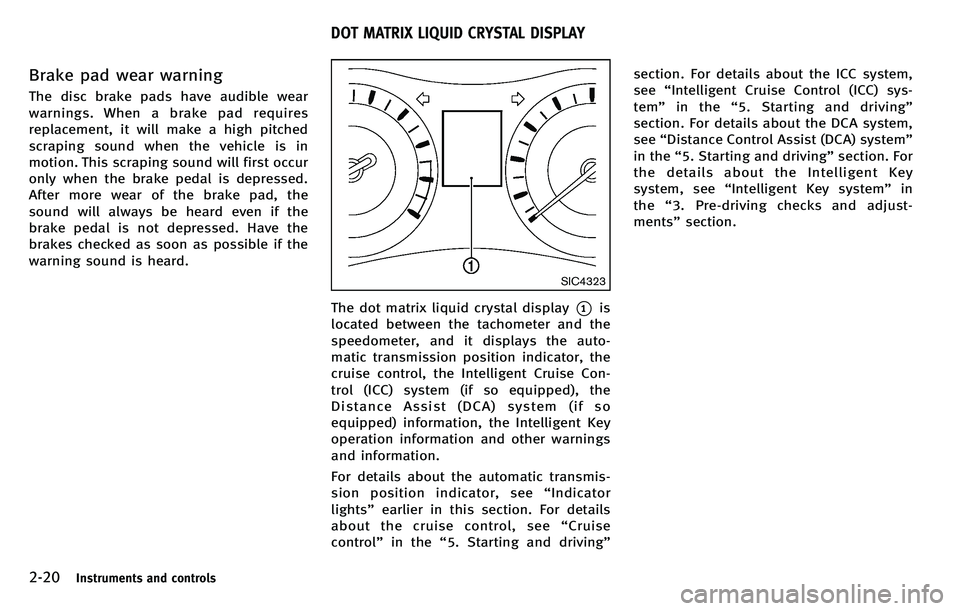
The dot matrix liquid crystal display*1is
located between the tachometer and the
speedometer, and it displays the auto-
matic transmission position indicator, the
cruise control, the Intelligent Cruise Con-
trol (ICC) system (if so equipped), the
Distance Assist (DCA) system (if so
equipped) information, the Intelligent Key
operation information and other warnings
and information.
For details about the automatic transmis-
sion position indicator, see “Indicator
lights” earlier in this section. For details
about the cruise control, see “Cruise
control ”in the “5. Starting and driving ”section. For details about the ICC system,
see
“Intelligent Cruise Control (ICC) sys-
tem ”in the “5. Starting and driving ”
section. For details about the DCA system,
see “Distance Control Assist (DCA) system ”
in the “5. Starting and driving ”section. For
the details about the Intelligent Key
system, see “Intelligent Key system ”in
the “3. Pre-driving checks and adjust-
ments” section.
DOT MATRIX LIQUID CRYSTAL DISPLAY
Page 95 of 522

2-22Instruments and controls
INDICATORS FOR OPERATION
1. Engine start operation indicator
This indicator appears when the selector
lever is in the P (Park) position.
This indicator means that the engine will
start by pushing the ignition switch with
the brake pedal depressed. You can start
the engine directly in any position.
2. Steering lock release malfunc-
tion indicator (if so equipped)
This indicator appears when the steering
wheel cannot be released from the LOCK
position.
If this indicator appears, push the push-
button ignition switch while lightly turning
the steering wheel right and left.
3. NO KEY warning
This warning appears in either of the
following conditions.
No key inside the vehicle:
The warning appears when the door is
closed with the Intelligent Key left outside
the vehicle and the ignition switch in the
ACC or ON position. Make sure that the
Intelligent Key is inside the vehicle.Unregistered Intelligent Key:
The warning appears when the ignition
switch is pushed from the LOCK position
and the Intelligent Key cannot be recog-
nized by the system. You cannot start the
engine with an unregistered key. Use the
registered Intelligent Key.
See
“Intelligent Key system” in the“3. Pre-
driving checks and adjustments” section
for more details.
4. SHIFT “P ” warning
This warning appears when the ignition
switch is pushed to stop the engine with
the selector lever in any position except
the P (Park) position.
If this warning appears, move the selector
lever to the P (Park) position or push the
ignition switch to the ON position.
An inside warning chime will also sound.
(See “Intelligent Key system” in the“3.
Pre-driving checks and adjustments ”sec-
tion.)
5. “PUSH ”warning
This warning appears when the selector
lever is moved to the P (Park) position with
the ignition switch in the ACC position after
the SHIFT “P ” warning appears. To push the ignition switch to the OFF
position, perform the following procedure:
.
SHIFT “P”warning ?(Move the selec-
tor lever to “P ”) ? PUSH warning ?
(Push the ignition switch ?ignition
switch position is turned to ON) ?
PUSH warning ?(Push the ignition
switch ?ignition switch position is
turned to OFF)
6. Intelligent Key battery discharge
indicator
This indicator appears when the Intelligent
Key battery is running out of power.
If this indicator appears, replace the
battery with a new one. (See “Intelligent
Key battery replacement ”in the “8. Main-
tenance and do-it-yourself ”section.)
7. Engine start operation for Intel-
ligent Key system indicator
This indicator appears when the Intelligent
Key battery is running out of power and
when the Intelligent Key System and
vehicle are not communicating normally.
If this indicator appears, touch the ignition
switch with the Intelligent Key while
depressing the brake pedal. (See “Intelli-
gent Key battery discharge ”in the “5.
Page 96 of 522
Starting and driving”section.)
8. Parking brake release warning
This warning appears when the vehicle
speed is above 4 MPH (7 km/h) and the
parking brake is applied.
9. Low fuel warning
This warning appears when the fuel level in
the tank is getting low. Refuel as soon as it
is convenient, preferably before the fuel
gauge reaches the empty (0) position.
There is a small reserve of fuel remaining
in the tank when the fuel gauge reaches
the empty (0) position.
10. Low washer fluid warning
This warning appears when the washer
tank fluid is at a low level. Add washer fluid
as necessary. (See “Window washer fluid ”
in the “8. Maintenance and do-it-yourself ”
section.)
11. Door/trunk open warning (igni-
tion switch is in the ON position)
This warning appears if any of the doors
and/or the trunk lid are open or not closed
securely. The vehicle icon indicates which
door or the trunk lid is open on the display.
12. Intelligent Key system warning
This warning appears if there is a malfunc-
tion in the steering lock system (if so
equipped) or Intelligent Key system.
If this warning appears while the engine is
stopped, the steering lock (if so equipped)
cannot be released or the engine cannot be
started. If this warning appears while the
engine is running, the vehicle can be
driven. However, contact an INFINITI retai-
ler for repair as soon as possible.
13. Loose fuel cap warning
This warning appears when the fuel-filler
cap is not tightened correctly after the
vehicle has been refueled. (See “Fuel-filler
cap ”in the “3. Pre-driving checks and
adjustments ”section.)
14. Check tire pressure warning
This warning appears when the low tire
pressure warning light in the meter illumi-
nates and low tire pressure is detected. If
this warning appears, stop the vehicle and
adjust the pressure to the recommended
COLD tire pressure shown on the recom-
mended COLD tire pressure shown on the
Tire and Loading Information label. (See
“Low tire pressure warning light ”earlier in this section and
“Tire Pressure Monitoring
System (TPMS) ”in the “5. Starting and
driving ”section.)
15. “TIMER ”indicator
This indicator appears when the set
“TIMER ”indicator activates. You can set
the time for up to 6 hours. (See “Trip
computer ”later in this section.)
16. Low outside temperature warn-
ing
This warning appears if the outside tem-
perature is below 37 8F(3 8C). The warning
can be set not to be displayed. (See “Trip
computer ”later in this section.)
17. Cruise indicator
Cruise main switch indicator:
The indicator is displayed when the cruise
control main switch is pushed. When the
main switch is pushed again, the indicator
disappears. When the cruise control main
switch indicator is displayed, the cruise
control system is operational.
Cruise set switch indicator:
The indicator is displayed while the vehicle
speed is controlled by the cruise control
system. If the indicator blinks while the
Instruments and controls2-23
Page 110 of 522
.Never leave the light switch on when the
engine is not running for extended
periods of time even if the headlights
turn off automatically.
Daytime running light system (Ca-
nada only)
The daytime running lights automatically
illuminate when the engine is started with
the parking brake released. The daytime
running lights operate with the headlight
switch in the OFF position or in the
position. Turn the headlight switch to the
position for full illumination when
driving at night.
If the parking brake is applied before the
engine is started, the daytime running
lights do not illuminate. The daytime
running lights illuminate once the parking
brake is released. The daytime running
lights will remain on until the ignition
switch is pushed to the OFF position.
Adaptive Front lighting System
(AFS) (if so equipped)
The Adaptive Front lighting System (AFS)
will automatically adjust the headlights
(low beam) toward the turning direction to improve the driver
’s view. When the head-
light switch is ON and the driver operates
the steering wheel in a turn, the AFS
system will be activated.
The AFS will operate:
. when the headlight switch is ON.
. when the selector lever is in any
position other than P (Park) or R
(Reverse).
. when the vehicle is driven at above 16
MPH (25 km/h) for the left-side head-
light. Note that the right-side low beam
headlight will swivel but the left side
will not swivel when the vehicle is
below 3 MPH (5 km/h) and the steering
wheel is turned. The vehicle must attain
a speed above 16 MPH (25 km/h)
before AFS activates the left-side head-
light.
SIC4333
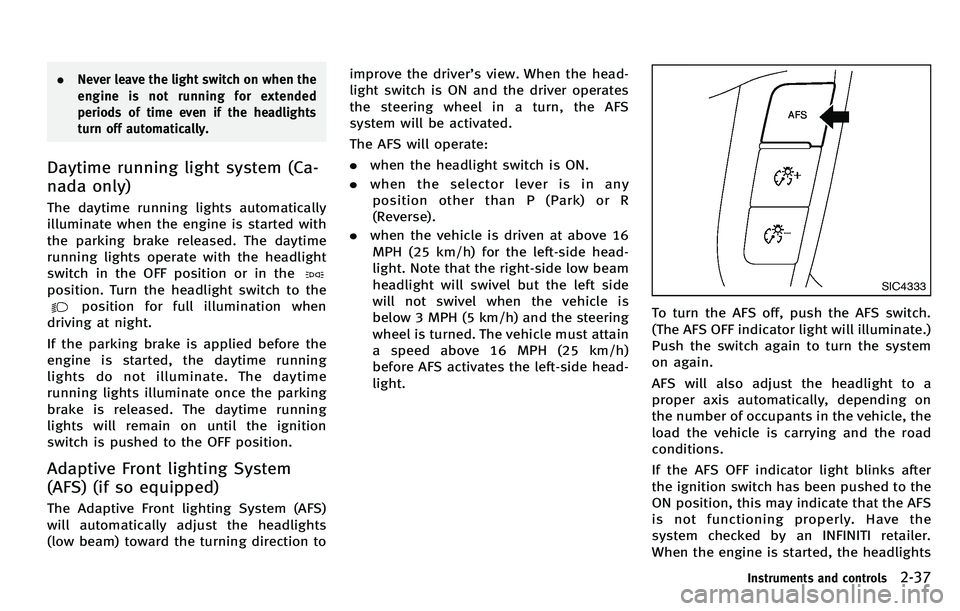
To turn the AFS off, push the AFS switch.
(The AFS OFF indicator light will illuminate.)
Push the switch again to turn the system
on again.
AFS will also adjust the headlight to a
proper axis automatically, depending on
the number of occupants in the vehicle, the
load the vehicle is carrying and the road
conditions.
If the AFS OFF indicator light blinks after
the ignition switch has been pushed to the
ON position, this may indicate that the AFS
is not functioning properly. Have the
system checked by an INFINITI retailer.
When the engine is started, the headlights
Instruments and controls2-37
Page 117 of 522

2-44Instruments and controls
SIC4335
The warning systems switch is used to turn
on and off the warning systems (Forward
Collision Warning (FCW), Lane Departure
Warning (LDW) and Blind Spot Warning
(BSW) systems) that are activated using
the settings menu on the center display.
When the warning systems switch is turned
off, the indicator
*1on the switch is off.
The indicator will also be off if all of the
warning systems are deactivated using the
settings menu.
The FCW system will sound a warning
chime and the vehicle ahead detection
indicator light blinks to alert the driver if
the vehicle is traveling close to the vehicle ahead. (See
“Forward Collision Warning
(FCW) system ”in the “5. Starting and
driving ”section.)
The LDW system will sound a warning
chime and blink the lane departure warn-
ing light (orange) to alert the driver if the
vehicle is traveling close to either the left
or the right of a traveling lane with
detectable lane markers. (See “Lane De-
parture Warning (LDW) system/Lane De-
parture Prevention (LDP) system” in the“5.
Starting and driving ”section.)
The BSW system will turn on the BSW/
Blind Spot Intervention (BSI) indicator
lights, located next to the outside mirrors,
if the radar sensors detect a vehicle in the
detection zone. If the turn signal is
activated in the direction of the detected
vehicle, a chime sounds twice and the
BSW/BSI indicator light will flash. (See
“ Blind Spot Warning (BSW) system/Blind
Spot InterventionTM(BSI) system” in the
“ 5. Starting and driving ”section.)
SIC4337
The vehicle should be driven with the
Intelligent Brake Assist (IBA) system on
for most driving conditions.
The Intelligent Brake Assist (IBA) system
will sound a warning chime and the vehicle
ahead detection indicator light blinks to
alert the driver when the vehicle is travel-
ing too close to the vehicle ahead. The
system will also apply the brake control if
necessary.
To turn off the system, push the IBA OFF
switch. The
indicator will illuminate.
The IBA system will remain in the last ON
or OFF state it was left in until it is
manually changed by pushing the IBA OFF
WARNING SYSTEMS SWITCH (if so
equipped) INTELLIGENT BRAKE ASSIST (IBA) OFF
SWITCH (if so equipped)
Page 194 of 522
SAA2487
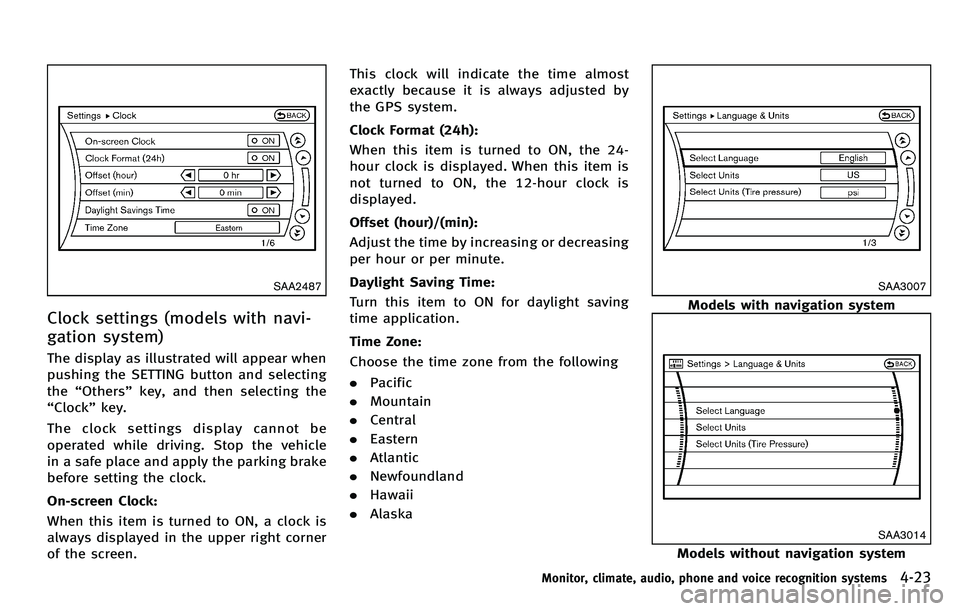
Clock settings (models with navi-
gation system)
The display as illustrated will appear when
pushing the SETTING button and selecting
the“Others ”key, and then selecting the
“ Clock ”key.
The clock settings display cannot be
operated while driving. Stop the vehicle
in a safe place and apply the parking brake
before setting the clock.
On-screen Clock:
When this item is turned to ON, a clock is
always displayed in the upper right corner
of the screen. This clock will indicate the time almost
exactly because it is always adjusted by
the GPS system.
Clock Format (24h):
When this item is turned to ON, the 24-
hour clock is displayed. When this item is
not turned to ON, the 12-hour clock is
displayed.
Offset (hour)/(min):
Adjust the time by increasing or decreasing
per hour or per minute.
Daylight Saving Time:
Turn this item to ON for daylight saving
time application.
Time Zone:
Choose the time zone from the following
.
Pacific
. Mountain
. Central
. Eastern
. Atlantic
. Newfoundland
. Hawaii
. Alaska
SAA3007
Models with navigation system
SAA3014
Models without navigation system
Monitor, climate, audio, phone and voice recognition systems4-23
Page 203 of 522
4-32Monitor, climate, audio, phone and voice recognition systems
PREDICTIVE COURSE LINE SETTINGS
To turn ON or OFF the predictive course line
display, push the SETTING button, select
the“Camera ”key and push the ENTER
button.
. Predictive Course Lines
When this item is turned to ON, the
predicted course lines will be displayed
on the monitor when the selector/shift
lever is in the “R ” (Reverse) position.
HOW TO ADJUST SCREEN
To adjust the Display ON/OFF, Brightness,
Tint, Color, Contrast and Black Level of the
RearView monitor, push the SETTING but-
ton with the RearView monitor on, select
the “Display ”key on the screen and select
the item key and adjust the level using the
INFINITI controller.
Do not adjust the Brightness, Tint, Color,
Contrast and Black Level of the RearView
monitor while the vehicle is moving. Make
sure the parking brake is firmly applied
and the engine is not running.
The display of the predicted course lines
can be set to ON or OFF. For details, see
“ Camera settings ”earlier in this section.
OPERATING TIPS
. When the selector lever is shifted to the
“ R ” (Reverse) position, the monitor
screen automatically changes to the
RearView monitor mode.
. It may take some time until the Rear-
View monitor is displayed after the
selector lever has been shifted to “R ”
from another position or to another
position from “R ”. Objects may be
distorted momentarily until the Rear-
View monitor screen is displayed com-
pletely.
. When the temperature is extremely high
or low, the screen may not clearly
display objects. This is not a malfunc-
tion.
. When strong light directly enters the
camera, objects may not be displayed
clearly. This is not a malfunction.
. Vertical lines may be seen in objects on
the screen. This is due to strong
reflected light from the bumper. This
is not a malfunction.
. The screen may flicker under fluores-
cent light. This is not a malfunction.
. The colors of objects on the RearView
monitor may differ somewhat from
those of the actual object. .
Objects on the monitor may not be clear
in a dark place or at night. This is not a
malfunction.
. If dirt, rain or snow attaches to the
camera, the RearView monitor may not
clearly display objects. Clean the cam-
era.
. Do not use alcohol, benzine or thinner
to clean the camera. This will cause
discoloration. To clean the camera,
wipe with a cloth dampened with
diluted mild cleaning agent and then
wipe with a dry cloth.
. Do not damage the camera as the
monitor screen may be adversely af-
fected.
. Do not use wax on the camera window.
Wipe off any wax with a clean cloth
dampened with mild detergent diluted
with water.
Page 321 of 522
5-8Starting and driving
tions of the vehicle, road and traffic.
WARNING
The following actions can increase the
chance of losing control of the vehicle if
there is a sudden loss of tire air pressure.
Losing control of the vehicle may cause a
collision and result in personal injury.
.The vehicle generally moves or pulls in
the direction of the flat tire.
. Do not rapidly apply the brakes.
. Do not rapidly release the accelerator
pedal.
. Do not rapidly turn the steering wheel.
1. Remain calm and do not overreact.
2. Maintain a firm grip on the steering
wheel with both hands and try to hold a
straight course.
3. When appropriate, slowly release the accelerator pedal to gradually slow the
vehicle.
4. Gradually steer the vehicle to a safe location off the road and away from
traffic if possible. 5. Lightly apply the brake pedal to gradu-
ally stop the vehicle.
6. Turn on the hazard warning flashers and either contact a roadside emer-
gency service to change the tire or see
“Changing a flat tire ”in the “6. In case
of emergency” section of this Owner ’s
Manual.
DRINKING ALCOHOL/DRUGS AND
DRIVING
WARNING
Never drive under the influence of alcohol or
drugs. Alcohol in the bloodstream reduces
coordination, delays reaction time and im-
pairs judgement. Driving after drinking
alcohol increases the likelihood of being
involved in an accident injuring yourself and
others. Additionally, if you are injured in an
accident, alcohol can increase the severity
of the injury.
INFINITI is committed to safe driving.
However, you must choose not to drive
under the influence of alcohol. Every year
thousands of people are injured or killed in
alcohol-related accidents. Although the local laws vary on what is considered to
be legally intoxicated, the fact is that
alcohol affects all people differently and
most people underestimate the effects of
alcohol.
Remember, drinking and driving don
’t mix!
And that is true for drugs, too (over-the-
counter, prescription, and illegal drugs).
Don ’t drive if your ability to operate your
vehicle is impaired by alcohol, drugs, or
some other physical condition.
INTELLIGENT ALL-WHEEL DRIVE
(AWD) DRIVING SAFETY PRECAU-
TIONS
WARNING
. Do not drive beyond the performance
capability of the tires, even with Intelli-
gent AWD engaged. Accelerating quickly,
sharp steering ma neuvers or sudden
braking may cause loss of control.
. Always use tires of the same type, size,
brand, construction (bias, bias-belted or
radial), and tread pattern on all four
wheels. Install tire chains on the rear
wheels when driving on slippery roads
and drive carefully.