change wheel INFINITI M 2012 User Guide
[x] Cancel search | Manufacturer: INFINITI, Model Year: 2012, Model line: M, Model: INFINITI M 2012Pages: 522, PDF Size: 3.8 MB
Page 333 of 522
5-20Starting and driving
SNOW MODE
Used on snowy roads or slippery areas.
When the SNOW mode is activated, engine
output is controlled to avoid wheel spin.
Turn the SNOW mode off for normal
driving. Turn the drive mode select switch
to the SNOW position.“SNOW” appears in
the vehicle information display for 2
seconds.
ECO MODE
Adjusts engine and transmission points to
enhance fuel economy.
NOTE:
Selecting this drive mode will not neces-
sarily improve fuel economy as many
driving factors influence its effectiveness.
Operation
Turn the drive mode select switch to the
ECO position. “ECO ”appears in the vehicle
information display for 2 seconds and the
ECO drive indicator light illuminates on the
instrument panel.
When the accelerator pedal is depressed
within the range of economy drive, the ECO
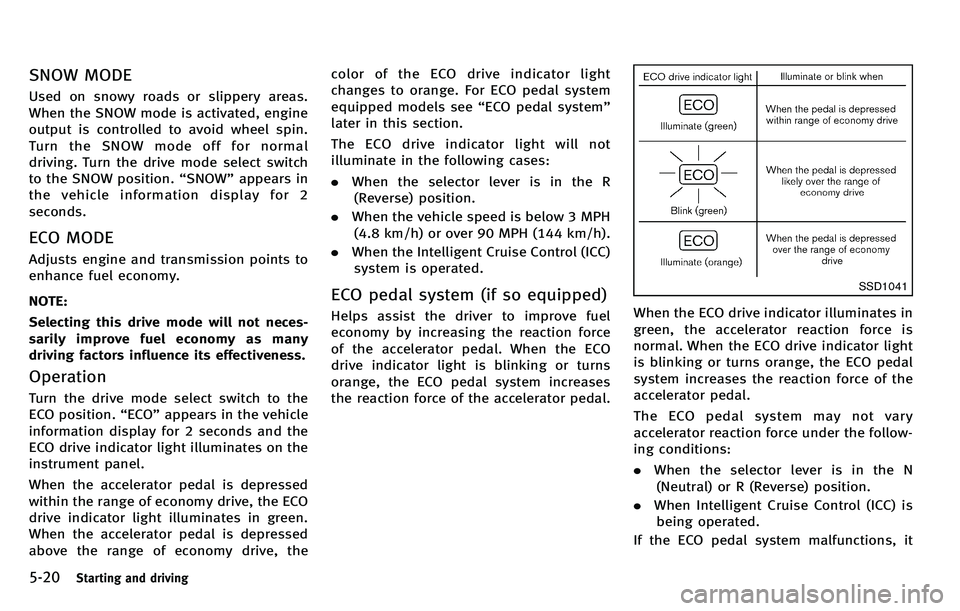
drive indicator light illuminates in green.
When the accelerator pedal is depressed
above the range of economy drive, the color of the ECO drive indicator light
changes to orange. For ECO pedal system
equipped models see
“ECO pedal system ”
later in this section.
The ECO drive indicator light will not
illuminate in the following cases:
. When the selector lever is in the R
(Reverse) position.
. When the vehicle speed is below 3 MPH
(4.8 km/h) or over 90 MPH (144 km/h).
. When the Intelligent Cruise Control (ICC)
system is operated.
ECO pedal system (if so equipped)
Helps assist the driver to improve fuel
economy by increasing the reaction force
of the accelerator pedal. When the ECO
drive indicator light is blinking or turns
orange, the ECO pedal system increases
the reaction force of the accelerator pedal.
SSD1041
When the ECO drive indicator illuminates in
green, the accelerator reaction force is
normal. When the ECO drive indicator light
is blinking or turns orange, the ECO pedal
system increases the reaction force of the
accelerator pedal.
The ECO pedal system may not vary
accelerator reaction force under the follow-
ing conditions:
. When the selector lever is in the N
(Neutral) or R (Reverse) position.
. When Intelligent Cruise Control (ICC) is
being operated.
If the ECO pedal system malfunctions, it
Page 336 of 522
The LDW and LDP systems monitor the lane
markers on the traveling lane using the
camera unit
*1located above the inside
mirror. When the camera unit detects that
the vehicle is traveling close to either the
left or the right of the traveling lane, the
lane departure warning light on the instru-
ment panel blinks in orange and a warning
chime sounds. When the LDP system is on,
it will automatically apply the brakes for a
short period of time, using the function of
the Vehicle Dynamic Control (VDC) system.
LANE DEPARTURE WARNING (LDW)
SYSTEM
Precautions on LDW system
WARNING
. This system is only a warning device to
inform the driver of a potential unin-
tended lane departure. It will not steer
the vehicle or prevent loss of control. It
is the driver ’s responsibility to stay
alert, drive safely, keep the vehicle in
the traveling lane, and be in control of
the vehicle at all times.
. The system will not operate at speeds below approximately 45 MPH or if it
cannot detect lane markers.
. If the LDW system malfunctions, it will
cancel automatically, and the lane de-
parture warning light (orange) will illu-
minate.
. If the lane departure warning light
(orange) illuminates, pull off the road
to a safe location and stop the vehicle.
Turn the engine off and restart the
engine. If the lane departure warning
light (orange) continues to illuminate,
have the system checked by an INFINITI
retailer.
. Excessive noise will interfere with the
warning chime sound, and the chime
may not be heard.The system may not function properly
under the following conditions:
.On roads where there are multiple
parallel lane markers; lane markers
that are faded or not painted clearly;
yellow painted lane markers; non-stan-
dard lane markers; or lane markers
covered with water, dirt, snow, etc.
. On roads where the discontinued lane
markers are still detectable. .
On roads where there are sharp curves.
. On roads where there are sharply
contrasting objects, such as shadows,
snow, water, wheel ruts, seams or lines
remaining after road repairs. (The LDW
system could detect these items as
lane markers.)
. On roads where the traveling lane
merges or separates.
. When the vehicle ’s traveling direction
does not align with the lane marker.
. When traveling close to the vehicle in
front of you, which obstructs the lane
camera unit detection range.
. When rain, snow or dirt adheres to the
windshield in front of the lane camera
unit.
. When the headlights are not bright due
to dirt on the lens or if the aiming is not
adjusted properly.
. When strong light enters the lane
camera unit. (For example, the light
directly shines on the front of the
vehicle at sunrise or sunset.)
. When a sudden change in brightness
occurs. (For example, when the vehicle
enters or exits a tunnel or under a
bridge.)
Starting and driving5-23
Page 340 of 522

chains, non-standard wheels).
—When the vehicle is equipped withnonoriginal brake parts or suspen-
sion parts.
. If the LDP system malfunctions, it will
cancel automatically. The lane departure
warning light (orange) on the instrument
panel will illuminate.
. If the lane departure warning light
(orange) illuminates, pull off the road
to a safe location and stop the vehicle.
Turn the engine off and restart the
engine. If the warning light (orange)
continues to illuminate, have the LDP
system checked by an INFINITI retailer.
. Excessive noise will interfere with the
warning chime sound, and the chime
may not be heard.
The functions of the LDP system (warning
and brake control assist) may or may not
operate properly under the following con-
ditions:
.On roads where there are multiple
parallel lane markers; lane markers
that are faded or not painted clearly;
yellow painted lane markers; non-stan-
dard lane markers; lane markers cov- ered with water, dirt, snow, etc.
. On roads where discontinued lane
markers are still detectable.
. On roads where there are sharp curves.
. On roads where there are sharply
contrasting objects, such as shadows,
snow, water, wheel ruts, seams or lines
remaining after road repairs. (The LDP
system could detect these items as
lane markers.)
. On roads where the traveling lane
merges or separates.
. When the vehicle ’s traveling direction
does not align with the lane marker.
. When traveling close to the vehicle in
front of you, which obstructs the lane
camera unit detection range.
. When rain, snow or dirt adheres to the
windshield in front of the lane camera
unit.
. When the headlights are not bright due
to dirt on the lens or if the aiming is not
adjusted properly.
. When strong light enters the lane
camera unit. (For example, the light
directly shines on the front of the
vehicle at sunrise or sunset.) .
When a sudden change in brightness
occurs. (For example, when the vehicle
enters or exits a tunnel or under a
bridge.)
While the LDP system is operating, you
may hear a sound of brake operation. This
is normal and indicates that the LDP
system is operating properly.
Starting and driving5-27
Page 343 of 522
5-30Starting and driving
.When you operate the lane change
signal and change the traveling lanes
in the direction of the signal. (The LDP
system will be deactivated for approxi-
mately 2 seconds after the lane change
signal is turned off.)
. When the vehicle speed lowers to less
than approximately 45 MPH (70 km/h).
. When the BSI system activates an
audible warning or brake control.
After the above conditions have finished
and the necessary operating conditions are
satisfied, the warning and assist functions
will resume.
Condition B:
The assist function of the LDP system is not
designed to work under the following
conditions (warning is still functional):
. When the brake pedal is depressed.
. When the steering wheel is turned as
far as necessary for the vehicle to
change lanes.
. When the accelerator pedal is de-
pressed while the brake control assist
is provided.
. When the Intelligent Cruise Control (ICC)
approach warning occurs. .
When the hazard warning flashers are
operated.
. When driving on a curve at high speed.
After the above conditions have finished
and the necessary operating conditions are
satisfied, the LDP brake control assist
function will resume.
Condition C:
Under the following conditions, a beep will
sound and the LDP system will be canceled
automatically. The LDP ON indicator light
will blink in green, and the LDP system
cannot be activated:
. When the VDC system (except TCS
function) or ABS operates.
. When the VDC system is turned off.
. When the drive mode select switch is
turned to the SNOW mode.
Action to take:
When the above conditions no longer exist,
turn off the LDP system. Push the dynamic
driver assistance switch again to turn the
LDP system back on.
Temporary disabled status at high tem-
perature:
If the vehicle is parked in direct sunlight
under high temperature conditions (over approximately 104
8F (408 C)) and then the
LDP system is turned on, the LDP system
may be deactivated automatically. The lane
departure warning light (orange) will blink.
Action to take:
When the above conditions no longer exist,
turn off the LDP system. Push the dynamic
driver assistance switch again to turn the
LDP system back on.
Page 351 of 522

5-38Starting and driving
certain objects are present such as:
—Pedestrians, bicycles, animals
— Several types of vehicles such as
motorcycles
— Oncoming vehicles
— Vehicles remaining in the detection
zone when you accelerate from a
stop
(See “BSW/BSI driving situations ”
later in this section)
— A vehicle merging into an adjacent
lane at a speed approximately the
same as your vehicle
(See “BSW/BSI driving situations ”
later in this section)
— A vehicle approaching rapidly from
behind.
(See “BSW/BSI driving situations ”
later in this section)
— A vehicle which your vehicle over-
takes rapidly.
(See “BSW/BSI driving situations ”
later in this section)
. Severe weather or road spray condi-
tions may reduce the ability of the
radar to detect other vehicles.
. The radar sensors detection zone is
designed based on a standard lane
width. When driving in a wider lane, the radar sensors may not detect vehicles
in an adjacent lane. When driving in a
narrow lane, the radar sensors may
detect vehicles driving two lanes away.
. The radar sensors are designed to
ignore most stationary objects, how-
ever objects such as guardrails, walls,
foliage and parked vehicles may occa-
sionally be detected. This is a normal
operating condition.
. The camera may not detect lane mar-
kers in the following situations and the
BSI system may not operate properly.
— On roads where there are multiple
parallel lane markers; lane markers
that are faded or not painted clearly;
yellow painted lane markers; non-
standard lane markers; lane mar-
kers covered with water, dirt, snow,
etc.
— On roads where discontinued lane
markers are still detectable.
— On roads where there are sharp
curves.
— On roads where there are sharply
contrasting objects, such as sha-
dows, snow, water, wheel ruts,
seams or lines remaining after road
repairs. —
On roads where the traveling lane
merges or separates.
— When the vehicle ’s traveling direc-
tion does not align with the lane
markers.
— When traveling close to the vehicle
in front of you, which obstructs the
lane camera unit detection range.
— When rain, snow or dirt adheres to
the windshield in front of a lane
camera unit.
— When the headlights are not bright
due to dirt on the lens or if aiming is
not adjusted properly.
— When strong light enters a lane
c a mera
unit. (e.g. light directly
shines on the front of the vehicle
at sunrise or sunset.)
— When a sudden change in bright-
ness occurs. (e.g. when the vehicle
enters or exits a tunnel or under a
bridge.)
Page 367 of 522
5-54Starting and driving
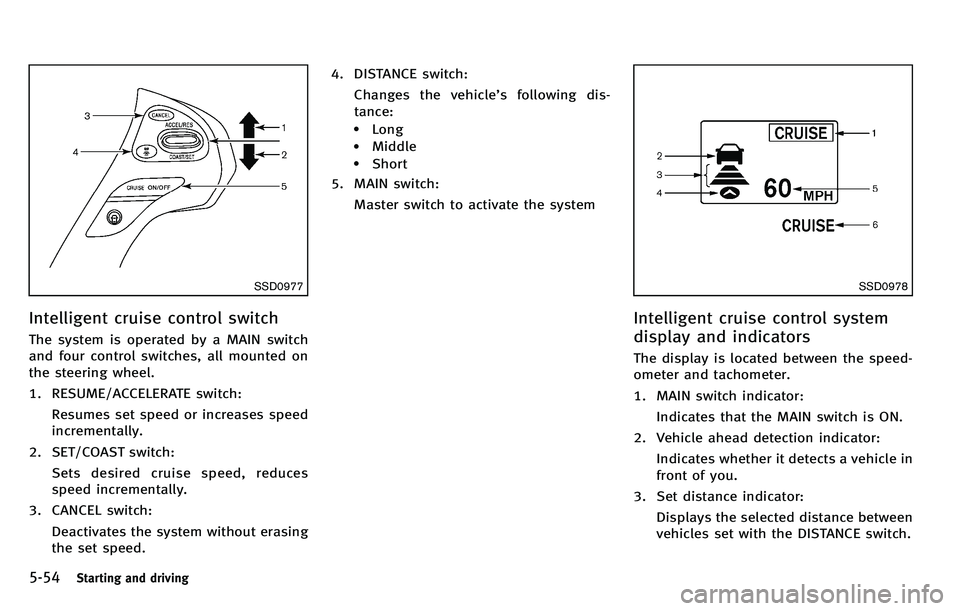
SSD0977
Intelligent cruise control switch
The system is operated by a MAIN switch
and four control switches, all mounted on
the steering wheel.
1. RESUME/ACCELERATE switch:Resumes set speed or increases speed
incrementally.
2. SET/COAST switch: Sets desired cruise speed, reduces
speed incrementally.
3. CANCEL switch:
Deactivates the system without erasing
the set speed. 4. DISTANCE switch:
Changes the vehicle ’s following dis-
tance:
.Long.Middle.Short
5. MAIN switch:
Master switch to activate the system
SSD0978
Intelligent cruise control system
display and indicators
The display is located between the speed-
ometer and tachometer.
1. MAIN switch indicator:Indicates that the MAIN switch is ON.
2. Vehicle ahead detection indicator: Indicates whether it detects a vehicle in
front of you.
3. Set distance indicator: Displays the selected distance between
vehicles set with the DISTANCE switch.
Page 404 of 522
If any malfunction occurs in the Intelligent
AWD system while the engine is running,
the warning light will come on.
The warning light may blink rapidly (about
twice per second) while trying to free a
stuck vehicle due to high power train oil
temperature. The driving mode may change
to two-wheel drive. If the warning light
blinks rapidly during operation, stop the
vehicle with the engine idling in a safe
place immediately. Then if the light goes
off after a while, you can continue driving.
A large difference between the diameters
of front and rear wheels will make the
warning light blink slowly (about once per
two seconds). Pull off the road in a safe
area, and idle the engine. Check that all
tire sizes are the same, tire pressure is
correct and tires are not worn.
If the warning light is blinking after the
above operation, have your vehicle
checked by an INFINITI retailer as soon as
possible.
WARNING
.For AWD equipped vehicles, do not
attempt to raise two wheels off the ground and shift the transmission to
any drive or reverse position with the
engine running. Doing so may result in
drivetrain damage or unexpected vehicle
movement which could result in serious
vehicle damage or personal injury.
. Do not attempt to test an AWD equipped
vehicle on a 2-wheel dynamometer (such
as the dynamometers used by some
states for emissions testing) or similar
equipment even if the other two wheels
are raised off the ground. Make sure that
you inform the test facility personnel
that your vehicle is equipped with AWD
before it is placed on a dynamometer.
Using the wrong test equipment may
result in drivetrain damage or unex-
pected vehicle movement which could
result in serious vehicle damage or
personal injury.
CAUTION
.Do not operate the engine on a free
roller when any of the wheels are raised.
. If the warning light comes on while
driving there may be a malfunction in the AWD system. Reduce the vehicle
speed and have your vehicle checked by
an INFINITI retailer as soon as possible.
. If the warning light remains on after the
above operation, have your vehicle
checked by an INFINITI retailer as soon
as possible.
. The power train may be damaged if you
continue driving with the warning light
blinking.
Starting and driving5-91
Page 420 of 522

vehicle speed, pull off the road to a safe
location and stop the vehicle as soon as
possible. Driving with under-inflated
tires may permanently damage the tires
and increase the likelihood of tire fail-
ure. Serious vehicle damage could occur
and may lead to an accident and could
result in serious personal injury. Check
the tire pressure for all four tires. Adjust
the tire pressure to the recommended
COLD tire pressure shown on the Tire
and Loading Information label to turn
the low tire pressure warning light OFF. If
the light still illuminates while driving
after adjusting the tire pressure, a tire
may be flat. If you have a flat tire,
replace it with a spare tire as soon as
possible.
. When a spare tire is mounted or a wheel
is replaced, the TPMS will not function
and the low tire pressure warning light
will flash for approximately 1 minute.
The light will remain on after 1 minute.
Contact your INFINITI retailer as soon as
possible for tire replacement and/or
system resetting.
. Replacing tires with those not originally
specified by INFINITI could affect the
proper operation of the TPMS. .
Do not inject any tire liquid or aerosol
tire sealant into the tires, as this may
cause a malfunction of the tire pressure
sensors.
CHANGING A FLAT TIRE
If you have a flat tire, follow the instruc-
tions below.
Stopping the vehicle
1. Safely move the vehicle off the road
and away from traffic.
2. Turn on the hazard warning flashers.
3. Park on a level surface and apply the parking brake. Move the selector lever
to the P (Park) position.
4. Turn off the engine.
5. Raise the hood to warn other traffic, and to signal professional road assis-
tance personnel that you need assis-
tance.
6. Have all passengers get out of the vehicle and stand in a safe place, away
from traffic and clear of the vehicle.
WARNING
. Make sure the parking brake is securely
applied and the automatic transmission
into P (Park).
. Never change tires when the vehicle is
on a slope, ice or slippery areas. This is
hazardous.
. Never change tires if oncoming traffic is
close to your vehicle. Wait for profes-
sional road assistance.
In case of emergency6-3
Page 436 of 522

.Wax your vehicle only after a thorough
washing. Follow the instructions sup-
plied with the wax.
. Do not use a wax containing any
abrasives, cutting compounds or clea-
ners that may damage the vehicle
finish.
Machine compound or aggressive polish-
ing on a base coat/clear coat paint finish
may dull the finish or leave swirl marks.
REMOVING SPOTS
Remove tar and oil spots, industrial dust,
insects, and tree sap as quickly as possible
from the paint surface to avoid lasting
damage or staining. Special cleaning
products are available at an INFINITI
retailer or any automotive accessory
stores.
UNDERBODY
In areas where road salt is used in winter,
the underbody must be cleaned regularly.
This will prevent dirt and salt from building
up and causing the acceleration of corro-
sion on the underbody and suspension.
Before the winter period and again in the
spring, the underseal must be checked
and, if necessary, re-treated.
GLASS
Use glass cleaner to remove smoke and
dust film from the glass surfaces. It is
normal for glass to become coated with a
film after the vehicle is parked in the hot
sun. Glass cleaner and a soft cloth will
easily remove this film.
CAUTION
When cleaning the inside of the windows,
do not use sharp-edged tools, abrasive
cleaners or chlorine-based disinfectant clea-
ners. They could damage the electrical
conductors, radio antenna elements or rear
window defroster elements.
WHEELS
Wash the wheels when washing the vehicle
to maintain their appearance.
. Clean the inner side of the wheels when
the wheel is changed or the underside
of the vehicle is washed.
. Inspect wheel rims regularly for dents
or corrosion. Such damage may cause
loss of pressure or poor seal at the tire
bead. .
INFINITI recommends that the road
wheels be waxed to protect against
road salt in areas where it is used
during winter.
CAUTION
Do not use abrasive cleaners when washing
the wheels.
Aluminum alloy wheels
Wash regularly with a sponge dampened in
a mild soap solution, especially during
winter months in areas where road salt is
used. Salt could discolor the wheels if not
removed.
CAUTION
Follow the directions below to avoid stain-
ing or discoloring the wheels:
. Do not use a cleaner that uses strong
acid or alkali contents to clean the
wheels.
. Do not apply wheel cleaners to the
wheels when they are hot. The wheel
temperature should be the same as
Appearance and care7-3
Page 445 of 522
8-4Maintenance and do-it-yourself
Accelerator pedal:Check the pedal for
smooth operation and make sure the pedal
does not catch or require uneven effort.
Keep the floor mat away from the pedal.
Automatic transmission P (Park) mechan-
ism: On a fairly steep hill, check that your
vehicle is held securely with the selector
leverintheP(Park)positionwithout
applying any brakes.
Brake pedal: Check the pedal for smooth
operation. If the brake pedal suddenly
goes down further than normal, the pedal
feels spongy or the vehicle seems to take
longer to stop, see an INFINITI retailer
immediately. Keep the floor mat away from
the pedal.
Brakes: Check that the brakes do not pull
the vehicle to one side when applied.
Parking brake: Check the parking brake
operation regularly. The vehicle should be
securely held on a fairly steep hill with only
the parking brake applied. If the parking
brake needs adjusted, see an INFINITI
retailer.
Seat belts: Check that all parts of the seat
belt system (for example, buckles, an-
chors, adjuster and retractors) operate
properly and smoothly, and are installed securely. Check the belt webbing for cuts,
fraying, wear or damage.
Seats:
Check seat position controls such as
seat adjusters, seatback recliner, etc. to
ensure they operate smoothly and that all
latches lock securely in every position.
Check that the head restraints move up
and down smoothly and that the locks (if
so equipped) hold securely in all latched
positions.
Steering wheel: Check for changes in the
steering conditions, such as excessive free
play, hard steering or strange noises.
Warning lights and chimes: Make sure that
all warning lights and chimes are operating
properly.
Windshield defroster: Check that the air
comes out of the defroster outlets properly
and in sufficient quantity when operating
the heater or air conditioner.
Windshield wiper and washer*: Check that
the wipers and washer operate properly
and that the wipers do not streak.
Under the hood and vehicle
The maintenance items listed here should
be checked periodically (for example, each
time you check the engine oil or refuel). Battery*:
Check the fluid level in each cell.
It should be between the MAX and MIN
lines. Vehicles operated in high tempera-
tures or under severe condition require
frequent checks of the battery fluid level.
Brake fluid level*: Make sure that the
brake fluid level is between the MAX and
MIN lines on the reservoir.
Engine coolant level*: Check the coolant
level when the engine is cold.
Engine drive belts*: Make sure that no belt
is frayed, worn, cracked or oily.
Engine oil level*: Check the level after
parking the vehicle on a level spot and
turning off the engine. Wait more than 15
minutes for the oil to drain back into the oil
pan.
Exhaust system: Make sure there are no
loose supports, cracks or holes. If the
sound of the exhaust seems unusual or
there is a smell of exhaust fumes, im-
mediately have the exhaust system in-
spected by an INFINITI retailer. (See
“ Precautions when starting and driving ”
in the “5. Starting and driving ”section for
exhaust gas (Carbon monoxide).)
Fluid leaks: Check under the vehicle for
fuel, oil, water or other fluid leaks after the