key battery INFINITI M 2012 User Guide
[x] Cancel search | Manufacturer: INFINITI, Model Year: 2012, Model line: M, Model: INFINITI M 2012Pages: 522, PDF Size: 3.8 MB
Page 167 of 522

3-28Pre-driving checks and adjustments
The automatic drive positioner system has
four features:
.Entry/exit function
. Seat synchronization function
. Memory storage
. Setting memory function
ENTRY/EXIT FUNCTION
This system is designed so that the driver ’s
seat and steering column will automati-
cally move when the selector lever is in the
P (Park) position. This allows the driver to
get into and out of the driver’ s seat more
easily.
The driver ’s seat will slide backward and
the steering wheel will move up when the
driver ’s door is opened with the ignition
switch in the LOCK position.
The driver ’s seat and steering wheel will
return to the previous positions when the
ignition switch is pushed to the ACC
position.
The driver ’s seat will not return to the
previous positions if the seat or steering
adjusting switch is operated when the seat
is at the exit position.
Cancel or activate entry/exit func-
tion
The selector lever must be in the P (Park)
position with the ignition switch in the OFF
position.
The entry/exit function can be activated or
canceled by pressing and holding the SET
switch for more than 10 seconds.
The indicator lights on the memory
switches (1 and 2) will blink once when
the function is canceled, and the indicator
lights will blink twice when the function is
activated. Note that the indicator lights
may illuminate after 5 seconds while
holding the SET switch. This indicates
readiness for linking the Intelligent Key to
a stored memory position. Keep the SET
switch pressed for more than 10 seconds
to turn on or off the entry/exit function.
The entry/exit function can also be acti-
vated or canceled if the “Lift Steering
Wheel on Exit” key or“Slide Driver Seat
Back on Exit ”key is turned to ON or OFF in
the “Comfort settings ”settings. (See “Ve-
hicle information and settings ”in the “4.
Monitor, climate, audio, phone and voice
recognition systems ”section.)
Initialize entry/exit function
If the battery cable is disconnected, or if
the fuse opens, the entry/exit function will
not work though this function was set on
before. In such a case, after connecting the
battery or replacing with a new fuse, open
and close the driver ’s door more than two
times after the ignition switch is turned
from the ON position to the LOCK position.
The entry/exit function will be activated.
AUTOMATIC DRIVE POSITIONER
Page 169 of 522

3-30Pre-driving checks and adjustments
memory switch, the previous memory
will be deleted.
Linking Intelligent Key to a stored
memory position
The Intelligent Key can be linked to a
stored memory position with the following
procedure.
1. Follow the steps for storing a memoryposition.
2. While the indicator light for the memory switch being set is illuminated for 5
seconds, push the
button on the
Intelligent Key. If the indicator light
blinks, the Intelligent Key is linked to
that memory setting.
Push the ignition switch to the OFF posi-
tion, and then push the
button on the
Intelligent Key. The driver ’s seat, steering
wheel and outside mirrors will move to the
memorized position.
Confirming memory storage
. Push the ignition switch to the ON
position and push the SET switch. If
the main memory has not been stored,
the indicator light will come on for
approximately 0.5 second. When the
memory has stored in position, the indicator light will stay on for approxi-
mately 5 seconds.
. If the battery cable is disconnected, or if
the fuse opens, the memory will be
canceled. In this case, reset the desired
position using the previous procedure.
. If optional Intelligent Keys are added to
your vehicle, the memory storage pro-
cedure to switch 1 or 2 and linking
Intelligent Key procedure to a stored
memory position should be performed
again for each Intelligent Key. For
additional Intelligent Key information,
see “Keys ”earlier in this section.
Selecting the memorized position
1. Move the selector lever to the P (Park)
position.
2. Use one of the following methods to move the driver ’s seat, the outside
mirrors and the steering wheel.
.Push the ignition switch to the ON position and push the memory
switch (1 or 2) fully for at least 1
second.
.Within 45 seconds of opening the
driver’ s door, push the memory
switch (1 or 2) fully for at least 1
second. The driver
’s seat, steering column
and outside mirrors will move to the
memorized position with the indica-
tor light flashing, and then the light
will stay on for approximately 5
seconds.
SETTING MEMORY FUNCTION
The status of the following settings can be
linked to the Intelligent Key and the
memorized settings can be available for
each Intelligent Key.
. Climate control system
. Navigation system (if so equipped)
. Audio system
To use the memory function, lock the doors
with the Intelligent Key that is linked to the
settings.
To enable the memorized settings:
1. Carry the Intelligent Key that is linked to the settings, and unlock the doors by
pushing the driver ’s door handle re-
quest switch or UNLOCK
button on
the Intelligent Key.
2. Push the ignition switch to the “ON ”
position. “Connection with the key has
been done ”will be displayed on the
screen and the memorized settings are
available (only when a new Intelligent
Page 234 of 522
tune from low to high or high to low
frequencies and to stop at the next
broadcasting station.
. For XM Satellite Radio
Push the SEEK button
orto
tune to the first channel of the next or
previous category.
During satellite radio reception, the follow-
ing notices will be displayed under certain
conditions.
. NO SIGNAL (No signal is received while
the SAT tuner is connected.)
. OFF AIR (Broadcasting signed off)
. CHECK ANTENNA (Antenna connection
error)
. LOADING (When the initial setting is
performed)
. UPDATING (When the satellite radio
subscription is not active)
SCAN tuning:
Push the SCAN tuning button to tune from
low to high frequencies and stop at each
broadcasting station/channel for 5 sec-
onds. Pushing the button again during this
5 seconds period will stop SCAN tuning
and the radio will remain tuned to that
station/channel. If the SCAN tuning button is not pushed
within 5 seconds, SCAN tuning moves to
the next station/channel.
toStation memory operations:
12 stations/channels can be set for the FM
band (6 each for FM1 and FM2), 18 for XM
radio (6 each for XM1, XM2 and XM3) and 6
stations can be set for the AM band.
1. Choose the radio band using the radio band select button.
2. Tune to the desired station/channel using the
, SCAN button or the
radio TUNE knob.
3. Push and hold the desired station preset button
tountil the radio
mutes.
4. The station indicator will then come on and the sound will resume. Memorizing
is now complete.
5. Other buttons can be set in the same manner.
If the battery cable is disconnected, or if
the fuse opens, the radio memory will be
erased. In that case, reset the desired
stations/channels. Menu (XM Satellite Radio) (models with
navigation system):
When the
“Menu ”key on the display is
selected while the XM Satellite Radio is
being played, the menu list will be
displayed.
The following items are available.
. Preset List
Displays the preset channel list. If 1 of
the 6 preset stations listed is touched
and held, the current station will be
stored as the new preset.
. Customize Channel List
Selects specific channels to skip while
using the TUNE, SEEK/CATEGORY or
Menu-Categories feature.
. Favorite Artists & Songs
Stores the current artist or song that is
being played. Touch the “Alert” key to
be reminded when the stored artist or
song is playing on a station while
listening to XM.
. Categories
Selecting a category will go to the first
channel in that category as defined by
XM Radio.
. Direct Tune
Inputs the channel number by using a
Monitor, climate, audio, phone and voice recognition systems4-63
Page 237 of 522

4-66Monitor, climate, audio, phone and voice recognition systems
CAUTION
.Only operate the DVD while the vehicle
engine is running. Operating the DVD for
extended periods of time with the
engine OFF can discharge the vehicle
battery.
. Do not allow the system to get wet.
Excessive moisture such as spilled
liquids may cause the system to mal-
function.
. While playing VIDEO-CD media, this DVD
player does not guarantee complete
functionality of all VIDEO-CD formats.
Display settings
To adjust the front display mode, push the
SETTING button while the DVD is being
played, select the “Others ”key and then
select the “Display ”key.
To adjust the display ON/OFF, brightness,
tint, color and contrast, select the “Display
Adjustment ”key and then select each key.
Then you can adjust each item using the
INFINITI controller. After changes have
been made push the BACK button to save
the setting.
SAA2497
Playing a DVD
DISC·AUX button:
Park the vehicle in a safe location for the
front seat occupants to operate the DVD
drive while watching the images.
Push the DISC·AUX button on the instru-
ment panel and turn the display to the DVD
mode.
When a DVD is loaded, it will be replayed
automatically.
The operation screen will be turned on
when the DISC·AUX button located on the
instrument panel is pushed while a DVD is being played, and it will turn off auto-
matically after a period of time. To turn it
on again, push the DISC·AUX button again.
DVD operation keys:
When the DVD is playing without the
operation screen being shown, you may
use the touch screen to select items from
the displayed video. You may also use the
INFINITI controller to select an item from
the displayed video. When the operation
screen is being shown, use the INFINITI
controller or touch screen to select an item
from the displayed menus.
PAUSE:
Select the “
”key to pause the DVD. To
resume playing the DVD, use the “PLAY ”
key.
PLAY:
Select the “
”key to start playing the
DVD, for example, after pausing the DVD.
STOP:
Select the “
”key to stop playing the
DVD.
Page 314 of 522

5 Starting and driving
Precautions when starting and driving ................. 5-3Exhaust gas (carbon monoxide) ....................... 5-3
Three-way catalyst........................................... 5-3
Tire Pressure Monitoring System (TPMS) ........ 5-4
Avoiding collision and rollover......................... 5-6
Off-road recovery............................................. 5-7
Rapid air pressure loss ................................... 5-7
Drinking alcohol/drugs and driving ................. 5-8
Intelligent All-Wheel Drive (AWD) driving
safety precautions ........................................... 5-8
Push-button ignition switch ................................. 5-9 Operating range for engine start function ...... 5-10
Push-button ignition switch operation ........... 5-10
Steering lock (if so equipped)........................ 5-11
Push-button ignition switch positions ............ 5-11
Emergency engine shut off ............................ 5-12
Intelligent Key battery discharge ................... 5-12
Before starting the engine ................................. 5-13
Starting the engine............................................ 5-13
Driving the vehicle ............................................. 5-14
Automatic transmission ................................. 5-14
Parking brake .................................................... 5-18
INFINITI drive mode selector............................... 5-19
Standard mode ............................................. 5-19
Sport mode ................................................... 5-19 Snow mode ................................................. 5-20
Eco mode .................................................... 5-20
Lane Departure Warning (LDW) system/Lane
Departure Prevention (LDP) system (if
so equipped)..................................................... 5-22 Lane Departure Warning (LDW) system......... 5-23
Lane Departure Prevention (LDP) system ...... 5-26
Lane camera unit maintenance .................... 5-31
Blind Spot Warning (BSW) system/Blind Spot
Intervention
TM(BSI) system (if so equipped)...... 5-31
BSW system operation ................................. 5-33
BSI system operation................................... 5-36
BSW/BSI driving situations .......................... 5-39
BSW/BSI malfunction................................... 5-44
System maintenance.................................... 5-44
Cruise control.................................................... 5-45
Precautions on cruise control....................... 5-45
Cruise control operations ............................. 5-45
Intelligent Cruise Control (ICC) system (if
so equipped)..................................................... 5-47
Selecting the vehicle-to-vehicle distance
control mode ............................................... 5-48
Vehicle-to-vehicle distance control mode...... 5-48
Precautions on vehicle-to-vehicle distance
control mode ............................................... 5-49
Page 323 of 522

5-10Starting and driving
SSD0659
OPERATING RANGE FOR ENGINE
START FUNCTION
The Intelligent Key can only be used for
starting the engine when the Intelligent
Key is within the specified operating range.
When the Intelligent Key battery is almost
discharged or strong radio waves are
present near the operating location, the
Intelligent Key system’s operating range
becomes narrower and may not function
properly.
If the Intelligent Key is within the operating
range, it is possible for anyone, even
someone who does not carry the Intelligent Key, to push the ignition switch to start the
engine.
.
The trunk area is not included in the
operating range but the Intelligent Key
may function.
. If the Intelligent Key is placed on the
instrument panel, rear parcel shelf,
inside the glove box or door pocket,
the Intelligent Key may not function.
. If the Intelligent Key is placed near the
door or window outside the vehicle, the
Intelligent Key may function.
SSD1021
PUSH-BUTTON IGNITION SWITCH
OPERATION
When the ignition switch is pushed without
depressing the brake pedal, the ignition
switch position will change as follows:
. Push center once to change to ACC.
. Push center two times to change to ON.
. Push center three times to change to
OFF. (No position illuminates.)
. Push center four times to return to ACC.
. Open or close any door to return to
LOCK during the OFF position.
Page 324 of 522
If the battery of the vehicle is discharged,
the push-button ignition switch cannot be
turned from the LOCK position.
Some indicators and warnings for opera-
tion are displayed on the dot matrix liquid
crystal display between the speedometer
and tachometer. (See“Dot matrix liquid
crystal display ”in the “2. Instruments and
controls ”section.)
The ignition lock is designed so that the
ignition switch position cannot be switched
to LOCK until the selector lever is moved to
the P (Park) position.
When the ignition switch cannot be pushed
toward the LOCK position, proceed as
follows:
1. Move the selector lever into the P (Park) position.
2. Push the ignition switch to the OFF position. The ignition switch position
indicator will not illuminate.
3. Open the door. The ignition switch will change to the LOCK position.
The selector lever can be moved from the P
(Park) position if the ignition switch is in
the ON position and the brake pedal is
depressed.STEERING LOCK (if so equipped)
In order for the steering wheel to be
locked, it must be turned about 1/8 of a
right or left turn from the straight up
position.
To lock the steering wheel, push the
ignition switch to the OFF position. To
unlock the steering wheel, push the
ignition switch. If the steering lock release
malfunction indicator appears on the dot
matrix liquid crystal display, push the
push-button ignition switch again while
lightly turning the steering wheel right
and left. (See “Dot matrix liquid crystal
display ”in the “2. Instruments and con-
trols ”section.)
PUSH-BUTTON IGNITION SWITCH
POSITIONS
LOCK (Normal parking position)
The ignition switch can only be locked in
this position.
The ignition switch will be unlocked when
it is pushed to the ACC position while
carrying the Intelligent Key.
ACC (Accessories)
This position activates electrical acces-
sories such as the radio, when the engine
is not running.
ON (Normal operating position)
This position turns on the ignition system
and electrical accessories.
OFF
The engine can be turned off in this
position.
The ignition lock is designed so that the
ignition switch cannot be switched to the
LOCK position until the selector lever is
moved to the P (Park) position.
CAUTION
Do not leave the vehicle with the push-
button ignition switch in ACC or ON posi-
tions when the engine is not running for an
extended period. This can discharge the
battery.
Starting and driving5-11
Page 325 of 522
5-12Starting and driving
EMERGENCY ENGINE SHUT OFF
To shut off the engine in an emergency
situation while driving perform the follow-
ing procedure:
.Rapidly push the push-button ignition
switch 3 consecutive times, or
. Push and hold the push-button ignition
switch for more than 2 seconds.
SSD0860
INTELLIGENT KEY BATTERY DIS-
CHARGE
If the battery of the Intelligent Key is
discharged, or environmental conditions
interfere with the Intelligent Key operation,
start the engine according to the following
procedure:
1. Move the selector lever to the P (Park)
position.
2. Firmly apply the foot brake.
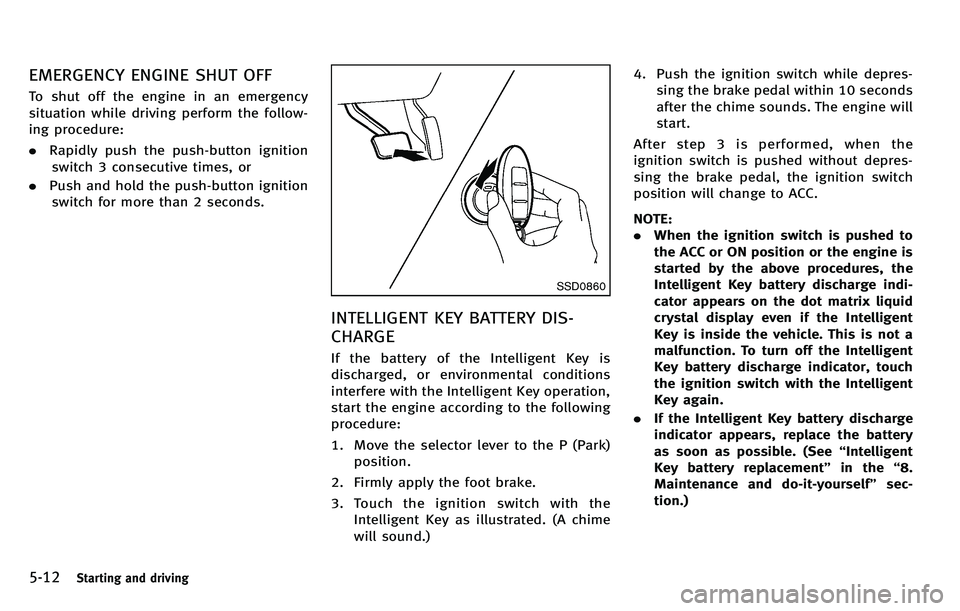
3. Touch the ignition switch with the Intelligent Key as illustrated. (A chime
will sound.) 4. Push the ignition switch while depres-
sing the brake pedal within 10 seconds
after the chime sounds. The engine will
start.
After step 3 is performed, when the
ignition switch is pushed without depres-
sing the brake pedal, the ignition switch
position will change to ACC.
NOTE:
. When the ignition switch is pushed to
the ACC or ON position or the engine is
started by the above procedures, the
Intelligent Key battery discharge indi-
cator appears on the dot matrix liquid
crystal display even if the Intelligent
Key is inside the vehicle. This is not a
malfunction. To turn off the Intelligent
Key battery discharge indicator, touch
the ignition switch with the Intelligent
Key again.
. If the Intelligent Key battery discharge
indicator appears, replace the battery
as soon as possible. (See “Intelligent
Key battery replacement” in the“8.
Maintenance and do-it-yourself ”sec-
tion.)
Page 414 of 522
or being driven at extremely low speed.
. The steering wheel is forcibly turned
beyond its operation limits.
. The battery voltage is reduced.
Repeated steering maneuvers that may
activate the protection mechanism will
damage the 4WAS system.
WARNING
The 4WAS system, although a sophisticated
device, cannot prevent accidents resulting
from careless or dangerous driving tech-
niques. Ultimately the responsibility for
safety of self and others rests in the hands
of the driver. Therefore only through atten-
tive and careful driving methods can the
4WAS system be fully appreciated and
safety optimized.
FREEING A FROZEN DOOR LOCK
To prevent a door lock from freezing, apply
deicer through the key hole. If the lock
becomes frozen, heat the key before
inserting it into the key hole or use the
Intelligent Key system.
ANTIFREEZE
In the winter when it is anticipated that the
outside temperature will drop below 32 8F
(0 8C), check antifreeze to assure proper
winter protection. For additional informa-
tion, see “Engine cooling system” in the
“ 8. Maintenance and do-it-yourself ”sec-
tion.
BATTERY
If the battery is not fully charged during
extremely cold weather conditions, the
battery fluid may freeze and damage the
battery. To maintain maximum efficiency,
the battery should be checked regularly.
For additional information, see “Battery ”in
the “8. Maintenance and do-it-yourself ”
section.
DRAINING OF COOLANT WATER
If the vehicle is to be left outside without
antifreeze, drain the cooling system, in-
cluding the engine block. Refill before
operating the vehicle. For details, see
“ Engine cooling system” in the“8. Main-
tenance and do-it-yourself ”section.
TIRE EQUIPMENT
SUMMER tires have a tread designed to
provide superior performance on dry pave-
ment. However, the performance of these
tires will be substantially reduced in snowy
and icy conditions. If you operate your
vehicle on snowy or icy roads, INFINITI
recommends the use of MUD & SNOW or
ALL SEASON tires on all four wheels.
Consult an INFINITI retailer for the tire
type, size, speed rating and availability
information.
For additional traction on icy roads,
studded tires may be used. However, some
U.S. states and Canadian provinces prohi-
bit their use. Check local, state and
provincial laws before installing studded
tires.
Starting and driving5-101
COLD WEATHER DRIVING
Page 442 of 522
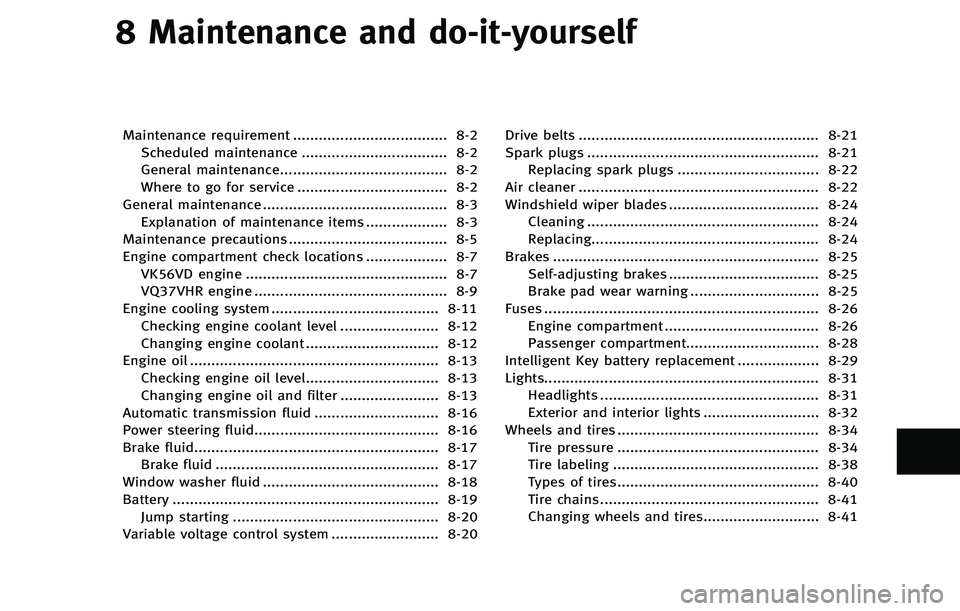
8 Maintenance and do-it-yourself
Maintenance requirement .................................... 8-2Scheduled maintenance .................................. 8-2
General maintenance....................................... 8-2
Where to go for service ................................... 8-2
General maintenance ........................................... 8-3 Explanation of maintenance items ................... 8-3
Maintenance precautions ..................................... 8-5
Engine compartment check locations ................... 8-7 VK56VD engine ............................................... 8-7
VQ37VHR engine ............................................. 8-9
Engine cooling system ....................................... 8-11 Checking engine coolant level ....................... 8-12
Changing engine coolant ............................... 8-12
Engine oil .......................................................... 8-13 Checking engine oil level............................... 8-13
Changing engine oil and filter ....................... 8-13
Automatic transmission fluid ............................. 8-16
Power steering fluid........................................... 8-16
Brake fluid......................................................... 8-17 Brake fluid .................................................... 8-17
Window washer fluid ......................................... 8-18
Battery .............................................................. 8-19 Jump starting ................................................ 8-20
Variable voltage control system ......................... 8-20 Drive belts ........................................................ 8-21
Spark plugs ...................................................... 8-21
Replacing spark plugs ................................. 8-22
Air cleaner ........................................................ 8-22
Windshield wiper blades ................................... 8-24 Cleaning ...................................................... 8-24
Replacing..................................................... 8-24
Brakes .............................................................. 8-25 Self-adjusting brakes ................................... 8-25
Brake pad wear warning .............................. 8-25
Fuses ................................................................ 8-26 Engine compartment .................................... 8-26
Passenger compartment............................... 8-28
Intelligent Key battery replacement ................... 8-29
Lights................................................................ 8-31 Headlights ................................................... 8-31
Exterior and interior lights ........................... 8-32
Wheels and tires ............................................... 8-34 Tire pressure ............................................... 8-34
Tire labeling ................................................ 8-38
Types of tires............................................... 8-40
Tire chains ................................................... 8-41
Changing wheels and tires........................... 8-41