fuel INFINITI M 2012 Owner's Manual
[x] Cancel search | Manufacturer: INFINITI, Model Year: 2012, Model line: M, Model: INFINITI M 2012Pages: 522, PDF Size: 3.8 MB
Page 181 of 522

4-10Monitor, climate, audio, phone and voice recognition systems
HOW TO USE STATUS BUTTON
To display the status of the audio, climate
control system, fuel consumption and
navigation system (if so equipped), push
the STATUS button. The following informa-
tion will appear when the STATUS button is
pushed repeatedly.
Audio and Climate control system?Audio
and fuel economy ?Audio and Navigation
system (if so equipped)
HOW TO USE BRIGHTNESS CON-
TROL AND DISPLAY ON/OFF BUTTON
Push the “OFF”button to switch the
display brightness to the daytime mode or
the nighttime mode, and to adjust the
display brightness using the INFINITI con-
troller while the indicator is displayed at
the bottom of the screen.
Push and hold the “
OFF”button for
more than 2 seconds to turn the display
off. Push the button again to turn the
display on.
Models without navigation system:
The display brightness can also be ad-
justed using the “
”button or “”
button.
HOW TO USE DISP BUTTON
Push the DISP button to show the display
setting screen. (See “Display settings
(models with navigation system) ”later in
this section.)
HOW TO USEECON BUTTON
(models without navigation system)
Push the “ECON ”button to show fuel
economy information. (See “Fuel Economy
information ”later in this section.)
HOW TO USE INFO BUTTON
The display screen shows vehicle and
navigation (if so equipped) information
for your convenience.
The information shown on the screen
should be a guide to determine the
condition of the vehicle. See the following
for details.SAA3144
Models with navigation system
SAA2145
Models without navigation system
VEHICLE INFORMATION AND SETTINGS
Page 183 of 522
4-12Monitor, climate, audio, phone and voice recognition systems
Fuel Economy information
The approximate distance to empty, aver-
age fuel economy and current fuel econo-
my will be displayed for reference.
To reset the average fuel economy (Avg
Fuel Econ), select the“Reset Fuel Eco ”or
“ Reset ”key.
If the “Fuel Eco History” or“View ”key is
selected, the average fuel consumption
history will be displayed in graph form
along with the average for the previous
Reset-to-Reset period.
The unit can be converted between “US ”
and “Metric ”. (See “How to use SETTING
button ”later in this section.)
The fuel economy information may differ
from the information displayed on the
vehicle information display. This is due to
the timing difference in updating the
information and does not indicate a mal-
function.
For models without the navigation system,
the information can be displayed by
pushing the
ECON button on the
control panel.
SAA3146
Models with navigation system
SAA3147
Models without navigation system
TIRE PRESSURE information
WARNING
. When a spare tire is mounted or a wheel
is replaced, tire pressure will not be
indicated, the TPMS will not function
and the low tire pressure warning light
will flash for approximately 1 minute.
The light will remain on after 1 minute.
Contact your INFINITI retailer as soon as
possible for tire replacement and/or
system resetting.
. Replacing tires with those not originally
specified by INFINITI could affect the
proper operation of the TPMS.
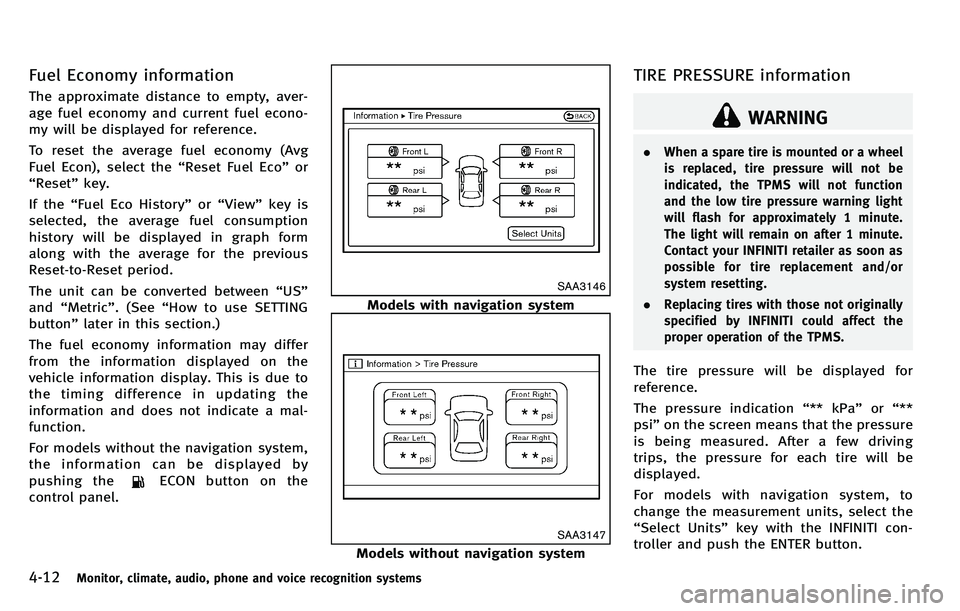
The tire pressure will be displayed for
reference.
The pressure indication “** kPa” or“**
psi ”on the screen means that the pressure
is being measured. After a few driving
trips, the pressure for each tire will be
displayed.
For models with navigation system, to
change the measurement units, select the
“ Select Units ”key with the INFINITI con-
troller and push the ENTER button.
Page 198 of 522
SAA1896
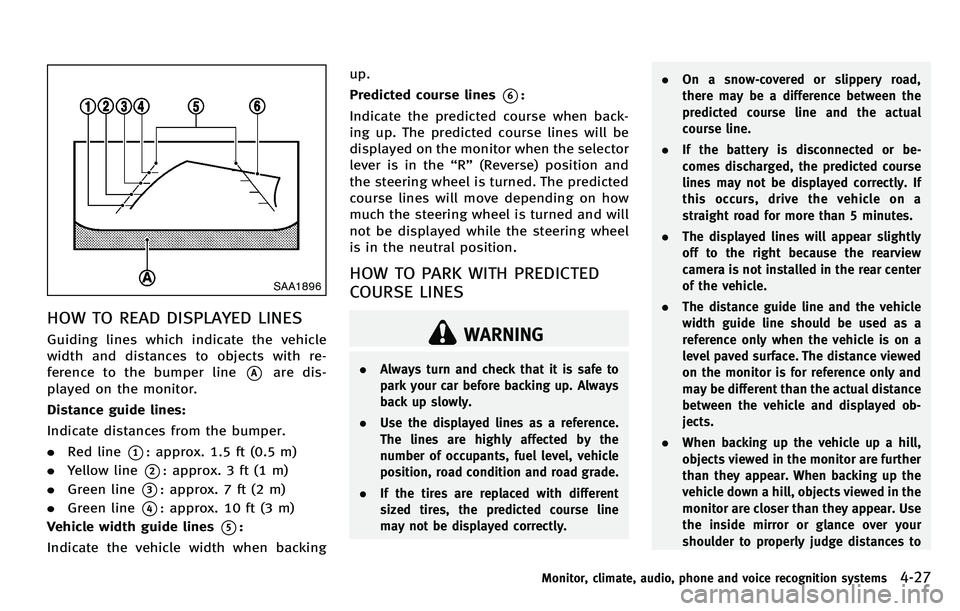
HOW TO READ DISPLAYED LINES
Guiding lines which indicate the vehicle
width and distances to objects with re-
ference to the bumper line
*Aare dis-
played on the monitor.
Distance guide lines:
Indicate distances from the bumper.
. Red line
*1: approx. 1.5 ft (0.5 m)
. Yellow line
*2: approx. 3 ft (1 m)
. Green line
*3: approx. 7 ft (2 m)
. Green line
*4: approx. 10 ft (3 m)
Vehicle width guide lines
*5:
Indicate the vehicle width when backing up.
Predicted course lines
*6:
Indicate the predicted course when back-
ing up. The predicted course lines will be
displayed on the monitor when the selector
lever is in the “R ” (Reverse) position and
the steering wheel is turned. The predicted
course lines will move depending on how
much the steering wheel is turned and will
not be displayed while the steering wheel
is in the neutral position.
HOW TO PARK WITH PREDICTED
COURSE LINES
WARNING
. Always turn and check that it is safe to
park your car before backing up. Always
back up slowly.
. Use the displayed lines as a reference.
The lines are highly affected by the
number of occupants, fuel level, vehicle
position, road condition and road grade.
. If the tires are replaced with different
sized tires, the predicted course line
may not be displayed correctly. .
On a snow-covered or slippery road,
there may be a difference between the
predicted course line and the actual
course line.
. If the battery is disconnected or be-
comes discharged, the predicted course
lines may not be displayed correctly. If
this occurs, drive the vehicle on a
straight road for more than 5 minutes.
. The displayed lines will appear slightly
off to the right because the rearview
camera is not installed in the rear center
of the vehicle.
. The distance guide line and the vehicle
width guide line should be used as a
reference only when the vehicle is on a
level paved surface. The distance viewed
on the monitor is for reference only and
may be different than the actual distance
between the vehicle and displayed ob-
jects.
. When backing up the vehicle up a hill,
objects viewed in the monitor are further
than they appear. When backing up the
vehicle down a hill, objects viewed in the
monitor are closer than they appear. Use
the inside mirror or glance over your
shoulder to properly judge distances to
Monitor, climate, audio, phone and voice recognition systems4-27
Page 218 of 522
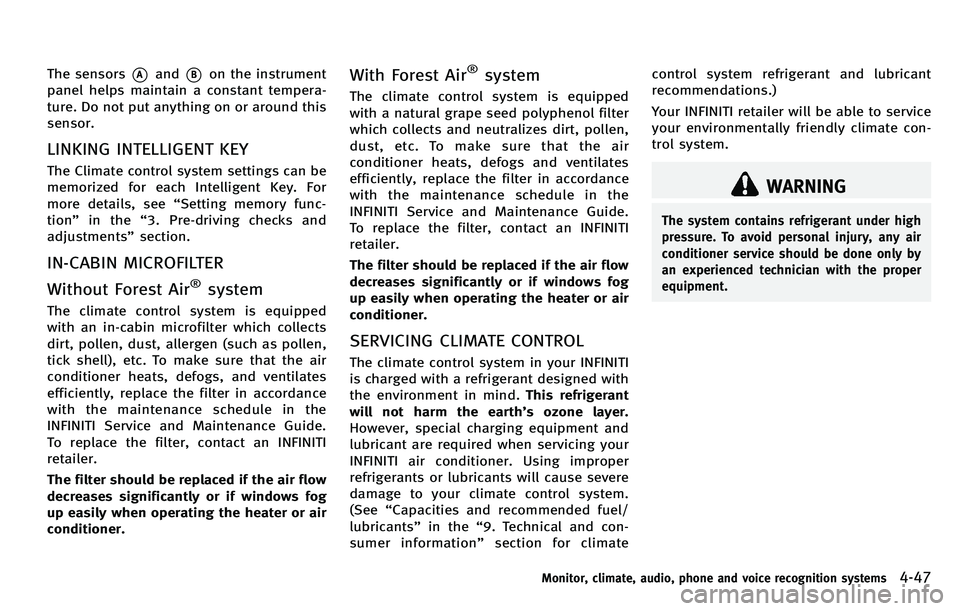
The sensors*Aand*Bon the instrument
panel helps maintain a constant tempera-
ture. Do not put anything on or around this
sensor.
LINKING INTELLIGENT KEY
The Climate control system settings can be
memorized for each Intelligent Key. For
more details, see “Setting memory func-
tion ”in the “3. Pre-driving checks and
adjustments ”section.
IN-CABIN MICROFILTER
Without Forest Air
®system
The climate control system is equipped
with an in-cabin microfilter which collects
dirt, pollen, dust, allergen (such as pollen,
tick shell), etc. To make sure that the air
conditioner heats, defogs, and ventilates
efficiently, replace the filter in accordance
with the maintenance schedule in the
INFINITI Service and Maintenance Guide.
To replace the filter, contact an INFINITI
retailer.
The filter should be replaced if the air flow
decreases significantly or if windows fog
up easily when operating the heater or air
conditioner.
With Forest Air®system
The climate control system is equipped
with a natural grape seed polyphenol filter
which collects and neutralizes dirt, pollen,
dust, etc. To make sure that the air
conditioner heats, defogs and ventilates
efficiently, replace the filter in accordance
with the maintenance schedule in the
INFINITI Service and Maintenance Guide.
To replace the filter, contact an INFINITI
retailer.
The filter should be replaced if the air flow
decreases significantly or if windows fog
up easily when operating the heater or air
conditioner.
SERVICING CLIMATE CONTROL
The climate control system in your INFINITI
is charged with a refrigerant designed with
the environment in mind. This refrigerant
will not harm the earth ’s ozone layer.
However, special charging equipment and
lubricant are required when servicing your
INFINITI air conditioner. Using improper
refrigerants or lubricants will cause severe
damage to your climate control system.
(See “Capacities and recommended fuel/
lubricants ”in the “9. Technical and con-
sumer information ”section for climate control system refrigerant and lubricant
recommendations.)
Your INFINITI retailer will be able to service
your environmentally friendly climate con-
trol system.
WARNING
The system contains refrigerant under high
pressure. To avoid personal injury, any air
conditioner service should be done only by
an experienced technician with the proper
equipment.
Monitor, climate, audio, phone and voice recognition systems4-47
Page 293 of 522
4-122Monitor, climate, audio, phone and voice recognition systems
CommandAction
Previous Destinations Sets a route to a previous destination.
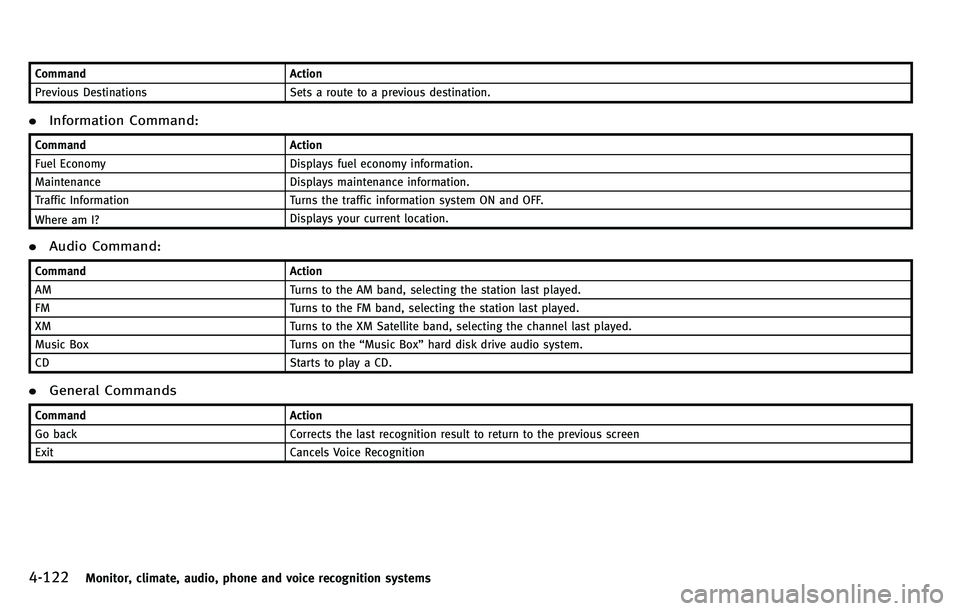
.Information Command:
Command Action
Fuel Economy Displays fuel economy information.
Maintenance Displays maintenance information.
Traffic Information Turns the traffic information system ON and OFF.
Where am I? Displays your current location.
.
Audio Command:
Command Action
AM Turns to the AM band, selecting the station last played.
FM Turns to the FM band, selecting the station last played.
XM Turns to the XM Satellite band, selecting the channel last played.
Music Box Turns on the“Music Box ”hard disk drive audio system.
CD Starts to play a CD.
.General Commands
Command Action
Go back Corrects the last recognition result to return to the previous screen
Exit Cancels Voice Recognition
Page 303 of 522
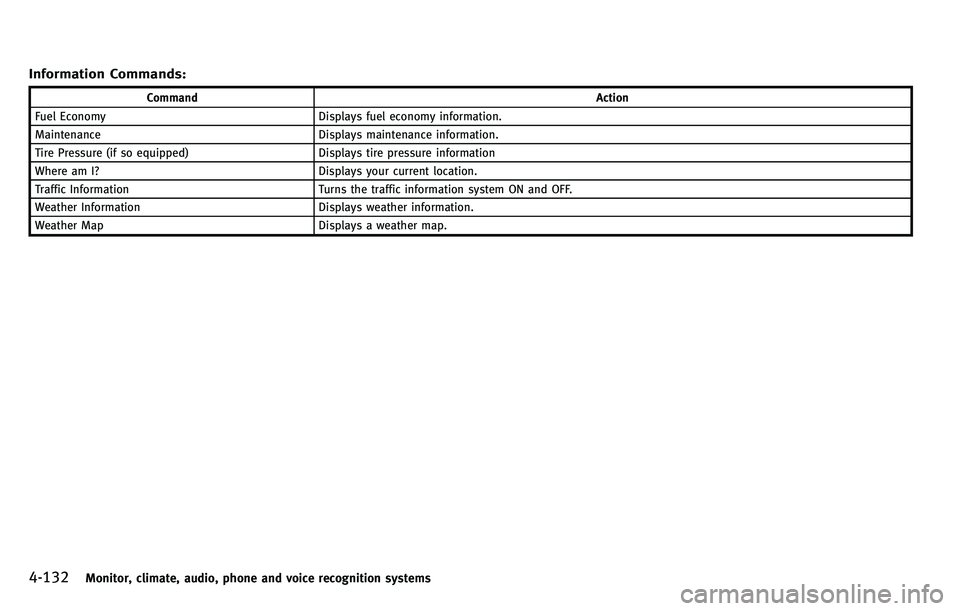
4-132Monitor, climate, audio, phone and voice recognition systems
Information Commands:
CommandAction
Fuel Economy Displays fuel economy information.
Maintenance Displays maintenance information.
Tire Pressure (if so equipped) Displays tire pressure information
Where am I? Displays your current location.
Traffic Information Turns the traffic information system ON and OFF.
Weather Information Displays weather information.
Weather Map Displays a weather map.
Page 315 of 522

Vehicle-to-vehicle distance control
mode operation ............................................. 5-50
Conventional (fixed speed) cruise
control mode ................................................. 5-65
Preview function (for Intelligent Cruise Control
system equipped models) ............................. 5-69
Distance Control Assist (DCA) system (if
so equipped) ..................................................... 5-69
Precautions on Distance Control
Assist system ................................................ 5-70
Distance Control Assist operation .................. 5-71
Forward Collision Warning (FCW) system (if
so equipped) ..................................................... 5-82 Precautions on FCW system ........................... 5-83
Intelligent Brake Assist (IBA) system (if
so equipped) ..................................................... 5-86 Precautions on IBA system ............................ 5-87
Break-in schedule .............................................. 5-90
Increasing fuel economy .................................... 5-90
Intelligent All-Wheel Drive (AWD) (if
so equipped) ..................................................... 5-90
Parking/parking on hills .................................... 5-92
Power steering................................................... 5-93
Brake system..................................................... 5-93
Braking precautions ...................................... 5-93
Parking brake break-in .................................. 5-93 Brake assist ...................................................... 5-94
Brake assist................................................. 5-94
Preview function (Intelligent Cruise Control
system equipped models) ............................ 5-94
Anti-lock Braking System (ABS).................... 5-96
Vehicle Dynamic Control (VDC) system .............. 5-98 Active trace control (if so equipped)............. 5-98
Rise-up and build-up ................................... 5-99
Brake force distribution ............................... 5-99
Hill Start Assist system ................................... 5-100
4 Wheel Active Steer (4WAS) system (if
so equipped)................................................... 5-100
Cold weather driving ....................................... 5-101 Freeing a frozen door lock ......................... 5-101
Antifreeze .................................................. 5-101
Battery....................................................... 5-101
Draining of coolant water........................... 5-101
Tire equipment .......................................... 5-101
Special winter equipment .......................... 5-102
Driving on snow or ice ............................... 5-102
Engine block heater (if so equipped).......... 5-102
Active noise control......................................... 5-103
Page 317 of 522
5-4Starting and driving
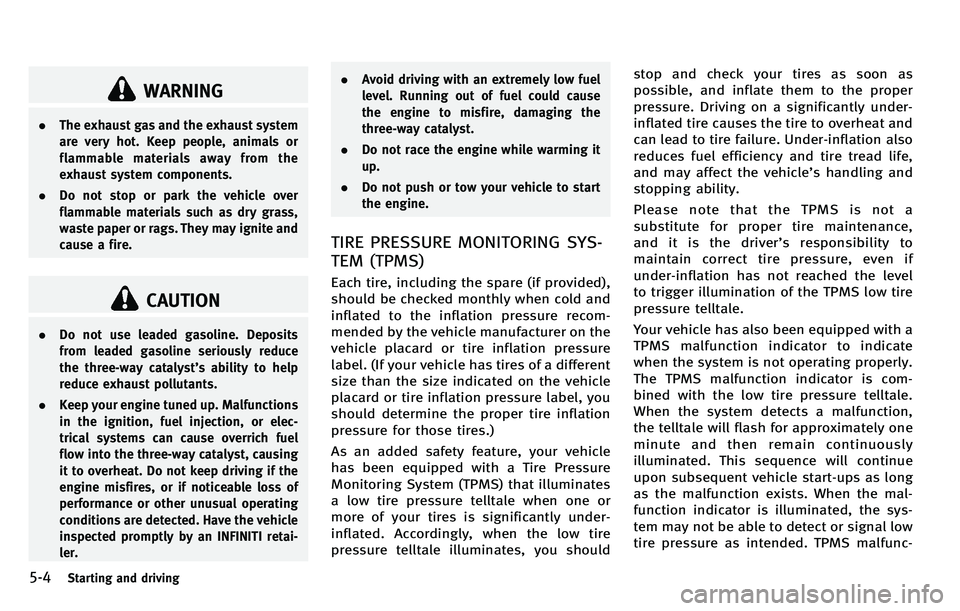
WARNING
.The exhaust gas and the exhaust system
are very hot. Keep people, animals or
flammable materials away from the
exhaust system components.
. Do not stop or park the vehicle over
flammable materials such as dry grass,
waste paper or rags. They may ignite and
cause a fire.
CAUTION
.Do not use leaded gasoline. Deposits
from leaded gasoline seriously reduce
the three-way catalyst ’s ability to help
reduce exhaust pollutants.
. Keep your engine tuned up. Malfunctions
in the ignition, fuel injection, or elec-
trical systems can cause overrich fuel
flow into the three-way catalyst, causing
it to overheat. Do not keep driving if the
engine misfires, or if noticeable loss of
performance or other unusual operating
conditions are detected. Have the vehicle
inspected promptly by an INFINITI retai-
ler. .
Avoid driving with an extremely low fuel
level. Running out of fuel could cause
the engine to misfire, damaging the
three-way catalyst.
. Do not race the engine while warming it
up.
. Do not push or tow your vehicle to start
the engine.
TIRE PRESSURE MONITORING SYS-
TEM (TPMS)
Each tire, including the spare (if provided),
should be checked monthly when cold and
inflated to the inflation pressure recom-
mended by the vehicle manufacturer on the
vehicle placard or tire inflation pressure
label. (If your vehicle has tires of a different
size than the size indicated on the vehicle
placard or tire inflation pressure label, you
should determine the proper tire inflation
pressure for those tires.)
As an added safety feature, your vehicle
has been equipped with a Tire Pressure
Monitoring System (TPMS) that illuminates
a low tire pressure telltale when one or
more of your tires is significantly under-
inflated. Accordingly, when the low tire
pressure telltale illuminates, you should stop and check your tires as soon as
possible, and inflate them to the proper
pressure. Driving on a significantly under-
inflated tire causes the tire to overheat and
can lead to tire failure. Under-inflation also
reduces fuel efficiency and tire tread life,
and may affect the vehicle
’s handling and
stopping ability.
Please note that the TPMS is not a
substitute for proper tire maintenance,
anditisthedriver ’s responsibility to
maintain correct tire pressure, even if
under-inflation has not reached the level
to trigger illumination of the TPMS low tire
pressure telltale.
Your vehicle has also been equipped with a
TPMS malfunction indicator to indicate
when the system is not operating properly.
The TPMS malfunction indicator is com-
bined with the low tire pressure telltale.
When the system detects a malfunction,
the telltale will flash for approximately one
minute and then remain continuously
illuminated. This sequence will continue
upon subsequent vehicle start-ups as long
as the malfunction exists. When the mal-
function indicator is illuminated, the sys-
tem may not be able to detect or signal low
tire pressure as intended. TPMS malfunc-
Page 326 of 522
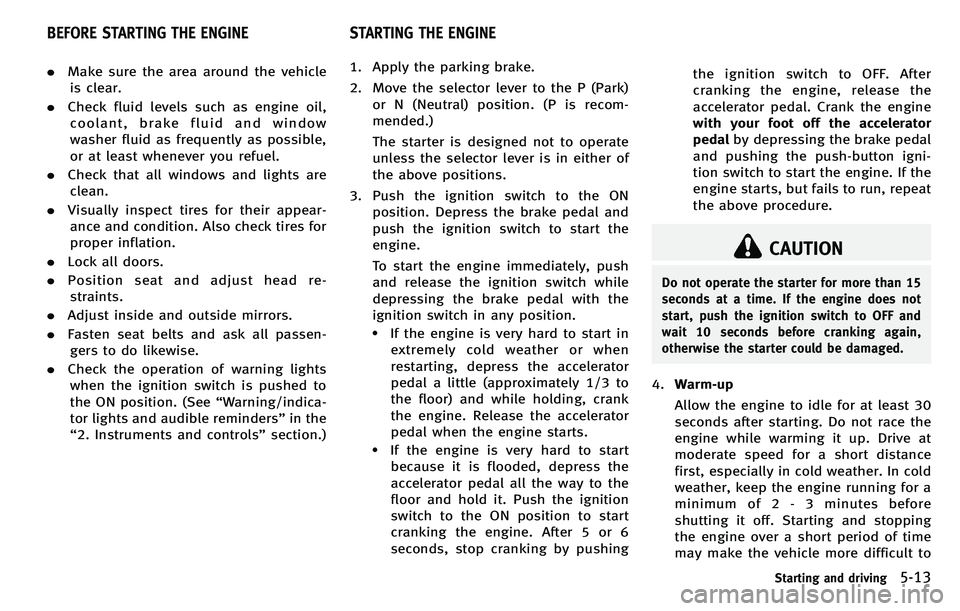
.Make sure the area around the vehicle
is clear.
. Check fluid levels such as engine oil,
coolant, brake fluid and window
washer fluid as frequently as possible,
or at least whenever you refuel.
. Check that all windows and lights are
clean.
. Visually inspect tires for their appear-
ance and condition. Also check tires for
proper inflation.
. Lock all doors.
. Position seat and adjust head re-
straints.
. Adjust inside and outside mirrors.
. Fasten seat belts and ask all passen-
gers to do likewise.
. Check the operation of warning lights
when the ignition switch is pushed to
the ON position. (See “Warning/indica-
tor lights and audible reminders ”in the
“ 2. Instruments and controls ”section.) 1. Apply the parking brake.
2. Move the selector lever to the P (Park)
or N (Neutral) position. (P is recom-
mended.)
The starter is designed not to operate
unless the selector lever is in either of
the above positions.
3. Push the ignition switch to the ON position. Depress the brake pedal and
push the ignition switch to start the
engine.
To start the engine immediately, push
and release the ignition switch while
depressing the brake pedal with the
ignition switch in any position.
.If the engine is very hard to start inextremely cold weather or when
restarting, depress the accelerator
pedal a little (approximately 1/3 to
the floor) and while holding, crank
the engine. Release the accelerator
pedal when the engine starts.
.If the engine is very hard to startbecause it is flooded, depress the
accelerator pedal all the way to the
floor and hold it. Push the ignition
switch to the ON position to start
cranking the engine. After 5 or 6
seconds, stop cranking by pushing the ignition switch to OFF. After
cranking the engine, release the
accelerator pedal. Crank the engine
with your foot off the accelerator
pedal
by depressing the brake pedal
and pushing the push-button igni-
tion switch to start the engine. If the
engine starts, but fails to run, repeat
the above procedure.
CAUTION
Do not operate the starter for more than 15
seconds at a time. If the engine does not
start, push the ignition switch to OFF and
wait 10 seconds before cranking again,
otherwise the starter could be damaged.
4. Warm-up
Allow the engine to idle for at least 30
seconds after starting. Do not race the
engine while warming it up. Drive at
moderate speed for a short distance
first, especially in cold weather. In cold
weather, keep the engine running for a
minimum of 2 - 3 minutes before
shutting it off. Starting and stopping
the engine over a short period of time
may make the vehicle more difficult to
Starting and driving5-13
BEFORE STARTING THE ENGINE STARTING THE ENGINE
Page 327 of 522

5-14Starting and driving
start.
When racing the engine up to 4,000
rpm (VK56VD engine) or 4,500 rpm
(VQ37VHR engine) or more under no
load condition, the engine will enter the
fuel cut mode.
5. To stop the engine, shift the selector lever to the P (Park) position and push
the ignition switch to the OFF position.
In preparation for the next engine start,
the engine may have a slightly delayed
shutoff after pushing the ignition
switch to the OFF position, depending
on the driving conditions (VK56VD
engine models).AUTOMATIC TRANSMISSION
The automatic transmission in your vehicle
is electronically controlled by a transmis-
sion control module to produce maximum
efficiency and smooth operation.
Shown on the following pages are the
recommended operating procedures for
this transmission. Follow these procedures
for maximum vehicle performance and
driving enjoyment.
Starting the vehicle
After starting the engine, fully depress the
foot brake pedal and push the selector
lever button before shifting the selector
lever to the R (Reverse), N (Neutral), D
(Drive) or Manual shift mode position. Be
sure the vehicle is fully stopped before
attempting to shift the selector lever.
This automatic transmission model is
designed so that the foot brake pedal
must be depressed before shifting from P
(Park) to any drive position while the
ignition switch position is ON.
The selector lever cannot be moved out of
the P (Park) position and into any of the
other gear positions if the ignition switch
is pushed to the LOCK, OFF or ACC
position. 1. Keep the foot brake pedal depressed
and push the selector lever button to
shift into a driving gear.
2. Release the parking brake and foot brake, then gradually start the vehicle
in motion.
WARNING
. Do not depress the accelerator pedal
while shifting from P (Park) or N
(Neutral) to R (Reverse), D (Drive) or
manual shift mode. Always depress the
brake pedal until shifting is completed.
Failure to do so could cause you to lose
control and have an accident.
. Cold engine idle speed is high, so use
caution when shifting into a forward or
reverse gear before the engine has
warmed up.
. Never shift to P (Park) or R (Reverse)
while vehicle is moving forward. Never
shift to P (Park) or D (Drive) while vehicle
is moving rearward. Failure to do so
could cause you to lose control and have
an accident.
DRIVING THE VEHICLE