battery INFINITI M 2012 Owner's Guide
[x] Cancel search | Manufacturer: INFINITI, Model Year: 2012, Model line: M, Model: INFINITI M 2012Pages: 522, PDF Size: 3.8 MB
Page 261 of 522
4-90Monitor, climate, audio, phone and voice recognition systems
Once a cellular phone is connected to the
in-vehicle phone module, no phone con-
necting procedure is required anymore.
Your phone is automatically connected
with the in-vehicle phone module when
the ignition switch is pushed to the ON
position with the registered cellular phone
turned on and carried in the vehicle.
You can register up to 5 different Blue-
tooth
®cellular phones in the in-vehicle
phone module. However, you can talk on
only one cellular phone at a time.
The INFINITI Voice Recognition system
supports the phone commands, so dialing
a phone number using your voice is
possible. For more details, see “INFINITI
Voice Recognition system (models with
navigation system) ”later in this section;
page 4-114.
Before using the Bluetooth
®Hands-Free
Phone System, refer to the following notes.
. Set up the wireless connection between
a compatible cellular phone and the in-
vehicle phone module before using the
Bluetooth
®Hands-Free Phone System.
. Some Bluetooth®enabled cellular
phones may not be recognized by the
in-vehicle phone module. Please visit www.InfinitiUSA.com/bluetooth for a
recommended phone list.
. You will not be able to use a hands-free
phone under the following conditions:
— Your vehicle is outside of the tele-
phone service area.
— Your vehicle is in an area where it is
difficult to receive radio waves; such
as in a tunnel, in an underground
parking garage, behind a tall build-
ing or in a mountainous area.
— Your cellular phone is locked in
order not to be dialed.
. When the radio wave condition is not
ideal or ambient sound is too loud, it
may be difficult to hear the other
person ’s voice during a call.
. Immediately after the ignition switch is
pushed to the ON position, it may be
impossible to receive a call for a short
period of time.
. Do not place the cellular phone in an
area surrounded by metal or far away
from the in-vehicle phone module to
prevent tone quality degradation and
wireless connection disruption.
. While a cellular phone is connected
through the Bluetooth
®wireless con-
nection, the battery power of the cellular phone may discharge quicker
than usual.
. If the Bluetooth
®Hands-Free Phone
System seems to be malfunctioning,
please visit www.InfinitiUSA.com/blue-
tooth for troubleshooting help.
. Some cellular phones or other devices
may cause interference or a buzzing
noise to come from the audio system
speakers. Storing the device in a
different location may reduce or elim-
inate the noise.
. Refer to the cellular phone Owner ’s
Manual regarding the telephone pairing
procedure specific to your phone,
battery charging, cellular phone anten-
na, etc.
. The antenna display on the monitor will
not coincide with the antenna display
of some cellular phones.
. Keep the interior of the vehicle as quiet
as possible to hear the caller ’s voice
clearlyaswellastominimizeits
echoes.
. If reception between callers is unclear,
adjusting the incoming or outgoing call
volume may improve the clarity.
Page 271 of 522

4-100Monitor, climate, audio, phone and voice recognition systems
WARNING
.Use a phone after stopping your vehicle
in a safe location. If you have to use a
phone while driving, exercise extreme
caution at all times so full attention may
be given to vehicle operation.
. If you find yourself unable to devote full
attention to vehicle operation while
talking on the phone, pull off the road
to a safe location and stop your vehicle
before doing so.
CAUTION
To avoid draining the vehicle battery, use a
phone after starting the engine.
Your vehicle is equipped with Bluetooth®
Hands-Free Phone System. If you are an
owner of a Bluetooth®enabled cellular
phone, you can set up the wireless
connection between your cellular phone
and the in-vehicle phone module. With
Bluetooth
®wireless technology, you can
make or receive a telephone call with your
cellular phone in your pocket. Once your cellular phone is paired to the
in-vehicle phone module, no phone con-
necting procedure is required. Your phone
is automatically connected with the in-
vehicle phone module when the ignition
switch is pushed to the
“ON ”position with
the registered cellular phone turned on
and carried in the vehicle.
You can register up to 5 different Blue-
tooth
®cellular phones in the in-vehicle
phone module. However, you can talk on
only one cellular phone at a time.
When a call is active, the audio system and
microphone (located in the ceiling in front
of the rearview mirror) are used for the
handsfree communications.
If the audio system is being used at the
time, the audio mode will mute and will
stay muted until the active call is ended.
The INFINITI Voice Recognition system
supports the phone commands, so dialing
a phone number using your voice is
possible.
Before using the Bluetooth
®Hands-Free
Phone System, refer to the following notes.
. Set up the wireless connection between
a cellular phone and the in-vehicle
phone module before using the Blue- tooth
®Hands-Free Phone System.
. Some Bluetooth®enabled cellular
phones may not be recognized by the
in-vehicle phone module.
. You will not be able to use a hands-free
phone under the following conditions:
— Your vehicle is outside of the tele-
phone service area.
— Your vehicle is in an area where it is
difficult to receive radio waves; such
as in a tunnel, in an underground
parking garage, behind a tall build-
ing or in a mountainous area.
— Your cellular phone is locked in
order not to be dialed.
. When the radio wave condition is not
ideal or ambient sound is too loud, it
may be difficult to hear the other
person ’s voice during a call.
. Immediately after the ignition switch is
pushed to the “ON ”position, it may be
impossible to receive a call for a short
period of time.
. Do not place the cellular phone in an
area surrounded by metal or far away
from the in-vehicle phone module to
prevent tone quality degradation and
wireless connection disruption.
BLUETOOTH®HANDS-FREE PHONE SYSTEM
(models without navigation system)
Page 272 of 522

.While a cellular phone is connected
through the Bluetooth®wireless con-
nection, the battery power of the
cellular phone may discharge quicker
than usual.
. If the Bluetooth
®Hands-Free Phone
System seems to be malfunctioning,
please contact an INFINITI retailer.
. Some cellular phones or other devices
may cause interference or a buzzing
noise to come from the audio system
speakers. Storing the device in a
different location may reduce or elim-
inate the noise.
. Refer to the cellular phone Owner ’s
Manual regarding the telephone pairing
procedure specific to your phone,
battery charging, cellular phone anten-
na, etc.
. The antenna display on the monitor will
not coincide with the antenna display
of some cellular phones.
. Keep the interior of the vehicle as quiet
as possible to hear the caller ’s voice
clearlyaswellastominimizeits
echoes.
. If reception between callers is unclear,
adjusting the incoming or outgoing call
volume may improve the clarity. .
This wireless hands free car kit is based
on Bluetooth
®technology,
— Frequency: 2402 MHz - 2480 MHz
— Output Power: 4,14dBm E.I.R.P
— Modulation: FHSS GFSK 8DPSK, p/
4DQPSK
— Number of Channel: 79
— This wireless equipment can ’tbe
used for any services related to
safety because there is the possibi-
lity of radio interference.
REGULATORY INFORMATION
FCC Regulatory information
. CAUTION: To maintain compliance with
FCC ’s RF exposure guidelines, use only
the supplied antenna. Unauthorized
antenna, modification, or attachments
could damage the transmitter and may
violate FCC regulations.
. Operation is subject to the following
two conditions:
1) this device may not cause interfer-
ence and
2) this device must accept any inter- ference, including interference that
may cause undesired operation of
the device
IC Regulatory information
.Operation is subject to the following
two conditions: (1) this device may not
cause interference, and (2) this device
must accept any interference, including
interference that may cause undesired
operation of the device.
. This Class B digital apparatus meets all
requirements of the Canadian Interfer-
ence-Causing Equipment Regulations.
Bluetooth trademark:
Bluetooth®is a trademark
owned by Bluetooth SIG, Inc.,
U.S.A. and licensed to Visteon
Corporation.
Monitor, climate, audio, phone and voice recognition systems4-101
Page 314 of 522

5 Starting and driving
Precautions when starting and driving ................. 5-3Exhaust gas (carbon monoxide) ....................... 5-3
Three-way catalyst........................................... 5-3
Tire Pressure Monitoring System (TPMS) ........ 5-4
Avoiding collision and rollover......................... 5-6
Off-road recovery............................................. 5-7
Rapid air pressure loss ................................... 5-7
Drinking alcohol/drugs and driving ................. 5-8
Intelligent All-Wheel Drive (AWD) driving
safety precautions ........................................... 5-8
Push-button ignition switch ................................. 5-9 Operating range for engine start function ...... 5-10
Push-button ignition switch operation ........... 5-10
Steering lock (if so equipped)........................ 5-11
Push-button ignition switch positions ............ 5-11
Emergency engine shut off ............................ 5-12
Intelligent Key battery discharge ................... 5-12
Before starting the engine ................................. 5-13
Starting the engine............................................ 5-13
Driving the vehicle ............................................. 5-14
Automatic transmission ................................. 5-14
Parking brake .................................................... 5-18
INFINITI drive mode selector............................... 5-19
Standard mode ............................................. 5-19
Sport mode ................................................... 5-19 Snow mode ................................................. 5-20
Eco mode .................................................... 5-20
Lane Departure Warning (LDW) system/Lane
Departure Prevention (LDP) system (if
so equipped)..................................................... 5-22 Lane Departure Warning (LDW) system......... 5-23
Lane Departure Prevention (LDP) system ...... 5-26
Lane camera unit maintenance .................... 5-31
Blind Spot Warning (BSW) system/Blind Spot
Intervention
TM(BSI) system (if so equipped)...... 5-31
BSW system operation ................................. 5-33
BSI system operation................................... 5-36
BSW/BSI driving situations .......................... 5-39
BSW/BSI malfunction................................... 5-44
System maintenance.................................... 5-44
Cruise control.................................................... 5-45
Precautions on cruise control....................... 5-45
Cruise control operations ............................. 5-45
Intelligent Cruise Control (ICC) system (if
so equipped)..................................................... 5-47
Selecting the vehicle-to-vehicle distance
control mode ............................................... 5-48
Vehicle-to-vehicle distance control mode...... 5-48
Precautions on vehicle-to-vehicle distance
control mode ............................................... 5-49
Page 315 of 522

Vehicle-to-vehicle distance control
mode operation ............................................. 5-50
Conventional (fixed speed) cruise
control mode ................................................. 5-65
Preview function (for Intelligent Cruise Control
system equipped models) ............................. 5-69
Distance Control Assist (DCA) system (if
so equipped) ..................................................... 5-69
Precautions on Distance Control
Assist system ................................................ 5-70
Distance Control Assist operation .................. 5-71
Forward Collision Warning (FCW) system (if
so equipped) ..................................................... 5-82 Precautions on FCW system ........................... 5-83
Intelligent Brake Assist (IBA) system (if
so equipped) ..................................................... 5-86 Precautions on IBA system ............................ 5-87
Break-in schedule .............................................. 5-90
Increasing fuel economy .................................... 5-90
Intelligent All-Wheel Drive (AWD) (if
so equipped) ..................................................... 5-90
Parking/parking on hills .................................... 5-92
Power steering................................................... 5-93
Brake system..................................................... 5-93
Braking precautions ...................................... 5-93
Parking brake break-in .................................. 5-93 Brake assist ...................................................... 5-94
Brake assist................................................. 5-94
Preview function (Intelligent Cruise Control
system equipped models) ............................ 5-94
Anti-lock Braking System (ABS).................... 5-96
Vehicle Dynamic Control (VDC) system .............. 5-98 Active trace control (if so equipped)............. 5-98
Rise-up and build-up ................................... 5-99
Brake force distribution ............................... 5-99
Hill Start Assist system ................................... 5-100
4 Wheel Active Steer (4WAS) system (if
so equipped)................................................... 5-100
Cold weather driving ....................................... 5-101 Freeing a frozen door lock ......................... 5-101
Antifreeze .................................................. 5-101
Battery....................................................... 5-101
Draining of coolant water........................... 5-101
Tire equipment .......................................... 5-101
Special winter equipment .......................... 5-102
Driving on snow or ice ............................... 5-102
Engine block heater (if so equipped).......... 5-102
Active noise control......................................... 5-103
Page 323 of 522

5-10Starting and driving
SSD0659
OPERATING RANGE FOR ENGINE
START FUNCTION
The Intelligent Key can only be used for
starting the engine when the Intelligent
Key is within the specified operating range.
When the Intelligent Key battery is almost
discharged or strong radio waves are
present near the operating location, the
Intelligent Key system’s operating range
becomes narrower and may not function
properly.
If the Intelligent Key is within the operating
range, it is possible for anyone, even
someone who does not carry the Intelligent Key, to push the ignition switch to start the
engine.
.
The trunk area is not included in the
operating range but the Intelligent Key
may function.
. If the Intelligent Key is placed on the
instrument panel, rear parcel shelf,
inside the glove box or door pocket,
the Intelligent Key may not function.
. If the Intelligent Key is placed near the
door or window outside the vehicle, the
Intelligent Key may function.
SSD1021
PUSH-BUTTON IGNITION SWITCH
OPERATION
When the ignition switch is pushed without
depressing the brake pedal, the ignition
switch position will change as follows:
. Push center once to change to ACC.
. Push center two times to change to ON.
. Push center three times to change to
OFF. (No position illuminates.)
. Push center four times to return to ACC.
. Open or close any door to return to
LOCK during the OFF position.
Page 324 of 522
If the battery of the vehicle is discharged,
the push-button ignition switch cannot be
turned from the LOCK position.
Some indicators and warnings for opera-
tion are displayed on the dot matrix liquid
crystal display between the speedometer
and tachometer. (See“Dot matrix liquid
crystal display ”in the “2. Instruments and
controls ”section.)
The ignition lock is designed so that the
ignition switch position cannot be switched
to LOCK until the selector lever is moved to
the P (Park) position.
When the ignition switch cannot be pushed
toward the LOCK position, proceed as
follows:
1. Move the selector lever into the P (Park) position.
2. Push the ignition switch to the OFF position. The ignition switch position
indicator will not illuminate.
3. Open the door. The ignition switch will change to the LOCK position.
The selector lever can be moved from the P
(Park) position if the ignition switch is in
the ON position and the brake pedal is
depressed.STEERING LOCK (if so equipped)
In order for the steering wheel to be
locked, it must be turned about 1/8 of a
right or left turn from the straight up
position.
To lock the steering wheel, push the
ignition switch to the OFF position. To
unlock the steering wheel, push the
ignition switch. If the steering lock release
malfunction indicator appears on the dot
matrix liquid crystal display, push the
push-button ignition switch again while
lightly turning the steering wheel right
and left. (See “Dot matrix liquid crystal
display ”in the “2. Instruments and con-
trols ”section.)
PUSH-BUTTON IGNITION SWITCH
POSITIONS
LOCK (Normal parking position)
The ignition switch can only be locked in
this position.
The ignition switch will be unlocked when
it is pushed to the ACC position while
carrying the Intelligent Key.
ACC (Accessories)
This position activates electrical acces-
sories such as the radio, when the engine
is not running.
ON (Normal operating position)
This position turns on the ignition system
and electrical accessories.
OFF
The engine can be turned off in this
position.
The ignition lock is designed so that the
ignition switch cannot be switched to the
LOCK position until the selector lever is
moved to the P (Park) position.
CAUTION
Do not leave the vehicle with the push-
button ignition switch in ACC or ON posi-
tions when the engine is not running for an
extended period. This can discharge the
battery.
Starting and driving5-11
Page 325 of 522
5-12Starting and driving
EMERGENCY ENGINE SHUT OFF
To shut off the engine in an emergency
situation while driving perform the follow-
ing procedure:
.Rapidly push the push-button ignition
switch 3 consecutive times, or
. Push and hold the push-button ignition
switch for more than 2 seconds.
SSD0860
INTELLIGENT KEY BATTERY DIS-
CHARGE
If the battery of the Intelligent Key is
discharged, or environmental conditions
interfere with the Intelligent Key operation,
start the engine according to the following
procedure:
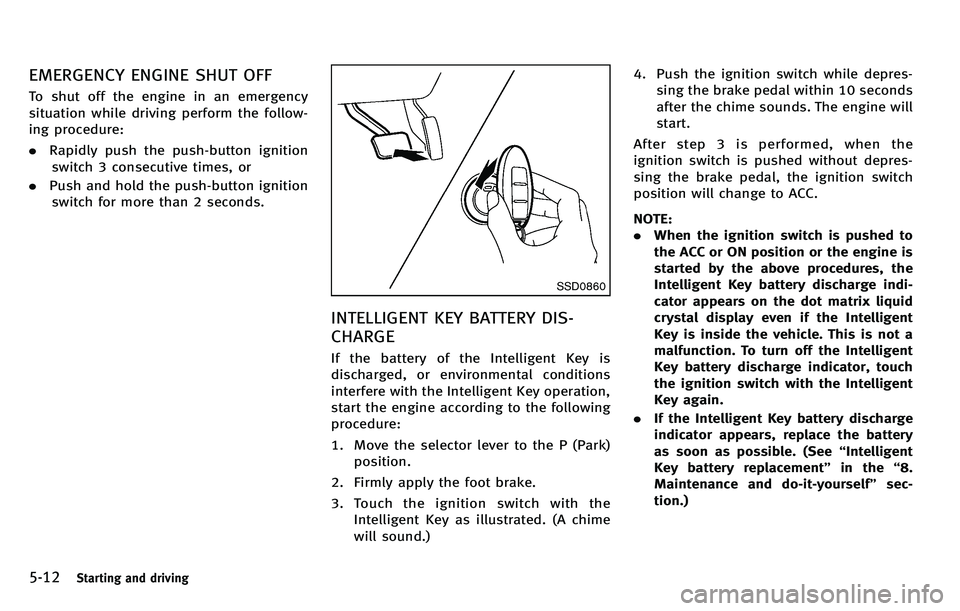
1. Move the selector lever to the P (Park)
position.
2. Firmly apply the foot brake.
3. Touch the ignition switch with the Intelligent Key as illustrated. (A chime
will sound.) 4. Push the ignition switch while depres-
sing the brake pedal within 10 seconds
after the chime sounds. The engine will
start.
After step 3 is performed, when the
ignition switch is pushed without depres-
sing the brake pedal, the ignition switch
position will change to ACC.
NOTE:
. When the ignition switch is pushed to
the ACC or ON position or the engine is
started by the above procedures, the
Intelligent Key battery discharge indi-
cator appears on the dot matrix liquid
crystal display even if the Intelligent
Key is inside the vehicle. This is not a
malfunction. To turn off the Intelligent
Key battery discharge indicator, touch
the ignition switch with the Intelligent
Key again.
. If the Intelligent Key battery discharge
indicator appears, replace the battery
as soon as possible. (See “Intelligent
Key battery replacement” in the“8.
Maintenance and do-it-yourself ”sec-
tion.)
Page 331 of 522
5-18Starting and driving
SSD0974
Shift lock release
If the battery charge is low or discharged,
the selector lever may not be moved from
the P (Park) position even with the brake
pedal depressed and the selector lever
button pushed.
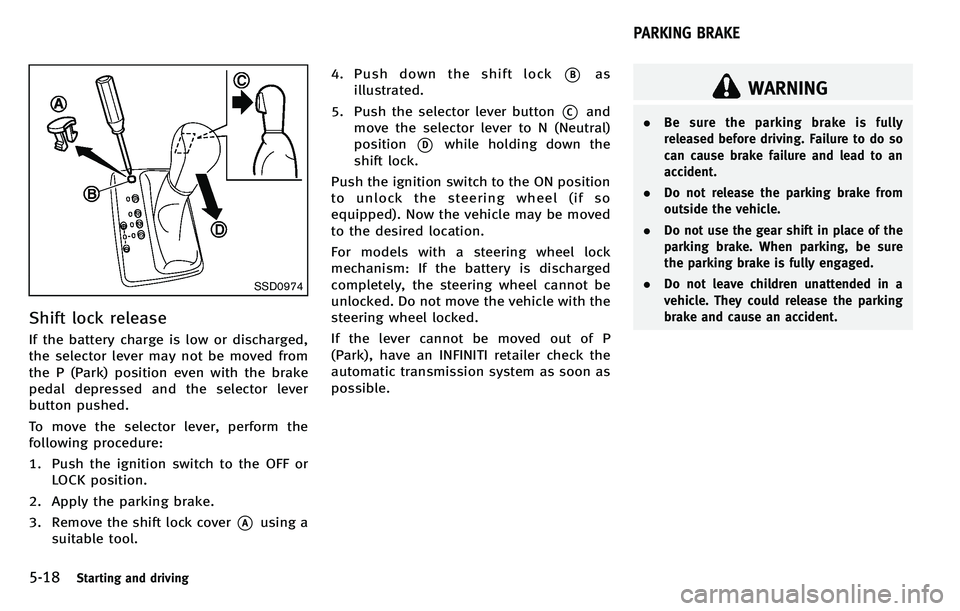
To move the selector lever, perform the
following procedure:
1. Push the ignition switch to the OFF orLOCK position.
2. Apply the parking brake.
3. Remove the shift lock cover
*Ausing a
suitable tool. 4. Push down the shift lock
*Bas
illustrated.
5. Push the selector lever button
*Cand
move the selector lever to N (Neutral)
position
*Dwhile holding down the
shift lock.
Push the ignition switch to the ON position
to unlock the steering wheel (if so
equipped). Now the vehicle may be moved
to the desired location.
For models with a steering wheel lock
mechanism: If the battery is discharged
completely, the steering wheel cannot be
unlocked. Do not move the vehicle with the
steering wheel locked.
If the lever cannot be moved out of P
(Park), have an INFINITI retailer check the
automatic transmission system as soon as
possible.
WARNING
. Be sure the parking brake is fully
released before driving. Failure to do so
can cause brake failure and lead to an
accident.
. Do not release the parking brake from
outside the vehicle.
. Do not use the gear shift in place of the
parking brake. When parking, be sure
the parking brake is fully engaged.
. Do not leave children unattended in a
vehicle. They could release the parking
brake and cause an accident.
PARKING BRAKE
Page 414 of 522
or being driven at extremely low speed.
. The steering wheel is forcibly turned
beyond its operation limits.
. The battery voltage is reduced.
Repeated steering maneuvers that may
activate the protection mechanism will
damage the 4WAS system.
WARNING
The 4WAS system, although a sophisticated
device, cannot prevent accidents resulting
from careless or dangerous driving tech-
niques. Ultimately the responsibility for
safety of self and others rests in the hands
of the driver. Therefore only through atten-
tive and careful driving methods can the
4WAS system be fully appreciated and
safety optimized.
FREEING A FROZEN DOOR LOCK
To prevent a door lock from freezing, apply
deicer through the key hole. If the lock
becomes frozen, heat the key before
inserting it into the key hole or use the
Intelligent Key system.
ANTIFREEZE
In the winter when it is anticipated that the
outside temperature will drop below 32 8F
(0 8C), check antifreeze to assure proper
winter protection. For additional informa-
tion, see “Engine cooling system” in the
“ 8. Maintenance and do-it-yourself ”sec-
tion.
BATTERY
If the battery is not fully charged during
extremely cold weather conditions, the
battery fluid may freeze and damage the
battery. To maintain maximum efficiency,
the battery should be checked regularly.
For additional information, see “Battery ”in
the “8. Maintenance and do-it-yourself ”
section.
DRAINING OF COOLANT WATER
If the vehicle is to be left outside without
antifreeze, drain the cooling system, in-
cluding the engine block. Refill before
operating the vehicle. For details, see
“ Engine cooling system” in the“8. Main-
tenance and do-it-yourself ”section.
TIRE EQUIPMENT
SUMMER tires have a tread designed to
provide superior performance on dry pave-
ment. However, the performance of these
tires will be substantially reduced in snowy
and icy conditions. If you operate your
vehicle on snowy or icy roads, INFINITI
recommends the use of MUD & SNOW or
ALL SEASON tires on all four wheels.
Consult an INFINITI retailer for the tire
type, size, speed rating and availability
information.
For additional traction on icy roads,
studded tires may be used. However, some
U.S. states and Canadian provinces prohi-
bit their use. Check local, state and
provincial laws before installing studded
tires.
Starting and driving5-101
COLD WEATHER DRIVING