ECO mode INFINITI M 2012 Workshop Manual
[x] Cancel search | Manufacturer: INFINITI, Model Year: 2012, Model line: M, Model: INFINITI M 2012Pages: 522, PDF Size: 3.8 MB
Page 220 of 522
Fade and drift: As your vehicle moves away
from a station transmitter, the signals will
tend to fade and/or drift.
Static and flutter: During signal interfer-
ence from buildings, large hills or due to
antenna position, usually in conjunction
with increased distance from the station
transmitter, static or flutter can be heard.
This can be reduced by lowering the treble
setting to reduce the treble response.
Multipath reception: Because of the reflec-
tive characteristics of FM signals, direct
and reflected signals reach the receiver at
the same time. The signals may cancel
each other, resulting in momentary flutter
or loss of sound.
AM radio reception:
AM signals, because of their low frequency,
can bend around objects and skip along
the ground. In addition, the signals can be
bounced off the ionosphere and bent back
to earth. Because of these characteristics.
AM signals are also subject to interference
as they travel from transmitter to receiver.
Fading: Occurs while the vehicle is passing
through freeway underpasses or in areas
with many tall buildings. It can also occur
for several seconds during ionosphericturbulence even in areas where no obsta-
cles exist.
Static: Caused by thunderstorms, electrical
power lines, electric signs and even traffic
lights.
Satellite radio reception:
When the satellite radio is used for the first
time or the battery has been replaced, the
satellite radio may not work properly. This
is not a malfunction. Wait more than 10
minutes with the satellite radio ON and the
vehicle outside of any metal or large
building for the satellite radio to receive
all of the necessary data.
The satellite radio mode requires an active
XM
®Satellite Radio subscription. The
satellite radio is not available in Alaska,
Hawaii and Guam.
The satellite radio performance may be
affected if cargo carried on the roof blocks
the satellite radio signal.
If possible, do not put cargo near the
satellite antenna.
A build up of ice on the satellite radio
antenna can affect satellite radio perfor-
mance. Remove the ice to restore satellite
radio reception.
SAA0480
Compact Disc (CD) player
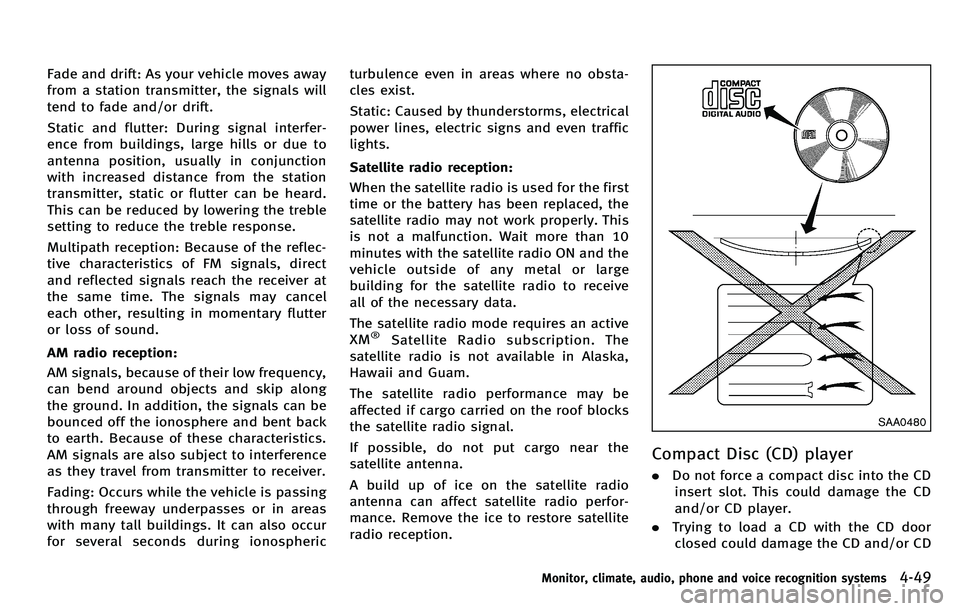
. Do not force a compact disc into the CD
insert slot. This could damage the CD
and/or CD player.
. Trying to load a CD with the CD door
closed could damage the CD and/or CD
Monitor, climate, audio, phone and voice recognition systems4-49
Page 221 of 522
4-50Monitor, climate, audio, phone and voice recognition systems
player.
. During cold weather or rainy days, the
player may malfunction due to the
humidity. If this occurs, remove the
CD and dehumidify or ventilate the
player completely.
. The player may skip while driving on
rough roads.
. The CD player sometimes cannot func-
tion when the passenger compartment
temperature is extremely high. De-
crease the temperature before use.
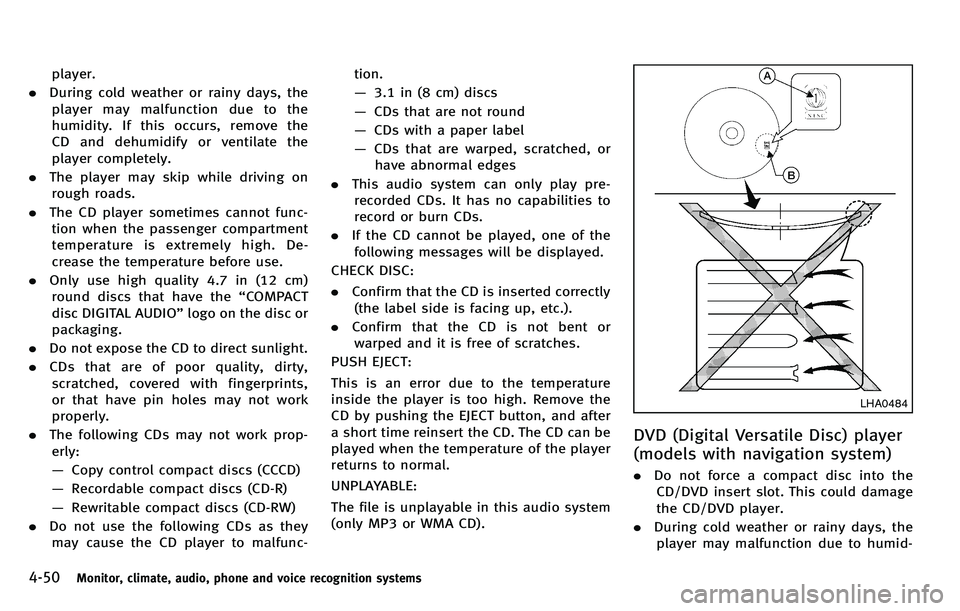
. Only use high quality 4.7 in (12 cm)
round discs that have the “COMPACT
disc DIGITAL AUDIO ”logo on the disc or
packaging.
. Do not expose the CD to direct sunlight.
. CDs that are of poor quality, dirty,
scratched, covered with fingerprints,
or that have pin holes may not work
properly.
. The following CDs may not work prop-
erly:
— Copy control compact discs (CCCD)
— Recordable compact discs (CD-R)
— Rewritable compact discs (CD-RW)
. Do not use the following CDs as they
may cause the CD player to malfunc- tion.
—
3.1 in (8 cm) discs
— CDs that are not round
— CDs with a paper label
— CDs that are warped, scratched, or
have abnormal edges
. This audio system can only play pre-
recorded CDs. It has no capabilities to
record or burn CDs.
. If the CD cannot be played, one of the
following messages will be displayed.
CHECK DISC:
. Confirm that the CD is inserted correctly
(the label side is facing up, etc.).
. Confirm that the CD is not bent or
warped and it is free of scratches.
PUSH EJECT:
This is an error due to the temperature
inside the player is too high. Remove the
CD by pushing the EJECT button, and after
a short time reinsert the CD. The CD can be
played when the temperature of the player
returns to normal.
UNPLAYABLE:
The file is unplayable in this audio system
(only MP3 or WMA CD).
LHA0484
DVD (Digital Versatile Disc) player
(models with navigation system)
. Do not force a compact disc into the
CD/DVD insert slot. This could damage
the CD/DVD player.
. During cold weather or rainy days, the
player may malfunction due to humid-
Page 223 of 522
4-52Monitor, climate, audio, phone and voice recognition systems
not issued.
. Modifying or disassembling is prohib-
ited.
. Dolby digital is manufactured under
license from Dolby Laboratories, Inc.
. Dolby and the double D mark “
”are
trademarks of Dolby Laboratories, Inc.
. DTS and DTS 2.0 “
”are registered
trademarks of DTS, Inc.
. DTS and DTS Digital Surround “
”are
registered trademarks of Digital Theater
Systems, Inc.
Parental level (parental control):
DVDs with the parental control setting can
be played with this system. Please use
your own judgement to set the parental
control with the system.
Disc selection:
The following disc formats can be played
with the DVD drive.
. DVD-VIDEO
. VIDEO-CD
. CD-DA (Conventional Compact Disc)
. DTS-CD
USB (Universal Serial Bus)
This system supports various USB memory
sticks, USB hard drives and iPod®players.
There are some USB devices which may not
be supported with this system.
. Make sure that the USB device is
connected correctly into the USB con-
nector.
. Do not force the memory stick or USB
cable into the USB connector. This
could damage the connector.
. During cold weather or rainy days, the
player may malfunction due to humid-
ity. If this occurs, remove the USB
device and dehumidify or ventilate the
USB player completely.
. The USB player sometimes cannot
function when the passenger compart-
ment temperature is extremely high.
Decrease the temperature before use.
. Do not leave USB memory in a place
prone to static electricity or where the
air conditioner blows directly. The data
in the USB memory may be damaged.
. The vehicle is not equipped with a USB
memory stick.
. A USB device cannot be formatted with
this system. To format a USB device, use a personal computer.
. Partitioned USB devices may not be
played correctly.
. Some characters used in other lan-
guages (Chinese, Japanese, etc.) are
not displayed properly on the vehicle
center screen. Using English language
characters with a USB device is recom-
mended.
. Do not connect a USB device if a
connector or cable is wet. Allow the
cable and/or connectors to dry com-
pletely before connecting the USB
device. If the connector is exposed to
fluids other than water, evaporative
residue may cause a short between
the connector pins.
. Large video podcast files cause slow
responses in an iPod
®. The vehicle
center display may momentarily black
out, but it will soon recover.
. If an iPod
®automatically selects large
video podcast files while in the shuffle
mode, the vehicle center display may
momentarily black out, but it will soon
recover.
. Audiobooks may not play in the same
order as they appear on an iPod
®.
Page 224 of 522

.An iPod nano®(1st Generation) may
remain in fast forward or rewind mode
if it is connected during a seek opera-
tion. In this case, please manually reset
the iPod
®.
. An iPod nano®(2nd Generation) will
continue to fast forward or rewind if it
is disconnected during a seek opera-
tion.
. An incorrect song title may appear when
the Play Mode is changed while using
the iPod nano
®(2nd Generation)
iPod®is a trademark of Apple Inc.,
registered in the U.S. and other countries.
Compressed Audio Files (MP3/
WMA/AAC)
Explanation of terms:
. MP3 —MP3 is short for Moving Pictures
Experts Group Audio Layer 3. MP3 is
the most well known compressed
digital audio file format. This format
allows for near “CD quality ”sound, but
at a fraction of the size of normal audio
files. MP3 conversion of an audio track
can reduce the file size by approxi-
mately a 10:1 ratio (Sampling: 44.1
kHz, Bit rate: 128 kbps) with virtually
no perceptible loss in quality. The compression reduces certain parts of
sound that seem inaudible to most
people.
. WMA —Windows Media Audio (WMA) is
a compressed audio format created by
Microsoft as an alternative to MP3. The
WMA codec offers greater file compres-
sion than the MP3 codec, enabling
storage of more digital audio tracks in
the same amount of space when
compared to MP3s at the same level
of quality.
. AAC/M4A —Advanced Audio Coding
(AAC) is a lossy audio compression
format. Audio files that have been
encoded with AAC are generally smaller
in size and deliver a higher quality of
sound than MP3.
. Bit rate —Bit rate denotes the number
of bits per second used by a digital
music file. The size and quality of a
compressed digital audio file is deter-
mined by the bit rate used when
encoding the file.
. Sampling frequency —Sampling fre-
quency is the rate at which the samples
of a signal are converted from analog to
digital (A/D conversion) per second. .
Multisession —Multisession is one of
the methods for writing data to media.
Writing data once to the media is called
a single session, and writing more than
once is called a multisession.
. ID3/WMA Tag —The ID3/WMA tag is the
part of the encoded MP3 or WMA file
that contains information about the
digital music file such as song title,
artist, album title, encoding bit rate,
track time duration, etc. ID3 tag in-
formation is displayed on the Album/
Artist/Track title line on the display.
* Windows
®and Windows Media®are
registered trademarks or trademarks of
Microsoft Corporation in the United States
of America and/or other countries.
Monitor, climate, audio, phone and voice recognition systems4-53
Page 226 of 522
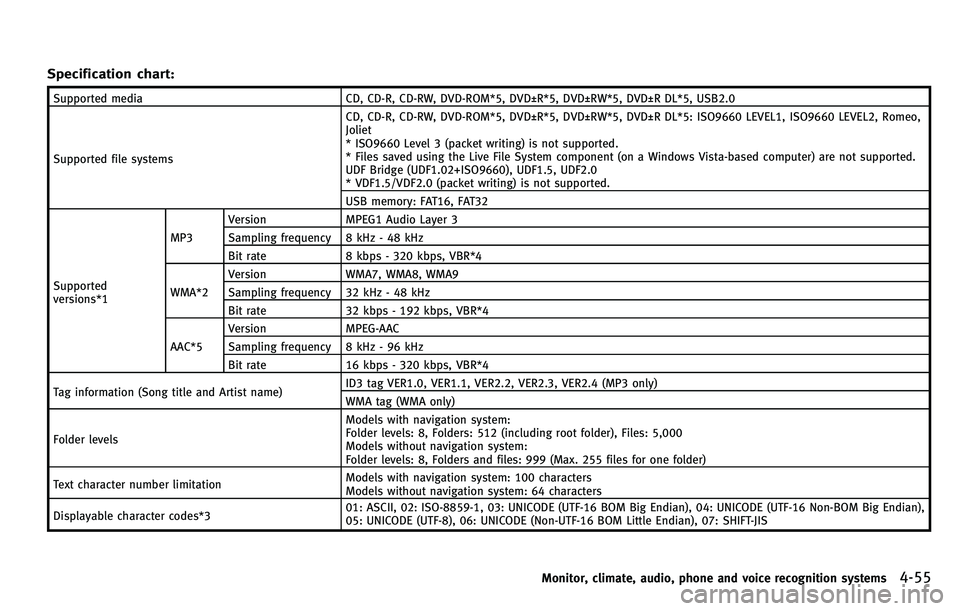
Specification chart:
Supported mediaCD, CD-R, CD-RW, DVD-ROM*5, DVD±R*5, DVD±RW*5, DVD±R DL*5, USB2.0
Supported file systems CD, CD-R, CD-RW, DVD-ROM*5, DVD±R*5, DVD±RW*5, DVD±R DL*5: ISO9660 LEVEL1, ISO9660 LEVEL2, Romeo,
Joliet
* ISO9660 Level 3 (packet writing) is not supported.
* Files saved using the Live File System component (on a Windows Vista-based computer) are not supported.
UDF Bridge (UDF1.02+ISO9660), UDF1.5, UDF2.0
* VDF1.5/VDF2.0 (packet writing) is not supported.
USB memory: FAT16, FAT32
Supported
versions*1 MP3
Version
MPEG1 Audio Layer 3
Sampling frequency 8 kHz - 48 kHz
Bit rate 8 kbps - 320 kbps, VBR*4
WMA*2 Version
WMA7, WMA8, WMA9
Sampling frequency 32 kHz - 48 kHz
Bit rate 32 kbps - 192 kbps, VBR*4
AAC*5 Version
MPEG-AAC
Sampling frequency 8 kHz - 96 kHz
Bit rate 16 kbps - 320 kbps, VBR*4
Tag information (Song title and Artist name) ID3 tag VER1.0, VER1.1, VER2.2, VER2.3, VER2.4 (MP3 only)
WMA tag (WMA only)
Folder levels Models with navigation system:
Folder levels: 8, Folders: 512 (including root folder), Files: 5,000
Models without navigation system:
Folder levels: 8, Folders and files: 999 (Max. 255 files for one folder)
Text character number limitation Models with navigation system: 100 characters
Models without navigation system: 64 characters
Displayable character codes*3 01: ASCII, 02: ISO-8859-1, 03: UNICODE (UTF-16 BOM Big Endian), 04: UNICODE (UTF-16 Non-BOM Big Endian),
05: UNICODE (UTF-8), 06: UNICODE (Non-UTF-16 BOM Little Endian), 07: SHIFT-JIS
Monitor, climate, audio, phone and voice recognition systems4-55
Page 227 of 522
4-56Monitor, climate, audio, phone and voice recognition systems
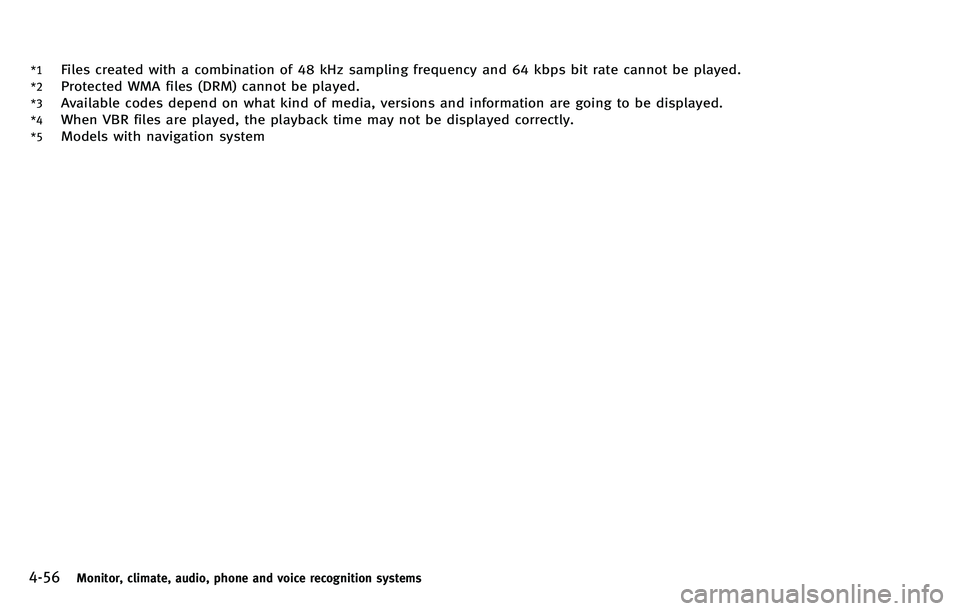
*1Files created with a combination of 48 kHz sampling frequency and 64 kbps bit rate cannot be played.
*2Protected WMA files (DRM) cannot be played.
*3Available codes depend on what kind of media, versions and information are going to be displayed.
*4When VBR files are played, the playback time may not be displayed correctly.
*5Models with navigation system
Page 229 of 522

4-58Monitor, climate, audio, phone and voice recognition systems
Compressed Video Files (models
with navigation system)
Explanation of terms:
.DivX®- DivX®refers to the DivX®codec
owned by DivX, Inc. used for a lossy
compression of video based on MPEG-
4.
. AVI - AVI stands for Audio Video
Interleave. It is a standard file format
originated by Microsoft Corporation. A
“ .divx ”encoded file can be saved into
the “.avi ”file format for playback on
this system if it meets the requirements
stated in the table in this section.
However, not all the “.avi” files are
playable on this system since different
encodings can be used than the DivX
®
codec.
. ASF - ASF stands for Advanced Systems
Format. It is a file format owned by
Microsoft Corporation. Note: Only “.
asf ”files that meet the requirements
stated in the table in this section can
be played.
. Bit rate —Bit rate denotes the number
of bits per second used by a digital
video file. The size and quality of a
compressed digital audio file is deter- mined by the bit rate used when
encoding the file.
Page 230 of 522
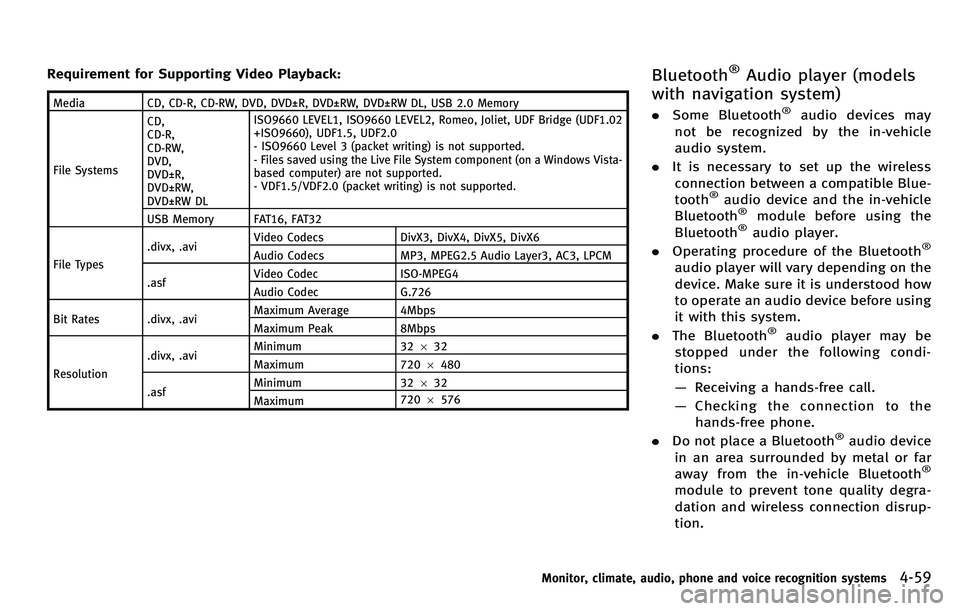
Requirement for Supporting Video Playback:
MediaCD, CD-R, CD-RW, DVD, DVD±R, DVD±RW, DVD±RW DL, USB 2.0 Memory
File Systems CD,
CD-R,
CD-RW,
DVD,
DVD±R,
DVD±RW,
DVD±RW DL ISO9660 LEVEL1, ISO9660 LEVEL2, Romeo, Joliet, UDF Bridge (UDF1.02
+ISO9660), UDF1.5, UDF2.0
- ISO9660 Level 3 (packet writing) is not supported.
- Files saved using the Live File System component (on a Windows Vista-
based computer) are not supported.
- VDF1.5/VDF2.0 (packet writing) is not supported.
USB Memory FAT16, FAT32
File Types .divx, .avi
Video Codecs
DivX3, DivX4, DivX5, DivX6
Audio Codecs MP3, MPEG2.5 Audio Layer3, AC3, LPCM
.asf Video Codec
ISO-MPEG4
Audio Codec G.726
Bit Rates .divx, .avi Maximum Average 4Mbps
Maximum Peak
8Mbps
Resolution .divx, .avi
Minimum
32632
Maximum 7206480
.asf Minimum
32632
Maximum 720
6576
Bluetooth®Audio player (models
with navigation system)
. Some Bluetooth®audio devices may
not be recognized by the in-vehicle
audio system.
. It is necessary to set up the wireless
connection between a compatible Blue-
tooth
®audio device and the in-vehicle
Bluetooth®module before using the
Bluetooth®audio player.
. Operating procedure of the Bluetooth®
audio player will vary depending on the
device. Make sure it is understood how
to operate an audio device before using
it with this system.
. The Bluetooth
®audio player may be
stopped under the following condi-
tions:
— Receiving a hands-free call.
— Checking the connection to the
hands-free phone.
. Do not place a Bluetooth
®audio device
in an area surrounded by metal or far
away from the in-vehicle Bluetooth
®
module to prevent tone quality degra-
dation and wireless connection disrup-
tion.
Monitor, climate, audio, phone and voice recognition systems4-59
Page 231 of 522

4-60Monitor, climate, audio, phone and voice recognition systems
.While an audio device is connected
through a Bluetooth®wireless connec-
tion, the battery power of the device
may discharge quicker than usual.
. This system supports the Bluetooth
®
Audio Distribution Profile (A2DP,
AVRCP).
. Bluetooth
®is a trademark owned by
Bluetooth SIG, Inc. and licensed to
Clarion Co., Ltd.
Music Box (models with navigation
system)
Recording:
. Note that data that is lost and not
stored to the hard disk drive due to
system damage, improper operation or
malfunction is not under warranty.
. Vehicle owners are not permitted to
record music without permission of the
ownerofthecopyrightexceptfor
personal use.
. Check if the music is appropriately
recorded to the hard disk drive after
recording when the compact disc can-
not be rerecorded.
. Some music cannot be recorded de-
pending on the disc condition due to high-speed recording.
. Jumping sounds may be recorded when
a compact disc is recorded while
driving on rough roads and excessive
vibration occurs.
. A mark indicating jumping sounds is
displayed if jumping sounds are re-
corded.
. No sounds may be recorded if jumping
sounds occurs or the disc is in poor
condition.
. Tracks that include Serial Copy Manage-
ment System (SCMS) are not recorded.
. If a compact disc is scratched or dirty, it
may not be recorded, jumping sounds
may occur or it may take a long time to
record.
Automatic title download:
. The title information that is automati-
cally downloaded may differ from the
actual title.
. When newly released compact discs are
recorded, their title information may
not be downloaded.
. The title information in the hard disk
can be updated. (See “Playing recorded
songs” later in this section.)
Page 232 of 522
SAA2957
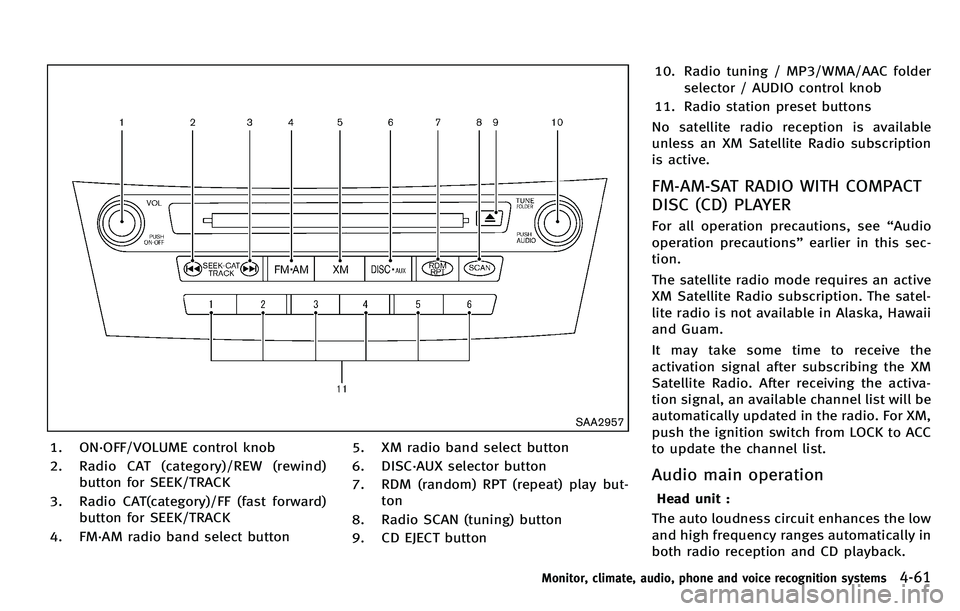
1. ON·OFF/VOLUME control knob
2. Radio CAT (category)/REW (rewind)button for SEEK/TRACK
3. Radio CAT(category)/FF (fast forward) button for SEEK/TRACK
4. FM·AM radio band select button 5. XM radio band select button
6. DISC·AUX selector button
7. RDM (random) RPT (repeat) play but-
ton
8. Radio SCAN (tuning) button
9. CD EJECT button 10. Radio tuning / MP3/WMA/AAC folder
selector / AUDIO control knob
11. Radio station preset buttons
No satellite radio reception is available
unless an XM Satellite Radio subscription
is active.
FM-AM-SAT RADIO WITH COMPACT
DISC (CD) PLAYER
For all operation precautions, see “Audio
operation precautions” earlier in this sec-
tion.
The satellite radio mode requires an active
XM Satellite Radio subscription. The satel-
lite radio is not available in Alaska, Hawaii
and Guam.
It may take some time to receive the
activation signal after subscribing the XM
Satellite Radio. After receiving the activa-
tion signal, an available channel list will be
automatically updated in the radio. For XM,
push the ignition switch from LOCK to ACC
to update the channel list.
Audio main operation
Head unit :
The auto loudness circuit enhances the low
and high frequency ranges automatically in
both radio reception and CD playback.
Monitor, climate, audio, phone and voice recognition systems4-61