parking brake INFINITI M 2012 Owners Manual
[x] Cancel search | Manufacturer: INFINITI, Model Year: 2012, Model line: M, Model: INFINITI M 2012Pages: 522, PDF Size: 3.8 MB
Page 15 of 522
0-8Illustrated table of contents
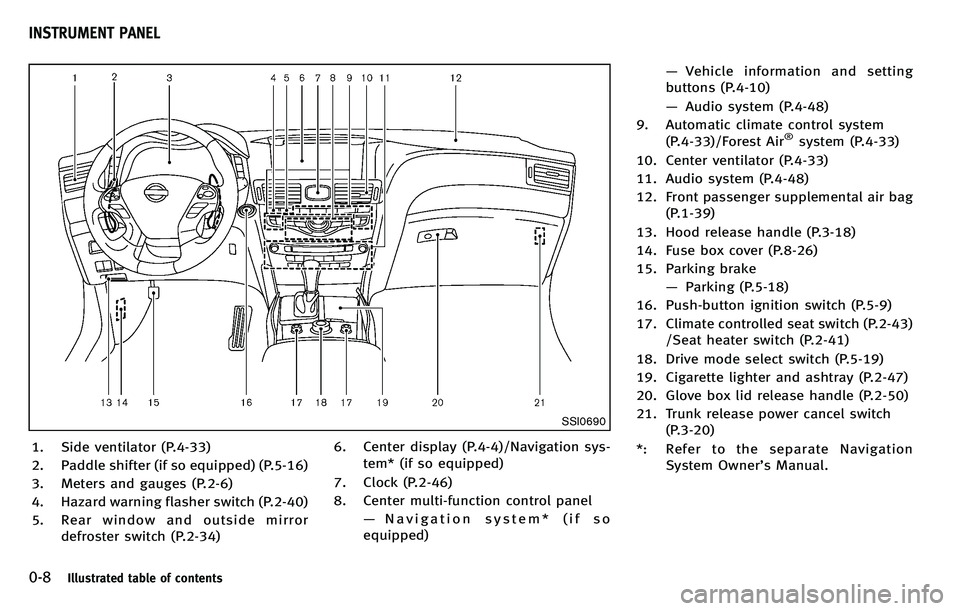
SSI0690
1. Side ventilator (P.4-33)
2. Paddle shifter (if so equipped) (P.5-16)
3. Meters and gauges (P.2-6)
4. Hazard warning flasher switch (P.2-40)
5. Rear window and outside mirrordefroster switch (P.2-34) 6. Center display (P.4-4)/Navigation sys-
tem* (if so equipped)
7. Clock (P.2-46)
8. Center multi-function control panel —Navigation system* (if so
equipped) —
Vehicle information and setting
buttons (P.4-10)
— Audio system (P.4-48)
9. Automatic climate control system (P.4-33)/Forest Air
®system (P.4-33)
10. Center ventilator (P.4-33)
11. Audio system (P.4-48)
12. Front passenger supplemental air bag (P.1-39)
13. Hood release handle (P.3-18)
14. Fuse box cover (P.8-26)
15. Parking brake —Parking (P.5-18)
16. Push-button ignition switch (P.5-9)
17. Climate controlled seat switch (P.2-43) /Seat heater switch (P.2-41)
18. Drive mode select switch (P.5-19)
19. Cigarette lighter and ashtray (P.2-47)
20. Glove box lid release handle (P.2-50)
21. Trunk release power cancel switch (P.3-20)
*: Refer to the separate Navigation System Owner ’s Manual.
INSTRUMENT PANEL
Page 78 of 522
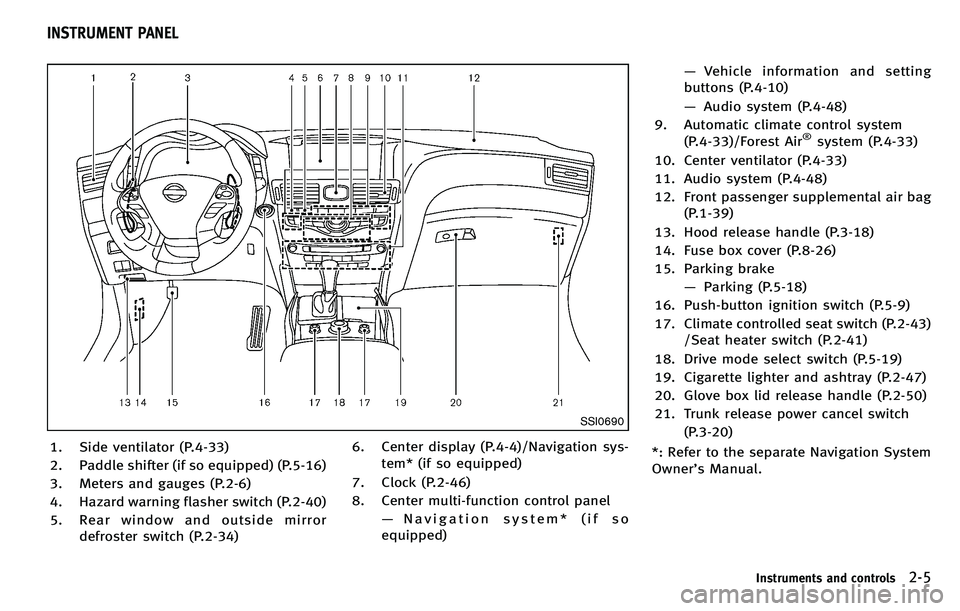
SSI0690
1. Side ventilator (P.4-33)
2. Paddle shifter (if so equipped) (P.5-16)
3. Meters and gauges (P.2-6)
4. Hazard warning flasher switch (P.2-40)
5. Rear window and outside mirrordefroster switch (P.2-34) 6. Center display (P.4-4)/Navigation sys-
tem* (if so equipped)
7. Clock (P.2-46)
8. Center multi-function control panel —Navigation system* (if so
equipped) —
Vehicle information and setting
buttons (P.4-10)
— Audio system (P.4-48)
9. Automatic climate control system (P.4-33)/Forest Air
®system (P.4-33)
10. Center ventilator (P.4-33)
11. Audio system (P.4-48)
12. Front passenger supplemental air bag (P.1-39)
13. Hood release handle (P.3-18)
14. Fuse box cover (P.8-26)
15. Parking brake —Parking (P.5-18)
16. Push-button ignition switch (P.5-9)
17. Climate controlled seat switch (P.2-43) /Seat heater switch (P.2-41)
18. Drive mode select switch (P.5-19)
19. Cigarette lighter and ashtray (P.2-47)
20. Glove box lid release handle (P.2-50)
21. Trunk release power cancel switch (P.3-20)
*: Refer to the separate Navigation System
Owner ’s Manual.
Instruments and controls2-5
INSTRUMENT PANEL
Page 83 of 522
2-10Instruments and controls
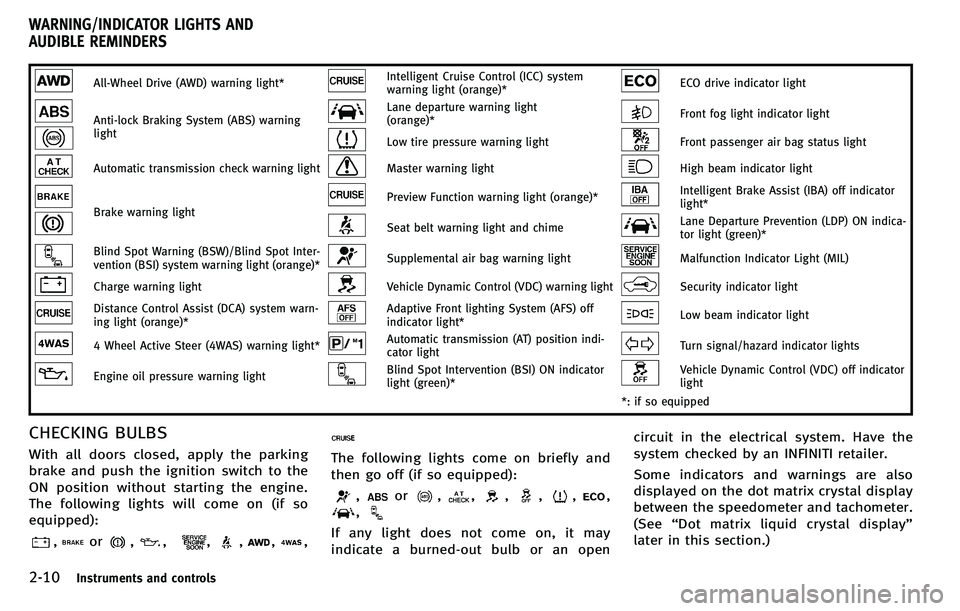
All-Wheel Drive (AWD) warning light*Intelligent Cruise Control (ICC) system
warning light (orange)*ECO drive indicator light
Anti-lock Braking System (ABS) warning
lightLane departure warning light
(orange)*Front fog light indicator light
Low tire pressure warning lightFront passenger air bag status light
Automatic transmission check warning lightMaster warning lightHigh beam indicator light
Brake warning lightPreview Function warning light (orange)*Intelligent Brake Assist (IBA) off indicator
light*
Seat belt warning light and chimeLane Departure Prevention (LDP) ON indica-
tor light (green)*
Blind Spot Warning (BSW)/Blind Spot Inter-
vention (BSI) system warning light (orange)*Supplemental air bag warning lightMalfunction Indicator Light (MIL)
Charge warning lightVehicle Dynamic Control (VDC) warning lightSecurity indicator light
Distance Control Assist (DCA) system warn-
ing light (orange)*Adaptive Front lighting System (AFS) off
indicator light*Low beam indicator light
4 Wheel Active Steer (4WAS) warning light*Automatic transmission (AT) position indi-
cator lightTurn signal/hazard indicator lights
Engine oil pressure warning lightBlind Spot Intervention (BSI) ON indicator
light (green)*Vehicle Dynamic Control (VDC) off indicator
light
*: if so equipped
CHECKING BULBS
With all doors closed, apply the parking
brake and push the ignition switch to the
ON position without starting the engine.
The following lights will come on (if so
equipped):
,or,,,,,,
The following lights come on briefly and
then go off (if so equipped):
,or,,,,,,
,
If any light does not come on, it may
indicate a burned-out bulb or an open circuit in the electrical system. Have the
system checked by an INFINITI retailer.
Some indicators and warnings are also
displayed on the dot matrix crystal display
between the speedometer and tachometer.
(See
“Dot matrix liquid crystal display ”
later in this section.)
WARNING/INDICATOR LIGHTS AND
AUDIBLE REMINDERS
Page 84 of 522
WARNING LIGHTS
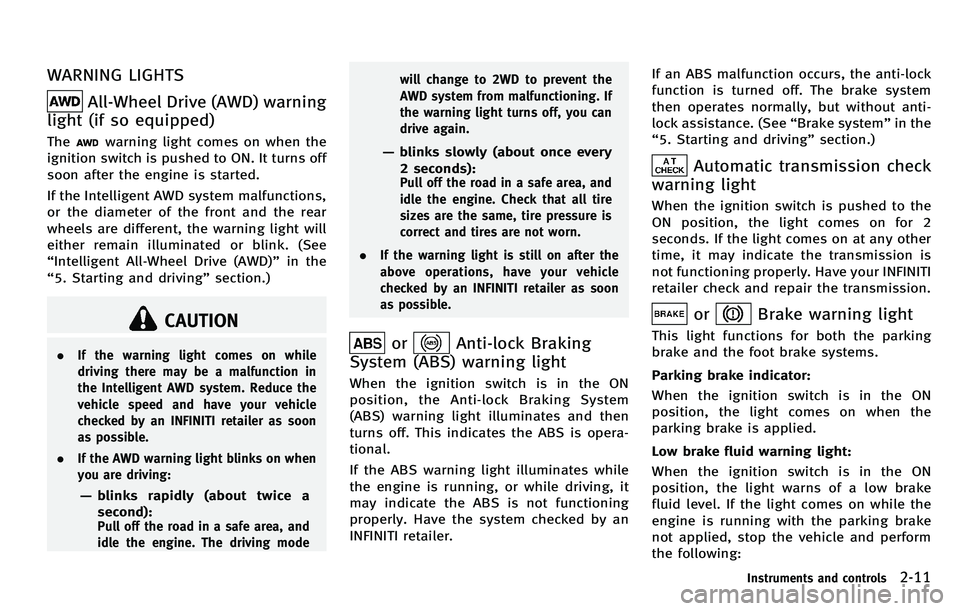
All-Wheel Drive (AWD) warning
light (if so equipped)
Thewarning light comes on when the
ignition switch is pushed to ON. It turns off
soon after the engine is started.
If the Intelligent AWD system malfunctions,
or the diameter of the front and the rear
wheels are different, the warning light will
either remain illuminated or blink. (See
“ Intelligent All-Wheel Drive (AWD) ”in the
“ 5. Starting and driving ”section.)
CAUTION
. If the warning light comes on while
driving there may be a malfunction in
the Intelligent AWD system. Reduce the
vehicle speed and have your vehicle
checked by an INFINITI retailer as soon
as possible.
. If the AWD warning light blinks on when
you are driving:
—blinks rapidly (about twice a
second):
Pull off the road in a safe area, and
idle the engine. The driving mode will change to 2WD to prevent the
AWD system from malfunctioning. If
the warning light turns off, you can
drive again.
—
blinks slowly (about once every
2 seconds):
Pull off the road in a safe area, and
idle the engine. Check that all tire
sizes are the same, tire pressure is
correct and tires are not worn.
. If the warning light is still on after the
above operations, have your vehicle
checked by an INFINITI retailer as soon
as possible.
orAnti-lock Braking
System (ABS) warning light
When the ignition switch is in the ON
position, the Anti-lock Braking System
(ABS) warning light illuminates and then
turns off. This indicates the ABS is opera-
tional.
If the ABS warning light illuminates while
the engine is running, or while driving, it
may indicate the ABS is not functioning
properly. Have the system checked by an
INFINITI retailer. If an ABS malfunction occurs, the anti-lock
function is turned off. The brake system
then operates normally, but without anti-
lock assistance. (See
“Brake system ”in the
“ 5. Starting and driving ”section.)
Automatic transmission check
warning light
When the ignition switch is pushed to the
ON position, the light comes on for 2
seconds. If the light comes on at any other
time, it may indicate the transmission is
not functioning properly. Have your INFINITI
retailer check and repair the transmission.
orBrake warning light
This light functions for both the parking
brake and the foot brake systems.
Parking brake indicator:
When the ignition switch is in the ON
position, the light comes on when the
parking brake is applied.
Low brake fluid warning light:
When the ignition switch is in the ON
position, the light warns of a low brake
fluid level. If the light comes on while the
engine is running with the parking brake
not applied, stop the vehicle and perform
the following:
Instruments and controls2-11
Page 85 of 522
2-12Instruments and controls
1. Check the brake fluid level. If brakefluid is necessary, add fluid and have
the system checked by your INFINITI
retailer. (See “Brake fluid ”in the “8.
Maintenance and do-it-yourself ”sec-
tion.)
2. If the brake fluid level is correct, have the warning system checked by an
INFINITI retailer.
Anti-lock Braking System (ABS) warning
indicator:
When the parking brake is released and
the brake fluid level is sufficient, if both
the brake warning light and the Anti-lock
Braking System (ABS) warning light illumi-
nate, it may indicate the ABS is not
functioning properly. Have the brake sys-
tem checked, and if necessary repaired, by
an INFINITI retailer promptly. (See “Anti-
lock Braking System (ABS) warning light ”
earlier in this section.)
WARNING
. Your brake system may not be working
properly if the warning light is on.
Driving could be dangerous. If you judge
it to be safe, drive carefully to the nearest service station for repairs.
Otherwise, have your vehicle towed
because driving it could be dangerous.
. Pressing the brake pedal with the
engine stopped and/or low brake fluid
level may increase your stopping dis-
tance and braking will require greater
pedal effort as well as pedal travel.
. If the brake fluid level is below the
minimum or MIN mark on the brake fluid
reservoir, do not drive until the brake
system has been checked at an INFINITI
retailer.
Blind Spot Warning (BSW)/
Blind Spot Intervention (BSI) sys-
tem warning light (orange; if so
equipped)
When the ignition switch is pushed to the
ON position, the indicator light will first
illuminate in orange and turn green before
turning off. This indicates that the Blind
Spot Warning (BSW) and Blind Spot Inter-
vention (BSI) systems are operational.
If the light comes on in orange and remains
on, it may indicate that the BSW and BSI
systems are not functioning properly.
Although the vehicle is still driveable, have the systems checked by an INFINITI retailer.
See
“Blind Spot Warning (BSW) system/
Blind Spot Intervention
TM(BSI) system” in
the “5. Starting and driving ”section.
Charge warning light
If the light comes on while the engine is
running, it may indicate the charging
system is not functioning properly. Turn
the engine off and check the alternator
belt. If the belt is loose, broken, missing or
if the light remains on, see an INFINITI
retailer immediately.
CAUTION
Do not continue driving if the alternator belt
is loose, broken or missing.
Distance Control Assist (DCA)
system warning light (orange; if so
equipped)
This light comes on if there is a malfunc-
tion in the Distance Control Assist (DCA)
system.
If the warning light illuminates, park the
vehicle in a safe place. Turn the engine off,
restart the engine, resume driving and turn
Page 88 of 522
and Loading Information label to turn
the low tire pressure warning light OFF. If
the light still illuminates while driving
after adjusting the tire pressure, a tire
may be flat. If you have a flat tire,
replace it with a spare tire as soon as
possible.
. When a spare tire is mounted or a wheel
is replaced, the TPMS will not function
and the low tire pressure warning light
will flash for approximately 1 minute.
The light will remain on after the 1
minute. Contact your INFINITI retailer as
soon as possible for tire replacement
and/or system resetting.
. Replacing tires with those not originally
specified by INFINITI could affect the
proper operation of the TPMS.
CAUTION
.The TPMS is not a substitute for the
regular tire pressure check. Be sure to
check the tire pressure regularly.
. If the vehicle is being driven at speeds of
less than 16 MPH (25 km/h), the TPMS
may not operate correctly. .
Be sure to install the specified size of
tires to the four wheels correctly.
Master warning light
When the ignition switch is in the ON
position, the master warning light illumi-
nates if any of the following are displayed
on the dot matrix liquid crystal display:
.No key warning
. Low fuel warning
. Low washer fluid warning
. Parking brake release warning
. Door/trunk open warning
. Loose fuel cap warning
. Check tire pressure warning
. Intelligent Key system warning
See “Dot matrix liquid crystal display ”later
in this section.
Preview Function warning light
(orange; if so equipped)
The light comes on if there is a malfunction
in the Brake Assist (with Preview Function)
system.
If the warning light comes on, park the
vehicle in a safe place. Turn the engine off,
restart the engine, then resume driving. If the indicator stays on, it may indicate
that the system is malfunctioning.
Although the vehicle is still driveable
under normal conditions, have the vehicle
checked at an INFINITI retailer.
Seat belt warning light and
chime
The light and chime remind you to fasten
seat belts. The light illuminates whenever
the ignition switch is pushed to the ON
position, and will remain illuminated until
the driver ’s seat belt is fastened. At the
same time, the chime will sound for about
6 seconds unless the driver ’s seat belt is
securely fastened.
The seat belt warning light for the front
passenger will illuminate if the seat belt is
not fastened when the front passenger ’s
seat is occupied. For 7 seconds after the
ignition switch is in the ON position, the
system does not activate the warning light
for the front passenger.
See “1. Seat belts ”in the “1. Safety —
Seats, seat belts and supplemental re-
straint system” section for precautions on
seat belt usage.
Instruments and controls2-15
Page 92 of 522
4) If possible, reduce the amount ofcargo being hauled or towed.
The malfunction indicator light may
stop blinking and remain on.
Have the vehicle inspected by an
INFINITI retailer. You do not need to
have your vehicle towed to the retailer.
CAUTION
Continued vehicle operation without having
the emission control system checked and
repaired as necessary could lead to poor
driveability, reduced fuel economy, and
possible damage to the emission control
system.
Security indicator light
The light blinks when the ignition switch is
in the ACC, OFF or LOCK position. This
function indicates the security system
equipped on the vehicle is operational.
If the security system is malfunctioning,
this light will remain on while the ignition
switch is in the ON position. For additional
information, see “Security systems ”later
in this section.
Low beam indicator light
(green)
The low beam indicator light illuminates
when the front park lights, rear combina-
tion lights and license plate lights are on.
The indicator light turns off when the
is turned off.
Turn signal/hazard indicator
lights
The light flashes when the turn signal
switch lever or hazard switch is turned on.
Vehicle Dynamic Control (VDC)
off indicator light
The light comes on when the vehicle
dynamic control off switch is pushed to
OFF. This indicates that the vehicle dynamic
control system and traction control system
are not operating.
AUDIBLE REMINDERS
Key reminder chime
A chime will sound if the driver side door is
opened while the ignition switch is pushed
to the ACC position. Make sure the ignition
switch is pushed to the OFF position, and
take the Intelligent Key with you when
leaving the vehicle.
Light reminder chime
A chime will sound when the driver side
door is opened with the light switch in the
orposition and the ignition switch
in the ACC, OFF or LOCK position.
Turn the light switch off when you leave the
vehicle.
The chime will also sound for 2 seconds
when the ignition switch is turned to the
OFF position with the fog lights on while
the headlight switch is in the AUTO
position.
Parking brake reminder chime
The parking brake reminder chime will
sound if the vehicle is driven at more than
4 MPH (7 km/h) with the parking brake
applied. Stop the vehicle and release the
parking brake.
Instruments and controls2-19
Page 96 of 522
Starting and driving”section.)
8. Parking brake release warning
This warning appears when the vehicle
speed is above 4 MPH (7 km/h) and the
parking brake is applied.
9. Low fuel warning
This warning appears when the fuel level in
the tank is getting low. Refuel as soon as it
is convenient, preferably before the fuel
gauge reaches the empty (0) position.
There is a small reserve of fuel remaining
in the tank when the fuel gauge reaches
the empty (0) position.
10. Low washer fluid warning
This warning appears when the washer
tank fluid is at a low level. Add washer fluid
as necessary. (See “Window washer fluid ”
in the “8. Maintenance and do-it-yourself ”
section.)
11. Door/trunk open warning (igni-
tion switch is in the ON position)
This warning appears if any of the doors
and/or the trunk lid are open or not closed
securely. The vehicle icon indicates which
door or the trunk lid is open on the display.
12. Intelligent Key system warning
This warning appears if there is a malfunc-
tion in the steering lock system (if so
equipped) or Intelligent Key system.
If this warning appears while the engine is
stopped, the steering lock (if so equipped)
cannot be released or the engine cannot be
started. If this warning appears while the
engine is running, the vehicle can be
driven. However, contact an INFINITI retai-
ler for repair as soon as possible.
13. Loose fuel cap warning
This warning appears when the fuel-filler
cap is not tightened correctly after the
vehicle has been refueled. (See “Fuel-filler
cap ”in the “3. Pre-driving checks and
adjustments ”section.)
14. Check tire pressure warning
This warning appears when the low tire
pressure warning light in the meter illumi-
nates and low tire pressure is detected. If
this warning appears, stop the vehicle and
adjust the pressure to the recommended
COLD tire pressure shown on the recom-
mended COLD tire pressure shown on the
Tire and Loading Information label. (See
“Low tire pressure warning light ”earlier in this section and
“Tire Pressure Monitoring
System (TPMS) ”in the “5. Starting and
driving ”section.)
15. “TIMER ”indicator
This indicator appears when the set
“TIMER ”indicator activates. You can set
the time for up to 6 hours. (See “Trip
computer ”later in this section.)
16. Low outside temperature warn-
ing
This warning appears if the outside tem-
perature is below 37 8F(3 8C). The warning
can be set not to be displayed. (See “Trip
computer ”later in this section.)
17. Cruise indicator
Cruise main switch indicator:
The indicator is displayed when the cruise
control main switch is pushed. When the
main switch is pushed again, the indicator
disappears. When the cruise control main
switch indicator is displayed, the cruise
control system is operational.
Cruise set switch indicator:
The indicator is displayed while the vehicle
speed is controlled by the cruise control
system. If the indicator blinks while the
Instruments and controls2-23
Page 110 of 522
.Never leave the light switch on when the
engine is not running for extended
periods of time even if the headlights
turn off automatically.
Daytime running light system (Ca-
nada only)
The daytime running lights automatically
illuminate when the engine is started with
the parking brake released. The daytime
running lights operate with the headlight
switch in the OFF position or in the
position. Turn the headlight switch to the
position for full illumination when
driving at night.
If the parking brake is applied before the
engine is started, the daytime running
lights do not illuminate. The daytime
running lights illuminate once the parking
brake is released. The daytime running
lights will remain on until the ignition
switch is pushed to the OFF position.
Adaptive Front lighting System
(AFS) (if so equipped)
The Adaptive Front lighting System (AFS)
will automatically adjust the headlights
(low beam) toward the turning direction to improve the driver
’s view. When the head-
light switch is ON and the driver operates
the steering wheel in a turn, the AFS
system will be activated.
The AFS will operate:
. when the headlight switch is ON.
. when the selector lever is in any
position other than P (Park) or R
(Reverse).
. when the vehicle is driven at above 16
MPH (25 km/h) for the left-side head-
light. Note that the right-side low beam
headlight will swivel but the left side
will not swivel when the vehicle is
below 3 MPH (5 km/h) and the steering
wheel is turned. The vehicle must attain
a speed above 16 MPH (25 km/h)
before AFS activates the left-side head-
light.
SIC4333
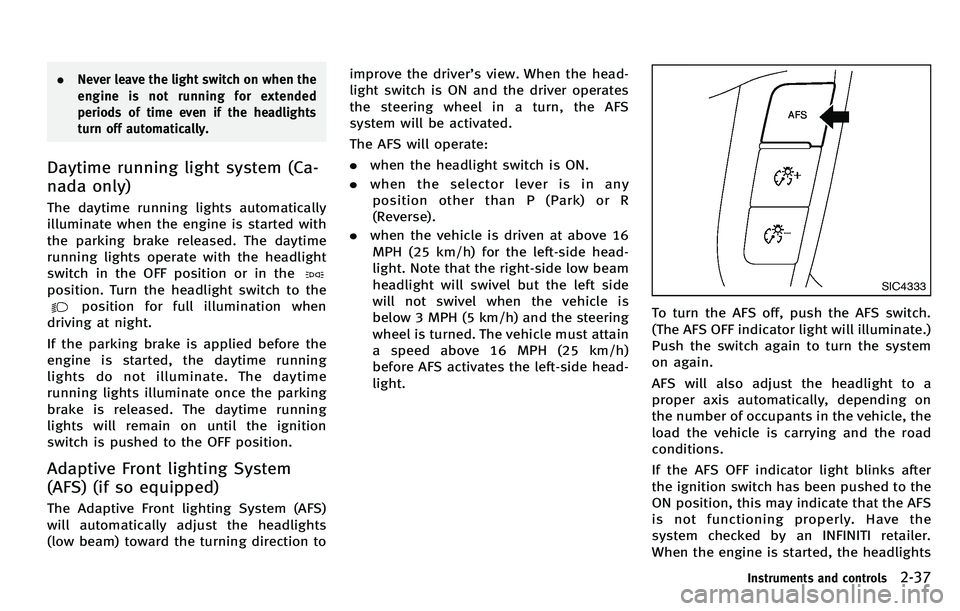
To turn the AFS off, push the AFS switch.
(The AFS OFF indicator light will illuminate.)
Push the switch again to turn the system
on again.
AFS will also adjust the headlight to a
proper axis automatically, depending on
the number of occupants in the vehicle, the
load the vehicle is carrying and the road
conditions.
If the AFS OFF indicator light blinks after
the ignition switch has been pushed to the
ON position, this may indicate that the AFS
is not functioning properly. Have the
system checked by an INFINITI retailer.
When the engine is started, the headlights
Instruments and controls2-37
Page 174 of 522
WARNING
.Do not disassemble or modify this
system. If you do, it may result in
accidents, fire, or electric shock.
. Do not use this system if you notice any
abnormality, such as a frozen screen or
lack of sound. Continued use of the
system may result in accident, fire or
electric shock.
. In case you notice any foreign object in
the system hardware, spill liquid on it,
or notice smoke or smell coming from it,
stop using the system immediately and
contact your nearest INFINITI retailer.
Ignoring such conditions may lead to
accidents, fire, or electric shock.
. Park the vehicle in a safe location and
apply the parking brake to view the
images on the front center display
screen.
Do not attempt to operate the system in
extreme temperature conditions [below
−48F( −20 8C) and above 158 8F (70 8C)].
Operating this system under these condi-
tions may result in system malfunctions.
Monitor, climate, audio, phone and voice recognition systems4-3
SAFETY NOTE