power steering INFINITI M 2012 Owners Manual
[x] Cancel search | Manufacturer: INFINITI, Model Year: 2012, Model line: M, Model: INFINITI M 2012Pages: 522, PDF Size: 3.8 MB
Page 17 of 522
0-10Illustrated table of contents
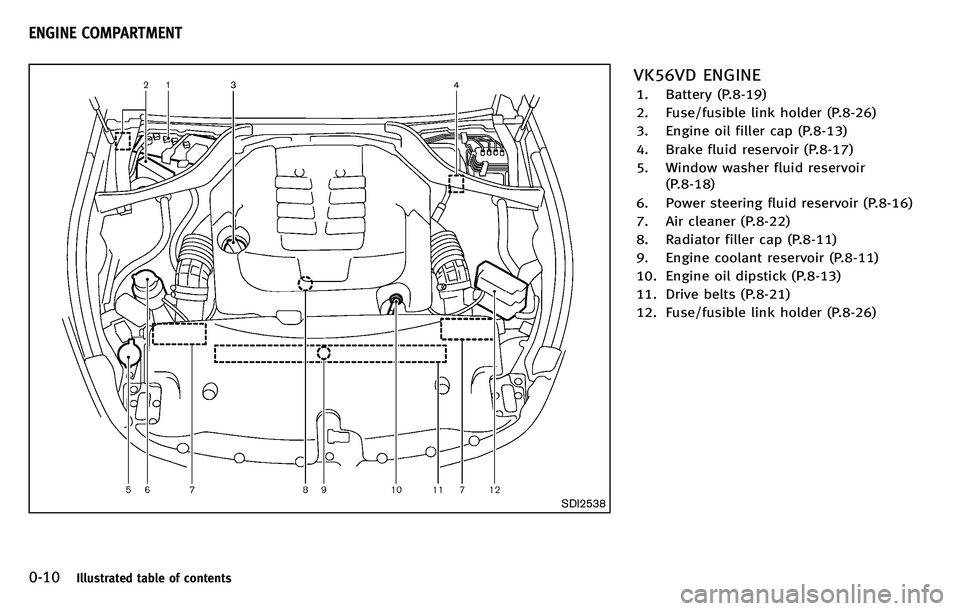
SDI2538
VK56VD ENGINE
1. Battery (P.8-19)
2. Fuse/fusible link holder (P.8-26)
3. Engine oil filler cap (P.8-13)
4. Brake fluid reservoir (P.8-17)
5. Window washer fluid reservoir(P.8-18)
6. Power steering fluid reservoir (P.8-16)
7. Air cleaner (P.8-22)
8. Radiator filler cap (P.8-11)
9. Engine coolant reservoir (P.8-11)
10. Engine oil dipstick (P.8-13)
11. Drive belts (P.8-21)
12. Fuse/fusible link holder (P.8-26)
ENGINE COMPARTMENT
Page 18 of 522
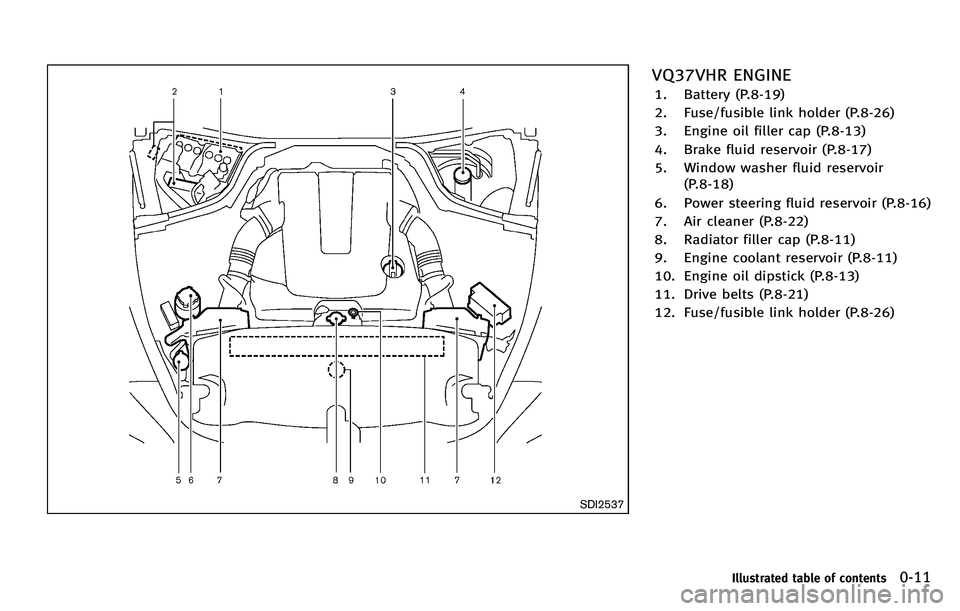
SDI2537
VQ37VHR ENGINE
1. Battery (P.8-19)
2. Fuse/fusible link holder (P.8-26)
3. Engine oil filler cap (P.8-13)
4. Brake fluid reservoir (P.8-17)
5. Window washer fluid reservoir(P.8-18)
6. Power steering fluid reservoir (P.8-16)
7. Air cleaner (P.8-22)
8. Radiator filler cap (P.8-11)
9. Engine coolant reservoir (P.8-11)
10. Engine oil dipstick (P.8-13)
11. Drive belts (P.8-21)
12. Fuse/fusible link holder (P.8-26)
Illustrated table of contents0-11
Page 74 of 522
2 Instruments and controls
Cockpit ................................................................ 2-3
Instrument panel ................................................. 2-5
Meters and gauges .............................................. 2-6Speedometer and odometer ............................ 2-6
Tachometer...................................................... 2-7
Engine coolant temperature gauge .................. 2-8
Fuel gauge ...................................................... 2-9
Warning/indicator lights and
audible reminders ............................................. 2-10 Checking bulbs.............................................. 2-10
Warning lights ............................................... 2-11
Indicator lights .............................................. 2-16
Audible reminders ......................................... 2-19
Dot matrix liquid crystal display ........................ 2-20 Indicators for operation ................................. 2-22
Indicators for maintenance ............................ 2-25
Trip computer ................................................ 2-26
Security systems ............................................... 2-29 Vehicle Security System ................................ 2-29
INFINITI Vehicle Immobilizer System .............. 2-30
Windshield wiper and washer switch ................. 2-31 Rain-sensing auto wiper system .................... 2-33
Rear window and outside mirror
defroster switch................................................. 2-34 Headlight and turn signal switch....................... 2-34
Xenon headlights......................................... 2-34
Headlight switch .......................................... 2-35
Turn signal switch........................................ 2-39
Fog light switch ........................................... 2-39
Hazard warning flasher switch .......................... 2-40
Heated steering wheel (if so equipped) ............. 2-40
Horn ................................................................. 2-41
Heated seats..................................................... 2-41
Climate controlled seats (if so equipped) .......... 2-43
Warning systems switch (if so equipped) .......... 2-44
Intelligent Brake Assist (IBA) OFF switch (if
so equipped)..................................................... 2-44
Vehicle Dynamic Control (VDC) OFF switch ......... 2-45
Clock................................................................. 2-46 Adjusting the time ....................................... 2-46
Power outlet ..................................................... 2-46
Cigarette lighter and ashtrays ........................... 2-47 Front............................................................ 2-47
Rear............................................................. 2-48
Storage ............................................................. 2-48 Cup holders ................................................. 2-48
Sunglasses holder ....................................... 2-49
Glove box .................................................... 2-50>
Page 95 of 522

2-22Instruments and controls
INDICATORS FOR OPERATION
1. Engine start operation indicator
This indicator appears when the selector
lever is in the P (Park) position.
This indicator means that the engine will
start by pushing the ignition switch with
the brake pedal depressed. You can start
the engine directly in any position.
2. Steering lock release malfunc-
tion indicator (if so equipped)
This indicator appears when the steering
wheel cannot be released from the LOCK
position.
If this indicator appears, push the push-
button ignition switch while lightly turning
the steering wheel right and left.
3. NO KEY warning
This warning appears in either of the
following conditions.
No key inside the vehicle:
The warning appears when the door is
closed with the Intelligent Key left outside
the vehicle and the ignition switch in the
ACC or ON position. Make sure that the
Intelligent Key is inside the vehicle.Unregistered Intelligent Key:
The warning appears when the ignition
switch is pushed from the LOCK position
and the Intelligent Key cannot be recog-
nized by the system. You cannot start the
engine with an unregistered key. Use the
registered Intelligent Key.
See
“Intelligent Key system” in the“3. Pre-
driving checks and adjustments” section
for more details.
4. SHIFT “P ” warning
This warning appears when the ignition
switch is pushed to stop the engine with
the selector lever in any position except
the P (Park) position.
If this warning appears, move the selector
lever to the P (Park) position or push the
ignition switch to the ON position.
An inside warning chime will also sound.
(See “Intelligent Key system” in the“3.
Pre-driving checks and adjustments ”sec-
tion.)
5. “PUSH ”warning
This warning appears when the selector
lever is moved to the P (Park) position with
the ignition switch in the ACC position after
the SHIFT “P ” warning appears. To push the ignition switch to the OFF
position, perform the following procedure:
.
SHIFT “P”warning ?(Move the selec-
tor lever to “P ”) ? PUSH warning ?
(Push the ignition switch ?ignition
switch position is turned to ON) ?
PUSH warning ?(Push the ignition
switch ?ignition switch position is
turned to OFF)
6. Intelligent Key battery discharge
indicator
This indicator appears when the Intelligent
Key battery is running out of power.
If this indicator appears, replace the
battery with a new one. (See “Intelligent
Key battery replacement ”in the “8. Main-
tenance and do-it-yourself ”section.)
7. Engine start operation for Intel-
ligent Key system indicator
This indicator appears when the Intelligent
Key battery is running out of power and
when the Intelligent Key System and
vehicle are not communicating normally.
If this indicator appears, touch the ignition
switch with the Intelligent Key while
depressing the brake pedal. (See “Intelli-
gent Key battery discharge ”in the “5.
Page 140 of 522
3 Pre-driving checks and adjustments
Keys .................................................................... 3-2Intelligent Key ................................................. 3-2
Valet hand-off.................................................. 3-3
Doors .................................................................. 3-4 Locking with mechanical key ........................... 3-4
Opening and closing windows with the
mechanical key................................................ 3-5
Locking with inside lock knob ......................... 3-5
Locking with power door lock switch ............... 3-5
Automatic door locks....................................... 3-6
Child safety rear door lock .............................. 3-6
Intelligent Key system ......................................... 3-7 Intelligent Key operating range........................ 3-8
Door locks/unlocks precaution ....................... 3-9
Intelligent Key operation ............................... 3-10
Battery saver system ..................................... 3-11
Warning signals............................................. 3-12
Troubleshooting guide ................................... 3-13
Remote keyless entry system............................. 3-14 How to use remote keyless entry system....... 3-14
Hood ................................................................. 3-18 Trunk lid ........................................................... 3-18
Trunk lid release switch ............................... 3-19
Trunk open request switch ........................... 3-19
Opening with key......................................... 3-19
Trunk open button ....................................... 3-19
Trunk release power cancel switch ............... 3-20
Interior trunk lid release .............................. 3-20
Fuel-filler door................................................... 3-21 Opening the fuel-filler door.......................... 3-21
Fuel-filler cap............................................... 3-21
Tilt/telescopic steering ...................................... 3-23 Electric operation ......................................... 3-24
Sun visors......................................................... 3-24
Mirrors .............................................................. 3-25 Inside mirror................................................ 3-25
Outside mirrors............................................ 3-26
Vanity mirror................................................ 3-27
Automatic drive positioner ................................ 3-28 Entry/exit function ....................................... 3-28
Seat synchronization function ..................... 3-29
Memory storage........................................... 3-29
Setting memory function.............................. 3-30
System operation......................................... 3-31
Page 146 of 522
WARNING
.Radio waves could adversely affect
electric medical equipment. Those who
use a pacemaker should contact the
electric medical equipment manufacturer
for the possible influences before use.
. The Intelligent Key transmits radio
waves when the buttons are pushed.
The FAA advises that the radio waves
may affect aircraft navigation and com-
munication systems. Do not operate the
Intelligent Key while on an airplane.
Make sure the buttons are not operated
unintentionally when the unit is stored
during a flight.
The Intelligent Key system can operate all
the doors and the trunk lid using the
remote controller function or pushing the
request switch on the vehicle without
taking the key out from a pocket or purse.
The operating environment and/or condi-
tions may affect the Intelligent Key system
operation.
Be sure to read the following before using
the Intelligent Key system.
CAUTION
.Be sure to carry the Intelligent Key with
you when operating the vehicle.
. Never leave the Intelligent Key in the
vehicle when you leave the vehicle.
The Intelligent Key is always communicat-
ing with the vehicle as it receives radio
waves. The Intelligent Key system trans-
mits weak radio waves. Environmental
conditions may interfere with the operation
of the Intelligent Key system under the
following operating conditions.
.When operating near a location where
strong radio waves are transmitted,
such as a TV tower, power station and
broadcasting station.
. When in possession of wireless equip-
ment, such as a cellular telephone,
transceiver, and CB radio.
. When the Intelligent Key is in contact
with or covered by metallic materials.
. When any type of radio wave remote
control is used nearby.
. When the Intelligent Key is placed near
an electric appliance such as a perso- nal computer.
. When the vehicle is parked near a
parking meter.
In such cases, correct the operating condi-
tions before using the Intelligent Key
function or use the mechanical key.
Although the life of the battery varies
depending on the operating conditions,
the battery ’s life is approximately 2 years.
If the battery is discharged, replace it with
a new one.
Since the Intelligent Key is continuously
receiving radio waves, if the key is left near
equipment which transmits strong radio
waves, such as signals from a TV and
personal computer, the battery life may
become shorter.
For information regarding replacement of a
battery, see “Intelligent Key battery repla-
cement” in the“8. Maintenance and do-it-
yourself ”section.
For models with a steering wheel lock
mechanism: Because the steering wheel is
locked electrically, unlocking the steering
wheel with the ignition switch in the LOCK
position is impossible when the vehicle
battery is completely discharged. Pay
special attention that the vehicle battery
Pre-driving checks and adjustments3-7
INTELLIGENT KEY SYSTEM
Page 168 of 522
SPA2792
SEAT SYNCHRONIZATION FUNCTION
The seat synchronization function automa-
tically adjusts the positions of the steering
wheel and outside mirrors when the seat is
adjusted using the power seat switches.
However, the steering wheel and outside
mirrors will not move if the seat is adjusted
over the maximum thresholds. The system
considers that the steering wheel and
outside mirror adjustments are not neces-
sary because the seat may not be adjusted
for the driving position. Note that the
function is set to disabled as the factory
default setting.The seat synchronization function operates
under the following conditions:
.
The ignition switch is in the ON posi-
tion.
. The selector lever is in the P (Park)
position.
If the outside mirrors or the steering wheel
reaches its maximum adjustment, the
function is automatically disabled. Restart
the function by selecting a previously
stored seat memory position using the
memory switches (1 or 2). An Intelligent
Key that was previously linked to the
stored seat memory can also be used to
restart the function.
If a seat position was not previously stored
in the seat memory, restart the function by
adjusting the steering wheel and outside
mirrors manually for your best driving
position and then drive the vehicle above
4 MPH (7 km/h).
Cancel or activate seat synchroni-
zation function
The selector lever must be in the P (Park)
position with the ignition switch in the ACC
position.
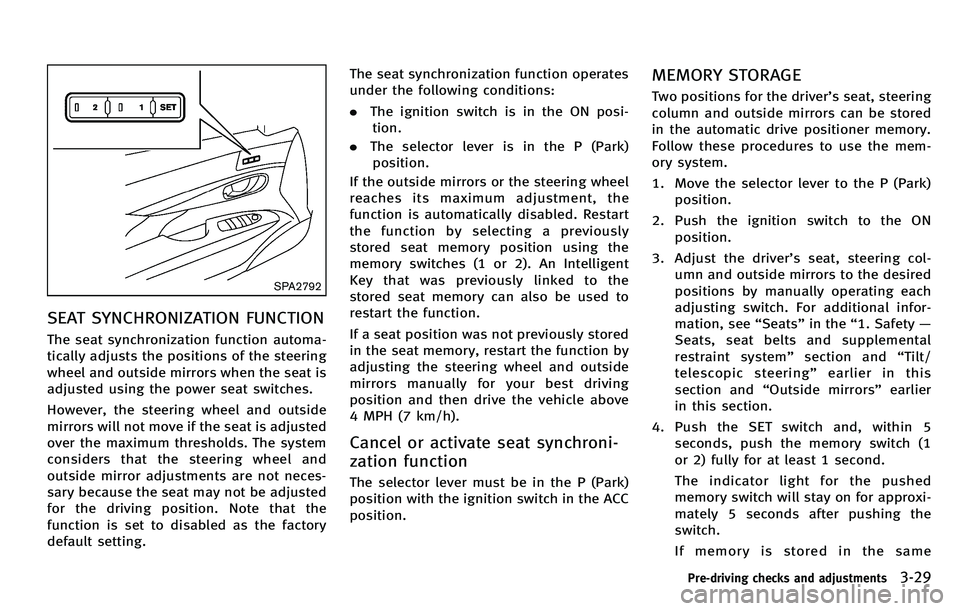
MEMORY STORAGE
Two positions for the driver ’s seat, steering
column and outside mirrors can be stored
in the automatic drive positioner memory.
Follow these procedures to use the mem-
ory system.
1. Move the selector lever to the P (Park) position.
2. Push the ignition switch to the ON position.
3. Adjust the driver ’s seat, steering col-
umn and outside mirrors to the desired
positions by manually operating each
adjusting switch. For additional infor-
mation, see “Seats ”in the “1. Safety —
Seats, seat belts and supplemental
restraint system ”section and “Tilt/
telescopic steering ”earlier in this
section and “Outside mirrors” earlier
in this section.
4. Push the SET switch and, within 5 seconds, push the memory switch (1
or 2) fully for at least 1 second.
The indicator light for the pushed
memory switch will stay on for approxi-
mately 5 seconds after pushing the
switch.
If memory is stored in the same
Pre-driving checks and adjustments3-29
Page 315 of 522

Vehicle-to-vehicle distance control
mode operation ............................................. 5-50
Conventional (fixed speed) cruise
control mode ................................................. 5-65
Preview function (for Intelligent Cruise Control
system equipped models) ............................. 5-69
Distance Control Assist (DCA) system (if
so equipped) ..................................................... 5-69
Precautions on Distance Control
Assist system ................................................ 5-70
Distance Control Assist operation .................. 5-71
Forward Collision Warning (FCW) system (if
so equipped) ..................................................... 5-82 Precautions on FCW system ........................... 5-83
Intelligent Brake Assist (IBA) system (if
so equipped) ..................................................... 5-86 Precautions on IBA system ............................ 5-87
Break-in schedule .............................................. 5-90
Increasing fuel economy .................................... 5-90
Intelligent All-Wheel Drive (AWD) (if
so equipped) ..................................................... 5-90
Parking/parking on hills .................................... 5-92
Power steering................................................... 5-93
Brake system..................................................... 5-93
Braking precautions ...................................... 5-93
Parking brake break-in .................................. 5-93 Brake assist ...................................................... 5-94
Brake assist................................................. 5-94
Preview function (Intelligent Cruise Control
system equipped models) ............................ 5-94
Anti-lock Braking System (ABS).................... 5-96
Vehicle Dynamic Control (VDC) system .............. 5-98 Active trace control (if so equipped)............. 5-98
Rise-up and build-up ................................... 5-99
Brake force distribution ............................... 5-99
Hill Start Assist system ................................... 5-100
4 Wheel Active Steer (4WAS) system (if
so equipped)................................................... 5-100
Cold weather driving ....................................... 5-101 Freeing a frozen door lock ......................... 5-101
Antifreeze .................................................. 5-101
Battery....................................................... 5-101
Draining of coolant water........................... 5-101
Tire equipment .......................................... 5-101
Special winter equipment .......................... 5-102
Driving on snow or ice ............................... 5-102
Engine block heater (if so equipped).......... 5-102
Active noise control......................................... 5-103
Page 406 of 522
WARNING
If the engine is not running or is turned off
while driving, the power assist for the
steering will not work. Steering will be
harder to operate.
The power assisted steering uses a hy-
draulic pump, driven by the engine, to
assist steering.
If the engine stops or the drive belt breaks,
you will still have control of the vehicle.
However, much greater steering effort is
needed, especially in sharp turns and at
low speeds.
BRAKING PRECAUTIONS
The brake system has two separate hy-
draulic circuits. If one circuit malfunctions,
you will still have braking at two wheels.
Vacuum assisted brakes
The brake booster aids braking by using
engine vacuum. If the engine stops, you
can stop the vehicle by depressing the
brake pedal. However, greater foot pres-
sure on the brake pedal will be required to
stop the vehicle and the stopping distance
will be longer.
When the brake pedal is depressed slowly
and firmly, you may hear a clicking noise
and feel a slight pulsation. This is normal
and indicates that the Brake Assist System
is operating.
Wet brakes
When the vehicle is washed or driven
through water, the brakes may get wet.
As a result, your braking distance will be
longer and the vehicle may pull to one side
during braking.
To dry brakes, drive the vehicle at a safe
speed while lightly tapping the brake pedal
to heat-up the brakes. Do this until the
brakes return to normal. Avoid driving thevehicle at high speeds until the brakes
function correctly.
PARKING BRAKE BREAK-IN
Break in the parking brake shoes whenever
the stopping effect of the parking brake is
weakened or whenever the parking brake
shoes and/or drums/rotors are replaced,
in order to assure the best braking
performance.
This procedure is described in the vehicle
service manual and can be performed by
an INFINITI retailer.
Using the brakes
Avoid resting your foot on the brake pedal
while driving. This will cause overheating
of the brakes, wearing out the brake and
pads faster and reduce gas mileage.
To help save the brakes and to prevent the
brakes from overheating, reduce speed
and downshift to a lower gear before going
down a slope or long grade. Overheated
brakes may reduce braking performance
and could result in loss of vehicle control.
Starting and driving5-93
POWER STEERING
BRAKE SYSTEM
Page 411 of 522

5-98Starting and driving
The Vehicle Dynamic Control (VDC) system
uses various sensors to monitor driver
inputs and vehicle motion. Under certain
driving conditions, the VDC system helps
to perform the following functions.
.Controls brake pressure to reduce
wheel slip on one slipping drive wheel
so power is transferred to a non
slipping drive wheel on the same axle.
. Controls brake pressure and engine
output to reduce drive wheel slip based
on vehicle speed (traction control func-
tion).
. Controls brake pressure at individual
wheels and engine output to help the
driver maintain control of the vehicle in
the following conditions:
— understeer (vehicle tends to not
follow the steered path despite
increased steering input)
— oversteer (vehicle tends to spin due
to certain road or driving condi-
tions).
The VDC system can help the driver to
maintain control of the vehicle, but it
cannot prevent loss of vehicle control in
all driving situations.
When the VDC system operates, the VDC
warning light
in the instrument panel flashes so note the following:
.
The road may be slippery or the system
may determine some action is required
to help keep the vehicle on the steered
path.
. You may feel a pulsation in the brake
pedal and hear a noise or vibration
from under the hood. This is normal
and indicates that the VDC system is
working properly.
. Adjust your speed and driving to the
road conditions.
See “Vehicle Dynamic Control (VDC) warn-
ing light” in the“2. Instruments and
controls ”section.
If a malfunction occurs in the system, the
VDC warning light
illuminates in the
instrument panel. The VDC system auto-
matically turns off.
The VDC OFF switch is used to turn off the
VDC system. The VDC off indicator
illuminates to indicate the VDC system is
off. When the VDC switch is used to turn off
the system, the VDC system still operates
to prevent one drive wheel from slipping by
transferring power to a non slipping drive
wheel. The VDC warning light
flashes if
this occurs. All other VDC functions are off,
except for rise-up and build-up and brake force distribution, and the VDC warning
light
will not flash. The VDC system is
automatically reset to on when the ignition
switch is placed in the off position then
back to the on position.
See “Vehicle Dynamic Control (VDC) warn-
ing light” in the“2. Instruments and
controls ”section and “Vehicle Dynamic
Control (VDC) off indicator light” in the“2.
Instruments and controls ”section.
The computer has a built-in diagnostic
feature that tests the system each time you
start the engine and move the vehicle
forward or in reverse at a slow speed.
When the self-test occurs, you may hear a
“ clunk ”noise and/or feel a pulsation in the
brake pedal. This is normal and is not an
indication of a malfunction.
ACTIVE TRACE CONTROL (if so
equipped)
This system senses driving based on the
driver ’s steering and acceleration/braking
patterns, and controls brake pressure at
individual wheels and engine output to
help smooth vehicle response.
When the drive mode selector switch is set
to the “SPORT ”mode, the amount of brake
control provided by active trace control is
VEHICLE DYNAMIC CONTROL (VDC) SYSTEM