light INFINITI M 2013 Owner's Manual
[x] Cancel search | Manufacturer: INFINITI, Model Year: 2013, Model line: M, Model: INFINITI M 2013Pages: 522, PDF Size: 3.72 MB
Page 221 of 522

4-50Monitor, climate, audio, phone and voice recognition systems
from a station transmitter, the signals will
tend to fade and/or drift.
Static and flutter: During signal interfer-
ence from buildings, large hills or due to
antenna position, usually in conjunction
with increased distance from the station
transmitter, static or flutter can be heard.
This can be reduced by lowering the treble
setting to reduce the treble response.
Multipath reception: Because of the reflec-
tive characteristics of FM signals, direct
and reflected signals reach the receiver at
the same time. The signals may cancel
each other, resulting in momentary flutter
or loss of sound.
AM radio reception:
AM signals, because of their low frequency,
can bend around objects and skip along
the ground. In addition, the signals can be
bounced off the ionosphere and bent back
to earth. Because of these characteristics.
AM signals are also subject to interference
as they travel from transmitter to receiver.
Fading: Occurs while the vehicle is passing
through freeway underpasses or in areas
with many tall buildings. It can also occur
for several seconds during ionospheric
turbulence even in areas where no obsta-cles exist.
Static: Caused by thunderstorms, electrical
power lines, electric signs and even traffic
lights.
Satellite radio reception:
When the satellite radio is used for the first
time or the battery has been replaced, the
satellite radio may not work properly. This
is not a malfunction. Wait more than 10
minutes with the satellite radio ON and the
vehicle outside of any metal or large
building for the satellite radio to receive
all of the necessary data.
The satellite radio mode requires an active
SiriusXM Satellite Radio subscription. The
satellite radio is not available in Alaska,
Hawaii and Guam.
The satellite radio performance may be
affected if cargo carried on the roof blocks
the satellite radio signal.
If possible, do not put cargo near the
satellite antenna.
A build up of ice on the satellite radio
antenna can affect satellite radio perfor-
mance. Remove the ice to restore satellite
radio reception.
SAA0480
Compact Disc (CD) player
. Do not force a compact disc into the CD
insert slot. This could damage the CD
and/or CD player.
. Trying to load a CD with the CD door
closed could damage the CD and/or CD
Page 222 of 522

player.
. During cold weather or rainy days, the
player may malfunction due to the
humidity. If this occurs, remove the
CD and dehumidify or ventilate the
player completely.
. The player may skip while driving on
rough roads.
. The CD player sometimes cannot func-
tion when the passenger compartment
temperature is extremely high. De-
crease the temperature before use.
. Only use high quality 4.7 in (12 cm)
round discs that have the “COMPACT
disc DIGITAL AUDIO” logo on the disc or
packaging.
. Do not expose the CD to direct sunlight.
. CDs that are of poor quality, dirty,
scratched, covered with fingerprints,
or that have pin holes may not work
properly.
. The following CDs may not work prop-
erly:
— Copy control compact discs (CCCD)
— Recordable compact discs (CD-R)
— Rewritable compact discs (CD-RW)
. Do not use the following CDs as they
may cause the CD player to malfunc- tion.
—
3.1 in (8 cm) discs
— CDs that are not round
— CDs with a paper label
— CDs that are warped, scratched, or
have abnormal edges
. This audio system can only play pre-
recorded CDs. It has no capabilities to
record or burn CDs.
. If the CD cannot be played, one of the
following messages will be displayed.
CHECK DISC:
. Confirm that the CD is inserted correctly
(the label side is facing up, etc.).
. Confirm that the CD is not bent or
warped and it is free of scratches.
PUSH EJECT:
This is an error due to the temperature
inside the player is too high. Remove the
CD by pushing the EJECT button, and after
a short time reinsert the CD. The CD can be
played when the temperature of the player
returns to normal.
UNPLAYABLE:
The file is unplayable in this audio system
(only MP3 or WMA CD). Gracenote:
NOTE:
. The information contained in the Grace-
note Database is not fully guaranteed.
. The service of the Gracenote Database
on the Internet may be stopped with-
out prior notice for maintenance.
End-User License Agreement
USE OF THIS PRODUCT IMPLIES ACCEP-
TANCE OF THE TERMS BELOW.
Gracenote
®MusicID Terms of Use
This application or device contains soft-
ware from Gracenote, Inc. of Emeryville,
California (“Gracenote”). The software from
Gracenote (the “Gracenote Software”) en-
ables this application to perform disc and/
or file identification and obtain music-
related information, including name, artist,
track, and title information (“ Gracenote
Data”) from online servers or embedded
databases (collectively, “Gracenote Ser-
vers”) and to perform other functions. You
may use Gracenote Data only by means of
the intended End-User functions of this
Monitor, climate, audio, phone and voice recognition systems4-51
Page 224 of 522
Gracenote and CDDB are registered trade-
marks of Gracenote. The Gracenote logo
and logotype, and the“Powered by Grace-
note” logo are trademarks of Gracenote.
LHA0484
DVD (Digital Versatile Disc) player
(models with navigation system)
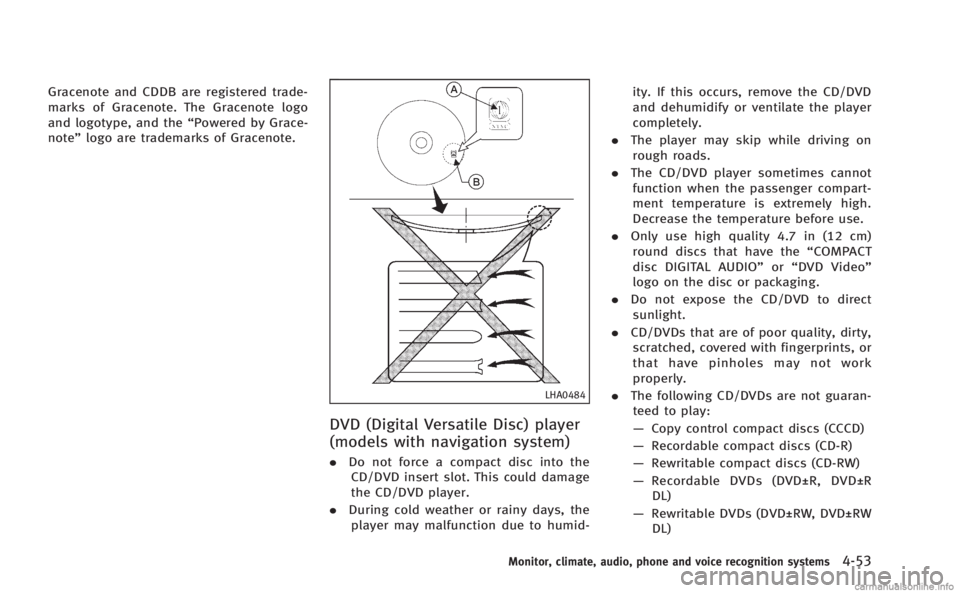
.Do not force a compact disc into the
CD/DVD insert slot. This could damage
the CD/DVD player.
. During cold weather or rainy days, the
player may malfunction due to humid- ity. If this occurs, remove the CD/DVD
and dehumidify or ventilate the player
completely.
. The player may skip while driving on
rough roads.
. The CD/DVD player sometimes cannot
function when the passenger compart-
ment temperature is extremely high.
Decrease the temperature before use.
. Only use high quality 4.7 in (12 cm)
round discs that have the “COMPACT
disc DIGITAL AUDIO” or“DVD Video”
logo on the disc or packaging.
. Do not expose the CD/DVD to direct
sunlight.
. CD/DVDs that are of poor quality, dirty,
scratched, covered with fingerprints, or
that have pinholes may not work
properly.
. The following CD/DVDs are not guaran-
teed to play:
— Copy control compact discs (CCCD)
— Recordable compact discs (CD-R)
— Rewritable compact discs (CD-RW)
— Recordable DVDs (DVD±R, DVD±R
DL)
— Rewritable DVDs (DVD±RW, DVD±RW
DL)
Monitor, climate, audio, phone and voice recognition systems4-53
Page 254 of 522
Next/Previous Track and Fast For-
ward/Rewind:
When the
orbutton is pushed for
more than 1.5 seconds while the iPod®is
playing, the iPod®will play while fast
forwarding or rewinding. When the button
is released, the iPod
®will return to the
normal play speed.
When the
orbutton is pushed for
less than 1.5 seconds while the iPod®is
playing, the next track or the beginning of
the current track on the iPod
®will be
played.
The INFINITI controller can also be used to
select tracks when the iPod
®is playing.
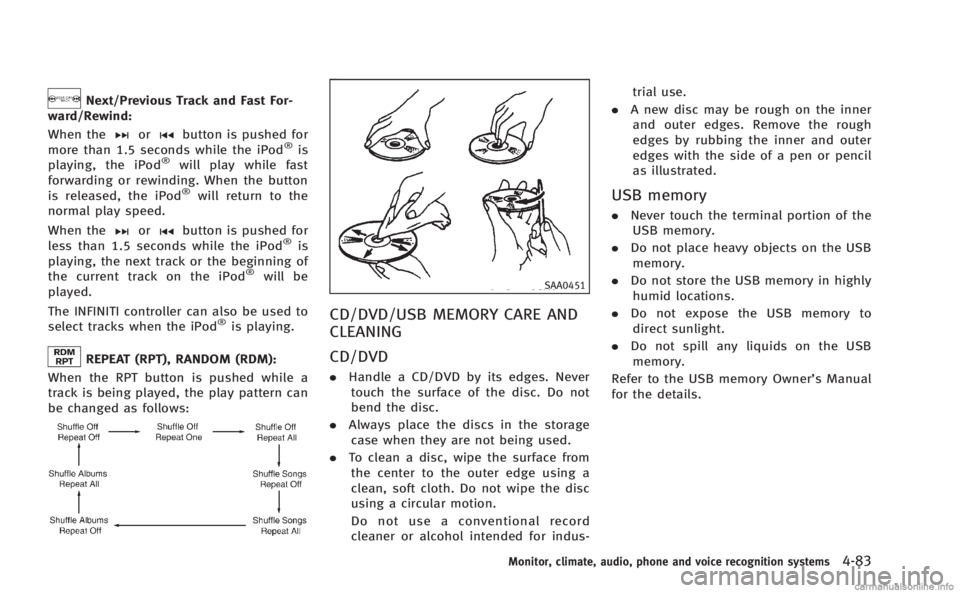
REPEAT (RPT), RANDOM (RDM):
When the RPT button is pushed while a
track is being played, the play pattern can
be changed as follows:
SAA0451
CD/DVD/USB MEMORY CARE AND
CLEANING
CD/DVD
. Handle a CD/DVD by its edges. Never
touch the surface of the disc. Do not
bend the disc.
. Always place the discs in the storage
case when they are not being used.
. To clean a disc, wipe the surface from
the center to the outer edge using a
clean, soft cloth. Do not wipe the disc
using a circular motion.
Do not use a conventional record
cleaner or alcohol intended for indus- trial use.
. A new disc may be rough on the inner
and outer edges. Remove the rough
edges by rubbing the inner and outer
edges with the side of a pen or pencil
as illustrated.
USB memory
. Never touch the terminal portion of the
USB memory.
. Do not place heavy objects on the USB
memory.
. Do not store the USB memory in highly
humid locations.
. Do not expose the USB memory to
direct sunlight.
. Do not spill any liquids on the USB
memory.
Refer to the USB memory Owner’s Manual
for the details.
Monitor, climate, audio, phone and voice recognition systems4-83
Page 256 of 522
folder number (if playing compressed
audio files).
. Pushing the menu control switch will
show the CD Menu.
DVD (models with navigation system):
. Tilting up/down for less than 1.5
seconds will increase or decrease the
track number.
. Tilting up/down for more than 1.5
seconds will increase or decrease the
title number.
. Pushing the menu control switch will
select an item from the DVD display.
. When the transparent operation menu
appears, the switch will control the
menu.
USB:
. Tilting up/down for less than 1.5
seconds will increase or decrease the
track number.
. Tilting up/down for more than 1.5
seconds will increase/decrease the
folder number
. Pushing the menu control switch will
show the USB Menu. Bluetooth®Audio (models with navigation
system):
. Tilting up/down for less than 1.5
seconds will increase or decrease the
track number.
BACK switch (models with
navigation system)
Push this switch to go back to the previous
screen or cancel the selection if it is not
completed.
Volume control switches
Push the upper (+) or lower (−) side switch
to increase or decrease the volume.
Audio source switch
Push the audio source switch to change
the mode as follows.
. Models with navigation system
AM ?FM ?SAT ?CD/DVD ?USB/
iPod
®? Bluetooth®Audio
. Models without navigation system
AM ?FM ?CD ?USB/iPod
®?SAT
ANTENNA
Window antenna
The antenna pattern is printed inside the
rear window.
CAUTION
. Do not place metalized film near the rear
window glass or attach any metal parts
to it. This may cause poor reception or
noise.
. When cleaning the inside of the rear
window, be careful not to scratch or
damage the rear window antenna.
Lightly wipe along the antenna with a
dampened soft cloth.
Monitor, climate, audio, phone and voice recognition systems4-85
Page 296 of 522
SAA2529
Activating Alternate Command
Mode
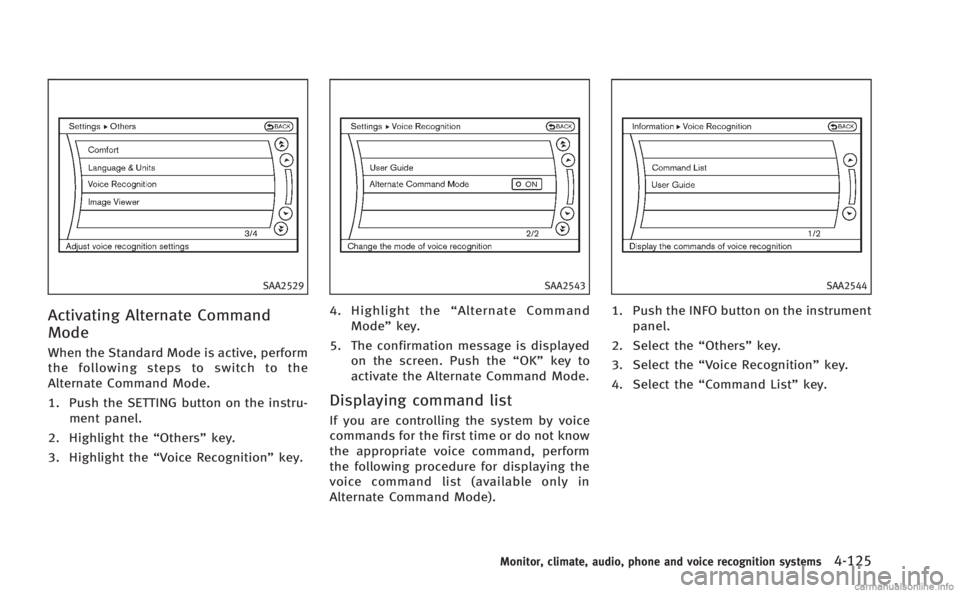
When the Standard Mode is active, perform
the following steps to switch to the
Alternate Command Mode.
1. Push the SETTING button on the instru-ment panel.
2. Highlight the “Others”key.
3. Highlight the “Voice Recognition” key.
SAA2543
4. Highlight the“Alternate Command
Mode” key.
5. The confirmation message is displayed on the screen. Push the “OK”key to
activate the Alternate Command Mode.
Displaying command list
If you are controlling the system by voice
commands for the first time or do not know
the appropriate voice command, perform
the following procedure for displaying the
voice command list (available only in
Alternate Command Mode).
SAA2544
1. Push the INFO button on the instrument
panel.
2. Select the “Others”key.
3. Select the “Voice Recognition” key.
4. Select the “Command List” key.
Monitor, climate, audio, phone and voice recognition systems4-125
Page 304 of 522

SAA2547
Displaying user guide
You can confirm how to use voice com-
mands by accessing a simplified User
Guide, which contains basic instructions
and tutorials for several voice commands.
1. Push the INFO button on the instrumentpanel.
2. Select the “Others” key using the
INFINITI controller and push the ENTER
button.
3. Highlight the “Voice Recognition” key
using the INFINITI controller and push
the ENTER button. 4. Highlight the
“User Guide”key using
the INFINITI controller and push the
ENTER button.
5. Highlight an item using the INFINITI controller and push the ENTER button.
Available items:
. Getting Started
Describe the basics of how to operate
the INFINITI Voice Recognition system.
. Let’s Practice
Mode that allows practicing by follow-
ing the instructions of the system voice.
. Using the Address Book
Refer to Navigation System Owner’s
Manual.
. Finding a Street Address (if so
equipped)
Refer to Navigation System Owner’s
Manual.
. Placing Calls
Tutorial for making a phone call by
voice command operation.
. Help on Speaking
Displays useful tips for how to correctly
speak commands in order for them to
be properly recognized by the system. .
Voice Recognition Settings
Describes the available voice recogni-
tion settings.
. Adapting the System to Your Voice
Tutorial adapting the system to your
voice.
USING THE SYSTEM
Initialization
When the ignition switch is pushed to the
ON position, INFINITI Voice Recognition is
initialized, which may take up to one
minute. When completed, the system is
ready to accept voice commands. If the
TALK
switch is pushed before the
initialization completes the display will
show the message: “System not ready.”
or a beep sounds.
Before starting
To get the best performance from INFINITI
Voice Recognition, observe the following.
. Keep the interior of the vehicle as quiet
as possible. Close the windows to
eliminate the surrounding noises (traf-
fic noises, vibration sounds, etc.),
which may prevent the system from
recognizing the voice commands cor-
rectly.
Monitor, climate, audio, phone and voice recognition systems4-133
Page 316 of 522

minute and then remain continuously
illuminated. This sequence will continue
upon subsequent vehicle start-ups as long
as the malfunction exists. When the mal-
function indicator is illuminated, the sys-
tem may not be able to detect or signal low
tire pressure as intended. TPMS malfunc-
tions may occur for a variety of reasons,
including the installation of replacement or
alternate tires or wheels on the vehicle that
prevent the TPMS from functioning prop-
erly. Always check the TPMS malfunction
telltale after replacing one or more tires or
wheels on your vehicle to ensure that the
replacement or alternate tires and wheels
allow the TPMS to continue to function
properly.
Additional information
.The TPMS does not monitor the tire
pressure of the spare tire.
. The TPMS will activate only when the
vehicle is driven at speeds above 16
MPH (25 km/h). Also, this system may
not detect a sudden drop in tire
pressure (for example a flat tire while
driving).
. The low tire pressure warning light does
not automatically turn off when the tire
pressure is adjusted. After the tire is inflated to the recommended pressure,
the vehicle must be driven at speeds
above 16 MPH (25 km/h) to activate the
TPMS and turn off the low tire pressure
warning light. Use a tire pressure gauge
to check the tire pressure.
. The CHECK TIRE PRESSURE warning
appears in the dot matrix liquid crystal
display when the low tire pressure
warning light is illuminated and low
tire pressure is detected. The CHECK
TIRE PRESSURE warning turns off when
the low tire pressure warning light
turns off.
The CHECK TIRE PRESSURE warning
does not appear if the tire pressure
warning light illuminates to indicate a
TPMS malfunction.
. Tire pressure rises and falls depending
on the heat caused by the vehicle’s
operation and the outside temperature.
Low outside temperature can lower the
temperature of the air inside the tire
which can cause a lower tire inflation
pressure. This may cause the low tire
pressure warning light to illuminate. If
the warning light illuminates in low
ambient temperature, check the tire
pressure for all four tires. .
You can also check the pressure of all
tires (except the spare tire) on the
display screen. The order of the tire
pressure figures displayed on the
screen does not correspond with the
actual order of the tire position. See
“TIRE PRESSURE information” in the“4.
Monitor, climate, audio, phone and
voice recognition systems” section.
For additional information, see “Low tire
pressure warning light” in the“2. Instru-
ments and controls” section and“Tire
Pressure Monitoring System (TPMS)” in
the “6. In case of emergency” section.
WARNING
.If the low tire pressure warning light
illuminates or LOW PRESSURE informa-
tion is displayed on the monitor screen
while driving, avoid sudden steering
maneuvers or abrupt braking, reduce
vehicle speed, pull off the road to a safe
location and stop the vehicle as soon as
possible. Driving with under-inflated
tires may permanently damage the tires
and increase the likelihood of tire fail-
ure. Serious vehicle damage could occur
and may lead to an accident and could
Starting and driving5-5
Page 317 of 522
5-6Starting and driving
result in serious personal injury. Check
the tire pressure for all four tires. Adjust
the tire pressure to the recommended
COLD tire pressure shown on the Tire
and Loading Information label to turn
the low tire pressure warning light OFF. If
the light still illuminates while driving
after adjusting the tire pressure, a tire
may be flat. If you have a flat tire,
replace it with a spare tire as soon as
possible. (See“Flat tire”in the“6. In
case of emergency” section for changing
a flat tire.)
. When a spare tire is mounted or a wheel
is replaced, the TPMS will not function
and the low tire pressure warning light
will flash for approximately 1 minute.
The light will remain on after 1 minute.
Contact your INFINITI retailer as soon as
possible for tire replacement and/or
system resetting.
. Replacing tires with those not originally
specified by INFINITI could affect the
proper operation of the TPMS.
. Do not inject any tire liquid or aerosol
tire sealant into the tires, as this may
cause a malfunction of the tire pressure
sensors.CAUTION
.The TPMS may not function properly
when the wheels are equipped with tire
chains or the wheels are buried in snow.
. Do not place metalized film or any metal
parts (antenna, etc.) on the windows.
This may cause poor reception of the
signals from the tire pressure sensors,
and the TPMS will not function properly.
Some devices and transmitters may tem-
porarily interfere with the operation of the
TPMS and cause the low tire pressure
warning light to illuminate. Some exam-
ples are:
.Facilities or electric devices using simi-
lar radio frequencies are near the
vehicle.
. If a transmitter set to similar frequen-
cies is being used in or near the
vehicle.
. If a computer (or similar equipment) or
a DC/AC converter is being used in or
near the vehicle. FCC Notice:
For USA:
This device complies with Part 15 of the
FCC Rules. Operation is subject to the
following two conditions: (1) This device
may not cause harmful interference, and
(2) this device must accept any interfer-
ence received, including interference that
may cause undesired operation.
NOTE:
Changes or modifications not expressly
approved by the party responsible for
compliance could void the user’s authority
to operate the equipment.
For Canada:
This device complies with RSS-210 of
Industry Canada. Operation is subject to
the following two conditions: (1) this
device may not cause interference, and
(2) this device must accept any interfer-
ence, including interference that may
cause undesired operation of the device.
Page 319 of 522
5-8Starting and driving
Maintenance and do-it-yourself”section of
this manual.
If a tire rapidly loses air pressure or
“blows-out” while driving maintain control
of the vehicle by following the procedure
below. Please note that this procedure is
only a general guide. The vehicle must be
driven as appropriate based on the condi-
tions of the vehicle, road and traffic.
WARNING
The following actions can increase the
chance of losing control of the vehicle if
there is a sudden loss of tire air pressure.
Losing control of the vehicle may cause a
collision and result in personal injury.
. The vehicle generally moves or pulls in
the direction of the flat tire.
. Do not rapidly apply the brakes.
. Do not rapidly release the accelerator
pedal.
. Do not rapidly turn the steering wheel.
1. Remain calm and do not overreact.
2. Maintain a firm grip on the steering
wheel with both hands and try to hold a straight course.
3. When appropriate, slowly release the accelerator pedal to gradually slow the
vehicle.
4. Gradually steer the vehicle to a safe location off the road and away from
traffic if possible.
5. Lightly apply the brake pedal to gradu- ally stop the vehicle.
6. Turn on the hazard warning flashers and either contact a roadside emer-
gency service to change the tire or see
“Changing a flat tire” in the“6. In case
of emergency” section of this Owner’s
Manual.
DRINKING ALCOHOL/DRUGS AND
DRIVING
WARNING
Never drive under the influence of alcohol or
drugs. Alcohol in the bloodstream reduces
coordination, delays reaction time and im-
pairs judgement. Driving after drinking
alcohol increases the likelihood of being
involved in an accident injuring yourself and
others. Additionally, if you are injured in an accident, alcohol can increase the severity
of the injury.
INFINITI is committed to safe driving.
However, you must choose not to drive
under the influence of alcohol. Every year
thousands of people are injured or killed in
alcohol-related accidents. Although the
local laws vary on what is considered to
be legally intoxicated, the fact is that
alcohol affects all people differently and
most people underestimate the effects of
alcohol.
Remember, drinking and driving don’t mix!
And that is true for drugs, too (over-the-
counter, prescription, and illegal drugs).
Don’t drive if your ability to operate your
vehicle is impaired by alcohol, drugs, or
some other physical condition.
INTELLIGENT ALL-WHEEL DRIVE
(AWD) DRIVING SAFETY PRECAU-
TIONS
WARNING
. Do not drive beyond the performance
capability of the tires, even with Intelli-