audio INFINITI M 2013 Owner's Manual
[x] Cancel search | Manufacturer: INFINITI, Model Year: 2013, Model line: M, Model: INFINITI M 2013Pages: 522, PDF Size: 3.72 MB
Page 305 of 522
4-134Monitor, climate, audio, phone and voice recognition systems
.When the air conditioner is in the AUTO
mode, the fan speed decreases auto-
matically for easy recognition.
. Wait until a tone sounds before speak-
ing a command.
. Speak in a natural voice without paus-
ing between words.
SAA3001
Giving voice command
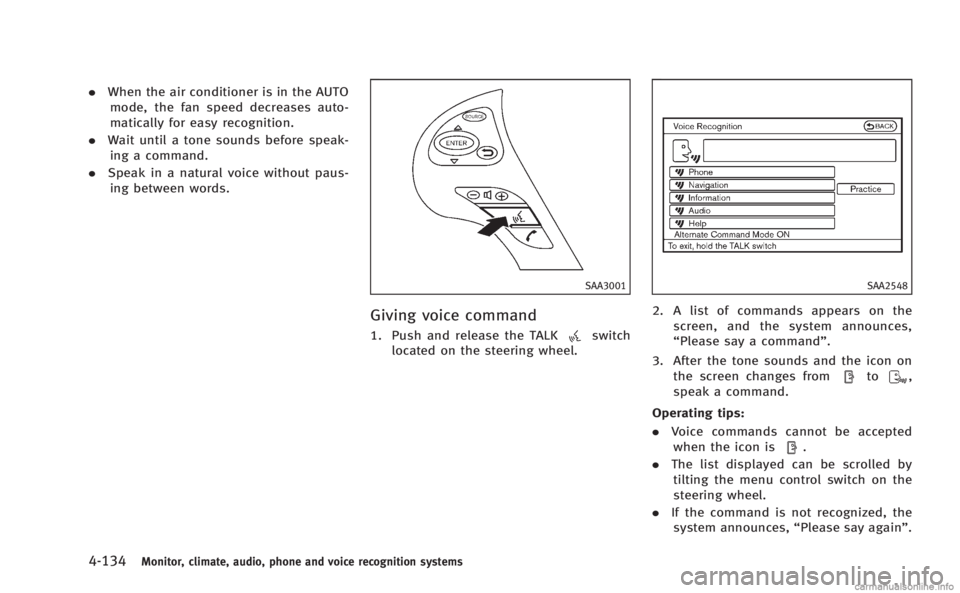
1. Push and release the TALKswitch
located on the steering wheel.
SAA2548
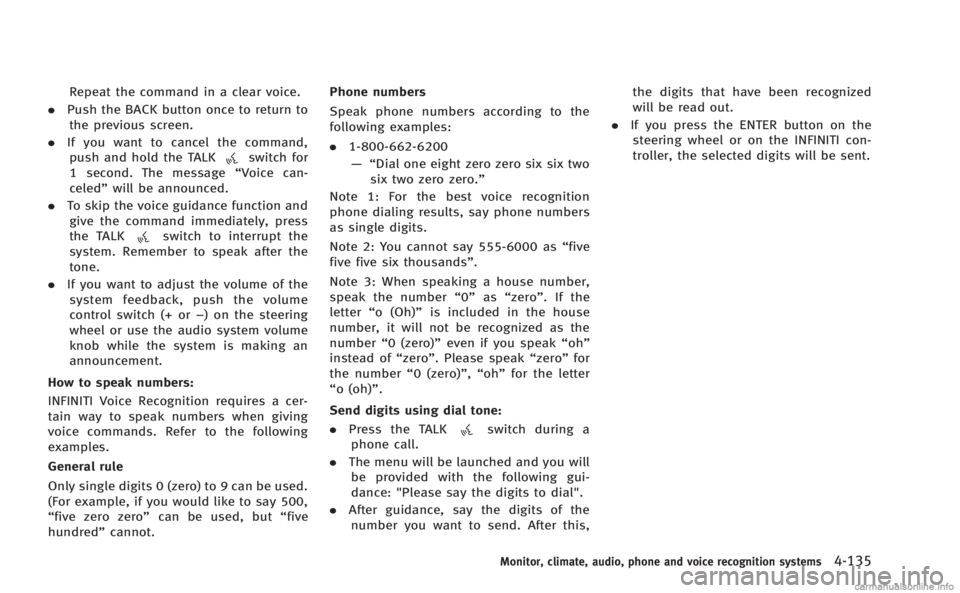
2. A list of commands appears on the
screen, and the system announces,
“Please say a command”.
3. After the tone sounds and the icon on the screen changes from
to,
speak a command.
Operating tips:
. Voice commands cannot be accepted
when the icon is
.
. The list displayed can be scrolled by
tilting the menu control switch on the
steering wheel.
. If the command is not recognized, the
system announces, “Please say again”.
Page 306 of 522
Repeat the command in a clear voice.
. Push the BACK button once to return to
the previous screen.
. If you want to cancel the command,
push and hold the TALK
switch for
1 second. The message “Voice can-
celed” will be announced.
. To skip the voice guidance function and
give the command immediately, press
the TALK
switch to interrupt the
system. Remember to speak after the
tone.
. If you want to adjust the volume of the
system feedback, push the volume
control switch (+ or −) on the steering
wheel or use the audio system volume
knob while the system is making an
announcement.
How to speak numbers:
INFINITI Voice Recognition requires a cer-
tain way to speak numbers when giving
voice commands. Refer to the following
examples.
General rule
Only single digits 0 (zero) to 9 can be used.
(For example, if you would like to say 500,
“five zero zero” can be used, but “five
hundred” cannot. Phone numbers
Speak phone numbers according to the
following examples:
.
1-800-662-6200
—“ Dial one eight zero zero six six two
six two zero zero.”
Note 1: For the best voice recognition
phone dialing results, say phone numbers
as single digits.
Note 2: You cannot say 555-6000 as “five
five five six thousands” .
Note 3: When speaking a house number,
speak the number “0”as“zero”. If the
letter “o (Oh)” is included in the house
number, it will not be recognized as the
number “0 (zero)” even if you speak “oh”
instead of “zero”. Please speak “zero”for
the number “0 (zero)”,“oh”for the letter
“o (oh)”.
Send digits using dial tone: . Press the TALK
switch during a
phone call.
. The menu will be launched and you will
be provided with the following gui-
dance: "Please say the digits to dial".
. After guidance, say the digits of the
number you want to send. After this, the digits that have been recognized
will be read out.
. If you press the ENTER button on the
steering wheel or on the INFINITI con-
troller, the selected digits will be sent.
Monitor, climate, audio, phone and voice recognition systems4-135
Page 307 of 522

4-136Monitor, climate, audio, phone and voice recognition systems
SAA2549
Speaker adaptation function (for
Alternate Command Mode)
The voice recognition system has a func-
tion to learn the user’s voice for better
voice recognition performance. The system
can memorize the voices of up to three
persons.
Having the system learn the user’s voice:
1. Push the SETTING button on the instru- ment panel and select the “Others”
key.
2. Select the “Voice Recognition” key.
3. Select the “Speaker Adaptation” key.
SAA2550
4. Select the user whose voice is memor-
ized by the system.
5. Select the “Start Speaker Adaptation
Learning” key.
SAA2551
6. Select a category to be learned by the
system from the following list.
.Phone Commands.Navigation Commands.Information Commands.Audio Commands.Help Commands
The voice commands in the category
are displayed.
7. Select a voice command and then push the ENTER button.
The voice recognition system starts.
Page 308 of 522
SAA2552
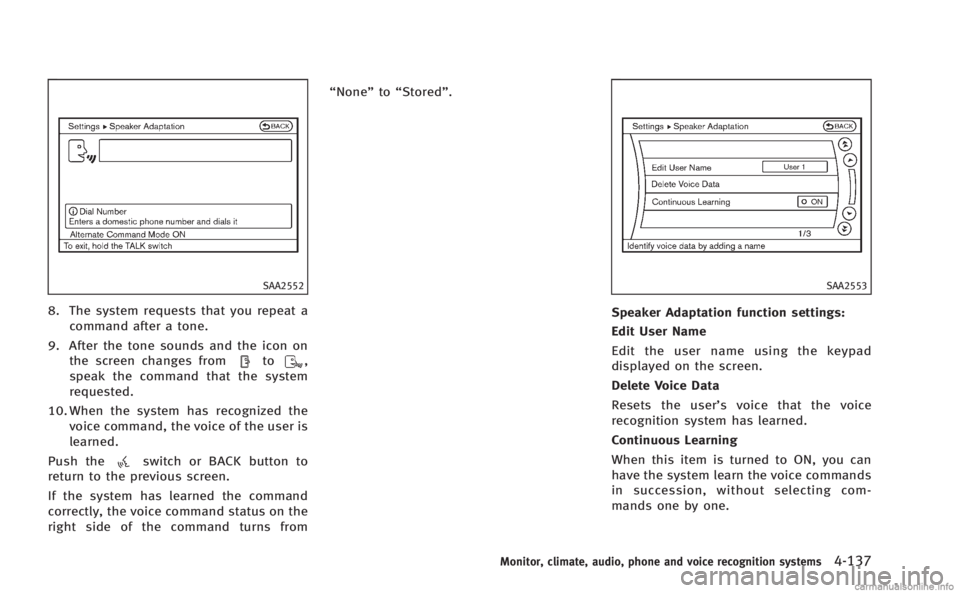
8. The system requests that you repeat acommand after a tone.
9. After the tone sounds and the icon on the screen changes from
to,
speak the command that the system
requested.
10. When the system has recognized the voice command, the voice of the user is
learned.
Push the
switch or BACK button to
return to the previous screen.
If the system has learned the command
correctly, the voice command status on the
right side of the command turns from “None”
to“Stored”.
SAA2553
Speaker Adaptation function settings:
Edit User Name
Edit the user name using the keypad
displayed on the screen.
Delete Voice Data
Resets the user’ s voice that the voice
recognition system has learned.
Continuous Learning
When this item is turned to ON, you can
have the system learn the voice commands
in succession, without selecting com-
mands one by one.
Monitor, climate, audio, phone and voice recognition systems4-137
Page 309 of 522

4-138Monitor, climate, audio, phone and voice recognition systems
Minimize voice feedback (for Alter-
nate Command Mode)
To minimize the voice feedback from the
system, perform the following steps.
1. Push the SETTING button on the instru-ment panel.
2. Select the “Others”key.
3. Select the “Voice Recognition” key.
4. Select the “Minimize Voice Feedback”
key.
5. The setting is turned to ON and the voice guidance will now be reduced
when using the Voice Recognition
system.
Page 310 of 522

TROUBLESHOOTING GUIDE
The system should respond correctly to all voice commands without difficulty. If problems are encountered, follow the solutions given in
this guide for the appropriate error.
Where the solutions are listed by number, try each solution in turn, starting with number one, until the problem is resolved.
Symptom/error messageSolution
The system fails to interpret the command correctly. 1. Ensure that the command format is valid, see“Command List”earlier in this section.
2. Speak clearly without pausing between words and at a level appropriate to the ambient noise level.
3. Ensure that the ambient noise level is not excessive, for example, windows open or defrost on.
NOTE:
If it is too noisy to use the phone, it is likely that voice commands will not be recognized.
4. If optional words of the command have been omitted, then the command should be tried with these in place.
The system consistently selects the wrong voicetag in
the phonebook. 1. Ensure that the voicetag requested matches what was originally stored. (See
“Bluetooth
®Hands-Free Phone
System (models with navigation system)” earlier in this section; page 4-86.)
2. Replace one of the voicetags being confused with a different voicetag.
Monitor, climate, audio, phone and voice recognition systems4-139
Page 311 of 522

4-140Monitor, climate, audio, phone and voice recognition systems
MEMO
Page 316 of 522

minute and then remain continuously
illuminated. This sequence will continue
upon subsequent vehicle start-ups as long
as the malfunction exists. When the mal-
function indicator is illuminated, the sys-
tem may not be able to detect or signal low
tire pressure as intended. TPMS malfunc-
tions may occur for a variety of reasons,
including the installation of replacement or
alternate tires or wheels on the vehicle that
prevent the TPMS from functioning prop-
erly. Always check the TPMS malfunction
telltale after replacing one or more tires or
wheels on your vehicle to ensure that the
replacement or alternate tires and wheels
allow the TPMS to continue to function
properly.
Additional information
.The TPMS does not monitor the tire
pressure of the spare tire.
. The TPMS will activate only when the
vehicle is driven at speeds above 16
MPH (25 km/h). Also, this system may
not detect a sudden drop in tire
pressure (for example a flat tire while
driving).
. The low tire pressure warning light does
not automatically turn off when the tire
pressure is adjusted. After the tire is inflated to the recommended pressure,
the vehicle must be driven at speeds
above 16 MPH (25 km/h) to activate the
TPMS and turn off the low tire pressure
warning light. Use a tire pressure gauge
to check the tire pressure.
. The CHECK TIRE PRESSURE warning
appears in the dot matrix liquid crystal
display when the low tire pressure
warning light is illuminated and low
tire pressure is detected. The CHECK
TIRE PRESSURE warning turns off when
the low tire pressure warning light
turns off.
The CHECK TIRE PRESSURE warning
does not appear if the tire pressure
warning light illuminates to indicate a
TPMS malfunction.
. Tire pressure rises and falls depending
on the heat caused by the vehicle’s
operation and the outside temperature.
Low outside temperature can lower the
temperature of the air inside the tire
which can cause a lower tire inflation
pressure. This may cause the low tire
pressure warning light to illuminate. If
the warning light illuminates in low
ambient temperature, check the tire
pressure for all four tires. .
You can also check the pressure of all
tires (except the spare tire) on the
display screen. The order of the tire
pressure figures displayed on the
screen does not correspond with the
actual order of the tire position. See
“TIRE PRESSURE information” in the“4.
Monitor, climate, audio, phone and
voice recognition systems” section.
For additional information, see “Low tire
pressure warning light” in the“2. Instru-
ments and controls” section and“Tire
Pressure Monitoring System (TPMS)” in
the “6. In case of emergency” section.
WARNING
.If the low tire pressure warning light
illuminates or LOW PRESSURE informa-
tion is displayed on the monitor screen
while driving, avoid sudden steering
maneuvers or abrupt braking, reduce
vehicle speed, pull off the road to a safe
location and stop the vehicle as soon as
possible. Driving with under-inflated
tires may permanently damage the tires
and increase the likelihood of tire fail-
ure. Serious vehicle damage could occur
and may lead to an accident and could
Starting and driving5-5
Page 349 of 522

5-38Starting and driving
How to enable/disable the BSI
system using the settings menu
Perform the following steps to enable or
disable the BSI system.
1. Push the SETTING
*1button and high-
light the “Driver Assistance” key on the
display using the INFINITI controller.
Then push the ENTER
*2button.
2. Highlight the “Dynamic Assistance Set-
tings” key, and push the ENTER
*2
button.
SSD1002
3. Highlight the “Blind Spot Intervention”
key, select ON (enabled) or OFF (dis-
abled) and push the ENTER
*2button.
For the LDP and DCA systems, see “Lane
Departure Prevention (LDP) system” earlier
in this section and “Distance Control Assist
(DCA) system” later in this section.
WARNING
.Do not use the BSI system under the
following conditions because the system
may not function properly.
—During bad weather (for example, rain, fog, snow, wind, etc.)
—When driving on slippery roads,
such as on ice or snow, etc.
—When driving on winding or uneven roads.
—When there is a lane closure due to
road repairs.
—When driving in a makeshift lane.
—When driving on roads where thelane width is too narrow.
—When driving with a tire that is notwithin normal tire conditions (for
example, tire wear, low tire pressure,
installation of spare tire, tire chains,
non-standard wheels).
—When the vehicle is equipped withnon-original brake parts or suspen-
sion parts.
. Excessive noise (for example, audio
system volume, open vehicle window)
will interfere with the chime sound, and
it may not be heard.
.The radar sensors may not be able to
detect and activate BSI/BSW when
certain objects are present such as:
Page 405 of 522

5-94Starting and driving
the tone will sound continuously.
Keep the corner/center sonar (located on
the bumper fascia) free from snow, ice and
large accumulations of dirt (do not clean
the sonar with sharp objects). If the sonar
is covered, it will affect the accuracy of the
sonar system.
The sensitivity level of the corner/center
sonar can be adjusted (higher or lower) in
the SONAR setting display. (See“How to
use SETTING button” in the“Monitor,
climate, audio, phone and voice recogni-
tion systems” for the“Sonar” settings.)
SSD0928
*1Rear view monitor display
*ACorner sonar indicator
*BCenter sonar indicator
SONAR INDICATOR
With the “Sonar Display” key ON in the
“Sonar” settings, when the corner/center
sonar detects obstacles near the bumper, a
tone will sound and the sonar indicator will
appear in the center display. When the rear
view monitor is displayed, the sonar
indicator will appear in the upper corner
of the display
*1.
The sonar indicators
*Aand*Bindicate
the position of the object and the distance to the object with its color and rate of
blinking.
When an object is detected, the indicator
(green) appears and blinks (the tone
sounds intermittently). When the vehicle
moves closer to the object, the color of the
indicator turns yellow and the rate of
blinking increases (the rate of the tone
increases). When the bumper is very close
to the object, less than 11.8 in (30 cm)
away, the indicator stops blinking and
turns red (the tone sounds continuously).
When the rear view monitor is displayed,
the colors of the sonar indicator and the
distance guide lines in the rear view
indicate different distances to the object.
The sonar indicator can be turned off in the
SONAR setting display. (See
“How to use
SETTING button” in the“Monitor, climate,
audio, phone and voice recognition sys-
tems” for the “Sonar” settings.) When the
sonar indicator is off, only a tone sounds
when the sonar detects obstacles.