light INFINITI M 2013 Owner's Manual
[x] Cancel search | Manufacturer: INFINITI, Model Year: 2013, Model line: M, Model: INFINITI M 2013Pages: 522, PDF Size: 3.72 MB
Page 392 of 522

.When driving into a strong light (for
example, sunlight)
Action to take:
When the conditions listed above are no
longer present, turn the system off with the
dynamic driver assistance switch. Turn the
DCA system back on to use the system.
SSD0998
Condition B:
When the sensor window is dirty, making it
impossible to detect a vehicle ahead, the
DCA system is automatically canceled.
The chime sounds and the system warning
light (orange) will come on and the “CLEAN
SENSOR” indicator will appear.
Action to take:
If the warning light comes on, park the
vehicle in a safe place, turn the engine off.
Clean the sensor window with a soft cloth
and then perform the settings again.
SSD0999
Condition C:
When the DCA system is not operating
properly, the chime sounds and the system
warning light (“CRUISE” orange) will come
on.
Action to take:
If the warning light comes on, park the
vehicle in a safe place. Turn the engine off,
restart the engine, and turn on the DCA
system again.
If it is not possible to set the system or the
indicator stays on, it may indicate that the
system is malfunctioning. Although the
vehicle is still driveable under normal
Starting and driving5-81
Page 393 of 522
5-82Starting and driving
conditions, have the vehicle checked at an
INFINITI retailer.
Sensor maintenance
How to handle the sensor:
The sensor for the DCA system is common
with Intelligent Cruise Control and is
located below the front bumper.
To handle the sensor, see“Intelligent
Cruise Control (ICC) system” earlier in this
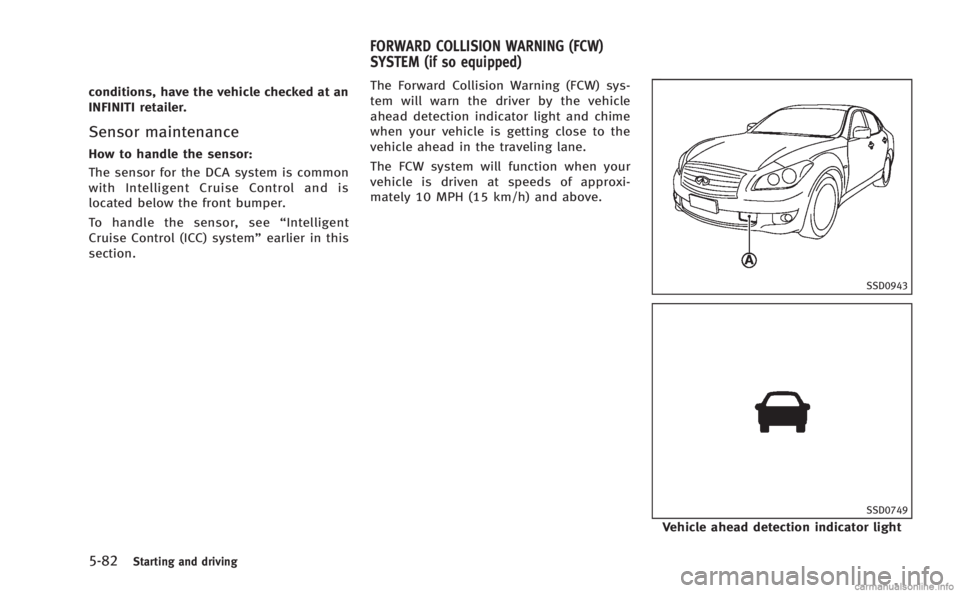
section. The Forward Collision Warning (FCW) sys-
tem will warn the driver by the vehicle
ahead detection indicator light and chime
when your vehicle is getting close to the
vehicle ahead in the traveling lane.
The FCW system will function when your
vehicle is driven at speeds of approxi-
mately 10 MPH (15 km/h) and above.
SSD0943
SSD0749
Vehicle ahead detection indicator light
FORWARD COLLISION WARNING (FCW)
SYSTEM (if so equipped)
Page 394 of 522

The FCW system uses the distance sensor
*Alocated below the front bumper to
measure the distance to the vehicle ahead.
When the system judges that your vehicle
is getting close to the vehicle ahead in the
travel lane, the vehicle ahead detection
indicator light on the instrument panel
blinks and a warning chime sounds.
PRECAUTIONS ON FCW SYSTEM
WARNING
. The FCW system is intended to warn you
before a collision but will not avoid a
collision. It is the driver’s responsibility
to stay alert, drive safely and be in
control of the vehicle at all times.
. As there is a performance limit, the
system may not provide a warning in
certain conditions.
. The system will not detect the following
objects:
—Pedestrians, animals or obstacles in
the roadway
—Oncoming vehicles in the same lane
. The system will not detect another
vehicle under the following conditions:
—When the sensor gets dirty and it is
impossible to detect the distance
from the vehicle ahead.
—When driving into a strong light (forexample, sunlight)
. The sensor generally detects the signals
returned from the reflectors on a vehicle
ahead. Therefore, the system may not
function properly under the following
conditions:
—When the reflectors of the vehicle
ahead are positioned high or close to
each other (including a small vehicle
such as motorcycles).
—When the sensor gets dirty or it isimpossible to detect the distance
from the vehicle ahead.
—When the reflectors on the vehicle
ahead are missing, damaged or
covered.
—When the reflectors of the vehicleahead are covered with dirt, snow or
road spray.
—When visibility is low (such as rain,fog, snow, etc.).
—When snow or road spray fromtraveling vehicles is splashed.
—When dense exhaust or other smoke (black smoke) from vehicles reduces
the visibility of the sensor.
—When excessively heavy baggage is
loaded in the rear seat or the
luggage room of your vehicle.
—When abruptly accelerating or de-celerating.
—On a steep downhill slope or onroads with sharp curves.
—When there is a highly reflectiveobject near the vehicle ahead (for
example, being very close to another
vehicle, signboard, etc.)
. Depending on certain road conditions
(curved or beginning of a curve), vehicle
conditions (steering position or vehicle
position), or the preceding vehicle’ s
conditions (position in lane, etc.), the
system may not function properly. The
system may detect highly reflective
objects such as reflectors, signs, white
markers, and other stationary objects on
the road or near the traveling lane and
provide unnecessary warning.
Starting and driving5-83
Page 395 of 522

5-84Starting and driving
.The system may not function in offset
conditions.
. The system may not function when the
distance to the vehicle ahead is extre-
mely close.
. The system is designed to automatically
check the sensor’s functionality. If the
sensor is covered with ice, a transparent
or translucent plastic bag, etc., the
system may not detect them. In these
instances the system may not be able to
warn the driver properly. Be sure to
check and clean the sensor regularly.
. Excessive noise will interfere with the
warning chime sound, and the chime
may not be heard.
. A sudden appearance of a vehicle in
front (for example, it abruptly cuts in)
may not be detected and the system may
not warn the driver soon enough.
. The system will be cancelled automati-
cally with a beep sound and the IBA OFF
indicator light will illuminate under the
following conditions:
—When the sensor window is dirty
—When the system malfunctions
SSD1000
If the IBA OFF indicator light*Ailluminates
with a beep sound, pull off the road to a
safe location, stop the vehicle and turn the
engine off. Check to see if the sensor
window is dirty. If the sensor window is
dirty, clean it with a soft cloth and restart
the engine. If the sensor window is not
dirty, restart the engine. If the IBA OFF
indicator light continues to illuminate even
if the IBA system is turned on with the IBA
OFF switch
*B, have the system checked
by an INFINITI retailer.
To turn on the IBA system, see “Intelligent
Brake Assist (IBA) system” later in this
section.
SIC4335
Warning systems switch
FCW system operation
The warning systems switch is used to turn
on and off the FCW system when it is
activated using the settings menu on the
center display. See “How to enable/disable
the FCW system using the settings menu”
later in this section.
When the warning systems switch is turned
off, the indicator
*1on the switch is off.
The indicator will also be off if the FCW, the
Lane Departure Warning (LDW) and the
Blind Spot Warning (BSW) systems are
deactivated.
Page 396 of 522

For the LDW and BSW systems, see“Lane
Departure Warning (LDW) system/Lane
Departure Prevention (LDP) system” earlier
in this section and “Blind Spot Warning
(BSW) system/Blind Spot Intervention
TM
(BSI) system” earlier in this section.
SSD0939
With navigation system
SSD1001
How to enable/disable the FCW
system using the settings menu
Perform the following steps to enable or
disable the FCW system.
1. Push the SETTING
*1button and high-
light the “Driver Assistance” key on the
display using the INFINITI controller.
Then push the ENTER
*2button.
2. Highlight the “Driver Assistance Warn-
ings” key, and push the ENTER
*2
button.
Starting and driving5-85
Page 397 of 522

5-86Starting and driving
JVS0080X
3. Highlight the“Forward Collision Warn-
ing” key, select ON (enabled) or OFF
(disabled) and push the ENTER
*2
button.
For the sensor maintenance, see “Intelli-
gent Cruise Control (ICC) system” earlier in
this section. The Intelligent Brake Assist (IBA) system
warns the driver by a warning light and
chime when there is a risk of a collision
with the vehicle ahead in the traveling lane
and the driver must take avoidance action
immediately. The system helps reduce the
rear-end collision speed by applying the
brakes when the system judges that the
collision cannot be prevented.
The IBA system will function when your
vehicle is driven at speeds of approxi-
mately 10 MPH (15 km/h) and above, and
when your vehicle is driven at speeds
approximately 10 MPH (15 km/h) faster
than the vehicle ahead.
SSD0943
SSD0749
Vehicle ahead detection indicator light
INTELLIGENT BRAKE ASSIST (IBA) SYSTEM
(if so equipped)
Page 398 of 522
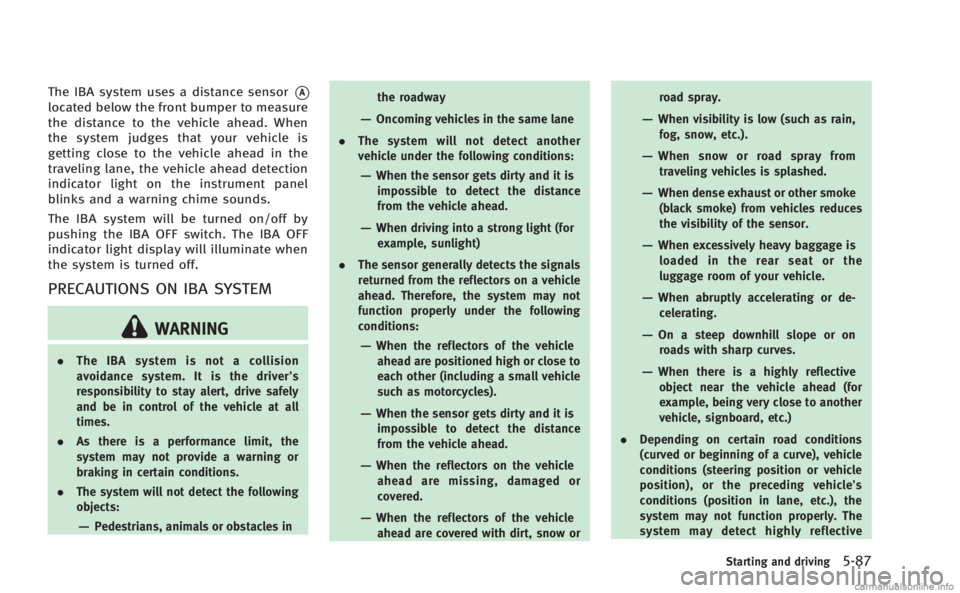
The IBA system uses a distance sensor*A
located below the front bumper to measure
the distance to the vehicle ahead. When
the system judges that your vehicle is
getting close to the vehicle ahead in the
traveling lane, the vehicle ahead detection
indicator light on the instrument panel
blinks and a warning chime sounds.
The IBA system will be turned on/off by
pushing the IBA OFF switch. The IBA OFF
indicator light display will illuminate when
the system is turned off.
PRECAUTIONS ON IBA SYSTEM
WARNING
.The IBA system is not a collision
avoidance system. It is the driver’ s
responsibility to stay alert, drive safely
and be in control of the vehicle at all
times.
. As there is a performance limit, the
system may not provide a warning or
braking in certain conditions.
. The system will not detect the following
objects:
—Pedestrians, animals or obstacles in the roadway
—Oncoming vehicles in the same lane
. The system will not detect another
vehicle under the following conditions:
—When the sensor gets dirty and it is
impossible to detect the distance
from the vehicle ahead.
—When driving into a strong light (forexample, sunlight)
. The sensor generally detects the signals
returned from the reflectors on a vehicle
ahead. Therefore, the system may not
function properly under the following
conditions:
—When the reflectors of the vehicle
ahead are positioned high or close to
each other (including a small vehicle
such as motorcycles).
—When the sensor gets dirty and it isimpossible to detect the distance
from the vehicle ahead.
—When the reflectors on the vehicle
ahead are missing, damaged or
covered.
—When the reflectors of the vehicleahead are covered with dirt, snow or road spray.
—When visibility is low (such as rain,
fog, snow, etc.).
—When snow or road spray fromtraveling vehicles is splashed.
—When dense exhaust or other smoke
(black smoke) from vehicles reduces
the visibility of the sensor.
—When excessively heavy baggage isloaded in the rear seat or the
luggage room of your vehicle.
—When abruptly accelerating or de-celerating.
—On a steep downhill slope or on
roads with sharp curves.
—When there is a highly reflectiveobject near the vehicle ahead (for
example, being very close to another
vehicle, signboard, etc.)
. Depending on certain road conditions
(curved or beginning of a curve), vehicle
conditions (steering position or vehicle
position), or the preceding vehicle’ s
conditions (position in lane, etc.), the
system may not function properly. The
system may detect highly reflective
Starting and driving5-87
Page 399 of 522

5-88Starting and driving
objects such as reflectors, signs, white
markers, and other stationary objects on
the road or near the traveling lane and
provide unnecessary warning.
. The system may not function in offset
conditions.
. The system may not function when the
distance to the vehicle ahead is extre-
mely close.
SSD0805
Reflectors on the road
WARNING
.The system may detect highly reflective
objects such as reflectors, signs, white
markers and other stationary objects on
the road or near the traveling lane.
In extreme conditions, detection of these
objects may cause the system to func-
tion.
. The system is designed to automatically
check the sensor’s functionality. If the
sensor is covered with ice, a transparent
or translucent plastic bag, etc., the system may not detect them. In these
instances the system may not be able to
warn the driver properly. Be sure to
check and clean the sensor regularly.
. Excessive noise will interfere with the
warning chime sound, and the chime
may not be heard.
. A sudden appearance of a vehicle in
front (for example, it abruptly cuts in)
may not be detected and the system may
not warn the driver soon enough.
. The system will be cancelled automati-
cally with a beep sound and the IBA
warning light will illuminate under the
following conditions:
—When the sensor window is dirty
—When the system malfunctions
If the IBA OFF indicator light illuminates
with a beep sound, pull off the road to a
safe location, stop the vehicle and turn the
engine off. Check to see if the sensor
window is dirty. If the sensor window is
dirty, clean it with a soft cloth and restart
the engine. If the sensor window is not
dirty, restart the engine. If the IBA OFF
indicator light continues to illuminate even
if the IBA system is turned on, have the
Page 400 of 522

system checked by an INFINITI retailer.
SSD1000
IBA system operation
The IBA system will function when your
vehicle is driven at speeds of approxi-
mately 10 MPH (15 km/h) or above, and
when the vehicle’s speed is approximately
10 MPH (15 km/h) faster than that of the
vehicle ahead.
To turn the system off/on, push and hold
the IBA OFF switch
*Bfor more than 1
second after starting the engine. When the
IBA OFF indicator light
*Aon the instru-
ment panel turns off and the IBA OFF
switch is pushed, the system will turn off
and the IBA OFF indicator light will
illuminate. When the IBA OFF switch is pushed again, the system will turn on and
the IBA OFF indicator light will turn off.
The IBA system will remain in the last ON
or OFF state it was left in until it is
manually changed by pressing the IBA
OFF switch.
Illumination of the IBA OFF indicator light
without the warning chime sound is an
indication that the IBA system is tempora-
rily unavailable. It will occur under the
following conditions:
.
When driving into a strong light (for
example, sunlight)
The IBA OFF indicator light will turn off
when the system returns to its normal
operating conditions.
For the sensor maintenance, see “Intelli-
gent Cruise Control (ICC) system” earlier in
this section.
Starting and driving5-89
Page 401 of 522

5-90Starting and driving
CAUTION
During the first 1,200 miles (2,000 km),
follow these recommendations to obtain
maximum engine performance and ensure
the future reliability and economy of your
new vehicle.
Failure to follow these recommendations
may result in shortened engine life and
reduced engine performance.
.Avoid driving for long periods at con-
stant speed, either fast or slow. Do not
run the engine over 4,000 rpm.
. Do not accelerate at full throttle in any
gear.
. Avoid quick starts.
. Avoid hard braking as much as possi-
ble. .
Accelerate slowly and smoothly. Main-
tain cruising speeds with a constant
accelerator position.
. Drive at moderate speeds on the high-
way.
. Avoid unnecessary stopping and brak-
ing. Keep a safe distance behind other
vehicles.
. Select a gear range suitable to road
conditions.
. Avoid unnecessary prolonged engine
idling.
. Keep your engine tuned up.
. Follow the recommended periodic main-
tenance schedule.
. Keep the tires inflated at the correct
pressure. Improper tire pressure will
increase wear and waste fuel.
. Make sure the front wheels are properly
aligned. Improper alignment will cause
premature tire wear and lower fuel
economy.
. Climate control operation lowers fuel
economy. Use the air conditioner only
when necessary.
. When cruising at highway speeds, it is
more economical to use the air condi-
tioner and leave the windows closed to
reduce drag.
SSD0336
The AWD warning light is located in the
meter.
The AWD warning light comes on when the
ignition switch is pushed to the ON
position. It turns off soon after the engine
is started.
BREAK-IN SCHEDULE INCREASING FUEL ECONOMY INTELLIGENT ALL-WHEEL DRIVE (AWD) (if so
equipped)