instrument panel INFINITI M 2013 User Guide
[x] Cancel search | Manufacturer: INFINITI, Model Year: 2013, Model line: M, Model: INFINITI M 2013Pages: 522, PDF Size: 3.72 MB
Page 78 of 522
JVC0291X
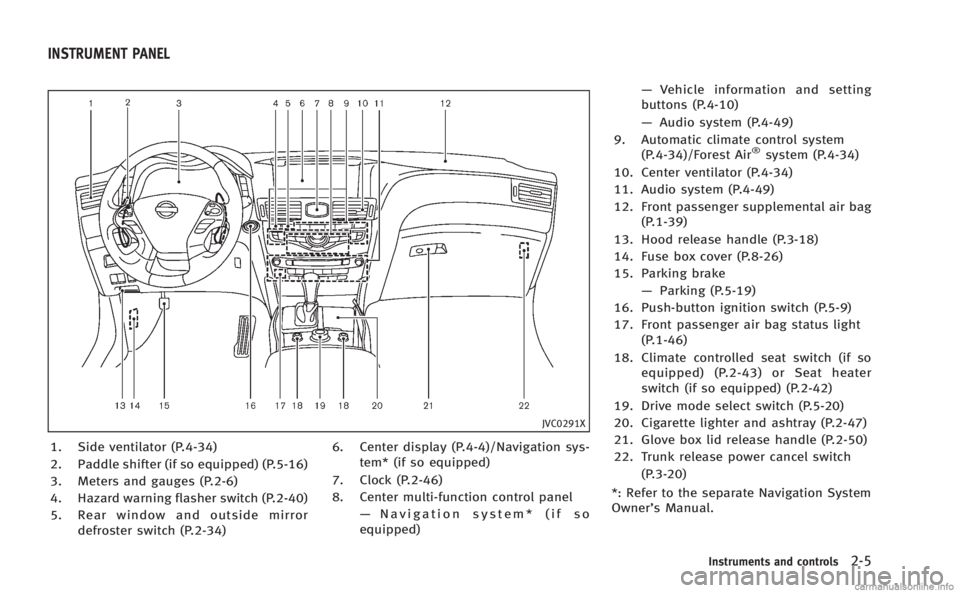
1. Side ventilator (P.4-34)
2. Paddle shifter (if so equipped) (P.5-16)
3. Meters and gauges (P.2-6)
4. Hazard warning flasher switch (P.2-40)
5. Rear window and outside mirrordefroster switch (P.2-34) 6. Center display (P.4-4)/Navigation sys-
tem* (if so equipped)
7. Clock (P.2-46)
8. Center multi-function control panel —Navigation system* (if so
equipped) —
Vehicle information and setting
buttons (P.4-10)
— Audio system (P.4-49)
9. Automatic climate control system (P.4-34)/Forest Air
®system (P.4-34)
10. Center ventilator (P.4-34)
11. Audio system (P.4-49)
12. Front passenger supplemental air bag (P.1-39)
13. Hood release handle (P.3-18)
14. Fuse box cover (P.8-26)
15. Parking brake —Parking (P.5-19)
16. Push-button ignition switch (P.5-9)
17. Front passenger air bag status light (P.1-46)
18. Climate controlled seat switch (if so equipped) (P.2-43) or Seat heater
switch (if so equipped) (P.2-42)
19. Drive mode select switch (P.5-20)
20. Cigarette lighter and ashtray (P.2-47)
21. Glove box lid release handle (P.2-50)
22. Trunk release power cancel switch (P.3-20)
*: Refer to the separate Navigation System
Owner’s Manual.
Instruments and controls2-5
INSTRUMENT PANEL
Page 80 of 522

SIC4318
Speedometer
SPEEDOMETER AND ODOMETER
Speedometer
The speedometer indicates vehicle speed
in miles per hour (MPH) and kilometers per
hour (km/h).
SIC4319
Odometer/twin trip odometer
Odometer/twin trip odometer
The odometer*1and twin trip odometer
*2are displayed on the dot matrix crystal
display when the ignition switch is in the
ON position.
The odometer records the total distance
the vehicle has been driven.
The twin trip odometer records the dis-
tance of individual trips.
Changing the display:
Pushing the TRIP RESET switch
*3on the
right of the combination meter panel
changes the display as follows: TRIP A
?TRIP B ?TRIP A
Resetting the trip odometer:
Pushing the TRIP RESET switch
*3for more
than 1 second resets the trip odometer to
zero.
Average fuel economy and distance to
empty information is also available. (See
“Dot matrix liquid crystal display” later in
this section and “How to use STATUS
button” in the“4. Monitor, climate, audio,
phone and voice recognition systems”
section.)
Instruments and controls2-7
Page 90 of 522
See“Adaptive Front lighting System (AFS)”
later in this section.
Automatic Transmission (AT)
position indicator light
When the ignition switch is pushed to the
ON position, the indicator shows the
automatic selector position.
In the manual shift mode, when the
transmission does not shift to the selected
gear due to a transmission protection
mode, the AT position indicator light will
blink and a chime will sound.
See “Automatic transmission” in the“5.
Starting and driving” section for further
details.
Blind Spot Intervention (BSI)
ON indicator light (green; if so
equipped)
The light comes on in green when the Blind
Spot Intervention (BSI) system is turned
on. The light turns off when the system is
turned off.
NOTE:
This light is common with the blind spot
warning light (orange). (See “Blind Spot
Warning (BSW)/Blind Spot Intervention (BSI) system warning light”
earlier in this
section).
For more details, see “Blind Spot Warning
(BSW) system/Blind Spot Intervention
TM
(BSI) system” in the“5. Starting and
driving” section.
ECO drive indicator light
When the ignition switch is pushed to the
ON position, the light will come on in
orange, turn green, and then turn off.
When the drive mode select switch is
turned to the ECO mode, the ECO drive
indicator light will illuminate or change its
color depending on the accelerator pedal
operation to help assist the driver to drive
economically. For more details, see “Eco
mode” in the“5. Starting and driving”
section.
Exterior light indicator
This indicator illuminates when the head-
light switch is turned to the AUTO,orposition and the front parking lights,
instrument panel lights, rear combination
lights, license plate lights or headlights are
on. The indicator turns off when these
lights are turned off.
Front fog light indicator light
The front fog light indicator light illumi-
nates when the front fog lights are on. (See
“Fog light switch” later in this section.)
Front passenger air bag status
light
The front passenger air bag status light
() will be lit and the passenger front air
bag will be OFF depending on how the front
passenger seat is being used.
For front passenger air bag status light
operation, see “INFINITI Advanced Air Bag
System (front seats)” in the“1. Safety —
Seats, seat belts and supplemental re-
straint system” section of this manual.
High beam indicator light
This light comes on when the headlight
high beam is on and goes out when the low
beam is selected.
Intelligent Brake Assist (IBA)
off indicator light (if so equipped)
The light illuminates when the Intelligent
Brake Assist (IBA) off switch is pushed to
OFF. This indicates that the Intelligent
Brake Assist (IBA) system is not operating.
When the IBA off indicator light illuminates
Instruments and controls2-17
Page 99 of 522
2-26Instruments and controls
SIC4326
SIC4327
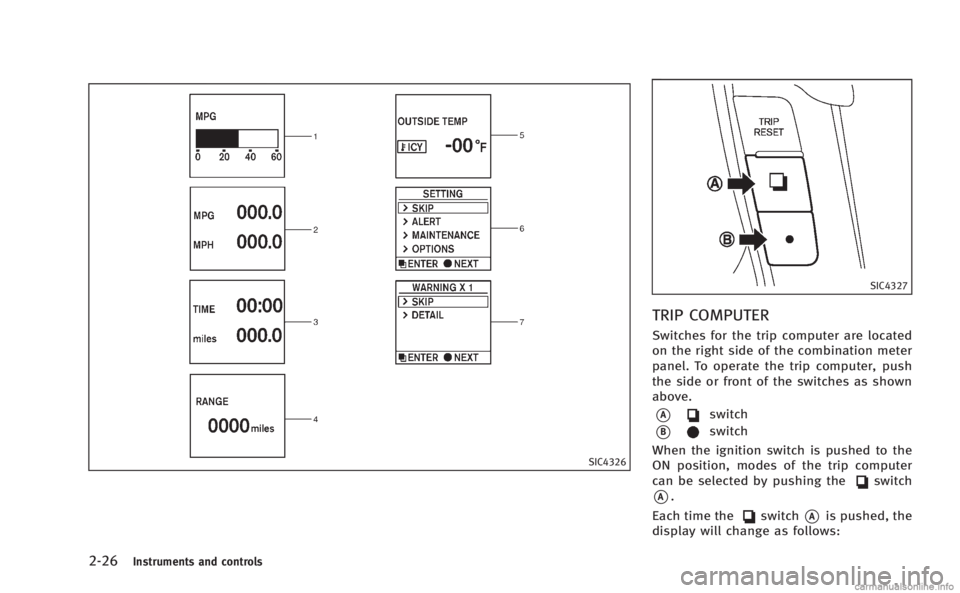
TRIP COMPUTER
Switches for the trip computer are located
on the right side of the combination meter
panel. To operate the trip computer, push
the side or front of the switches as shown
above.
*Aswitch
*Bswitch
When the ignition switch is pushed to the
ON position, modes of the trip computer
can be selected by pushing the
switch
*A.
Each time the
switch*Ais pushed, the
display will change as follows:
Page 104 of 522

cause undesired operation of the device.
SIC2045
Security indicator light
The security indicator light is located on
the meter panel. It indicates the status of
the INFINITI Vehicle Immobilizer System.
The light blinks after the ignition switch
was in the LOCK, ACC or OFF position. This
function indicates the security systems
equipped on the vehicle are operational.
If the INFINITI Vehicle Immobilizer System
is malfunctioning, this light will remain on
while the ignition switch is in the ON
position.If the light still remains on and/or the
engine will not start, see an INFINITI
retailer for INFINITI Vehicle Immobilizer
System service as soon as possible.
Please bring all Intelligent Keys that you
have when visiting an INFINITI retailer for
service.
Instruments and controls2-31
Page 109 of 522

2-36Instruments and controls
The autolight system can turn on the
headlights automatically when it is dark
and turn off the headlights when it is light.
For US models: The headlights will also be
turned on automatically at twilight or in
rainy weather (when the windshield wiper
is operated continuously).
If the ignition switch is pushed to the OFF
position and one of the doors is opened
and this condition is continued, the head-
lights remain on for 5 minutes.
Automatic headlights off delay:
You can keep the headlights on for up to
180 seconds after you push the ignition
switch to OFF and open any door then close
all the doors.
You can adjust the period of the automatic
headlights off delay from 0 seconds (OFF)
to 180 seconds. The factory default setting
is 45 seconds.
For automatic headlights off delay setting,
see“Light Off Delay” in the“4. Monitor,
climate, audio, phone and voice recogni-
tion systems” section.
SAA0642A
Be sure not to put anything on top of the
photo sensor
*Alocated on the top of the
instrument panel. The photo sensor con-
trols the autolight; if it is covered, the
photo sensor reacts as if it is dark and the
headlights will illuminate.
SIC3269
Headlight beam select
*1To select the low beam, put the lever
in the neutral position as shown.
*2To select the high beam, push the
lever forward while the switch is in the
position. Pull it back to select the
low beam.
*3Pulling the lever toward you will flash
the headlight high beam even when
the headlight switch is in the OFF
position.
Page 112 of 522
SIC3270
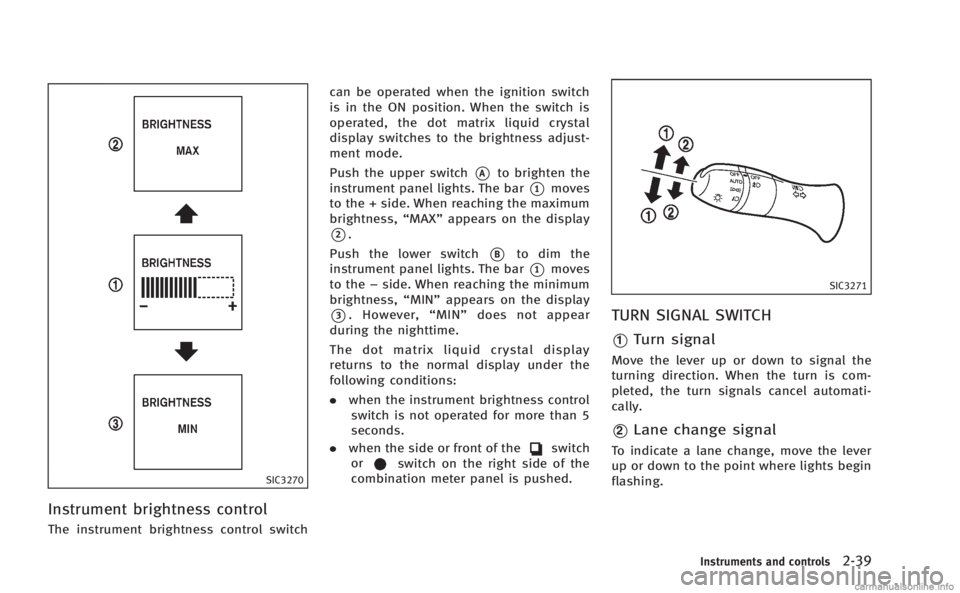
Instrument brightness control
The instrument brightness control switchcan be operated when the ignition switch
is in the ON position. When the switch is
operated, the dot matrix liquid crystal
display switches to the brightness adjust-
ment mode.
Push the upper switch
*Ato brighten the
instrument panel lights. The bar
*1moves
to the + side. When reaching the maximum
brightness, “MAX”appears on the display
*2.
Push the lower switch
*Bto dim the
instrument panel lights. The bar
*1moves
to the −side. When reaching the minimum
brightness, “MIN”appears on the display
*3. However, “MIN” does not appear
during the nighttime.
The dot matrix liquid crystal display
returns to the normal display under the
following conditions:
. when the instrument brightness control
switch is not operated for more than 5
seconds.
. when the side or front of the
switch
orswitch on the right side of the
combination meter panel is pushed.
SIC3271
TURN SIGNAL SWITCH
*1Turn signal
Move the lever up or down to signal the
turning direction. When the turn is com-
pleted, the turn signals cancel automati-
cally.
*2Lane change signal
To indicate a lane change, move the lever
up or down to the point where lights begin
flashing.
Instruments and controls2-39
Page 130 of 522
Depending on the environment or driving
conditions, the auto reverse function may
be activated if an impact or load similar to
something being caught in the moonroof
occurs.
If the moonroof does not operate
If the moonroof does not operate properly,
perform the following procedure to initi-
alize the moonroof operation system.
1. If the moonroof is open, close it fully byrepeatedly pushing the moonroof
switch to the close position
*1to tilt
the moonroof up.
2. Push and hold the switch to the close position
*1.
3. Release the moonroof switch after the moonroof moves slightly up and down.
4. Push and hold the switch to the open position
*2to fully tilt the moonroof
down.
5. Check if the moonroof switch operates normally.
If the moonroof does not operate properly
after performing the procedure above, have
your vehicle checked by an INFINITI retailer.
CAUTION
. To avoid personal injury, keep your
hands, fingers and head away from the
sunshade arm, arm rail and sunshade
inlet port.
. Do not allow children near the rear
sunshade system. They could be injured.
. Do not place objects on or near the rear
sunshade. This could cause improper
operation or damage it.
. Do not pull or push the rear sunshade.
This could cause improper operation or
damage it.
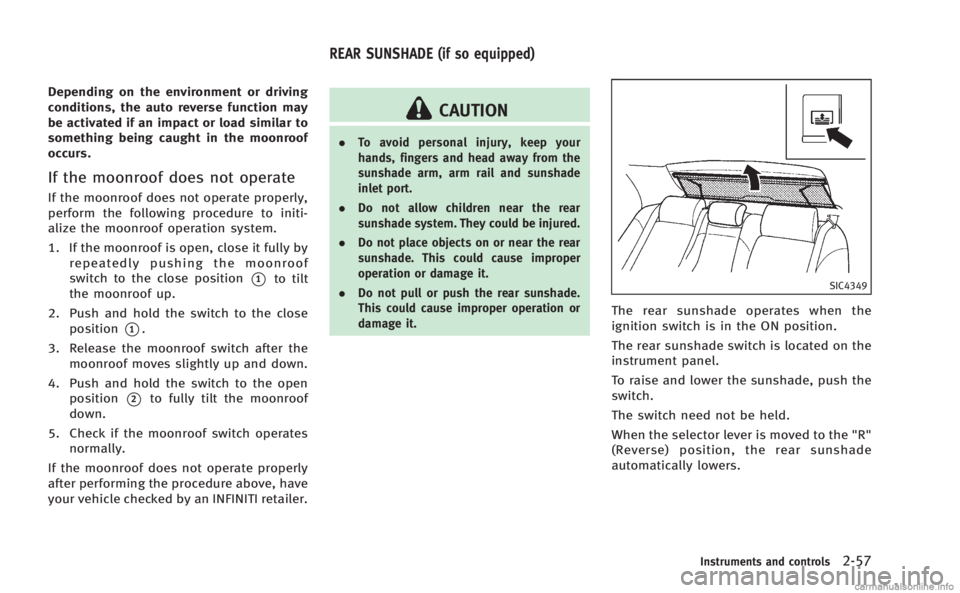
SIC4349
The rear sunshade operates when the
ignition switch is in the ON position.
The rear sunshade switch is located on the
instrument panel.
To raise and lower the sunshade, push the
switch.
The switch need not be held.
When the selector lever is moved to the "R"
(Reverse) position, the rear sunshade
automatically lowers.
Instruments and controls2-57
REAR SUNSHADE (if so equipped)
Page 157 of 522
3-18Pre-driving checks and adjustments
SPA2733
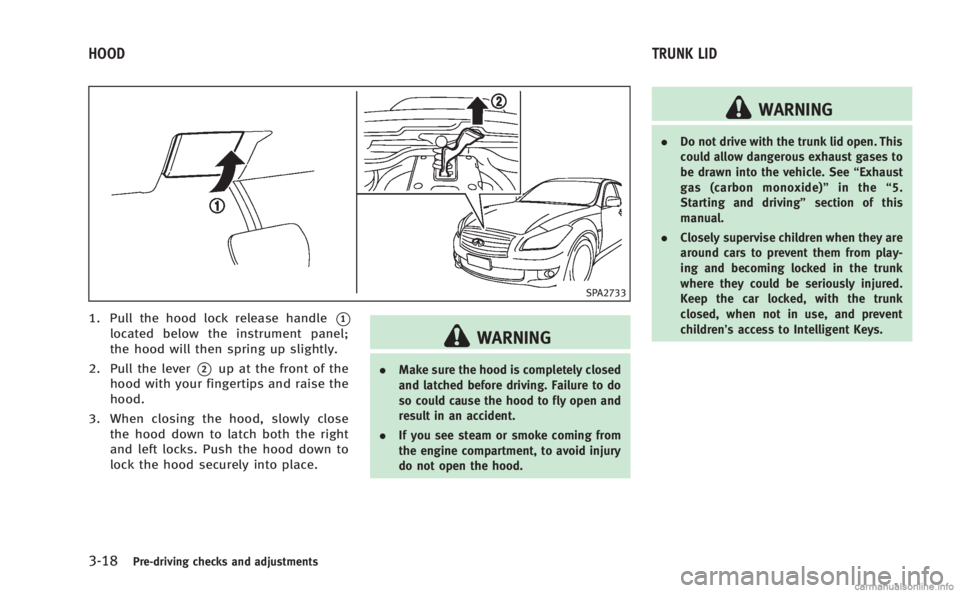
1. Pull the hood lock release handle*1
located below the instrument panel;
the hood will then spring up slightly.
2. Pull the lever
*2up at the front of the
hood with your fingertips and raise the
hood.
3. When closing the hood, slowly close the hood down to latch both the right
and left locks. Push the hood down to
lock the hood securely into place.
WARNING
. Make sure the hood is completely closed
and latched before driving. Failure to do
so could cause the hood to fly open and
result in an accident.
. If you see steam or smoke coming from
the engine compartment, to avoid injury
do not open the hood.
WARNING
.Do not drive with the trunk lid open. This
could allow dangerous exhaust gases to
be drawn into the vehicle. See “Exhaust
gas (carbon monoxide)” in the“5.
Starting and driving” section of this
manual.
. Closely supervise children when they are
around cars to prevent them from play-
ing and becoming locked in the trunk
where they could be seriously injured.
Keep the car locked, with the trunk
closed, when not in use, and prevent
children’s access to Intelligent Keys.
HOOD TRUNK LID
Page 158 of 522
SPA2734
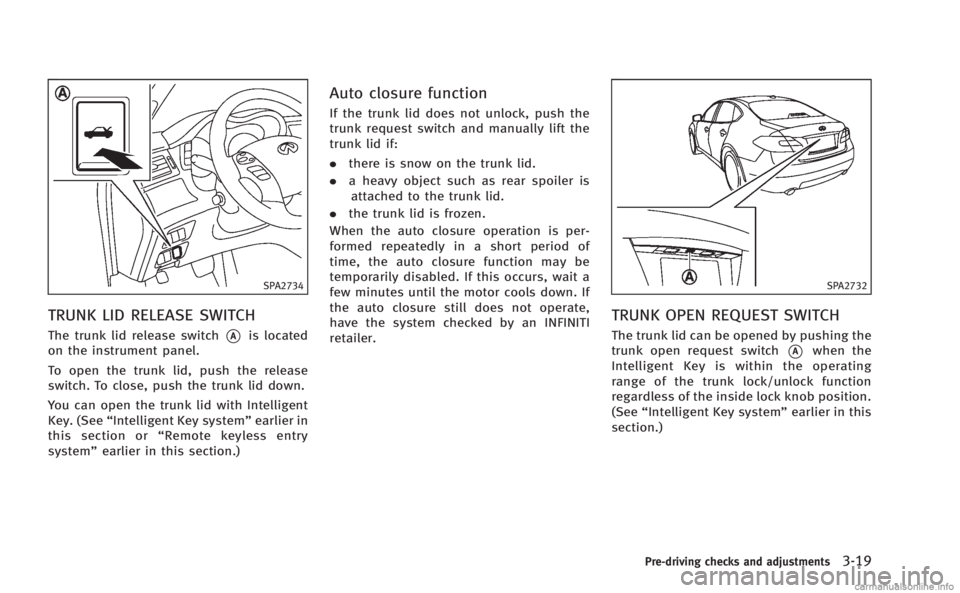
TRUNK LID RELEASE SWITCH
The trunk lid release switch*Ais located
on the instrument panel.
To open the trunk lid, push the release
switch. To close, push the trunk lid down.
You can open the trunk lid with Intelligent
Key. (See “Intelligent Key system” earlier in
this section or “Remote keyless entry
system” earlier in this section.)
Auto closure function
If the trunk lid does not unlock, push the
trunk request switch and manually lift the
trunk lid if:
.there is snow on the trunk lid.
. a heavy object such as rear spoiler is
attached to the trunk lid.
. the trunk lid is frozen.
When the auto closure operation is per-
formed repeatedly in a short period of
time, the auto closure function may be
temporarily disabled. If this occurs, wait a
few minutes until the motor cools down. If
the auto closure still does not operate,
have the system checked by an INFINITI
retailer.
SPA2732
TRUNK OPEN REQUEST SWITCH
The trunk lid can be opened by pushing the
trunk open request switch
*Awhen the
Intelligent Key is within the operating
range of the trunk lock/unlock function
regardless of the inside lock knob position.
(See “Intelligent Key system” earlier in this
section.)
Pre-driving checks and adjustments3-19