turn signal INFINITI M 2013 User Guide
[x] Cancel search | Manufacturer: INFINITI, Model Year: 2013, Model line: M, Model: INFINITI M 2013Pages: 522, PDF Size: 3.72 MB
Page 113 of 522
2-40Instruments and controls
SIC3272
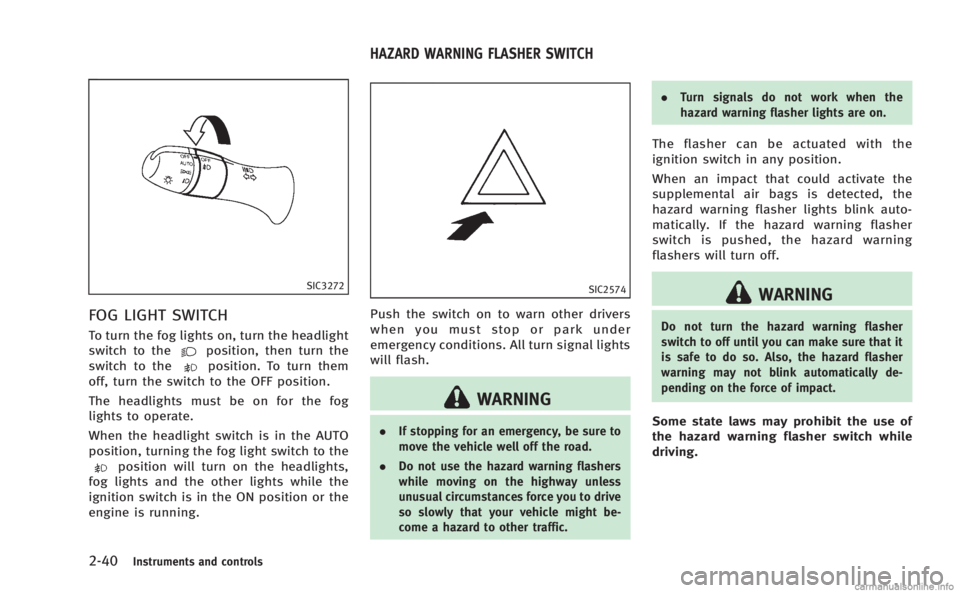
FOG LIGHT SWITCH
To turn the fog lights on, turn the headlight
switch to theposition, then turn the
switch to theposition. To turn them
off, turn the switch to the OFF position.
The headlights must be on for the fog
lights to operate.
When the headlight switch is in the AUTO
position, turning the fog light switch to the
position will turn on the headlights,
fog lights and the other lights while the
ignition switch is in the ON position or the
engine is running.
SIC2574
Push the switch on to warn other drivers
when you must stop or park under
emergency conditions. All turn signal lights
will flash.
WARNING
. If stopping for an emergency, be sure to
move the vehicle well off the road.
. Do not use the hazard warning flashers
while moving on the highway unless
unusual circumstances force you to drive
so slowly that your vehicle might be-
come a hazard to other traffic. .
Turn signals do not work when the
hazard warning flasher lights are on.
The flasher can be actuated with the
ignition switch in any position.
When an impact that could activate the
supplemental air bags is detected, the
hazard warning flasher lights blink auto-
matically. If the hazard warning flasher
switch is pushed, the hazard warning
flashers will turn off.
WARNING
Do not turn the hazard warning flasher
switch to off until you can make sure that it
is safe to do so. Also, the hazard flasher
warning may not blink automatically de-
pending on the force of impact.
Some state laws may prohibit the use of
the hazard warning flasher switch while
driving.
HAZARD WARNING FLASHER SWITCH
Page 117 of 522
2-44Instruments and controls
.Do not put anything on the seat which
insulates heat, such as a blanket,
cushion, seat cover, etc. Otherwise, the
seat may become overheated.
. Do not place anything hard or heavy on
the seat or pierce it with a pin or similar
object. This may result in damage to the
climate controlled seat.
. Any liquid spilled on the seat should be
removed immediately with a dry cloth.
. The climate controlled seat has an air
filter. Do not operate climate controlled
seat without an air filter. This may result
in damage to the system.
. When cleaning the seat, never use
gasoline, thinner, or any similar materi-
als.
. If any malfunctions are found or the
climate controlled seat does not operate,
turn the switch off and have the system
checked by an INFINITI retailer.
SIC4335
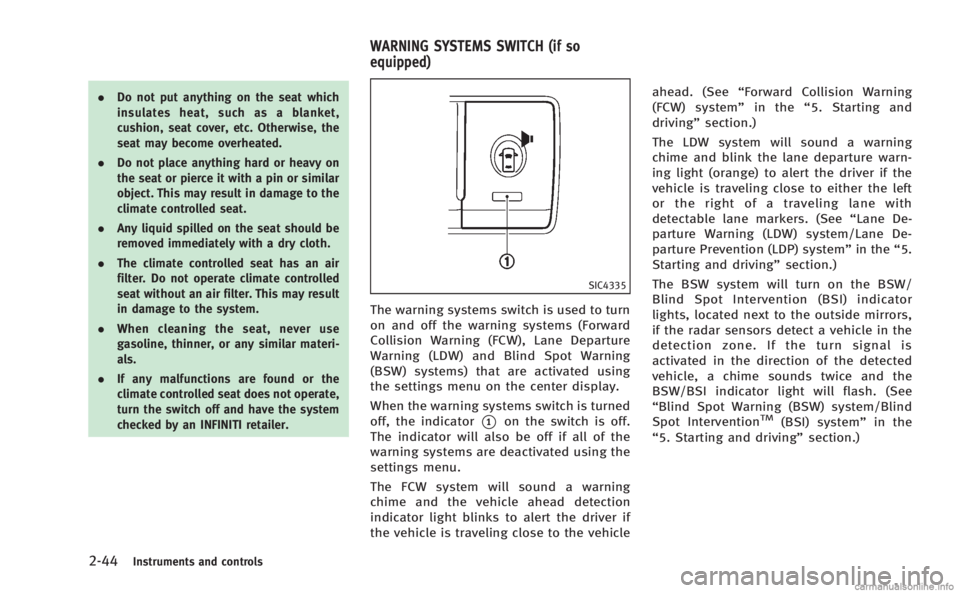
The warning systems switch is used to turn
on and off the warning systems (Forward
Collision Warning (FCW), Lane Departure
Warning (LDW) and Blind Spot Warning
(BSW) systems) that are activated using
the settings menu on the center display.
When the warning systems switch is turned
off, the indicator
*1on the switch is off.
The indicator will also be off if all of the
warning systems are deactivated using the
settings menu.
The FCW system will sound a warning
chime and the vehicle ahead detection
indicator light blinks to alert the driver if
the vehicle is traveling close to the vehicle ahead. (See
“Forward Collision Warning
(FCW) system” in the“5. Starting and
driving” section.)
The LDW system will sound a warning
chime and blink the lane departure warn-
ing light (orange) to alert the driver if the
vehicle is traveling close to either the left
or the right of a traveling lane with
detectable lane markers. (See “Lane De-
parture Warning (LDW) system/Lane De-
parture Prevention (LDP) system” in the“5.
Starting and driving” section.)
The BSW system will turn on the BSW/
Blind Spot Intervention (BSI) indicator
lights, located next to the outside mirrors,
if the radar sensors detect a vehicle in the
detection zone. If the turn signal is
activated in the direction of the detected
vehicle, a chime sounds twice and the
BSW/BSI indicator light will flash. (See
“Blind Spot Warning (BSW) system/Blind
Spot InterventionTM(BSI) system” in the
“5. Starting and driving” section.)
WARNING SYSTEMS SWITCH (if so
equipped)
Page 220 of 522

AUDIO OPERATION PRECAUTIONS
Radio
Push the ignition switch to the ACC or ON
position and push the radio band select
button to turn on the radio. If you listen to
the radio with the engine not running, the
ignition switch should be pushed to the
ACC position.
Radio reception is affected by station
signal strength, distance from radio trans-
mitter, buildings, bridges, mountains and
other external influences. Intermittent
changes in reception quality normally are
caused by these external influences.
Using a cellular phone in or near the
vehicle may influence radio reception
quality.
Radio reception:
Your INFINITI radio system is equipped with
state-of-the-art electronic circuits to en-
hance radio reception. These circuits are
designed to extend reception range, and to
enhance the quality of that reception.
However there are some general character-
istics of both FM and AM radio signals that
can affect radio reception quality in a
moving vehicle, even when the finestequipment is used. These characteristics
are completely normal in a given reception
area, and do not indicate any malfunction
in your INFINITI radio system.
Reception conditions will constantly
change because of vehicle movement.
Buildings, terrain, signal distance and
interference from other vehicles can work
against ideal reception. Described below
are some of the factors that can affect your
radio reception.
Some cellular phones or other devices may
cause interference or a buzzing noise to
come from the audio system speakers.
Storing the device in a different location
may reduce or eliminate the noise.
SAA0306
FM radio reception:
Range: FM range is normally limited to 25
to 30 miles (40 to 48 km), with monaural
(single station) FM having slightly more
range than stereo FM. External influences
may sometimes interfere with FM station
reception even if the FM station is within
25 miles (40 km). The strength of the FM
signal is directly related to the distance
between the transmitter and receiver. FM
signals follow a line-of-sight path, exhibit-
ing many of the same characteristics as
light. For example they will reflect off
objects.
Fade and drift: As your vehicle moves away
Monitor, climate, audio, phone and voice recognition systems4-49
AUDIO SYSTEM
Page 236 of 522
Audio main operation
Head unit :
The auto loudness circuit enhances the low
and high frequency ranges automatically in
both radio reception and CD playback.
ON·OFF/Volume control:
Push the ignition switch to the ACC or ON
position, and then push the ON·OFF button
while the system is off to turn on the last
audio source, which was playing immedi-
ately before the system was turned off.
While the system is on, pushing the
ON·OFF button turns the system off.
Turn the VOL control knob to adjust the
volume.
Adjusting tone quality and speaker bal-
ance:
To adjust Bass, Treble, Balance and Fade,
push the Audio control knob. When the
display shows the setting you want to
change (Bass, Treble, Balance and Fade),
rotate the Audio control knob to set the
desired setting. For the other setting
methods, see“How to use SETTING button”
earlier in this section.
This vehicle has some sound effect func-
tions as follows: .
Speed Sensitive Vol.
. Precision Phased Audio (if so equipped)
. BOSE®Centerpoint®2 (if so equipped)
. BOSE®AudioPilot®2 (if so equipped)
. Surround effect (if so equipped)
For more details, see “How to use SETTING
button” earlier in this section.
Switching the display:
Pushing the DISC·AUX button will switch
the displays as follows:
. Models with navigation system
iPod
®/USB ?CD/DVD ?Bluetooth®
Audio ?iPod®/USB
. Models without navigation system
iPod
®/USB ?CD ?iPod®/USB
Linking Intelligent Key (models with navi-
gation system):
The audio settings can be memorized for
each Intelligent Key. For more details, see
“Setting memory function” in the“3. Pre-
driving checks and adjustments” section.
FM-AM-SAT radio operation
When the radio band select button is
pushed while the ignition switch is in the
ACC or ON position, the radio will come on
at the channel last played. The last channel played will also come on
when the ON·OFF button is pushed to ON.
If another audio source is playing when the
radio band select button is turned to ON,
the audio source will automatically be
turned off and the last radio channel
played will come on.
When the stereo broadcast signal is weak,
the radio will automatically change from
stereo to monaural reception.
radio (FM·AM) band select :
Pushing the XM radio band select button
will change the band as follows:
AM ?FM1 ?FM2 ?AM
radio (XM) band select:
Pushing the XM radio band select button
will change the band as follows:
XM1 ?XM2 ?XM3 ?XM1
The satellite radio is not available in
Alaska, Hawaii and Guam.
TUNE (Tuning) : . For AM and FM radio
Turn the radio TUNE knob for manual
tuning.
Monitor, climate, audio, phone and voice recognition systems4-65
Page 237 of 522
4-66Monitor, climate, audio, phone and voice recognition systems
.For SiriusXM Satellite Radio
Turn the radio TUNE knob to seek
channels from all of the categories
when any category is not selected.
SEEK tuning/CATEGORY (CAT):
. For AM and FM radio
Push the SEEK button
orto
tune from low to high or high to low
frequencies and to stop at the next
broadcasting station.
. For SiriusXM Satellite Radio
Push the SEEK button
orto
tune to the first channel of the next or
previous category.
During satellite radio reception, the follow-
ing notices will be displayed under certain
conditions.
. NO SIGNAL (No signal is received while
the SAT tuner is connected.)
. OFF AIR (Broadcasting signed off)
. CHECK ANTENNA (Antenna connection
error)
. LOADING (When the initial setting is
performed)
. UPDATING (When the satellite radio
subscription is not active)
SCAN tuning:
Push the SCAN tuning button to tune from
low to high frequencies and stop at each
broadcasting station/channel for 5 sec-
onds. Pushing the button again during this
5 seconds period will stop SCAN tuning
and the radio will remain tuned to that
station/channel.
If the SCAN tuning button is not pushed
within 5 seconds, SCAN tuning moves to
the next station/channel.
toStation memory operations:
12 stations/channels can be set for the FM
band (6 each for FM1 and FM2), 18 for
SiriusXM Satellite Radio (6 each for XM1,
XM2 and XM3) and 6 stations can be set
for the AM band.
1. Choose the radio band using the radio band select button.
2. Tune to the desired station/channel using the
, SCAN button or the
radio TUNE knob.
3. Push and hold the desired station preset button
tountil the radio
mutes.
4. The station indicator will then come on and the sound will resume. Memorizing is now complete.
5. Other buttons can be set in the same manner.
If the battery cable is disconnected, or if
the fuse opens, the radio memory will be
erased. In that case, reset the desired
stations/channels.
Menu (SiriusXM Satellite Radio) (models
with navigation system):
When the “Menu”key on the display is
selected while the SiriusXM Satellite Radio
is being played, the menu list will be
displayed.
The following items are available.
. Preset List
Displays the preset channel list. If 1 of
the 6 preset stations listed is touched
and held, the current station will be
stored as the new preset.
. Customize Channel List
Selects specific channels to skip while
using the TUNE, SEEK/CATEGORY or
Menu-Categories feature.
. Favorite Artists & Songs
Stores the current artist or song that is
being played. Touch the “Alert”key to
be reminded when the stored artist or
Page 316 of 522

minute and then remain continuously
illuminated. This sequence will continue
upon subsequent vehicle start-ups as long
as the malfunction exists. When the mal-
function indicator is illuminated, the sys-
tem may not be able to detect or signal low
tire pressure as intended. TPMS malfunc-
tions may occur for a variety of reasons,
including the installation of replacement or
alternate tires or wheels on the vehicle that
prevent the TPMS from functioning prop-
erly. Always check the TPMS malfunction
telltale after replacing one or more tires or
wheels on your vehicle to ensure that the
replacement or alternate tires and wheels
allow the TPMS to continue to function
properly.
Additional information
.The TPMS does not monitor the tire
pressure of the spare tire.
. The TPMS will activate only when the
vehicle is driven at speeds above 16
MPH (25 km/h). Also, this system may
not detect a sudden drop in tire
pressure (for example a flat tire while
driving).
. The low tire pressure warning light does
not automatically turn off when the tire
pressure is adjusted. After the tire is inflated to the recommended pressure,
the vehicle must be driven at speeds
above 16 MPH (25 km/h) to activate the
TPMS and turn off the low tire pressure
warning light. Use a tire pressure gauge
to check the tire pressure.
. The CHECK TIRE PRESSURE warning
appears in the dot matrix liquid crystal
display when the low tire pressure
warning light is illuminated and low
tire pressure is detected. The CHECK
TIRE PRESSURE warning turns off when
the low tire pressure warning light
turns off.
The CHECK TIRE PRESSURE warning
does not appear if the tire pressure
warning light illuminates to indicate a
TPMS malfunction.
. Tire pressure rises and falls depending
on the heat caused by the vehicle’s
operation and the outside temperature.
Low outside temperature can lower the
temperature of the air inside the tire
which can cause a lower tire inflation
pressure. This may cause the low tire
pressure warning light to illuminate. If
the warning light illuminates in low
ambient temperature, check the tire
pressure for all four tires. .
You can also check the pressure of all
tires (except the spare tire) on the
display screen. The order of the tire
pressure figures displayed on the
screen does not correspond with the
actual order of the tire position. See
“TIRE PRESSURE information” in the“4.
Monitor, climate, audio, phone and
voice recognition systems” section.
For additional information, see “Low tire
pressure warning light” in the“2. Instru-
ments and controls” section and“Tire
Pressure Monitoring System (TPMS)” in
the “6. In case of emergency” section.
WARNING
.If the low tire pressure warning light
illuminates or LOW PRESSURE informa-
tion is displayed on the monitor screen
while driving, avoid sudden steering
maneuvers or abrupt braking, reduce
vehicle speed, pull off the road to a safe
location and stop the vehicle as soon as
possible. Driving with under-inflated
tires may permanently damage the tires
and increase the likelihood of tire fail-
ure. Serious vehicle damage could occur
and may lead to an accident and could
Starting and driving5-5
Page 317 of 522
5-6Starting and driving
result in serious personal injury. Check
the tire pressure for all four tires. Adjust
the tire pressure to the recommended
COLD tire pressure shown on the Tire
and Loading Information label to turn
the low tire pressure warning light OFF. If
the light still illuminates while driving
after adjusting the tire pressure, a tire
may be flat. If you have a flat tire,
replace it with a spare tire as soon as
possible. (See“Flat tire”in the“6. In
case of emergency” section for changing
a flat tire.)
. When a spare tire is mounted or a wheel
is replaced, the TPMS will not function
and the low tire pressure warning light
will flash for approximately 1 minute.
The light will remain on after 1 minute.
Contact your INFINITI retailer as soon as
possible for tire replacement and/or
system resetting.
. Replacing tires with those not originally
specified by INFINITI could affect the
proper operation of the TPMS.
. Do not inject any tire liquid or aerosol
tire sealant into the tires, as this may
cause a malfunction of the tire pressure
sensors.CAUTION
.The TPMS may not function properly
when the wheels are equipped with tire
chains or the wheels are buried in snow.
. Do not place metalized film or any metal
parts (antenna, etc.) on the windows.
This may cause poor reception of the
signals from the tire pressure sensors,
and the TPMS will not function properly.
Some devices and transmitters may tem-
porarily interfere with the operation of the
TPMS and cause the low tire pressure
warning light to illuminate. Some exam-
ples are:
.Facilities or electric devices using simi-
lar radio frequencies are near the
vehicle.
. If a transmitter set to similar frequen-
cies is being used in or near the
vehicle.
. If a computer (or similar equipment) or
a DC/AC converter is being used in or
near the vehicle. FCC Notice:
For USA:
This device complies with Part 15 of the
FCC Rules. Operation is subject to the
following two conditions: (1) This device
may not cause harmful interference, and
(2) this device must accept any interfer-
ence received, including interference that
may cause undesired operation.
NOTE:
Changes or modifications not expressly
approved by the party responsible for
compliance could void the user’s authority
to operate the equipment.
For Canada:
This device complies with RSS-210 of
Industry Canada. Operation is subject to
the following two conditions: (1) this
device may not cause interference, and
(2) this device must accept any interfer-
ence, including interference that may
cause undesired operation of the device.
Page 336 of 522

SSD0672
Lane departure warning light (orange)
LDW system operation
The LDW system provides a lane departure
warning function when the vehicle is driven
at speeds of approximately 45 MPH (70
km/h) and above. When the vehicle
approaches either the left or the right side
of the traveling lane, a warning chime will
sound and the lane departure warning light
(orange) on the instrument panel will blink
to alert the driver.
The warning function will stop when the
vehicle returns inside of the lane markers.
The LDW system is not designed to warn
under the following conditions..
When you operate the lane change
signal and change traveling lanes in
the direction of the signal. (The LDW
system will become operable again
approximately 2 seconds after the lane
change signal is turned off.)
. When the vehicle speed lowers to less
than approximately 45 MPH (70 km/h).
. When the Blind Spot Intervention (BSI)
system activates an audible warning or
brake control.
After the above conditions have finished
and the necessary operating conditions are
satisfied, the LDW functions will resume.
SIC4335
Warning systems switch
The warning systems switch is used to turn
on and off the LDW system when it is
activated using the settings menu on the
center display. See “How to enable/disable
the LDW system using the settings menu”
later in this section.
When the warning systems switch is turned
off, the indicator
*1on the switch is off.
The indicator will also be off if the LDW, the
Blind Spot Warning (BSW) and the Forward
Collision Warning (FCW) systems are deac-
tivated.
For the BSW and FCW systems, see “Blind
Spot Warning (BSW) system/Blind Spot
Starting and driving5-25
Page 342 of 522
.When you operate the lane change
signal and change the traveling lanes
in the direction of the signal. (The LDP
system will be deactivated for approxi-
mately 2 seconds after the lane change
signal is turned off.)
. When the vehicle speed lowers to less
than approximately 45 MPH (70 km/h).
. When the BSI system activates an
audible warning or brake control.
After the above conditions have finished
and the necessary operating conditions are
satisfied, the warning and assist functions
will resume.
Condition B:
The assist function of the LDP system is not
designed to work under the following
conditions (warning is still functional):
. When the brake pedal is depressed.
. When the steering wheel is turned as
far as necessary for the vehicle to
change lanes.
. When the accelerator pedal is de-
pressed while the brake control assist
is provided.
. When the Intelligent Cruise Control (ICC)
approach warning occurs. .
When the hazard warning flashers are
operated.
. When driving on a curve at high speed.
After the above conditions have finished
and the necessary operating conditions are
satisfied, the LDP brake control assist
function will resume.
Condition C:
Under the following conditions, a beep will
sound and the LDP system will be canceled
automatically. The LDP ON indicator light
will blink in green, and the LDP system
cannot be activated:
. When the VDC system (except TCS
function) or ABS operates.
. When the VDC system is turned off.
. When the drive mode select switch is
turned to the SNOW mode.
Action to take:
When the above conditions no longer exist,
turn off the LDP system. Push the dynamic
driver assistance switch again to turn the
LDP system back on.
Temporary disabled status at high tem-
perature:
If the vehicle is parked in direct sunlight
under high temperature conditions (over approximately 1048F (408C)) and then the
LDP system is turned on, the LDP system
may be deactivated automatically. The lane
departure warning light (orange) will blink.
Action to take:
When the above conditions no longer exist,
turn off the LDP system. Push the dynamic
driver assistance switch again to turn the
LDP system back on.
Starting and driving5-31
Page 344 of 522

SSD1027
The BSW system uses radar sensors*1
installed near the rear bumper to detect
other vehicles beside your vehicle in an
adjacent lane. In addition to the radar
sensors, the BSI system uses a camera
*2
installed behind the windshield to monitor
the lane markers of your traveling lane.
SSD1030
Detection zone
The radar sensors can detect vehicles on
either side of your vehicle within the
detection zone shown as illustrated. This
detection zone starts from the outside
mirror of your vehicle and extends approxi-
mately 10 ft (3.0 m) behind the rear
bumper, and approximately 10 ft (3.0 m)
sideways.
The BSW system operates above approxi-
mately 20 MPH (32 km/h). If the radar
sensors detects vehicles in the detection
zone, the BSW/BSI indicator light illumi-
nates. If the driver then activates the turn
signal, a chime will sound twice and the
BSW/BSI indicator light will flash. The BSI system operates above approxi-
mately 37 MPH (60 km/h). If the system
detects a vehicle in the detection zone and
your vehicle is approaching the lane
marker, the BSI system provides an audi-
ble warning (three times), flashes the
BSW/BSI indicator light and slightly ap-
plies the brakes for a short period of time
on one side to help return the vehicle back
to the traveling lane. The BSI system
provides an audible warning and turns on
or flashes the BSW/BSI indicator light even
if the BSW system is off.WARNING
.
The BSW and BSI systems are not a
replacement for proper driving procedure
and are not designed to prevent contact
with vehicles or objects. When changing
lanes, always use the side and rear
mirrors and turn and look in the direc-
tion you will move to ensure it is safe to
change lanes. Never rely solely on the
BSW or BSI system.
. Using the BSI system under some road,
lane marker or weather conditions could
lead to improper system operation. Al-
ways rely on your own steering and
Starting and driving5-33