audio INFINITI M 2013 Service Manual
[x] Cancel search | Manufacturer: INFINITI, Model Year: 2013, Model line: M, Model: INFINITI M 2013Pages: 522, PDF Size: 3.72 MB
Page 195 of 522

4-24Monitor, climate, audio, phone and voice recognition systems
Language & Units settings
The Language & Units settings display will
appear when pushing the SETTING button,
selecting the“Language & Units” key with
the INFINITI controller and pushing the
ENTER button.
For models with the navigation system,
select the “Others” key to show the
“Language & Units” key.
Select Language:
Select the “Select Language” key. Choose
“English”, “Français” or“Español” for your
favorite display appearance.
If you select the “Français”key, the French
language will be displayed, so please use
the French Owner’s Manual. To obtain a
French Owner’ s Manual, see “Owner’ s
Manual/Service Manual order information”
in the “9. Technical and consumer informa-
tion” section.
Select Units:
Select the “Select Units” key. Choose“US”
(Mile, 8F, MPG) or “Metric”(km,8C, L/100
km) for your favorite display appearance.
Select Units (Tire Pressure):
Choose the “Select Units (Tire Pressure)”
key and push the ENTER button. From the following display, select
“kPa”or“psi”.
When the ignition switch is in the ACC
position, the “Select Units (Tire Pressure)”
key is not displayed.
Voice Recognition settings (models
with navigation system)
For details about the “Voice Recognition”
settings, see “INFINITI Voice Recognition
system (models with navigation system)”
later in this section.
Camera settings
The “CAMERA” screen will appear when
selecting the “Camera” key with the
INFINITI controller and pushing the ENTER
button.
For the details about the camera system
operation, see “RearView monitor” later in
this section.
Infiniti Connection (models with
navigation system)
The information feeds history and the UNIT
ID can be confirmed and Infiniti Connection
history can be deleted. For further details,
see the separate Navigation System Own-
er’s Manual.
JVH0141M
Models with navigation system
Sonar settings (models with navi-
gation system)
The “Sonar” screen will appear when
selecting the “Sonar”key with the INFINITI
controller and pushing the ENTERbutton.
For the details of the sonar system opera-
tion, see “Sonar system” in the“5.
Starting and driving” section.
Sonar Display:
When this item is turned ON, the corner/
center sonar indicator will appear when the
sonar detect rear obstacles near the
bumper.
Page 196 of 522
Corner Sonar Sensitivity:
Adjust the sensitivity level of the corner
sonar higher (right) or lower (left).
Center Sonar Sensitivity:
Adjust the sensitivity level of the center
sonar higher (right) or lower (left).
SAA2491
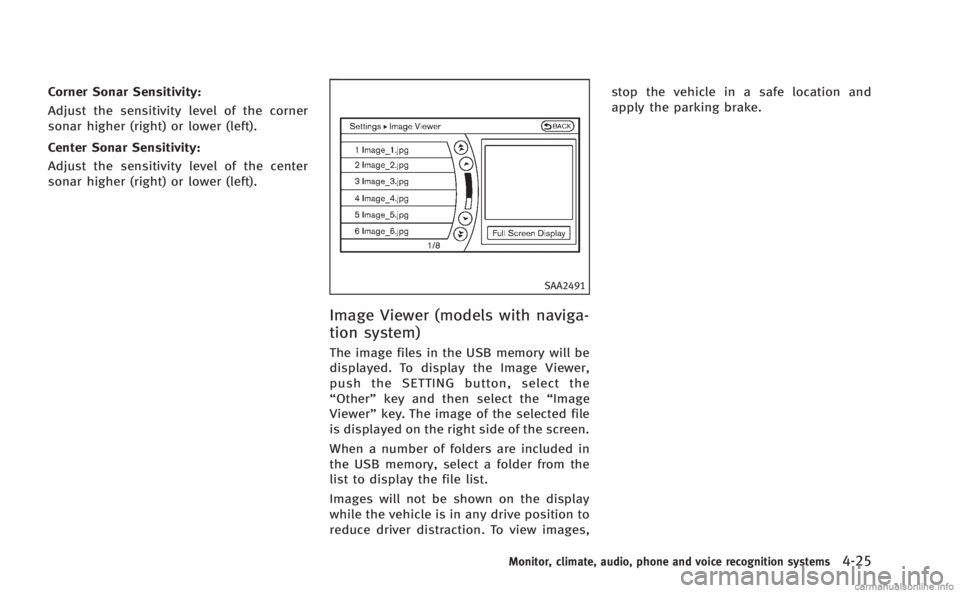
Image Viewer (models with naviga-
tion system)
The image files in the USB memory will be
displayed. To display the Image Viewer,
push the SETTING button, select the
“Other”key and then select the “Image
Viewer” key. The image of the selected file
is displayed on the right side of the screen.
When a number of folders are included in
the USB memory, select a folder from the
list to display the file list.
Images will not be shown on the display
while the vehicle is in any drive position to
reduce driver distraction. To view images, stop the vehicle in a safe location and
apply the parking brake.
Monitor, climate, audio, phone and voice recognition systems4-25
Page 197 of 522
4-26Monitor, climate, audio, phone and voice recognition systems
SAA2492
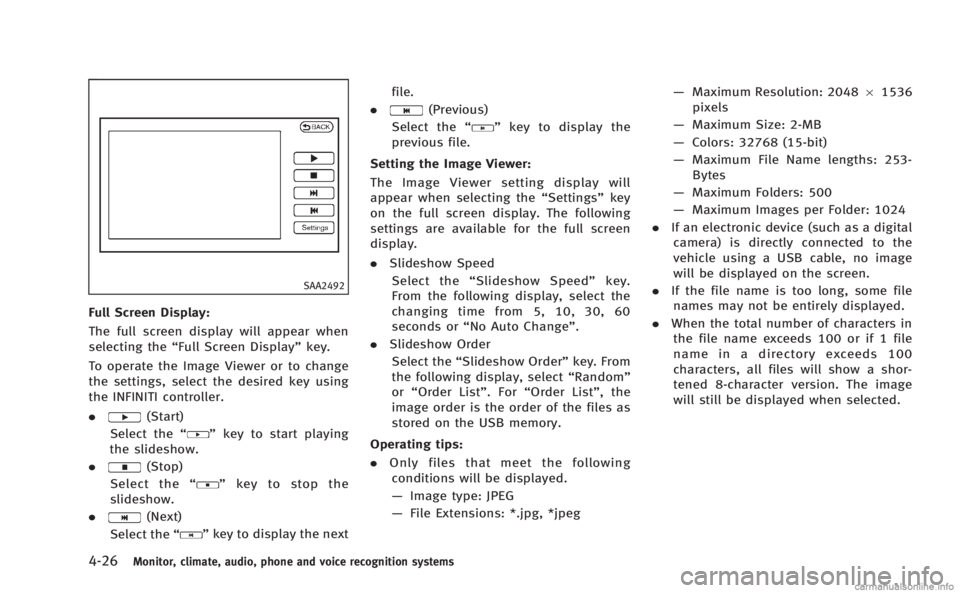
Full Screen Display:
The full screen display will appear when
selecting the“Full Screen Display” key.
To operate the Image Viewer or to change
the settings, select the desired key using
the INFINITI controller.
.
(Start)
Select the “
”key to start playing
the slideshow.
.
(Stop)
Select the “
”key to stop the
slideshow.
.
(Next)
Select the “
”key to display the next file.
.
(Previous)
Select the “
”key to display the
previous file.
Setting the Image Viewer:
The Image Viewer setting display will
appear when selecting the “Settings”key
on the full screen display. The following
settings are available for the full screen
display.
. Slideshow Speed
Select the “Slideshow Speed” key.
From the following display, select the
changing time from 5, 10, 30, 60
seconds or “No Auto Change”.
. Slideshow Order
Select the “Slideshow Order” key. From
the following display, select “Random”
or “Order List”. For “Order List”, the
image order is the order of the files as
stored on the USB memory.
Operating tips:
. Only files that meet the following
conditions will be displayed.
— Image type: JPEG
— File Extensions: *.jpg, *jpeg —
Maximum Resolution: 2048 61536
pixels
— Maximum Size: 2-MB
— Colors: 32768 (15-bit)
— Maximum File Name lengths: 253-
Bytes
— Maximum Folders: 500
— Maximum Images per Folder: 1024
. If an electronic device (such as a digital
camera) is directly connected to the
vehicle using a USB cable, no image
will be displayed on the screen.
. If the file name is too long, some file
names may not be entirely displayed.
. When the total number of characters in
the file name exceeds 100 or if 1 file
name in a directory exceeds 100
characters, all files will show a shor-
tened 8-character version. The image
will still be displayed when selected.
Page 198 of 522
When the selector lever is shifted into the
“R”(Reverse) position, the monitor display
shows view to the rear of the vehicle.
The system is designed as an aid to the
driver in detecting large stationary objects
to help avoid damaging the vehicle. The
system will not detect small objects below
the bumper and may not detect objects
close to the bumper or on the ground.
WARNING
. The RearView camera is a convenience
but it is not a substitute for proper
backing up. Always turn and check that
it is safe to do so before backing up.
Always back up slowly.
. Objects viewed in the RearView Monitor
differ from actual distance because a
wide-angle lens is used. Objects in the
RearView Monitor will appear visually
opposite like ones viewed in the inside
and outside mirrors.
. Make sure that the trunk is securely
closed when backing up.
. Underneath the bumper and the corner
areas of the bumper cannot be viewed on
the RearView monitor because of its monitoring range limitation.
. Do not put anything on the RearView
camera. The RearView camera is in-
stalled above the license plate.
. When washing the vehicle with high-
pressure water, be sure not to spray it
around the camera. Otherwise, water
may enter the camera unit causing water
condensation on the lens, a malfunction,
fire or an electric shock.
. Do not strike the camera. It is a precision
instrument. Otherwise, it may malfunc-
tion or cause damage resulting in a fire
or an electric shock.
CAUTION
There is a plastic cover over the camera. Do
not scratch the cover when cleaning dirt or
snow from the cover.
SAA1896
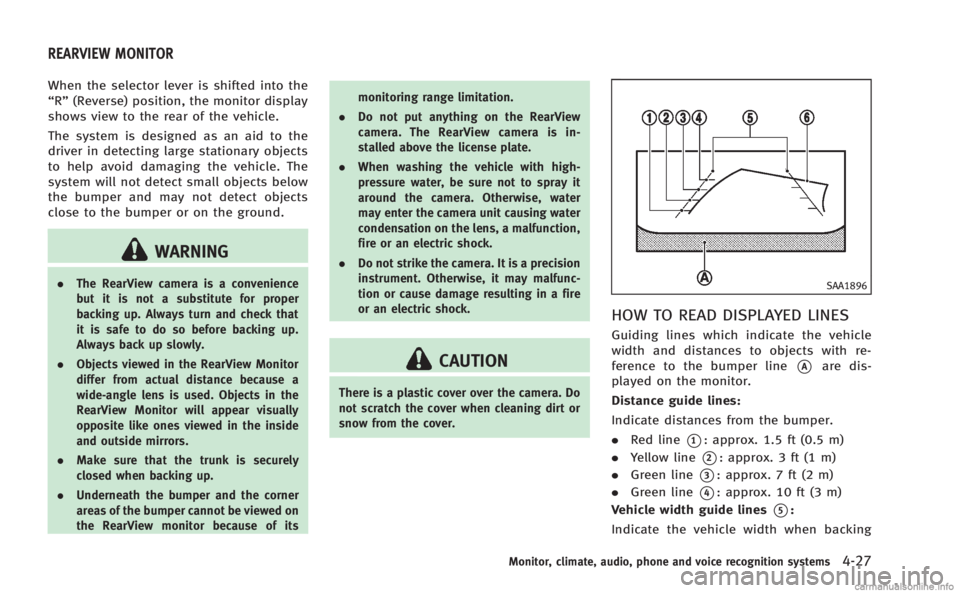
HOW TO READ DISPLAYED LINES
Guiding lines which indicate the vehicle
width and distances to objects with re-
ference to the bumper line
*Aare dis-
played on the monitor.
Distance guide lines:
Indicate distances from the bumper.
. Red line
*1: approx. 1.5 ft (0.5 m)
. Yellow line
*2: approx. 3 ft (1 m)
. Green line
*3: approx. 7 ft (2 m)
. Green line
*4: approx. 10 ft (3 m)
Vehicle width guide lines
*5:
Indicate the vehicle width when backing
Monitor, climate, audio, phone and voice recognition systems4-27
REARVIEW MONITOR
Page 199 of 522
4-28Monitor, climate, audio, phone and voice recognition systems
up.
Predictive course lines
*6:
Indicate the predictive course when back-
ing up. The predictive course lines will be
displayed on the monitor when the selector
lever is in the “R”(Reverse) position and
the steering wheel is turned. The predictive
course lines will move depending on how
much the steering wheel is turned and will
not be displayed while the steering wheel
is in the neutral position.
HOW TO PARK WITH PREDICTIVE
COURSE LINES
WARNING
. Always turn and check that it is safe to
park your car before backing up. Always
back up slowly.
. Use the displayed lines as a reference.
The lines are highly affected by the
number of occupants, fuel level, vehicle
position, road condition and road grade.
. If the tires are replaced with different
sized tires, the predictive course line
may not be displayed correctly. .
On a snow-covered or slippery road,
there may be a difference between the
predictive course line and the actual
course line.
. If predictive course lines are displayed
incorrectly, drive the vehicle on a
straight road for 110 yd (100 m) at a
speed of above 20 MPH (30 km/h).
. The displayed lines will appear slightly
off to the right because the RearView
camera is not installed in the rear center
of the vehicle.
. The distance guide line and the vehicle
width guide line should be used as a
reference only when the vehicle is on a
level paved surface. The distance viewed
on the monitor is for reference only and
may be different than the actual distance
between the vehicle and displayed ob-
jects.
. When backing up the vehicle up a hill,
objects viewed in the monitor are further
than they appear. When backing up the
vehicle down a hill, objects viewed in the
monitor are closer than they appear. Use
the inside mirror or glance over your
shoulder to properly judge distances to
other objects.
The vehicle width and predictive course
lines are wider than the actual width and
course.
Page 200 of 522
SAA1897
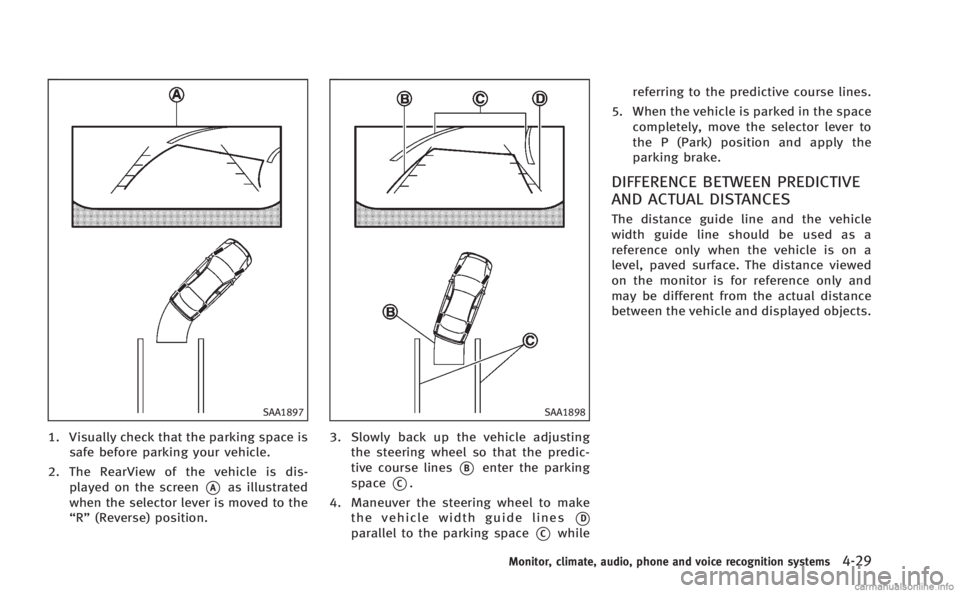
1. Visually check that the parking space issafe before parking your vehicle.
2. The RearView of the vehicle is dis- played on the screen
*Aas illustrated
when the selector lever is moved to the
“R” (Reverse) position.
SAA1898
3. Slowly back up the vehicle adjusting
the steering wheel so that the predic-
tive course lines
*Benter the parking
space
*C.
4. Maneuver the steering wheel to make the vehicle width guide lines
*D
parallel to the parking space*Cwhile referring to the predictive course lines.
5. When the vehicle is parked in the space completely, move the selector lever to
the P (Park) position and apply the
parking brake.
DIFFERENCE BETWEEN PREDICTIVE
AND ACTUAL DISTANCES
The distance guide line and the vehicle
width guide line should be used as a
reference only when the vehicle is on a
level, paved surface. The distance viewed
on the monitor is for reference only and
may be different from the actual distance
between the vehicle and displayed objects.
Monitor, climate, audio, phone and voice recognition systems4-29
Page 201 of 522
4-30Monitor, climate, audio, phone and voice recognition systems
SAA1899
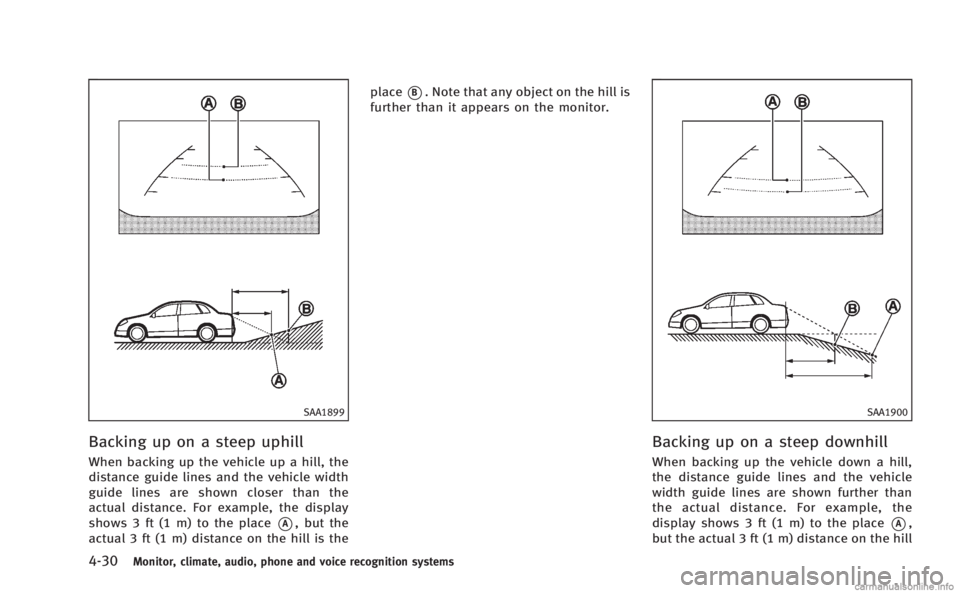
Backing up on a steep uphill
When backing up the vehicle up a hill, the
distance guide lines and the vehicle width
guide lines are shown closer than the
actual distance. For example, the display
shows 3 ft (1 m) to the place
*A, but the
actual 3 ft (1 m) distance on the hill is the place
*B. Note that any object on the hill is
further than it appears on the monitor.
SAA1900
Backing up on a steep downhill
When backing up the vehicle down a hill,
the distance guide lines and the vehicle
width guide lines are shown further than
the actual distance. For example, the
display shows 3 ft (1 m) to the place
*A,
but the actual 3 ft (1 m) distance on the hill
Page 202 of 522
is the place*B. Note that any object on
the hill is closer than it appears on the
monitor.
SAA1923
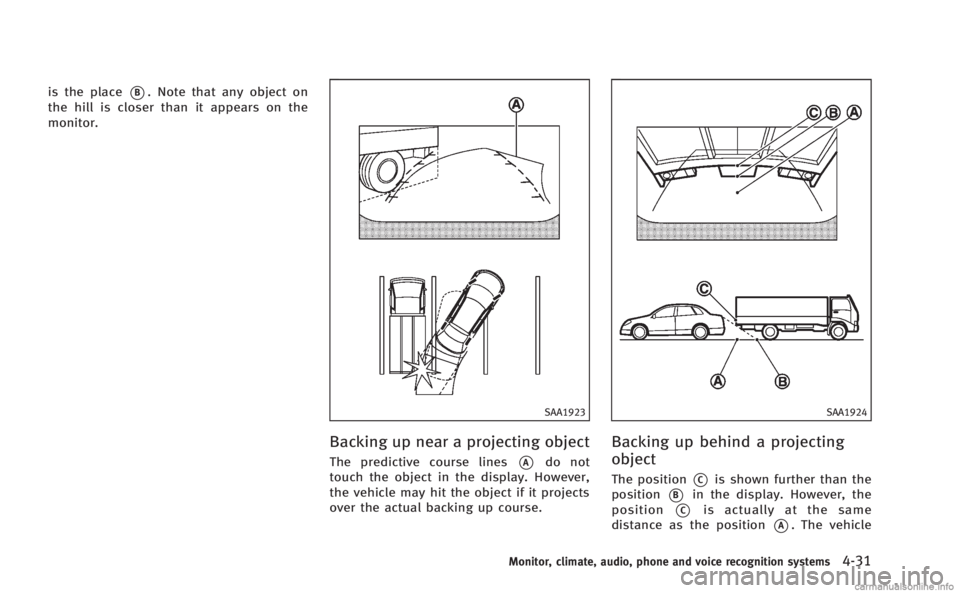
Backing up near a projecting object
The predictive course lines*Ado not
touch the object in the display. However,
the vehicle may hit the object if it projects
over the actual backing up course.
SAA1924
Backing up behind a projecting
object
The position*Cis shown further than the
position
*Bin the display. However, the
position
*Cis actually at the same
distance as the position
*A. The vehicle
Monitor, climate, audio, phone and voice recognition systems4-31
Page 203 of 522
4-32Monitor, climate, audio, phone and voice recognition systems
may hit the object when backing up to the
position
*Aif the object projects over the
actual backing up course.
SAA2404
Models with navigation system
SAA2606
Models without navigation system
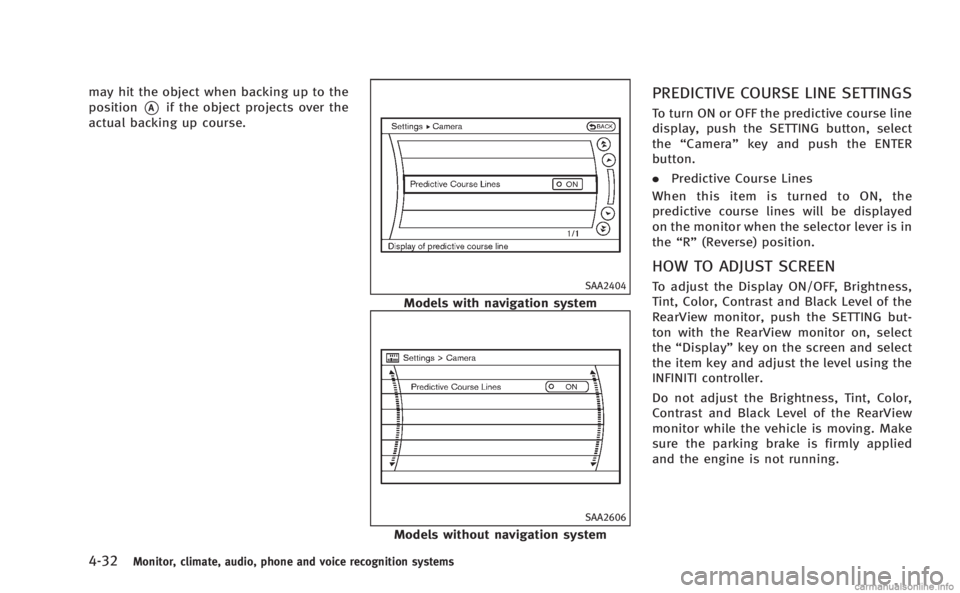
PREDICTIVE COURSE LINE SETTINGS
To turn ON or OFF the predictive course line
display, push the SETTING button, select
the “Camera” key and push the ENTER
button.
. Predictive Course Lines
When this item is turned to ON, the
predictive course lines will be displayed
on the monitor when the selector lever is in
the “R” (Reverse) position.
HOW TO ADJUST SCREEN
To adjust the Display ON/OFF, Brightness,
Tint, Color, Contrast and Black Level of the
RearView monitor, push the SETTING but-
ton with the RearView monitor on, select
the“Display” key on the screen and select
the item key and adjust the level using the
INFINITI controller.
Do not adjust the Brightness, Tint, Color,
Contrast and Black Level of the RearView
monitor while the vehicle is moving. Make
sure the parking brake is firmly applied
and the engine is not running.
Page 204 of 522
SONAR INDICATOR (if so equipped)
When the“Sonar Display” key is ON, the
sonar indicator will appear in the display.
(See“How to use SETTING button” earlier in
this section and “Sonar system”in the“5.
Starting and driving” section.)
OPERATING TIPS
.When the selector lever is shifted to the
“ R ” (Reverse) position, the monitor
screen automatically changes to the
RearView monitor mode. However, the
radio can be heard.
. It may take some time until the Rear-
View monitor is displayed after the
selector lever has been shifted to “R”
from another position or to another
position from “R ”. Objects may be
distorted momentarily until the Rear-
View monitor screen is displayed com-
pletely.
. When the temperature is extremely high
or low, the screen may not clearly
display objects. This is not a malfunc-
tion.
. When strong light directly enters the
camera, objects may not be displayed
clearly. This is not a malfunction. .
Vertical lines may be seen in objects on
the screen. This is due to strong
reflected light from the bumper. This
is not a malfunction.
. The screen may flicker under fluores-
cent light. This is not a malfunction.
. The colors of objects on the RearView
monitor may differ somewhat from
those of the actual object.
. Objects on the monitor may not be clear
in a dark place or at night. This is not a
malfunction.
. If dirt, rain or snow attaches to the
camera, the RearView monitor may not
clearly display objects. Clean the cam-
era.
. Do not use alcohol, benzine or thinner
to clean the camera. This will cause
discoloration. To clean the camera,
wipe with a cloth dampened with
diluted mild cleaning agent and then
wipe with a dry cloth.
. Do not damage the camera as the
monitor screen may be adversely af-
fected.
. Do not use wax on the camera window.
Wipe off any wax with a clean cloth
dampened with mild detergent diluted
with water.
Monitor, climate, audio, phone and voice recognition systems4-33