warning light INFINITI M 2013 Manual PDF
[x] Cancel search | Manufacturer: INFINITI, Model Year: 2013, Model line: M, Model: INFINITI M 2013Pages: 522, PDF Size: 3.72 MB
Page 343 of 522
5-32Starting and driving
SSD0453
LANE CAMERA UNIT MAINTENANCE
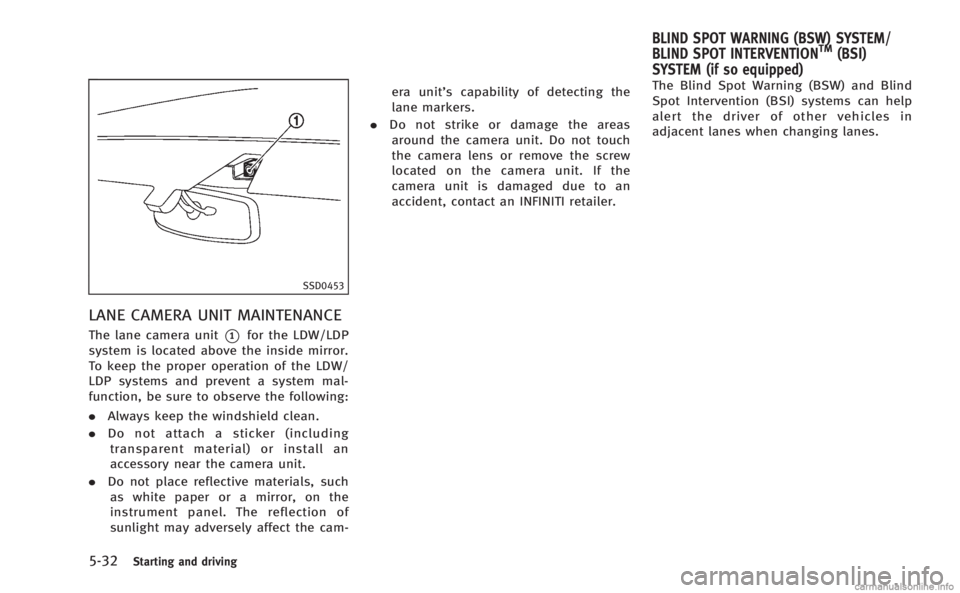
The lane camera unit*1for the LDW/LDP
system is located above the inside mirror.
To keep the proper operation of the LDW/
LDP systems and prevent a system mal-
function, be sure to observe the following:
. Always keep the windshield clean.
. Do not attach a sticker (including
transparent material) or install an
accessory near the camera unit.
. Do not place reflective materials, such
as white paper or a mirror, on the
instrument panel. The reflection of
sunlight may adversely affect the cam- era unit’s capability of detecting the
lane markers.
. Do not strike or damage the areas
around the camera unit. Do not touch
the camera lens or remove the screw
located on the camera unit. If the
camera unit is damaged due to an
accident, contact an INFINITI retailer. The Blind Spot Warning (BSW) and Blind
Spot Intervention (BSI) systems can help
alert the driver of other vehicles in
adjacent lanes when changing lanes.
BLIND SPOT WARNING (BSW) SYSTEM/
BLIND SPOT INTERVENTIONTM(BSI)
SYSTEM (if so equipped)
Page 344 of 522

SSD1027
The BSW system uses radar sensors*1
installed near the rear bumper to detect
other vehicles beside your vehicle in an
adjacent lane. In addition to the radar
sensors, the BSI system uses a camera
*2
installed behind the windshield to monitor
the lane markers of your traveling lane.
SSD1030
Detection zone
The radar sensors can detect vehicles on
either side of your vehicle within the
detection zone shown as illustrated. This
detection zone starts from the outside
mirror of your vehicle and extends approxi-
mately 10 ft (3.0 m) behind the rear
bumper, and approximately 10 ft (3.0 m)
sideways.
The BSW system operates above approxi-
mately 20 MPH (32 km/h). If the radar
sensors detects vehicles in the detection
zone, the BSW/BSI indicator light illumi-
nates. If the driver then activates the turn
signal, a chime will sound twice and the
BSW/BSI indicator light will flash. The BSI system operates above approxi-
mately 37 MPH (60 km/h). If the system
detects a vehicle in the detection zone and
your vehicle is approaching the lane
marker, the BSI system provides an audi-
ble warning (three times), flashes the
BSW/BSI indicator light and slightly ap-
plies the brakes for a short period of time
on one side to help return the vehicle back
to the traveling lane. The BSI system
provides an audible warning and turns on
or flashes the BSW/BSI indicator light even
if the BSW system is off.WARNING
.
The BSW and BSI systems are not a
replacement for proper driving procedure
and are not designed to prevent contact
with vehicles or objects. When changing
lanes, always use the side and rear
mirrors and turn and look in the direc-
tion you will move to ensure it is safe to
change lanes. Never rely solely on the
BSW or BSI system.
. Using the BSI system under some road,
lane marker or weather conditions could
lead to improper system operation. Al-
ways rely on your own steering and
Starting and driving5-33
Page 345 of 522

5-34Starting and driving
braking operation to avoid accidents.
. The BSW and BSI systems may not
provide a warning or brake control for
vehicles that pass through the detection
zone quickly.
SSD1028
BSW/BSI indicator light
BSW SYSTEM OPERATION
If the radar sensors detect vehicles in the
detection zone, the BSW/BSI indicator
light located inside the outside mirrors
illuminates. If the turn signal is then
activated, the BSW/BSI indicator light
flashes and a chime sounds twice. The
indicator light continues to flash until the
detected vehicles leave the detection zone.
The BSW/BSI indicator lights illuminate for
a few seconds when the ignition switch is
pushed to the ON position.
The brightness of the BSW/BSI indicator
lights is adjusted automatically depending on the brightness of the ambient light.
A chime sounds if the radar sensors have
already detected vehicles when the driver
activates the turn signal. If a vehicle comes
into the detection zone after the driver
activates the turn signal, then only the
BSW/BSI indicator light flashes and no
chime sounds. (See
“BSW/BSI driving
situations” later in this section.)
Page 347 of 522
5-36Starting and driving
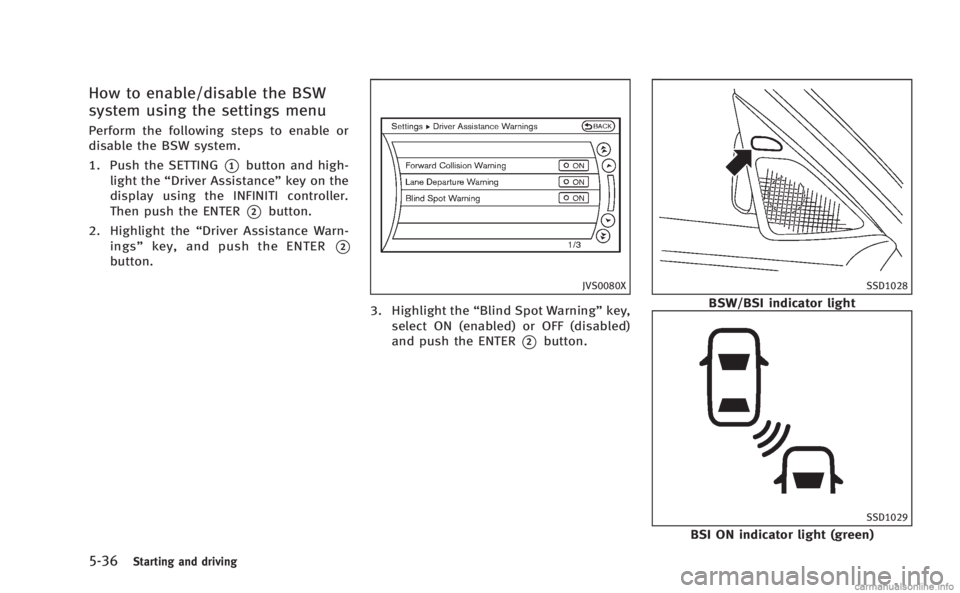
How to enable/disable the BSW
system using the settings menu
Perform the following steps to enable or
disable the BSW system.
1. Push the SETTING
*1button and high-
light the “Driver Assistance” key on the
display using the INFINITI controller.
Then push the ENTER
*2button.
2. Highlight the “Driver Assistance Warn-
ings” key, and push the ENTER
*2
button.
JVS0080X
3. Highlight the “Blind Spot Warning” key,
select ON (enabled) or OFF (disabled)
and push the ENTER
*2button.
SSD1028
BSW/BSI indicator light
SSD1029
BSI ON indicator light (green)
Page 348 of 522

SSD0938
Dynamic driver assistance switch
BSI SYSTEM OPERATION
If the radar sensors detect vehicles in the
detection zone, the BSW/BSI indicator
light located inside the outside mirrors
illuminates. If your vehicle is approaching
a lane marker, the BSW/BSI indicator light
flashes and an audible warning will sound
three times. Then the system applies the
brakes on one side of the vehicle for a
short period of time to help return the
vehicle back to the center of the lane. BSI
operates regardless of turn signal usage.NOTE:
.
Warning and brake control will only be
activated if the BSW/BSI indicator light
is already illuminated when your vehi-
cle approaches a lane marker. If
another vehicle comes into the detec-
tion zone after your vehicle has
crossed a lane marker, no warning or
brake control will be activated. (See
“BSW/BSI driving situations” later in
this section.)
. The BSI system is typically activated
earlier than the Lane Departure Pre-
vention (LDP) system when your vehi-
cle is approaching a lane marker.
The BSI system turns on when the dynamic
driver assistance switch on the steering
wheel is pushed when the “Blind Spot
Intervention” is enabled in the settings
menu on the center display. The BSI ON
indicator light (green) on the instrument
panel illuminates when the BSI system is
turned on.
The BSI system provides an audible warn-
ing and flashes the indicator light when
BSI is activated even if the BSW system is
off.
SSD0939
With navigation system
SSD1001
Starting and driving5-37
Page 349 of 522

5-38Starting and driving
How to enable/disable the BSI
system using the settings menu
Perform the following steps to enable or
disable the BSI system.
1. Push the SETTING
*1button and high-
light the “Driver Assistance” key on the
display using the INFINITI controller.
Then push the ENTER
*2button.
2. Highlight the “Dynamic Assistance Set-
tings” key, and push the ENTER
*2
button.
SSD1002
3. Highlight the “Blind Spot Intervention”
key, select ON (enabled) or OFF (dis-
abled) and push the ENTER
*2button.
For the LDP and DCA systems, see “Lane
Departure Prevention (LDP) system” earlier
in this section and “Distance Control Assist
(DCA) system” later in this section.
WARNING
.Do not use the BSI system under the
following conditions because the system
may not function properly.
—During bad weather (for example, rain, fog, snow, wind, etc.)
—When driving on slippery roads,
such as on ice or snow, etc.
—When driving on winding or uneven roads.
—When there is a lane closure due to
road repairs.
—When driving in a makeshift lane.
—When driving on roads where thelane width is too narrow.
—When driving with a tire that is notwithin normal tire conditions (for
example, tire wear, low tire pressure,
installation of spare tire, tire chains,
non-standard wheels).
—When the vehicle is equipped withnon-original brake parts or suspen-
sion parts.
. Excessive noise (for example, audio
system volume, open vehicle window)
will interfere with the chime sound, and
it may not be heard.
.The radar sensors may not be able to
detect and activate BSI/BSW when
certain objects are present such as:
Page 355 of 522
5-44Starting and driving
SSD1040
NOTE:
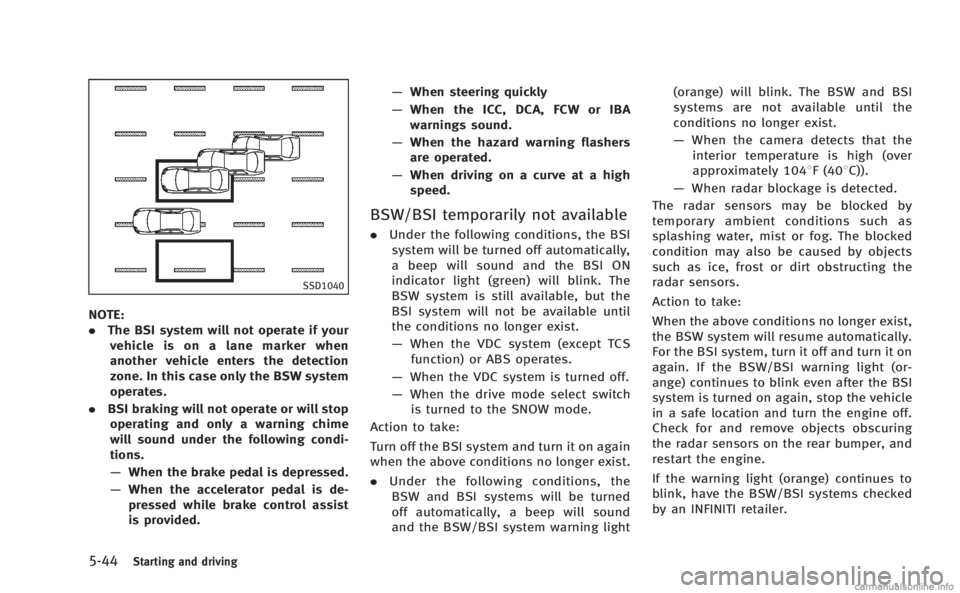
.The BSI system will not operate if your
vehicle is on a lane marker when
another vehicle enters the detection
zone. In this case only the BSW system
operates.
. BSI braking will not operate or will stop
operating and only a warning chime
will sound under the following condi-
tions.
— When the brake pedal is depressed.
— When the accelerator pedal is de-
pressed while brake control assist
is provided. —
When steering quickly
— When the ICC, DCA, FCW or IBA
warnings sound.
— When the hazard warning flashers
are operated.
— When driving on a curve at a high
speed.
BSW/BSI temporarily not available
. Under the following conditions, the BSI
system will be turned off automatically,
a beep will sound and the BSI ON
indicator light (green) will blink. The
BSW system is still available, but the
BSI system will not be available until
the conditions no longer exist.
— When the VDC system (except TCS
function) or ABS operates.
— When the VDC system is turned off.
— When the drive mode select switch
is turned to the SNOW mode.
Action to take:
Turn off the BSI system and turn it on again
when the above conditions no longer exist.
. Under the following conditions, the
BSW and BSI systems will be turned
off automatically, a beep will sound
and the BSW/BSI system warning light (orange) will blink. The BSW and BSI
systems are not available until the
conditions no longer exist.
—
When the camera detects that the
interior temperature is high (over
approximately 1048F (408C)).
— When radar blockage is detected.
The radar sensors may be blocked by
temporary ambient conditions such as
splashing water, mist or fog. The blocked
condition may also be caused by objects
such as ice, frost or dirt obstructing the
radar sensors.
Action to take:
When the above conditions no longer exist,
the BSW system will resume automatically.
For the BSI system, turn it off and turn it on
again. If the BSW/BSI warning light (or-
ange) continues to blink even after the BSI
system is turned on again, stop the vehicle
in a safe location and turn the engine off.
Check for and remove objects obscuring
the radar sensors on the rear bumper, and
restart the engine.
If the warning light (orange) continues to
blink, have the BSW/BSI systems checked
by an INFINITI retailer.
Page 356 of 522
BSW/BSI MALFUNCTION
When the BSW/BSI systems malfunction,
they will be turned off automatically, a
beep will sound and the BSW/BSI system
warning light (orange) will illuminate.
Action to take:
Stop the vehicle in a safe location, turn the
engine off and restart the engine.
If the warning light (orange) continues to
illuminate, have the BSW/BSI systems
checked by an INFINITI retailer.
SSD1027
SYSTEM MAINTENANCE
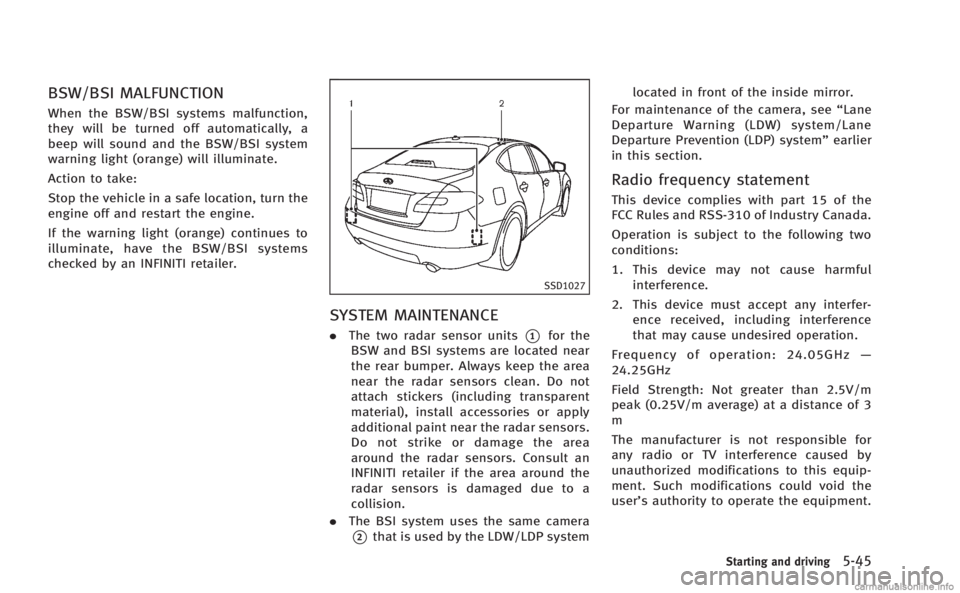
.The two radar sensor units*1for the
BSW and BSI systems are located near
the rear bumper. Always keep the area
near the radar sensors clean. Do not
attach stickers (including transparent
material), install accessories or apply
additional paint near the radar sensors.
Do not strike or damage the area
around the radar sensors. Consult an
INFINITI retailer if the area around the
radar sensors is damaged due to a
collision.
. The BSI system uses the same camera
*2that is used by the LDW/LDP system located in front of the inside mirror.
For maintenance of the camera, see “Lane
Departure Warning (LDW) system/Lane
Departure Prevention (LDP) system” earlier
in this section.
Radio frequency statement
This device complies with part 15 of the
FCC Rules and RSS-310 of Industry Canada.
Operation is subject to the following two
conditions:
1. This device may not cause harmful interference.
2. This device must accept any interfer- ence received, including interference
that may cause undesired operation.
Frequency of operation: 24.05GHz —
24.25GHz
Field Strength: Not greater than 2.5V/m
peak (0.25V/m average) at a distance of 3
m
The manufacturer is not responsible for
any radio or TV interference caused by
unauthorized modifications to this equip-
ment. Such modifications could void the
user’s authority to operate the equipment.
Starting and driving5-45
Page 361 of 522
5-50Starting and driving
SSD0943
PRECAUTIONS ON VEHICLE-TO-VE-
HICLE DISTANCE CONTROL MODE
The system is intended to enhance the
operation of the vehicle when following a
vehicle traveling in the same lane and
direction.
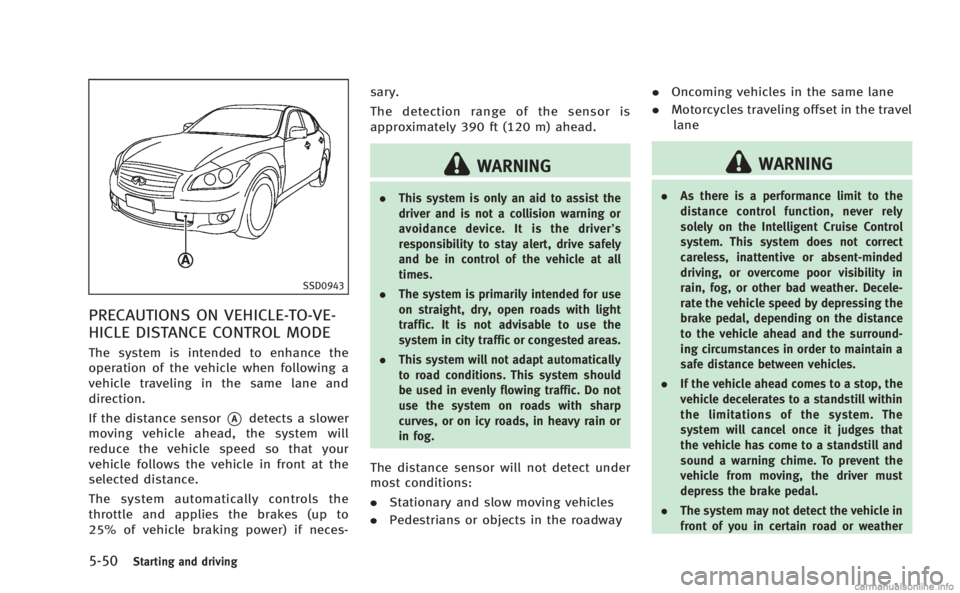
If the distance sensor
*Adetects a slower
moving vehicle ahead, the system will
reduce the vehicle speed so that your
vehicle follows the vehicle in front at the
selected distance.
The system automatically controls the
throttle and applies the brakes (up to
25% of vehicle braking power) if neces- sary.
The detection range of the sensor is
approximately 390 ft (120 m) ahead.
WARNING
.
This system is only an aid to assist the
driver and is not a collision warning or
avoidance device. It is the driver’ s
responsibility to stay alert, drive safely
and be in control of the vehicle at all
times.
. The system is primarily intended for use
on straight, dry, open roads with light
traffic. It is not advisable to use the
system in city traffic or congested areas.
. This system will not adapt automatically
to road conditions. This system should
be used in evenly flowing traffic. Do not
use the system on roads with sharp
curves, or on icy roads, in heavy rain or
in fog.
The distance sensor will not detect under
most conditions:
.Stationary and slow moving vehicles
. Pedestrians or objects in the roadway .
Oncoming vehicles in the same lane
. Motorcycles traveling offset in the travel
lane
WARNING
. As there is a performance limit to the
distance control function, never rely
solely on the Intelligent Cruise Control
system. This system does not correct
careless, inattentive or absent-minded
driving, or overcome poor visibility in
rain, fog, or other bad weather. Decele-
rate the vehicle speed by depressing the
brake pedal, depending on the distance
to the vehicle ahead and the surround-
ing circumstances in order to maintain a
safe distance between vehicles.
. If the vehicle ahead comes to a stop, the
vehicle decelerates to a standstill within
the limitations of the system. The
system will cancel once it judges that
the vehicle has come to a standstill and
sound a warning chime. To prevent the
vehicle from moving, the driver must
depress the brake pedal.
. The system may not detect the vehicle in
front of you in certain road or weather
Page 369 of 522
5-58Starting and driving
SSD0983
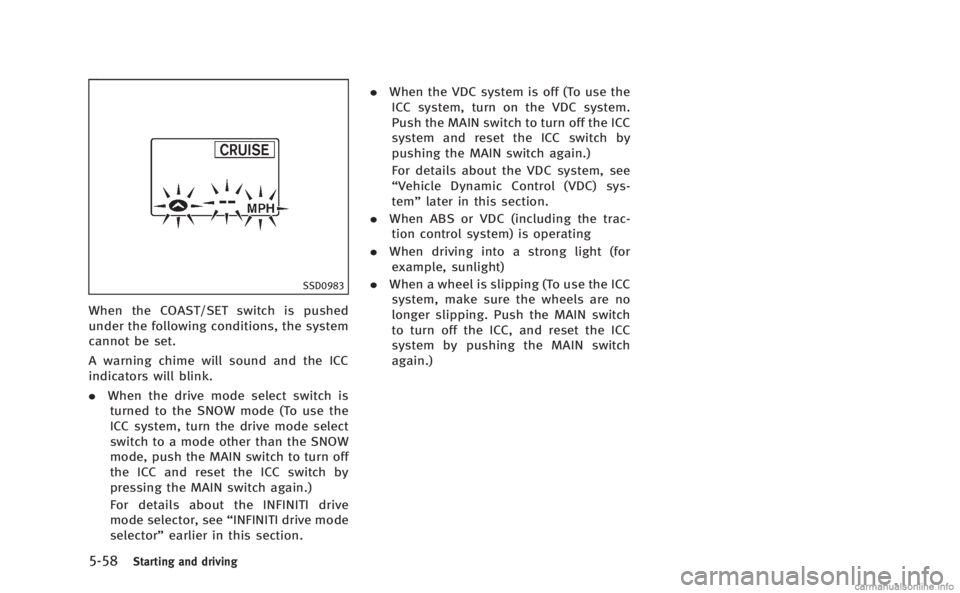
When the COAST/SET switch is pushed
under the following conditions, the system
cannot be set.
A warning chime will sound and the ICC
indicators will blink.
.When the drive mode select switch is
turned to the SNOW mode (To use the
ICC system, turn the drive mode select
switch to a mode other than the SNOW
mode, push the MAIN switch to turn off
the ICC and reset the ICC switch by
pressing the MAIN switch again.)
For details about the INFINITI drive
mode selector, see “INFINITI drive mode
selector” earlier in this section. .
When the VDC system is off (To use the
ICC system, turn on the VDC system.
Push the MAIN switch to turn off the ICC
system and reset the ICC switch by
pushing the MAIN switch again.)
For details about the VDC system, see
“Vehicle Dynamic Control (VDC) sys-
tem” later in this section.
. When ABS or VDC (including the trac-
tion control system) is operating
. When driving into a strong light (for
example, sunlight)
. When a wheel is slipping (To use the ICC
system, make sure the wheels are no
longer slipping. Push the MAIN switch
to turn off the ICC, and reset the ICC
system by pushing the MAIN switch
again.)