lock INFINITI M 2013 Manual Online
[x] Cancel search | Manufacturer: INFINITI, Model Year: 2013, Model line: M, Model: INFINITI M 2013Pages: 522, PDF Size: 3.72 MB
Page 313 of 522
Vehicle-to-vehicle distance control
mode operation............................................. 5-51
Conventional (fixed speed) cruise
control mode ................................................. 5-66
Preview function (for Intelligent Cruise Control
system equipped models) ............................. 5-69
Distance Control Assist (DCA) system (if
so equipped) ..................................................... 5-70
Precautions on Distance Control
Assist system ................................................ 5-70
Distance Control Assist operation .................. 5-72
Forward Collision Warning (FCW) system (if
so equipped) ..................................................... 5-82 Precautions on FCW system ........................... 5-83
Intelligent Brake Assist (IBA) system (if
so equipped) ..................................................... 5-86 Precautions on IBA system ............................ 5-87
Break-in schedule .............................................. 5-90
Increasing fuel economy .................................... 5-90
Intelligent All-Wheel Drive (AWD) (if
so equipped) ..................................................... 5-90
Parking/parking on hills .................................... 5-92
Sonar system (if so equipped) ........................... 5-93 Sonar indicator.............................................. 5-94
Sonar system OFF switch ............................... 5-95
Power steering................................................... 5-95 Brake system .................................................... 5-95
Braking precautions ..................................... 5-95
Parking brake break-in................................. 5-96
Brake assist ...................................................... 5-96
Brake assist................................................. 5-96
Preview function (Intelligent Cruise Control
system equipped models) ............................ 5-96
Anti-lock Braking System (ABS) .................... 5-99
Vehicle Dynamic Control (VDC) system ............ 5-100 Active trace control (if so equipped)........... 5-101
Rise-up and build-up ................................. 5-101
Brake force distribution ............................. 5-101
Hill Start Assist system ................................... 5-102
4 Wheel Active Steer (4WAS) system (if
so equipped)................................................... 5-103
Cold weather driving ....................................... 5-103 Freeing a frozen door lock ......................... 5-103
Antifreeze .................................................. 5-103
Battery....................................................... 5-103
Draining of coolant water........................... 5-104
Tire equipment .......................................... 5-104
Special winter equipment .......................... 5-104
Driving on snow or ice ............................... 5-104
Engine block heater (if so equipped).......... 5-105
Active noise control......................................... 5-106
Page 314 of 522

WARNING
.Do not leave children or adults who
would normally require the support of
others alone in your vehicle. Pets should
not be left alone either. They could
accidentally injure themselves or others
through inadvertent operation of the
vehicle. Also, on hot, sunny days,
temperatures in a closed vehicle could
quickly become high enough to cause
severe or possibly fatal injuries to
people or animals.
. Closely supervise children when they are
around cars to prevent them from play-
ing and becoming locked in the trunk
where they could be seriously injured.
Keep the car locked, with the rear
seatback and trunk lid securely latched
when not in use, and prevent children’s
access to car keys.
EXHAUST GAS (carbon monoxide)
WARNING
.Do not breathe exhaust gases; they
contain colorless and odorless carbon
monoxide. Carbon monoxide is danger-
ous. It can cause unconsciousness or
death.
. If you suspect that exhaust fumes are
entering the vehicle, drive with all
windows fully open, and have the
vehicle inspected immediately.
. Do not run the engine in closed spaces
such as a garage.
. Do not park the vehicle with the engine
running for any extended length of time.
. Keep the trunk lid closed while driving,
otherwise exhaust gases could be drawn
into the passenger compartment. If you
must drive with the trunk lid open,
follow these precautions:
1) Open all the windows.
2) Set the
air recirculation to off
and the fan control to high to
circulate the air. .
If electrical wiring or other cable con-
nections must pass to a trailer through
the seal on the trunk lid or the body,
follow the manufacturer’s recommenda-
tion to prevent carbon monoxide entry
into the vehicle.
. The exhaust system and body should be
inspected by a qualified mechanic when-
ever:
—The vehicle is raised for service.
—You suspect that exhaust fumes are
entering into the passenger compart-
ment.
—You notice a change in the sound of
the exhaust system.
—You have had an accident involvingdamage to the exhaust system,
underbody, or rear of the vehicle.
Starting and driving5-3
PRECAUTIONS WHEN STARTING AND
DRIVING
Page 321 of 522

5-10Starting and driving
SSD0659
OPERATING RANGE FOR ENGINE
START FUNCTION
The Intelligent Key can only be used for
starting the engine when the Intelligent
Key is within the specified operating range.
When the Intelligent Key battery is almost
discharged or strong radio waves are
present near the operating location, the
Intelligent Key system’s operating range
becomes narrower and may not function
properly.
If the Intelligent Key is within the operating
range, it is possible for anyone, even
someone who does not carry the Intelligent Key, to push the ignition switch to start the
engine.
.
The trunk area is not included in the
operating range but the Intelligent Key
may function.
. If the Intelligent Key is placed on the
instrument panel, rear parcel shelf,
inside the glove box or door pocket,
the Intelligent Key may not function.
. If the Intelligent Key is placed near the
door or window outside the vehicle, the
Intelligent Key may function.
SSD1021
PUSH-BUTTON IGNITION SWITCH
OPERATION
When the ignition switch is pushed without
depressing the brake pedal, the ignition
switch position will change as follows:
. Push center once to change to ACC.
. Push center two times to change to ON.
. Push center three times to change to
OFF. (No position illuminates.)
. Push center four times to return to ACC.
. Open or close any door to return to
LOCK during the OFF position.
Page 322 of 522

If the battery of the vehicle is discharged,
the push-button ignition switch cannot be
turned from the LOCK position.
Some indicators and warnings for opera-
tion are displayed on the dot matrix liquid
crystal display between the speedometer
and tachometer. (See“Dot matrix liquid
crystal display” in the“2. Instruments and
controls” section.)
The ignition lock is designed so that the
ignition switch position cannot be switched
to LOCK until the selector lever is moved to
the P (Park) position.
When the ignition switch cannot be pushed
toward the LOCK position, proceed as
follows:
1. Move the selector lever into the P (Park) position.
2. Push the ignition switch to the OFF position. The ignition switch position
indicator will not illuminate.
3. Open the door. The ignition switch will change to the LOCK position.
The selector lever can be moved from the P
(Park) position if the ignition switch is in
the ON position and the brake pedal is
depressed.STEERING LOCK (if so equipped)
In order for the steering wheel to be
locked, it must be turned about 1/8 of a
right or left turn from the straight up
position.
To lock the steering wheel, push the
ignition switch to the OFF position. To
unlock the steering wheel, push the
ignition switch. If the steering lock release
malfunction indicator appears on the dot
matrix liquid crystal display, push the
push-button ignition switch again while
lightly turning the steering wheel right
and left. (See “Dot matrix liquid crystal
display” in the“2. Instruments and con-
trols” section.)
PUSH-BUTTON IGNITION SWITCH
POSITIONS
LOCK (Normal parking position)
The ignition switch can only be locked in
this position.
The ignition switch will be unlocked when
it is pushed to the ACC position while
carrying the Intelligent Key.
ACC (Accessories)
This position activates electrical acces-
sories such as the radio, when the engine
is not running.
ON (Normal operating position)
This position turns on the ignition system
and electrical accessories.
OFF
The engine can be turned off in this
position.
The ignition lock is designed so that the
ignition switch cannot be switched to the
LOCK position until the selector lever is
moved to the P (Park) position.
CAUTION
Do not leave the vehicle with the push-
button ignition switch in ACC or ON posi-
tions when the engine is not running for an
extended period. This can discharge the
battery.
Starting and driving5-11
Page 324 of 522

.Make sure the area around the vehicle
is clear.
. Check fluid levels such as engine oil,
coolant, brake fluid and window
washer fluid as frequently as possible,
or at least whenever you refuel.
. Check that all windows and lights are
clean.
. Visually inspect tires for their appear-
ance and condition. Also check tires for
proper inflation.
. Lock all doors.
. Position seat and adjust head re-
straints.
. Adjust inside and outside mirrors.
. Fasten seat belts and ask all passen-
gers to do likewise.
. Check the operation of warning lights
when the ignition switch is pushed to
the ON position. (See “Warning/indica-
tor lights and audible reminders” in the
“2. Instruments and controls” section.)1. Apply the parking brake.
2. Move the selector lever to the P (Park)
or N (Neutral) position. (P is recom-
mended.)
The starter is designed not to operate
unless the selector lever is in either of
the above positions.
3. Push the ignition switch to the ON position. Depress the brake pedal and
push the ignition switch to start the
engine.
To start the engine immediately, push
and release the ignition switch while
depressing the brake pedal with the
ignition switch in any position.
.If the engine is very hard to start inextremely cold weather or when
restarting, depress the accelerator
pedal a little (approximately 1/3 to
the floor) and while holding, crank
the engine. Release the accelerator
pedal when the engine starts.
.If the engine is very hard to startbecause it is flooded, depress the
accelerator pedal all the way to the
floor and hold it. Push the ignition
switch to the ON position to start
cranking the engine. After 5 or 6
seconds, stop cranking by pushing the ignition switch to OFF. After
cranking the engine, release the
accelerator pedal. Crank the engine
with your foot off the accelerator
pedal
by depressing the brake pedal
and pushing the push-button igni-
tion switch to start the engine. If the
engine starts, but fails to run, repeat
the above procedure.
CAUTION
Do not operate the starter for more than 15
seconds at a time. If the engine does not
start, push the ignition switch to OFF and
wait 10 seconds before cranking again,
otherwise the starter could be damaged.
4. Warm-up
Allow the engine to idle for at least 30
seconds after starting. Do not race the
engine while warming it up. Drive at
moderate speed for a short distance
first, especially in cold weather. In cold
weather, keep the engine running for a
minimum of 2 - 3 minutes before
shutting it off. Starting and stopping
the engine over a short period of time
may make the vehicle more difficult to
Starting and driving5-13
BEFORE STARTING THE ENGINE STARTING THE ENGINE
Page 325 of 522

5-14Starting and driving
start.
When racing the engine up to 4,000
rpm (VK56VD engine) or 4,500 rpm
(VQ37VHR engine) or more under no
load condition, the engine will enter the
fuel cut mode.
5. To stop the engine, shift the selector lever to the P (Park) position and push
the ignition switch to the OFF position.
In preparation for the next engine start,
the engine may have a slightly delayed
shutoff after pushing the ignition
switch to the OFF position, depending
on the driving conditions (VK56VD
engine models).
NOTE:
Care should be taken to avoid situations
that can lead to potential battery dis-
charge and potential no-start conditions
such as:
1. Installation or extended use of electro-
nic accessories that consume battery
power when the engine is not running
(Phone chargers, GPS, DVD players,
etc.)
2. Vehicle is not driven regularly and/or
only driven short distances. In these cases, the battery may need to be
charged to maintain battery health.AUTOMATIC TRANSMISSION
The automatic transmission in your vehicle
is electronically controlled by a transmis-
sion control module to produce maximum
efficiency and smooth operation.
Shown on the following pages are the
recommended operating procedures for
this transmission. Follow these procedures
for maximum vehicle performance and
driving enjoyment.
Starting the vehicle
After starting the engine, fully depress the
foot brake pedal and push the selector
lever button before shifting the selector
lever to the R (Reverse), N (Neutral), D
(Drive) or Manual shift mode position. Be
sure the vehicle is fully stopped before
attempting to shift the selector lever.
This automatic transmission model is
designed so that the foot brake pedal
must be depressed before shifting from P
(Park) to any drive position while the
ignition switch position is ON.
The selector lever cannot be moved out of
the P (Park) position and into any of the
other gear positions if the ignition switch
is pushed to the LOCK, OFF or ACC
position.
DRIVING THE VEHICLE
Page 328 of 522

The transmission shifts to the lower range.
When canceling the manual shift mode,
return the selector lever to the D (Drive)
position. The transmission returns to the
normal driving mode.
When you pull the paddle shifter while in
the D (Drive) position, the transmission will
shift to the upper or lower range tempora-
rily. The transmission will automatically
return to the D (Drive) position after a short
period of time. If you want to return to the
D (Drive) position manually, pull and hold
the paddle shifter for about 1.5 seconds.
In the manual shift mode, the shift range is
displayed on the position indicator in the
meter.
Shift ranges up or down one by one as
follows:
M1?
/M2?
/M3?
/M4?
/M5?
/M6?
/M7
M7 (7th):
Use these positions for all normal forward
driving at highway speeds.
M6 (6th) andM5 (5th):
Use this position when driving up long
slopes, or for engine braking when driving
down long slopes.
M4 (4th),M3 (3rd) andM2 (2nd):
Use these positions for hill climbing or
engine braking on downhill grades.
M1 (1st):
Use this position when climbing steep hills
slowly or driving slowly through deep
snow, or for maximum engine braking on
steep downhill grades.
. Remember not to drive at high speeds
for extended periods of time in lower
than 7th gear. This reduces fuel econ-
omy.
. Moving the selector lever rapidly to the
same side twice will shift the ranges in
succession.
. In the manual shift mode, the transmis-
sion may not shift to the selected gear
or may automatically shift to the other
gear. This helps maintain driving per-
formance and reduces the chance of
vehicle damage or loss of control.
. When the transmission does not shift
to the selected gear, the Automatic
Transmission (AT) position indicator
light (on the dot matrix liquid crystal
display) will blink and the buzzer will
sound. .
In the manual shift mode, the transmis-
sion automatically shifts down to 1st
gear before the vehicle comes to a
stop. When accelerating again, it is
necessary to shift up to the desired
range.
Accelerator downshift —In D (Drive)
position —
For passing or hill climbing, fully depress
the accelerator pedal to the floor. This
shifts the transmission down into the lower
gear, depending on the vehicle speed.
Fail-safe
When the fail-safe operation occurs, note
that the transmission will be locked in any
of the forward gears according to the
condition.
If the vehicle is driven under extreme
conditions, such as excessive wheel spin-
ning and subsequent hard braking, the
fail-safe system may be activated. This will
occur even if all electrical circuits are
functioning properly. In this case, push
the ignition switch to the OFF position and
wait for 3 seconds. Then push the ignition
switch back to the ON position. The vehicle
should return to its normal operating
condition. If it does not return to its
Starting and driving5-17
Page 329 of 522
5-18Starting and driving
normal operating condition, have an
INFINITI retailer check the transmission
and repair if necessary.
SSD0974
Shift lock release
If the battery charge is low or discharged,
the selector lever may not be moved from
the P (Park) position even with the brake
pedal depressed and the selector lever
button pushed.
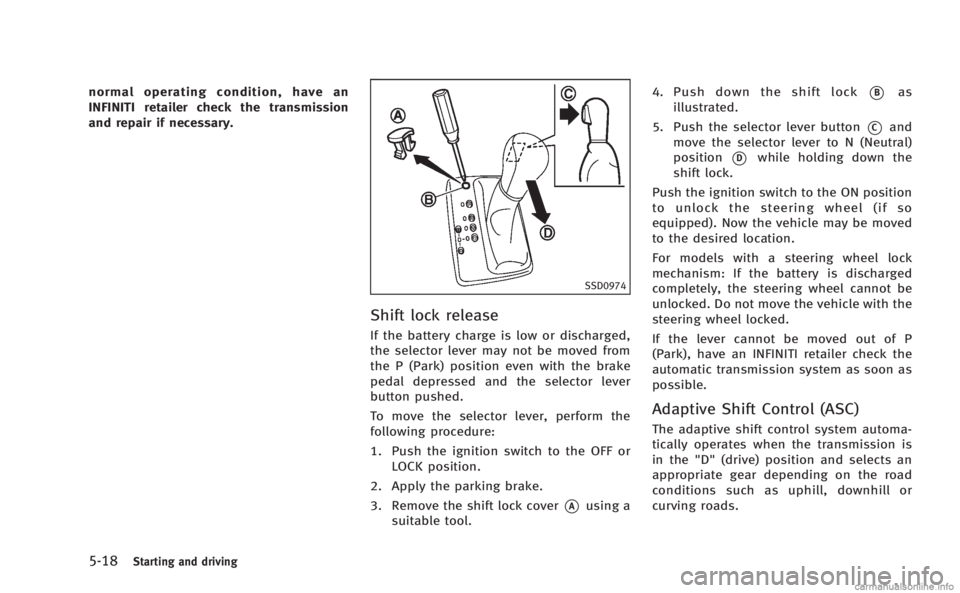
To move the selector lever, perform the
following procedure:
1. Push the ignition switch to the OFF orLOCK position.
2. Apply the parking brake.
3. Remove the shift lock cover
*Ausing a
suitable tool. 4. Push down the shift lock
*Bas
illustrated.
5. Push the selector lever button
*Cand
move the selector lever to N (Neutral)
position
*Dwhile holding down the
shift lock.
Push the ignition switch to the ON position
to unlock the steering wheel (if so
equipped). Now the vehicle may be moved
to the desired location.
For models with a steering wheel lock
mechanism: If the battery is discharged
completely, the steering wheel cannot be
unlocked. Do not move the vehicle with the
steering wheel locked.
If the lever cannot be moved out of P
(Park), have an INFINITI retailer check the
automatic transmission system as soon as
possible.
Adaptive Shift Control (ASC)
The adaptive shift control system automa-
tically operates when the transmission is
in the "D" (drive) position and selects an
appropriate gear depending on the road
conditions such as uphill, downhill or
curving roads.
Page 355 of 522
5-44Starting and driving
SSD1040
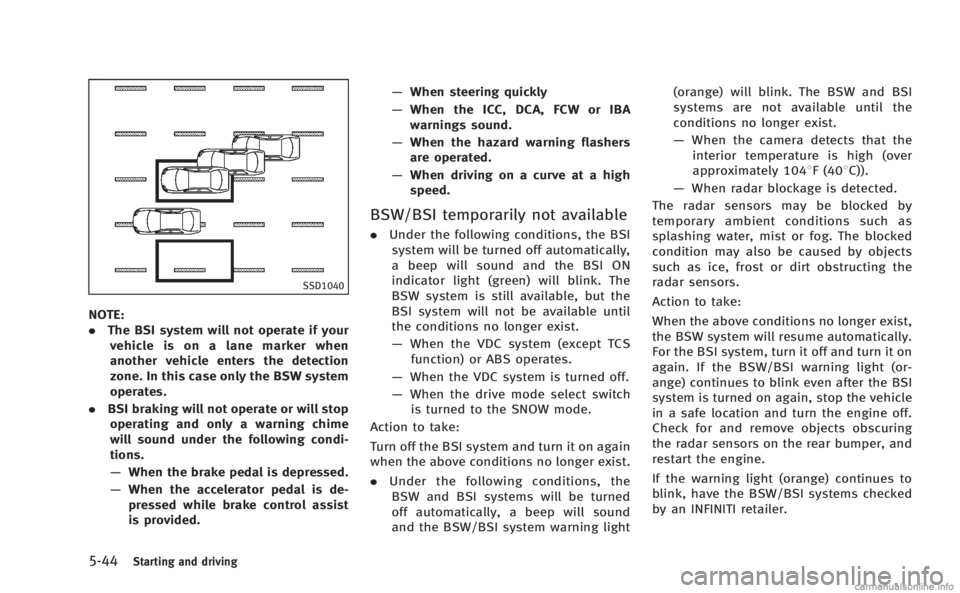
NOTE:
.The BSI system will not operate if your
vehicle is on a lane marker when
another vehicle enters the detection
zone. In this case only the BSW system
operates.
. BSI braking will not operate or will stop
operating and only a warning chime
will sound under the following condi-
tions.
— When the brake pedal is depressed.
— When the accelerator pedal is de-
pressed while brake control assist
is provided. —
When steering quickly
— When the ICC, DCA, FCW or IBA
warnings sound.
— When the hazard warning flashers
are operated.
— When driving on a curve at a high
speed.
BSW/BSI temporarily not available
. Under the following conditions, the BSI
system will be turned off automatically,
a beep will sound and the BSI ON
indicator light (green) will blink. The
BSW system is still available, but the
BSI system will not be available until
the conditions no longer exist.
— When the VDC system (except TCS
function) or ABS operates.
— When the VDC system is turned off.
— When the drive mode select switch
is turned to the SNOW mode.
Action to take:
Turn off the BSI system and turn it on again
when the above conditions no longer exist.
. Under the following conditions, the
BSW and BSI systems will be turned
off automatically, a beep will sound
and the BSW/BSI system warning light (orange) will blink. The BSW and BSI
systems are not available until the
conditions no longer exist.
—
When the camera detects that the
interior temperature is high (over
approximately 1048F (408C)).
— When radar blockage is detected.
The radar sensors may be blocked by
temporary ambient conditions such as
splashing water, mist or fog. The blocked
condition may also be caused by objects
such as ice, frost or dirt obstructing the
radar sensors.
Action to take:
When the above conditions no longer exist,
the BSW system will resume automatically.
For the BSI system, turn it off and turn it on
again. If the BSW/BSI warning light (or-
ange) continues to blink even after the BSI
system is turned on again, stop the vehicle
in a safe location and turn the engine off.
Check for and remove objects obscuring
the radar sensors on the rear bumper, and
restart the engine.
If the warning light (orange) continues to
blink, have the BSW/BSI systems checked
by an INFINITI retailer.
Page 410 of 522
ANTI-LOCK BRAKING SYSTEM (ABS)
WARNING
.The Anti-lock Braking System (ABS) is a
sophisticated device, but it cannot pre-
vent accidents resulting from careless or
dangerous driving techniques. It can
help maintain vehicle control during
braking on slippery surfaces. Remember
that stopping distances on slippery
surfaces will be longer than on normal
surfaces even with ABS. Stopping dis-
tances may also be longer on rough,
gravel or snow covered roads, or if you
are using tire chains. Always maintain a
safe distance from the vehicle in front of
you. Ultimately, the driver is responsible
for safety.
. Tire type and condition may also affect
braking effectiveness.
—When replacing tires, install the
specified size of tires on all four
wheels.
—When installing a spare tire, make
sure that it is the proper size and
type as specified on the Tire and
Loading Information label. See “Tireand loading information label”
in the
“9. Technical and consumer informa-
tion” section of this manual.
—For detailed information, see
“Wheels and tires” in the“8. Main-
tenance and do-it-yourself” section
of this manual.
The Anti-lock Braking System (ABS) con-
trols the brakes so the wheels do not lock
during hard braking or when braking on
slippery surfaces. The system detects the
rotation speed at each wheel and varies
the brake fluid pressure to prevent each
wheel from locking and sliding. By pre-
venting each wheel from locking, the
system helps the driver maintain steering
control and helps to minimize swerving
and spinning on slippery surfaces.
Using the system
Depress the brake pedal and hold it down.
Depress the brake pedal with firm steady
pressure, but do not pump the brakes. The
ABS will operate to prevent the wheels
from locking up. Steer the vehicle to avoid
obstacles.
WARNING
Do not pump the brake pedal. Doing so may
result in increased stopping distances.
Self-test feature
The ABS includes electronic sensors, elec-
tric pumps, hydraulic solenoids and a
computer. The computer has a built-in
diagnostic feature that tests the system
each time you start the engine and move
the vehicle at a low speed in forward or
reverse. When the self-test occurs, you may
hear a “clunk” noise and/or feel a pulsa-
tion in the brake pedal. This is normal and
does not indicate a malfunction. If the
computer senses a malfunction, it switches
the ABS off and illuminates the ABS
warning light on the instrument panel.
The brake system then operates normally,
but without anti-lock assistance.
If the ABS warning light illuminates during
the self-test or while driving, have the
vehicle checked by an INFINITI retailer.
Starting and driving5-99