key INFINITI M-HEV 2013 Owners Manual
[x] Cancel search | Manufacturer: INFINITI, Model Year: 2013, Model line: M-HEV, Model: INFINITI M-HEV 2013Pages: 530, PDF Size: 3.71 MB
Page 337 of 530

5-10Starting and driving
someone who does not carry the Intelligent
Key, to push the ignition switch to start the
hybrid system.
.The trunk area is not included in the
operating range but the Intelligent Key
may function.
. If the Intelligent Key is placed on the
instrument panel, rear parcel shelf,
inside the glove box or door pocket,
the Intelligent Key may not function.
. If the Intelligent Key is placed near the
door or window outside the vehicle, the
Intelligent Key may function.
CAUTION
When pressing the ignition to the OFF
position, make sure the button is not
pressed twice. This may unintentionally
leave the vehicle in ACC or ON mode. This
may discharge the 12-volt battery.
SSD0910
PUSH-BUTTON IGNITION SWITCH
OPERATION
When the ignition switch is pushed without
depressing the brake pedal, the ignition
switch position will change as follows:
. Push center once to change to ACC.
. Push center two times to change to ON.
. Push center three times to change to
OFF. (No position illuminates.)
. Push center four times to return to ACC.
. Open or close any door to return to
LOCK during the OFF position.
If the ignition switch is pushed quickly or is
rapidly pushed twice, the hybrid system may not start. If this occurs, put the
selector lever in the
“P”(Park) position,
and leave the ignition switch in the “OFF”
position for one minute. Then depress the
brake pedal and push the ignition switch to
“ON”. When the READY to drive indicator
light
illuminates, the vehicle can be
driven.
The ignition lock is designed so that the
ignition switch position cannot be switched
to LOCK until the selector lever is moved to
the P (Park) positon.
When the ignition switch cannot be
switched toward the LOCK position, pro-
ceed as follows:
Move the selector lever into the P (Park)
position.
Steering lock (if so equipped)
In order for the steering wheel to be
locked, it must be turned about 1/8 of a
right or left turn from the straight up
position.
To lock the steering wheel, push the
ignition switch to the OFF position.
To unlock the steering wheel, push the
ignition switch.
If the steering lock release malfunction
Page 338 of 530
indicator appears on the dot matrix liquid
crystal display, push the push-button
ignition switch again while lightly turning
the steering wheel right and left. (See“Dot
matrix liquid crystal display” in the“2.
Instruments and controls” section.)
If the battery of the vehicle is discharged,
the push-button ignition switch cannot be
turned from the LOCK position.
Some indicators and warnings for opera-
tion are displayed on the dot matrix liquid
crystal display between the speedometer
and tachometer. (See “Dot matrix liquid
crystal display” in the“2. Instruments and
controls” section.)
PUSH-BUTTON IGNITION SWITCH
POSITIONS
LOCK (Normal parking position)
The ignition switch can only be locked in
this position.
The ignition switch will be unlocked when
it is pushed to the ACC position while
carrying the Intelligent Key or with the
Intelligent Key inserted in the port.
ACC (Accessories)
This position activates electrical acces-
sories such as the radio, when the hybrid
system is not running.
ON (Normal operating position)
This position turns on the ignition system
and electrical accessories.
OFF
The hybrid system can be turned off in this
position.
The ignition lock is designed so that the
ignition switch cannot be switched to the
LOCK position until the selector lever is
moved to the P (Park) position.
CAUTION
Do not leave the vehicle with the push-
button ignition switch in ACC or ON posi-
tions when the hybrid system is not running
for an extended period. This can discharge
the 12-volt battery.
EMERGENCY ENGINE SHUT OFF
To shut off the engine in an emergency
situation while driving perform the follow-
ing procedure:
.Rapidly push the push-button ignition
switch 3 consecutive times.
. Push and hold the push button ignition
switch for more than 2 seconds.
Starting and driving5-11
Page 339 of 530

5-12Starting and driving
SSD0860
INTELLIGENT KEY BATTERY DIS-
CHARGE
If the battery of the Intelligent Key is
discharged, or environmental conditions
interfere with the Intelligent Key operation,
start the hybrid system according to the
following procedure:
1. Move the selector lever to the P (Park)position.
2. Firmly apply the foot brake.
3. Touch the ignition switch with the Intelligent Key as illustrated. (A chime
will sound.) 4. Push the ignition switch while depres-
sing the brake pedal within 10 seconds
after the chime sounds. The hybrid
system will start.
After step 3 is performed, when the
ignition switch is pushed without depres-
sing the brake pedal, the ignition switch
position will change to ACC.
NOTE:
. When the ignition switch is pushed to
the ACC or ON position or the hybrid
system is started by the above proce-
dures, the Intelligent Key battery dis-
charge indicator appears on the dot
matrix liquid crystal display even if the
Intelligent Key is inside the vehicle.
This is not a malfunction. To turn off
the Intelligent Key battery discharge
indicator, touch the ignition switch
with the Intelligent Key again.
. If the Intelligent Key battery discharge
indicator appears, replace the battery
as soon as possible. (See “Intelligent
Key battery replacement” in the“8.
Maintenance and do-it-yourself” sec-
tion.) .
Make sure the area around the vehicle
is clear.
. Check fluid levels such as engine oil,
coolant, brake fluid and window
washer fluid as frequently as possible,
or at least whenever you refuel.
. Check that all windows and lights are
clean.
. Visually inspect tires for their appear-
ance and condition. Also check tires for
proper inflation.
. Lock all doors.
. Position seat and adjust head re-
straints.
. Adjust inside and outside mirrors.
. Fasten seat belts and ask all passen-
gers to do likewise.
. Check the operation of warning lights
when the ignition switch is pushed to
the ON position. (See “Warning/indica-
tor lights and audible reminders” in the
“2. Instruments and controls” section.)
BEFORE STARTING THE INFINITI DIRECT
RESPONSE HYBRIDTMSYSTEM
Page 348 of 530
SSD0939
SSD1001
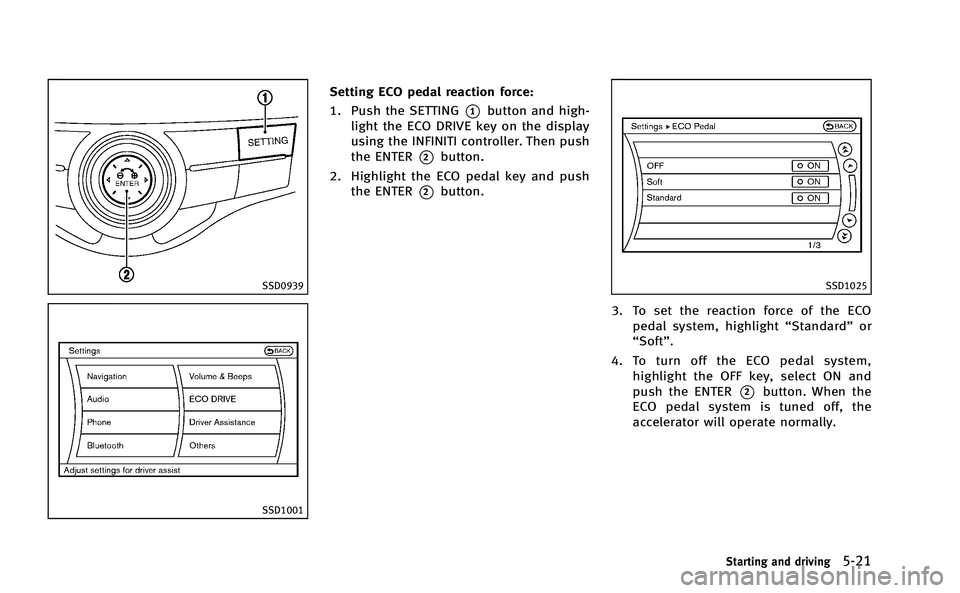
Setting ECO pedal reaction force:
1. Push the SETTING
*1button and high-
light the ECO DRIVE key on the display
using the INFINITI controller. Then push
the ENTER
*2button.
2. Highlight the ECO pedal key and push the ENTER
*2button.
SSD1025
3. To set the reaction force of the ECOpedal system, highlight “Standard”or
“Soft”.
4. To turn off the ECO pedal system, highlight the OFF key, select ON and
push the ENTER
*2button. When the
ECO pedal system is tuned off, the
accelerator will operate normally.
Starting and driving5-21
Page 352 of 530

SSD0939
With navigation system
SSD1001
How to enable/disable the LDW
system using the settings menu
Perform the following steps to enable or
disable the LDW system.
1. Push the SETTING
*1button and high-
light the “Driver Assistance” key on the
display using the INFINITI controller.
Then push the ENTER
*2button.
2. Highlight the “Driver Assistance Warn-
ings” key, and push the ENTER
*2
button.
JVS0080X
3. Highlight the “Lane Departure Warning”
key, select ON (enabled) or OFF (dis-
abled) and push the ENTER
*2button.
Temporary disabled status at high
temperature
If the vehicle is parked in direct sunlight
under high temperature conditions (over
approximately 1048 F (408C) and then
started, the LDW system may be deacti-
vated automatically. The lane departure
warning light (orange) will flash.
When the interior temperature is reduced,
the LDW system will resume operating
automatically and the lane departure
Starting and driving5-25
Page 356 of 530
How to enable/disable the LDP
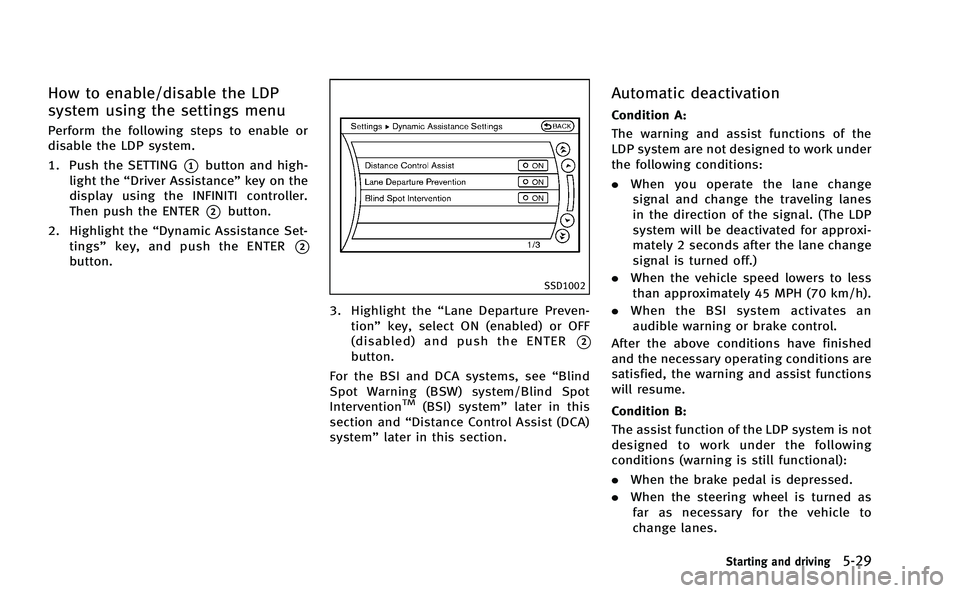
system using the settings menu
Perform the following steps to enable or
disable the LDP system.
1. Push the SETTING
*1button and high-
light the “Driver Assistance” key on the
display using the INFINITI controller.
Then push the ENTER
*2button.
2. Highlight the “Dynamic Assistance Set-
tings” key, and push the ENTER
*2
button.
SSD1002
3. Highlight the “Lane Departure Preven-
tion” key, select ON (enabled) or OFF
(disabled) and push the ENTER
*2
button.
For the BSI and DCA systems, see “Blind
Spot Warning (BSW) system/Blind Spot
Intervention
TM(BSI) system” later in this
section and “Distance Control Assist (DCA)
system” later in this section.
Automatic deactivation
Condition A:
The warning and assist functions of the
LDP system are not designed to work under
the following conditions:
.When you operate the lane change
signal and change the traveling lanes
in the direction of the signal. (The LDP
system will be deactivated for approxi-
mately 2 seconds after the lane change
signal is turned off.)
. When the vehicle speed lowers to less
than approximately 45 MPH (70 km/h).
. When the BSI system activates an
audible warning or brake control.
After the above conditions have finished
and the necessary operating conditions are
satisfied, the warning and assist functions
will resume.
Condition B:
The assist function of the LDP system is not
designed to work under the following
conditions (warning is still functional):
. When the brake pedal is depressed.
. When the steering wheel is turned as
far as necessary for the vehicle to
change lanes.
Starting and driving5-29
Page 361 of 530
5-34Starting and driving
Departure Prevention (LDP) system”earlier
in this section and “Forward Collision
Warning (FCW) system” later in this sec-
tion.
SSD0939
SSD1001
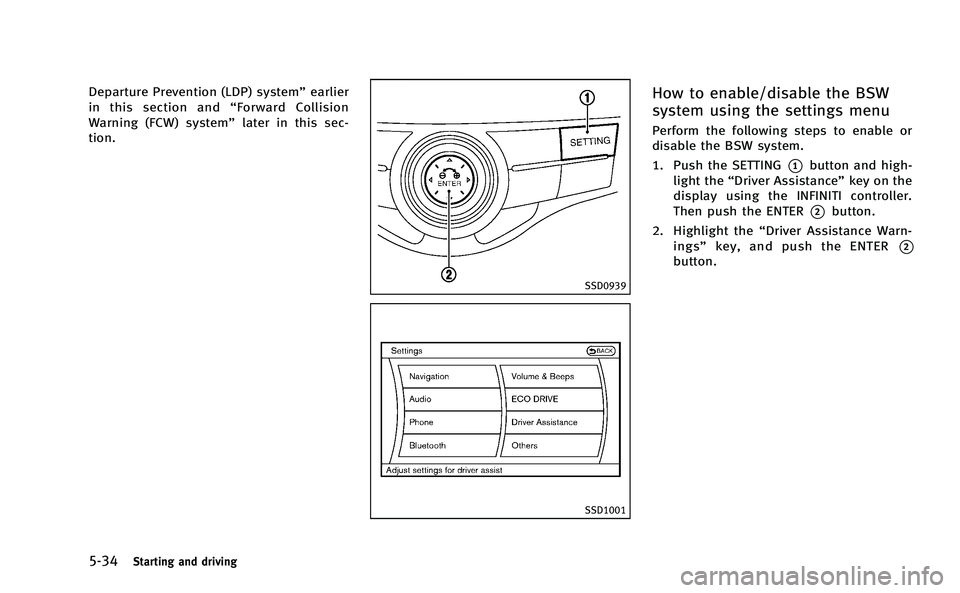
How to enable/disable the BSW
system using the settings menu
Perform the following steps to enable or
disable the BSW system.
1. Push the SETTING
*1button and high-
light the “Driver Assistance” key on the
display using the INFINITI controller.
Then push the ENTER
*2button.
2. Highlight the “Driver Assistance Warn-
ings” key, and push the ENTER
*2
button.
Page 362 of 530

JVS0080X
3. Highlight the“Blind Spot Warning” key,
select ON (enabled) or OFF (disabled)
and push the ENTER
*2button.
SSD1028
BSW/BSI indicator light
SSD1029
BSI ON indicator light (green)
SSD0938
Dynamic driver assistance switch
BSI SYSTEM OPERATION
If the radar sensors detect vehicles in the
detection zone, the BSW/BSI indicator
light located inside the outside mirrors
illuminates. If your vehicle is approaching
a lane marker, the BSW/BSI indicator light
flashes and an audible warning will sound
three times. Then the system applies the
brakes on one side of the vehicle for a
short period of time to help return the
vehicle back to the center of the lane. BSI
operates regardless of turn signal usage.
Starting and driving5-35
Page 363 of 530

5-36Starting and driving
NOTE:
.Warning and brake control will only be
activated if the BSW/BSI indicator light
is already illuminated when your vehi-
cle approaches a lane marker. If
another vehicle comes into the detec-
tion zone after your vehicle has
crossed a lane marker, no warning or
brake control will be activated. (See
“BSW/BSI driving situations” later in
this section.)
. The BSI system is typically activated
earlier than the Lane Departure Pre-
vention (LDP) system when your vehi-
cle is approaching a lane marker.
The BSI system turns on when the dynamic
driver assistance switch on the steering
wheel is pushed when the “Blind Spot
Intervention” is enabled in the settings
menu on the center display. The BSI ON
indicator light (green) on the instrument
panel illuminates when the BSI system is
turned on.
The BSI system provides an audible warn-
ing and flashes the indicator light when
BSI system is activated even if the BSW
system is off.
SSD0939
With navigation system
SSD1001
How to enable/disable the BSI
system using the settings menu
Perform the following steps to enable or
disable the BSI system.
1. Push the SETTING
*1button and high-
light the “Driver Assistance” key on the
display using the INFINITI controller.
Then push the ENTER
*2button.
2. Highlight the “Dynamic Assistance Set-
tings” key, and push the ENTER
*2
button.
Page 364 of 530

SSD1002
3. Highlight the“Blind Spot Intervention”
key, select ON (enabled) or OFF (dis-
abled) and push the ENTER
*2button.
For the LDP and DCA systems, see “Lane
Departure Warning (LDW) system/Lane
Departure Prevention (LDP) system” earlier
in this section and “Distance Control Assist
(DCA) system” later in this section.
WARNING
.Do not use the BSI system under the
following conditions because the system
may not function properly.
—During bad weather (e.g. rain, fog,
snow, wind, etc.)
—When driving on slippery roads,such as on ice or snow, etc.
—When driving on winding or uneven roads.
—When there is a lane closure due toroad repairs.
—When driving in a makeshift lane.
—When driving on roads where the
lane width is too narrow.
—When driving with a tire that is notwithin normal tire conditions (e.g.
tire wear, low tire pressure, installa-
tion of spare tire, tire chains, non-
standard wheels).
—When the vehicle is equipped withnon-original brake parts or suspen-
sion parts.
. Excessive noise (for example, audio
system volume, open vehicle window)
will interfere with the chime sound, and
it may not be heard.
.The radar sensors may not be able to
detect and activate BSI/BSW when certain objects are present such as:
—
Pedestrians, bicycles, animals
— Several types of vehicles such as
motorcycles
— Oncoming vehicles
— Vehicles remaining in the detection
zone when you accelerate from a
stop
(See “BSW/BSI driving situations”
later in this section)
— A vehicle merging into an adjacent
lane at a speed approximately the
same as your vehicle
(See “BSW/BSI driving situations”
later in this section)
— A vehicle approaching rapidly from
behind.
(See “BSW/BSI driving situations”
later in this section)
— A vehicle which your vehicle over-
takes rapidly.
(See “BSW/BSI driving situations”
later in this section)
. Severe weather or road spray condi-
tions may reduce the ability of the
radar to detect other vehicles.
. The radar sensors detection zone is
designed based on a standard lane
width. When driving in a wider lane, the
Starting and driving5-37