light INFINITI M-HEV 2013 Owners Manual
[x] Cancel search | Manufacturer: INFINITI, Model Year: 2013, Model line: M-HEV, Model: INFINITI M-HEV 2013Pages: 530, PDF Size: 3.71 MB
Page 229 of 530
4-42Monitor, climate, audio, phone and voice recognition systems
.The temperature can be set within the
following range.
— For U.S.: 60 to 908F (16 to 328C)
— For Canada: 64 to 908F (18 to 328C)
Air recirculation:
Push the intake air control “
”button to
recirculate interior air inside the vehicle.
The “
”indicator light on the button will
come on.
The air recirculation mode cannot be
activated when the air conditioner is in
the front defrosting mode “
”.
Depending on the vehicle condition, the air
recirculation mode may be switched to the
outside air circulation mode automatically.
Outside air circulation:
Push the intake air control “
”button to
change the air circulation from the intake
air to the outside air. The “
”indicator
light will turn off.
Automatic air intake control:
In the AUTO mode, the intake air will be
controlled automatically. To manually con-
trol the intake air, push the intake air
control “
”button. To return to the
automatic control mode, push the intake
air control “
”button for approximately 2 seconds. The indicator lights will flash
twice, and then the intake air will be
controlled automatically.
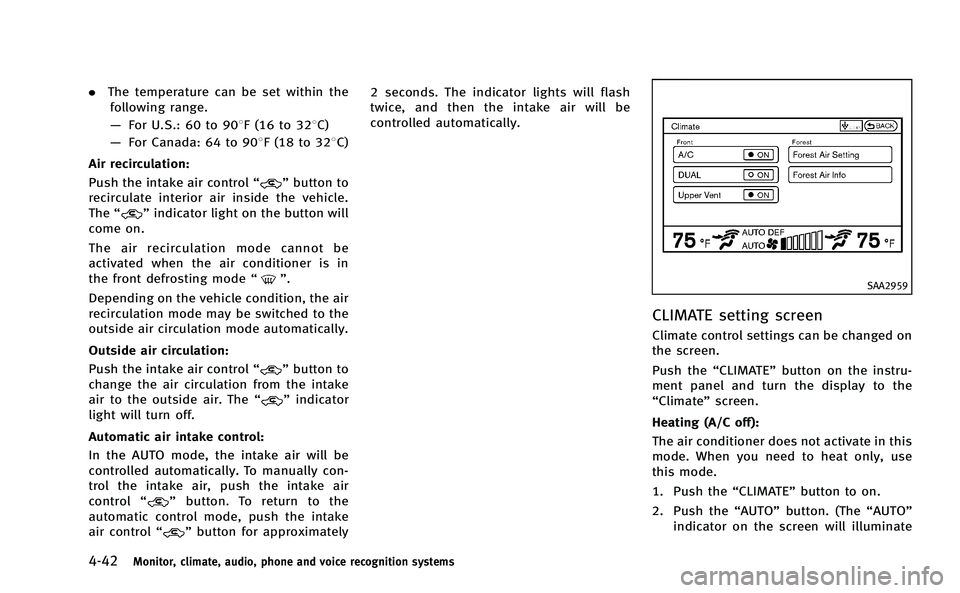
SAA2959
CLIMATE setting screen
Climate control settings can be changed on
the screen.
Push the
“CLIMATE” button on the instru-
ment panel and turn the display to the
“Climate” screen.
Heating (A/C off):
The air conditioner does not activate in this
mode. When you need to heat only, use
this mode.
1. Push the “CLIMATE”button to on.
2. Push the “AUTO”button. (The “AUTO”
indicator on the screen will illuminate
Page 230 of 530
and“AUTO” will appear on the display.)
3. If the “A/C” indicator illuminates,
select the “A/C” key. (The “A/C”
indicator will turn off.)
4. Push the temperature control button to set the desired temperature.
. Do not set the temperature lower than
the outside air temperature. Doing so
may cause the temperature to not to be
controlled properly.
. If the windows fog up, use dehumidified
heating instead of A/C off heating.
Dual control mode setting:
You can individually set driver and front
passenger side temperature and air flow
mode using each temperature control or
manual air flow control button.
1. Push the “CLIMATE”button to on.
2. By selecting the “DUAL”key, or when
the passenger side temperature control
button or manual air control button is
pushed, the “DUAL”indicator on the
screen will illuminate.
3. To turn off the passenger side tempera- ture control, select the “DUAL”key and
the “DUAL” indicator will turn off. .
The Dual control mode cannot be
activated when the air conditioner is
in the front defrosting mode “
”.
Automatic upper ventilator system:
1. Push the “CLIMATE”button to on.
2. Select the “Upper Vent”key and the
indicator on the screen will illuminate.
The air flow against the driver’sor
passenger’s upper body becomes gen-
tle.
In this mode, air from the center
ventilators flows both straight and
upward in order to control the cabin
temperature without blowing air di-
rectly on the occupants.
Distribution between straight and upward
flows is determined automatically by the
climate control system. If you prefer strong
air flow against your upper body, select
“Upper Vent” key to turn the indicator off.
. When the outside temperature de-
creases to approximately 148 F
( − 108 C), the “Upper Vent” function
does not activate. The “Upper Vent”
function reactivates automatically when
the ambient temperature is 148 F
(−108C) or more. Display Forest Air
®system setting screen:
The “Forest Air setting” screen will appear
when selecting the “Forest Air Setting” key.
For the details about the Forest Air
®
system setting operation, see “Setting
Forest Air®” later in this section.
Display Forest Air
®Information screen:
The Forest Air®system information screen
will appear when selecting the “Forest Air
Info” key.
For details about the Forest Air
®system
information screen, see “Forest Air®sys-
tem information” later in this section.
FOREST AIR®(if so equipped)
The Forest Air®system keeps the air inside
the vehicle clean using the automatic air
intake system and automatic ventilation.
The Forest Air
®system also makes the
inside of the vehicle more comfortable,
using a combination of the upper ventilator
and center ventilators at random.
*Forest Air
®is a trademark of Nissan Motor
Co., Ltd.
Main operation
Push the “”Forest button.
(The “
”and “AUTO” indicator light on
Monitor, climate, audio, phone and voice recognition systems4-43
Page 231 of 530
4-44Monitor, climate, audio, phone and voice recognition systems
the button will illuminate.)
When the following functions and sensors
are turned on, the Forest Air
®system
settings will activate.
. Breeze Mode
. Outside odor and exhaust gas detection
sensor
. Inside Air Quality sensor
. Auto humidity control
The fan speed and air flow is automatically
set to the AUTO position.
. The Forest Air
®system can be adjusted
and/or activated/deactivated for each
function. For details of the Forest Air
®
system settings, see later in this
section.
. When the “
”Forest button is
pushed while the air conditioner is
off, the air conditioner will automati-
cally activate.
. When the outside temperature de-
creases to approximately 328F(0 8C),
the outside odor and exhaust gas
detection sensor and auto humidity
control functions will not operate. The
system will not be reactivated auto-
matically even if the outside tempera-
ture reaches 328F(0 8C). To reactivate the system, push the
Forest button
manually. (The indicator light on the
Forest button will illuminate.)
. The air flow control is not available in
the front defroster mode. When the
“
” button is pushed while the
Forest Air®system is turned on, the
Forest Air®system will turn off.
Operating tips
Breeze Mode:
When this mode is ON, fan speed fluc-
tuates during the Forest Air
®system
operation, creating a wind breeze similar
to a natural breeze using a combination of
the upper ventilator and the center venti-
lators at random.
. Breeze Mode will activate after the
temperature of the passenger compart-
ment becomes suitable.
. This function will not operate immedi-
ately after the hybrid system starts.
. Breeze Mode will activate when the air
flow mode is in the “
”and “”
mode.
. This function will turn off if the fan
speed or a ventilator outlet is manually
adjusted. .
The breeze patterns may change in
accordance with the amount of sun
load.
. When operating fan speed or air flow
control while the Forest Air
®system is
turned on, the “”indicator light on
the button will turn off automatically,
and the Breeze Mode function will turn
off.
. When the Breeze Mode function is
turned off while the Forest Air
®system
is on, the Breeze Mode function will
remain off until the “
”Forest button
is turned off and on again.
Outside odor and exhaust gas detection
sensor:
This vehicle is equipped with an outside
odor and exhaust gas detection sensor.
When the automatic intake air control is
on, the sensor detects odors and exhaust
gas, and then the system automatically
changes from the outside air circulation
mode to the recirculation mode. When the
“
” Forest button is pushed, the outside
odor and exhaust gas detection sensor will
turn on.
When the Forest Air
®system is on, for the
first 40 seconds, the recirculation mode is
selected to prevent dust, dirt and pollen
Page 232 of 530
from entering the vehicle, and the system
cleans the air inside of the vehicle with
Plasmacluster
®ion that are emitted from
the ventilator. After 40 seconds, the out-
side odor and exhaust gas sensor activates
and automatically alternates between the
recirculation mode and outside air circula-
tion mode.
. The outside odor and exhaust gas
detection sensor detects industry odors
such as pulp or chemicals, and exhaust
gas such as gasoline or diesel.
Inside Air Quality sensor:
This vehicle is equipped with an inside air
quality sensor. When the sensor detects
odor in the cabin, the system increases the
fan speed automatically. When the Forest
Air
®system is on, the inside air quality
sensor will turn on. This function may not
work during the first 5 minutes after the
engine is started because the system is
still warming up.
. The Outside/Inside Air Mix function will
turn off when the air recirculation and
outside air circulation modes are chan-
ged manually. When the Outside/Inside
Air Mix function is not active, turn off
and on the Forest Air
®system, the
Outside/Inside Air Mix function will activate again.
Auto humidity control:
The sensor installed on the upper side of
the windshield detects the temperature
and humidity of the passenger compart-
ment and the surface of the windshield,
and controls the humidity of the passenger
compartment to not be over-dry or moist
enough to fog the windows. Moreover, it
detects potential fog before formation on
the windows and operates to remove it.
. Push the “AUTO”or“
”Forest button
(The “AUTO” or“”indicator light on
the button will illuminate and “AUTO
DEF” will appear on the display.)
. The “Auto humidity control” function
will not operate if the fan speed or a
vent outlet is manually adjusted.
(“AUTO DEF” will disappear from the
display.)
. When auto humidity control is turned
off while the Forest Air
®system is on,
turn off and on the Forest Air®system,
the auto humidity control will activate
again.
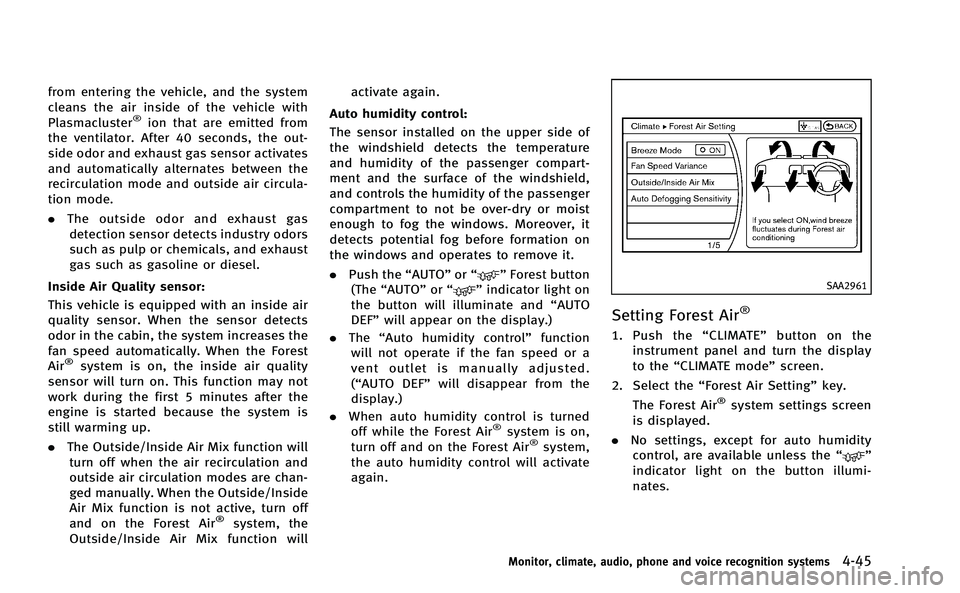
SAA2961
Setting Forest Air®
1. Push the “CLIMATE” button on the
instrument panel and turn the display
to the “CLIMATE mode” screen.
2. Select the “Forest Air Setting” key.
The Forest Air
®system settings screen
is displayed.
. No settings, except for auto humidity
control, are available unless the “
”
indicator light on the button illumi-
nates.
Monitor, climate, audio, phone and voice recognition systems4-45
Page 237 of 530
4-50Monitor, climate, audio, phone and voice recognition systems
SAA0306
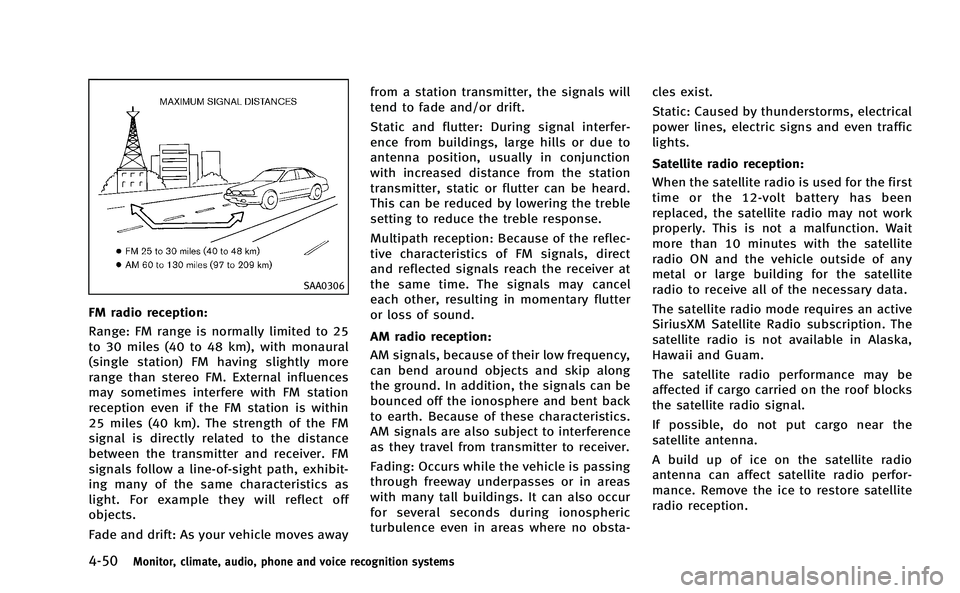
FM radio reception:
Range: FM range is normally limited to 25
to 30 miles (40 to 48 km), with monaural
(single station) FM having slightly more
range than stereo FM. External influences
may sometimes interfere with FM station
reception even if the FM station is within
25 miles (40 km). The strength of the FM
signal is directly related to the distance
between the transmitter and receiver. FM
signals follow a line-of-sight path, exhibit-
ing many of the same characteristics as
light. For example they will reflect off
objects.
Fade and drift: As your vehicle moves awayfrom a station transmitter, the signals will
tend to fade and/or drift.
Static and flutter: During signal interfer-
ence from buildings, large hills or due to
antenna position, usually in conjunction
with increased distance from the station
transmitter, static or flutter can be heard.
This can be reduced by lowering the treble
setting to reduce the treble response.
Multipath reception: Because of the reflec-
tive characteristics of FM signals, direct
and reflected signals reach the receiver at
the same time. The signals may cancel
each other, resulting in momentary flutter
or loss of sound.
AM radio reception:
AM signals, because of their low frequency,
can bend around objects and skip along
the ground. In addition, the signals can be
bounced off the ionosphere and bent back
to earth. Because of these characteristics.
AM signals are also subject to interference
as they travel from transmitter to receiver.
Fading: Occurs while the vehicle is passing
through freeway underpasses or in areas
with many tall buildings. It can also occur
for several seconds during ionospheric
turbulence even in areas where no obsta- cles exist.
Static: Caused by thunderstorms, electrical
power lines, electric signs and even traffic
lights.
Satellite radio reception:
When the satellite radio is used for the first
time or the 12-volt battery has been
replaced, the satellite radio may not work
properly. This is not a malfunction. Wait
more than 10 minutes with the satellite
radio ON and the vehicle outside of any
metal or large building for the satellite
radio to receive all of the necessary data.
The satellite radio mode requires an active
SiriusXM Satellite Radio subscription. The
satellite radio is not available in Alaska,
Hawaii and Guam.
The satellite radio performance may be
affected if cargo carried on the roof blocks
the satellite radio signal.
If possible, do not put cargo near the
satellite antenna.
A build up of ice on the satellite radio
antenna can affect satellite radio perfor-
mance. Remove the ice to restore satellite
radio reception.
Page 238 of 530

SAA0480
Compact Disc (CD) player
.Do not force a compact disc into the CD
insert slot. This could damage the CD
and/or CD player.
. Trying to load a CD with the CD door
closed could damage the CD and/or CD player.
. During cold weather or rainy days, the
player may malfunction due to the
humidity. If this occurs, remove the
CD and dehumidify or ventilate the
player completely.
. The player may skip while driving on
rough roads.
. The CD player sometimes cannot func-
tion when the passenger compartment
temperature is extremely high. De-
crease the temperature before use.
. Only use high quality 4.7 in (12 cm)
round discs that have the “COMPACT
disc DIGITAL AUDIO” logo on the disc or
packaging.
. Do not expose the CD to direct sunlight.
. CDs that are of poor quality, dirty,
scratched, covered with fingerprints,
or that have pin holes may not work
properly.
. The following CDs may not work prop-
erly:
— Copy control compact discs (CCCD)
— Recordable compact discs (CD-R)
— Rewritable compact discs (CD-RW)
. Do not use the following CDs as they
may cause the CD player to malfunc- tion.
—
3.1 in (8 cm) discs
— CDs that are not round
— CDs with a paper label
— CDs that are warped, scratched, or
have abnormal edges
. This audio system can only play pre-
recorded CDs. It has no capabilities to
record or burn CDs.
. If the CD cannot be played, one of the
following messages will be displayed.
CHECK DISC:
. Confirm that the CD is inserted correctly
(the label side is facing up, etc.).
. Confirm that the CD is not bent or
warped and it is free of scratches.
PUSH EJECT:
This is an error due to the temperature
inside the player is too high. Remove the
CD by pushing the EJECT button, and after
a short time reinsert the CD. The CD can be
played when the temperature of the player
returns to normal.
UNPLAYABLE:
The file is unplayable in this audio system
(only MP3 or WMA CD).
Monitor, climate, audio, phone and voice recognition systems4-51
Page 241 of 530

4-54Monitor, climate, audio, phone and voice recognition systems
ity. If this occurs, remove the CD/DVD
and dehumidify or ventilate the player
completely.
. The player may skip while driving on
rough roads.
. The CD/DVD player sometimes cannot
function when the passenger compart-
ment temperature is extremely high.
Decrease the temperature before use.
. Only use high quality 4.7 in (12 cm)
round discs that have the “COMPACT
disc DIGITAL AUDIO” or“DVD Video”
logo on the disc or packaging.
. Do not expose the CD/DVD to direct
sunlight.
. CD/DVDs that are of poor quality, dirty,
scratched, covered with fingerprints, or
that have pinholes may not work
properly.
. The following CD/DVDs are not guaran-
teed to play:
— Copy control compact discs (CCCD)
— Recordable compact discs (CD-R)
— Rewritable compact discs (CD-RW)
— Recordable DVDs (DVD±R, DVD±R
DL)
— Rewritable DVDs (DVD±RW, DVD±RW
DL) .
Do not use the following CD/DVDs as
they may cause the CD/DVD player to
malfunction.
— 3.1 in (8 cm) discs
— CD/DVDs that are not round
— CD/DVDs with a paper label
— CD/DVDs that are warped, scratched
or have abnormal edges
— This audio system can only play
prerecorded CD/DVDs. It has no
capabilities to record or burn CD/
DVDs.
. If the CD/DVD cannot be played, one of
the following messages will be dis-
played.
Disc Read Error:
. Confirm that the CD/DVD is inserted
correctly (the label side is facing up,
etc.).
. Confirm that the CD/DVD is not bent or
warped and it is free of scratches.
Please Eject Disc:
. This may be an error due to the
temperature inside the player being
too high. Remove the CD/DVD by
pushing the EJECT button, and after a
short time reinsert the CD/DVD. The
CD/DVD can be played when the temperature of the player returns to
normal. If the error persists, consult
your local retailer.
Unplayable File:
. The file may be copy protected.
. The file is not MP3, WMA, AAC, M4A or
DivX
®type.
Region Invalid:
. The DVD is not for region 1 or all
regions. Use DVDs with a region code
“1”, “ALL” or“1 included” for your DVD
entertainment system. (The region code
*Ais displayed as a small symbol
printed on the top of the DVD
*B.) This
vehicle-installed DVD player cannot
play DVDs with a region code other
than “1”or“ALL”.
Copyright and trademark:
. The technology protected by the U.S.
patent and other intellectual property
rights owned by Macrovision Corpora-
tion and other right holders is adopted
for this system.
. This copyright protected technology
cannot be used without a permit from
Macrovision Corporation. It is limited to
be personal use, etc., as long as the
permit from Macrovision Corporation is
Page 272 of 530
trial use.
. A new disc may be rough on the inner
and outer edges. Remove the rough
edges by rubbing the inner and outer
edges with the side of a pen or pencil
as illustrated.
USB memory
. Never touch the terminal portion of the
USB memory.
. Do not place heavy objects on the USB
memory.
. Do not store the USB memory in highly
humid locations.
. Do not expose the USB memory to
direct sunlight.
. Do not spill any liquids on the USB
memory.
Refer to the USB memory Owner’s Manual
for the details.
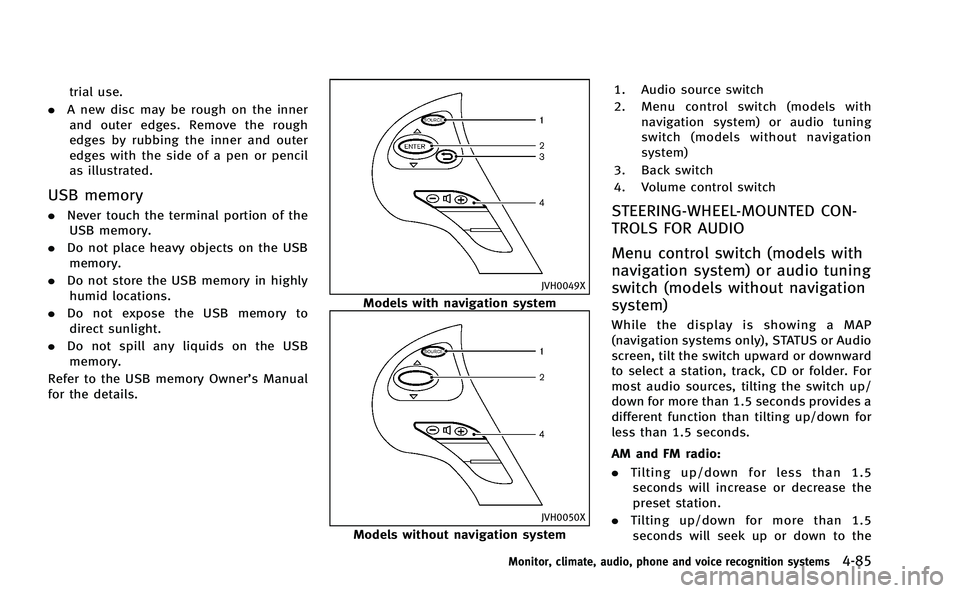
JVH0049X
Models with navigation system
JVH0050X
Models without navigation system 1. Audio source switch
2. Menu control switch (models with
navigation system) or audio tuning
switch (models without navigation
system)
3. Back switch
4. Volume control switch
STEERING-WHEEL-MOUNTED CON-
TROLS FOR AUDIO
Menu control switch (models with
navigation system) or audio tuning
switch (models without navigation
system)
While the display is showing a MAP
(navigation systems only), STATUS or Audio
screen, tilt the switch upward or downward
to select a station, track, CD or folder. For
most audio sources, tilting the switch up/
down for more than 1.5 seconds provides a
different function than tilting up/down for
less than 1.5 seconds.
AM and FM radio:
. Tilting up/down for less than 1.5
seconds will increase or decrease the
preset station.
. Tilting up/down for more than 1.5
seconds will seek up or down to the
Monitor, climate, audio, phone and voice recognition systems4-85
Page 274 of 530
ANTENNA
Window antenna
The antenna pattern is printed inside the
rear window.
CAUTION
.Do not place metalized film near the rear
window glass or attach any metal parts
to it. This may cause poor reception or
noise.
. When cleaning the inside of the rear
window, be careful not to scratch or
damage the rear window antenna.
Lightly wipe along the antenna with a
dampened soft cloth.
When installing a car phone or a CB radio
in your vehicle, be sure to observe the
following cautions, otherwise the new
equipment may adversely affect the elec-
tronic control modules and electronic con-
trol system harness.
WARNING
.A cellular phone should not be used for
any purpose while driving so full atten-
tion may be given to vehicle operation.
Some jurisdictions prohibit the use of
cellular phones while driving.
. If you must make a call while your
vehicle is in motion, the hands-free
cellular phone operational mode (if so
equipped) is highly recommended. Ex-
ercise extreme caution at all times so full
attention may be given to vehicle opera-
tion.
. If a conversation in a moving vehicle
requires you to take notes, pull off the
road to a safe location and stop your
vehicle before doing so.
CAUTION
.Keep the antenna as far away as
possible from the electronic control
modules.
. Keep the antenna wire more than 8 in
(20 cm) away from the electronic control
system harness. Do not route the anten-
na wire next to any harness.
. Adjust the antenna standing-wave ratio
as recommended by the manufacturer.
. Connect the ground wire from the CB
radio chassis to the body.
. For details, consult an INFINITI retailer.
Monitor, climate, audio, phone and voice recognition systems4-87
CAR PHONE OR CB RADIO
Page 313 of 530

4-126Monitor, climate, audio, phone and voice recognition systems
SAA2529
Activating Alternate Command
Mode
When the Standard Mode is active, perform
the following steps to switch to the
Alternate Command Mode.
1. Push the SETTING button on the instru-ment panel.
2. Highlight the “Others”key.
3. Highlight the “Voice Recognition” key.
SAA2543
4. Highlight the“Alternate Command
Mode” key.
5. The confirmation message is displayed on the screen. Push the “OK”key to
activate the Alternate Command Mode.
Displaying command list
If you are controlling the system by voice
commands for the first time or do not know
the appropriate voice command, perform
the following procedure for displaying the
voice command list (available only in
Alternate Command Mode).
SAA2544
1. Push the INFO button on the instrument
panel.
2. Select the “Others”key.
3. Select the “Voice Recognition” key.
4. Select the “Command List” key.