warning lights INFINITI M-HEV 2013 Owner's Manual
[x] Cancel search | Manufacturer: INFINITI, Model Year: 2013, Model line: M-HEV, Model: INFINITI M-HEV 2013Pages: 530, PDF Size: 3.71 MB
Page 354 of 530

dard lane markers; lane markers cov-
ered with water, dirt, snow, etc.
. On roads where discontinued lane
markers are still detectable.
. On roads where there are sharp curves.
. On roads where there are sharply
contrasting objects, such as shadows,
snow, water, wheel ruts, seams or lines
remaining after road repairs. (The LDP
system could detect these items as
lane markers.)
. On roads where the traveling lane
merges or separates.
. When the vehicle’s traveling direction
does not align with the lane marker.
. When traveling close to the vehicle in
front of you, which obstructs the lane
camera unit detection range.
. When rain, snow or dirt adheres to the
windshield in front of the lane camera
unit.
. When the headlights are not bright due
to dirt on the lens or if the aiming is not
adjusted properly.
. When strong light enters the lane
camera unit. (For example, the light
directly shines on the front of the
vehicle at sunrise or sunset.) .
When a sudden change in brightness
occurs. (For example, when the vehicle
enters or exits a tunnel or under a
bridge.)
While the LDP system is operating, you
may hear a sound of brake operation. This
is normal and indicates that the LDP
system is operating properly.
SSD0672
LDP ON indicator light (green)/ Warning light (orange)
LDP system operation
The LDP system provides a lane departure
warning and brake control assistance when
the vehicle is driven at speeds of approxi-
mately 45 MPH (70 km/h) and above.
When the vehicle approaches either the left
or the right side of the traveling lane, a
warning chime will sound and the lane
departure warning light (orange) on the
instrument panel will blink to alert the
driver. Then, the LDP system will automa-
tically apply the brakes for a short period
of time to help assist the driver to return
Starting and driving5-27
Page 360 of 530
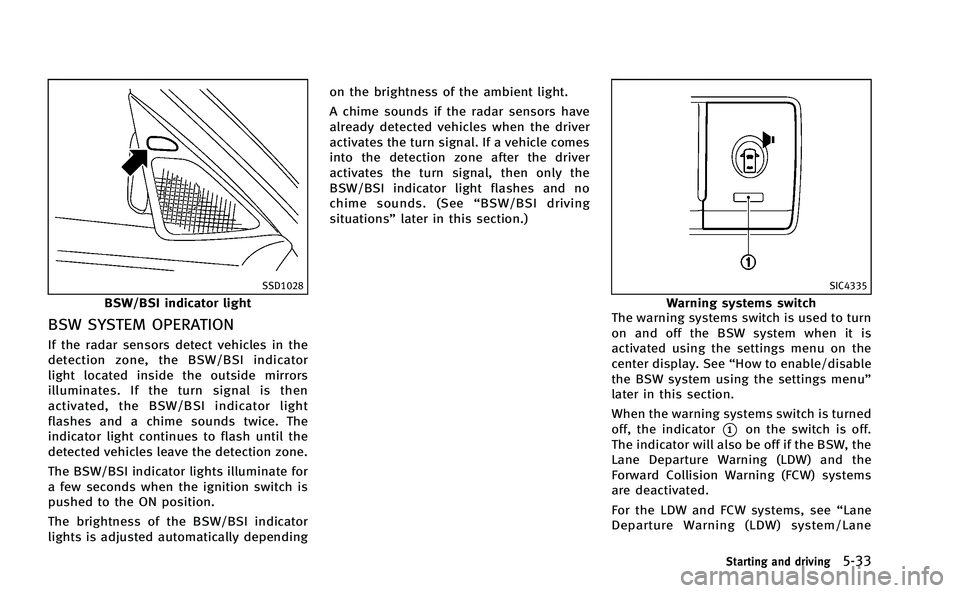
SSD1028
BSW/BSI indicator light
BSW SYSTEM OPERATION
If the radar sensors detect vehicles in the
detection zone, the BSW/BSI indicator
light located inside the outside mirrors
illuminates. If the turn signal is then
activated, the BSW/BSI indicator light
flashes and a chime sounds twice. The
indicator light continues to flash until the
detected vehicles leave the detection zone.
The BSW/BSI indicator lights illuminate for
a few seconds when the ignition switch is
pushed to the ON position.
The brightness of the BSW/BSI indicator
lights is adjusted automatically dependingon the brightness of the ambient light.
A chime sounds if the radar sensors have
already detected vehicles when the driver
activates the turn signal. If a vehicle comes
into the detection zone after the driver
activates the turn signal, then only the
BSW/BSI indicator light flashes and no
chime sounds. (See
“BSW/BSI driving
situations” later in this section.)
SIC4335
Warning systems switch
The warning systems switch is used to turn
on and off the BSW system when it is
activated using the settings menu on the
center display. See “How to enable/disable
the BSW system using the settings menu”
later in this section.
When the warning systems switch is turned
off, the indicator
*1on the switch is off.
The indicator will also be off if the BSW, the
Lane Departure Warning (LDW) and the
Forward Collision Warning (FCW) systems
are deactivated.
For the LDW and FCW systems, see “Lane
Departure Warning (LDW) system/Lane
Starting and driving5-33
Page 385 of 530
5-58Starting and driving
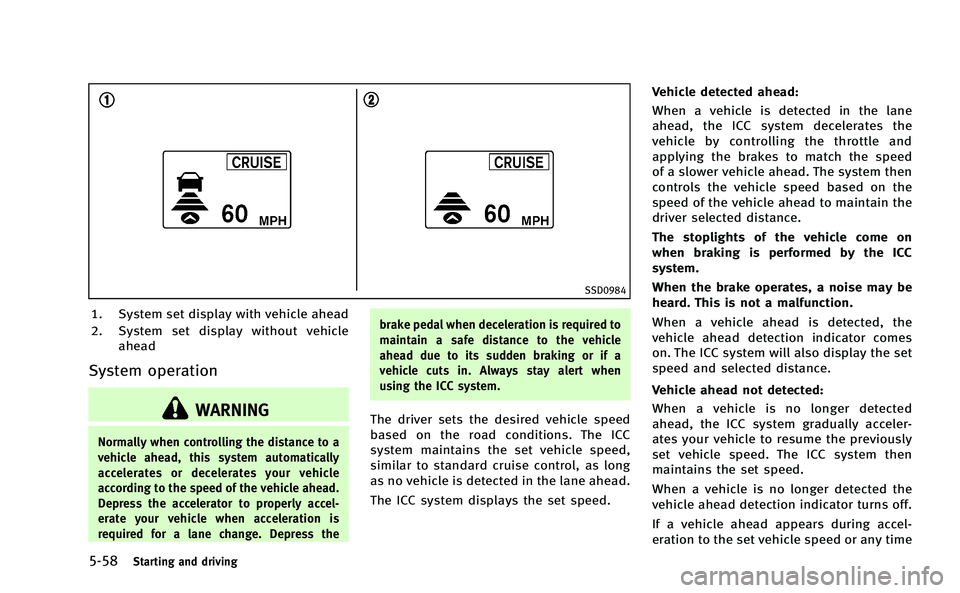
SSD0984
1. System set display with vehicle ahead
2. System set display without vehicleahead
System operation
WARNING
Normally when controlling the distance to a
vehicle ahead, this system automatically
accelerates or decelerates your vehicle
according to the speed of the vehicle ahead.
Depress the accelerator to properly accel-
erate your vehicle when acceleration is
required for a lane change. Depress the brake pedal when deceleration is required to
maintain a safe distance to the vehicle
ahead due to its sudden braking or if a
vehicle cuts in. Always stay alert when
using the ICC system.
The driver sets the desired vehicle speed
based on the road conditions. The ICC
system maintains the set vehicle speed,
similar to standard cruise control, as long
as no vehicle is detected in the lane ahead.
The ICC system displays the set speed.Vehicle detected ahead:
When a vehicle is detected in the lane
ahead, the ICC system decelerates the
vehicle by controlling the throttle and
applying the brakes to match the speed
of a slower vehicle ahead. The system then
controls the vehicle speed based on the
speed of the vehicle ahead to maintain the
driver selected distance.
The stoplights of the vehicle come on
when braking is performed by the ICC
system.
When the brake operates, a noise may be
heard. This is not a malfunction.
When a vehicle ahead is detected, the
vehicle ahead detection indicator comes
on. The ICC system will also display the set
speed and selected distance.
Vehicle ahead not detected:
When a vehicle is no longer detected
ahead, the ICC system gradually acceler-
ates your vehicle to resume the previously
set vehicle speed. The ICC system then
maintains the set speed.
When a vehicle is no longer detected the
vehicle ahead detection indicator turns off.
If a vehicle ahead appears during accel-
eration to the set vehicle speed or any time
Page 404 of 530
SSD0997
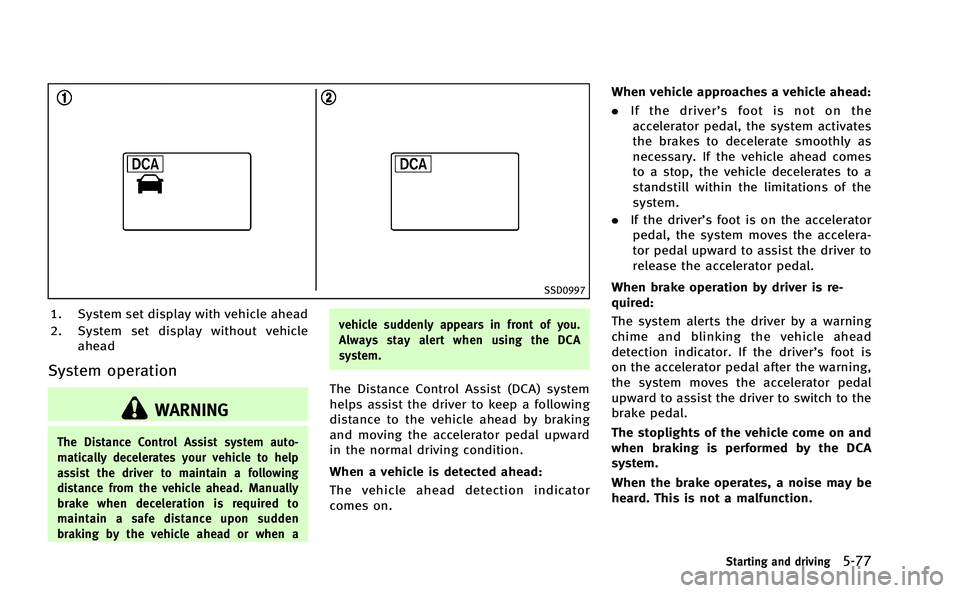
1. System set display with vehicle ahead
2. System set display without vehicleahead
System operation
WARNING
The Distance Control Assist system auto-
matically decelerates your vehicle to help
assist the driver to maintain a following
distance from the vehicle ahead. Manually
brake when deceleration is required to
maintain a safe distance upon sudden
braking by the vehicle ahead or when a vehicle suddenly appears in front of you.
Always stay alert when using the DCA
system.
The Distance Control Assist (DCA) system
helps assist the driver to keep a following
distance to the vehicle ahead by braking
and moving the accelerator pedal upward
in the normal driving condition.
When a vehicle is detected ahead:
The vehicle ahead detection indicator
comes on.When vehicle approaches a vehicle ahead:
. If the driver’ s foot is not on the
accelerator pedal, the system activates
the brakes to decelerate smoothly as
necessary. If the vehicle ahead comes
to a stop, the vehicle decelerates to a
standstill within the limitations of the
system.
. If the driver’s foot is on the accelerator
pedal, the system moves the accelera-
tor pedal upward to assist the driver to
release the accelerator pedal.
When brake operation by driver is re-
quired:
The system alerts the driver by a warning
chime and blinking the vehicle ahead
detection indicator. If the driver’s foot is
on the accelerator pedal after the warning,
the system moves the accelerator pedal
upward to assist the driver to switch to the
brake pedal.
The stoplights of the vehicle come on and
when braking is performed by the DCA
system.
When the brake operates, a noise may be
heard. This is not a malfunction.
Starting and driving5-77
Page 433 of 530

6-2In case of emergency
In the event of a roadside emergency,
Roadside Assistance Service is available to
you. Please refer to your Warranty Informa-
tion Booklet (U.S.) or Warranty & Roadside
Assistance Information Booklet (Canada)
for details.To shut off the INFINITI Direct Response
HybridTMSystem in an emergency situa-
tion, while driving perform the following
procedure:
. Rapidly push the push-button ignition
switch 3 consecutive times, or
. Push and hold the push-button ignition
switch for more than 2 seconds.TIRE PRESSURE MONITORING SYS-
TEM (TPMS)
This vehicle is equipped with the Tire
Pressure Monitoring System (TPMS). It
monitors tire pressure of all tires except
the spare. When the low tire pressure
warning light is lit and the CHECK TIRE
PRESSURE warning appears in the dot
matrix liquid crystal display, one or more
of your tires is significantly under-inflated.
If the vehicle is being driven with low tire
pressure, the TPMS will activate and warn
you of it by the low tire pressure warning
light. This system will activate only when
the vehicle is driven at speeds above 16
MPH (25 km/h). For more details, see
“Warning/indicator lights and audible re-
minders” in the“2. Instruments and
controls” section and “Tire Pressure Mon-
itoring System (TPMS) ”in the “5. Starting
and driving” section.
WARNING
.If the low tire pressure warning light
illuminates or LOW PRESSURE informa-
tion is displayed on the monitor screen
while driving, avoid sudden steering
maneuvers or abrupt braking, reduce
ROADSIDE ASSISTANCE PROGRAM EMERGENCY INFINITI DIRECT RESPONSE
HYBRIDTMSYSTEM SHUT OFFFLAT TIRE
Page 439 of 530

6-8In case of emergency
JVE0012X
6. Put trunk floor cover*1against in the
trunk room and store the damaged tire.
7. Close the trunk.
WARNING
. Always make sure that the spare tire and
jacking equipment are properly secured
after use. Such items can become
dangerous projectiles in an accident or
sudden stop.
. The T-type spare tire and small size
spare tire are designed for emergency
use. See specific instructions under the heading
“Wheels and tires” in the“8.
Maintenance and do-it-yourself” section.
If needed, Roadside Assistance is avail-
able. Please see your Warranty Information
Booklet or Roadside Assistance I.D. Card
for the toll-free number to call (U.S.) or
Warranty Information Booklet (Canada). Before attempting to jump start the vehi-
cle, make sure the fuel tank is not empty
and the correct starting procedure is
followed. See
“Starting the INFINITI Direct
Response HybridTMSystem” in the“5.
Starting and driving” section. Do not drive
the vehicle on battery power only if the fuel
tank is empty. The Lithium ion (Li-ion)
battery will become discharged and the
INFINITI Direct Response Hybrid
TMSystem
will turn off.
CONFIRM BATTERY IS DISCHARGED
If any of the following conditions occurs,
the 12-volt battery might discharged:
. The instrument cluster and/or head-
lights are not normal brightness.
. Audio accessories cannot be turned on.
. The hybrid system does not become
ready to drive mode.
. The ignition switch cannot be placed in
the ON position.
Check the following if you notice above
conditions.
1. Check that the 12-volt battery terminals are tight and clean. See “12-volt
battery” in the“8. Maintenance and
do-it-yourself” section. The battery is
located on the left hand side of the
IF THE VEHICLE DOES NOT START
Page 456 of 530

8 Maintenance and do-it-yourself
Maintenance requirement.................................... 8-2
Scheduled maintenance .................................. 8-2
General maintenance....................................... 8-2
Where to go for service ................................... 8-2
General maintenance ........................................... 8-3 Explanation of maintenance items ................... 8-3
Maintenance precautions ..................................... 8-5
Engine compartment check locations ................... 8-7 VQ35HR engine ............................................... 8-7
Engine cooling system ......................................... 8-9
Checking engine coolant level ....................... 8-10
Changing engine coolant ............................... 8-10
Inverter cooling system...................................... 8-11
Checking inverter coolant level ...................... 8-12
Changing inverter coolant.............................. 8-12
Engine oil .......................................................... 8-12
Checking engine oil level............................... 8-12
Changing engine oil and filter ....................... 8-13
Automatic transmission fluid ............................. 8-15
Power steering fluid........................................... 8-15
Brake fluid......................................................... 8-16 Brake fluid .................................................... 8-16
Window washer fluid ......................................... 8-17
12-volt battery ................................................... 8-18 Checking battery fluid level ........................... 8-19 Jump starting ............................................... 8-19
Spark plugs ...................................................... 8-19 Replacing spark plugs ................................. 8-20
Air cleaner ........................................................ 8-20
Windshield wiper blades ................................... 8-21 Cleaning ...................................................... 8-21
Replacing..................................................... 8-22
Brakes .............................................................. 8-23 Self-adjusting brakes ................................... 8-23
Brake pad wear warning .............................. 8-23
Fuses ................................................................ 8-24 Engine compartment or trunk room.............. 8-24
Passenger compartment............................... 8-25
Intelligent Key battery replacement ................... 8-26
Lights................................................................ 8-29 Headlights ................................................... 8-29
Exterior and interior lights ........................... 8-30
Wheels and tires ............................................... 8-32 Tire pressure ............................................... 8-32
Tire labeling ................................................ 8-36
Types of tires............................................... 8-38
Tire chains ................................................... 8-39
Changing wheels and tires........................... 8-39
Page 459 of 530

8-4Maintenance and do-it-yourself
Accelerator pedal:Check the pedal for
smooth operation and make sure the pedal
does not catch or require uneven effort.
Keep the floor mat away from the pedal.
Automatic transmission P (Park) mechan-
ism: On a fairly steep hill, check that your
vehicle is held securely with the selector
lever in the P (Park) position without
applying any brakes.
Brake pedal: Check the pedal for smooth
operation. If the brake pedal suddenly
goes down further than normal, the pedal
feels spongy or the vehicle seems to take
longer to stop, see an INFINITI retailer
immediately. Keep the floor mat away from
the pedal.
Brakes: Check that the brakes do not pull
the vehicle to one side when applied.
Parking brake: Check the parking brake
operation regularly. The vehicle should be
securely held on a fairly steep hill with only
the parking brake applied. If the parking
brake needs adjusted, see an INFINITI
retailer.
Seat belts: Check that all parts of the seat
belt system (for example, buckles, an-
chors, adjuster and retractors) operate
properly and smoothly, and are installed securely. Check the belt webbing for cuts,
fraying, wear or damage.
Seats:
Check seat position controls such as
seat adjusters, seatback recliner, etc. to
ensure they operate smoothly and that all
latches lock securely in every position.
Check that the head restraints move up
and down smoothly and that the locks (if
so equipped) hold securely in all latched
positions.
Steering wheel: Check for changes in the
steering conditions, such as excessive free
play, hard steering or strange noises.
Warning lights and chimes: Make sure that
all warning lights and chimes are operating
properly.
Windshield defroster: Check that the air
comes out of the defroster outlets properly
and in sufficient quantity when operating
the heater or air conditioner.
Windshield wiper and washer*: Check that
the wipers and washer operate properly
and that the wipers do not streak.
Under the hood and vehicle
The maintenance items listed here should
be checked periodically (for example, each
time you check the engine oil or refuel). 12-volt battery*:
Check the fluid level in
each cell. It should be between the MAX
and MIN lines. Vehicles operated in high
temperatures or under severe condition
require frequent checks of the battery fluid
level.
NOTE:
Care should be taken to avoid situations
that can lead to potential 12-volt battery
discharge and potential no-start condi-
tions such as:
1. Installation or extended use of electro-
nic accessories that consume 12-volt
battery power when the engine is not
running (Phone chargers, GPS, DVD
players, etc.)
2. Vehicle is not driven regularly and/or
only driven short distances.
In these cases, the 12-volt battery may
need to be charged to maintain 12-volt
battery health.
Brake fluid level*: Make sure that the
brake fluid level is between the MAX and
MIN lines on the reservoir.
Engine coolant level*: Check the coolant
level when the engine is cold.
Engine drive belts*: Make sure that no belt
Page 484 of 530
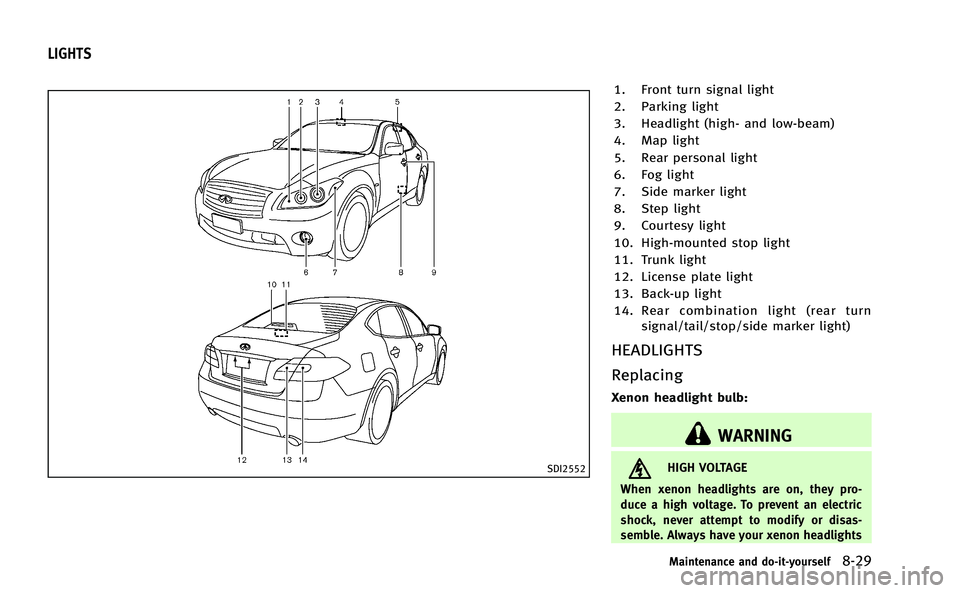
SDI2552
1. Front turn signal light
2. Parking light
3. Headlight (high- and low-beam)
4. Map light
5. Rear personal light
6. Fog light
7. Side marker light
8. Step light
9. Courtesy light
10. High-mounted stop light
11. Trunk light
12. License plate light
13. Back-up light
14. Rear combination light (rear turnsignal/tail/stop/side marker light)
HEADLIGHTS
Replacing
Xenon headlight bulb:
WARNING
HIGH VOLTAGE
When xenon headlights are on, they pro-
duce a high voltage. To prevent an electric
shock, never attempt to modify or disas-
semble. Always have your xenon headlights
Maintenance and do-it-yourself8-29
LIGHTS
Page 523 of 530
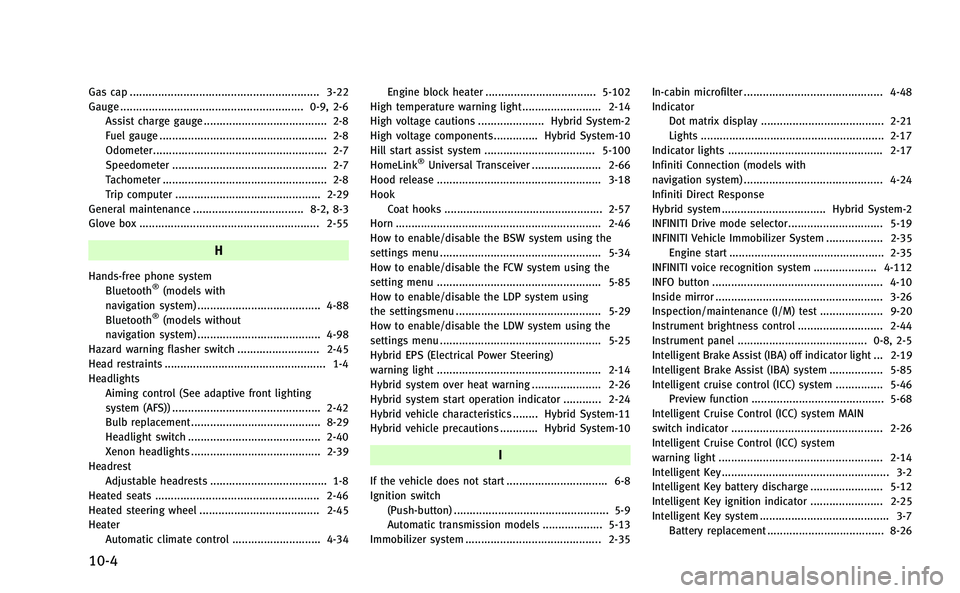
10-4
Gas cap ............................................................ 3-22
Gauge .......................................................... 0-9, 2-6Assist charge gauge ....................................... 2-8
Fuel gauge ..................................................... 2-8
Odometer....................................................... 2-7
Speedometer ................................................. 2-7
Tachometer .................................................... 2-8
Trip computer .............................................. 2-29
General maintenance ................................... 8-2, 8-3
Glove box ......................................................... 2-55
H
Hands-free phone system Bluetooth®(models with
navigation system) ....................................... 4-88
Bluetooth
®(models without
navigation system) ....................................... 4-98
Hazard warning flasher switch .......................... 2-45
Head restraints ................................................... 1-4
Headlights
Aiming control (See adaptive front lighting
system (AFS)) ............................................... 2-42
Bulb replacement ......................................... 8-29
Headlight switch .......................................... 2-40
Xenon headlights ......................................... 2-39
Headrest
Adjustable headrests ..................................... 1-8
Heated seats .................................................... 2-46
Heated steering wheel ...................................... 2-45
Heater Automatic climate control ............................ 4-34 Engine block heater ................................... 5-102
High temperature warning light ......................... 2-14
High voltage cautions ..................... Hybrid System-2
High voltage components .............. Hybrid System-10
Hill start assist system ................................... 5-100
HomeLink
®Universal Transceiver ...................... 2-66
Hood release .................................................... 3-18
Hook Coat hooks .................................................. 2-57
Horn ................................................................. 2-46
How to enable/disable the BSW system using the
settings menu ................................................... 5-34
How to enable/disable the FCW system using the
setting menu .................................................... 5-85
How to enable/disable the LDP system using
the settingsmenu .............................................. 5-29
How to enable/disable the LDW system using the
settings menu ................................................... 5-25
Hybrid EPS (Electrical Power Steering)
warning light .................................................... 2-14
Hybrid system over heat warning ...................... 2-26
Hybrid system start operation indicator ............ 2-24
Hybrid vehicle characteristics ........ Hybrid System-11
Hybrid vehicle precautions ............ Hybrid System-10
I
If the vehicle does not start ................................ 6-8
Ignition switch (Push-button) ................................................. 5-9
Automatic transmission models ................... 5-13
Immobilizer system ........................................... 2-35 In-cabin microfilter ............................................ 4-48
Indicator
Dot matrix display ....................................... 2-21
Lights .......................................................... 2-17
Indicator lights ................................................. 2-17
Infiniti Connection (models with
navigation system) ............................................ 4-24
Infiniti Direct Response
Hybrid system ................................. Hybrid System-2
INFINITI Drive mode selector.............................. 5-19
INFINITI Vehicle Immobilizer System .................. 2-35 Engine start ................................................. 2-35
INFINITI voice recognition system .................... 4-112
INFO button ...................................................... 4-10
Inside mirror ..................................................... 3-26
Inspection/maintenance (I/M) test .................... 9-20
Instrument brightness control ........................... 2-44
Instrument panel ......................................... 0-8, 2-5
Intelligent Brake Assist (IBA) off indicator light ... 2-19
Intelligent Brake Assist (IBA) system ................. 5-85
Intelligent cruise control (ICC) system ............... 5-46 Preview function .......................................... 5-68
Intelligent Cruise Control (ICC) system MAIN
switch indicator ................................................ 2-26
Intelligent Cruise Control (ICC) system
warning light .................................................... 2-14
Intelligent Key ..................................................... 3-2
Intelligent Key battery discharge ....................... 5-12
Intelligent Key ignition indicator ....................... 2-25
Intelligent Key system ......................................... 3-7 Battery replacement ..................................... 8-26