belt INFINITI M-HEV 2013 Repair Manual
[x] Cancel search | Manufacturer: INFINITI, Model Year: 2013, Model line: M-HEV, Model: INFINITI M-HEV 2013Pages: 530, PDF Size: 3.71 MB
Page 102 of 530

The seat belt warning light for the front
passenger will illuminate if the seat belt is
not fastened when the front passenger’s
seat is occupied. For 7 seconds after the
ignition switch is in the ON position, the
system does not activate the warning light
for the front passenger.
See “Seat belts” in the“1. Safety —Seats,
seat belts and supplemental restraint
system” section for precautions on seat
belt usage.
Supplemental air bag warning
light
After pushing the ignition switch to the ON
position, the supplemental air bag warning
light will illuminate. The supplemental air
bag warning light will turn off after about 7
seconds if the SRS air bag systems are
operational.
If any of the following conditions occur, the
air bags and/or pretensioner systems need
servicing and your vehicle must be taken to
your nearest INFINITI retailer.
. The supplemental air bag warning light
remains on after approximately 7 sec-
onds.
. The supplemental air bag warning light
flashes intermittently. .
The supplemental air bag warning light
does not come on at all.
Unless checked and repaired, the Supple-
mental Restraint Systems and/or the pre-
tensioners may not function properly.
For additional information, see “Supple-
mental restraint system” in the“1. Safety
— Seats, seat belts and supplemental
restraint system” section.
WARNING
If the supplemental air bag warning light is
on, it could mean that the air bags and/or
pretensioner systems will not operate in an
accident. To help avoid injury to yourself or
others, have your vehicle checked by a
retailer as soon as possible.
Vehicle Dynamic Control (VDC)
warning light
The light will blink when the VDC system or
the traction control system is operating,
thus alerting the driver that the vehicle is
nearing its traction limits. The road surface
may be slippery.
When the vehicle dynamic control warning light illuminates when the vehicle dynamic
control system is turned on, this light
alerts the driver to the fact that the vehicle
dynamic control system’s fail-safe mode is
operating, for example the vehicle dynamic
control, active trace control (if so
equipped), Rise-up & Build-up function,
Brake Force Distribution or hill start assist
system may not be functioning properly.
Have the system checked by an INFINITI
retailer. If a malfunction occurs in the
system, the vehicle dynamic control sys-
tem function will be canceled but the
vehicle is still driveable. For additional
information, see “Vehicle Dynamic Control
(VDC) system” in the“5. Starting and
driving” section of this manual.
INDICATOR LIGHTS
Adaptive Front lighting System
(AFS) off indicator light (if so
equipped)
When the ignition switch is pushed to the
ON position, the Adaptive Front lighting
System (AFS) off indicator light will illumi-
nate. The light will turn off in about 1
second if the AFS is operational.
This light also illuminates when the AFS is
turned off using the AFS switch.
Instruments and controls2-17
Page 104 of 530

Seats, seat belts and supplemental re-
straint system”section of this manual.
High beam indicator light
This light comes on when the headlight
high beam is on and goes out when the low
beam is selected.
Intelligent Brake Assist (IBA)
off indicator light (if so equipped)
The light illuminates when the Intelligent
Brake Assist (IBA) off switch is pushed to
OFF. This indicates that the Intelligent
Brake Assist (IBA) system is not operating.
When the IBA off indicator light illuminates
while the system is turned on (without the
warning chime sound), this light indicates
that the system control is temporarily
unavailable.
When the IBA off indicator light illuminates
with the warning chime sound while the
IBA system is turned on, this light indicates
that the system may not be functioning
properly. Park the vehicle in a safe place.
Check to see if the laser sensor is clean.
Stop the hybrid system, then restart the
hybrid system.
If the IBA off indicator light illuminates
after following the procedures above, it may indicate that the system or Active
Trace Control (if so equipped) is malfunc-
tioning. Although the vehicle is still drive-
able under normal conditions, have the
vehicle checked at an INFINITI retailer. (See
“Intelligent Brake Assist (IBA) system”
in
the “5. Starting and driving” section and
“Vehicle Dynamic Control (VDC) system” in
the “5. Starting and driving” section.)Lane Departure Prevention
(LDP) ON indicator light (green; if so
equipped)
The light comes on in green when the Lane
Departure Prevention (LDP) system is
turned on. The light turns off when the
system is turned off.
NOTE:
This light is common with the lane
departure warning light (orange). (See
“Lane departure warning light” earlier in
this section.)
For more details, see “Lane Departure
Warning (LDW) system/Lane Departure
Prevention (LDP) system” in the“5. Start-
ing and driving” section.
Malfunction Indicator Light
(MIL)
If the malfunction indicator light comes on
steady or blinks when the ignition switch is
in the ON position, it may indicate a
potential emission control malfunction.
The malfunction indicator light may also
come on steady if the fuel-filler cap is loose
or missing, or if the vehicle runs out of fuel.
Check to make sure the fuel-filler cap is
installed and closed tightly, and that the
vehicle has at least 3 US gallons (14 liters)
of fuel in the fuel tank.
After a few driving trips, the
light
should turn off if no other potential
emission control system malfunction ex-
ists.
If this indicator light remains on for 20
seconds and then blinks for 10 seconds
when the engine is not running, it indicates
that the vehicle is not ready for an
emission control system inspection/main-
tenance test. (See “Readiness for Inspec-
tion/Maintenance (I/M) test (US only)” in
the “9. Technical and consumer informa-
tion”.)
Instruments and controls2-19
Page 145 of 530
2-60Instruments and controls
(closing only) does not operate properly,
perform the following procedure to initi-
alize the power window system.
1. Push the ignition switch to the ONposition.
2. Close the door.
3. Open the window completely by oper- ating the power window switch.
4. Pull the power window switch and hold it to close the window, and then hold
the switch more than 3 seconds after
the window is closed completely.
5. Release the power window switch. Operate the window by the automatic
function to confirm the initialization is
complete.
6. Perform steps 2 through 5 above for other windows.
If the power window automatic function
does not operate properly after performing
the procedure above, have your vehicle
checked by an INFINITI retailer.WARNING
. In an accident you could be thrown from
the vehicle through an open moonroof.
Always use seat belts and child re-
straints.
. Do not allow anyone to stand up or
extend any portion of their body out of
the moonroof opening while the vehicle
is in motion or while the moonroof is
closing.
CAUTION
.Remove water drops, snow, ice or sand
from the moonroof before opening.
. Do not place any heavy object on the
moonroof or surrounding area.
AUTOMATIC MOONROOF
The moonroof only operates when the
ignition switch is in the ON position.
The automatic moonroof is operational for
about 45 seconds, even if the ignition
switch is pushed to the OFF position. If the
driver’s door or the passenger’s door is
opened during this period of about 45
seconds, power to the moonroof is can-
celed.
MOONROOF
Page 159 of 530

3-4Pre-driving checks and adjustments
controls”section.WARNING
.Always have the doors locked while
driving. Along with the use of seat belts,
this provides greater safety in the event
of an accident by helping to prevent
persons from being thrown from the
vehicle. This also helps keep children
and others from unintentionally opening
the doors, and will help keep out
intruders.
. Before opening any door, always look for
and avoid oncoming traffic.
. Do not leave children unattended inside
the vehicle. They could unknowingly
activate switches or controls. Unat-
tended children could become involved
in serious accidents.
CAUTION
To prevent theft or accidents, be sure to stop
the engine and lock the doors before
stepping away from the vehicle.
SPA2527
LOCKING WITH MECHANICAL KEY
The power door lock system allows you to
lock or unlock all doors simultaneously
using the mechanical key.
.Turning the driver’s door key cylinder to
the front of the vehicle
*1will lock all
doors.
. Turning the driver’s door key cylinder
once to the rear of the vehicle
*2will
unlock the driver’s door. After returning
the key to the neutral position
*3,
turning it to the rear again within 60
seconds will unlock all doors.
DOORS
Page 179 of 530
3-24Pre-driving checks and adjustments
1 second to turn off the LOOSE FUEL
CAP warning after tightening the fuel
cap.WARNING
.Do not adjust the steering wheel while
driving. You could lose control of your
vehicle and cause an accident.
. Do not adjust the steering wheel any
closer to you than is necessary for
proper steering operation and comfort.
The driver’s air bag inflates with great
force. If you are unrestrained, leaning
forward, sitting sideways or out of
position in any way, you are at greater
risk of injury or death in a crash. You
may also receive serious or fatal injuries
from the air bag if you are up against it
when it inflates. Always sit back against
the seatback and as far away as practical
from the steering wheel. Always use the
seat belts.
SPA2737
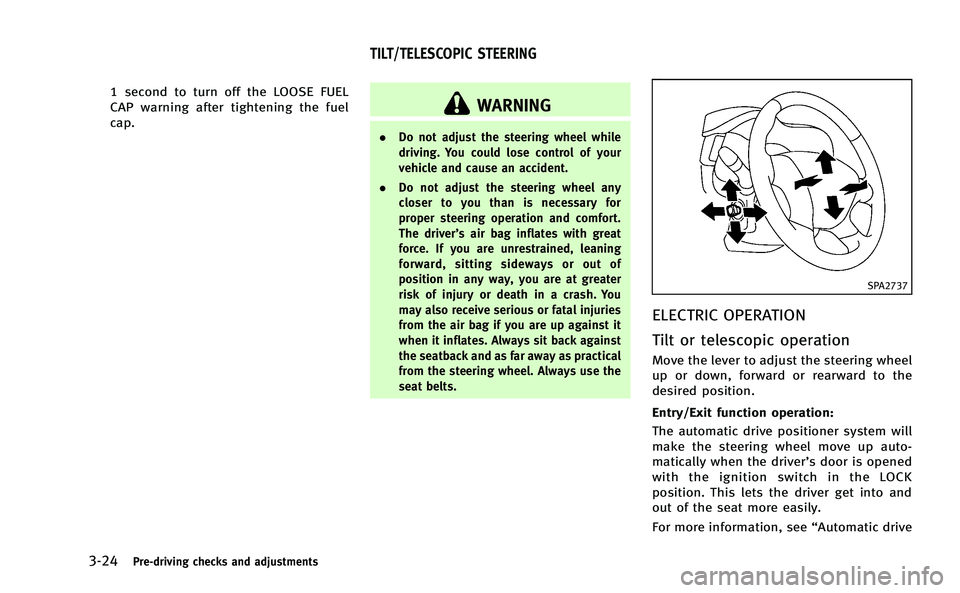
ELECTRIC OPERATION
Tilt or telescopic operation
Move the lever to adjust the steering wheel
up or down, forward or rearward to the
desired position.
Entry/Exit function operation:
The automatic drive positioner system will
make the steering wheel move up auto-
matically when the driver’s door is opened
with the ignition switch in the LOCK
position. This lets the driver get into and
out of the seat more easily.
For more information, see “Automatic drive
TILT/TELESCOPIC STEERING
Page 185 of 530

3-30Pre-driving checks and adjustments
The seat synchronization function operates
under the following conditions:
.The ignition switch is in the ON posi-
tion.
. The selector lever is in the P (Park)
position.
If the outside mirrors or the steering wheel
reaches its maximum adjustment, the
function is automatically disabled. Restart
the function by selecting a previously
stored seat memory position using the
memory switches (1 or 2). An Intelligent
Key that was previously linked to the
stored seat memory can also be used to
restart the function.
If a seat position was not previously stored
in the seat memory, restart the function by
adjusting the steering wheel and outside
mirrors manually for your best driving
position and then drive the vehicle above
4 MPH (7 km/h).
Cancel or activate seat synchroni-
zation function
The selector lever must be in the P (Park)
position with the ignition switch in the ACC
position.
MEMORY STORAGE
Two positions for the driver’s seat, steering
column and outside mirrors can be stored
in the automatic drive positioner memory.
Follow these procedures to use the mem-
ory system.
1. Move the selector lever to the P (Park) position.
2. Push the ignition switch to the ON position.
3. Adjust the driver’s seat, steering col- umn and outside mirrors to the desired
positions by manually operating each
adjusting switch. For additional infor-
mation, see “Seats”in the“1. Safety —
Seats, seat belts and supplemental
restraint system” section and“Tilt/
telescopic steering” earlier in this
section and “Outside mirrors” earlier
in this section.
4. Push the SET switch and, within 5 seconds, push the memory switch (1
or 2) fully for at least 1 second.
The indicator light for the pushed
memory switch will stay on for approxi-
mately 5 seconds after pushing the
switch.
If memory is stored in the same memory switch, the previous memory
will be deleted.
Linking Intelligent Key to a stored
memory position
The Intelligent Key can be linked to a
stored memory position with the following
procedure.
1. Follow the steps for storing a memory
position.
2. While the indicator light for the memory switch being set is illuminated for 5
seconds, push the
button on the
Intelligent Key. If the indicator light
blinks, the Intelligent Key is linked to
that memory setting.
Push the ignition switch to the OFF posi-
tion, and then push the
button on the
Intelligent Key. The driver’s seat, steering
wheel and outside mirrors will move to the
memorized position.
Confirming memory storage
. Push the ignition switch to the ON
position and push the SET switch. If
the main memory has not been stored,
the indicator light will come on for
approximately 0.5 second. When the
memory has stored in position, the
Page 334 of 530
For Canada:
This device complies with RSS-210 of
Industry Canada. Operation is subject to
the following two conditions: (1) this
device may not cause interference, and
(2) this device must accept any interfer-
ence, including interference that may
cause undesired operation of the device.
AVOIDING COLLISION AND ROLL-
OVER
WARNING
Failure to operate this vehicle in a safe and
prudent manner may result in loss of control
or an accident.
Be alert and drive defensively at all times.
Obey all traffic regulations. Avoid exces-
sive speed, high speed cornering, or
sudden steering maneuvers, because
these driving practices could cause you to
lose control of your vehicle.As with any
vehicle, a loss of control could result in a
collision with other vehicles or objects, or
cause the vehicle to rollover, particularly if
the loss of control causes the vehicle to
slide sideways. Be attentive at all times, and avoid driving when tired. Never drive
when under the influence of alcohol or
drugs (including prescription or over-the-
counter drugs which may cause drowsi-
ness). Always wear your seat belt as
outlined in the
“Seat belts”in the“1.
Safety —Seats, seat belts and supple-
mental restraint system” section of this
manual, and also instruct your passengers
to do so.
Seat belts help reduce the risk of injury in
collisions and rollovers. In a rollover crash,
an unbelted or improperly belted person is
significantly more likely to be injured or
killed than a person properly wearing a
seat belt.
OFF-ROAD RECOVERY
While driving, the right side or left side
wheels may unintentionally leave the road
surface. If this occurs, maintain control of
the vehicle by following the procedure
below. Please note that this procedure is
only a general guide. The vehicle must be
driven as appropriate based on the condi-
tions of the vehicle, road and traffic.
1. Remain calm and do not overreact.
2. Do not apply the brakes. 3. Maintain a firm grip on the steering
wheel with both hands and try to hold a
straight course.
4. When appropriate, slowly release the accelerator pedal to gradually slow the
vehicle.
5. If there is nothing in the way, steer the vehicle to follow the road while the
vehicle speed is reduced. Do not
attempt to drive the vehicle back onto
the road surface until vehicle speed is
reduced.
6. When it is safe to do so, gradually turn the steering wheel until both tires
return to the road surface. When all
tires are on the road surface, steer the
vehicle to stay in the appropriate
driving lane..If you decide that it is not safe toreturn the vehicle to the road surface
based on vehicle, road or traffic
conditions, gradually slow the vehi-
cle to a stop in a safe place off the
road.
Starting and driving5-7
Page 339 of 530

5-12Starting and driving
SSD0860
INTELLIGENT KEY BATTERY DIS-
CHARGE
If the battery of the Intelligent Key is
discharged, or environmental conditions
interfere with the Intelligent Key operation,
start the hybrid system according to the
following procedure:
1. Move the selector lever to the P (Park)position.
2. Firmly apply the foot brake.
3. Touch the ignition switch with the Intelligent Key as illustrated. (A chime
will sound.) 4. Push the ignition switch while depres-
sing the brake pedal within 10 seconds
after the chime sounds. The hybrid
system will start.
After step 3 is performed, when the
ignition switch is pushed without depres-
sing the brake pedal, the ignition switch
position will change to ACC.
NOTE:
. When the ignition switch is pushed to
the ACC or ON position or the hybrid
system is started by the above proce-
dures, the Intelligent Key battery dis-
charge indicator appears on the dot
matrix liquid crystal display even if the
Intelligent Key is inside the vehicle.
This is not a malfunction. To turn off
the Intelligent Key battery discharge
indicator, touch the ignition switch
with the Intelligent Key again.
. If the Intelligent Key battery discharge
indicator appears, replace the battery
as soon as possible. (See “Intelligent
Key battery replacement” in the“8.
Maintenance and do-it-yourself” sec-
tion.) .
Make sure the area around the vehicle
is clear.
. Check fluid levels such as engine oil,
coolant, brake fluid and window
washer fluid as frequently as possible,
or at least whenever you refuel.
. Check that all windows and lights are
clean.
. Visually inspect tires for their appear-
ance and condition. Also check tires for
proper inflation.
. Lock all doors.
. Position seat and adjust head re-
straints.
. Adjust inside and outside mirrors.
. Fasten seat belts and ask all passen-
gers to do likewise.
. Check the operation of warning lights
when the ignition switch is pushed to
the ON position. (See “Warning/indica-
tor lights and audible reminders” in the
“2. Instruments and controls” section.)
BEFORE STARTING THE INFINITI DIRECT
RESPONSE HYBRIDTMSYSTEM
Page 443 of 530

6-12In case of emergency
CAUTION
.Do not continue to drive if your vehicle
overheats. Doing so could cause engine
damage or a vehicle fire.
. To avoid the danger of being scalded,
never remove the radiator cap while the
engine is still hot. When the radiator cap
is removed, pressurized hot water will
spurt out, possibly causing serious
injury.
. Do not open the hood if steam is coming
out.
If your vehicle is overheating (indicated by
an extremely high temperature gauge
reading), or if you feel a lack of engine
power, detect abnormal noise, etc., take
the following steps:
1. Move the vehicle safely off the road,
apply the parking brake and move the
selector lever to the P (Park) position.
Do not turn the INFINITI Direct Re-
sponse Hybrid
TMSystem off.
2. Turn off the climate control. Open all the windows, move the heater or air
conditioner temperature control to maximum hot and fan control to high
speed.
3. If engine overheating is caused by climbing a long hill on a hot day, run
the engine at a fast idle (approximately
1,500 rpm) until the temperature gauge
indication returns to normal.
4. Get out of the vehicle. Look and listen for steam or coolant escaping from the
radiator before opening the hood. (If
steam or coolant is escaping, turn off
the hybrid system.) Do not open the
hood further until no steam or coolant
can be seen.
5. Open the engine hood.
WARNING
If steam or water is coming from the engine,
stand clear to prevent getting burned.
6. Also check if the cooling fan is running. The radiator hoses and radiator should
not leak water. If coolant is leaking or
the cooling fan does not run, stop the
hybrid system.
WARNING
Be careful not to allow your hands, hair,
jewelry or clothing to come into contact
with, or get caught in, engine belts or the
engine cooling fan. The engine cooling fan
can start at any time.
7. After the engine cools down, check thecoolant level in the reservoir tank with
the engine running. Add coolant to the
reservoir tank if necessary. Have your
vehicle repaired at the nearest INFINITI
retailer.
If needed, Roadside Assistance is avail-
able. Please see your Warranty Information
Booklet or Roadside Assistance I.D. Card
for the toll-free number to call (U.S.) or
Warranty & Roadside Assistance Informa-
tion Booklet (Canada).
IF YOUR VEHICLE OVERHEATS
Page 448 of 530
7 Appearance and care
Cleaning exterior................................................. 7-2
Washing .......................................................... 7-2
Waxing ............................................................ 7-2
Removing spots............................................... 7-3
Underbody ...................................................... 7-3
Glass............................................................... 7-3
Wheels ............................................................ 7-3
Chrome parts .................................................. 7-4
Tire dressing ................................................... 7-4
Cleaning interior .................................................. 7-4
Lithium-ion (Li-ion) battery air vent.................. 7-5 Air fresheners ................................................ 7-5
Moonroof sunshade ...................................... 7-6
Floor mats ..................................................... 7-6
Seat belts ...................................................... 7-7
Corrosion protection............................................ 7-7 Most common factors contributing to
vehicle corrosion ........................................... 7-7
Environmental factors influence the rate
of corrosion ................................................... 7-7
To protect your vehicle from corrosion ........... 7-8