lock INFINITI M-HEV 2013 Repair Manual
[x] Cancel search | Manufacturer: INFINITI, Model Year: 2013, Model line: M-HEV, Model: INFINITI M-HEV 2013Pages: 530, PDF Size: 3.71 MB
Page 175 of 530

3-20Pre-driving checks and adjustments
SPA2766
OPENING WITH KEY
To open the trunk lid, insert the mechanical
key to the trunk key cylinder and turn the
key to the right side of the vehicle. To
close, remove the key and push the trunk
lid down.
SPA2767
TRUNK RELEASE POWER CANCEL
SWITCH
When the switch located inside the glove
box is in the OFF position
*A, the power to
the trunk lid will be canceled and the trunk
lid cannot be opened by the trunk lid
release switch, the trunk open request
switch or the TRUNK button on the
Intelligent Key.
When you have to leave the vehicle with a
valet and want to keep your belongings
safe in the glove box and the trunk, push
this switch to OFF and lock the glove box
with the mechanical key. Then leave the vehicle and the Intelligent Key with the
valet and keep the mechanical key with
you.
See
“Keys” earlier in this section.
To connect the power to the trunk lid, push
the switch to the ON
*Bposition.
AUTO CLOSURE
If the trunk lid is pulled down to a partly
open position, the trunk lid will pull itself
to the closed position.
Do not apply excessive force when the
auto closure is operating. Excessive force
applied may cause the mechanism to
malfunction.
CAUTION
. The trunk lid will automatically close
from a partly open position. To avoid
pinching, keep hands and fingers away
from trunk lid opening.
. Do not let children operate the trunk lid.
The auto closure may not function if the
12-volt battery is weak. If the auto closure
does not work, close the trunk lid manu-
ally, or perform the auto closure operation
Page 176 of 530

again after starting hybrid system.
If the auto closure operation is performed
repeatedly with the trunk overloaded, the
auto closure may not operate properly.
Reduce the amount of items in trunk. If the
auto closure still does not operate, have
the system checked by an INFINITI retailer.
SPA2768
INTERIOR TRUNK LID RELEASE
WARNING
Closely supervise children when they are
around cars to prevent them from playing
and becoming locked in the trunk where
they could be seriously injured. Keep the car
locked, with the trunk lid securely latched,
when not in use, and prevent children’s
access to Intelligent Keys.
The interior trunk lid release mechanism
allows opening of the trunk lid in the eventthat people become locked inside the trunk
or in the event of the loss of electrical
power such as a discharged 12-volt bat-
tery.
Releasing inside the trunk
To open the trunk lid from the inside, pull
the release handle
*1until the lock
releases and push up on the trunk lid.
The release lever is made of a material that
glows in the dark after a brief exposure to
ambient light.
The handle is located on the back of the
trunk lid as illustrated.
Pre-driving checks and adjustments3-21
Page 177 of 530
3-22Pre-driving checks and adjustments
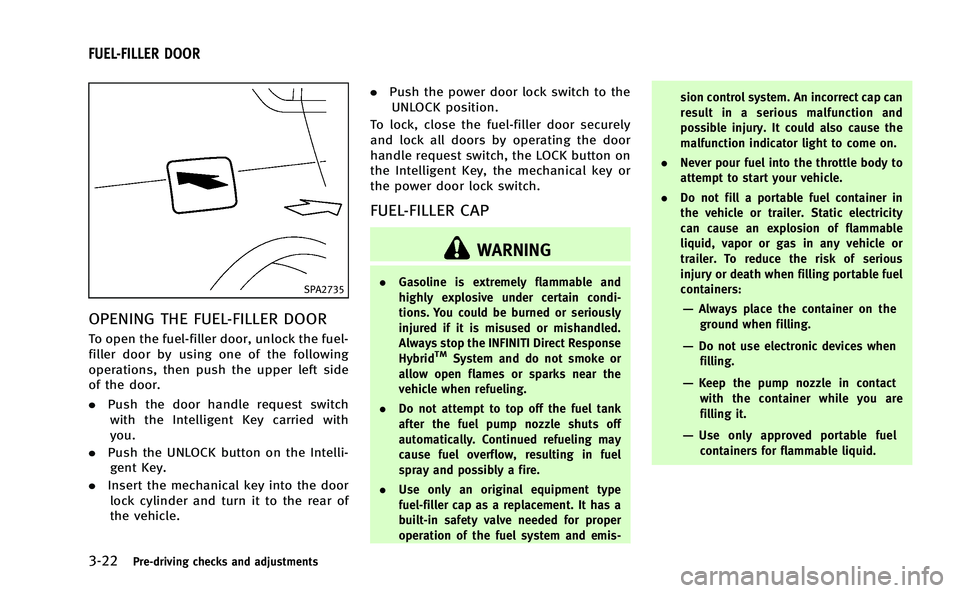
SPA2735
OPENING THE FUEL-FILLER DOOR
To open the fuel-filler door, unlock the fuel-
filler door by using one of the following
operations, then push the upper left side
of the door.
.Push the door handle request switch
with the Intelligent Key carried with
you.
. Push the UNLOCK button on the Intelli-
gent Key.
. Insert the mechanical key into the door
lock cylinder and turn it to the rear of
the vehicle. .
Push the power door lock switch to the
UNLOCK position.
To lock, close the fuel-filler door securely
and lock all doors by operating the door
handle request switch, the LOCK button on
the Intelligent Key, the mechanical key or
the power door lock switch.
FUEL-FILLER CAP
WARNING
. Gasoline is extremely flammable and
highly explosive under certain condi-
tions. You could be burned or seriously
injured if it is misused or mishandled.
Always stop the INFINITI Direct Response
Hybrid
TMSystem and do not smoke or
allow open flames or sparks near the
vehicle when refueling.
. Do not attempt to top off the fuel tank
after the fuel pump nozzle shuts off
automatically. Continued refueling may
cause fuel overflow, resulting in fuel
spray and possibly a fire.
. Use only an original equipment type
fuel-filler cap as a replacement. It has a
built-in safety valve needed for proper
operation of the fuel system and emis- sion control system. An incorrect cap can
result in a serious malfunction and
possible injury. It could also cause the
malfunction indicator light to come on.
. Never pour fuel into the throttle body to
attempt to start your vehicle.
. Do not fill a portable fuel container in
the vehicle or trailer. Static electricity
can cause an explosion of flammable
liquid, vapor or gas in any vehicle or
trailer. To reduce the risk of serious
injury or death when filling portable fuel
containers:
—Always place the container on the
ground when filling.
—Do not use electronic devices whenfilling.
—Keep the pump nozzle in contact
with the container while you are
filling it.
—Use only approved portable fuelcontainers for flammable liquid.
FUEL-FILLER DOOR
Page 178 of 530

CAUTION
.If fuel is spilled on the vehicle body,
flush it away with water to avoid paint
damage.
. Insert the cap straight into the fuel-filler
tube, then tighten until the fuel-filler cap
a single click is heard. Failure to tighten
the fuel-filler cap properly may cause the
malfunction indicator light (MIL) to
illuminate. If thelight illuminates
because the fuel-filler cap is loose or
missing, tighten or install the cap and
continue to drive the vehicle. The
light should turn off after a few driving
trips. If thelight does not turn off
after a few driving trips, have the vehicle
inspected by an INFINITI retailer.
. The LOOSE FUEL CAP warning will appear
if the fuel-filler cap is not properly
tightened. It may take a few driving
trips for the message to be displayed.
Failure to tighten the fuel-filler cap
properly after the LOOSE FUEL CAP
warning appears may cause the
Malfunction Indicator Light (MIL) to
illuminate.
JVP0046X
To remove the fuel-filler cap:
1. Turn the fuel-filler cap counterclockwise
to remove.
2. Put the fuel-filler cap on the cap holder
*Awhile refueling.
To install the fuel-filler cap:
1. Insert the fuel-filler cap straight into the fuel-filler tube.
2. Turn the fuel-filler cap clockwise until a single click is heard.
SPA2832
Loose fuel cap warning
The LOOSE FUEL CAP warning appears on
the dot matrix liquid crystal display when
the fuel-filler cap is not tightened correctly
after the vehicle has been refueled. It may
take a few driving trips for the warning to
be displayed. To turn off the warning,
perform the following steps:
1. Remove and install the fuel-filler cap assoon as possible. (See “Fuel-filler cap”
earlier in this section.)
2. Tighten the fuel-filler cap until it clicks.
3. Push the reset switch
*Aon the right
side of the combination meter for about
Pre-driving checks and adjustments3-23
Page 179 of 530
3-24Pre-driving checks and adjustments
1 second to turn off the LOOSE FUEL
CAP warning after tightening the fuel
cap.WARNING
.Do not adjust the steering wheel while
driving. You could lose control of your
vehicle and cause an accident.
. Do not adjust the steering wheel any
closer to you than is necessary for
proper steering operation and comfort.
The driver’s air bag inflates with great
force. If you are unrestrained, leaning
forward, sitting sideways or out of
position in any way, you are at greater
risk of injury or death in a crash. You
may also receive serious or fatal injuries
from the air bag if you are up against it
when it inflates. Always sit back against
the seatback and as far away as practical
from the steering wheel. Always use the
seat belts.
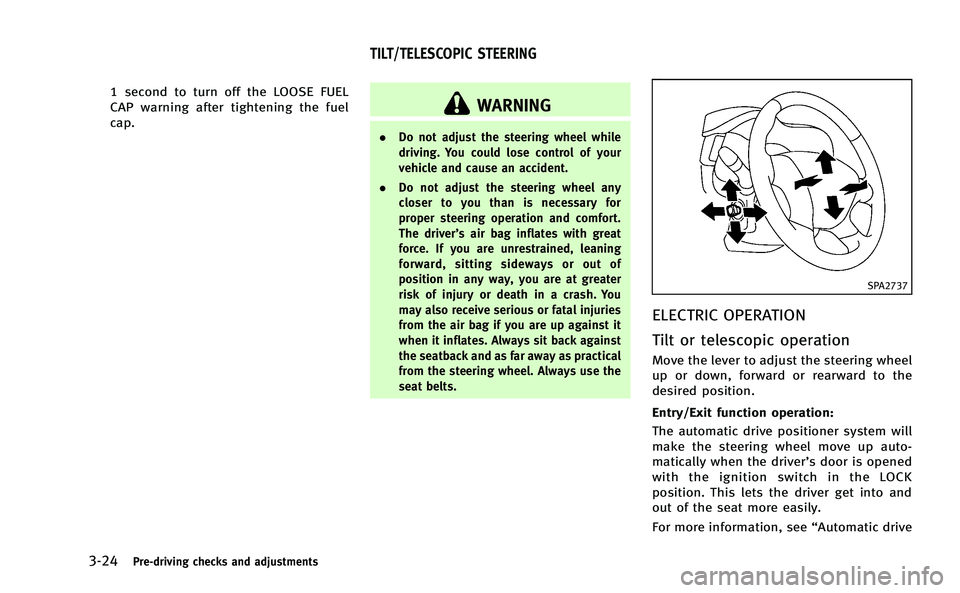
SPA2737
ELECTRIC OPERATION
Tilt or telescopic operation
Move the lever to adjust the steering wheel
up or down, forward or rearward to the
desired position.
Entry/Exit function operation:
The automatic drive positioner system will
make the steering wheel move up auto-
matically when the driver’s door is opened
with the ignition switch in the LOCK
position. This lets the driver get into and
out of the seat more easily.
For more information, see “Automatic drive
TILT/TELESCOPIC STEERING
Page 180 of 530
positioner”later in this section.
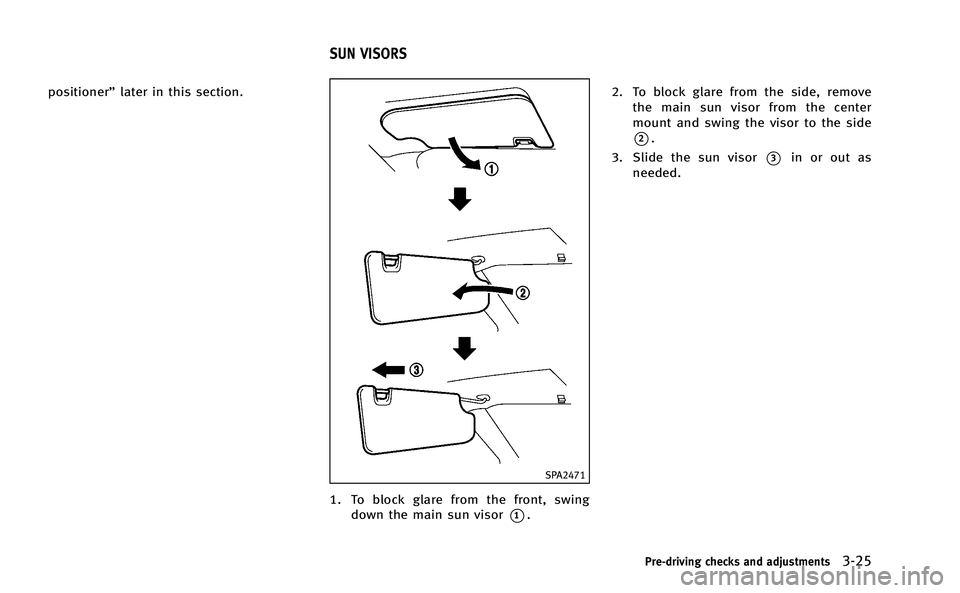
SPA2471
1. To block glare from the front, swing
down the main sun visor
*1. 2. To block glare from the side, remove
the main sun visor from the center
mount and swing the visor to the side
*2.
3. Slide the sun visor
*3in or out as
needed.
Pre-driving checks and adjustments3-25
SUN VISORS
Page 183 of 530

3-28Pre-driving checks and adjustments
switch.
4. The outside mirror surface moves downward.
When one of the following conditions has
occurred, the outside mirror surface will
return to its original position.
. The selector lever is moved to any
position other than R (Reverse).
. The outside mirror control switch is set
to the center position.
. The ignition switch is pushed to the OFF
position.
Automatic anti-glare
The outside rearview mirror is designed so
that it automatically changes reflection
according to the intensity of the headlights
of the vehicle following you.
The anti-glare system will be automatically
turned on when you push the ignition
switch to the “ON”position.
SIC3869
VANITY MIRROR
To use the front vanity mirror, pull down
the sun visor and pull up the cover. The automatic drive positioner system has
four features:
.
Entry/exit function
. Seat synchronization function
. Memory storage
. Setting memory function
ENTRY/EXIT FUNCTION
This system is designed so that the driver’s
seat and steering column will automati-
cally move when the selector lever is in the
P (Park) position. This allows the driver to
get into and out of the driver’s seat more
easily.
The driver’s seat will slide backward and
the steering wheel will move up when the
driver’s door is opened with the ignition
switch in the LOCK position.
The driver’s seat and steering wheel will
return to the previous positions when the
ignition switch is pushed to the ACC
position.
The driver’s seat will not return to the
previous positions if the seat or steering
adjusting switch is operated when the seat
is at the exit position.
AUTOMATIC DRIVE POSITIONER
Page 184 of 530

Cancel or activate entry/exit func-
tion
The selector lever must be in the P (Park)
position with the ignition switch in the OFF
position.
The entry/exit function can be activated or
canceled by pressing and holding the SET
switch for more than 10 seconds.
The indicator lights on the memory
switches (1 and 2) will blink once when
the function is canceled, and the indicator
lights will blink twice when the function is
activated. Note that the indicator lights
may illuminate after 5 seconds while
holding the SET switch. This indicates
readiness for linking the Intelligent Key to
a stored memory position. Keep the SET
switch pressed for more than 10 seconds
to turn on or off the entry/exit function.
The entry/exit function can also be acti-
vated or canceled if the“Lift Steering
Wheel on Exit” key or“Slide Driver Seat
Back on Exit” key is turned to ON or OFF in
the “Comfort” settings. (See “Vehicle
information and settings” in the“4.
Monitor, climate, audio, phone and voice
recognition systems” section.)
Initialize entry/exit function
If the 12-volt battery cable is disconnected,
or if the fuse opens, the entry/exit function
will not work though this function was set
on before. In such a case, after connecting
the 12-volt battery or replacing with a new
fuse, open and close the driver’s door more
than two times after the ignition switch is
turned from the ON position to the LOCK
position. The entry/exit function will be
activated.
SPA2792
SEAT SYNCHRONIZATION FUNCTION
The seat synchronization function automa-
tically adjusts the positions of the steering
wheel and outside mirrors when the seat is
adjusted using the power seat switches.
However, the steering wheel and outside
mirrors will not move if the seat is adjusted
over the maximum thresholds. The system
considers that the steering wheel and
outside mirror adjustments are not neces-
sary because the seat may not be adjusted
for the driving position. Note that the
function is set to disabled as the factory
default setting.
Pre-driving checks and adjustments3-29
Page 186 of 530

indicator light will stay on for approxi-
mately 5 seconds.
. If the 12-volt battery cable is discon-
nected, or if the fuse opens, the
memory will be canceled. In this case,
reset the desired position using the
previous procedure.
. If optional Intelligent Keys are added to
your vehicle, the memory storage pro-
cedure to switch 1 or 2 and linking
Intelligent Key procedure to a stored
memory position should be performed
again for each Intelligent Key. For
additional Intelligent Key information,
see “Keys” earlier in this section.
Selecting the memorized position
1. Move the selector lever to the P (Park)
position.
2. Use one of the following methods to move the driver’ s seat, the outside
mirrors and the steering wheel.
.Push the ignition switch to the ON position and push the memory
switch (1 or 2) fully for at least 1
second.
.Within 45 seconds of opening thedriver’ s door, push the memory
switch (1 or 2) fully for at least 1 second.
The driver’s seat, steering column
and outside mirrors will move to the
memorized position with the indica-
tor light flashing, and then the light
will stay on for approximately 5
seconds.
SETTING MEMORY FUNCTION
The status of the following settings can be
linked to the Intelligent Key and the
memorized settings can be available for
each Intelligent Key.
. Climate control system
. Navigation system (if so equipped)
. Audio system
To use the memory function, lock the doors
with the Intelligent Key that is linked to the
settings.
To enable the memorized settings:
1. Carry the Intelligent Key that is linked to the settings, and unlock the doors by
pushing the driver’s door handle re-
quest switch or UNLOCK
button on
the Intelligent Key.
2. Push the ignition switch to the “ON”
position. “Connection with the key has
been done” will be displayed on the
screen and the memorized settings are available (only when a new Intelligent
Key is used).
SYSTEM OPERATION
The automatic drive positioner system will
not work or will stop operating under the
following conditions:
.
When the vehicle speed is above 4 MPH
(7 km/h).
. When the adjusting switch for the
driver’s seat and steering column is
turned on while the automatic drive
positioner is operating.
. When the memory switch 1 or 2 is not
pushed for at least 1 second.
. When the seat, steering column and
outside mirrors have already been
moved to the memorized position.
. When no position is stored in the
memory switch.
. When the INFINITI Direct Response
Hybrid
TMSystem is started while mov-
ing the automatic drive positioner.
. When the selector lever is moved from
the P (Park) position to any other
position. (However, it will not be
canceled if the switch is pushed while
the seat and steering column are
returning to the previous positions
Pre-driving checks and adjustments3-31
Page 207 of 530

4-20Monitor, climate, audio, phone and voice recognition systems
.Image Viewer
Depending on the vehicle equipment,
pushing SETTING button will display the
following items.
. Display
. Clock
SAA2486
Display settings (models with na-
vigation system)
The display as illustrated will appear when
pushing the SETTING button and selecting
the “Others” key, and then selecting the
“Display” key.
Also, the “Display” screen will display
when the DISP button on the control panel
is pushed.
Display Adjustment:
To adjust the display settings, select the
“Display Adjustment” key. The following
settings are available. .
Display
To turn off the screen, push the ENTER
button and turn the “Display”indicator off.
The other method is to push and hold the
“
OFF” button for more than 2 seconds.
When any mode button is pushed with the
screen off, the screen turns on for further
operation. The screen will turn off auto-
matically 5 seconds after the operation is
finished.
To turn on the screen, set this item to the
ON position, or push and hold the “
OFF”button.
. Brightness/Contrast/Background Color
To adjust the brightness and contrast of
the screen, select the “Brightness” or
“Contrast” key.
Then, you can adjust the brightness and
the contrast using the INFINITI controller.
For information on the “Background Color”
key, refer to the separate Navigation
System Owner’s Manual.
Color Theme:
Choose the theme color of the menu screen
from “Black”, “Brown” or“Silver”.