brakes INFINITI Q50 2014 User Guide
[x] Cancel search | Manufacturer: INFINITI, Model Year: 2014, Model line: Q50, Model: INFINITI Q50 2014Pages: 394, PDF Size: 1.99 MB
Page 261 of 394
5-86Starting and driving
When a vehicle ahead is detected:
The vehicle ahead detection indicator
comes on.
When the vehicle approaches a vehicle
ahead:
.If the driver’ s foot is not on the
accelerator pedal, the system activates
the brakes to decelerate smoothly as
necessary. If the vehicle ahead comes
to a stop, the vehicle decelerates to a
standstill within the limitations of the
system.
. If the driver’s foot is on the accelerator
pedal, the system moves the accelera-
tor pedal upward to assist the driver to
release the accelerator pedal.
When brake operation by the driver is
required:
The system alerts the driver by a warning
chime and blinking the vehicle ahead
detection indicator. If the driver’s foot is
on the accelerator pedal after the warning,
the system moves the accelerator pedal
upward to assist the driver to switch to the
brake pedal. The stop lights of the vehicle come on
when braking is performed by the DCA
system.
When the brake operates, a noise may be
heard. This is not a malfunction.
WARNING
.
When the vehicle ahead detection in-
dicator is not illuminated, the system
will not control or warn the driver.
. Depending on the position of the accel-
erator pedal, the system may not be able
to assist the driver to release the
accelerator pedal appropriately.
. If the vehicle ahead comes to a stand-
still, the vehicle decelerates to a stand-
still within the limitations of the system.
The system will release brake control
with a warning chime once it judges the
vehicle is at a standstill. To prevent the
vehicle from moving, the driver must
depress the brake pedal. (The system
will resume control automatically once
the system reaches 3 MPH (5 km/h)).
Overriding the system:
The following driver’s operation overrides
the system operation.
.When the driver depresses the accel-
erator pedal even further while the
system is moving the accelerator pedal
upward, the DCA system control of the
accelerator pedal is canceled.
. When the driver’s foot is on the accel-
erator pedal, the brake control by the
system is not operated.
. When the driver’s foot is on the brake
pedal, neither the brake control nor the
alert by the system operates.
. When the Intelligent Cruise Control (ICC)
system is set, the DCA system will be
cancelled.
Approach warning
If your vehicle comes closer to the vehicle
ahead due to rapid deceleration of that
vehicle or if another vehicle cuts in, the
system warns the driver with the chime
and DCA system display. Decelerate by
depressing the brake pedal to maintain a
safe vehicle distance if:
. The chime sounds.
. The vehicle ahead detection indicator
blinks.
Page 265 of 394
5-90Starting and driving
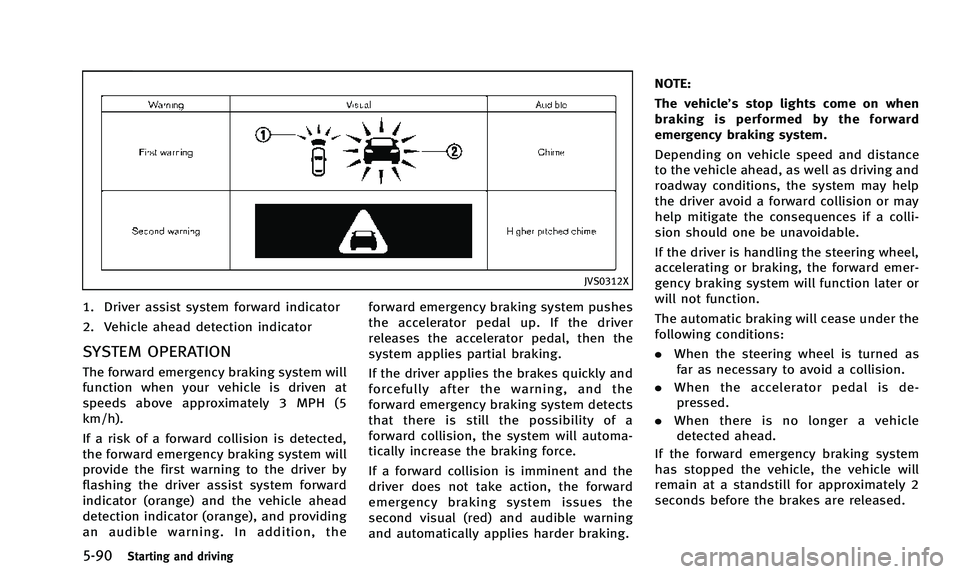
JVS0312X
1. Driver assist system forward indicator
2. Vehicle ahead detection indicator
SYSTEM OPERATION
The forward emergency braking system will
function when your vehicle is driven at
speeds above approximately 3 MPH (5
km/h).
If a risk of a forward collision is detected,
the forward emergency braking system will
provide the first warning to the driver by
flashing the driver assist system forward
indicator (orange) and the vehicle ahead
detection indicator (orange), and providing
an audible warning. In addition, theforward emergency braking system pushes
the accelerator pedal up. If the driver
releases the accelerator pedal, then the
system applies partial braking.
If the driver applies the brakes quickly and
forcefully after the warning, and the
forward emergency braking system detects
that there is still the possibility of a
forward collision, the system will automa-
tically increase the braking force.
If a forward collision is imminent and the
driver does not take action, the forward
emergency braking system issues the
second visual (red) and audible warning
and automatically applies harder braking.NOTE:
The vehicle’s stop lights come on when
braking is performed by the forward
emergency braking system.
Depending on vehicle speed and distance
to the vehicle ahead, as well as driving and
roadway conditions, the system may help
the driver avoid a forward collision or may
help mitigate the consequences if a colli-
sion should one be unavoidable.
If the driver is handling the steering wheel,
accelerating or braking, the forward emer-
gency braking system will function later or
will not function.
The automatic braking will cease under the
following conditions:
.
When the steering wheel is turned as
far as necessary to avoid a collision.
. When the accelerator pedal is de-
pressed.
. When there is no longer a vehicle
detected ahead.
If the forward emergency braking system
has stopped the vehicle, the vehicle will
remain at a standstill for approximately 2
seconds before the brakes are released.
Page 281 of 394
5-106Starting and driving
BRAKING PRECAUTIONS
The brake system has two separate hy-
draulic circuits. If one circuit malfunctions,
you will still have braking at two wheels.
Vacuum assisted brakes
The brake booster aids braking by using
engine vacuum. If the engine stops, you
can stop the vehicle by depressing the
brake pedal. However, greater foot pres-
sure on the brake pedal will be required to
stop the vehicle and the stopping distance
will be longer.
Using the brakes
Avoid resting your foot on the brake pedal
while driving. This will cause overheating
of the brakes, wearing out the brake and
pads faster and reduce gas mileage.
To help save the brakes and to prevent the
brakes from overheating, reduce speed
and downshift to a lower gear before going
down a slope or long grade. Overheated
brakes may reduce braking performance
and could result in loss of vehicle control.
WARNING
.While driving on a slippery surface, be
careful when braking, accelerating or
downshifting. Abrupt braking or accel-
erating could cause the wheels to skid
and result in an accident.
. If the engine is not running or is turned
off while driving, the power assist for
the brakes will not work. Braking will be
harder.
Wet brakes
When the vehicle is washed or driven
through water, the brakes may get wet.
As a result, your braking distance will be
longer and the vehicle may pull to one side
during braking.
To dry brakes, drive the vehicle at a safe
speed while lightly tapping the brake pedal
to heat-up the brakes. Do this until the
brakes return to normal. Avoid driving the
vehicle at high speeds until the brakes
function correctly.
PARKING BRAKE BREAK-IN
Break in the parking brake shoes whenever
the stopping effect of the parking brake is
weakened or whenever the parking brake
shoes and/or drums/rotors are replaced,
in order to assure the best braking
performance.
This procedure is described in the vehicle
service manual and can be performed by
an INFINITI retailer.
BRAKE SYSTEM
Page 282 of 394

BRAKE ASSIST
When the force applied to the brake pedal
exceeds a certain level, the Brake Assist is
activated generating greater braking force
than a conventional brake booster even
with light pedal force.
WARNING
The Brake Assist is only an aid to assist
braking operation and is not a collision
warning or avoidance device. It is the
driver’s responsibility to stay alert, drive
safely and be in control of the vehicle at all
times.
ANTI-LOCK BRAKING SYSTEM (ABS)
WARNING
.The Anti-lock Braking System (ABS) is a
sophisticated device, but it cannot pre-
vent accidents resulting from careless or
dangerous driving techniques. It can
help maintain vehicle control during
braking on slippery surfaces. Remember
that stopping distances on slippery
surfaces will be longer than on normal surfaces even with ABS. Stopping dis-
tances may also be longer on rough,
gravel or snow covered roads, or if you
are using tire chains. Always maintain a
safe distance from the vehicle in front of
you. Ultimately, the driver is responsible
for safety.
. Tire type and condition may also affect
braking effectiveness.
—When replacing tires, install the
specified size of tires on all four
wheels.
—When installing a spare tire, make sure that it is the proper size and
type as specified on the Tire and
Loading Information label. See “Tire
and loading information label” (P.9-
13) of this manual.
—For detailed information, see “Wheels and tires” (P.8-29) of this
manual.
The Anti-lock Braking System (ABS) con-
trols the brakes so the wheels do not lock
during hard braking or when braking on
slippery surfaces. The system detects the
rotation speed at each wheel and varies
the brake fluid pressure to prevent each wheel from locking and sliding. By pre-
venting each wheel from locking, the
system helps the driver maintain steering
control and helps to minimize swerving
and spinning on slippery surfaces.
Using the system
Depress the brake pedal and hold it down.
Depress the brake pedal with firm steady
pressure, but do not pump the brakes. The
ABS will operate to prevent the wheels
from locking up. Steer the vehicle to avoid
obstacles.
WARNING
Do not pump the brake pedal. Doing so may
result in increased stopping distances.
Self-test feature
The ABS includes electronic sensors, elec-
tric pumps, hydraulic solenoids and a
computer. The computer has a built-in
diagnostic feature that tests the system
each time you start the engine and move
the vehicle at a low speed in forward or
reverse. When the self-test occurs, you may
hear a
“clunk” noise and/or feel a pulsa-
Starting and driving5-107
BRAKE ASSIST
Page 283 of 394

5-108Starting and driving
tion in the brake pedal. This is normal and
does not indicate a malfunction. If the
computer senses a malfunction, it switches
the ABS off and illuminates the ABS
warning light on the instrument panel.
The brake system then operates normally,
but without anti-lock assistance.
If the ABS warning light illuminates during
the self-test or while driving, have the
vehicle checked by an INFINITI retailer.
Normal operation
The ABS operates at speeds above 3 to 6
MPH (5 to 10 km/h).
When the ABS senses that one or more
wheels are close to locking up, the actuator
rapidly applies and releases hydraulic
pressure. This action is similar to pumping
the brakes very quickly. You may feel a
pulsation in the brake pedal and hear a
noise from under the hood or feel a
vibration from the actuator when it is
operating. This is normal and indicates
that the ABS is operating properly. How-
ever, the pulsation may indicate that road
conditions are hazardous and extra care is
required while driving.The Vehicle Dynamic Control (VDC) system
uses various sensors to monitor driver
inputs and vehicle motion. Under certain
driving conditions, the VDC system helps
to perform the following functions.
.
Controls brake pressure to reduce
wheel slip on one slipping drive wheel
so power is transferred to a non
slipping drive wheel on the same axle.
. Controls brake pressure and engine
output to reduce drive wheel slip based
on vehicle speed (traction control func-
tion).
. Controls brake pressure at individual
wheels and engine output to help the
driver maintain control of the vehicle in
the following conditions:
— understeer (vehicle tends to not
follow the steered path despite
increased steering input)
— oversteer (vehicle tends to spin due
to certain road or driving condi-
tions).
The VDC system can help the driver to
maintain control of the vehicle, but it
cannot prevent loss of vehicle control in
all driving situations.
When the VDC system operates, the VDC
warning light
in the instrument panel flashes so note the following:
.
The road may be slippery or the system
may determine some action is required
to help keep the vehicle on the steered
path.
. You may feel a pulsation in the brake
pedal and hear a noise or vibration
from under the hood. This is normal
and indicates that the VDC system is
working properly.
. Adjust your speed and driving to the
road conditions.
See “Vehicle Dynamic Control (VDC) warn-
ing light” (P.2-17).
If a malfunction occurs in the system, the
VDC warning light
illuminates in the
instrument panel. The VDC system auto-
matically turns off.
The VDC OFF switch is used to turn off the
VDC system. The VDC off indicator light
illuminates to indicate the VDC system is
off. When the VDC switch is used to turn off
the system, the VDC system still operates
to prevent one drive wheel from slipping by
transferring power to a non slipping drive
wheel. The VDC warning light
flashes if
this occurs. All other VDC functions are off,
except for brake force distribution, and the
VDC warning light
will not flash. The
VEHICLE DYNAMIC CONTROL (VDC) SYSTEM
Page 286 of 394
driver (for example, avoidance scenes).WARNING
.Never rely solely on the hill start assist
system to prevent the vehicle from
moving backward on a hill. Always drive
carefully and attentively. Depress the
brake pedal when the vehicle is stopped
on a steep hill. Be especially careful
when stopped on a hill on frozen or
muddy roads. Failure to prevent the
vehicle from rolling backwards may
result in a loss of control of the vehicle
and possible serious injury or death.
. The hill start assist system is not
designed to hold the vehicle at a
standstill on a hill. Depress the brake
pedal when the vehicle is stopped on a
steep hill. Failure to do so may cause the
vehicle to roll backwards and may result
in a collision or serious personal injury.
. The hill start assist system may not
prevent the vehicle from rolling back-
wards on a hill under all load or road
conditions. Always be prepared to de-
press the brake pedal to prevent the
vehicle from rolling backwards. Failure to
do so may result in a collision or serious
personal injury.
The hill start assist system automatically
keeps the brakes applied to help prevent
the vehicle from rolling backwards in the
time it takes the driver to release the brake
pedal and apply the accelerator when the
vehicle is stopped on a hill.
The hill start assist system will operate
automatically under the following condi-
tions:
.The transmission is shifted to a forward
or reverse gear.
. The vehicle is stopped completely on a
hill by applying the brake.
The maximum holding time is 2 seconds.
After 2 seconds the vehicle will begin to
roll back and the hill start assist system
will stop operating completely.
The hill start assist system will not operate
when the transmission is shifted to the N
(Neutral) or P (Park) position or on a flat
and level road.
Starting and driving5-111
HILL START ASSIST SYSTEM
Page 318 of 394
8 Maintenance and do-it-yourself
Maintenance requirement .................................... 8-2Scheduled maintenance .................................. 8-2
General maintenance....................................... 8-2
Where to go for service ................................... 8-2
General maintenance ........................................... 8-2 Explanation of maintenance items ................... 8-2
Maintenance precautions ..................................... 8-5
Engine compartment check locations ................... 8-6 VQ37VHR engine ............................................. 8-6
Engine cooling system ......................................... 8-8
Checking engine coolant level ......................... 8-9
Changing engine coolant ................................. 8-9
Engine oil .......................................................... 8-10
Checking engine oil level............................... 8-10
Changing engine oil and filter ....................... 8-10
Automatic transmission fluid ............................. 8-12
Power steering fluid (if so equipped) ................. 8-13
Brake fluid......................................................... 8-13
Window washer fluid ......................................... 8-14
Battery .............................................................. 8-15
Jump starting ................................................ 8-16
Variable voltage control system ......................... 8-17
Drive belts ......................................................... 8-17 Spark plugs ...................................................... 8-18
Replacing spark plugs ................................. 8-18
Air cleaner ........................................................ 8-19
Windshield wiper blades ................................... 8-20 Cleaning ...................................................... 8-20
Replacing..................................................... 8-20
Brakes .............................................................. 8-21 Self-adjusting brakes ................................... 8-21
Brake pad wear warning .............................. 8-21
Fuses ................................................................ 8-22
Engine compartment .................................... 8-22
Passenger compartment............................... 8-23
Intelligent Key battery replacement ................... 8-24
Lights................................................................ 8-26 Headlights ................................................... 8-27
Exterior and interior lights ........................... 8-27
Wheels and tires ............................................... 8-29 Tire pressure ............................................... 8-29
Tire labeling ................................................ 8-33
Types of tires............................................... 8-35
Tire chains ................................................... 8-37
Changing wheels and tires........................... 8-38
Page 320 of 394
is released.
When driving in areas using road salt or
other corrosive materials, check lubrication
frequently.
Lights*:Clean the headlights on a regular
basis. Make sure that the headlights, stop
lights, tail lights, turn signal lights, and
other lights are all operating properly and
installed securely. Also check headlight
aim.
Road wheel nuts (lug nuts)*: When check-
ing the tires, make sure no wheel nuts are
missing, and check for any loose wheel
nuts. Tighten if necessary.
Tire rotation*: Tires should be rotated
every 5,000 miles (8,000 km).
Tires*: Check the pressure with a gauge
often and always prior to long distance
trips. If necessary, adjust the pressure in
all tires, including the spare, to the
pressure specified. Check carefully for
damage, cuts or excessive wear.
Tire Pressure Monitoring System (TPMS)
transmitter components: Replace the TPMS
transmitter grommet seal, valve core and
cap when the tires are replaced due to
wear or age.
Tire, wheel alignment and balance: If thevehicle should pull to either side while
driving on a straight and level road, or if
you detect uneven or abnormal tire wear,
there may be a need for wheel alignment.
If the steering wheel or seat vibrates at
normal highway speeds, wheel balancing
may be needed.
For additional information regarding tires,
refer to
“Important Tire Safety Information”
(US) or “Tire Safety Information” (Canada)
in the INFINITI Warranty Information Book-
let.
Windshield: Clean the windshield on a
regular basis. Check the windshield at
least every six months for cracks or other
damage. Have a damaged windshield
repaired by a qualified repair facility.
Windshield wiper blades*: Check for
cracks or wear if they do not wipe properly.
Inside the vehicle
The maintenance items listed here should
be checked on a regular basis, such as
when performing periodic maintenance,
cleaning the vehicle, etc.
Accelerator pedal: Check the pedal for
smooth operation and make sure the pedal
does not catch or require uneven effort. Keep the floor mat away from the pedal.
Automatic transmission P (Park) mechan-
ism:
On a fairly steep hill, check that your
vehicle is held securely with the shift lever
in the P (Park) position without applying
any brakes.
Brake pedal: Check the pedal for smooth
operation. If the brake pedal suddenly
goes down further than normal, the pedal
feels spongy or the vehicle seems to take
longer to stop, see an INFINITI retailer
immediately. Keep the floor mat away from
the pedal.
Brakes: Check that the brakes do not pull
the vehicle to one side when applied.
Parking brake: Check the parking brake
operation regularly. The vehicle should be
securely held on a fairly steep hill with only
the parking brake applied. If the parking
brake needs adjusted, see an INFINITI
retailer.
Seat belts: Check that all parts of the seat
belt system (for example, buckles, an-
chors, adjuster and retractors) operate
properly and smoothly, and are installed
securely. Check the belt webbing for cuts,
fraying, wear or damage.
Seats: Check seat position controls such as
Maintenance and do-it-yourself8-3
Page 338 of 394
maged from wind pressure.If the brakes do not operate properly, have
the brakes checked by an INFINITI retailer.
SELF-ADJUSTING BRAKES
Your vehicle is equipped with self-adjust-
ing brakes.
The disc-type brakes self-adjust every time
the brake pedal is applied.
WARNING
See an INFINITI retailer for a brake system
check if the brake pedal height does not
return to normal.
BRAKE PAD WEAR WARNING
The disc brake pads have audible wear
warnings. When a brake pad requires
replacement, it will make a high pitched
scraping sound when the vehicle is in
motion. This scraping sound will first occur
only when the brake pedal is depressed.
After more wear of the brake pad, the
sound will always be heard even if the
brake pedal is not depressed. Have the
brakes checked as soon as possible if the
wear warning sound is heard.
Under some driving or climate conditions,occasional brake squeak, squeal or other
noise may be heard. Occasional brake
noise during light to moderate stops is
normal and does not affect the function or
performance of the brake system.
Proper brake inspection intervals should
be followed.
For additional information,
see the maintenance log section of your
“INFINITI Service and Maintenance Guide”
for maintenance intervals.
Maintenance and do-it-yourself8-21
BRAKES