battery INFINITI Q50 2014 Owner's Guide
[x] Cancel search | Manufacturer: INFINITI, Model Year: 2014, Model line: Q50, Model: INFINITI Q50 2014Pages: 394, PDF Size: 1.99 MB
Page 318 of 394
8 Maintenance and do-it-yourself
Maintenance requirement .................................... 8-2Scheduled maintenance .................................. 8-2
General maintenance....................................... 8-2
Where to go for service ................................... 8-2
General maintenance ........................................... 8-2 Explanation of maintenance items ................... 8-2
Maintenance precautions ..................................... 8-5
Engine compartment check locations ................... 8-6 VQ37VHR engine ............................................. 8-6
Engine cooling system ......................................... 8-8
Checking engine coolant level ......................... 8-9
Changing engine coolant ................................. 8-9
Engine oil .......................................................... 8-10
Checking engine oil level............................... 8-10
Changing engine oil and filter ....................... 8-10
Automatic transmission fluid ............................. 8-12
Power steering fluid (if so equipped) ................. 8-13
Brake fluid......................................................... 8-13
Window washer fluid ......................................... 8-14
Battery .............................................................. 8-15
Jump starting ................................................ 8-16
Variable voltage control system ......................... 8-17
Drive belts ......................................................... 8-17 Spark plugs ...................................................... 8-18
Replacing spark plugs ................................. 8-18
Air cleaner ........................................................ 8-19
Windshield wiper blades ................................... 8-20 Cleaning ...................................................... 8-20
Replacing..................................................... 8-20
Brakes .............................................................. 8-21 Self-adjusting brakes ................................... 8-21
Brake pad wear warning .............................. 8-21
Fuses ................................................................ 8-22
Engine compartment .................................... 8-22
Passenger compartment............................... 8-23
Intelligent Key battery replacement ................... 8-24
Lights................................................................ 8-26 Headlights ................................................... 8-27
Exterior and interior lights ........................... 8-27
Wheels and tires ............................................... 8-29 Tire pressure ............................................... 8-29
Tire labeling ................................................ 8-33
Types of tires............................................... 8-35
Tire chains ................................................... 8-37
Changing wheels and tires........................... 8-38
Page 321 of 394

8-4Maintenance and do-it-yourself
seat adjusters, seatback recliner, etc. to
ensure they operate smoothly and that all
latches lock securely in every position.
Check that the head restraints move up
and down smoothly and that the locks (if
so equipped) hold securely in all latched
positions.
Steering wheel:Check for changes in the
steering conditions, such as excessive free
play, hard steering or strange noises.
Warning lights and chimes: Make sure that
all warning lights and chimes are operating
properly.
Windshield defroster: Check that the air
comes out of the defroster outlets properly
and in sufficient quantity when operating
the heater or air conditioner.
Windshield wiper and washer*: Check that
the wipers and washer operate properly
and that the wipers do not streak.
Under the hood and vehicle
The maintenance items listed here should
be checked periodically (for example, each
time you check the engine oil or refuel).
Battery*: Check the fluid level in each cell.
It should be between the MAX and MIN
lines. Vehicles operated in high tempera- tures or under severe condition require
frequent checks of the battery fluid level.
NOTE:
Care should be taken to avoid situations
that can lead to potential battery dis-
charge and potential no-start conditions
such as:
1.
Installation or extended use of electro-
nic accessories that consume battery
power when the engine is not running
(Phone chargers, GPS, DVD players,
etc.)
2. Vehicle is not driven regularly and/or
only driven short distances.
In these cases, the battery may need to be
charged to maintain battery health.
Brake fluid level*: Make sure that the
brake fluid level is between the MAX and
MIN lines on the reservoir.
Engine coolant level*: Check the coolant
level when the engine is cold.
Engine drive belts*: Make sure that no belt
is frayed, worn, cracked or oily.
Engine oil level*: Check the level after
parking the vehicle on a level spot and
turning off the engine. Wait more than 15
minutes for the oil to drain back into the oil pan.
Exhaust system:
Make sure there are no
loose supports, cracks or holes. If the
sound of the exhaust seems unusual or
there is a smell of exhaust fumes, im-
mediately have the exhaust system in-
spected by an INFINITI retailer. (See
“Precautions when starting and driving”
(P.5-3).)
Fluid leaks: Check under the vehicle for
fuel, oil, water or other fluid leaks after the
vehicle has been parked for a while. Water
dripping from the air conditioner after use
is normal. If you should notice any leaks or
if gasoline fumes are evident, check for the
cause and have it corrected immediately.
Power steering fluid level* and lines:
Check the level when the fluid is cold,
with the engine off. Check the lines for
proper attachment, leaks, cracks, etc.
Radiator and hoses: Check the front of the
radiator and clean off any dirt, insects,
leaves, etc., that may have accumulated.
Make sure the hoses have no cracks,
deformation, rot or loose connections.
Underbody: The underbody is frequently
exposed to corrosive substances such as
those used on icy roads or to control dust.
Page 322 of 394
It is very important to remove these
substances, otherwise rust will form on
the floor pan, frame, fuel lines and around
the exhaust system. At the end of winter,
the underbody should be thoroughly
flushed with plain water, being careful to
clean those areas where mud and dirt may
accumulate. For additional information,
see“Cleaning exterior” (P.7-2).
Windshield washer fluid*: Check that there
is adequate fluid in the reservoir. When performing any inspection or main-
tenance work on your vehicle, always take
care to prevent serious accidental injury to
yourself or damage to the vehicle. The
following are general precautions which
should be closely observed.
WARNING
.
Park the vehicle on a level surface, apply
the parking brake securely and block the
wheels to prevent the vehicle from
moving. Move the shift lever to P (Park).
. Be sure the ignition switch is in the OFF
or LOCK position when performing any
parts replacement or repairs.
. Never connect or disconnect the battery
or any transistorized component while
the ignition switch is in the ON position.
. Never leave the engine or automatic
transmission related component har-
nesses disconnected while the ignition
switch is in the ON position.
. If you must work with the engine
running, keep your hands, clothing, hair
and tools away from moving fans, belts
and any other moving parts. .
It is advisable to secure or remove any
loose clothing and remove any jewelry,
such as rings, watches, etc. before
working on your vehicle.
. Always wear eye protection whenever
you work on your vehicle.
. If you must run the engine in an
enclosed space such as a garage, be
sure there is proper ventilation for
exhaust gases to escape.
. Never get under the vehicle while it is
supported only by a jack. If it is
necessary to work under the vehicle,
support it with safety stands.
. Keep smoking materials, flame and
sparks away from fuel tank and the
battery.
. Your vehicle is equipped with an auto-
matic engine cooling fan. It may come on
at any time without warning, even if the
ignition key is in the OFF position and
the engine is not running. To avoid
injury, always disconnect the negative
battery cable before working near the
fan.
. The fuel filter or fuel lines should be
serviced by an INFINITI retailer because
the fuel lines are under high pressure
Maintenance and do-it-yourself8-5
MAINTENANCE PRECAUTIONS
Page 324 of 394
JVM0250X
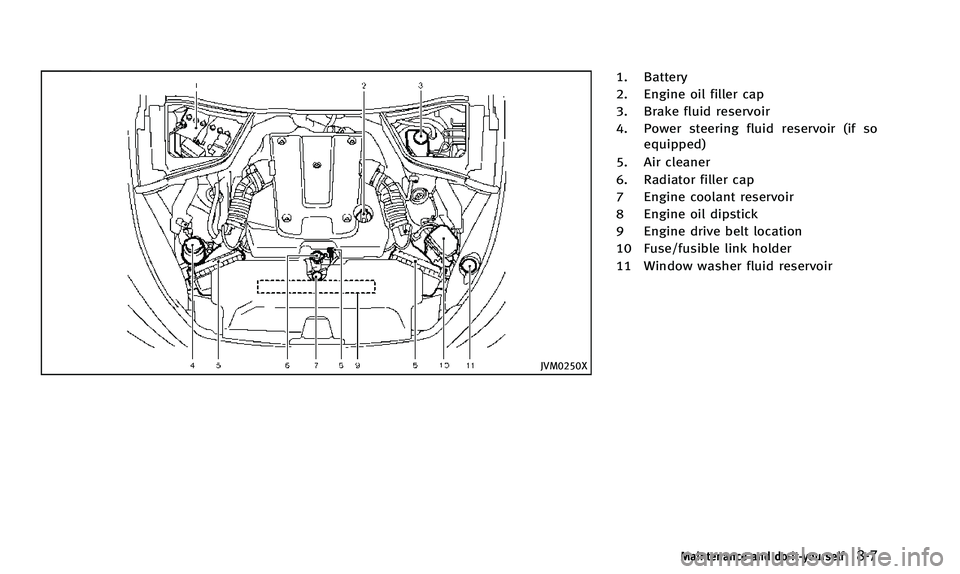
1. Battery
2. Engine oil filler cap
3. Brake fluid reservoir
4. Power steering fluid reservoir (if soequipped)
5. Air cleaner
6. Radiator filler cap
7 Engine coolant reservoir
8 Engine oil dipstick
9 Engine drive belt location
10 Fuse/fusible link holder
11 Window washer fluid reservoir
Maintenance and do-it-yourself8-7
Page 332 of 394

.Pre-mix washer fluid concentrates with
water to the manufacturer’ s recom-
mended levels before pouring the fluid
into the window washer reservoir. Do not
use the window washer reservoir to mix
the washer fluid concentrate and water.. Keep the battery surface clean and dry.
Clean the battery with a solution of
baking soda and water.
. Make certain the terminal connections
are clean and securely tightened.
. If the vehicle is not to be used for 30
days or longer, disconnect the negative
(−) battery terminal cable to prevent
discharging it.
NOTE:
Care should be taken to avoid situations
that can lead to potential battery dis-
charge and potential no-start conditions
such as:
1. Installation or extended use of electro-
nic accessories that consume battery
power when the engine is not running
(Phone chargers, GPS, DVD players,
etc.)
2. Vehicle is not driven regularly and/or
only driven short distances.
In these cases, the battery may need to be
charged to maintain battery health.
WARNING
. Do not expose the battery to flames or
electrical sparks. Hydrogen gas gener- ated by the battery is explosive. Do not
allow battery fluid to contact your skin,
eyes, fabrics, or painted surfaces. After
touching a battery or battery cap, do not
touch or rub your eyes. Thoroughly wash
your hands. If the acid contacts your
eyes, skin or clothing, immediately flush
with water for at least 15 minutes and
seek medical attention.
. Do not operate the vehicle if the fluid in
the battery is low. Low battery fluid can
cause a higher load on the battery which
can generate heat, reduce battery life,
and in some cases lead to an explosion.
. When working on or near a battery,
always wear suitable eye protection and
remove all jewelry.
. Battery posts, terminals and related
accessories contain lead and lead com-
pounds. Wash hands after handling.
. Keep the battery out of the reach of
children.
Maintenance and do-it-yourself8-15
BATTERY
Page 333 of 394
8-16Maintenance and do-it-yourself
DI0137MA
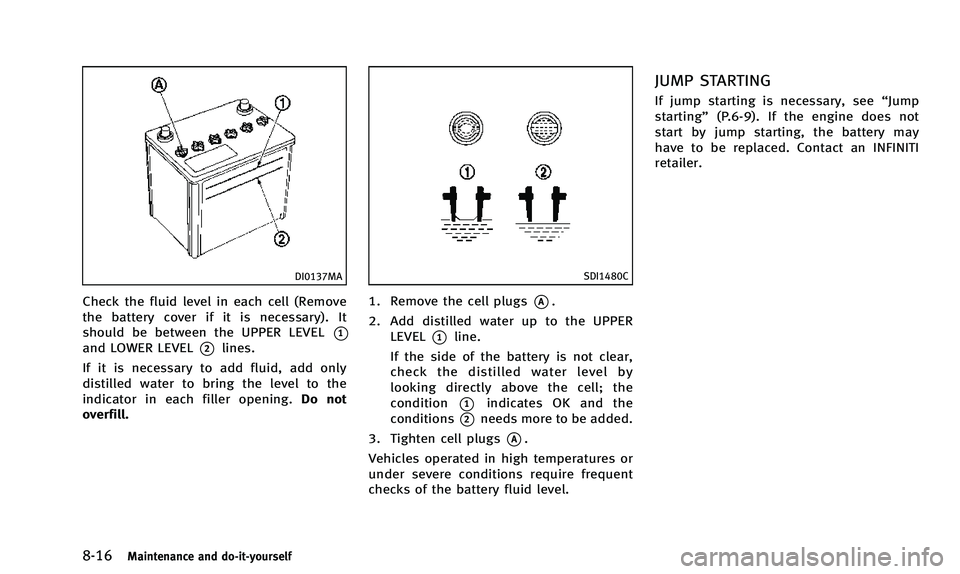
Check the fluid level in each cell (Remove
the battery cover if it is necessary). It
should be between the UPPER LEVEL
*1and LOWER LEVEL*2lines.
If it is necessary to add fluid, add only
distilled water to bring the level to the
indicator in each filler opening. Do not
overfill.
SDI1480C
1. Remove the cell plugs*A.
2. Add distilled water up to the UPPER LEVEL
*1line.
If the side of the battery is not clear,
check the distilled water level by
looking directly above the cell; the
condition
*1indicates OK and the
conditions
*2needs more to be added.
3. Tighten cell plugs
*A.
Vehicles operated in high temperatures or
under severe conditions require frequent
checks of the battery fluid level.
JUMP STARTING
If jump starting is necessary, see “Jump
starting” (P.6-9). If the engine does not
start by jump starting, the battery may
have to be replaced. Contact an INFINITI
retailer.
Page 334 of 394
CAUTION
.Do not ground accessories directly to the
battery terminal. Doing so will bypass
the variable voltage control system and
the vehicle battery may not charge
completely.
. Use electrical accessories with the en-
gine running to avoid discharging the
vehicle battery.
The variable voltage control system mea-
sures the amount of electrical discharge
from the battery and controls voltage
generated by the generator.SDI2119
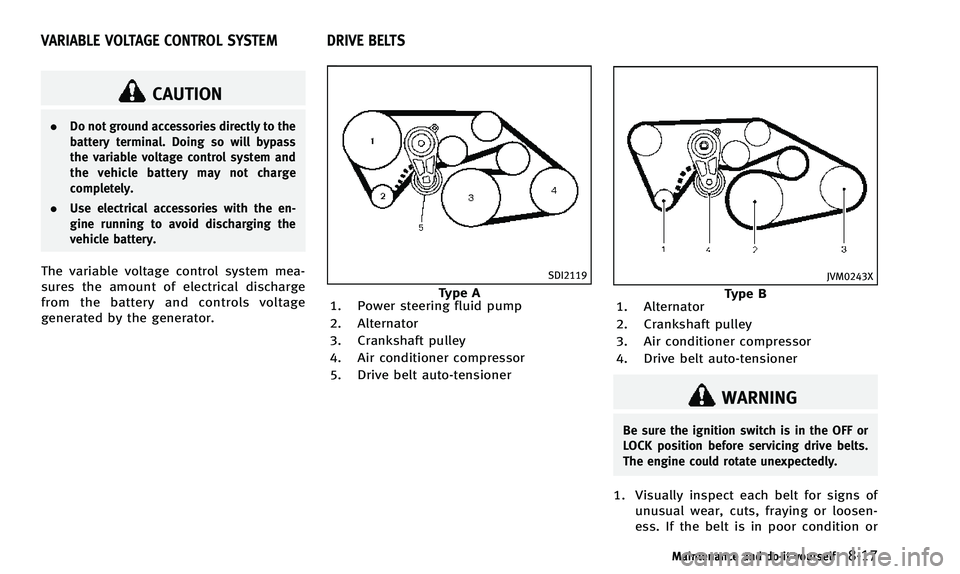
Type A
1. Power steering fluid pump
2. Alternator
3. Crankshaft pulley
4. Air conditioner compressor
5. Drive belt auto-tensioner
JVM0243X
Type B
1. Alternator
2. Crankshaft pulley
3. Air conditioner compressor
4. Drive belt auto-tensioner
WARNING
Be sure the ignition switch is in the OFF or
LOCK position before servicing drive belts.
The engine could rotate unexpectedly.
1. Visually inspect each belt for signs of
unusual wear, cuts, fraying or loosen-
ess. If the belt is in poor condition or
Maintenance and do-it-yourself8-17
VARIABLE VOLTAGE CONTROL SYSTEM DRIVE BELTS
Page 340 of 394

JVM0256X
PASSENGER COMPARTMENT
CAUTION
Never use a fuse of a higher or lower
amperage rating than that specified on the
fuse box cover. This could damage the
electrical system or cause a fire.
If any electrical equipment does not
operate, check for an open fuse.
1. Be sure the ignition switch is pushed tothe OFF or LOCK position and the
headlight switch is turned to OFF. 2. Open the fuse box lid.
3. Remove the fuse with the fuse puller
*A.
4. If the fuse is open, replace it with a new fuse.
5. If a new fuse also opens, have the electrical system checked and repaired
by an INFINITI retailer. Spare fuses are
stored in the fuse box.
JVM0257X
Extended storage fuse switch (if so
equipped)
To reduce battery drain, the extended
storage fuse switch comes from the factory
switched off. Prior to delivery of your
vehicle, the switch is pushed in (switched
on) and should always remain on.
If the extended storage fuse switch is not
pushed in (switched on), the “Shipping
Mode On, Push Storage Fuse” warning may
appear in the vehicle information display.
See “18. Extended storage fuse warning”
(P.2-23).
If any electrical equipment does not
Maintenance and do-it-yourself8-23
Page 341 of 394

8-24Maintenance and do-it-yourself
operate, remove the extended storage fuse
switch and check for an open fuse.
NOTE:
If the extended storage fuse switch mal-
functions or if the fuse is open, it is not
necessary to replace the switch. In this
case, remove the extended storage fuse
switch and replace it with a new fuse of
the same rating.
How to remove the extended storage fuse
switch:
1. To remove the extended storage fuseswitch, be sure the ignition switch is in
the OFF or LOCK position.
2. Be sure the headlight switch is in the OFF position.
3. Remove the fuse box cover.
4. Pinch the locking tabs
*1found on
each side of the storage fuse switch.
5. Pull the storage fuse switch straight out from the fuse box
*2.
CAUTION
Be careful not to allow children to swallow
the battery and removed parts.
JVM0317X
To replace the battery:
1. Release the lock knob at the back of theIntelligent Key and remove the mechan-
ical key.
2. Insert a flat-blade screwdriver wrapped with a cloth into the slit of the corner
and twist it to separate the upper part
INTELLIGENT KEY BATTERY REPLACEMENT
Page 342 of 394
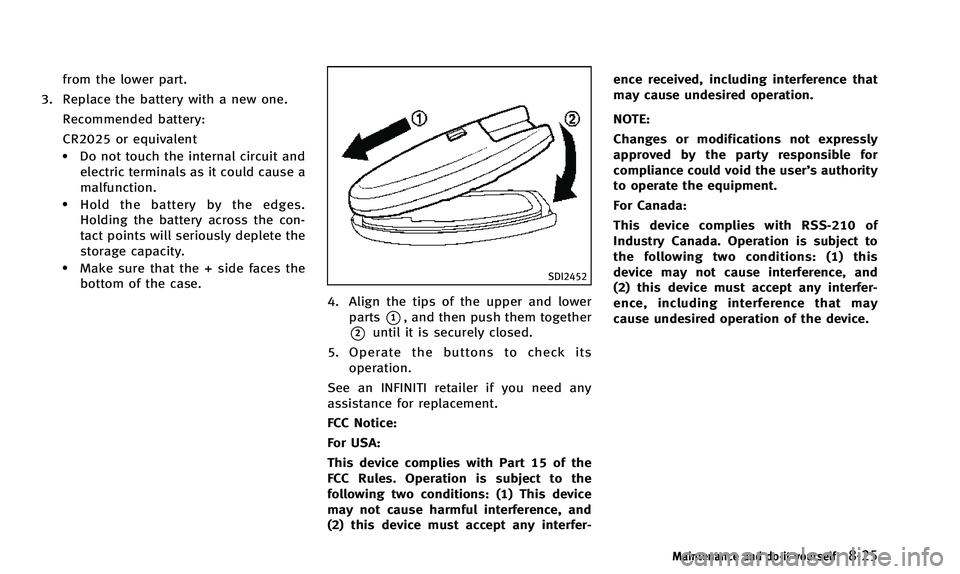
from the lower part.
3. Replace the battery with a new one.
Recommended battery:
CR2025 or equivalent
.Do not touch the internal circuit andelectric terminals as it could cause a
malfunction.
.Hold the battery by the edges.
Holding the battery across the con-
tact points will seriously deplete the
storage capacity.
.Make sure that the + side faces thebottom of the case.SDI2452
4. Align the tips of the upper and lower
parts
*1, and then push them together
*2until it is securely closed.
5. Operate the buttons to check its operation.
See an INFINITI retailer if you need any
assistance for replacement.
FCC Notice:
For USA:
This device complies with Part 15 of the
FCC Rules. Operation is subject to the
following two conditions: (1) This device
may not cause harmful interference, and
(2) this device must accept any interfer- ence received, including interference that
may cause undesired operation.
NOTE:
Changes or modifications not expressly
approved by the party responsible for
compliance could void the user’s authority
to operate the equipment.
For Canada:
This device complies with RSS-210 of
Industry Canada. Operation is subject to
the following two conditions: (1) this
device may not cause interference, and
(2) this device must accept any interfer-
ence, including interference that may
cause undesired operation of the device.
Maintenance and do-it-yourself8-25