steering INFINITI Q50 2014 Workshop Manual
[x] Cancel search | Manufacturer: INFINITI, Model Year: 2014, Model line: Q50, Model: INFINITI Q50 2014Pages: 394, PDF Size: 1.99 MB
Page 222 of 394

SSD1040
NOTE:
.The BSI system will not operate if your
vehicle is on a lane marker when
another vehicle enters the detection
zone. In this case only the BSW system
operates.
. BSI steering assist will not operate or
will stop operating and only a warning
chime will sound under the following
conditions.
— When the accelerator pedal is de-
pressed while steering control as-
sist is provided.
— When steering quickly —
When the ICC, DCA, predictive for-
ward collision warning or forward
emergency braking warnings sound.
— When the hazard warning flashers
are operated.
— When driving on a curve at a high
speed.
BSW/BSI temporarily not available
Condition A:
. Under the following conditions, the BSI
system will be turned off automatically,
a beep will sound and the “currently
unavailable” warning message will
appear in the vehicle information dis-
play. The BSW system is still available,
but the BSI system will not be available
until the conditions no longer exist.
— When the VDC system (except TCS
function) or ABS operates.
— When the VDC system is turned off.
— When the INFINITI Drive Mode Se-
lector is turned to the SNOW mode.
Action to take:
When the above conditions no longer exist,
push the dynamic driver assistance switch
again to turn the BSI system back on. Condition B:
BSW system: When radar blockage is
detected, the BSW system will be deacti-
vated automatically, the “side radar ob-
struction” warning message will appear
and the driver assist system blind spot
indicator (white) will blink in the vehicle
information display.
BSI system: When radar blockage is
detected, the BSI system will be turned
off automatically, a beep will sound and
the “side radar obstruction” warning mes-
sage will appear in the vehicle information
display.
The BSW and BSI systems are not available
until the conditions no longer exist.
The radar sensors may be blocked by
temporary ambient conditions such as
splashing water, mist or fog. The blocked
condition may also be caused by objects
such as ice, frost or dirt obstructing the
radar sensors.
Action to take:
When the above conditions no longer exist,
the BSW system will resume automatically.
For the BSI system, turn it on again. If the
driver assist system blind spot indicator
(white) continues to blink and/or the “side
Starting and driving5-47
Page 239 of 394

5-64Starting and driving
SSD0253
When driving on some roads, such as
winding, hilly, curved, narrow roads, or
roads which are under construction, the
radar sensor may detect vehicles in a
different lane, or may temporarily not
detect a vehicle traveling ahead. This may
cause the ICC system to decelerate or
accelerate the vehicle.
The detection of vehicles may also be
affected by vehicle operation (steering
maneuver or traveling position in the lane,
etc.) or vehicle condition.If this occurs, the
ICC system may warn you by blinking the
system indicator and sounding the chime
unexpectedly. You will have to manually control the proper distance away from the
vehicle traveling ahead.
SSD0254
When driving on the freeway at a set speed
and approaching a slower traveling vehicle
ahead, the ICC will adjust the speed to
maintain the distance, selected by the
driver, from the vehicle ahead. If the
vehicle ahead changes lanes or exits the
freeway, the ICC system will accelerate and
maintain the speed up to the set speed.
Pay attention to the driving operation to
maintain control of the vehicle as it
accelerates to the set speed.
The vehicle may not maintain the set speed
on winding or hilly roads. If this occurs,
you will have to manually control the
vehicle speed.
Page 240 of 394

JVS0226X
ICC switch
The system is operated by a MAIN switch
and four control switches, all mounted on
the steering wheel.
1. RESUME/ACCELERATE (+) switch:Resumes set speed or increases speed
incrementally.
2. SET/COAST (-) switch: Sets desired cruise speed, reduces
speed incrementally.
3. CANCEL switch:
Deactivates the system without erasing
the set speed. 4. MAIN switch:
Master switch to activate the system
5. DISTANCE switch: Changes the vehicle’s following dis-
tance:
.Long.Middle.Short
JVS0220X
ICC system display and indicators
The display is located between the speed-
ometer and tachometer.
1. This indicator indicates the ICC systemstatus depending on a color.
.Intelligent Cruise Control system ONindicator (white):
Indicates that the MAIN switch is ON.
.Intelligent Cruise Control system setindicator (green):
Indicates that cruising speed is set
.Intelligent Cruise Control system
warning (orange):
Indicates that if there is a malfunc-
Starting and driving5-65
Page 247 of 394

5-72Starting and driving
SSD0284A
NOTE:
The approach warning chime may sound
and the system display may blink when
the radar sensor detects objects on the
side of the vehicle
*Aor on the side of the
road
*A. This may cause the ICC system to
decelerate or accelerate the vehicle. The
radar sensor may detect these objects
when the vehicle is driven on winding
roads, narrow roads, hilly roads or when
entering or exiting a curve. In these cases
you will have to manually control the
proper distance ahead of your vehicle.
Also, the sensor sensitivity can be affected
by vehicle operation (steering maneuver or driving position in the lane) or traffic or
vehicle condition (for example, if a vehicle
is being driven with some damage).
Automatic cancellation
A chime sounds under the following con-
ditions and the control is automatically
canceled.
.
When the vehicle ahead is not detected
and your vehicle is traveling below the
speed of 15 MPH (24 km/h)
. When the system judges the vehicle is
at standstill
. When the shift lever is not in the D
position or Manual mode
. When the parking brake is applied
. When the INFINITI Drive Mode Selector
is turned to the SNOW mode
. When the VDC system is turned off
. When ABS or VDC (including the trac-
tion control system) operates
. When distance measurement becomes
impaired due to adhesion of dirt or
obstruction to the sensor
. When a wheel slips
Warning and display
Condition A:
Under the following conditions, the Intelli-
gent Cruise Control (ICC) system is auto-
matically canceled. The chime will sound
and the “currently unavailable” warning
message will appear in the vehicle infor-
mation display.
. When the VDC is turned off
. When the ABS or VDC (including the
traction control system) operates
. When a tire slips
. When the INFINITI Drive Mode Selector
is turned to the SNOW mode
. When the radar signal is temporarily
interrupted
Action to take:
When the conditions listed above are no
longer present, turn the ICC system back
on to use the system.
Condition B:
When the radar sensor area of the front
bumper is covered with dirt or is ob-
structed, making it impossible to detect a
vehicle ahead, the ICC system is automa-
tically canceled.
The chime will sound and the “front radar
Page 258 of 394

SSD0253
When driving on some roads, such as
winding, hilly, curved, narrow roads, or
roads which are under construction, the
sensor may detect vehicles in a different
lane, or may temporarily not detect a
vehicle traveling ahead. This may cause
the system to work inappropriately.
The detection of vehicles may also be
affected by vehicle operation (steering
maneuver or traveling position in the lane,
etc.) or vehicle condition.If this occurs, the
system may warn you by blinking the
system indicator and sounding the chime
unexpectedly. You will have to manually
control the proper distance away from the vehicle traveling ahead.
JVS0225X
DCA system display and indicators
The display is located between the speed-
ometer and tachometer.
1. Driver assist system forward indicator
.Driver assist system forward indica-
tor (green):
Indicates that the DCA system is ON.
.Driver assist system forward indica-tor (orange):
Indicates whether there is a mal-
function in the DCA system.
2. Vehicle ahead detection indicator: Indicates whether it detects a vehicle in
Starting and driving5-83
Page 259 of 394
5-84Starting and driving
front of you.
JVS0206X
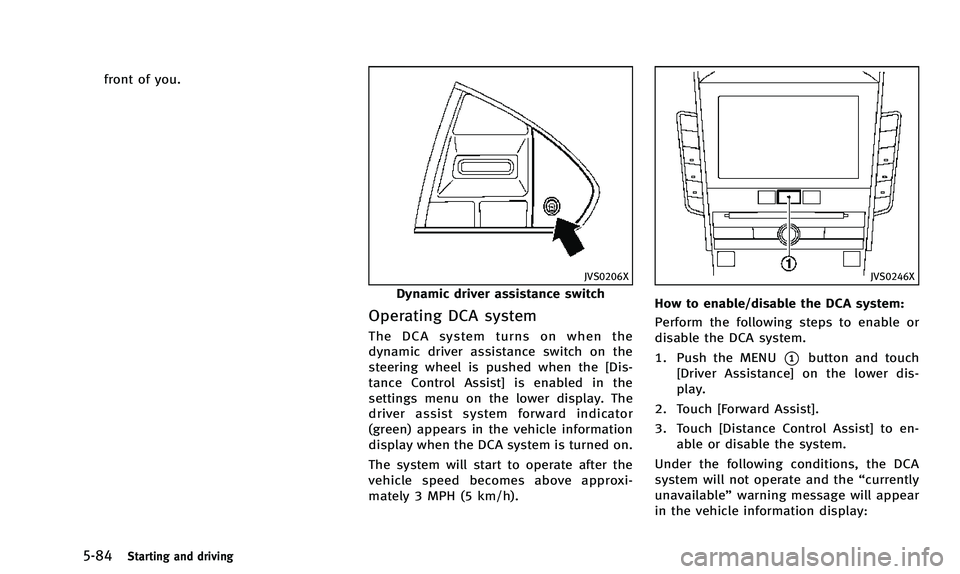
Dynamic driver assistance switch
Operating DCA system
The DCA system turns on when the
dynamic driver assistance switch on the
steering wheel is pushed when the [Dis-
tance Control Assist] is enabled in the
settings menu on the lower display. The
driver assist system forward indicator
(green) appears in the vehicle information
display when the DCA system is turned on.
The system will start to operate after the
vehicle speed becomes above approxi-
mately 3 MPH (5 km/h).
JVS0246X
How to enable/disable the DCA system:
Perform the following steps to enable or
disable the DCA system.
1. Push the MENU
*1button and touch
[Driver Assistance] on the lower dis-
play.
2. Touch [Forward Assist].
3. Touch [Distance Control Assist] to en- able or disable the system.
Under the following conditions, the DCA
system will not operate and the “currently
unavailable” warning message will appear
in the vehicle information display:
Page 262 of 394

.The driver assist system forward indi-
cator (orange) blinks.
. When the vehicles are traveling at the
same speed and the distance between
vehicles is not changing
. When the vehicle ahead is traveling
faster and the distance between vehi-
cles is increasing
. When a vehicle cuts in near your vehicle
The driver assist system forward indicator
(orange) blinks and the warning chime will
not sound when your vehicle approaches
vehicles that are parked or moving slowly.
SSD0284A
NOTE:
The approach warning chime may sound
and the driver assist system forward
indicator (orange) may blink when the
radar sensor detects objects on the side of
the vehicle
*Aor on the side of the road
*A. This may cause the DCA system to
decelerate or accelerate the vehicle. The
radar sensor may detect these objects
when the vehicle is driven on winding
roads, narrow roads, hilly roads or when
entering or exiting a curve. In these cases
you will have to manually control the
proper distance ahead of your vehicle.
Also, the sensor sensitivity can be affected by vehicle operation (steering maneuver or
driving position in the lane) or traffic or
vehicle condition (for example, if a vehicle
is being driven with some damage).
Automatic cancellation
Condition A:
Under the following conditions, the Dis-
tance Control Assist (DCA) system is
automatically canceled. The chime will
sound and the
“currently unavailable”
warning message will appear in the vehicle
information display. The system will not be
able to be set.
. When the VDC system is turned off
. When the VDC or ABS (including the
traction control system) operates
. When the INFINITI Drive Mode Selector
is turned to the SNOW mode
. When the radar signal is temporarily
interrupted.
Action to take:
When the conditions listed above are no
longer present, turn the DCA system back
on to use the system.
Condition B:
When the radar sensor area of the front
bumper is covered with dirt or is ob-
Starting and driving5-87
Page 265 of 394
5-90Starting and driving
JVS0312X
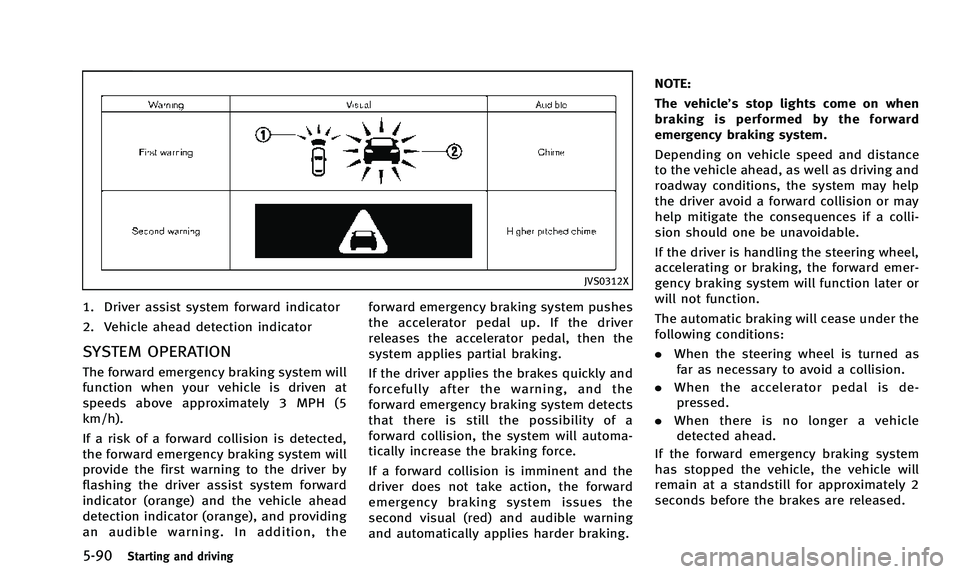
1. Driver assist system forward indicator
2. Vehicle ahead detection indicator
SYSTEM OPERATION
The forward emergency braking system will
function when your vehicle is driven at
speeds above approximately 3 MPH (5
km/h).
If a risk of a forward collision is detected,
the forward emergency braking system will
provide the first warning to the driver by
flashing the driver assist system forward
indicator (orange) and the vehicle ahead
detection indicator (orange), and providing
an audible warning. In addition, theforward emergency braking system pushes
the accelerator pedal up. If the driver
releases the accelerator pedal, then the
system applies partial braking.
If the driver applies the brakes quickly and
forcefully after the warning, and the
forward emergency braking system detects
that there is still the possibility of a
forward collision, the system will automa-
tically increase the braking force.
If a forward collision is imminent and the
driver does not take action, the forward
emergency braking system issues the
second visual (red) and audible warning
and automatically applies harder braking.NOTE:
The vehicle’s stop lights come on when
braking is performed by the forward
emergency braking system.
Depending on vehicle speed and distance
to the vehicle ahead, as well as driving and
roadway conditions, the system may help
the driver avoid a forward collision or may
help mitigate the consequences if a colli-
sion should one be unavoidable.
If the driver is handling the steering wheel,
accelerating or braking, the forward emer-
gency braking system will function later or
will not function.
The automatic braking will cease under the
following conditions:
.
When the steering wheel is turned as
far as necessary to avoid a collision.
. When the accelerator pedal is de-
pressed.
. When there is no longer a vehicle
detected ahead.
If the forward emergency braking system
has stopped the vehicle, the vehicle will
remain at a standstill for approximately 2
seconds before the brakes are released.
Page 279 of 394

5-104Starting and driving
HYDRAULIC POWER STEERING TYPE
WARNING
If the engine is not running or is turned off
while driving, the power assist for the
steering will not work. Steering will be
harder to operate.
The power assisted steering uses a hy-
draulic pump, driven by the engine, to
assist steering.
If the engine stops or the drive belt breaks,
you will still have control of the vehicle.
However, much greater steering effort is
needed, especially in sharp turns and at
low speeds.
DIRECT ADAPTIVE STEERING TYPE
WARNING
When the power steering warning light
illuminates with the engine running, the
power assist for the steering will cease
operation. You will still have control of the
vehicle, but the steering will be harder to
operate.
CAUTION
.If wheels or tires other than the INFINITI
recommended ones are used, Direct
Adaptive Steering may not operate
properly and the power steering warning
light may illuminate.
. Do not modify the vehicle’s suspension.
If suspension parts such as shock
absorbers, struts, springs, stabilizer
bars, bushings and wheels are not
INFINITI recommended for your vehicle
or are extremely deteriorated, Direct
Adaptive Steering may not operate
properly and the power steering warning
light may illuminate.
. Do not modify the vehicle’s steering. If
steering parts are not INFINITI recom-
mended for your vehicle or are extremely
deteriorated, Direct Adaptive Steering
may not operate properly and the power
steering warning light may illuminate.
. If the VDC warning light illuminates, the
power steering warning light may also
illuminate at the same time. Stop the
vehicle in a safe location, turn the
engine off and restart the engine. If the
power steering warning light continues to illuminate, have the system checked
by an INFNITI retailer. For VDC system,
see
“Vehicle Dynamic Control (VDC)
system” (P.5-108).
. Do not place the ignition switch is in the
ON position while the steering wheel or
a tire is removed.
. Do not turn the steering wheel as much
as possible while the ignition switch is
in any position other than the ON
position.
. Installing an accessory on the steering
wheel, or changing the steering wheel,
may reduce the steering performance.
Direct Adaptive Steering is designed to
control the steering force and steering
angle according to the vehicle speed and
amount of turning of the steering wheel.
The steering characteristic can be selected
with the INFINITI Drive Mode Selector. See
“INFINITI Drive Mode Selector” (P.5-21).
When the steering wheel is operated
repeatedly or continuously while parking
or driving at a very low speed, the power
assist for the steering wheel will be
reduced and the steering wheel may be
slightly turned even when driving on a
POWER STEERING
Page 280 of 394

straight road. This is to prevent overheat-
ing of Direct Adaptive Steering and protect
it from getting damaged. When the tem-
perature of Direct Adaptive Steering cools
down, the power assist level will return to
normal. Avoid repeating steering wheel
operations that could cause Direct Adap-
tive Steering to overheat.
If the power steering warning light illumi-
nates while the engine is running, it may
indicate that Direct Adaptive Steering is
not functioning properly and may need
servicing. Have the system checked by an
INFINITI retailer. (See“Power steering
warning light” (P.2-16).)
When the power steering warning light
illuminates with the engine running, the
power assist for the steering will cease
operation. You will still have control of the
vehicle. However, greater steering effort
will be needed, especially in sharp turns
and at low speeds.
If Direct Adaptive Steering is malfunction-
ing, the steering wheel may turn slightly
even when driving on a straight road.
Under the following conditions, the steer-
ing wheel may turn slightly even when
driving on a straight road. This is due to a
protection mechanism for Direct Adaptive Steering.
.
When the battery is discharged
. When the engine is stalled
. After the vehicle is tested on the four-
wheel dynamometer
. When the steering wheel is held in the
full lock position or when the front tire
touches an obstruction.
The steering wheel will return to the
normal position after the protection me-
chanism deactivates. To return to the
normal position, turn the engine off, restart
the engine, and then drive the vehicle for a
period of time.
When the vehicle is tested on the 2-wheel
dynamometer, the power steering warning
light may illuminate. To turn off the power
steering warning light, stop the vehicle in a
safe location, turn the engine off, restart
the engine, and then drive the vehicle for a
period of time.
The following conditions do not indicate a
malfunction of Direct Adaptive Steering.
. You may notice wider steering play
when the ignition switch is in the OFF
or ACC position compared to when it is
in the ON position. .
After the engine is started, the steering
wheel may turn slightly even when
driving on a straight road. To return to
the normal position, drive the vehicle
on a straight road for a period of time.
. After the engine is started, the steering
wheel may move if the steering wheel
was turned to the fully locked position
while the ignition switch was in the OFF
position.
You may hear a noise under the following
conditions. However, this is not a malfunc-
tion.
. When the engine is started or stopped.
. When the steering wheel is turned in
the full lock position.
Starting and driving5-105