reset INFINITI Q50 2014 Owners Manual
[x] Cancel search | Manufacturer: INFINITI, Model Year: 2014, Model line: Q50, Model: INFINITI Q50 2014Pages: 394, PDF Size: 1.99 MB
Page 13 of 394

0-6Illustrated table of contents
JVC0426X
1. Side ventilator (P.4-2)
2. Headlight, fog light and turn signalswitch (P.2-36)
3. Steering wheel —Horn (P.2-43) —
Driver supplemental air bag
(P.1-42)
— Heated steering wheel (if so
equipped)*
— Steering system (P.5-104) 4. Windshield wiper and washer switch
(P.2-33)
5. Hazard warning flasher switch (P.6-2)
6. Shift lever (P.5-15)
7. INFINITI controller*
8. Vehicle Dynamic Control (VDC) OFF switch (P.2-43, P.5-108)
9. Trunk lid release switch (P.3-19)
10. Instrument brightness control switch (P.2-42)
11. TRIP/RESET switch for twin trip od- ometer (P.2-7)
12. Electric tilting/telescopic steering wheel switch (if so equipped)
(P.3-24)
13. Manual tilting/telescopic steering wheel lever (if so equipped) (P.3-24)
14. Steering-wheel-mounted controls (left side)
—Audio control steering switch*
— Hands-Free Phone System switch*
— Voice recognition system switch*
15. Steering-wheel-mounted controls (right side)
—Trip computer switches (P.2-28)
— Cruise control switches (if so
equipped) (P.5-56)
COCKPIT
Page 22 of 394

FRONT SEATS
Front power seat adjustment
Operating tips:
.The power seat motor has an auto-reset
overload protection circuit. If the motor
stops during operation, wait 30 sec-
onds, then reactivate the switch.
. Do not operate the power seat switch
for a long period of time when the
engine is off. This will discharge the
battery.
See “Automatic drive positioner” (P.3-29)
for the seat position memory function (if so
equipped).
SSS1051
Forward and backward:
Moving the switch
*1forward or backward
will slide the seat forward or backward to
the desired position.
Reclining:
Move the recline switch
*2backward until
the desired angle is obtained. To bring the
seatback forward again, move the switch
*2forward.
The reclining feature allows adjustment of
the seatback for occupants of different
sizes for added comfort and to help obtain
proper seat belt fit. (See “Precautions on
seat belt usage” (P.1-12).) Also, the seat- back can be reclined to allow occupants to
rest when the vehicle is parked.
Safety
—Seats, seat belts and supplemental restraint system1-3
Page 80 of 394
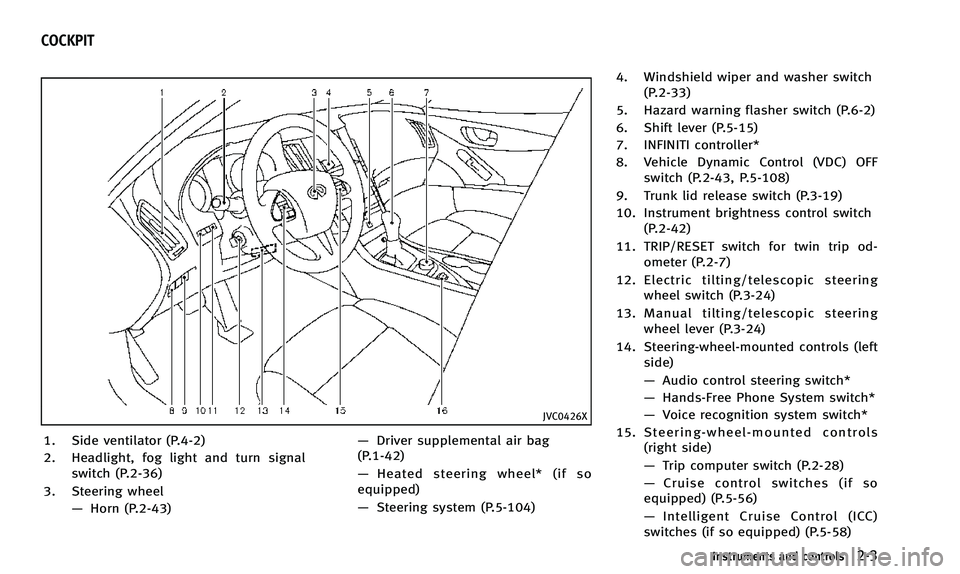
JVC0426X
1. Side ventilator (P.4-2)
2. Headlight, fog light and turn signalswitch (P.2-36)
3. Steering wheel —Horn (P.2-43) —
Driver supplemental air bag
(P.1-42)
— Heated steering wheel* (if so
equipped)
— Steering system (P.5-104) 4. Windshield wiper and washer switch
(P.2-33)
5. Hazard warning flasher switch (P.6-2)
6. Shift lever (P.5-15)
7. INFINITI controller*
8. Vehicle Dynamic Control (VDC) OFF switch (P.2-43, P.5-108)
9. Trunk lid release switch (P.3-19)
10. Instrument brightness control switch (P.2-42)
11. TRIP/RESET switch for twin trip od- ometer (P.2-7)
12. Electric tilting/telescopic steering wheel switch (P.3-24)
13. Manual tilting/telescopic steering wheel lever (P.3-24)
14. Steering-wheel-mounted controls (left side)
—Audio control steering switch*
— Hands-Free Phone System switch*
— Voice recognition system switch*
15. Steering-wheel-mounted controls (right side)
—Trip computer switch (P.2-28)
— Cruise control switches (if so
equipped) (P.5-56)
— Intelligent Cruise Control (ICC)
switches (if so equipped) (P.5-58)
Instruments and controls2-3
COCKPIT
Page 84 of 394

JVI0636X
Speedometer
SPEEDOMETER AND ODOMETER
Speedometer
The speedometer indicates vehicle speed
in miles per hour (MPH) and kilometers per
hour (km/h).
JVI0637X
Odometer/twin trip odometer
Odometer/twin trip odometer
The odometer*1and twin trip odometer
*2are displayed in the vehicle information
display when the ignition switch is in the
ON position.
The odometer records the total distance
the vehicle has been driven.
The twin trip odometer records the dis-
tance of individual trips.
Changing the display:
Pushing the TRIP RESET switch
*3under
the combination meter panel changes the
display as follows: TRIP A
?TRIP B ?TRIP A
Resetting the trip odometer:
Pushing the TRIP RESET switch
*3for more
than 1 second resets the trip odometer to
zero.
Instruments and controls2-7
Page 91 of 394
2-14Instruments and controls
indicate that the system is unavailable.
See“Forward emergency braking system”
(P.5-89) for more details.
Low fuel warning light
This light illuminates when the fuel in the
tank is getting low. Refuel as soon as it is
convenient, preferably before the fuel
gauge reaches the 0 (empty) position.
There will be a small reserve of fuel
remaining in the tank when the fuel gauge
reaches the 0 position.
Low tire pressure warning
light
Your vehicle is equipped with a Tire
Pressure Monitoring System (TPMS) that
monitors the tire pressure of all tires
except the spare tire (if so equipped).
The low tire pressure warning light warns
of low tire pressure and flat tire or
indicates that the TPMS is not functioning
properly.
After the ignition switch is placed in the ON
position, this light illuminates for about 1
second and turns off. Low tire pressure warning:
If the vehicle is being driven with low tire
pressure, the warning light will illuminate.
The “Tire Pressure Low - Add Air” warning
also appears in the vehicle information
display.
When the low tire pressure warning light
illuminates, you should stop and adjust
the tire pressure to the recommended
COLD tire pressure shown on the Tire and
Loading Information label. The low tire
pressure warning light does not automati-
cally turn off when the tire pressure is
adjusted. After the tire is inflated to the
recommended pressure, the vehicle must
be driven at speeds above 16 MPH (25
km/h) to activate the TPMS and turn off the
low tire pressure warning light. Use a tire
pressure gauge to check the tire pressure.
The “Tire Pressure Low - Add Air” warning
is active as long as the low tire pressure
warning light remains illuminated.
For additional information, see “Vehicle
information display” (P.2-20),“Tire Pres-
sure Monitoring System (TPMS)” (P.5-4)
and “Tire Pressure Monitoring System
(TPMS)” (P.6-3). Run-flat tire warning:
The run-flat tire warning warns of a flat tire.
If the vehicle is being driven with one or
more flat tires, the low tire pressure
warning light will illuminate continuously
and a chime will sound for 10 seconds. A
“ Flat Tire - Visit dealer” warning also
appears in the vehicle information display.
The chime will only sound at the first
indication of a flat tire and the warning
light will illuminate continuously. When the
flat tire warning is activated, have the
system reset and the tire checked, and
replaced if necessary, by an INFINITI
retailer. Even if the tire is inflated to the
specified COLD tire pressure, the warning
light will continue to illuminate until the
system is reset, by an INFINITI retailer.
Your vehicle can be driven for a limited
time on a flat tire. See “Run-flat tires”(P.6-
4).
TPMS malfunction:
If the TPMS is not functioning properly, the
low tire pressure warning light will flash for
approximately 1 minute when the ignition
switch is placed in the ON position. The
light will remain on after the 1 minute.
Have the system checked by an INFINITI
Page 92 of 394

retailer. The“Tire Pressure Low - Add Air”
warning does not appear if the low tire
pressure warning light illuminates to in-
dicate a TPMS malfunction.
For additional information, see “Tire Pres-
sure Monitoring System (TPMS)” (P.5-4).
WARNING
.Radio waves could adversely affect
electric medical equipment. Those who
use a pacemaker should contact the
electric medical equipment manufacturer
for the possible influences before use.
. If the light does not illuminate with the
ignition switch pushed ON, have the
vehicle checked by an INFINITI retailer as
soon as possible.
. If the light illuminates while driving,
avoid sudden steering maneuvers or
abrupt braking, reduce vehicle speed,
pull off the road to a safe location and
stop the vehicle as soon as possible.
Driving with under-inflated tires may
permanently damage the tires and in-
crease the likelihood of tire failure.
Serious vehicle damage could occur
and may lead to an accident and could result in serious personal injury. Check
the tire pressure for all four tires. Adjust
the tire pressure to the recommended
COLD tire pressure shown on the Tire
and Loading Information label to turn
the low tire pressure warning light OFF. If
the light still illuminates while driving
after adjusting the tire pressure, a tire
may be flat. If you have a flat tire,
replace it with a spare tire (if so
equipped).
. Although you can continue driving with a
punctured run-flat tire, remember that
vehicle handling stability is reduced,
which could lead to an accident and
personal injury. Also, driving a long
distance at high speeds may damage
the tires.
. Do not drive at speeds above 50 MPH
(80 km/h) and do not drive more than
approximately 93 miles (150 km) with a
punctured run-flat tire. The actual dis-
tance the vehicle can be driven on a flat
tire depends on outside temperature,
vehicle load, road conditions and other
factors.
. If you detect any unusual sounds or
vibrations while driving with a punctured
run-flat tire, pull off the road to a safe location and stop the vehicle as soon as
possible. The tire may be seriously
damaged and need to be replaced.
. When a spare tire is mounted or a wheel
is replaced, the TPMS will not function
and the low tire pressure warning light
will flash for approximately 1 minute.
The light will remain on after the 1
minute. Contact your INFINITI retailer as
soon as possible for tire replacement
and/or system resetting.
. Replacing tires with those not originally
specified by INFINITI could affect the
proper operation of the TPMS.
CAUTION
.The TPMS is not a substitute for the
regular tire pressure check. Be sure to
check the tire pressure regularly.
. If the vehicle is being driven at speeds of
less than 16 MPH (25 km/h), the TPMS
may not operate correctly.
. Be sure to install the specified size of
tires to the four wheels correctly.
Instruments and controls2-15
Page 103 of 394

2-26Instruments and controls
1. Engine oil and filter replacement
indicator
This indicator appears when the customer
set time comes for changing the engine oil
and filter. You can set or reset the distance
for changing the engine oil and filter.
2. Tire replacement indicator
This indicator appears when the customer
set distance comes for replacing tires. You
can set or reset the distance for replacing
tires.
WARNING
The tire replacement indicator is not a
substitute for regular tire checks, including
tire pressure checks. See“Changing wheels
and tires” (P.8-38). Many factors including
tire inflation, alignment, driving habits and
road conditions affect tire wear and when
tires should be replaced. Setting the tire
replacement indicator for a certain driving
distance does not mean your tires will last
that long. Use the tire replacement indicator
as a guide only and always perform regular
tire checks. Failure to perform regular tire
checks, including tire pressure checks could
result in tire failure. Serious vehicle damage could occur and may lead to a collision,
which could result in serious personal injury
or death.
3. Other indicator
This indicator appears when the customer
set time comes for replacing items other
than the engine oil, oil filter and tires. You
can set or reset the distance for replacing
the items.
Page 105 of 394

2-28Instruments and controls
JVI0642X
TRIP COMPUTER
Switches for the trip computer are located
on the right side of the steering wheel. To
operate the trip computer, push the
switches as shown above.
Each time the
orswitch is pushed,
the display will change.
The display items for trip computer are
changed on the lower display. For details,
see the Infiniti InTouch Owner’s Manual.
1. Current fuel consumption and
average fuel consumption (MPG, l
(liter)/100 km or km/l)
Current fuel consumption:
The current fuel consumption mode shows
the current fuel consumption.
Average fuel consumption:
The average fuel consumption mode shows
the average fuel consumption since the
last reset. Resetting is done by pushing the
orswitch for longer than 1
second.
The average fuel consumption is also reset
on the lower display. See the Infiniti
InTouch Owner’s Manual.
The display is updated every 30 seconds.
At about the first 1/3 mile (500 m) after a
reset, the display shows “——”.
2. Average speed (MPH or km/h)
The average speed mode shows the
average vehicle speed since the last reset.
Resetting is done by pushing the
orswitch for longer than 1 second.
The display is updated every 30 seconds.
The first 30 seconds after a reset, the
display shows “——”.
3. Elapsed time and trip odometer
(mile or km)
Elapsed time:
The elapsed time mode shows the time
since the last reset. Resetting is done by
pushing the
orswitch for longer
than 1 second. (The trip odometer is also
reset at the same time.)
Trip odometer:
The trip odometer mode shows the total
distance the vehicle has been driven since
the last reset. Resetting is done by pushing
the
orswitch for longer than 1
second. (The elapsed time is also reset at
the same time.)
4. Distance to empty (dte —mile or
km)
The distance to empty (dte) mode provides
you with an estimation of the distance that
can be driven before refueling. The dte is
constantly being calculated, based on the
amount of fuel in the fuel tank and the
actual fuel consumption.
The display is updated every 30 seconds.
The dte mode includes a low range warning
feature. If the fuel level is low, the warning
is displayed on the screen.
Page 169 of 394

3-30Pre-driving checks and adjustments
InTouch Owner’s Manual.)
Initialize entry/exit function
If the battery cable is disconnected, or if
the fuse opens, the entry/exit function will
not work though this function was set on
before. In such a case, after connecting the
battery or replacing with a new fuse, open
and close the driver’s door more than two
times after the ignition switch is switched
from the ON position to the LOCK position.
The entry/exit function will be activated.
JVP0240X
MEMORY STORAGE
Two positions for the driver’s seat, steering
column and outside mirrors can be stored
in the automatic drive positioner memory.
Follow these procedures to use the mem-
ory system.
1. Adjust the driver’s seat, steering col-umn and outside mirrors to the desired
positions by manually operating each
adjusting switch. For additional infor-
mation, see “Seats”(P.1-2),“Tilt/tele-
scopic steering” (P.3-24) and“Outside
mirrors” (P.3-27).
2. Push the SET switch and, within 5 seconds, push the memory switch (1
or 2) fully for at least 1 second.
The indicator light for the pushed
memory switch will stay on for approxi-
mately 5 seconds after pushing the
switch.
When the memory is stored in the
memory switch (1 or 2), a buzzer will
sound.
If memory is stored in the same
memory switch, the previous memory
will be deleted.
Confirming memory storage
.
Push the ignition switch to the ON
position and push the SET switch. If
the main memory has not been stored,
the indicator light will come on for
approximately 0.5 seconds. When the
memory has stored in position, the
indicator light will stay on for approxi-
mately 5 seconds.
. If the battery cable is disconnected, or if
the fuse opens, the memory will be
canceled. In this case, reset the desired
position using the previous procedure.
Page 179 of 394

5-4Starting and driving
THREE-WAY CATALYST
The three-way catalyst is an emission
control device installed in the exhaust
system. Exhaust gases in the three-way
catalyst are burned at high temperatures to
help reduce pollutants.
WARNING
.The exhaust gas and the exhaust system
are very hot. Keep people, animals or
flammable materials away from the
exhaust system components.
. Do not stop or park the vehicle over
flammable materials such as dry grass,
waste paper or rags. They may ignite and
cause a fire.
CAUTION
.Do not use leaded gasoline. Deposits
from leaded gasoline seriously reduce
the three-way catalyst’s ability to help
reduce exhaust pollutants.
. Keep your engine tuned up. Malfunctions
in the ignition, fuel injection, or elec-
trical systems can cause overrich fuel flow into the three-way catalyst, causing
it to overheat. Do not keep driving if the
engine misfires, or if noticeable loss of
performance or other unusual operating
conditions are detected. Have the vehicle
inspected promptly by an INFINITI retai-
ler.
. Avoid driving with an extremely low fuel
level. Running out of fuel could cause
the engine to misfire, damaging the
three-way catalyst.
. Do not race the engine while warming it
up.
. Do not push or tow your vehicle to start
the engine.
TIRE PRESSURE MONITORING SYS-
TEM (TPMS)
Each tire, including the spare (if provided),
should be checked monthly when cold and
inflated to the inflation pressure recom-
mended by the vehicle manufacturer on the
vehicle placard or tire inflation pressure
label. (If your vehicle has tires of a different
size than the size indicated on the vehicle
placard or tire inflation pressure label, you
should determine the proper tire inflation
pressure for those tires.) As an added safety feature, your vehicle
has been equipped with a Tire Pressure
Monitoring System (TPMS) that illuminates
a low tire pressure telltale when one or
more of your tires is significantly under-
inflated. Accordingly, when the low tire
pressure telltale illuminates, you should
stop and check your tires as soon as
possible, and inflate them to the proper
pressure. Driving on a significantly under-
inflated tire causes the tire to overheat and
can lead to tire failure. Under-inflation also
reduces fuel efficiency and tire tread life,
and may affect the vehicle’s handling and
stopping ability.
If the vehicle is being driven with one or
more flat tires, the low tire pressure
warning light will illuminate continuously
and a chime will sound for 10 seconds. The
flat tire warning will also appear in the
vehicle information display. The chime will
only sound at the first indication of a flat
tire, and the warning light will illuminate
continuously. When the flat tire warning is
activated, have the system reset and the
tire checked and replaced if necessary by
an INFINITI retailer. Even if the tire is
inflated to the specified COLD tire pres-
sure, the warning light will continue to