transmission INFINITI Q50 2018 User Guide
[x] Cancel search | Manufacturer: INFINITI, Model Year: 2018, Model line: Q50, Model: INFINITI Q50 2018Pages: 458, PDF Size: 2.13 MB
Page 202 of 458

1M(1st):
Use this position when climbing steep hills
slowly or driving slowly through deep snow,
or for maximum engine braking on steep
downhill grades.
. Remember not to drive at high speeds for
extended periods of time in lower than
7th gear. This reduces fuel economy.
. Moving the shift lever rapidly to the same
side twice will shift the ranges in succes-
sion.
. In the manual shift mode, the transmis-
sion may not shift to the selected gear
or may automatically shift to the other
gear. This helps maintain driving per-
formance and reduces the chance of
vehicle damage or loss of control.
. When the transmission does not shift to
the selected gear, the Automatic Trans-
mission (AT) position indicator (in the
vehicle information display) will blink
and the buzzer will sound.
. In the manual shift mode, the transmis-
sion automatically shifts down to 1st
gear before the vehicle comes to a stop.
When accelerating again, it is necessary
to shift up to the desired range.Accelerator downshift — In D (Drive)
position —
For passing or hill climbing, fully depress the
accelerator pedal to the floor. This shifts the
transmission down into the lower gear,
depending on the vehicle speed.
Fail-safe
When the fail-safe operation occurs, note
that the transmission will be locked in any of
the forward gears according to the condi-
tion.
If the vehicle is driven under extreme
conditions, such as excessive wheel spinning
and subsequent hard braking, the fail-safe
system may be activated. This will occur
even if all electrical circuits are functioning
properly. In this case, push the ignition
switch to the OFF position and wait for 3
seconds. Then push the ignition switch back
to the ON position. The vehicle should
return to its normal operating condition. If
it does not return to its normal operating
condition, have the transmission checked
and repaired, if necessary. It is recom-
mended you visit an INFINITI retailer for
this service.
JVS0188X
Shift lock release
If the battery charge is low or discharged,
the shift lever may not be moved from the P
(Park) position even with the brake pedal
depressed and the shift lever button pushed.
To move the shift lever, perform the follow-
ing procedure:
1. Push the ignition switch to the OFF or
LOCK position.
2. Apply the parking brake.
3. Remove the shift lock cover
using a
suitable tool.
4. Push down the shift lock
using
mechanical key as illustrated.
Starting and driving5-19
Page 203 of 458

5-20Starting and driving
5. Push the shift lever buttonand move
the shift lever to N (Neutral) position
while holding down the shift lock.
If the lever cannot be moved out of P (Park),
have the automatic transmission system
checked as soon as possible. It is recom-
mended you visit an INFINITI retailer for this
service.
Adaptive Shift Control (ASC)
The adaptive shift control system automati-
cally operates when the transmission is in
the D (Drive) position and selects an appro-
priate gear depending on the road conditions
such as uphill, downhill or curving roads.
Control on uphill and curving roads:
A low gear is maintained that suits the
degree of the slope or curve to allow smooth
driving with a small number of shifts.
Control on downhill roads:
The adaptive shift control system shifts to a
low gear that suits the degree of the slope,
and uses the engine braking to reduce the
number of times that the brake must be
used.
Control on winding roads:
A low gear is maintained on continuous
curves that involve repeated acceleration
and deceleration, so that smooth accelera-
tion is available instantly when the accel- erator pedal is depressed.
NOTE:
.
Adaptive shift control may not operate
when the transmission oil temperature
is low immediately after the start of
driving or when it is very hot.
. During some driving situations, hard
braking for example, the adaptive shift
control may automatically operate. The
transmission may automatically shift to
a lower gear for engine braking. This
increases engine speed but not vehicle
speed. Vehicle speed is controlled by the
accelerator pedal when the vehicle is in
the Adaptive shift control mode.
. When the adaptive shift control oper-
ates, the transmission sometimes main-
tains a lower gear for a longer period of
time than when adaptive shift control is
not operating. Engine speed will be
higher for a specific vehicle speed while
ASC system is operating than when ASC
is not operating.
NAVI Shift Control (if so equipped)
NAVI Shift Control automatically adjusts the
Automatic Transmission (AT) gear position
in certain situations based on road informa-
tion from the navigation system.
When the navigation system detects that
the vehicle is approaching a curved road, NAVI Shift Control will adjust the gear
position if needed to help the driver run
through the curve smoothly.
Precaution on NAVI shift control:
.
The NAVI Shift Control does not provide
steering input or automated driving on a
curve. It is not a speed limit support
system and will not modify your speed
according to local speed limits.
. The NAVI Shift Control is a convenient
system intended to help the vehicle move
through a curve smoothly. However, the
driver must always drive safely and use
the brake pedal if needed.
. The NAVI Shift Control may be delayed
or not operate properly in the following
situations, because this function uses the
road information provided by the navi-
gation system.
— When the navigation system cannot accurately detect the location of the
vehicle.
— When the vehicle is driving on a road- way that is not recognized by the
navigation system.
— When the actual roadway differs from the map information on the naviga-
tion system due to road construction,
traffic lane obstructions, etc.
Page 204 of 458

.The NAVI Shift Control may not operate
properly in the following situations:
— If the vehicle’s transmission, engine, and/or navigation system, and/or
GPS is malfunctioning.
— If the vehicle speed is higher than 74 MPH (120 km/h) or lower than 19
MPH (30 km/h) and/or transmission
gear is outside the operating range of
the system.
— When the vehicle is driving on a free- way.
— When the vehicle is driving on a gentle curve
— When the vehicle is driving with the shift lever except in the D (Drive)
position.
JVS0246X
How to enable/disable the NAVI Shift
Control:
Perform the following steps to enable or
disable the NAVI shift control.
1. Push the MENU button
and touch
[Settings] on the lower display.
2. Touch [Drive Mode Enhancement].
3. Touch [Navi Shift Control] and select the ON (enabled) or OFF (disabled).
WARNING
.Be sure the parking brake is fully
released before driving. Failure to do
so can cause brake failure and lead to
an accident.
. Do not release the parking brake
from outside the vehicle.
. Do not use the gear shift in place of
the parking brake. When parking, be
sure the parking brake is fully en-
gaged.
. To help avoid risk of injury or death
through unintended operation of the
vehicle and/or its systems, do not
leave children, people who require the
assistance of others or pets unat-
tended in your vehicle. Additionally,
the temperature inside a closed ve-
hicle on a warm day can quickly
become high enough to cause a sig-
nificant risk of injury or death to
people and pets.
Starting and driving5-21
PARKING BRAKE
Page 206 of 458

SPORT+ MODE (if so equipped)
In addition to the characteristics of the
SPORT mode, this mode heightens steering
response and changes the setting of VDC
(Vehicle Dynamic Control) for a more sporty
driving experience.
NOTE:
.VDC operation is reduced when the
INFINITI Drive Mode Selector is used
to select the SPORT+ mode (if so
equipped). The VDC system may not
operate in the same circumstances when
compared to operation in the standard
mode. To help prevent accidents drive
carefully, avoid careless or dangerous
driving techniques and be especially
careful when driving and cornering on
slippery surfaces.
. In the SPORT+ mode, fuel economy may
be reduced.
SPORT MODE
. Adjusts the engine and transmission
points for a higher response.
. The setting of the steering system is
adjusted to provide a quick steering
response and a heavy steering effort.
. The setting of the suspension system is
adjusted to increase the damping force.
(if so equipped) NOTE:
In the SPORT mode, fuel economy may be
reduced.
SNOW MODE
Changes the engine characteristics to aid
driving on slippery roads.
ECO MODE (if so equipped)
Assists the driver’s eco-driving. The engine
and transmission points are adjusted for
improved fuel economy, providing such a
driving features as smooth starting or con-
stant cruising.
NOTE:
Selecting the ECO mode will not necessarily
improve fuel economy as many driving
factors influence its effectiveness.
Operation
Select the ECO mode using the INFINITI
Drive Mode Selector. The ECO drive indica-
tor light on the instrument panel illuminates.
When the accelerator pedal is depressed
within the range of economy drive, the ECO
drive indicator light illuminates in green.
When the accelerator pedal is depressed
above the range of economy drive, the ECO
drive indicator light turns off. For ECO pedal
system equipped models, see “ECO pedal
system” (P.5-23). The ECO drive indicator light will not
illuminate in the following cases:
.
When the shift lever is in the R (Reverse)
position.
. When the vehicle speed is below 2 MPH
(3.2 km/h) or over 90 MPH (144 km/h).
. When the cruise control (if so equipped)
or the Intelligent Cruise Control (ICC)
system (if so equipped) is operated.
ECO pedal system (if so equipped)
The ECO pedal system helps assist the driver
to improve fuel economy by increasing the
reaction force of the accelerator pedal.
When the ECO drive indicator light is
blinking or remains off, the ECO pedal
system increases the reaction force of the
accelerator pedal.
Starting and driving5-23
Page 208 of 458

PERSONAL MODE
When the PERSONAL mode is selected, the
following functions can be adjusted indivi-
dually.
.Engine/Transmission
. Steering
. Suspension (if so equipped)
. Active Trace Control
JVS0246X
How to set the PERSONAL mode
Perform the following steps to set the
PERSONAL mode.
1. Push the MENU button
and touch
[Infiniti Drive Mode Selector] on the
lower display.
2. Touch [Engine/Transmission], [Steer- ing], [Suspension] (if so equipped) or
[Active Trace Control] and select each
item. (See “Engine/Transmission”,
“Steering”, “Suspension” and “Active
Trace Control” about the feature of each
item.)
3. Touch [Back] or [Home] to finish the PERSONAL mode setting. Engine/Transmission:
“Engine/Transmission” can be set to [Sport],
[Eco] (if so equipped), [Standard] or [Snow].
Steering (models with Direct Adaptive
Steering):
Seven or four combinations of steering
mode and steering response can be set.
Mode
Response
Sport+ (if so equipped) Dynamic+
Dynamic
Default
Sport Dynamic+
Dynamic
Default
Standard Default
Steering (models without Direct Adaptive
Steering):
“Steering” can be set to [Sport] or [Stan-
dard].
Suspension (if so equipped):
“Suspension” can be set to [Sport] or
[Standard].
Active Trace Control:
“Active Trace Control” can be set to ON
(enabled) or OFF (disabled).
For details about the Active Trace Control,
Starting and driving5-25
Page 307 of 458

5-124Starting and driving
If any malfunction occurs in the Intelligent
All-Wheel Drive (AWD) system while the
engine is running, warning messages appear
in the vehicle information display.
JVS0228M
If the “AWD Error” warningappears, there
may be a malfunction in the Intelligent AWD
system. Reduce vehicle speed and have the
system checked as soon as possible. It is
recommended you visit an INFINITI retailer
for this service.
The “AWD High Temp.” (high temperature)
warning
may appear while trying to free a stuck vehicle due to increased oil tempera-
ture. The driving mode may change to Two-
Wheel Drive (2WD). If this warning is
displayed, stop the vehicle with the engine
idling, as soon as it is safe to do so. Then if
the warning turns off, you can continue
driving.
The “Tire Size Incorrect” warning
may
appear if there is a large difference between
the diameters of front and rear wheels. Pull
off the road in a safe area, with the engine
idling. Check that all tire sizes are the same,
that the tire pressure is correct and that the
tires are not excessively worn.
If any warning message continues to be
displayed, have your vehicle checked as soon
as possible. It is recommended you visit an
INFINITI retailer for this service.
WARNING
. For AWD equipped vehicles, do not
attempt to raise two wheels off the
ground and shift the transmission to
any drive or reverse position with the
engine running. Doing so may result
in drivetrain damage or unexpected
vehicle movement which could result
in serious vehicle damage or personal
injury.
INTELLIGENT ALL-WHEEL
DRIVE (AWD) (if so equipped)
Page 309 of 458
5-126Starting and driving
SD1006MA
WARNING
.Do not stop or park the vehicle over
flammable materials such as dry
grass, waste paper or rags. They
may ignite and cause a fire.
. Never leave the engine running while
the vehicle is unattended.
. Do not leave children unattended
inside the vehicle. They could un-
knowingly activate switches or con-
trols. Unattended children could
become involved in serious accidents. .
To help avoid risk of injury or death
through unintended operation of the
vehicle and/or its systems, do not
leave children, people who require the
assistance of others or pets unat-
tended in your vehicle. Additionally,
the temperature inside a closed ve-
hicle on a warm day can quickly
become high enough to cause a sig-
nificant risk of injury or death to
people and pets.
. Safe parking procedures require that
both the parking brake be applied
and the transmission placed into P
(Park). Failure to do so could cause the vehicle to move unexpectedly or
roll away and result in an accident.
. Make sure the automatic transmis-
sion shift lever has been pushed as far
forward as it can go and cannot be
moved without depressing the foot
brake pedal.
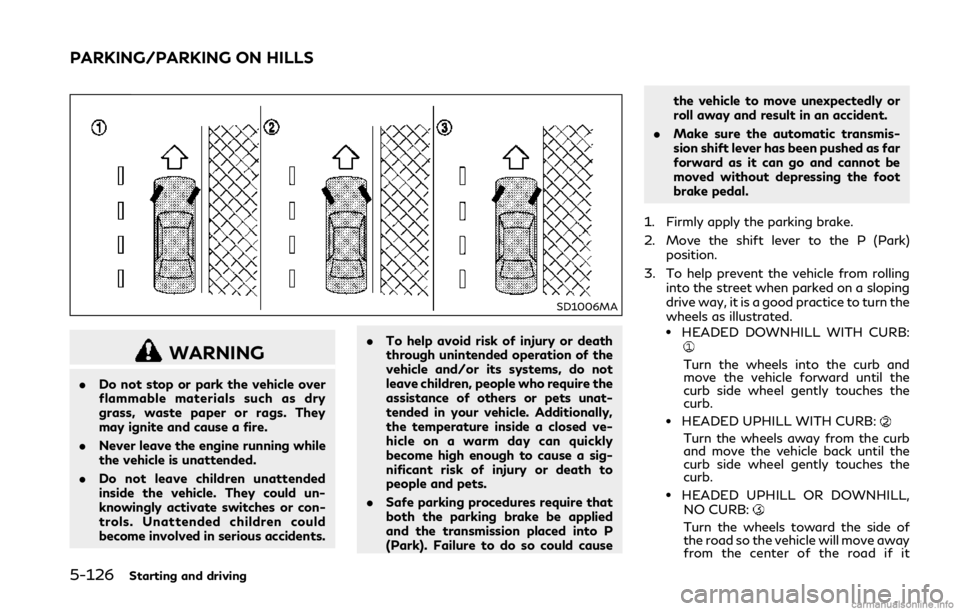
1. Firmly apply the parking brake.
2. Move the shift lever to the P (Park) position.
3. To help prevent the vehicle from rolling into the street when parked on a sloping
drive way, it is a good practice to turn the
wheels as illustrated.
.HEADED DOWNHILL WITH CURB:
Turn the wheels into the curb and
move the vehicle forward until the
curb side wheel gently touches the
curb.
.HEADED UPHILL WITH CURB:
Turn the wheels away from the curb
and move the vehicle back until the
curb side wheel gently touches the
curb.
.HEADED UPHILL OR DOWNHILL,
NO CURB:
Turn the wheels toward the side of
the road so the vehicle will move away
from the center of the road if it
PARKING/PARKING ON HILLS
Page 319 of 458

5-136Starting and driving
WARNING
.Never rely solely on the hill start
assist system to prevent the vehicle
from moving backward on a hill.
Always drive carefully and atten-
tively. Depress the brake pedal when
the vehicle is stopped on a steep hill.
Be especially careful when stopped
on a hill on frozen or muddy roads.
Failure to prevent the vehicle from
rolling backwards may result in a loss
of control of the vehicle and possible
serious injury or death.
. The hill start assist system is not
designed to hold the vehicle at a
standstill on a hill. Depress the brake
pedal when the vehicle is stopped on
a steep hill. Failure to do so may
cause the vehicle to roll backwards
and may result in a collision or serious
personal injury.
. The hill start assist system may not
prevent the vehicle from rolling back-
wards on a hill under all load or road
conditions. Always be prepared to
depress the brake pedal to prevent
the vehicle from rolling backwards.
Failure to do so may result in a
collision or serious personal injury. The hill start assist system automatically
keeps the brakes applied to help prevent the
vehicle from rolling backwards in the time it
takes the driver to release the brake pedal
and apply the accelerator when the vehicle is
stopped on a hill.
The hill start assist system will operate
automatically under the following condi-
tions:
.
The transmission is shifted to a forward
or reverse gear.
. The vehicle is stopped completely on a hill
by applying the brake.
The maximum holding time is 2 seconds.
After 2 seconds the vehicle will begin to roll
back and the hill start assist system will stop
operating completely.
The hill start assist system will not operate
when the transmission is shifted to the N
(Neutral) or P (Park) position or on a flat and
level road. The chassis control is an electric control
module that includes the following func-
tions:
.
Log-in function (See “Log-in function”
(P.3-16).)
. INFINITI Drive Mode Selector (See
“INFINITI Drive Mode Selector” (P.5-
22).)
. Active Lane Control (if so equipped) (See
“Active Lane Control” (P.5-26).)
. Active Trace Control (See “Active trace
control” (P.5-134).)
HILL START ASSIST SYSTEM CHASSIS CONTROL
Page 332 of 458

5. Raise the hood to warn other traffic, andto signal professional road assistance
personnel that you need assistance.
6. Have all passengers get out of the vehicle and stand in a safe place, away
from traffic and clear of the vehicle.
WARNING
.Make sure the parking brake is
securely applied and the automatic
transmission into P (Park).
. Never change tires when the vehicle
is on a slope, ice or slippery areas.
This is hazardous.
. Never change tires if oncoming traf-
fic is close to your vehicle. Wait for
professional road assistance.
MCE0001A
Blocking wheels
Place suitable blocksat both the front and
back of the wheel diagonally opposite the
flat tire to prevent the vehicle from moving
when it is jacked up.
WARNING
Be sure to block the wheel as the vehicle
may move and result in personal injury.
JVE0105X
Jacking tools
In case of emergency6-5
Page 343 of 458

6-16In case of emergency
INFINITI retailer.Do not attempt to start the engine by
pushing.
CAUTION
.
Automatic Transmission (AT) models
cannot be push-started or tow-
started. Attempting to do so may
cause transmission damage.
. Three-way catalyst equipped models
should not be started by pushing
since the three-way catalyst may be
damaged.
. Never try to start the vehicle by
towing it; when the engine starts,
the forward surge could cause the
vehicle to collide with the tow vehi-
cle.
CAUTION
.Do not continue to drive if your
vehicle overheats. Doing so could
cause engine damage or a vehicle fire.
. To avoid the danger of being scalded,
never remove the radiator cap while
the engine is still hot. When the
radiator cap is removed, pressurized
hot water will spurt out, possibly
causing serious injury.
. Do not open the hood if steam is
coming out.
If your vehicle is overheating (indicated by an
extremely high temperature gauge reading),
or if you feel a lack of engine power, detect
abnormal noise, etc., take the following
steps:
1. Move the vehicle safely off the road, apply the parking brake and move the
shift lever to the P (Park) position.
Do not stop the engine.
2. Turn off the climate control. Open all the windows, move the heater or air condi-
tioner temperature control to maximum
hot and fan control to high speed.
3. If engine overheating is caused by climb- ing a long hill on a hot day, run the engine
PUSH STARTING IF YOUR VEHICLE OVERHEATS