PERSONAL mode INFINITI Q50 2018 Owner's Manual
[x] Cancel search | Manufacturer: INFINITI, Model Year: 2018, Model line: Q50, Model: INFINITI Q50 2018Pages: 458, PDF Size: 2.13 MB
Page 3 of 458
.ALWAYS provide information about
the proper use of vehicle safety
features to all occupants of the
vehicle.
. ALWAYS review this Owner’s Man-
ual for important safety information.
MODIFICATION OF YOUR VEHI-
CLE
This vehicle should not be modified. Mod-
ification could affect its performance,
safety or durability, and may even violate
governmental regulations. In addition, da-
mage or performance problems resulting
from modification will not be covered
under the INFINITI warranties.
WARNING
Installing an aftermarket On-Board Di-
agnostic (OBD) plug-in device that uses
the port during normal driving, for
example remote insurance company
monitoring, remote vehicle diagnostics,
telematics or engine reprogramming,
may cause interference or damage to
vehicle systems. We do not recommend
or endorse the use of any aftermarket OBD plug-in devices, unless specifically
approved by INFINITI. The vehicle war-
ranty may not cover damage caused by
any aftermarket plug-in device.
WHEN READING THE MANUAL
This manual includes information for all
features and equipment available on this
model. Features and equipment in your
vehicle may vary depending on model, trim
level, options selected, order, date of pro-
duction, region or availability. Therefore,
you may find information about features or
equipment that are not included or installed
on your vehicle.
All information, specifications and illustra-
tions in this manual are those in effect at the
time of printing. INFINITI reserves the right
to change specifications, performance, de-
sign or component suppliers without notice
and without obligation. From time to time,
INFINITI may update or revise this manual to
provide owners with the most accurate
information currently available. Please care-
fully read and retain with this manual all
revision updates sent to you by INFINITI to
ensure you have access to accurate and up-
to-date information regarding your vehicle.
Current versions of vehicle Owner’s Manuals
and any updates can also be found in the
owner section of the INFINITI website athttps://owners.infinitiusa.com/owners/na-
vigation/manualsandGuides. If you have
questions concerning any information in
your Owner’s Manual, contact INFINITI
Consumer Affairs. See the INFINITI CUS-
TOMER CARE PROGRAM page in this
Owner’s Manual for contact information.IMPORTANT INFORMATION
ABOUT THIS MANUAL
You will see various symbols in this manual.
They are used in the following ways:
WARNING
This is used to indicate the presence of a
hazard that could cause death or serious
personal injury. To avoid or reduce the
risk, the procedures must be followed
precisely.
CAUTION
This is used to indicate the presence of a
hazard that could cause minor or mod-
erate personal injury or damage to your
vehicle. To avoid or reduce the risk, the
procedures must be followed carefully.
Page 37 of 458
1-18Safety — Seats, seat belts and supplemental restraint system
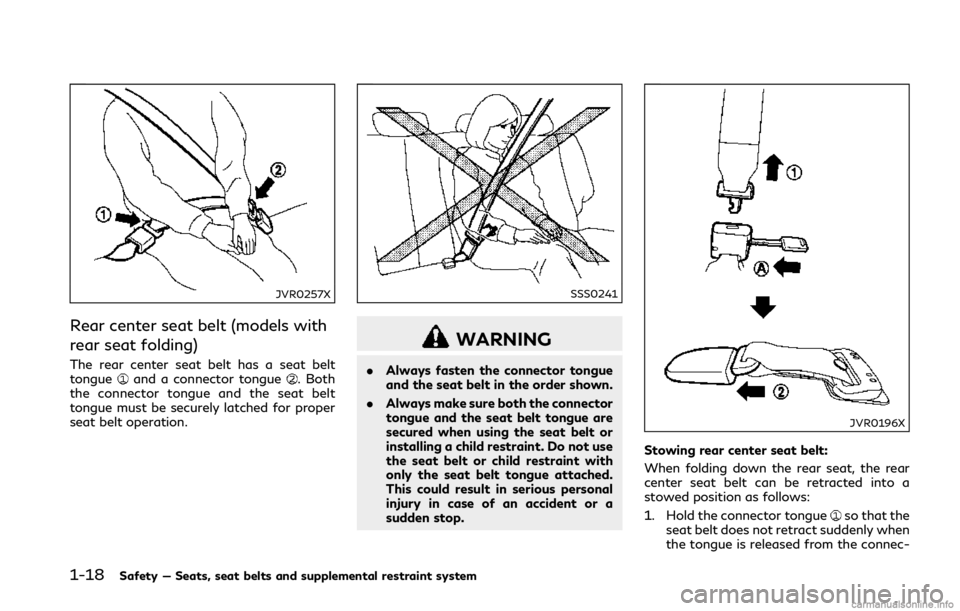
JVR0257X
Rear center seat belt (models with
rear seat folding)
The rear center seat belt has a seat belt
tongueand a connector tongue. Both
the connector tongue and the seat belt
tongue must be securely latched for proper
seat belt operation.
SSS0241
WARNING
. Always fasten the connector tongue
and the seat belt in the order shown.
. Always make sure both the connector
tongue and the seat belt tongue are
secured when using the seat belt or
installing a child restraint. Do not use
the seat belt or child restraint with
only the seat belt tongue attached.
This could result in serious personal
injury in case of an accident or a
sudden stop.
JVR0196X
Stowing rear center seat belt:
When folding down the rear seat, the rear
center seat belt can be retracted into a
stowed position as follows:
1. Hold the connector tongue
so that the
seat belt does not retract suddenly when
the tongue is released from the connec-
Page 96 of 458
WARNING
.Radio waves could adversely affect
electric medical equipment. Those
who use a pacemaker should contact
the electric medical equipment man-
ufacturer for the possible influences
before use.
. If the light does not illuminate with
the ignition switch pushed ON, have
the vehicle checked as soon as possi-
ble. It is recommended you visit an
INFINITI retailer for this service.
. If the light illuminates while driving,
avoid sudden steering maneuvers or
abrupt braking, reduce vehicle speed,
pull off the road to a safe location
and stop the vehicle as soon as
possible. Driving with under-inflated
tires may permanently damage the
tires and increase the likelihood of
tire failure. Serious vehicle damage
could occur and may lead to an
accident and could result in serious
personal injury. Check the tire pres-
sure for all four tires. Adjust the tire
pressure to the recommended COLD
tire pressure shown on the Tire and
Loading Information label to turn the
low tire pressure warning light OFF.
If the light still illuminates while driving after adjusting the tire pres-
sure, a tire may be flat or the TPMS
may be malfunctioning. If you have a
flat tire, replace it with a spare tire (if
so equipped) as soon as possible. If no
tire is flat and all tires are properly
inflated, it is recommended you con-
sult an INFINITI retailer.
. For models with run-flat tires,
although you can continue driving
with a punctured run-flat tire, re-
member that vehicle handling stabi-
lity is reduced, which could lead to an
accident and personal injury. Also,
driving a long distance at high speeds
may damage the tires.
— Do not drive at speeds above 50 MPH (80 km/h) and do not drive
more than approximately 93 miles
(150 km) with a punctured run-
flat tire. The actual distance the
vehicle can be driven on a flat tire
depends on outside temperature,
vehicle load, road conditions and
other factors.
— If you detect any unusual sounds or vibrations while driving with a
punctured run-flat tire, pull off
the road to a safe location and
stop the vehicle as soon as possi-
ble. The tire may be seriously damaged and need to be replaced.
. Since the spare tire is not equipped
with the TPMS, when a spare tire is
mounted or a wheel is replaced, the
TPMS will not function and the low
tire pressure warning light will flash
for approximately 1 minute. The light
will remain on after the 1 minute.
Have your tires replaced and/or
TPMS system reset as soon as pos-
sible. It is recommended you visit an
INFINITI retailer for these services.
. Replacing tires with those not origin-
ally specified by INFINITI could affect
the proper operation of the TPMS.
CAUTION
.The TPMS is not a substitute for the
regular tire pressure check. Be sure to
check the tire pressure regularly.
. If the vehicle is being driven at speeds
of less than 16 MPH (25 km/h), the
TPMS may not operate correctly.
. Be sure to install the specified size of
tires to the four wheels correctly.
Instruments and controls2-13
Page 107 of 458

2-24Instruments and controls
See “Conventional (fixed speed) cruise con-
trol mode” (P.5-90) for details.
30. Intelligent Cruise Control (ICC)
system ON indicator (if so
equipped)
This indicator shows the Intelligent Cruise
Control (ICC) system status. The status is
shown by the color. (See “Intelligent Cruise
Control (ICC)” (P.5-73).)
31. Driver assist system indicator (if
so equipped)
This indicator shows the status of the
following systems.
.Lane Departure Warning (LDW)
. Lane Departure Prevention (LDP)
. Blind Spot Warning (BSW)
. Blind Spot Intervention® (BSI)
. Distance Control Assist (DCA)
. Forward Emergency Braking (FEB)
. Predictive Forward Collision Warning
(PFCW)
For more details, see “Lane Departure
Warning (LDW)/Lane Departure Prevention
(LDP)” (P.5-34), “Blind Spot Warning
(BSW)” (P.5-41), “Blind Spot Intervention®
(BSI)” (P.5-49), “Distance Control Assist
(DCA)” (P.5-94), “Forward Emergency Brak-
ing (FEB)” (P.5-105) and “Predictive For- ward Collision Warning (PFCW)” (P.5-112).
The figure and color of this indicator will
change depending on the conditions of the
above systems. (In each section, the name of
this indicator is referred to as, “driver assist
system lane indicator”, “driver assist system
blind spot indicator” or “driver assist system
forward indicator” depending on the sys-
tems.)
32. INFINITI Drive Mode Selector
indicator
When a driving mode is selected using the
INFINITI Drive Mode Selector, the selected
mode indicator is displayed.
.
PERSONAL
. SPORT
. SPORT+ (if so equipped)
. STANDARD
. ECO (if so equipped)
. SNOW
(See “INFINITI Drive Mode Selector” (P.5-
22).)
33. Idling Stop System indicator (if
so equipped)
This indicator shows the Idling Stop System
status. See “Idling Stop System” (P.5-137).
34. Automatic Transmission (AT)
position indicator
This indicator shows the automatic shift
position.
In the manual shift mode, when the trans-
mission does not shift to the selected gear
due to a transmission protection mode, the
AT position indicator will blink and a chime
will sound.
See “Automatic transmission” (P.5-16) for
further details.
Page 161 of 458

3-16Pre-driving checks and adjustments
LOG-IN FUNCTION
After setting up the user information, the
system will automatically recognize the user
upon turning on the vehicle.
There will be a personalized welcome greet-
ing and screen prompt to log-in.
This feature allows 4 drivers to use their
own registration, drive mode, driving posi-
tion, air conditioner, and auto settings and
memorizes these custom settings.
The log-in user can be changed on the
welcome greeting screen or the User List
screen. For more details, see the Infiniti
InTouch Owner’s Manual.
The log-in function is linked to the following
items:
.Meter
. Audio
. Navigation system display (if so
equipped)
. Navigation settings (if so equipped)
. Air conditioner
. Automatic drive positioner (if so
equipped)
. Engine/Transmission
. Steering
. Suspension (if so equipped) .
Active trace control system
. Driver assistance* (if so equipped)
. Body Control Module (BCM)
*: except for the Forward Emergency Brak-
ing (FEB) systemWARNING
The Intelligent Key transmits radio
waves when the buttons are pushed.
The FAA advises that the radio waves
may affect aircraft navigation and com-
munication systems. Do not operate the
Intelligent Key while on an airplane.
Make sure the buttons are not operated
unintentionally when the unit is stored
during a flight.
It is possible to lock/unlock all doors and
fuel-filler door, open the trunk lid, activate
the panic alarm and open the windows by
pushing the buttons on the Intelligent Key
from outside the vehicle.
Before locking the doors, make sure the
Intelligent Key is not left in the vehicle.
The remote keyless entry function can
operate at a distance of approximately 33
ft (10 m) from the vehicle. (The effective
distance depends upon the conditions
around the vehicle.)
As many as 4 Intelligent Keys can be used
with one vehicle. For information concerning
the purchase and use of additional Intelli-
gent Keys, contact an INFINITI retailer.
The buttons on the Intelligent Key will not
operate when:
REMOTE KEYLESS ENTRY SYSTEM
Page 184 of 458

5 Starting and driving
Precautions when starting and driving........................ 5-4Exhaust gas (carbon monoxide)............................... 5-4
Three-way catalyst...................................................... 5-5
Tire Pressure Monitoring System (TPMS) ............ 5-5
Avoiding collision and rollover.................................. 5-9
Off-road recovery ........................................................ 5-9
Rapid air pressure loss................................................ 5-9
Drinking alcohol/drugs and driving....................... 5-10
Intelligent All-Wheel Drive (AWD) driving
safety precautions (AWD models)......................... 5-10
Push-button ignition switch ......................................... 5-11 Operating range for engine start function.......... 5-12
Push-button ignition switch operation................ 5-12
Push-button ignition switch positions ................. 5-13
Emergency engine shut off...................................... 5-13
Intelligent Key battery discharge........................... 5-14
Before starting the engine ............................................ 5-14
Starting the engine.......................................................... 5-15 Remote start (if so equipped) ................................. 5-15
Driving the vehicle ........................................................... 5-16
Automatic transmission............................................ 5-16
Parking brake.................................................................... 5-21
INFINITI Drive Mode Selector ..................................... 5-22
STANDARD mode...................................................... 5-22
SPORT+ mode (if so equipped) .............................. 5-23 SPORT mode............................................................. 5-23
SNOW mode.............................................................. 5-23
ECO mode (if so equipped) ................................... 5-23
PERSONAL mode.................................................... 5-25
Active Lane Control (if so equipped)......................... 5-26 Active Lane Control operation............................. 5-28
Turning Active Lane Control ON/OFF.............. 5-29
How to enable/disable Active Lane Control.... 5-30
Active Lane Control limitations............................ 5-31
System temporarily unavailable ........................... 5-32
System malfunction................................................. 5-32
System maintenance ............................................... 5-33
Lane Departure Warning (LDW)/Lane Departure
Prevention (LDP) (if so equipped) .............................. 5-34 LDW system operation........................................... 5-35
How to enable/disable the LDW system.......... 5-36
LDP system operation ............................................ 5-36
Turning the LDP system ON/OFF ..................... 5-37
How to enable/disable the LDP system ........... 5-38
LDW/LDP system limitations .............................. 5-38
System temporarily unavailable ........................... 5-39
System malfunction................................................ 5-40
System maintenance .............................................. 5-40
Blind Spot Warning (BSW) (if so equipped) ............ 5-41 BSW system operation........................................... 5-43
Page 190 of 458
WARNING
.Radio waves could adversely affect
electric medical equipment. Those
who use a pacemaker should contact
the electric medical equipment man-
ufacturer for the possible influences
before use.
. If the low tire pressure warning light
illuminates while driving, avoid sud-
den steering maneuvers or abrupt
braking, reduce vehicle speed, pull
off the road to a safe location and
stop the vehicle as soon as possible.
Driving with under-inflated tires may
permanently damage the tires and
increase the likelihood of tire failure.
Serious vehicle damage could occur
and may lead to an accident and
could result in serious personal injury.
Check the tire pressure for all four
tires. Adjust the tire pressure to the
recommended COLD tire pressure
shown on the Tire and Loading
Information label to turn the low tire
pressure warning light OFF. If the
light still illuminates while driving
after adjusting the tire pressure, a
tire may be flat or the TPMS may be
malfunctioning. If you have a flat tire,
replace it with a spare tire (if so equipped) as soon as possible. If no
tire is flat and all tires are properly
inflated, it is recommended you con-
sult an INFINITI retailer.
. For models with run-flat tires,
although you can continue driving
with a punctured run-flat tire, re-
member that vehicle handling stabi-
lity is reduced, which could lead to an
accident and personal injury. Also,
driving a long distance at high speeds
may damage the tires.
— Do not drive at speeds above 50 MPH (80 km/h) and do not drive
more than approximately 93 miles
(150 km) with a punctured run-
flat tire. The actual distance the
vehicle can be driven on a flat tire
depends on outside temperature,
vehicle load, road conditions and
other factors.
— If you detect any unusual sounds or vibrations while driving with a
punctured run-flat tire, pull off
the road to a safe location and
stop the vehicle as soon as possi-
ble. The tire may be seriously
damaged and need to be replaced.
. Since the spare tire is not equipped
with the TPMS, when a spare tire is
mounted or a wheel is replaced, the TPMS will not function and the low
tire pressure warning light will flash
for approximately 1 minute. The light
will remain on after 1 minute. Have
your tires replaced and/or TPMS
system reset as soon as possible. It
is recommended you visit an INFINITI
retailer for these services.
. Replacing tires with those not origin-
ally specified by INFINITI could affect
the proper operation of the TPMS.
. Do not inject any tire liquid or aerosol
tire sealant into the tires, as this may
cause a malfunction of the tire pres-
sure sensors.
CAUTION
.The TPMS may not function properly
when the wheels are equipped with
tire chains or the wheels are buried in
snow.
. Do not place metalized film or any
metal parts (antenna, etc.) on the
windows. This may cause poor recep-
tion of the signals from the tire
pressure sensors, and the TPMS will
not function properly.
Starting and driving5-7
Page 193 of 458
5-10Starting and driving
damage. See “Wheels and tires” (P.8-32) of
this manual.
If a tire rapidly loses air pressure or “blows-
out” while driving maintain control of the
vehicle by following the procedure below.
Please note that this procedure is only a
general guide. The vehicle must be driven as
appropriate based on the conditions of the
vehicle, road and traffic.
WARNING
The following actions can increase the
chance of losing control of the vehicle if
there is a sudden loss of tire air pressure.
Losing control of the vehicle may cause a
collision and result in personal injury.
.The vehicle generally moves or pulls
in the direction of the flat tire.
. Do not rapidly apply the brakes.
. Do not rapidly release the accelerator
pedal.
. Do not rapidly turn the steering
wheel.
1. Remain calm and do not overreact.
2. Maintain a firm grip on the steering wheel with both hands and try to hold
a straight course. 3. When appropriate, slowly release the
accelerator pedal to gradually slow the
vehicle.
4. Gradually steer the vehicle to a safe location off the road and away from
traffic if possible.
5. Lightly apply the brake pedal to gradu- ally stop the vehicle.
6. Turn on the hazard warning flashers and either contact a roadside emergency
service to change the tire or see “Chan-
ging a flat tire” (P.6-4) of this Owner’s
Manual.
DRINKING ALCOHOL/DRUGS
AND DRIVING
WARNING
Never drive under the influence of alco-
hol or drugs. Alcohol in the bloodstream
reduces coordination, delays reaction
time and impairs judgement. Driving
after drinking alcohol increases the like-
lihood of being involved in an accident
injuring yourself and others. Addition-
ally, if you are injured in an accident,
alcohol can increase the severity of the
injury. INFINITI is committed to safe driving. How-
ever, you must choose not to drive under the
influence of alcohol. Every year thousands of
people are injured or killed in alcohol-related
accidents. Although the local laws vary on
what is considered to be legally intoxicated,
the fact is that alcohol affects all people
differently and most people underestimate
the effects of alcohol.
Remember, drinking and driving don’t mix!
And that is true for drugs, too (over-the-
counter, prescription, and illegal drugs).
Don’t drive if your ability to operate your
vehicle is impaired by alcohol, drugs, or some
other physical condition.
INTELLIGENT ALL-WHEEL
DRIVE (AWD) DRIVING SAFETY
PRECAUTIONS (AWD models)
WARNING
.
Do not drive beyond the performance
capability of the tires, even with
Intelligent AWD engaged. Accelerat-
ing quickly, sharp steering maneuvers
or sudden braking may cause loss of
control.
. Always use tires of the same type,
size, brand, construction (bias, bias-
Page 200 of 458
CAUTION
.To avoid possible damage to your
vehicle; when stopping the vehicle on
an uphill grade, do not hold the
vehicle by depressing the accelerator
pedal. The foot brake should be used
for this purpose.
. Except in an emergency, do not shift
to the N (Neutral) position while
driving. Coasting with the transmis-
sion in the N (Neutral) position may
cause serious damage to the trans-
mission.
JVS0186X
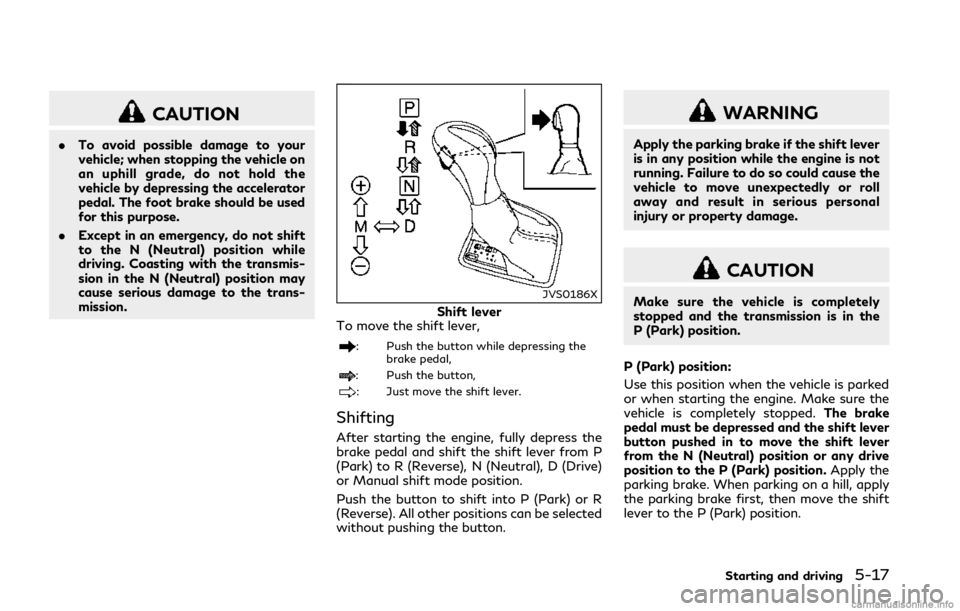
Shift lever
To move the shift lever,
: Push the button while depressing the
brake pedal,
: Push the button,
: Just move the shift lever.
Shifting
After starting the engine, fully depress the
brake pedal and shift the shift lever from P
(Park) to R (Reverse), N (Neutral), D (Drive)
or Manual shift mode position.
Push the button to shift into P (Park) or R
(Reverse). All other positions can be selected
without pushing the button.
WARNING
Apply the parking brake if the shift lever
is in any position while the engine is not
running. Failure to do so could cause the
vehicle to move unexpectedly or roll
away and result in serious personal
injury or property damage.
CAUTION
Make sure the vehicle is completely
stopped and the transmission is in the
P (Park) position.
P (Park) position:
Use this position when the vehicle is parked
or when starting the engine. Make sure the
vehicle is completely stopped. The brake
pedal must be depressed and the shift lever
button pushed in to move the shift lever
from the N (Neutral) position or any drive
position to the P (Park) position. Apply the
parking brake. When parking on a hill, apply
the parking brake first, then move the shift
lever to the P (Park) position.
Starting and driving5-17
Page 205 of 458

5-22Starting and driving
SPA2331
To apply:Fully depress the parking brake
pedal.
To release:
1. Firmly apply the foot brake
.
2. Depress the parking brake pedal
and
the parking brake will be released.
3. Before driving, be sure the brake warning light goes out.
JVS0189X
INFINITI Drive Mode Selector
JVS0191M
Six, five or four driving modes can be
selected by using the INFINITI Drive Mode
Selector (PERSONAL, SPORT+ (if so
equipped), SPORT, STANDARD, ECO (if so
equipped) and SNOW).
NOTE:
When the INFINITI Drive Mode Selector
selects a mode, the mode may not switch
immediately. This is not a malfunction.
The current mode is displayed in the vehicle
information display.
To change the mode, push the INFINITI
Drive Mode Selector up or down. The mode
list will appear on the upper display and you
can select the mode.
PERSONAL œSPORT+ (if so equipped) œ
SPORT œSTANDARD œECO (if so
equipped) œSNOW
NOTE:
The mode list will be turned off in approxi-
mately 5 seconds after the mode is selected.
STANDARD MODE
Allows for optimum driving according to the
driving conditions.
This mode will be selected first each time the
engine is started.
INFINITI DRIVE MODE SELECTOR