battery INFINITI Q50 2018 Owner's Manual
[x] Cancel search | Manufacturer: INFINITI, Model Year: 2018, Model line: Q50, Model: INFINITI Q50 2018Pages: 458, PDF Size: 2.13 MB
Page 166 of 458
Other conditions can affect the performance
of the Intelligent Key transmitter. See “In-
telligent Key system” (P.3-7) for additional
information.
REMOTE ENGINE START OPER-
ATING RANGE
The remote engine start function can only be
used when the Intelligent Key is within the
specified operating range from the vehicle.
When the Intelligent Key battery is dis-
charged or other strong radio wave sources
are present near the operating location, the
Intelligent Key operating range becomes
narrower, and the Intelligent Key may not
function properly.
The remote engine start operating range is
approximately 197 ft (60 m) from the
vehicle.
REMOTE STARTING THE ENGINE
To use the remote start function to start the
engine, perform the following:
1. Aim the Intelligent Key at the vehicle.
2. Push the LOCK
button to lock all
doors.
3. Within 5 seconds push and hold the remote engine start
button until
the turn signal lights flash and the tail
lights illuminate. If the vehicle is not within view, push and hold the remote
engine start
button for at least 2
seconds.
The following events will occur when the
engine starts:
. The front parking lights will turn on and
remain on as long as the engine is
running.
. The doors will be locked and the air
conditioner system may turn on.
. The engine will continue to run for about
10 minutes. Repeat the steps to extend
the time for an additional 10 minutes.
See “Extending engine run time” (P.3-
21).
Depress and hold the brake pedal, then place
the ignition switch in the ON position before
driving. For further instructions, see “Driving
the vehicle” (P.5-16).
EXTENDING ENGINE RUN TIME
The remote engine start function can be
extended one time by performing the steps
listed in “Remote starting the engine” (P.3-
21). Run time will be calculated as follows:
. The first 10 minute run time will start
when the remote engine start function is
performed.
. The second 10 minutes will start imme-
diately when the remote engine start
function is performed. For example, if the engine has been running for 5
minutes, and 10 minutes are added, the
engine will run for a total of 15 minutes.
. Extending engine run time will count
towards the two remote start limit.
A maximum of two remote starts, or a single
start with an extension, are allowed be-
tween ignition cycles.
The ignition switch must be cycled to the ON
position and then back to the OFF position
before the remote engine start procedure
can be used again.
CANCELING A REMOTE START
To cancel a remote start, perform one of the
following:
. Aim the Intelligent Key at the vehicle and
push and hold the remote engine start
button until the parking lights turn
off.
. Turn on the hazard warning flashers.
. Cycle the ignition switch ON and then
OFF.
. The extended engine run time has ex-
pired.
. The first 10 minute timer has expired.
. The engine hood has been opened.
. The shift lever is moved out of P (Park).
. The alarm sounds due to illegal entry into
the vehicle.
Pre-driving checks and adjustments3-21
Page 171 of 458

3-26Pre-driving checks and adjustments
that people become locked inside the trunk
or in the event of the loss of electrical power
such as a discharged battery.
Releasing inside the trunk
To open the trunk lid from the inside, pull the
release handleuntil the lock releases and
push up on the trunk lid. The release lever is
made of a material that glows in the dark
after a brief exposure to ambient light.
The handle is located on the back of the
trunk lid as illustrated.
Releasing from the rear seat
You can access the release handle through
the trunk pass-through (rear seat armrest).
(See “Armrest” (P.1-7).)
To open the trunk lid from the rear seat, pull
the release handle towards front of vehicle
until the lock releases.
If you cannot reach the release handle,
contact an INFINITI retailer.SPA2735
OPENING THE FUEL-FILLER
DOOR
To open the fuel-filler door, unlock the fuel-
filler door by using one of the following
operations, then push the upper left side of
the door.
. Touch the one touch unlock sensor on
one of the front door handles and then
push the door handle request switch
while carrying the Intelligent Key.
. Push the UNLOCK button on the Intel-
ligent Key twice.
. Insert the mechanical key into the door
lock cylinder and turn it to the rear of the
vehicle twice. .
Push the power door lock switch to the
UNLOCK position.
To lock, close the fuel-filler door securely
and lock all doors by operating the door
handle request switch, the LOCK button on
the Intelligent Key, the mechanical key or the
power door lock switch.
FUEL-FILLER CAP
WARNING
. Gasoline is extremely flammable and
highly explosive under certain condi-
tions. You could be burned or ser-
iously injured if it is misused or
mishandled. Always stop engine and
do not smoke or allow open flames or
sparks near the vehicle when refuel-
ing.
. Do not attempt to top off the fuel
tank after the fuel pump nozzle shuts
off automatically. Continued refuel-
ing may cause fuel overflow, resulting
in fuel spray and possibly a fire.
. Use only an original equipment type
fuel-filler cap as a replacement. It has
a built-in safety valve needed for
proper operation of the fuel system
and emission control system. An in-
correct cap can result in a serious
FUEL-FILLER DOOR
Page 178 of 458
The automatic drive positioner system has
two features:
.Entry/exit function
. Memory storage
ENTRY/EXIT FUNCTION
This system is designed so that the driver’s
seat and steering column will automatically
move when the shift lever is in the P (Park)
position. This allows the driver to get into
and out of the driver’s seat more easily.
The driver’s seat will slide backward and the
steering wheel will move up when the
driver’s door is opened with the ignition
switch in the LOCK position.
The driver’s seat and steering wheel will
return to the previous positions when the
ignition switch is pushed to the ACC posi-
tion.
The driver’s seat will not return to the
previous positions if the seat or steering
adjusting switch is operated when the seat is
at the exit position.
Cancel or activate entry/exit func-
tion
All the following conditions must be met
before cancelling or activating the entry/exit
function.
.The ignition switch is placed in the LOCK
position. .
The entry/exit function is not in opera-
tion.
. The following switches are not operated.
— Seat memory switches
— Power seat switches
— Electric tilting/telescopic steering wheel switch
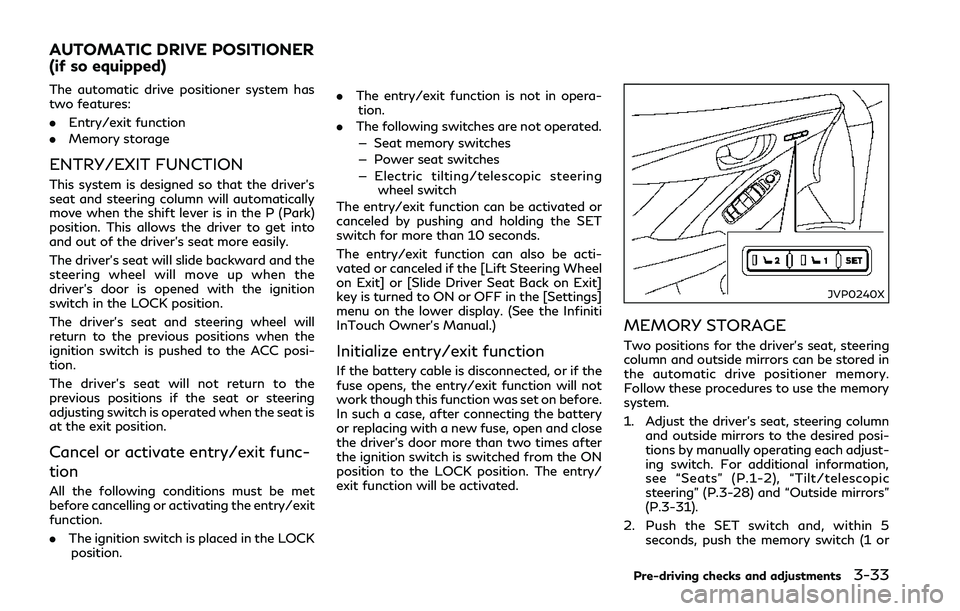
The entry/exit function can be activated or
canceled by pushing and holding the SET
switch for more than 10 seconds.
The entry/exit function can also be acti-
vated or canceled if the [Lift Steering Wheel
on Exit] or [Slide Driver Seat Back on Exit]
key is turned to ON or OFF in the [Settings]
menu on the lower display. (See the Infiniti
InTouch Owner’s Manual.)
Initialize entry/exit function
If the battery cable is disconnected, or if the
fuse opens, the entry/exit function will not
work though this function was set on before.
In such a case, after connecting the battery
or replacing with a new fuse, open and close
the driver’s door more than two times after
the ignition switch is switched from the ON
position to the LOCK position. The entry/
exit function will be activated.
JVP0240X
MEMORY STORAGE
Two positions for the driver’s seat, steering
column and outside mirrors can be stored in
the automatic drive positioner memory.
Follow these procedures to use the memory
system.
1. Adjust the driver’s seat, steering column and outside mirrors to the desired posi-
tions by manually operating each adjust-
ing switch. For additional information,
see “Seats” (P.1-2), “Tilt/telescopic
steering” (P.3-28) and “Outside mirrors”
(P.3-31).
2. Push the SET switch and, within 5 seconds, push the memory switch (1 or
Pre-driving checks and adjustments3-33
AUTOMATIC DRIVE POSITIONER
(if so equipped)
Page 184 of 458
5 Starting and driving
Precautions when starting and driving........................ 5-4Exhaust gas (carbon monoxide)............................... 5-4
Three-way catalyst...................................................... 5-5
Tire Pressure Monitoring System (TPMS) ............ 5-5
Avoiding collision and rollover.................................. 5-9
Off-road recovery ........................................................ 5-9
Rapid air pressure loss................................................ 5-9
Drinking alcohol/drugs and driving....................... 5-10
Intelligent All-Wheel Drive (AWD) driving
safety precautions (AWD models)......................... 5-10
Push-button ignition switch ......................................... 5-11 Operating range for engine start function.......... 5-12
Push-button ignition switch operation................ 5-12
Push-button ignition switch positions ................. 5-13
Emergency engine shut off...................................... 5-13
Intelligent Key battery discharge........................... 5-14
Before starting the engine ............................................ 5-14
Starting the engine.......................................................... 5-15 Remote start (if so equipped) ................................. 5-15
Driving the vehicle ........................................................... 5-16
Automatic transmission............................................ 5-16
Parking brake.................................................................... 5-21
INFINITI Drive Mode Selector ..................................... 5-22
STANDARD mode...................................................... 5-22
SPORT+ mode (if so equipped) .............................. 5-23 SPORT mode............................................................. 5-23
SNOW mode.............................................................. 5-23
ECO mode (if so equipped) ................................... 5-23
PERSONAL mode.................................................... 5-25
Active Lane Control (if so equipped)......................... 5-26 Active Lane Control operation............................. 5-28
Turning Active Lane Control ON/OFF.............. 5-29
How to enable/disable Active Lane Control.... 5-30
Active Lane Control limitations............................ 5-31
System temporarily unavailable ........................... 5-32
System malfunction................................................. 5-32
System maintenance ............................................... 5-33
Lane Departure Warning (LDW)/Lane Departure
Prevention (LDP) (if so equipped) .............................. 5-34 LDW system operation........................................... 5-35
How to enable/disable the LDW system.......... 5-36
LDP system operation ............................................ 5-36
Turning the LDP system ON/OFF ..................... 5-37
How to enable/disable the LDP system ........... 5-38
LDW/LDP system limitations .............................. 5-38
System temporarily unavailable ........................... 5-39
System malfunction................................................ 5-40
System maintenance .............................................. 5-40
Blind Spot Warning (BSW) (if so equipped) ............ 5-41 BSW system operation........................................... 5-43
Page 186 of 458

System malfunction ................................................. 5-121
System maintenance................................................ 5-121
Break-in schedule........................................................... 5-122
Fuel Efficient Driving Tips........................................... 5-122
Increasing fuel economy .............................................. 5-123
Intelligent All-Wheel Drive (AWD) (if
so equipped) ................................................................... 5-124
Parking/parking on hills............................................... 5-126
Power steering................................................................ 5-127 Electric power steering type ................................. 5-127
Hydraulic pump electric power
steering type.............................................................. 5-127
Direct Adaptive Steering type ............................. 5-128
Brake system.................................................................. 5-130
Braking precautions................................................ 5-130
Parking brake break-in .......................................... 5-130
Brake assist...................................................................... 5-131 Brake assist................................................................ 5-131
Anti-lock Braking System (ABS) .......................... 5-131
Vehicle Dynamic Control (VDC) system.................. 5-132 Brake force distribution.......................................... 5-133 Active trace control ..................................................... 5-134
Hill Start Assist system............................................... 5-136
Chassis control.............................................................. 5-136
Idling Stop System (if so equipped) ......................... 5-137
Retrograde movement control function ......... 5-138
Idling Stop System display.................................. 5-138
Idling Stop OFF switch........................................ 5-140
Cold weather driving.................................................... 5-141
Freeing a frozen door lock................................... 5-141
Antifreeze ................................................................. 5-141
Battery....................................................................... 5-141
Draining of coolant water.................................... 5-141
Tire equipment ........................................................ 5-141
Special winter equipment.................................... 5-142
Driving on snow or ice ......................................... 5-142
Engine block heater (if so equipped)................ 5-142
Active noise cancellation/Active
sound enhancement..................................................... 5-143
Active noise cancellation..................................... 5-144
Active sound enhancement ................................ 5-144
Page 195 of 458
5-12Starting and driving
SSD0659
OPERATING RANGE FOR EN-
GINE START FUNCTION
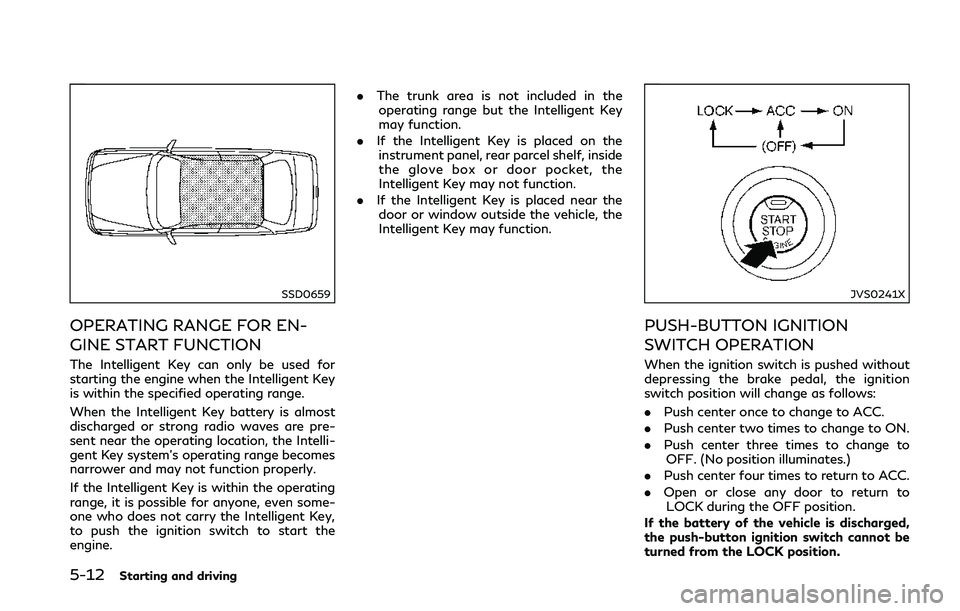
The Intelligent Key can only be used for
starting the engine when the Intelligent Key
is within the specified operating range.
When the Intelligent Key battery is almost
discharged or strong radio waves are pre-
sent near the operating location, the Intelli-
gent Key system’s operating range becomes
narrower and may not function properly.
If the Intelligent Key is within the operating
range, it is possible for anyone, even some-
one who does not carry the Intelligent Key,
to push the ignition switch to start the
engine..
The trunk area is not included in the
operating range but the Intelligent Key
may function.
. If the Intelligent Key is placed on the
instrument panel, rear parcel shelf, inside
the glove box or door pocket, the
Intelligent Key may not function.
. If the Intelligent Key is placed near the
door or window outside the vehicle, the
Intelligent Key may function.
JVS0241X
PUSH-BUTTON IGNITION
SWITCH OPERATION
When the ignition switch is pushed without
depressing the brake pedal, the ignition
switch position will change as follows:
. Push center once to change to ACC.
. Push center two times to change to ON.
. Push center three times to change to
OFF. (No position illuminates.)
. Push center four times to return to ACC.
. Open or close any door to return to
LOCK during the OFF position.
If the battery of the vehicle is discharged,
the push-button ignition switch cannot be
turned from the LOCK position.
Page 196 of 458
Some indicators and warnings for operation
are displayed in the vehicle information
display between the speedometer and tach-
ometer. (See “Vehicle information display”
(P.2-19).)
The ignition lock is designed so that the
ignition switch position cannot be switched
to LOCK until the shift lever is moved to the
P (Park) position.
When the ignition switch cannot be pushed
toward the LOCK position, proceed as
follows:
1. Move the shift lever into the P (Park)position.
2. Push the ignition switch to the OFF position. The ignition switch position
indicator will not illuminate.
3. Open the door. The ignition switch will change to the LOCK position.
The shift lever can be moved from the P
(Park) position if the ignition switch is in the
ON position and the brake pedal is de-
pressed.PUSH-BUTTON IGNITION
SWITCH POSITIONS
LOCK (Normal parking position)
The ignition switch can only be locked in this
position.
The ignition switch will be unlocked when it
is pushed to the ACC position while carrying
the Intelligent Key.
ACC (Accessories)
This position activates electrical accessories
such as the radio, when the engine is not
running.
ON (Normal operating position)
This position turns on the ignition system
and electrical accessories.
OFF
The engine can be turned off in this position.
The ignition lock is designed so that the
ignition switch cannot be switched to the
LOCK position until the shift lever is moved
to the P (Park) position.
CAUTION
Do not leave the vehicle with the push-
button ignition switch in ACC or ON
positions when the engine is not running
for an extended period. This can dis-
charge the battery.
EMERGENCY ENGINE SHUT OFF
To shut off the engine in an emergency
situation while driving, perform the follow-
ing procedure:
. Rapidly push the push-button ignition
switch 3 consecutive times in less than
1.5 seconds, or
. Push and hold the push-button ignition
switch for more than 2 seconds.
Starting and driving5-13
Page 197 of 458

5-14Starting and driving
JVS0404X
INTELLIGENT KEY BATTERY DIS-
CHARGE
If the battery of the Intelligent Key is
discharged, or environmental conditions in-
terfere with the Intelligent Key operation,
start the engine according to the following
procedure:
1. Move the shift lever to the P (Park)position.
2. Firmly apply the foot brake.
3. Touch the ignition switch with the Intelligent Key as illustrated. (A chime
will sound.)
4. Push the ignition switch while depressing the brake pedal within 10 seconds after
the chime sounds. The engine will start.
After step 3 is performed, when the ignition
switch is pushed without depressing the
brake pedal, the ignition switch position will
change to ACC.
NOTE:
. When the ignition switch is pushed to
the ACC or ON position or the engine is
started by the above procedures, the
Intelligent Key battery discharge indi-
cator appears in the vehicle information
display even if the Intelligent Key is
inside the vehicle. This is not a malfunc-
tion. To turn off the Intelligent Key
battery discharge indicator, touch the
ignition switch with the Intelligent Key
again.
. If the Intelligent Key battery discharge
indicator appears, replace the battery as
soon as possible. (See “Intelligent Key
battery replacement” (P.8-26).) .
Make sure the area around the vehicle is
clear.
. Check fluid levels such as engine oil,
coolant, brake fluid and window washer
fluid as frequently as possible, or at least
whenever you refuel.
. Check that all windows and lights are
clean.
. Visually inspect tires for their appearance
and condition. Also check tires for proper
inflation.
. Lock all doors.
. Position seat and adjust head restraints.
. Adjust inside and outside mirrors.
. Fasten seat belts and ask all passengers
to do likewise.
. Check the operation of warning lights
when the ignition switch is pushed to the
ON position. (See “Warning lights, in-
dicator lights and audible reminders”
(P.2-10).)
BEFORE STARTING THE ENGINE
Page 198 of 458

1. Apply the parking brake.
2. Move the shift lever to the P (Park) or N(Neutral) position. (P is recommended.)
The starter is designed not to operate
unless the shift lever is in either of the
above positions.
3. Push the ignition switch to the ON position. Depress the brake pedal and
push the ignition switch to start the
engine.
To start the engine immediately, push
and release the ignition switch while
depressing the brake pedal with the
ignition switch in any position.
.If the engine is very hard to start inextremely cold weather or when re-
starting, depress the accelerator ped-
al a little (approximately 1/3 to the
floor) and while holding, crank the
engine. Release the accelerator pedal
when the engine starts.
.If the engine is very hard to start
because it is flooded, depress the
accelerator pedal all the way to the
floor and hold it. Push the ignition
switch to the ON position to start
cranking the engine. After 5 or 6
seconds, stop cranking by pushing
the ignition switch to OFF. After
cranking the engine, release the accel-
erator pedal. Crank the engine withyour foot off the accelerator pedal
by
depressing the brake pedal and push-
ing the push-button ignition switch to
start the engine. If the engine starts,
but fails to run, repeat the above
procedure.
CAUTION
Do not operate the starter for more than
15 seconds at a time. If the engine does
not start, push the ignition switch to
OFF and wait 10 seconds before crank-
ing again, otherwise the starter could be
damaged.
4. Warm-up
Allow the engine to idle for at least 30
seconds after starting. Do not race the
engine while warming it up. Drive at
moderate speed for a short distance
first, especially in cold weather. In cold
weather, keep the engine running for a
minimum of 2 - 3 minutes before shut-
ting it off. Starting and stopping the
engine over a short period of time may
make the vehicle more difficult to start.
When racing the engine up to 4,500 rpm
or more under no load condition, the
engine will enter the fuel cut mode. 5. To stop the engine, shift the shift lever to
the P (Park) position and push the
ignition switch to the OFF position.
NOTE:
Care should be taken to avoid situations
that can lead to potential battery discharge
and potential no-start conditions such as:
1. Installation or extended use of electro-
nic accessories that consume battery
power when the engine is not running
(Phone chargers, GPS, DVD players,
etc.)
2. Vehicle is not driven regularly and/or
only driven short distances.
In these cases, the battery may need to be
charged to maintain battery health.
REMOTE START (if so equipped)
Vehicles started with the remote engine
start function require the ignition switch to
be placed in the ON position before the shift
lever can be moved from the P (Park)
position. To place the ignition switch in the
ON position, perform the following steps:
1. Make sure that the Intelligent Key is on you.
2. Depress the brake pedal.
3. Push the ignition switch once to the ON position.
Starting and driving5-15
STARTING THE ENGINE
Page 202 of 458
1M(1st):
Use this position when climbing steep hills
slowly or driving slowly through deep snow,
or for maximum engine braking on steep
downhill grades.
. Remember not to drive at high speeds for
extended periods of time in lower than
7th gear. This reduces fuel economy.
. Moving the shift lever rapidly to the same
side twice will shift the ranges in succes-
sion.
. In the manual shift mode, the transmis-
sion may not shift to the selected gear
or may automatically shift to the other
gear. This helps maintain driving per-
formance and reduces the chance of
vehicle damage or loss of control.
. When the transmission does not shift to
the selected gear, the Automatic Trans-
mission (AT) position indicator (in the
vehicle information display) will blink
and the buzzer will sound.
. In the manual shift mode, the transmis-
sion automatically shifts down to 1st
gear before the vehicle comes to a stop.
When accelerating again, it is necessary
to shift up to the desired range.Accelerator downshift — In D (Drive)
position —
For passing or hill climbing, fully depress the
accelerator pedal to the floor. This shifts the
transmission down into the lower gear,
depending on the vehicle speed.
Fail-safe
When the fail-safe operation occurs, note
that the transmission will be locked in any of
the forward gears according to the condi-
tion.
If the vehicle is driven under extreme
conditions, such as excessive wheel spinning
and subsequent hard braking, the fail-safe
system may be activated. This will occur
even if all electrical circuits are functioning
properly. In this case, push the ignition
switch to the OFF position and wait for 3
seconds. Then push the ignition switch back
to the ON position. The vehicle should
return to its normal operating condition. If
it does not return to its normal operating
condition, have the transmission checked
and repaired, if necessary. It is recom-
mended you visit an INFINITI retailer for
this service.
JVS0188X
Shift lock release
If the battery charge is low or discharged,
the shift lever may not be moved from the P
(Park) position even with the brake pedal
depressed and the shift lever button pushed.
To move the shift lever, perform the follow-
ing procedure:
1. Push the ignition switch to the OFF or
LOCK position.
2. Apply the parking brake.
3. Remove the shift lock cover
using a
suitable tool.
4. Push down the shift lock
using
mechanical key as illustrated.
Starting and driving5-19