service INFINITI Q50 2018 Owner's Manual
[x] Cancel search | Manufacturer: INFINITI, Model Year: 2018, Model line: Q50, Model: INFINITI Q50 2018Pages: 458, PDF Size: 2.13 MB
Page 99 of 458
2-16Instruments and controls
tion, Brake Force Distribution or hill start
assist system may not be functioning prop-
erly. Have the system checked. It is recom-
mended you visit an INFINITI retailer for this
service. If a malfunction occurs in the
system, the VDC system function will be
canceled but the vehicle is still driveable. For
additional information, see “Vehicle Dynamic
Control (VDC) system” (P.5-132).
INDICATOR LIGHTS
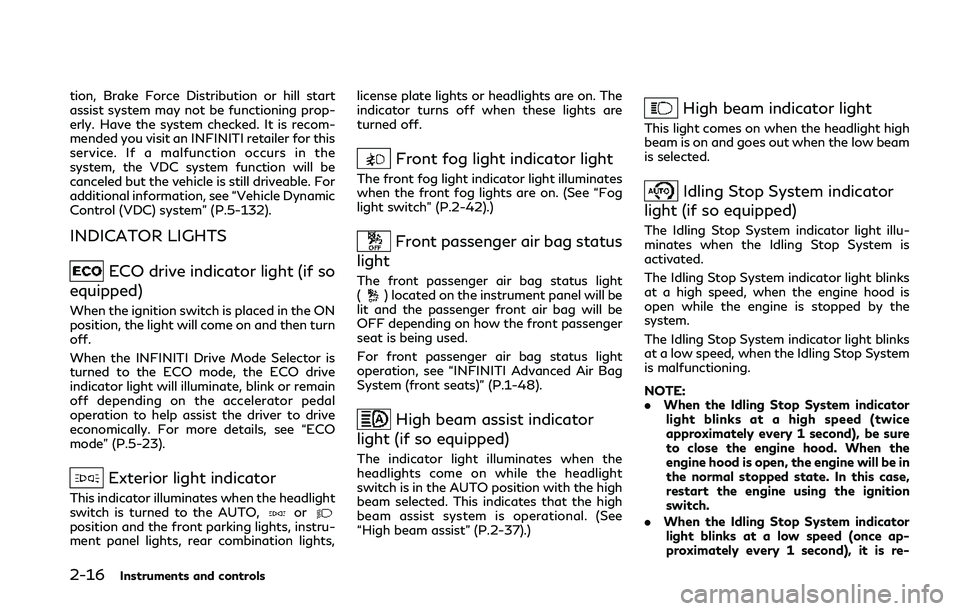
ECO drive indicator light (if so
equipped)
When the ignition switch is placed in the ON
position, the light will come on and then turn
off.
When the INFINITI Drive Mode Selector is
turned to the ECO mode, the ECO drive
indicator light will illuminate, blink or remain
off depending on the accelerator pedal
operation to help assist the driver to drive
economically. For more details, see “ECO
mode” (P.5-23).
Exterior light indicator
This indicator illuminates when the headlight
switch is turned to the AUTO,orposition and the front parking lights, instru-
ment panel lights, rear combination lights, license plate lights or headlights are on. The
indicator turns off when these lights are
turned off.
Front fog light indicator light
The front fog light indicator light illuminates
when the front fog lights are on. (See “Fog
light switch” (P.2-42).)
Front passenger air bag status
light
The front passenger air bag status light
() located on the instrument panel will be
lit and the passenger front air bag will be
OFF depending on how the front passenger
seat is being used.
For front passenger air bag status light
operation, see “INFINITI Advanced Air Bag
System (front seats)” (P.1-48).
High beam assist indicator
light (if so equipped)
The indicator light illuminates when the
headlights come on while the headlight
switch is in the AUTO position with the high
beam selected. This indicates that the high
beam assist system is operational. (See
“High beam assist” (P.2-37).)
High beam indicator light
This light comes on when the headlight high
beam is on and goes out when the low beam
is selected.
Idling Stop System indicator
light (if so equipped)
The Idling Stop System indicator light illu-
minates when the Idling Stop System is
activated.
The Idling Stop System indicator light blinks
at a high speed, when the engine hood is
open while the engine is stopped by the
system.
The Idling Stop System indicator light blinks
at a low speed, when the Idling Stop System
is malfunctioning.
NOTE:
. When the Idling Stop System indicator
light blinks at a high speed (twice
approximately every 1 second), be sure
to close the engine hood. When the
engine hood is open, the engine will be in
the normal stopped state. In this case,
restart the engine using the ignition
switch.
. When the Idling Stop System indicator
light blinks at a low speed (once ap-
proximately every 1 second), it is re-
Page 100 of 458
commended you have the system
checked, and if necessary repaired, by
an INFINITI retailer promptly.
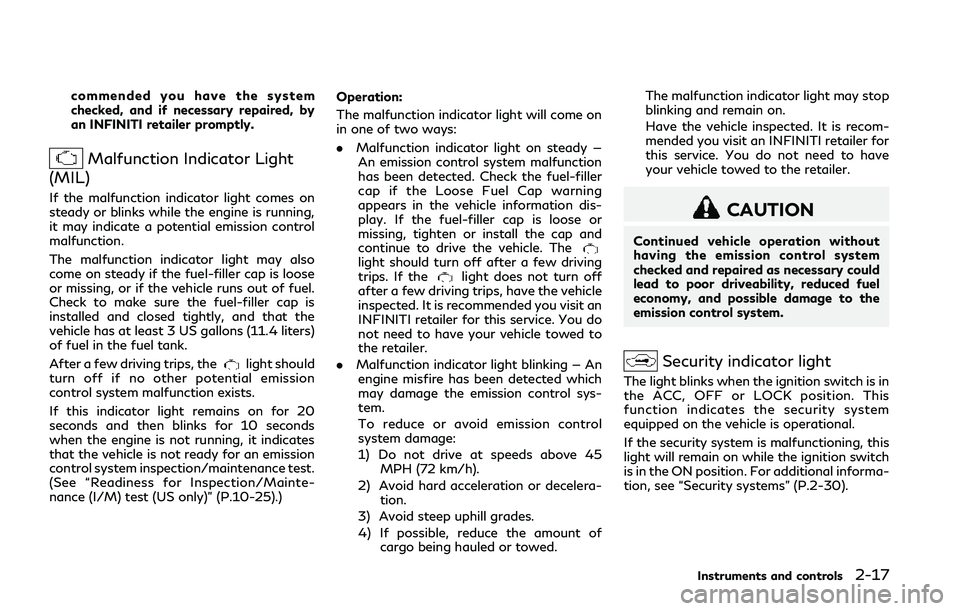
Malfunction Indicator Light
(MIL)
If the malfunction indicator light comes on
steady or blinks while the engine is running,
it may indicate a potential emission control
malfunction.
The malfunction indicator light may also
come on steady if the fuel-filler cap is loose
or missing, or if the vehicle runs out of fuel.
Check to make sure the fuel-filler cap is
installed and closed tightly, and that the
vehicle has at least 3 US gallons (11.4 liters)
of fuel in the fuel tank.
After a few driving trips, the
light should
turn off if no other potential emission
control system malfunction exists.
If this indicator light remains on for 20
seconds and then blinks for 10 seconds
when the engine is not running, it indicates
that the vehicle is not ready for an emission
control system inspection/maintenance test.
(See “Readiness for Inspection/Mainte-
nance (I/M) test (US only)” (P.10-25).) Operation:
The malfunction indicator light will come on
in one of two ways:
. Malfunction indicator light on steady —
An emission control system malfunction
has been detected. Check the fuel-filler
cap if the Loose Fuel Cap warning
appears in the vehicle information dis-
play. If the fuel-filler cap is loose or
missing, tighten or install the cap and
continue to drive the vehicle. The
light should turn off after a few driving
trips. If thelight does not turn off
after a few driving trips, have the vehicle
inspected. It is recommended you visit an
INFINITI retailer for this service. You do
not need to have your vehicle towed to
the retailer.
. Malfunction indicator light blinking — An
engine misfire has been detected which
may damage the emission control sys-
tem.
To reduce or avoid emission control
system damage:
1) Do not drive at speeds above 45 MPH (72 km/h).
2) Avoid hard acceleration or decelera- tion.
3) Avoid steep uphill grades.
4) If possible, reduce the amount of cargo being hauled or towed. The malfunction indicator light may stop
blinking and remain on.
Have the vehicle inspected. It is recom-
mended you visit an INFINITI retailer for
this service. You do not need to have
your vehicle towed to the retailer.
CAUTION
Continued vehicle operation without
having the emission control system
checked and repaired as necessary could
lead to poor driveability, reduced fuel
economy, and possible damage to the
emission control system.
Security indicator light
The light blinks when the ignition switch is in
the ACC, OFF or LOCK position. This
function indicates the security system
equipped on the vehicle is operational.
If the security system is malfunctioning, this
light will remain on while the ignition switch
is in the ON position. For additional informa-
tion, see “Security systems” (P.2-30).
Instruments and controls2-17
Page 105 of 458

2-22Instruments and controls
reaches the empty (0) position.
There is a small reserve of fuel remaining in
the tank when the fuel gauge reaches the
empty (0) position.
11. Low washer fluid warning
This warning appears when the washer tank
fluid is at a low level. Add washer fluid as
necessary. (See “Window washer fluid” (P.8-
15).)
12. Door/trunk open warning
This warning appears if any of the doors
and/or the trunk lid are open or not closed
securely. The vehicle icon indicates which
door or the trunk lid is open on the display.
13. Intelligent Key system warning
This warning appears if there is a malfunc-
tion in the Intelligent Key system.
If this warning appears while the engine is
stopped, the engine cannot be started. If this
warning appears while the engine is running,
the vehicle can be driven. However, in these
cases, have the system checked as soon as
possible. It is recommended you visit an
INFINITI retailer for this service.
14. Loose Fuel Cap warning
This warning appears when the fuel-filler
cap is not tightened correctly after thevehicle has been refueled. (See “Fuel-filler
cap” (P.3-26).)
15. Tire Pressure Low - Add Air
warning
This warning appears when the low tire
pressure warning light in the meter illumi-
nates and low tire pressure is detected. The
warning appears each time the ignition
switch is placed in the ON position as long
as the low tire pressure warning light
remains illuminated. If this warning appears,
stop the vehicle and adjust the pressure to
the recommended COLD tire pressure
shown on the Tire and Loading Information
label. (See “Low tire pressure warning light”
(P.2-12) and “Tire Pressure Monitoring
System (TPMS)” (P.5-5).)
16. Flat Tire - Visit dealer warning
(if so equipped)
This warning appears when the low tire
pressure warning light in the meter illumi-
nates and one or more flat tires are detected
while driving. A chime also sounds for
approximately 10 seconds. (See “Low tire
pressure warning light” (P.2-12) and “Tire
Pressure Monitoring System (TPMS)” (P.5-
5).)
17. Low oil pressure warning (for
VR30DDTT engine models)
This warning appears if low engine oil
pressure is detected. If the warning appears
during normal driving, pull off the road in a
safe area, stop the engine immediately and
call an INFINITI retailer or other authorized
repair shop.
The low oil pressure warning is not designed
to indicate a low oil level. Use the dipstick to
check the oil level. (See “Engine oil” (P.8-
10).)
18. Low oil level warning (for 2.0L
turbo gasoline engine models)
This warning appears if low engine oil level is
detected. If this warning appears, check the
oil level using the dipstick. (See “Engine oil”
(P.8-10).)
CAUTION
The oil level should be checked regularly
using the engine oil dipstick. Operating
with an insufficient amount of oil can
damage the engine and such damage is
not covered by the warranty.
Page 115 of 458
2-32Instruments and controls
FCC Notice:
For USA:
This device complies with Part 15 of the
FCC Rules. Operation is subject to the
following two conditions: (1) This device
may not cause harmful interference, and (2)
this device must accept any interference
received, including interference that may
cause undesired operation.
NOTE:
Changes or modifications not expressly
approved by the party responsible for
compliance could void the user’s authority
to operate the equipment.
For Canada:
This device complies with Industry Canada
licence-exempt RSS standard(s). Operation
is subject to the following two conditions:
(1) this device may not cause interference,
and (2) this device must accept any inter-
ference, including interference that may
cause undesired operation of the device.
SIC2045
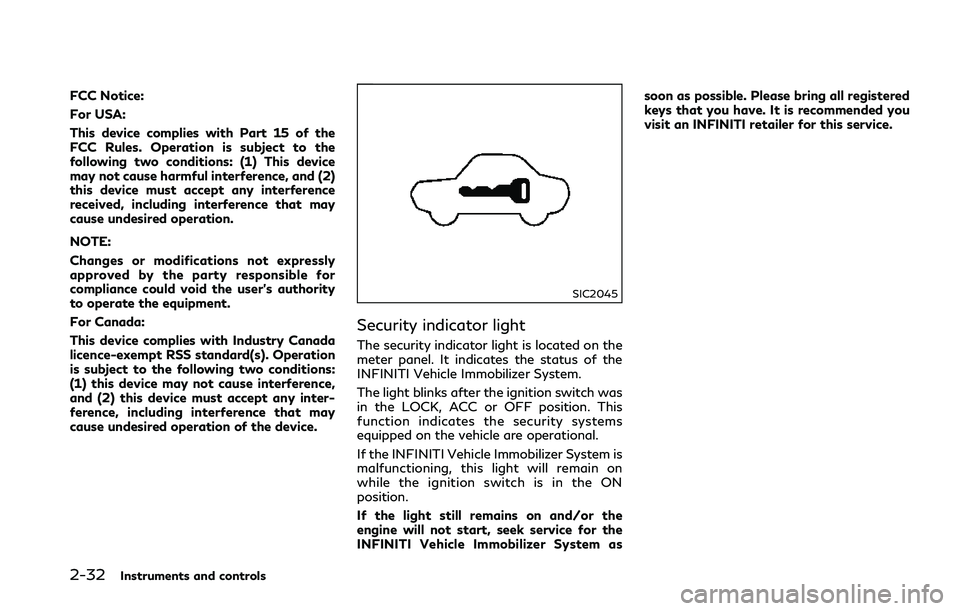
Security indicator light
The security indicator light is located on the
meter panel. It indicates the status of the
INFINITI Vehicle Immobilizer System.
The light blinks after the ignition switch was
in the LOCK, ACC or OFF position. This
function indicates the security systems
equipped on the vehicle are operational.
If the INFINITI Vehicle Immobilizer System is
malfunctioning, this light will remain on
while the ignition switch is in the ON
position.
If the light still remains on and/or the
engine will not start, seek service for the
INFINITI Vehicle Immobilizer System assoon as possible. Please bring all registered
keys that you have. It is recommended you
visit an INFINITI retailer for this service.
Page 123 of 458
2-40Instruments and controls
others.
Adaptive Front lighting System
(AFS) (if so equipped)
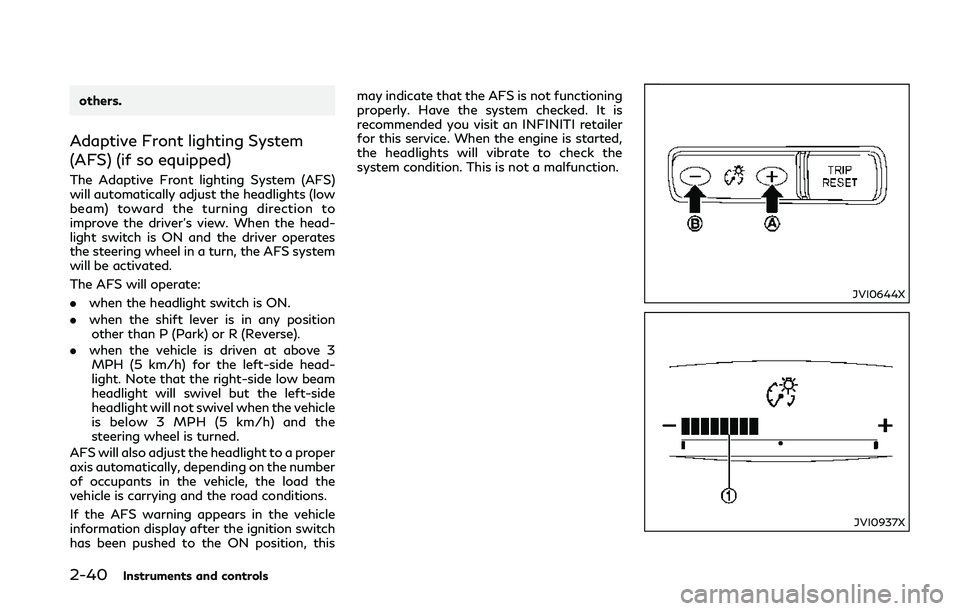
The Adaptive Front lighting System (AFS)
will automatically adjust the headlights (low
beam) toward the turning direction to
improve the driver’s view. When the head-
light switch is ON and the driver operates
the steering wheel in a turn, the AFS system
will be activated.
The AFS will operate:
.when the headlight switch is ON.
. when the shift lever is in any position
other than P (Park) or R (Reverse).
. when the vehicle is driven at above 3
MPH (5 km/h) for the left-side head-
light. Note that the right-side low beam
headlight will swivel but the left-side
headlight will not swivel when the vehicle
is below 3 MPH (5 km/h) and the
steering wheel is turned.
AFS will also adjust the headlight to a proper
axis automatically, depending on the number
of occupants in the vehicle, the load the
vehicle is carrying and the road conditions.
If the AFS warning appears in the vehicle
information display after the ignition switch
has been pushed to the ON position, this may indicate that the AFS is not functioning
properly. Have the system checked. It is
recommended you visit an INFINITI retailer
for this service. When the engine is started,
the headlights will vibrate to check the
system condition. This is not a
malfunction.
JVI0644X
JVI0937X
Page 126 of 458
(P.5-132).)
WARNING
Do not use or allow occupants to use the
seat heater if you or the occupants
cannot monitor elevated seat tempera-
tures or have an inability to feel pain in
those body parts in contact with the
seat. Use of the seat heater by such
people could result in serious injury.
CAUTION
.The battery could run down if the
seat heater is operated while the
engine is not running.
. Do not use the seat heater for
extended periods or when no one is
using the seat.
. Do not put anything on the seat
which insulates heat, such as a blan-
ket, cushion, seat cover, etc. Other-
wise, the seat may become
overheated.
. Do not place anything hard or heavy
on the seat or pierce it with a pin or
similar object. This may result in
damage to the heater. .
Any liquid spilled on the heated seat
should be removed immediately with
a dry cloth.
. When cleaning the seat, never use
gasoline, thinner, or any similar ma-
terials.
. If any malfunctions are found or the
heated seat does not operate, turn
the switch off and have the system
checked. It is recommended you visit
an INFINITI retailer for this service.
Instruments and controls2-43
HEATED SEATS (if so equipped)
Page 128 of 458
![INFINITI Q50 2018 Owners Manual system checked. It is recommended
that you visit an INFINITI retailer for
this service.
Push the CLIMATE button and touch
[Steering Heater] on the lower display to
turn on or off the steering wheel he](/img/42/41084/w960_41084-127.png "INFINITI Q50 2018 Owners Manual system checked. It is recommended
that you visit an INFINITI retailer for
this service.
Push the CLIMATE button and touch
[Steering Heater] on the lower display to
turn on or off the steering wheel he")
system checked. It is recommended
that you visit an INFINITI retailer for
this service.
Push the CLIMATE button and touch
[Steering Heater] on the lower display to
turn on or off the steering wheel heating
manually. The steering wheel heating will
turn off automatically 30 minutes after it
has been turned on. When the steering
wheel heating is turned on, the indicator
above [Steering Heater] will turn on.
If the surface temperature of the steering
wheel is above the temperature within which
the system is designed to operate, the
system will not heat the steering wheel. This
is not a malfunction.
Automatic steering wheel heating can be
turned on or off from the climate control
settings screen. For details, see the Infiniti
InTouch Owner’s Manual.
SIC4316
In the storage box
JVI1298X
In the console box The power outlets are located in the storage
box and in the console box.
CAUTION
.
The outlet and plug may be hot
during or immediately after use.
. Do not use with accessories that
exceed a 12 volt, 120W (10A) power
draw. Do not use double adapters or
more than one electrical accessory.
. Use power outlet with the engine
running to avoid discharging the
vehicle battery.
. Avoid using power outlet when the
air conditioner, headlights or rear
window defroster is on.
. This power outlet is not designed for
use with a cigarette lighter unit.
. Push the plug in as far as it will go. If
good contact is not made, the plug
may overheat or the internal tem-
perature fuse may blow.
. Before inserting or disconnecting a
plug, be sure the electrical accessory
being used is turned OFF.
. When not in use, be sure to close the
cap. Do not allow water or any liquid
to contact the outlet.
Instruments and controls2-45
POWER OUTLETS
Page 137 of 458
2-54Instruments and controls
will automatically open or close all the way.
To stop the roof, push the switch once more
while it is opening or closing.
Operating moonroof with Intelli-
gent Key (if so equipped)
The moonroof can be opened by pushing the
UNLOCK button on the Intelligent Key. This
function will not operate while the moonroof
timer is activated or when the moonroof
need to be initialized. For details about the
Intelligent Key button usage, see “How to
use remote keyless entry system” (P.3-17).
Opening:
To open the sunroof, push the UNLOCK
button on the Intelligent Key for about 3
seconds after the door is unlocked.
To stop opening, release the
button.
Auto reverse function
WARNING
There are some small distances immedi-
ately before the closed position which
cannot be detected. Make sure that all
passengers have their hands, etc., inside
the vehicle before closing the moonroof.If the control unit detects something caught
in the moonroof when it is closing, the
moonroof will be immediately opened.
The auto reverse function can be activated
when the moonroof is closed by automatic
operation when the ignition switch is in the
ON position or for about 45 seconds after
the ignition switch is pushed to the OFF
position.
If the moonroof cannot be closed automa-
tically when the auto reverse function
activates due to a malfunction, push and
hold the moonroof switch to the close
position
.
Depending on the environment or driving
conditions, the auto reverse function may
be activated if an impact or load similar to
something being caught in the moonroof
occurs.
If the moonroof does not operate
If the moonroof does not operate properly,
perform the following procedure to initialize
the moonroof operation system.
1. If the moonroof is open, close it fully by repeatedly pushing the moonroof switch
to the close position
to tilt the moon-
roof up.
2. Push and hold the switch to the close position
. 3. Release the moonroof switch after the
moonroof moves slightly up and down.
4. Push and hold the switch to the open position
to fully tilt the moonroof
down.
5. Check if the moonroof switch operates normally.
If the moonroof does not operate properly
after performing the procedure above, have
your moonroof checked and repaired. It is
recommended you visit an INFINITI retailer
for this service.
Page 172 of 458
malfunction and possible injury. It
could also cause the Malfunction
Indicator Light (MIL) to come on.
. Never pour fuel into the throttle body
to attempt to start your vehicle.
. Do not fill a portable fuel container in
the vehicle or trailer. Static electricity
can cause an explosion of flammable
liquid, vapor or gas in any vehicle or
trailer. To reduce the risk of serious
injury or death when filling portable
fuel containers:
— Always place the container on the ground when filling.
— Do not use electronic devices when filling.
— Keep the pump nozzle in contact with the container while you are
filling it.
— Use only approved portable fuel containers for flammable liquid.
CAUTION
. If fuel is spilled on the vehicle body,
flush it away with water to avoid
paint damage. .
Insert the cap straight into the fuel-
filler tube, then tighten the fuel-filler
cap until a single click is heard. Failure
to tighten the fuel-filler cap properly
may cause the
Malfunction In-
dicator Light (MIL) to illuminate. If
the
light illuminates because the
fuel-filler cap is loose or missing,
tighten or install the cap and con-
tinue to drive the vehicle. The
light should turn off after a few
driving trips. If thelight does
not turn off after a few driving trips,
have the vehicle inspected. It is
recommended you visit an INFINITI
retailer for this service.
. The Loose Fuel Cap warning will
appear if the fuel-filler cap is not
properly tightened. It may take a few
driving trips for the warning to be
displayed. Failure to tighten the fuel-
filler cap properly after the Loose
Fuel Cap warning appears may cause
the
Malfunction Indicator Light
(MIL) to illuminate.
. For additional information, see “Mal-
function Indicator Light (MIL)” (P.2-
17).
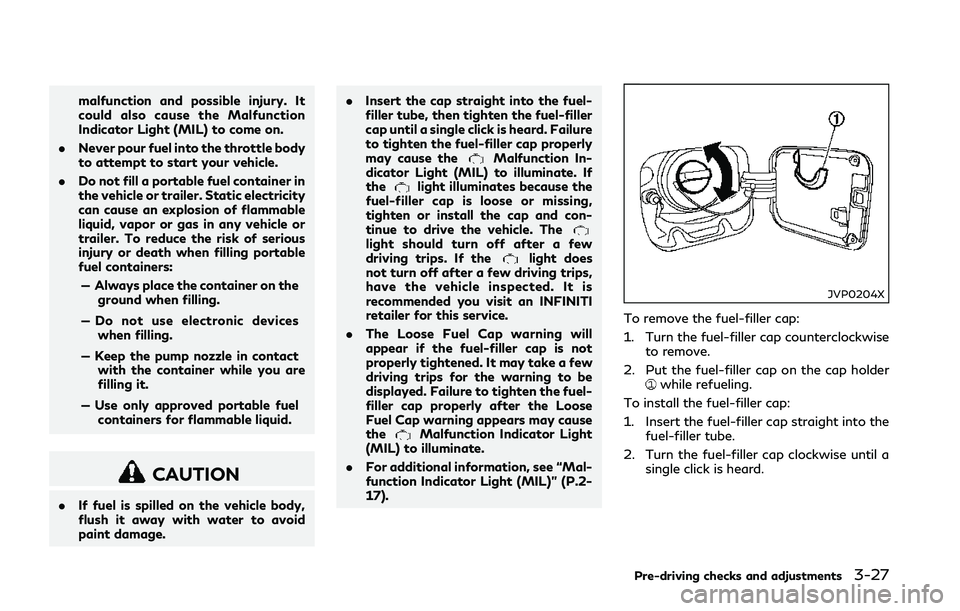
JVP0204X
To remove the fuel-filler cap:
1. Turn the fuel-filler cap counterclockwise
to remove.
2. Put the fuel-filler cap on the cap holder
while refueling.
To install the fuel-filler cap:
1. Insert the fuel-filler cap straight into the fuel-filler tube.
2. Turn the fuel-filler cap clockwise until a single click is heard.
Pre-driving checks and adjustments3-27
Page 181 of 458

4-2Monitor, climate, audio, phone and voice recognition systems
Refer to the Infiniti InTouch Owner’s Manual
that includes the following information.
.Infiniti InTouch Services
. Navigation system (if so equipped)
. Audio system
. Bluetooth® Hands-Free Phone system
. Heater and air conditioner
. Viewing information
. Other settings
. Voice recognition (if so equipped)
. Monitor system
. Meter settings
. General system information
JVH0510X
Center ventilators
JVH0511X
Side ventilators
JVH0574X
Rear ventilators
Open or close, and adjust the air flow
direction of ventilators.
: This symbol indicates that the ventilators
are closed.
: This symbol indicates that the ventilatorsare open.
INFINITI INTOUCH OWNER’S MANUALVENTILATORS