lights INFINITI Q50 2018 Owner's Guide
[x] Cancel search | Manufacturer: INFINITI, Model Year: 2018, Model line: Q50, Model: INFINITI Q50 2018Pages: 458, PDF Size: 2.13 MB
Page 177 of 458
3-32Pre-driving checks and adjustments
SPA1829
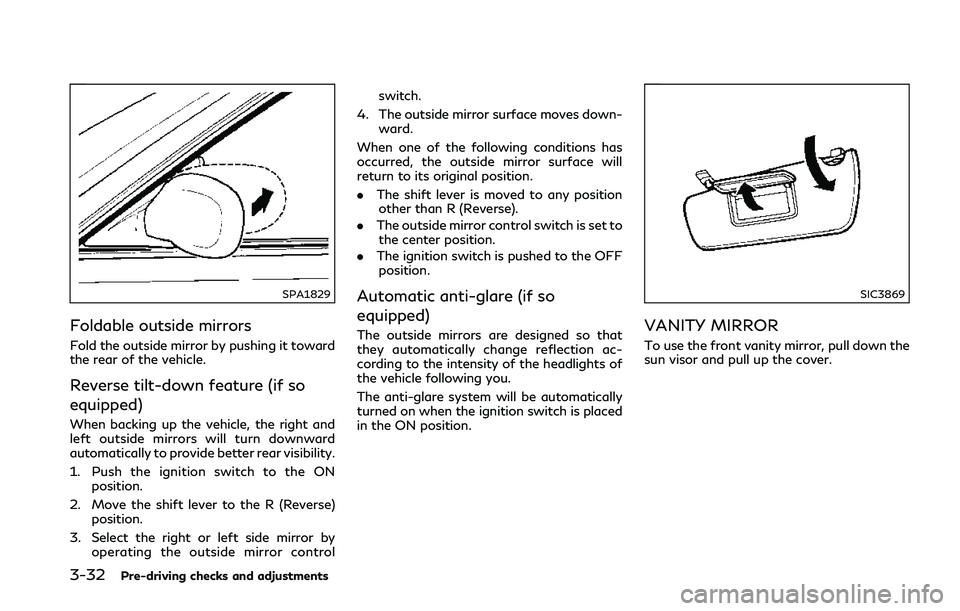
Foldable outside mirrors
Fold the outside mirror by pushing it toward
the rear of the vehicle.
Reverse tilt-down feature (if so
equipped)
When backing up the vehicle, the right and
left outside mirrors will turn downward
automatically to provide better rear visibility.
1. Push the ignition switch to the ONposition.
2. Move the shift lever to the R (Reverse) position.
3. Select the right or left side mirror by operating the outside mirror control switch.
4. The outside mirror surface moves down- ward.
When one of the following conditions has
occurred, the outside mirror surface will
return to its original position.
. The shift lever is moved to any position
other than R (Reverse).
. The outside mirror control switch is set to
the center position.
. The ignition switch is pushed to the OFF
position.
Automatic anti-glare (if so
equipped)
The outside mirrors are designed so that
they automatically change reflection ac-
cording to the intensity of the headlights of
the vehicle following you.
The anti-glare system will be automatically
turned on when the ignition switch is placed
in the ON position.
SIC3869
VANITY MIRROR
To use the front vanity mirror, pull down the
sun visor and pull up the cover.
Page 197 of 458

5-14Starting and driving
JVS0404X
INTELLIGENT KEY BATTERY DIS-
CHARGE
If the battery of the Intelligent Key is
discharged, or environmental conditions in-
terfere with the Intelligent Key operation,
start the engine according to the following
procedure:
1. Move the shift lever to the P (Park)position.
2. Firmly apply the foot brake.
3. Touch the ignition switch with the Intelligent Key as illustrated. (A chime
will sound.)
4. Push the ignition switch while depressing the brake pedal within 10 seconds after
the chime sounds. The engine will start.
After step 3 is performed, when the ignition
switch is pushed without depressing the
brake pedal, the ignition switch position will
change to ACC.
NOTE:
. When the ignition switch is pushed to
the ACC or ON position or the engine is
started by the above procedures, the
Intelligent Key battery discharge indi-
cator appears in the vehicle information
display even if the Intelligent Key is
inside the vehicle. This is not a malfunc-
tion. To turn off the Intelligent Key
battery discharge indicator, touch the
ignition switch with the Intelligent Key
again.
. If the Intelligent Key battery discharge
indicator appears, replace the battery as
soon as possible. (See “Intelligent Key
battery replacement” (P.8-26).) .
Make sure the area around the vehicle is
clear.
. Check fluid levels such as engine oil,
coolant, brake fluid and window washer
fluid as frequently as possible, or at least
whenever you refuel.
. Check that all windows and lights are
clean.
. Visually inspect tires for their appearance
and condition. Also check tires for proper
inflation.
. Lock all doors.
. Position seat and adjust head restraints.
. Adjust inside and outside mirrors.
. Fasten seat belts and ask all passengers
to do likewise.
. Check the operation of warning lights
when the ignition switch is pushed to the
ON position. (See “Warning lights, in-
dicator lights and audible reminders”
(P.2-10).)
BEFORE STARTING THE ENGINE
Page 215 of 458
5-32Starting and driving
— When the vehicle’s traveling di-rection does not align with the
lane marker.
— When traveling close to the ve- hicle in front of you, which ob-
structs the lane camera unit
detection range.
— When rain, snow, dirt or object adheres to the windshield in front
of the lane camera unit.
— When the headlights are not bright due to dirt on the lens or
if the aiming is not adjusted
properly.
— When strong light enters the lane camera unit. (For example, the
light directly shines on the front
of the vehicle at sunrise or sun-
set.)
— When a sudden change in bright- ness occurs. (For example, when
the vehicle enters or exits a tunnel
or under a bridge.)
— When entering or exiting toll- gates.
— When driving on roads with a widening or narrowing lane width.
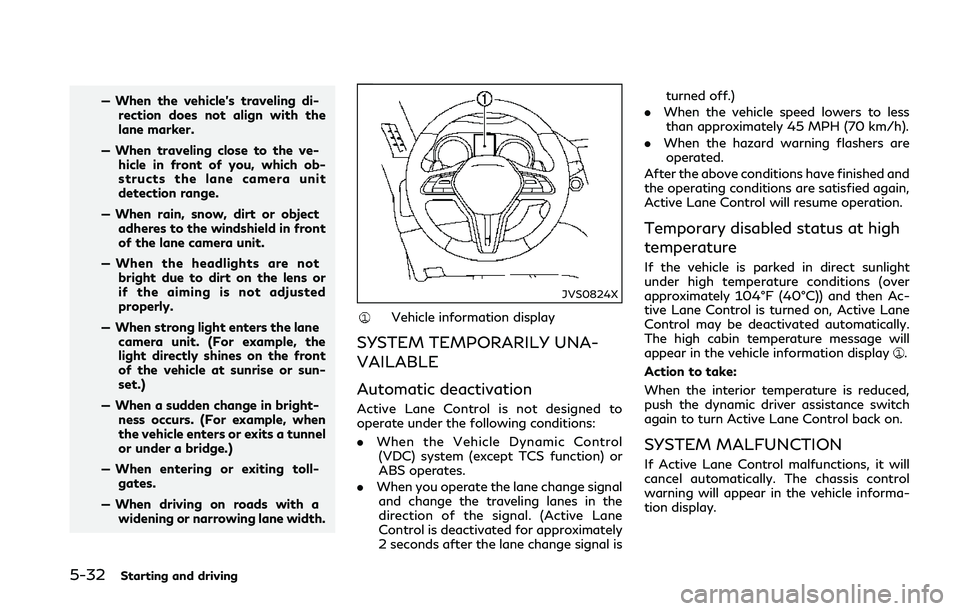
JVS0824X
Vehicle information display
SYSTEM TEMPORARILY UNA-
VAILABLE
Automatic deactivation
Active Lane Control is not designed to
operate under the following conditions:
. When the Vehicle Dynamic Control
(VDC) system (except TCS function) or
ABS operates.
. When you operate the lane change signal
and change the traveling lanes in the
direction of the signal. (Active Lane
Control is deactivated for approximately
2 seconds after the lane change signal is turned off.)
. When the vehicle speed lowers to less
than approximately 45 MPH (70 km/h).
. When the hazard warning flashers are
operated.
After the above conditions have finished and
the operating conditions are satisfied again,
Active Lane Control will resume operation.
Temporary disabled status at high
temperature
If the vehicle is parked in direct sunlight
under high temperature conditions (over
approximately 104°F (40°C)) and then Ac-
tive Lane Control is turned on, Active Lane
Control may be deactivated automatically.
The high cabin temperature message will
appear in the vehicle information display
.
Action to take:
When the interior temperature is reduced,
push the dynamic driver assistance switch
again to turn Active Lane Control back on.
SYSTEM MALFUNCTION
If Active Lane Control malfunctions, it will
cancel automatically. The chassis control
warning will appear in the vehicle informa-
tion display.
Page 222 of 458
dows, snow, water, wheel ruts,
seams or lines remaining after
road repairs. (The LDW and LDP
systems could detect these items
as lane markers.)
— On roads where the traveling lane merges or separates.
— When the vehicle’s traveling di- rection does not align with the
lane marker.
— When traveling close to the ve- hicle in front of you, which ob-
structs the lane camera unit
detection range.
— When rain, snow or dirt adheres to the windshield in front of the
lane camera unit.
— When the headlights are not bright due to dirt on the lens or
if the aiming is not adjusted
properly.
— When strong light enters the lane camera unit. (For example, the
light directly shines on the front
of the vehicle at sunrise or sun-
set.)
— When a sudden change in bright- ness occurs. (For example, when
the vehicle enters or exits a tunnel or under a bridge.)
. Excessive noise will interfere with the
warning chime sound, and the chime
may not be heard.
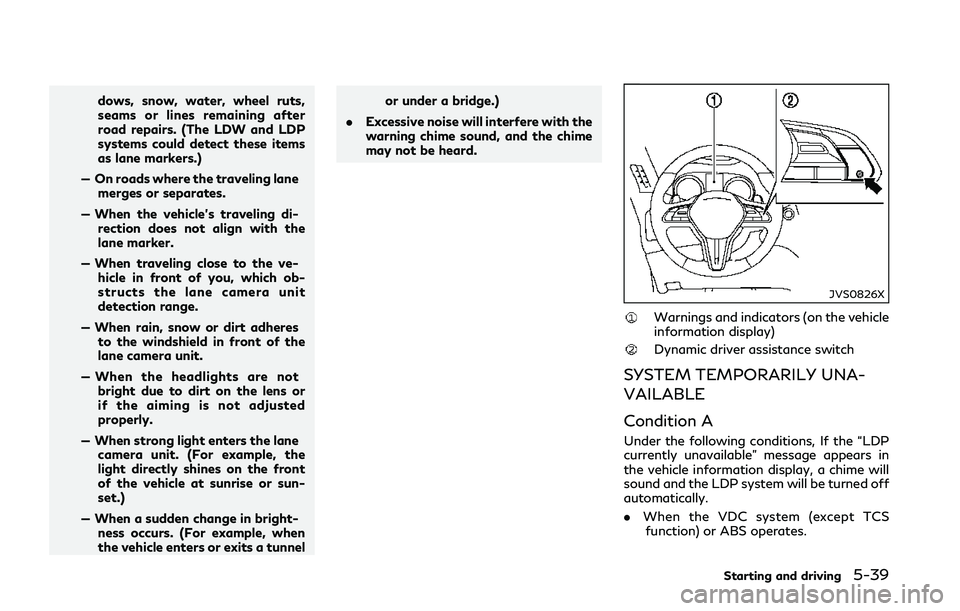
JVS0826X
Warnings and indicators (on the vehicle
information display)
Dynamic driver assistance switch
SYSTEM TEMPORARILY UNA-
VAILABLE
Condition A
Under the following conditions, If the “LDP
currently unavailable” message appears in
the vehicle information display, a chime will
sound and the LDP system will be turned off
automatically.
.When the VDC system (except TCS
function) or ABS operates.
Starting and driving5-39
Page 226 of 458
BSW SYSTEM OPERATION
The BSW system operates above approxi-
mately 20 MPH (32 km/h).
If the radar sensors detect a vehicle in the
detection zone, the side indicator light
illuminates.
If the turn signal is then activated, the
system chimes (twice) and the side indicator
light flashes. The side indicator light con-
tinues to flash until the detected vehicle
leaves the detection zone.
NOTE:
.The side indicator lights illuminate for a
few seconds when the ignition switch is
placed in the ON position.
. The brightness of the side indicator
lights is adjusted automatically depend-
ing on the brightness of the ambient
light.
. If a vehicle comes into the detection zone
after the driver activates the turn
signal, then only the side indicator light
flashes and no chime sounds. (See “BSW
driving situations” (P.5-44).)
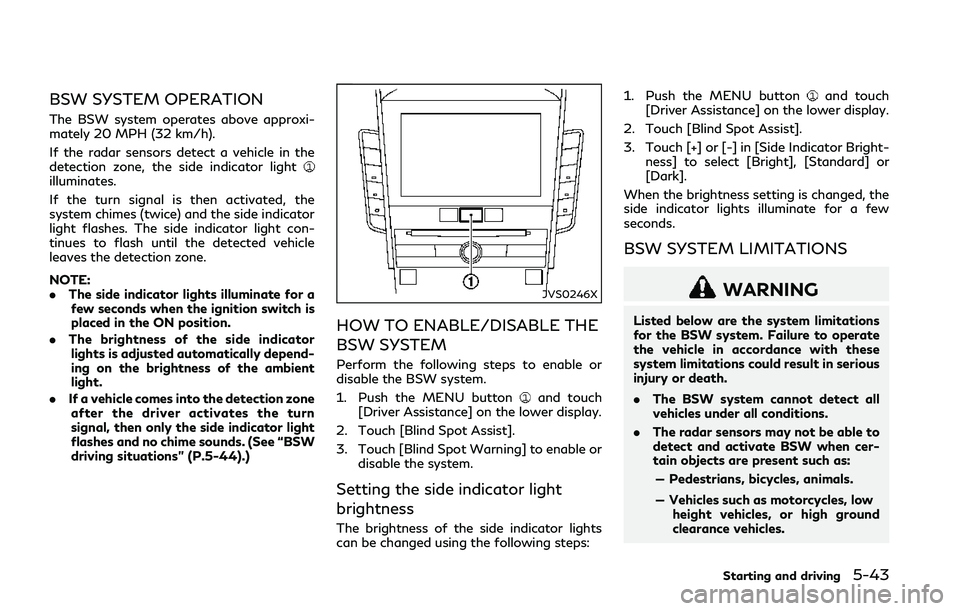
JVS0246X
HOW TO ENABLE/DISABLE THE
BSW SYSTEM
Perform the following steps to enable or
disable the BSW system.
1. Push the MENU button
and touch
[Driver Assistance] on the lower display.
2. Touch [Blind Spot Assist].
3. Touch [Blind Spot Warning] to enable or disable the system.
Setting the side indicator light
brightness
The brightness of the side indicator lights
can be changed using the following steps: 1. Push the MENU button
and touch
[Driver Assistance] on the lower display.
2. Touch [Blind Spot Assist].
3. Touch [+] or [-] in [Side Indicator Bright- ness] to select [Bright], [Standard] or
[Dark].
When the brightness setting is changed, the
side indicator lights illuminate for a few
seconds.
BSW SYSTEM LIMITATIONS
WARNING
Listed below are the system limitations
for the BSW system. Failure to operate
the vehicle in accordance with these
system limitations could result in serious
injury or death.
. The BSW system cannot detect all
vehicles under all conditions.
. The radar sensors may not be able to
detect and activate BSW when cer-
tain objects are present such as:
— Pedestrians, bicycles, animals.
— Vehicles such as motorcycles, low height vehicles, or high ground
clearance vehicles.
Starting and driving5-43
Page 236 of 458
![INFINITI Q50 2018 Owners Guide JVS0246X
HOW TO ENABLE/DISABLE THE
BSI SYSTEM
Perform the following steps to enable or
disable the BSI system.
1. Push the MENU button
and touch
[Driver Assistance] on the lower display.
2. Touch [Bli](/img/42/41084/w960_41084-235.png "INFINITI Q50 2018 Owners Guide JVS0246X
HOW TO ENABLE/DISABLE THE
BSI SYSTEM
Perform the following steps to enable or
disable the BSI system.
1. Push the MENU button
and touch
[Driver Assistance] on the lower display.
2. Touch [Bli")
JVS0246X
HOW TO ENABLE/DISABLE THE
BSI SYSTEM
Perform the following steps to enable or
disable the BSI system.
1. Push the MENU button
and touch
[Driver Assistance] on the lower display.
2. Touch [Blind Spot Assist].
3. Touch [Blind Spot Intervention] to en- able or disable the system.
Setting the side indicator light
brightness
The brightness of the side indicator lights
can be changed using the following steps:
1. Push the MENU button
and touch
[Driver Assistance] on the lower display.
2. Touch [Blind Spot Assist].
3. Touch [+] or [-] in [Side Indicator Bright- ness] to select [Bright], [Standard] or
[Dark].
When the brightness setting is changed, the
side indicator lights illuminate for a few
seconds.
BSI SYSTEM LIMITATIONS
WARNING
Listed below are the system limitations
for the BSI system. Failure to operate
the vehicle in accordance with these
system limitations could result in serious
injury or death.
. The BSI system cannot detect all
vehicles under all conditions.
. The radar sensors may not be able to
detect and activate BSI when certain
objects are present such as: — Pedestrians, bicycles, animals.
— Vehicles such as motorcycles, low
height vehicles, or high ground
clearance vehicles.
— Vehicles remaining in the detec- tion zone when you accelerate
from a stop.
— Oncoming vehicles.
— A vehicle merging into an adja- cent lane at a speed approxi-
mately the same as your vehicle.
— A vehicle approaching rapidly from behind.
— A vehicle which your vehicle over- takes rapidly.
— A vehicle that passes through the detection zone quickly.
. The radar sensor’s detection zone is
designed based on a standard lane
width. When driving in a wider lane,
the radar sensors may not detect
vehicles in an adjacent lane. When
driving in a narrow lane, the radar
sensors may detect vehicles driving
two lanes away.
. The radar sensors are designed to
ignore most stationary objects, how-
ever objects such as guardrails, walls,
Starting and driving5-53
Page 237 of 458
5-54Starting and driving
foliage and parked vehicles may oc-
casionally be detected. This is a
normal operation condition.
. The camera may not detect lane
markers in the following situations
and the BSI system may not operate
properly.
— On roads where there are multi- ple parallel lane markers; lane
markers that are faded or not
painted clearly; yellow painted
lane markers; nonstandard lane
markers; lane markers covered
with water, dirt, snow, etc.
— On roads where discontinued lane markers are still detectable.
— On roads where there are sharp curves.
— On roads where there are sharply contrasting objects, such as sha-
dows, snow, water, wheel ruts,
seams or lines remaining after
road repairs.
— On roads where the traveling lane merges or separates.
— When the vehicle’s traveling di- rection does not align with the
lane markers. — When traveling close to the ve-
hicle in front of you, which ob-
structs the lane camera unit
detection range.
— When rain, snow or dirt adheres to the windshield in front of a lane
camera unit.
— When the headlights are not bright due to dirt on the lens or
if aiming is not adjusted properly.
— When strong light enters a lane camera unit. (For example: light
directly shines on the front of the
vehicle at sunrise or sunset.)
— When a sudden change in bright- ness occurs. (For example: when
the vehicle enters or exits a tunnel
or under a bridge.)
. Do not use the BSI system under the
following conditions because the sys-
tem may not function properly.
— During bad weather. (For exam- ple: rain, fog, snow, etc.)
— When driving on slippery roads, such as on ice or snow, etc.
— When driving on winding or un- even roads. — When there is a lane closure due
to road repairs.
— When driving in a makeshift or temporary lane.
— When driving on roads where the lane width is too narrow.
— When driving with a tire that is not within normal tire conditions
(for example, tire wear, low tire
pressure, installation of spare tire,
tire chains, non-standard wheels).
— When the vehicle is equipped with non-original steering parts or sus-
pension parts.
. Excessive noise (for example, audio
system volume, open vehicle window)
will interfere with the chime sound,
and it may not be heard.
Page 263 of 458
5-80Starting and driving
A warning chime will sound and the “cur-
rently unavailable” warning message ap-
pears in the vehicle information display.
.When the INFINITI Drive Mode Selector
is turned to the SNOW mode (To use the
ICC system, turn the INFINITI Drive
Mode Selector to a mode other than
the SNOW mode, push the MAIN switch
to turn off the ICC and reset the ICC
switch by pressing the MAIN switch
again.)
For details about the INFINITI Drive
Mode Selector, see “INFINITI Drive
Mode Selector” (P.5-22).
. When the VDC system is off (To use the
ICC system, turn on the VDC system.
Push the MAIN switch to turn off the
ICC system and reset the ICC switch by
pushing the MAIN switch again.)
For details about the VDC system, see
“Vehicle Dynamic Control (VDC) system”
(P.5-132).
. When ABS or VDC (including the traction
control system) is operating
. When a wheel is slipping (To use the ICC
system, make sure the wheels are no
longer slipping.)
JVS0210X
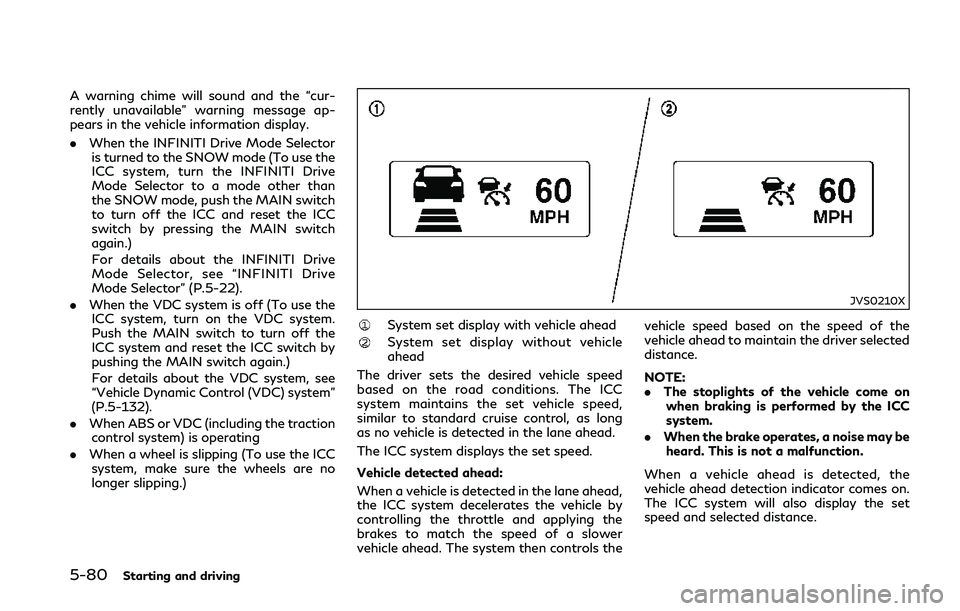
System set display with vehicle ahead
System set display without vehicle
ahead
The driver sets the desired vehicle speed
based on the road conditions. The ICC
system maintains the set vehicle speed,
similar to standard cruise control, as long
as no vehicle is detected in the lane ahead.
The ICC system displays the set speed.
Vehicle detected ahead:
When a vehicle is detected in the lane ahead,
the ICC system decelerates the vehicle by
controlling the throttle and applying the
brakes to match the speed of a slower
vehicle ahead. The system then controls the vehicle speed based on the speed of the
vehicle ahead to maintain the driver selected
distance.
NOTE:
.
The stoplights of the vehicle come on
when braking is performed by the ICC
system.
. When the brake operates, a noise may be
heard. This is not a malfunction.
When a vehicle ahead is detected, the
vehicle ahead detection indicator comes on.
The ICC system will also display the set
speed and selected distance.
Page 280 of 458

JVS0244X
System set display with a vehicle ahead
System set display without a vehicle
ahead
System set display with a vehicle ahead
(brake operation is necessary)
The DCA system helps assist the driver to
keep a following distance to the vehicle
ahead by braking and moving the accelera-
tor pedal upward in the normal driving
condition.
When a vehicle ahead is detected:
The vehicle ahead detection indicator ap-
pears. When the vehicle approaches a vehicle
ahead:
.
If the driver’s foot is not on the accel-
erator pedal, the system activates the
brakes to decelerate smoothly as neces-
sary. If the vehicle ahead comes to a
stop, the vehicle decelerates to a stand-
still within the limitations of the system.
. If the driver’s foot is on the accelerator
pedal, the system moves the accelerator
pedal upward to assist the driver to
release the accelerator pedal.
When brake operation by the driver is
required:
The system alerts the driver by a warning
chime and blinking the vehicle ahead detec- tion indicator. If the driver’s foot is on the
accelerator pedal after the warning, the
system moves the accelerator pedal upward
to assist the driver to switch to the brake
pedal.
NOTE:
.
The stop lights of the vehicle come on
when braking is performed by the DCA
system.
. When the brake operates, a noise may be
heard. This is not a malfunction.
Overriding the system:
The following driver’s operation overrides
the system operation.
. When the driver depresses the accelera-
tor pedal even further while the system is
moving the accelerator pedal upward,
the DCA system control of the accel-
erator pedal is canceled.
. When the driver’s foot is on the accel-
erator pedal, the brake control by the
system is not operated.
. When the driver’s foot is on the brake
pedal, neither the brake control nor the
alert by the system operates.
. When the Intelligent Cruise Control (ICC)
system is set, the DCA system will be
inactive.
Starting and driving5-97
Page 289 of 458

5-106Starting and driving
JVS0846X
FEB system warning light (on the
instrument panel)
Indicators and warnings (on the vehicle
information display)
Driver assist system forward indica-
tor
Vehicle ahead detection indicator
Lower display
FEB SYSTEM OPERATION
The FEB system operates at speeds above
approximately 3 MPH (5 km/h).
If a risk of a forward collision is detected, the
FEB system will provide the first warning to
the driver by flashing the driver assist system
forward indicator (orange)
and the vehicle
ahead detection indicator (orange), and
providing an audible warning. In addition,
the FEB system pushes the accelerator
pedal up. If the driver releases the accel-
erator pedal, then the system applies partial
braking.
If the driver applies the brakes quickly and
forcefully after the warning, and the FEB
system detects that there is still the possi-
bility of a forward collision, the system will
automatically increase the braking force.
If a forward collision is imminent and the
driver does not take action, the FEB system
issues the second visual (red) and audible
warning and automatically applies harder
braking.
NOTE:
The vehicle’s stop lights come on when
braking is performed by the FEB system.
Depending on vehicle speed and distance to
the vehicle ahead, as well as driving and
roadway conditions, the system may help
the driver avoid a forward collision or may