steering INFINITI Q50 2018 Owner's Guide
[x] Cancel search | Manufacturer: INFINITI, Model Year: 2018, Model line: Q50, Model: INFINITI Q50 2018Pages: 458, PDF Size: 2.13 MB
Page 193 of 458

5-10Starting and driving
damage. See “Wheels and tires” (P.8-32) of
this manual.
If a tire rapidly loses air pressure or “blows-
out” while driving maintain control of the
vehicle by following the procedure below.
Please note that this procedure is only a
general guide. The vehicle must be driven as
appropriate based on the conditions of the
vehicle, road and traffic.
WARNING
The following actions can increase the
chance of losing control of the vehicle if
there is a sudden loss of tire air pressure.
Losing control of the vehicle may cause a
collision and result in personal injury.
.The vehicle generally moves or pulls
in the direction of the flat tire.
. Do not rapidly apply the brakes.
. Do not rapidly release the accelerator
pedal.
. Do not rapidly turn the steering
wheel.
1. Remain calm and do not overreact.
2. Maintain a firm grip on the steering wheel with both hands and try to hold
a straight course. 3. When appropriate, slowly release the
accelerator pedal to gradually slow the
vehicle.
4. Gradually steer the vehicle to a safe location off the road and away from
traffic if possible.
5. Lightly apply the brake pedal to gradu- ally stop the vehicle.
6. Turn on the hazard warning flashers and either contact a roadside emergency
service to change the tire or see “Chan-
ging a flat tire” (P.6-4) of this Owner’s
Manual.
DRINKING ALCOHOL/DRUGS
AND DRIVING
WARNING
Never drive under the influence of alco-
hol or drugs. Alcohol in the bloodstream
reduces coordination, delays reaction
time and impairs judgement. Driving
after drinking alcohol increases the like-
lihood of being involved in an accident
injuring yourself and others. Addition-
ally, if you are injured in an accident,
alcohol can increase the severity of the
injury. INFINITI is committed to safe driving. How-
ever, you must choose not to drive under the
influence of alcohol. Every year thousands of
people are injured or killed in alcohol-related
accidents. Although the local laws vary on
what is considered to be legally intoxicated,
the fact is that alcohol affects all people
differently and most people underestimate
the effects of alcohol.
Remember, drinking and driving don’t mix!
And that is true for drugs, too (over-the-
counter, prescription, and illegal drugs).
Don’t drive if your ability to operate your
vehicle is impaired by alcohol, drugs, or some
other physical condition.
INTELLIGENT ALL-WHEEL
DRIVE (AWD) DRIVING SAFETY
PRECAUTIONS (AWD models)
WARNING
.
Do not drive beyond the performance
capability of the tires, even with
Intelligent AWD engaged. Accelerat-
ing quickly, sharp steering maneuvers
or sudden braking may cause loss of
control.
. Always use tires of the same type,
size, brand, construction (bias, bias-
Page 203 of 458
5-20Starting and driving
5. Push the shift lever buttonand move
the shift lever to N (Neutral) position
while holding down the shift lock.
If the lever cannot be moved out of P (Park),
have the automatic transmission system
checked as soon as possible. It is recom-
mended you visit an INFINITI retailer for this
service.
Adaptive Shift Control (ASC)
The adaptive shift control system automati-
cally operates when the transmission is in
the D (Drive) position and selects an appro-
priate gear depending on the road conditions
such as uphill, downhill or curving roads.
Control on uphill and curving roads:
A low gear is maintained that suits the
degree of the slope or curve to allow smooth
driving with a small number of shifts.
Control on downhill roads:
The adaptive shift control system shifts to a
low gear that suits the degree of the slope,
and uses the engine braking to reduce the
number of times that the brake must be
used.
Control on winding roads:
A low gear is maintained on continuous
curves that involve repeated acceleration
and deceleration, so that smooth accelera-
tion is available instantly when the accel- erator pedal is depressed.
NOTE:
.
Adaptive shift control may not operate
when the transmission oil temperature
is low immediately after the start of
driving or when it is very hot.
. During some driving situations, hard
braking for example, the adaptive shift
control may automatically operate. The
transmission may automatically shift to
a lower gear for engine braking. This
increases engine speed but not vehicle
speed. Vehicle speed is controlled by the
accelerator pedal when the vehicle is in
the Adaptive shift control mode.
. When the adaptive shift control oper-
ates, the transmission sometimes main-
tains a lower gear for a longer period of
time than when adaptive shift control is
not operating. Engine speed will be
higher for a specific vehicle speed while
ASC system is operating than when ASC
is not operating.
NAVI Shift Control (if so equipped)
NAVI Shift Control automatically adjusts the
Automatic Transmission (AT) gear position
in certain situations based on road informa-
tion from the navigation system.
When the navigation system detects that
the vehicle is approaching a curved road, NAVI Shift Control will adjust the gear
position if needed to help the driver run
through the curve smoothly.
Precaution on NAVI shift control:
.
The NAVI Shift Control does not provide
steering input or automated driving on a
curve. It is not a speed limit support
system and will not modify your speed
according to local speed limits.
. The NAVI Shift Control is a convenient
system intended to help the vehicle move
through a curve smoothly. However, the
driver must always drive safely and use
the brake pedal if needed.
. The NAVI Shift Control may be delayed
or not operate properly in the following
situations, because this function uses the
road information provided by the navi-
gation system.
— When the navigation system cannot accurately detect the location of the
vehicle.
— When the vehicle is driving on a road- way that is not recognized by the
navigation system.
— When the actual roadway differs from the map information on the naviga-
tion system due to road construction,
traffic lane obstructions, etc.
Page 206 of 458
SPORT+ MODE (if so equipped)
In addition to the characteristics of the
SPORT mode, this mode heightens steering
response and changes the setting of VDC
(Vehicle Dynamic Control) for a more sporty
driving experience.
NOTE:
.VDC operation is reduced when the
INFINITI Drive Mode Selector is used
to select the SPORT+ mode (if so
equipped). The VDC system may not
operate in the same circumstances when
compared to operation in the standard
mode. To help prevent accidents drive
carefully, avoid careless or dangerous
driving techniques and be especially
careful when driving and cornering on
slippery surfaces.
. In the SPORT+ mode, fuel economy may
be reduced.
SPORT MODE
. Adjusts the engine and transmission
points for a higher response.
. The setting of the steering system is
adjusted to provide a quick steering
response and a heavy steering effort.
. The setting of the suspension system is
adjusted to increase the damping force.
(if so equipped) NOTE:
In the SPORT mode, fuel economy may be
reduced.
SNOW MODE
Changes the engine characteristics to aid
driving on slippery roads.
ECO MODE (if so equipped)
Assists the driver’s eco-driving. The engine
and transmission points are adjusted for
improved fuel economy, providing such a
driving features as smooth starting or con-
stant cruising.
NOTE:
Selecting the ECO mode will not necessarily
improve fuel economy as many driving
factors influence its effectiveness.
Operation
Select the ECO mode using the INFINITI
Drive Mode Selector. The ECO drive indica-
tor light on the instrument panel illuminates.
When the accelerator pedal is depressed
within the range of economy drive, the ECO
drive indicator light illuminates in green.
When the accelerator pedal is depressed
above the range of economy drive, the ECO
drive indicator light turns off. For ECO pedal
system equipped models, see “ECO pedal
system” (P.5-23). The ECO drive indicator light will not
illuminate in the following cases:
.
When the shift lever is in the R (Reverse)
position.
. When the vehicle speed is below 2 MPH
(3.2 km/h) or over 90 MPH (144 km/h).
. When the cruise control (if so equipped)
or the Intelligent Cruise Control (ICC)
system (if so equipped) is operated.
ECO pedal system (if so equipped)
The ECO pedal system helps assist the driver
to improve fuel economy by increasing the
reaction force of the accelerator pedal.
When the ECO drive indicator light is
blinking or remains off, the ECO pedal
system increases the reaction force of the
accelerator pedal.
Starting and driving5-23
Page 208 of 458
PERSONAL MODE
When the PERSONAL mode is selected, the
following functions can be adjusted indivi-
dually.
.Engine/Transmission
. Steering
. Suspension (if so equipped)
. Active Trace Control
JVS0246X
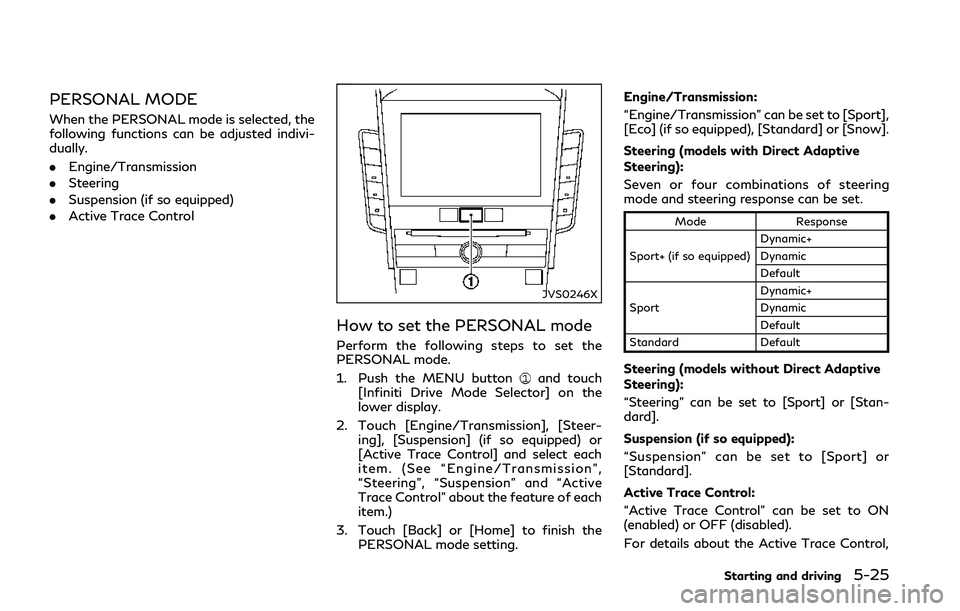
How to set the PERSONAL mode
Perform the following steps to set the
PERSONAL mode.
1. Push the MENU button
and touch
[Infiniti Drive Mode Selector] on the
lower display.
2. Touch [Engine/Transmission], [Steer- ing], [Suspension] (if so equipped) or
[Active Trace Control] and select each
item. (See “Engine/Transmission”,
“Steering”, “Suspension” and “Active
Trace Control” about the feature of each
item.)
3. Touch [Back] or [Home] to finish the PERSONAL mode setting. Engine/Transmission:
“Engine/Transmission” can be set to [Sport],
[Eco] (if so equipped), [Standard] or [Snow].
Steering (models with Direct Adaptive
Steering):
Seven or four combinations of steering
mode and steering response can be set.
Mode
Response
Sport+ (if so equipped) Dynamic+
Dynamic
Default
Sport Dynamic+
Dynamic
Default
Standard Default
Steering (models without Direct Adaptive
Steering):
“Steering” can be set to [Sport] or [Stan-
dard].
Suspension (if so equipped):
“Suspension” can be set to [Sport] or
[Standard].
Active Trace Control:
“Active Trace Control” can be set to ON
(enabled) or OFF (disabled).
For details about the Active Trace Control,
Starting and driving5-25
Page 209 of 458
![INFINITI Q50 2018 Owners Guide 5-26Starting and driving
see “Active trace control” (P.5-134).
Reset Settings:
Touch [Reset Settings] and touch [OK] to
restore all the PERSONAL mode settings to
default.
WARNING
Failure to follow](/img/42/41084/w960_41084-208.png "INFINITI Q50 2018 Owners Guide 5-26Starting and driving
see “Active trace control” (P.5-134).
Reset Settings:
Touch [Reset Settings] and touch [OK] to
restore all the PERSONAL mode settings to
default.
WARNING
Failure to follow")
5-26Starting and driving
see “Active trace control” (P.5-134).
Reset Settings:
Touch [Reset Settings] and touch [OK] to
restore all the PERSONAL mode settings to
default.
WARNING
Failure to follow the warnings and
instructions for proper use of Active
Lane Control could result in serious
injury or death.
.Active Lane Control will not always
steer the vehicle to keep it in the lane.
It is not designed to prevent loss of
control. It is the driver’s responsibility
to stay alert, drive safely, keep the
vehicle in the traveling lane, and be in
control of vehicle at all times.
Active Lane Control enables the driver to
make fewer steering corrections on free-
ways.
ACTIVE LANE CONTROL (if so equipped)
Page 211 of 458
5-28Starting and driving
JVS0251X
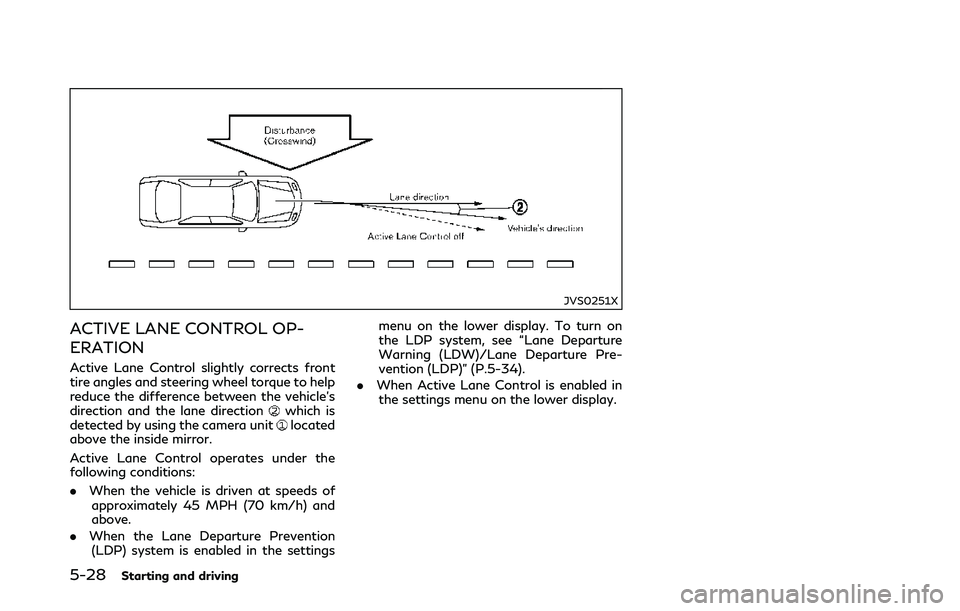
ACTIVE LANE CONTROL OP-
ERATION
Active Lane Control slightly corrects front
tire angles and steering wheel torque to help
reduce the difference between the vehicle’s
direction and the lane direction
which is
detected by using the camera unitlocated
above the inside mirror.
Active Lane Control operates under the
following conditions:
. When the vehicle is driven at speeds of
approximately 45 MPH (70 km/h) and
above.
. When the Lane Departure Prevention
(LDP) system is enabled in the settings menu on the lower display. To turn on
the LDP system, see “Lane Departure
Warning (LDW)/Lane Departure Pre-
vention (LDP)” (P.5-34).
. When Active Lane Control is enabled in
the settings menu on the lower display.
Page 212 of 458
JVS0822X
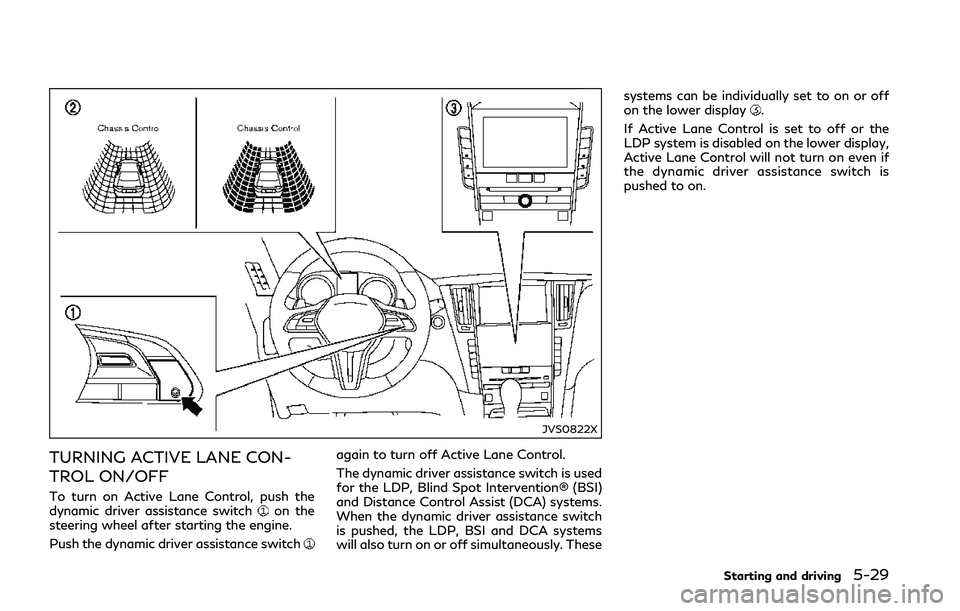
TURNING ACTIVE LANE CON-
TROL ON/OFF
To turn on Active Lane Control, push the
dynamic driver assistance switchon the
steering wheel after starting the engine.
Push the dynamic driver assistance switch
again to turn off Active Lane Control.
The dynamic driver assistance switch is used
for the LDP, Blind Spot Intervention® (BSI)
and Distance Control Assist (DCA) systems.
When the dynamic driver assistance switch
is pushed, the LDP, BSI and DCA systems
will also turn on or off simultaneously. These systems can be individually set to on or off
on the lower display
.
If Active Lane Control is set to off or the
LDP system is disabled on the lower display,
Active Lane Control will not turn on even if
the dynamic driver assistance switch is
pushed to on.
Starting and driving5-29
Page 214 of 458
![INFINITI Q50 2018 Owners Guide “How to enable/disable the LDP system”
(P.5-38).
Active Lane Control settings
Perform the following steps to set Active
Lane Control.
1. Push the MENU button
and touch
[Driver Assistance] on the l](/img/42/41084/w960_41084-213.png "INFINITI Q50 2018 Owners Guide “How to enable/disable the LDP system”
(P.5-38).
Active Lane Control settings
Perform the following steps to set Active
Lane Control.
1. Push the MENU button
and touch
[Driver Assistance] on the l")
“How to enable/disable the LDP system”
(P.5-38).
Active Lane Control settings
Perform the following steps to set Active
Lane Control.
1. Push the MENU button
and touch
[Driver Assistance] on the lower display.
2. Touch [Lane Assist].
3. Enable [Active Lane Control].
4. Touch [Active Lane Control setting] and select [Low] or [High] to change the
setting of Active Lane Control.
ACTIVE LANE CONTROL LIM-
ITATIONS
WARNING
Listed below are the limitations for
Active Lane Control. Failure to operate
the vehicle in accordance with these
limitations could result in serious injury
or death.
.Active Lane Control is primarily in-
tended for use on well-developed
freeways or highways. It may not
detect the lane markers for certain
roads, weather or driving conditions. .
Using Active Lane Control under
some conditions of road, lane marker
or weather, or if you attempt to
change lanes without using the lane
change signal could lead to an un-
expected system operation. In such
conditions, you need to correct the
vehicle’s direction with your steering
operation to avoid accidents.
. Active Lane Control will not operate
at speeds below approximately 45
MPH (70 km/h) or if it cannot detect
lane markers.
. Active Lane Control may not operate
properly and should not be used
under the following conditions:
— During bad weather (rain, fog, snow, etc.).
— When driving on slippery roads, such as on ice or snow, etc.
— When driving on winding or un- even roads.
— When there is a lane closure due to road repairs.
— When driving in a makeshift lane.
— When driving on roads where the lane width is too narrow.
— When driving with a tire that is not within normal tire conditions (for example, tire wear, low tire
pressure, installation of spare tire,
tire chains, non-standard wheels).
— When the vehicle is equipped with non-original steering parts or sus-
pension parts.
. Active Lane Control may or may not
operate properly under the following
conditions:
— On roads where there are multi- ple parallel lane markers; lane
markers that are faded or not
painted clearly; yellow painted
lane markers; non-standard lane
markers; or lane markers covered
with water, dirt, snow, etc.
— On roads where discontinued lane markers are still detectable.
— On roads where there are sharp curves.
— On roads where there are sharply contrasting objects, such as sha-
dows, snow, water, wheel ruts,
seams or lines remaining after
road repairs. (Active Lane Control
could detect these items as lane
markers.)
— On roads where the traveling lane merges or separates.
Starting and driving5-31
Page 217 of 458
5-34Starting and driving
WARNING
Failure to follow the warnings and
instructions for proper use of the LDW
and LDP systems could result in serious
personal injury or death.
.The LDW and LDP systems will not
prevent loss of control. It is the
driver’s responsibility to stay alert,
drive safely, keep the vehicle in the
traveling lane, and be in control of
the vehicle at all times.
. The LDP system may activate if you
change lanes without first activating
your turn signal or, for example, if a
construction zone directs traffic to
cross an existing lane marker. If this
occurs, you may need to apply cor-
rective steering to complete your lane
change.
. Because the LDP system may not
activate under the road, weather,
and lane marker conditions described
in this section, it may not activate
every time your vehicle begins to
leave its lane and you will need to
apply corrective steering. .
Lane Departure Warning (LDW) system
— warns the driver with an indicator in the vehicle information display and
chime that the vehicle is beginning to
leave the driving lane.
. Lane Departure Prevention (LDP) system
— warns the driver with an indicator in the vehicle information display and
chime, and helps the driver to return
the vehicle to the center of the
traveling lane.
JVS1124X
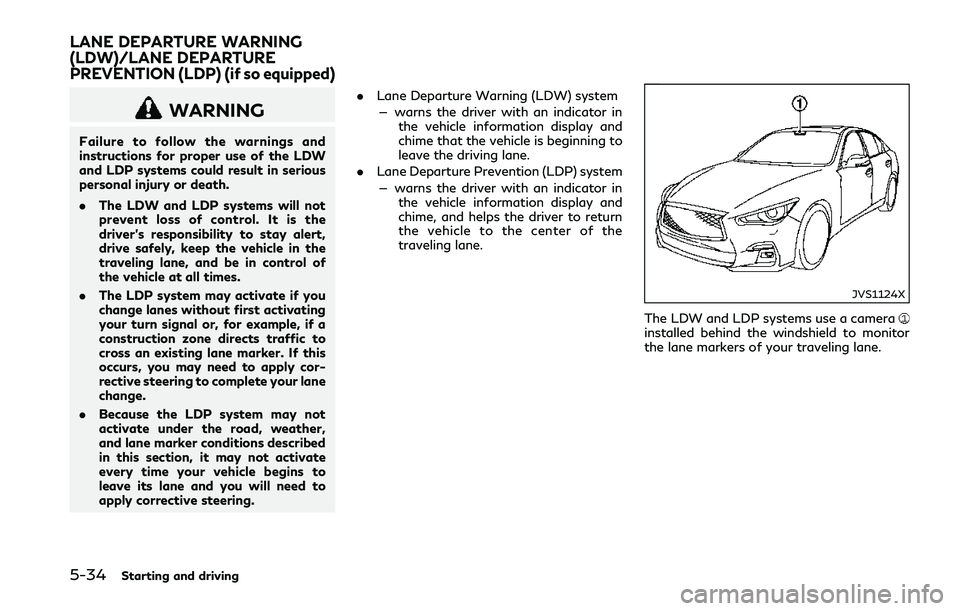
The LDW and LDP systems use a camerainstalled behind the windshield to monitor
the lane markers of your traveling lane.
LANE DEPARTURE WARNING
(LDW)/LANE DEPARTURE
PREVENTION (LDP) (if so equipped)
Page 219 of 458
![INFINITI Q50 2018 Owners Guide 5-36Starting and driving
JVS0246X
HOW TO ENABLE/DISABLE THE
LDW SYSTEM
Perform the following steps to enable or
disable the LDW system.
1. Push the MENU button
and touch
[Driver Assistance] on the low](/img/42/41084/w960_41084-218.png "INFINITI Q50 2018 Owners Guide 5-36Starting and driving
JVS0246X
HOW TO ENABLE/DISABLE THE
LDW SYSTEM
Perform the following steps to enable or
disable the LDW system.
1. Push the MENU button
and touch
[Driver Assistance] on the low")
5-36Starting and driving
JVS0246X
HOW TO ENABLE/DISABLE THE
LDW SYSTEM
Perform the following steps to enable or
disable the LDW system.
1. Push the MENU button
and touch
[Driver Assistance] on the lower display.
2. Touch [Lane Assist].
3. Touch [Lane Departure Warning] to enable or disable the system.
LDP SYSTEM OPERATION
The LDP system operates above approxi-
mately 45 MPH (70 km/h) and when the
lane markings are clear.
If the vehicle approaches either the left or
right side of the traveling lane, the driver
assist system lane indicator (orange) in the
vehicle information display will blink and a
warning chime will sound. Then, the LDP
system will automatically assist the driver to
return the vehicle to the center of the
traveling lane.
NOTE:
.The LDP system is not designed to work
when you operate the lane change signal
and change traveling lanes in the direc-
tion of the signal. (The LDP system will
become operable again approximately 2
seconds after the lane change signal is
turned off.)
. The LDP will not operate or will stop
operating and only a warning chime will
sound under the following conditions.
— When the steering wheel is turned as
far as necessary for the vehicle to
change lanes.
— When the accelerator pedal is de-
pressed.
— When the Intelligent Cruise Control
(ICC), Distance Control Assist (DCA), Blind Spot Intervention (BSI), Blind
Spot Warning (BSW), Predictive For-
ward Collision Warning (PFCW) or
Forward Emergency Braking (FEB)
approach warning occurs.
— When the BSI system activates.
— When the hazard warning flashers
are operated.
— When driving on a curve at a high
speed.
— When the brake pedal is depressed.
(models without Direct Adaptive
Steering)
. While the LDP system is operating, you
may hear a sound of brake operation.
This is normal and indicates that the
LDP system is operating properly.
(models without Direct Adaptive Steer-
ing)