warning light INFINITI Q50 2018 Manual PDF
[x] Cancel search | Manufacturer: INFINITI, Model Year: 2018, Model line: Q50, Model: INFINITI Q50 2018Pages: 458, PDF Size: 2.13 MB
Page 256 of 458
To reset at a faster cruising speed,use one
of the following methods:
. Depress the accelerator pedal. When the
vehicle attains the desired speed, push
and release the SET/COAST (-) switch.
. Push and hold the RESUME/ACCELER-
ATE (+) switch. When the vehicle attains
the speed you desire, release the switch.
. Push, then quickly release the RESUME/
ACCELERATE (+) switch. Each time you
do this, the set speed will increase by
about 1 MPH (1.6 km/h).
To reset at a slower cruising speed, use one
of the following methods:
. Lightly tap the brake pedal. When the
vehicle attains the desired speed, push
the SET/COAST (-) switch and release it.
. Push and hold the SET/COAST (-)
switch. Release the switch when the
vehicle slows down to the desired speed.
. Push, then quickly release the SET/
COAST (-) switch. Each time you do this,
the set speed will decrease by about 1
MPH (1.6 km/h).
To resume the preset speed, push and
release the RESUME/ACCELERATE (+)
switch. The vehicle will resume the last set
cruising speed when the vehicle speed is over
25 MPH (40 km/h).
WARNING
Failure to follow the warnings and
instructions for proper use of the ICC
system could result in serious injury or
death.
. ICC is not a collision avoidance or
warning device. For highway use only
and it is not intended for congested
areas or city driving. Failure to apply
the brakes could result in an accident.
. Always observe posted speed limits
and do not set the speed over them.
. Always drive carefully and atten-
tively when using either cruise con-
trol mode. Read and understand the
Owner’s Manual thoroughly before
using the cruise control. To avoid
serious injury or death, do not rely
on the system to prevent accidents or
to control the vehicle’s speed in
emergency situations. Do not use
cruise control except in appropriate
road and traffic conditions.
. In the conventional (fixed speed)
cruise control mode, a warning chime
will not sound to warn you if you are
too close to the vehicle ahead. Pay
special attention to the distance
between your vehicle and the vehicle ahead of you or a collision could
occur.
The ICC system maintains a selected dis-
tance from the vehicle in front of you within
the speed range of 0 to 90 MPH (0 to 144
km/h) up to the set speed. The set speed can
be selected by the driver between 20 to 90
MPH (32 to 144 km/h).
The vehicle travels at a set speed when the
road ahead is clear.
The ICC system can be set to one of two
cruise control modes.
. Vehicle-to-vehicle distance control
mode:
For maintaining a selected distance
between your vehicle and the vehicle in
front of you up to the preset speed.
. Conventional (fixed speed) cruise control
mode:
For cruising at a preset speed.
Starting and driving5-73
INTELLIGENT CRUISE CONTROL
(ICC) (if so equipped)
Page 263 of 458
5-80Starting and driving
A warning chime will sound and the “cur-
rently unavailable” warning message ap-
pears in the vehicle information display.
.When the INFINITI Drive Mode Selector
is turned to the SNOW mode (To use the
ICC system, turn the INFINITI Drive
Mode Selector to a mode other than
the SNOW mode, push the MAIN switch
to turn off the ICC and reset the ICC
switch by pressing the MAIN switch
again.)
For details about the INFINITI Drive
Mode Selector, see “INFINITI Drive
Mode Selector” (P.5-22).
. When the VDC system is off (To use the
ICC system, turn on the VDC system.
Push the MAIN switch to turn off the
ICC system and reset the ICC switch by
pushing the MAIN switch again.)
For details about the VDC system, see
“Vehicle Dynamic Control (VDC) system”
(P.5-132).
. When ABS or VDC (including the traction
control system) is operating
. When a wheel is slipping (To use the ICC
system, make sure the wheels are no
longer slipping.)
JVS0210X
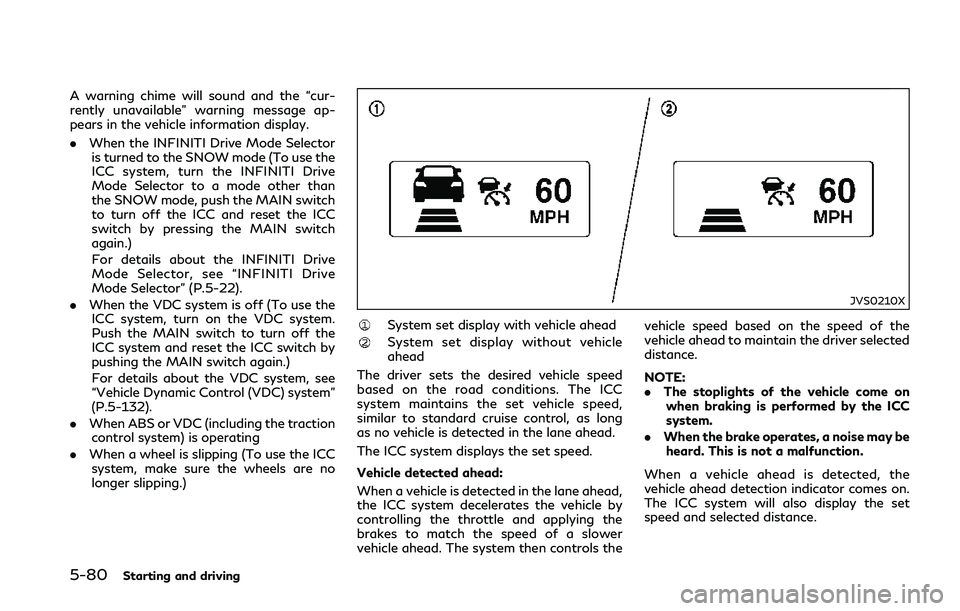
System set display with vehicle ahead
System set display without vehicle
ahead
The driver sets the desired vehicle speed
based on the road conditions. The ICC
system maintains the set vehicle speed,
similar to standard cruise control, as long
as no vehicle is detected in the lane ahead.
The ICC system displays the set speed.
Vehicle detected ahead:
When a vehicle is detected in the lane ahead,
the ICC system decelerates the vehicle by
controlling the throttle and applying the
brakes to match the speed of a slower
vehicle ahead. The system then controls the vehicle speed based on the speed of the
vehicle ahead to maintain the driver selected
distance.
NOTE:
.
The stoplights of the vehicle come on
when braking is performed by the ICC
system.
. When the brake operates, a noise may be
heard. This is not a malfunction.
When a vehicle ahead is detected, the
vehicle ahead detection indicator comes on.
The ICC system will also display the set
speed and selected distance.
Page 267 of 458
5-84Starting and driving
roads or when entering or exiting a curve. In
these cases you will have to manually
control the proper distance ahead of your
vehicle.
Also, the sensor sensitivity can be affected
by vehicle operation (steering maneuver or
driving position in the lane) or traffic or
vehicle condition (for example, if a vehicle is
being driven with some damage).
Automatic cancellation
A chime sounds under the following condi-
tions and the control is automatically can-
celed.
.When the vehicle ahead is not detected
and your vehicle is traveling below the
speed of 15 MPH (24 km/h)
. When the system judges the vehicle is at
standstill
. When the shift lever is not in the D
position or Manual mode
. When the parking brake is applied
. When the INFINITI Drive Mode Selector
is turned to the SNOW mode
. When the VDC system is turned off
. When ABS or VDC (including the traction
control system) operates
. When distance measurement becomes
impaired due to adhesion of dirt or
obstruction to the sensor .
When a wheel slips
. When the radar signal is temporarily
interrupted
Vehicle-to-vehicle distance control
mode limitations
WARNING
Listed below are the system limitations
for the ICC system. Failure to operate
the vehicle in accordance with these
system limitations could result in serious
injury or death.
. The system is primarily intended for
use on straight, dry, open roads with
light traffic. It is not advisable to use
the system in city traffic or con-
gested areas.
. This system will not adapt automati-
cally to road conditions. This system
should be used in evenly flowing
traffic. Do not use the system on
roads with sharp curves, or on icy
roads, in heavy rain or in fog.
. As there is a performance limit to the
distance control function, never rely
solely on the ICC system. This system
does not correct careless, inattentive
or absent-minded driving, or over- come poor visibility in rain, fog, or
other bad weather. Decelerate the
vehicle speed by depressing the brake
pedal, depending on the distance to
the vehicle ahead and the surround-
ing circumstances in order to main-
tain a safe distance between vehicles.
. If the vehicle ahead comes to a stop,
the vehicle decelerates to a standstill
within the limitations of the system.
The system will cancel once it judges
that the vehicle has come to a
standstill and sound a warning chime.
To prevent the vehicle from moving,
the driver must depress the brake
pedal.
. Always pay attention to the opera-
tion of the vehicle and be ready to
manually control the proper follow-
ing distance. The vehicle-to-vehicle
distance control mode of the ICC
system may not be able to maintain
the selected distance between vehi-
cles (following distance) or selected
vehicle speed under some circum-
stances.
. The system may not detect the
vehicle in front of you in certain road
or weather conditions. To avoid ac-
cidents, never use the ICC system
under the following conditions:
Page 280 of 458

JVS0244X
System set display with a vehicle ahead
System set display without a vehicle
ahead
System set display with a vehicle ahead
(brake operation is necessary)
The DCA system helps assist the driver to
keep a following distance to the vehicle
ahead by braking and moving the accelera-
tor pedal upward in the normal driving
condition.
When a vehicle ahead is detected:
The vehicle ahead detection indicator ap-
pears. When the vehicle approaches a vehicle
ahead:
.
If the driver’s foot is not on the accel-
erator pedal, the system activates the
brakes to decelerate smoothly as neces-
sary. If the vehicle ahead comes to a
stop, the vehicle decelerates to a stand-
still within the limitations of the system.
. If the driver’s foot is on the accelerator
pedal, the system moves the accelerator
pedal upward to assist the driver to
release the accelerator pedal.
When brake operation by the driver is
required:
The system alerts the driver by a warning
chime and blinking the vehicle ahead detec- tion indicator. If the driver’s foot is on the
accelerator pedal after the warning, the
system moves the accelerator pedal upward
to assist the driver to switch to the brake
pedal.
NOTE:
.
The stop lights of the vehicle come on
when braking is performed by the DCA
system.
. When the brake operates, a noise may be
heard. This is not a malfunction.
Overriding the system:
The following driver’s operation overrides
the system operation.
. When the driver depresses the accelera-
tor pedal even further while the system is
moving the accelerator pedal upward,
the DCA system control of the accel-
erator pedal is canceled.
. When the driver’s foot is on the accel-
erator pedal, the brake control by the
system is not operated.
. When the driver’s foot is on the brake
pedal, neither the brake control nor the
alert by the system operates.
. When the Intelligent Cruise Control (ICC)
system is set, the DCA system will be
inactive.
Starting and driving5-97
Page 289 of 458

5-106Starting and driving
JVS0846X
FEB system warning light (on the
instrument panel)
Indicators and warnings (on the vehicle
information display)
Driver assist system forward indica-
tor
Vehicle ahead detection indicator
Lower display
FEB SYSTEM OPERATION
The FEB system operates at speeds above
approximately 3 MPH (5 km/h).
If a risk of a forward collision is detected, the
FEB system will provide the first warning to
the driver by flashing the driver assist system
forward indicator (orange)
and the vehicle
ahead detection indicator (orange), and
providing an audible warning. In addition,
the FEB system pushes the accelerator
pedal up. If the driver releases the accel-
erator pedal, then the system applies partial
braking.
If the driver applies the brakes quickly and
forcefully after the warning, and the FEB
system detects that there is still the possi-
bility of a forward collision, the system will
automatically increase the braking force.
If a forward collision is imminent and the
driver does not take action, the FEB system
issues the second visual (red) and audible
warning and automatically applies harder
braking.
NOTE:
The vehicle’s stop lights come on when
braking is performed by the FEB system.
Depending on vehicle speed and distance to
the vehicle ahead, as well as driving and
roadway conditions, the system may help
the driver avoid a forward collision or may
Page 290 of 458

help mitigate the consequences of a collision
should one be unavoidable.
If the driver is handling the steering wheel,
accelerating or braking, the FEB system will
function later or will not function.
The automatic braking will cease under the
following conditions:
.When the steering wheel is turned as far
as necessary to avoid a collision.
. When the accelerator pedal is depressed.
. When there is no longer a vehicle de-
tected ahead.
If the FEB system has stopped the vehicle,
the vehicle will remain at a standstill for
approximately 2 seconds before the brakes
are released.
JVS0847X
FEB system warning light (on the
instrument panel)
Lower display
MENU button
Starting and driving5-107
Page 291 of 458
![INFINITI Q50 2018 Manual PDF 5-108Starting and driving
TURNING THE FEB SYSTEM ON/
OFF
Perform the following steps to turn the FEB
system on or off.
1. Push the MENU button
and touch
[Driver Assistance] on the lower display
.
2. T](/img/42/41084/w960_41084-290.png "INFINITI Q50 2018 Manual PDF 5-108Starting and driving
TURNING THE FEB SYSTEM ON/
OFF
Perform the following steps to turn the FEB
system on or off.
1. Push the MENU button
and touch
[Driver Assistance] on the lower display
.
2. T")
5-108Starting and driving
TURNING THE FEB SYSTEM ON/
OFF
Perform the following steps to turn the FEB
system on or off.
1. Push the MENU button
and touch
[Driver Assistance] on the lower display
.
2. Touch [Emergency Assist].
3. Touch [Forward emergency braking] to turn the system ON/OFF.
When the FEB system is turned off, the FEB
system warning light (orange)
illuminates.
The FEB system will be automatically turned
ON when the engine is restarted.
NOTE:
The PFCW system is integrated into the
FEB system. There is not a separate selec-
tion in the display for the PFCW system.
When the FEB is turned off, the PFCW
system is also turned off.
FEB SYSTEM LIMITATIONS
WARNING
Listed below are the system limitations
for the FEB system. Failure to operate
the vehicle in accordance with these
system limitations could result in serious
injury or death.
. The FEB system cannot detect all
vehicles under all conditions.
. The radar sensor does not detect the
following objects:
— Pedestrians, animals or obstacles in the roadway
— Oncoming vehicles
— Crossing vehicles
. The radar sensor has some perfor-
mance limitations. If a stationary
vehicle is in the vehicle’s path, the
FEB system will not function when
the vehicle is driven at speeds over
approximately 45 MPH (70 km/h).
. The radar sensor may not detect a
vehicle ahead in the following condi-
tions:
— Dirt, ice, snow or other material covering the radar sensor. — Interference by other radar
sources.
— Snow or road spray from travel- ing vehicles.
— If the vehicle ahead is narrow (e.g. motorcycle)
— When driving on a steep downhill slope or roads with sharp curves.
. In some road or traffic conditions, the
FEB system may unexpectedly push
the accelerator pedal up or apply
partial braking. When acceleration is
necessary, continue to depress the
accelerator pedal to override the
system.
. Braking distances increase on slip-
pery surfaces.
. The system is designed to automati-
cally check the sensor’s functionality,
within certain limitations. The system
may not detect some forms of ob-
struction of the sensor area such as
ice, snow, stickers, for example. In
these cases, the system may not be
able to warn the driver properly. Be
sure that you check, clean and clear
the sensor area regularly.
. Excessive noise will interfere with the
warning chime sound, and the chime
Page 293 of 458
5-110Starting and driving
JVS0848X
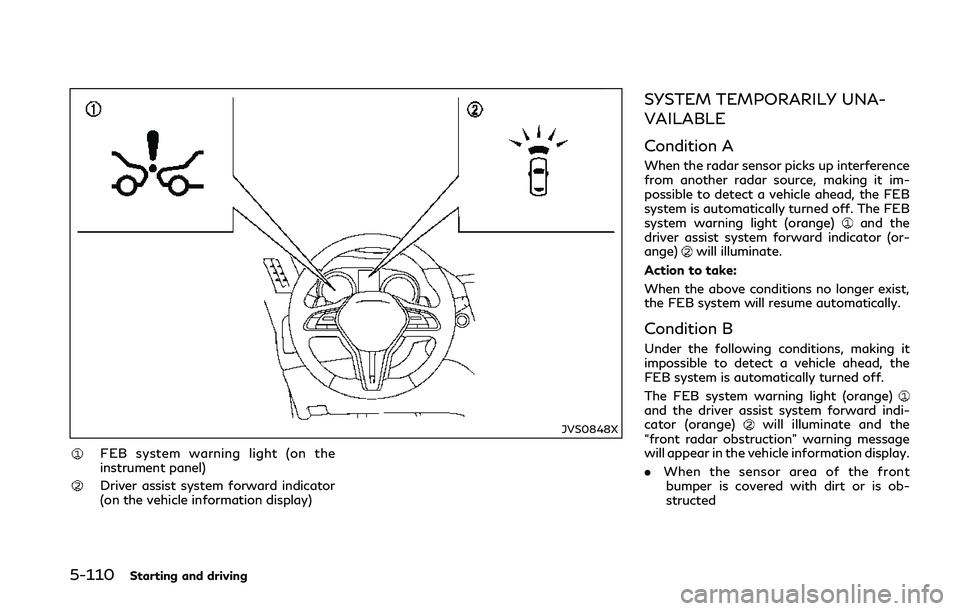
FEB system warning light (on the
instrument panel)
Driver assist system forward indicator
(on the vehicle information display)
SYSTEM TEMPORARILY UNA-
VAILABLE
Condition A
When the radar sensor picks up interference
from another radar source, making it im-
possible to detect a vehicle ahead, the FEB
system is automatically turned off. The FEB
system warning light (orange)
and the
driver assist system forward indicator (or-
ange)
will illuminate.
Action to take:
When the above conditions no longer exist,
the FEB system will resume automatically.
Condition B
Under the following conditions, making it
impossible to detect a vehicle ahead, the
FEB system is automatically turned off.
The FEB system warning light (orange)
and the driver assist system forward indi-
cator (orange)will illuminate and the
“front radar obstruction” warning message
will appear in the vehicle information display.
. When the sensor area of the front
bumper is covered with dirt or is ob-
structed
Page 294 of 458

Action to take:
If the FEB system warning light (orange)
comes on, stop the vehicle in a safe place,
place the shift lever in the P (Park) position
and turn the engine off. Clean the radar
cover on lower grille with a soft cloth, and
restart the engine. If the FEB system warn-
ing light continues to illuminate, have the
FEB system checked. It is recommended you
visit an INFINITI retailer for this service.
.When driving on roads with limited road
structures or buildings (for example, long
bridges, deserts, snow fields, driving next
to long walls)
Action to take:
When the above conditions no longer exist,
the FEB system will resume automatically.
Condition C
When the accelerator pedal actuator detects
that the internal motor temperature is high,
the FEB system is automatically turned off.
The FEB system warning light (orange)
and the driver assist system forward indi-
cator (orange)will illuminate and the
“Unavailable High Accelerator Temperature”
warning message will appear in the vehicle
information display. Action to take:
When the above conditions no longer exist,
the FEB system will resume automatically.
SYSTEM MALFUNCTION
If the FEB system malfunctions, it will be
turned off automatically, a chime will sound,
the FEB system warning light (orange)
and the driver assist system forward indi-
cator (orange)will illuminate and the
system “malfunction” warning message will
appear in the vehicle information display.
Action to take:
If the FEB system warning light (orange)
comes on, stop the vehicle in a safe location
and place the shift lever in the P (Park)
position. Turn the engine off and restart the
engine. If the warning light continues to
illuminate, have the FEB system checked. It
is recommended you visit an INFINITI re-
tailer for this service.
JVS1123X
SYSTEM MAINTENANCE
The sensoris located behind the lower
grille of the front bumper.
To keep the system operating properly, be
sure to observe the following:
. Always keep the sensor area of the front
bumper clean.
. Do not strike or damage the areas around
the sensor.
. Do not cover or attach stickers or similar
objects on the front bumper near the
sensor area. This could cause failure or
malfunction.
. Do not attach metallic objects near the
sensor area (brush guard, etc.). This
Starting and driving5-111
Page 296 of 458
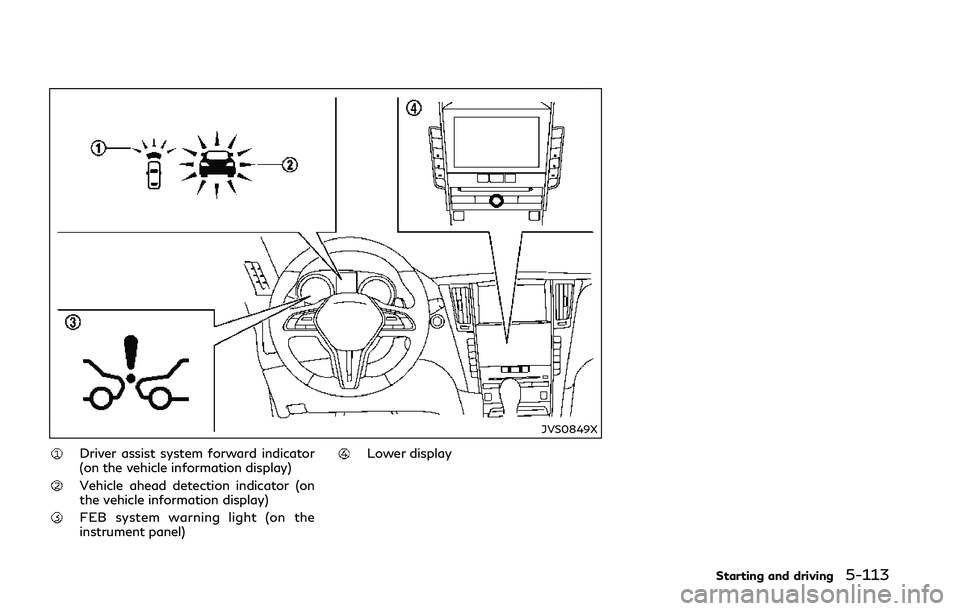
JVS0849X
Driver assist system forward indicator
(on the vehicle information display)
Vehicle ahead detection indicator (on
the vehicle information display)
FEB system warning light (on the
instrument panel)
Lower display
Starting and driving5-113