steering wheel INFINITI Q50 2020 Owner's Manual
[x] Cancel search | Manufacturer: INFINITI, Model Year: 2020, Model line: Q50, Model: INFINITI Q50 2020Pages: 468, PDF Size: 2.17 MB
Page 180 of 468

4-6Monitor, climate, audio, phone and voice recognition systems
SAA1923
Backing up near a projecting object
The predictive course linesdo not touch
the object in the display. However, the
vehicle may hit the object if it projects over
the actual backing up course.
SAA2244
Backing up behind a projecting
object
The positionis shown farther than the
positionin the display. However, the
positionis actually at the same distance
as the position. The vehicle may hit the
object when backing up to the positionif how to park with the object projects over
the actual backing up course.
HOW TO PARK WITH PREDIC-
TIVE COURSE LINES
WARNING
.
If the tires are replaced with different
sized tires, the predictive course lines
may not be displayed correctly.
. On a snow-covered or slippery road,
there may be a difference between
the predictive course lines and the
actual course line.
. The displayed lines will appear
slightly off to the right because the
rearview camera is not installed in the
rear center of the vehicle.
. If the battery is disconnected or
becomes discharged, the predictive
course lines may be displayed incor-
rectly. If this occurs, please perform
the following procedures:
— Turn the steering wheel from lock to lock while the engine is running.
— Drive the vehicle on a straight road for more than 5 minutes.
Page 181 of 468

SAA1897
1. Visually check that the parking space issafe before parking your vehicle.
2. The rear view of the vehicle is displayed on the screen
when the shift lever is
moved to the R (Reverse) position.
SAA1898
3. Slowly back up the vehicle adjusting the steering wheel so that the predictive
course lines
enter the parking space.
4. Maneuver the steering wheel to make the vehicle width guide lines
parallel to
the parking spacewhile referring to
the predictive course lines. 5. When the vehicle is parked in the space
completely, move the shift lever to the P
(Park) position and apply the parking
brake.
REARVIEW MONITOR SETTINGS
The RearView Monitor settings can be
changed using the following procedures.
1. Push the MENU button.
2. Touch [Settings] on the lower display.
3. Touch [Camera].
The displayed keys on the lower display may
vary depending on models, specifications
and software versions.
Monitor, climate, audio, phone and voice recognition systems4-7
Page 188 of 468

4-14Monitor, climate, audio, phone and voice recognition systems
Front and rear view:
Guiding lines that indicate the approximate
vehicle width and distances to objects with
reference to the vehicle body line
, are
displayed on the monitor.
Distance guide lines
-:
Indicate distances from the vehicle body.
. Red line
: approx. 1.5 ft (0.5 m)
. Yellow line
: approx. 3 ft (1 m)
. Green line
: approx. 7 ft (2 m)
. Green line
(front view only): approx. 10
ft (3 m)
Vehicle width guide lines
:
Indicate the approximate vehicle width.
Predictive course lines
:
Indicate the predictive course when operat-
ing the vehicle. The predictive course lines
will move depending on how much the
steering wheel is turned. The predictive
course lines in the rear view will not be
displayed while the steering wheel is in the
straight ahead position.
The front view will not be displayed when
the vehicle speed is above 6 MPH (10 km/h).
NOTE:
When the monitor displays the front view
and the steering wheel turns about 90
degrees or less from the straight ahead
position, both the right and left predictive course lines
are displayed. When the
steering wheel turns about 90 degrees or
more, a line is displayed only on the
opposite side of the turn.
WAE0231X
Bird’s-eye view:
The bird’s-eye view shows the overhead
view of the vehicle which helps confirm the
vehicle position and the predictive course to
a parking space.
The vehicle icon
shows the position of the
vehicle. Note that the distance between
objects viewed in the bird’s-eye view differs
from the actual distance.
The areas that the cameras cannot cover
are indicated in black.
After the ignition switch is placed in the ON
position, the unviewable area
is high-
lighted in yellow for a few seconds after the
bird’s-eye view is displayed.
Page 189 of 468

Predictive course lines (and) indicate the
predictive course when operating the vehi-
cle. The predictive course lines (
and) will
be displayed on the monitor when the
steering wheel is turned. The predictive
course lines (
and) will move depending
on how much the steering wheel is turned.
WARNING
. Objects in the bird’s-eye view will
appear farther than the actual dis-
tance.
. Tall objects, such as a curb or vehicle,
may be misaligned or not displayed at
the seam of the views.
. Objects that are above the camera
cannot be displayed.
. The view for the bird’s-eye view may
be misaligned when the camera posi-
tion alters.
. A line on the ground may be mis-
aligned and is not seen as being
straight at the seam of the views.
The misalignment will increase as the
line proceeds away from the vehicle.
. Tire angle display does not indicate
the actual tire angle.
JVH1141X
Front-side view:
Guiding lines:
Guiding lines that indicate the width and the
front end of the vehicle are displayed on the
monitor.
The front-of-vehicle line
shows the front
part of the vehicle.
The side-of-vehicle line
shows the vehicle
width including the outside mirror.
The extensions
of both the frontand
sidelines are shown with a green dotted
line.
CAUTION
The turn signal light may look like the
side-of-vehicle line. This is not a mal-
function.
Monitor, climate, audio, phone and voice recognition systems4-15
Page 192 of 468

4-18Monitor, climate, audio, phone and voice recognition systems
SAA2244
Backing up behind a projecting object:
The position
is shown farther than the
positionin the display. However, the
positionis actually at the same distance
as the position. The vehicle may hit the
object when backing up to the positionif
the object projects over the actual backing up course.
How to park with predictive course
lines
WARNING
.
If the tires are replaced with different
sized tires, the predictive course lines
may not be displayed correctly.
. On a snow-covered or slippery road,
there may be a difference between
the predictive course lines and the
actual course line.
. The displayed lines will appear
slightly off to the right because the
rearview camera is not installed in the
rear center of the vehicle.
. If the battery is disconnected or
becomes discharged, the predictive
course lines may be displayed incor-
rectly. If this occurs, please perform
the following procedures:
— Turn the steering wheel from lock to lock while the engine is running.
— Drive the vehicle on a straight road for more than 5 minutes.
SAA1897
1. Visually check that the parking space is
safe before parking your vehicle.
2. The rear view of the vehicle is displayed on the screen
when the shift lever is
moved to the R (Reverse) position.
Page 193 of 468
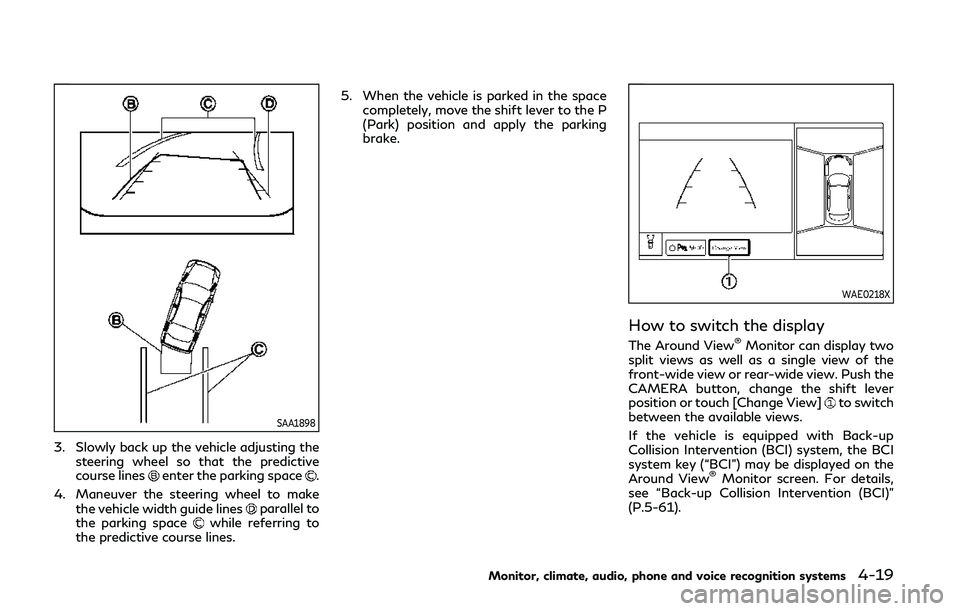
SAA1898
3. Slowly back up the vehicle adjusting thesteering wheel so that the predictive
course lines
enter the parking space.
4. Maneuver the steering wheel to make the vehicle width guide lines
parallel to
the parking spacewhile referring to
the predictive course lines. 5. When the vehicle is parked in the space
completely, move the shift lever to the P
(Park) position and apply the parking
brake.
WAE0218X
How to switch the display
The Around View®Monitor can display two
split views as well as a single view of the
front-wide view or rear-wide view. Push the
CAMERA button, change the shift lever
position or touch [Change View]
to switch
between the available views.
If the vehicle is equipped with Back-up
Collision Intervention (BCI) system, the BCI
system key (“BCI”) may be displayed on the
Around View
®Monitor screen. For details,
see “Back-up Collision Intervention (BCI)”
(P.5-61).
Monitor, climate, audio, phone and voice recognition systems4-19
Page 213 of 468

Air flow control:
Push the “
” manual air flow control
button to change the air flow mode.
: Air flows from the center and side
ventilators.
: Air flows from the center and sideventilators, and foot outlets.
: Air flows mainly from the foot outlets.
: Air flows from the defroster and footoutlets.
Temperature control:
Push the “
” temperature control increase
button or the “” temperature control
decrease button to set the desired tempera-
ture.
When the DUAL mode is on, you can
individually set temperatures for the driver’s
side and front passenger’s side.
Air intake control:
. Push the “
” air recirculation button to
recirculate interior air inside the vehicle.
The indicator light on the “
” air
recirculation button will illuminate.
. Push the “
” air recirculation button
twice to draw outside air into the
passenger compartment. The indicator
light on the “
” air recirculation button
will turn off. .
To control the air intake automatically,
push and hold the “
” air recirculation
button. The indicator lights will flash
twice, and then the air intake will switch
to automatic control.
The air intake mode can also be con-
trolled automatically by touching [Auto
Recirc] (if so equipped). The indicator
light on [Auto Recirc] will illuminate.
“Operations on touch panel screen”
(P.4-39)
Turning the system off
Push the ON/OFF button.
Operations on touch panel screen
Heater and air conditioner can be operated
on the touch panel screen. Push the CLI-
MATE button and switch the lower display
to the climate screen.
For details of the touch panel operation on
the lower display, see the separate INFINITI
InTouch
TMOwner’s Manual.
WAE0215X
Example
The following control keys are available.
(Availability of the item depends on the
model and specifications.)
Available items:
. “
”
Touch to change the air flow mode.
. “-
”/“+”
Touch to change the fan speed.
. [DUAL]
Touch to turn the DUAL mode on/off.
(See “DUAL mode setting” (P.4-40).)
. [Steering Heater] (if so equipped)
Touch to turn the steering wheel heater
on/off. (See “Heated steering wheel”
Monitor, climate, audio, phone and voice recognition systems4-39
Page 215 of 468

The Plasmacluster®icon on the climate
screen indicates the status of the Plas-
macluster
®ion emission from the system
and changes with the amount of the air flow.
CLIMATE SETTINGS
Climate settings can be changed on the
climate settings screen on the lower display.
1. Push the MENU button and touch [Set-
tings] on the lower display.
2. Touch [Others].
3. Touch [Climate].
The displayed keys on the lower display may
vary depending on models, specifications
and software versions.
Available settings:
. Left/Right Seat Heater
The driver’s seat and front passenger
seat temperature settings for the auto-
matic seat heating control mode can be
changed separately. (See “Heated seats”
(P.2-42).)
. Steering Wheel Heater
The steering wheel heater can be turned
on/off. (See “Heated steering wheel”
(P.2-43).)
. Auto Steering Wheel Heater
The automatic control mode for the
steering wheel heater can be turned
on/off. When this item is turned on, the steering wheel heater will turn on auto-
matically if the temperature inside the
vehicle compartment is low at the time
when the ignition switch is turned on.
Regardless of the temperature, the
steering wheel heating will turn off after
30 minutes.
If the steering wheel heater is manually
turned on/off by touching [Steering
Wheel Heater] on the climate settings
screen, the automatic steering wheel
heating control mode will be canceled
and the system will return to the manual
mode.
NOTE:
If the surface temperature of the steer-
ing wheel is above the temperature at
which the system is designed to operate,
the system will not heat the steering
wheel. This is not a malfunction.
5GC0006X
JVH0520X
OPERATING TIPS
When the engine coolant temperature and
outside air temperature are low, the air flow
from the foot outlets may not operate.
However, this is not a malfunction. After
the coolant temperature warms up, the air
flow from the foot outlets will operate
Monitor, climate, audio, phone and voice recognition systems4-41
Page 221 of 468

Break-in schedule ......................................................... 5-119
Fuel Efficient Driving Tips .......................................... 5-119
Increasing fuel economy ............................................ 5-120
Intelligent All-Wheel Drive (AWD)
(if so equipped) .............................................................. 5-121
Parking/parking on hills .............................................. 5-123
Power steering ............................................................. 5-124Electric power steering type ............................... 5-124
Direct Adaptive Steering type ............................ 5-124
Brake system .................................................................. 5-126 Braking precautions ................................................ 5-126
Parking brake break-in .......................................... 5-127
Brake assist .................................................................... 5-127 Brake assist ............................................................... 5-127
Anti-lock Braking System (ABS) ......................... 5-127
Vehicle Dynamic Control (VDC) system ................. 5-129 Brake force distribution ......................................... 5-129
Active trace control ..................................................... 5-130 Hill Start Assist system .............................................. 5-132
Chassis control .............................................................. 5-132
Sonar system (if so equipped) .................................. 5-133
Sonar system settings ........................................ 5-134
Sonar indicator ....................................................... 5-135
Cold weather driving ................................................... 5-135 Freeing a frozen door lock ................................. 5-135
Antifreeze ................................................................ 5-135
Battery ..................................................................... 5-135
Draining of coolant water .................................. 5-135
Tire equipment ....................................................... 5-135
Special winter equipment .................................. 5-136
Driving on snow or ice ........................................ 5-136
Engine block heater (if so equipped) .............. 5-136
Active noise cancellation/Active sound
enhancement ................................................................. 5-137 Active noise cancellation .................................... 5-138
Active sound enhancement ............................... 5-138
Page 225 of 468

WARNING
.Radio waves could adversely affect
electric medical equipment. Those
who use a pacemaker should contact
the electric medical equipment man-
ufacturer for the possible influences
before use.
. If the low tire pressure warning light
illuminates while driving, avoid sud-
den steering maneuvers or abrupt
braking, reduce vehicle speed, pull
off the road to a safe location and
stop the vehicle as soon as possible.
Driving with under-inflated tires may
permanently damage the tires and
increase the likelihood of tire failure.
Serious vehicle damage could occur
and may lead to an accident and
could result in serious personal injury.
Check the tire pressure for all four
tires. Adjust the tire pressure to the
recommended COLD tire pressure
shown on the Tire and Loading
Information label to turn the low tire
pressure warning light OFF. If the
light still illuminates while driving
after adjusting the tire pressure, a
tire may be flat or the TPMS may be
malfunctioning. If you have a flat tire,
replace it with a spare tire (if so equipped) as soon as possible. If no
tire is flat and all tires are properly
inflated, it is recommended you con-
sult an INFINITI retailer.
. For models with run-flat tires,
although you can continue driving
with a punctured run-flat tire, re-
member that vehicle handling stabi-
lity is reduced, which could lead to an
accident and personal injury. Also,
driving a long distance at high speeds
may damage the tires.
— Do not drive at speeds above 50 MPH (80 km/h) and do not drive
more than approximately 93 miles
(150 km) with a punctured run-
flat tire. The actual distance the
vehicle can be driven on a flat tire
depends on outside temperature,
vehicle load, road conditions and
other factors.
— If you detect any unusual sounds or vibrations while driving with a
punctured run-flat tire, pull off
the road to a safe location and
stop the vehicle as soon as possi-
ble. The tire may be seriously
damaged and need to be replaced.
. Since the spare tire is not equipped
with the TPMS, when a spare tire is
mounted or a wheel is replaced, the TPMS will not function and the low
tire pressure warning light will flash
for approximately 1 minute. The light
will remain on after 1 minute. Have
your tires replaced and/or TPMS
system reset as soon as possible. It
is recommended you visit an INFINITI
retailer for these services.
. Replacing tires with those not origin-
ally specified by INFINITI could affect
the proper operation of the TPMS.
. Do not inject any tire liquid or aerosol
tire sealant into the tires, as this may
cause a malfunction of the tire pres-
sure sensors.
CAUTION
.The TPMS may not function properly
when the wheels are equipped with
tire chains or the wheels are buried in
snow.
. Do not place metalized film or any
metal parts (antenna, etc.) on the
windows. This may cause poor recep-
tion of the signals from the tire
pressure sensors, and the TPMS will
not function properly.
Starting and driving5-7