brake INFINITI Q50 2021 User Guide
[x] Cancel search | Manufacturer: INFINITI, Model Year: 2021, Model line: Q50, Model: INFINITI Q50 2021Pages: 484, PDF Size: 1.86 MB
Page 103 of 484

INDICATORS FOR OPERATION
1. Engine start operation indicator
This indicator appears when the shift lever is
in the P (Park) position.
This indicator means that the engine will
start by pushing the ignition switch with the
brake pedal depressed. You can start the
engine directly in any position of the ignition
switch.
2. NO KEY warning
The warning appears when the door is
closed with the Intelligent Key left outside
the vehicle and the ignition switch in the
ACC or ON position. Make sure that the
Intelligent Key is inside the vehicle.
See “Intelligent Key system” (P.3-6) for more
details.
3. SHIFT “P” warning
This warning appears when the ignition
switch is pushed to stop the engine with
the shift lever in any position except the P
(Park) position.
If this warning appears, move the shift lever
to the P (Park) position or push the ignition
switch to the ON position.
An inside warning chime will also sound. (See
“Troubleshooting guide” (P.3-14).)
4. “PUSH” warning
This warning appears when the shift lever is
moved to the P (Park) position with the
ignition switch in the ACC position after the
SHIFT “P” warning appears.
To push the ignition switch to the OFF
position, perform the following procedure:
.SHIFT “P” warning ?(Move the shift
lever to “P”) ?PUSH warning ?(Push
the ignition switch ?ignition switch
position is turned to ON) ?PUSH
warning ?(Push the ignition switch ?
ignition switch position is turned to OFF)
5. Intelligent Key battery discharge
indicator
This indicator appears when the Intelligent
Key battery is running out of power.
If this indicator appears, replace the battery
with a new one. (See “Intelligent Key battery
replacement” (P.8-19).)
6. Engine start operation for Intel-
ligent Key system indicator
This indicator appears when the Intelligent
Key battery is running out of power and
when the Intelligent Key System and vehicle
are not communicating normally.
If this indicator appears, touch the ignition
switch with the Intelligent Key while depres- sing the brake pedal. (See “Intelligent Key
battery discharge” (P.5-14).)
7. Remote engine start indicator (if
so equipped)
This indicator appears when the engine has
been started using the remote engine start
function. To start the vehicle, depress the
brake pedal and place the ignition switch in
the ON position.
For more details, see “Remote engine start”
(P.3-19).
8. Key ID Incorrect warning
This warning appears when the ignition
switch is pushed from the LOCK position
and the Intelligent Key cannot be recognized
by the system. You cannot start the engine
with an unregistered key. Use the registered
Intelligent Key.
See “Intelligent Key system” (P.3-6).
9. Parking brake release warning
This warning appears when the vehicle
speed is above 4 MPH (7 km/h) and the
parking brake is applied.
10. Low fuel warning
This warning appears when the fuel level in
the tank is getting low. Refuel as soon as it is
convenient, preferably before the fuel gauge
Instruments and controls2-21
Page 121 of 484
JVI0670X
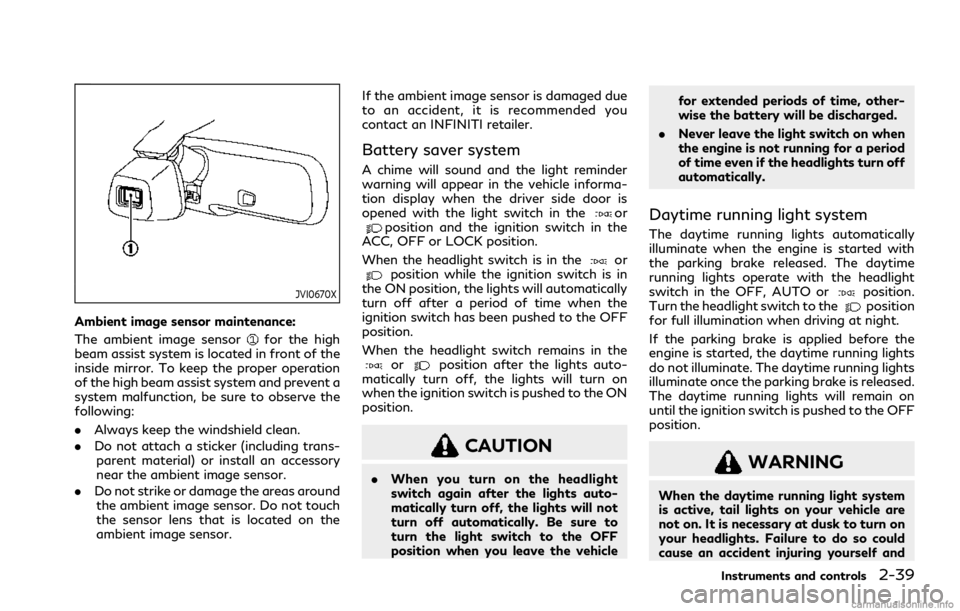
Ambient image sensor maintenance:
The ambient image sensor
for the high
beam assist system is located in front of the
inside mirror. To keep the proper operation
of the high beam assist system and prevent a
system malfunction, be sure to observe the
following:
. Always keep the windshield clean.
. Do not attach a sticker (including trans-
parent material) or install an accessory
near the ambient image sensor.
. Do not strike or damage the areas around
the ambient image sensor. Do not touch
the sensor lens that is located on the
ambient image sensor. If the ambient image sensor is damaged due
to an accident, it is recommended you
contact an INFINITI retailer.
Battery saver system
A chime will sound and the light reminder
warning will appear in the vehicle informa-
tion display when the driver side door is
opened with the light switch in the
orposition and the ignition switch in the
ACC, OFF or LOCK position.
When the headlight switch is in the
orposition while the ignition switch is in
the ON position, the lights will automatically
turn off after a period of time when the
ignition switch has been pushed to the OFF
position.
When the headlight switch remains in the
orposition after the lights auto-
matically turn off, the lights will turn on
when the ignition switch is pushed to the ON
position.
CAUTION
. When you turn on the headlight
switch again after the lights auto-
matically turn off, the lights will not
turn off automatically. Be sure to
turn the light switch to the OFF
position when you leave the vehicle for extended periods of time, other-
wise the battery will be discharged.
. Never leave the light switch on when
the engine is not running for a period
of time even if the headlights turn off
automatically.
Daytime running light system
The daytime running lights automatically
illuminate when the engine is started with
the parking brake released. The daytime
running lights operate with the headlight
switch in the OFF, AUTO or
position.
Turn the headlight switch to theposition
for full illumination when driving at night.
If the parking brake is applied before the
engine is started, the daytime running lights
do not illuminate. The daytime running lights
illuminate once the parking brake is released.
The daytime running lights will remain on
until the ignition switch is pushed to the OFF
position.
WARNING
When the daytime running light system
is active, tail lights on your vehicle are
not on. It is necessary at dusk to turn on
your headlights. Failure to do so could
cause an accident injuring yourself and
Instruments and controls2-39
Page 128 of 484
2-46Instruments and controls
.Avoid using power outlet when the
air conditioner, headlights or rear
window defroster is on.
. This power outlet is not designed for
use with a cigarette lighter unit.
. Push the plug in as far as it will go. If
good contact is not made, the plug
may overheat or the internal tem-
perature fuse may blow.
. Before inserting or disconnecting a
plug, be sure the electrical accessory
being used is turned OFF.
. When not in use, be sure to close the
cap. Do not allow water or any liquid
to contact the outlet.EMERGENCY SUPPORT
INFINITI InTouchTMprovides various ser-
vices to support dealing with emergencies of
the subscribed vehicle and the driver.
For example, in case of an illness or serious
injury, you can seek support by pushing the
in-vehicle Emergency Call (SOS) button and
connecting to the Response Center. The
Response Center can specify the location
of the vehicle via GPS, and the information
will be sent to the police or other agencies as
needed.
For information about other INFINITI In-
Touch
TMemergency support related ser-
vices, contact the INFINITI InTouchTM
support line at 1-855-444-7244 or refer
to the INFINITI InTouchTMServices website
www.infinitiusa.com/intouch (for U.S.)/
www.infiniti.ca/intouch/en/ (for Canada).
WARNING
. Please note that the Emergency Call
function cannot be used in the fol-
lowing conditions:
— Emergency functions and services will not be available without a
paid subscription to INFINITI In-
Touch
TM. — The INFINITI InTouch
TMnetwork
system is disabled.
— The vehicle moves outside the service area where the TCU (Tele-
matics Control Unit) is connected
to the system.
— The vehicle is outside the area where the cellular network service
is receivable.
— The vehicle is in a location with poor signal reception such as
tunnels, underground parking
garages, behind buildings or in
mountainous areas.
— The line is busy.
— The TCU (Telematics Control Unit) or other systems of your
vehicle are not working properly.
— It may not be possible to make an emergency call depending on the
severity of a collision and/or
emergency.
. Park the vehicle in a safe location and
set the parking brake before operat-
ing the Emergency Call (SOS) button.
. Only use this service in case of an
emergency. There may be a penalty
for inappropriate use of the service.
EMERGENCY CALL (SOS)
BUTTON (if so equipped)
Page 166 of 484

3-20Pre-driving checks and adjustments
remote engine start will not work” (P.3-21).
Other conditions can affect the performance
of the Intelligent Key transmitter. See “In-
telligent Key system” (P.3-6) for additional
information.
REMOTE ENGINE START OPER-
ATING RANGE
The remote engine start function can only be
used when the Intelligent Key is within the
specified operating range from the vehicle.
When the Intelligent Key battery is dis-
charged or other strong radio wave sources
are present near the operating location, the
Intelligent Key operating range becomes
narrower, and the Intelligent Key may not
function properly.
The remote engine start operating range is
approximately 197 ft (60 m) from the
vehicle.
REMOTE STARTING THE ENGINE
To use the remote start function to start the
engine, perform the following:
1. Aim the Intelligent Key at the vehicle.
2. Push the LOCK
button to lock all
doors.
3. Within 5 seconds push and hold the remote engine start
button until
the turn signal lights flash and the tail lights illuminate. If the vehicle is not
within view, push and hold the remote
engine start
button for at least 2
seconds.
The following events will occur when the
engine starts:
. The front parking lights will turn on and
remain on as long as the engine is
running.
. The doors will be locked and the air
conditioner system may turn on.
. The engine will continue to run for about
10 minutes. Repeat the steps to extend
the time for an additional 10 minutes.
See “Extending engine run time” (P.3-
20).
. The rear window glass and outside mirror
defroster may turn on automatically
when the outside air temperature, the
interior temperature and the engine
coolant temperature are low.
Depress and hold the brake pedal, then place
the ignition switch in the ON position before
driving. For further instructions, see “Driving
the vehicle” (P.5-16).
EXTENDING ENGINE RUN TIME
The remote engine start function can be
extended one time by performing the steps
listed in “Remote starting the engine” (P.3-
20). Run time will be calculated as follows:
. The first 10 minute run time will start
when the remote engine start function is
performed.
. The second 10 minutes will start imme-
diately when the remote engine start
function is performed. For example, if
the engine has been running for 5
minutes, and 10 minutes are added, the
engine will run for a total of 15 minutes.
. Extending engine run time will count
towards the two remote engine start
limit.
A maximum of two remote engine starts, or
a single start with an extension, are allowed
between ignition cycles.
The ignition switch must be cycled to the ON
position and then back to the OFF position
before the remote engine start procedure
can be used again.
Page 167 of 484

CANCELING A REMOTE ENGINE
START
To cancel a remote engine start, perform one
of the following:
.Aim the Intelligent Key at the vehicle and
push and hold the remote engine start
button until the parking lights turn
off.
. Turn on the hazard warning flashers.
. Cycle the ignition switch ON and then
OFF.
. The extended engine run time has ex-
pired.
. The first 10 minute timer has expired.
. The engine hood has been opened.
. The shift lever is moved out of P (Park).
. The alarm sounds due to illegal entry into
the vehicle.
. The ignition switch is pushed without an
Intelligent Key in the vehicle.
. The ignition switch is pushed with an
Intelligent Key in the vehicle but the
brake pedal is not depressed.
CONDITIONS THE REMOTE EN-
GINE START WILL NOT WORK
The remote engine start will not operate if
any of the following conditions are present:
. The ignition switch is placed in the ON
position.
. The hood is not securely closed.
. The hazard warning lights are on.
. The engine is still running. The engine
must be completely stopped. Wait at
least 6 seconds if the engine goes from
running to off. This is not applicable
when extending engine run time.
. The remote engine start
button is
not pushed and held for at least 2
seconds.
. The remote engine start
button is
not pushed and held within 5 seconds of
pushing the LOCK button.
. The brake pedal is depressed.
. The doors are not closed and locked.
. The trunk is open.
. The Intelligent Key warning message is
displayed in the vehicle information dis-
play.
. The alarm sounds due to illegal entry into
the vehicle.
. Two remote engine starts, or a single
remote engine start with an extension,
have already been used. .
The vehicle is not in P (Park).
. The remote engine start function has
been switched to OFF in the settings
menu on the lower display. For additional
information, see the INFINITI InTouch
TM
Owner’s Manual.
The remote engine start may display a
warning or indicator in the vehicle informa-
tion display. For an explanation of the
warning or indicator, see “Indicators for
operation” (P.2-21).
Pre-driving checks and adjustments3-21
Page 182 of 484
4-2Monitor, climate, audio, phone and voice recognition systems
Refer to the INFINITI InTouchTMOwner’s
Manual that includes the following informa-
tion.
. Navigation system (if so equipped)
. Audio system
. Bluetooth
®Hands-Free Phone system
. INFINITI InTouchTMServices (if so
equipped)
. SiriusXM Traffic
TM(if so equipped)
. SiriusXM®Travel Link (if so equipped)
. SiriusXM®Radio
. Viewing information
. Other settings
. Voice recognition (if so equipped)
. Meter settings
. General system information
. Android Auto
TM
.Apple CarPlay®
WARNING
.Do not adjust the display controls,
heater and air conditioner controls or
audio controls while driving so that
full attention may be given to vehicle
operation.
. If you noticed any foreign objects
entering the system hardware, spilled
liquid on the system, or noticed
smoke or fumes coming out from the
system, or any other unusual opera-
tion is observed, stop using the
system immediately and contact the
nearest INFINITI retailer. Ignoring
such conditions may lead to an acci-
dent, fire or electric shock.
. Do not disassemble or modify this
system. If you do, it may lead to an
accident, fire, or electric shock.
. Park the vehicle in a safe location and
apply the parking brake to view
images on the touch screen display.
CAUTION
.Do not use the system when the
engine is not running for extended periods of time to prevent battery
discharge.
. The glass screen on the liquid crystal
display may break if it is hit with a
hard or sharp object. If the glass
screen breaks, do not touch it. Doing
so could result in an injury.
. Extreme temperature conditions [be-
low −4°F (−20°C) and above 158°F
(70°C)] could affect the performance
of the system.
INFINITI INTOUCHTMOWNER’S MANUALSAFETY PRECAUTIONS
Page 187 of 484
WAE0528X
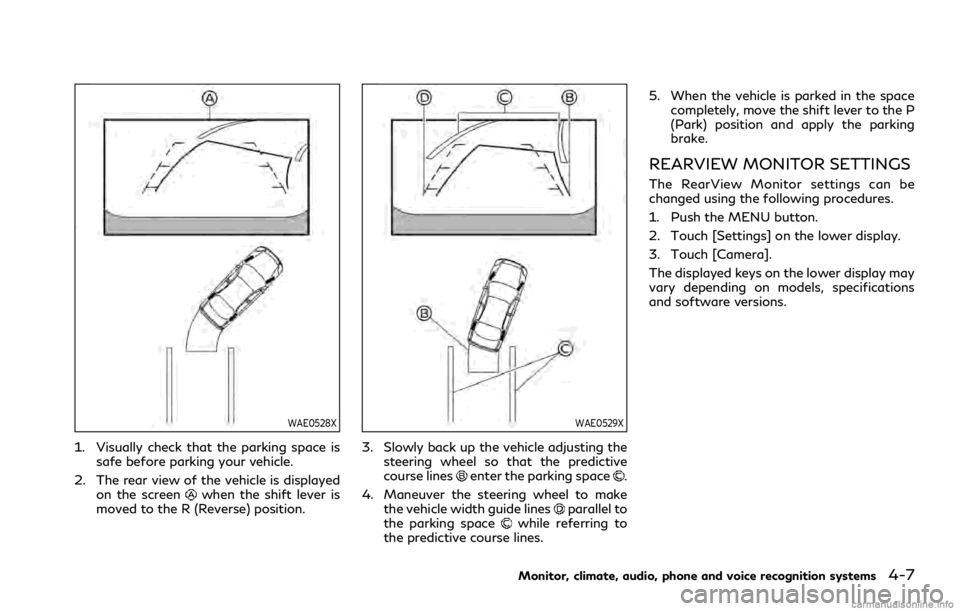
1. Visually check that the parking space issafe before parking your vehicle.
2. The rear view of the vehicle is displayed on the screen
when the shift lever is
moved to the R (Reverse) position.
WAE0529X
3. Slowly back up the vehicle adjusting the steering wheel so that the predictive
course lines
enter the parking space.
4. Maneuver the steering wheel to make the vehicle width guide lines
parallel to
the parking spacewhile referring to
the predictive course lines. 5. When the vehicle is parked in the space
completely, move the shift lever to the P
(Park) position and apply the parking
brake.
REARVIEW MONITOR SETTINGS
The RearView Monitor settings can be
changed using the following procedures.
1. Push the MENU button.
2. Touch [Settings] on the lower display.
3. Touch [Camera].
The displayed keys on the lower display may
vary depending on models, specifications
and software versions.
Monitor, climate, audio, phone and voice recognition systems4-7
Page 188 of 484

4-8Monitor, climate, audio, phone and voice recognition systems
Available setting items:
Setting ItemsAction
Predictive Course Lines When this item is turned on, the predictive course lines
are displayed on the rear view monitor screen. (See
“How to park with predictive course lines” (P.4-6).)
Display Settings
(Available only when cam-
era screen is displayed on
the upper display.) Brightness Adjust display settings by touching the “+”/“-” key.
Contrast
Tint
Color
Black Level
NOTE:
Do not adjust any of the RearView Monitor settings while the vehicle is moving. Make sure the parking brake is firmly applied.
Page 199 of 484
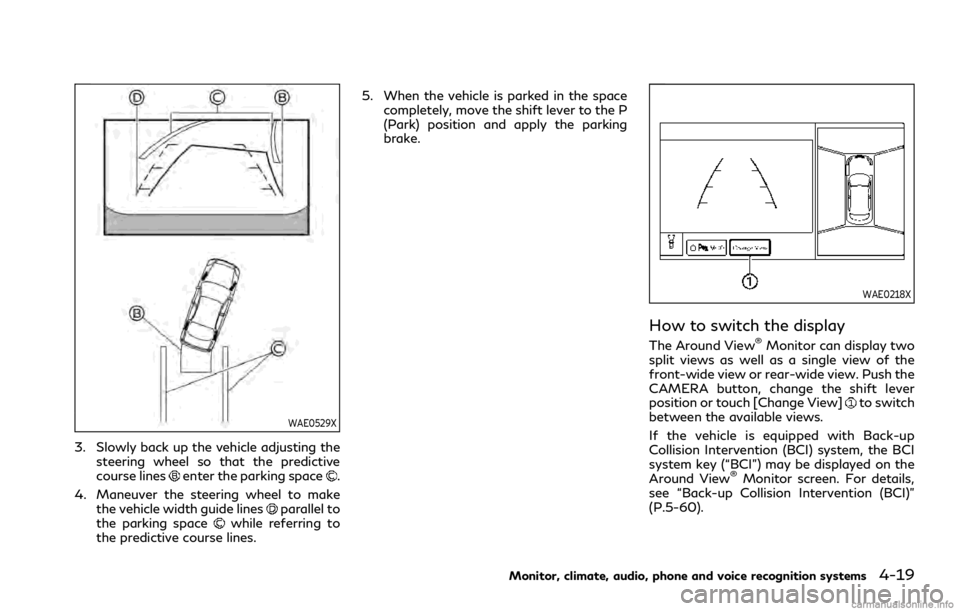
WAE0529X
3. Slowly back up the vehicle adjusting thesteering wheel so that the predictive
course lines
enter the parking space.
4. Maneuver the steering wheel to make the vehicle width guide lines
parallel to
the parking spacewhile referring to
the predictive course lines. 5. When the vehicle is parked in the space
completely, move the shift lever to the P
(Park) position and apply the parking
brake.
WAE0218X
How to switch the display
The Around View®Monitor can display two
split views as well as a single view of the
front-wide view or rear-wide view. Push the
CAMERA button, change the shift lever
position or touch [Change View]
to switch
between the available views.
If the vehicle is equipped with Back-up
Collision Intervention (BCI) system, the BCI
system key (“BCI”) may be displayed on the
Around View
®Monitor screen. For details,
see “Back-up Collision Intervention (BCI)”
(P.5-60).
Monitor, climate, audio, phone and voice recognition systems4-19
Page 201 of 484

Available setting items:
Setting itemAction
Camera MOD Turn the MOD system on/off. (See “Moving Object Detection (MOD)” (P.4-
30).)
MOD Volume The volume setting of the MOD detection warning chime can be adjusted.
Unviewable Area Reminder When this item is turned on, the unviewable area is highlighted in yellow for
several seconds after the bird’s-eye view is displayed for the first time when the
ignition switch is placed in the ON position.
Predictive Course Lines When this item is turned on, the predictive course lines are displayed in the
front, rear and bird’s-eye view screen.
Auto Show Sonar Image The automatic sonar display can be turned on/off.
Display Settings
(Available only
when camera screen
is displayed on the
upper display.) Brightness
Adjust display settings by touching the “+”/“-” key.
Contrast
Tint
Color
Black Level
NOTE:
Do not adjust any of the Around View®Monitor settings while the vehicle is moving. Make sure the parking brake is firmly applied.
Monitor, climate, audio, phone and voice recognition systems4-21