turn signal INFINITI Q50 2023 User Guide
[x] Cancel search | Manufacturer: INFINITI, Model Year: 2023, Model line: Q50, Model: INFINITI Q50 2023Pages: 494, PDF Size: 2.19 MB
Page 127 of 494

not latch, and release the lever. The turn
signal will automatically flash three
times.
Choose the appropriate method to signal a
lane change based on road and traffic
conditions.
SIC3272
Example
FOG LIGHT SWITCH
To turn the fog lights on, turn the headlight
switch to theposition, then turn the
switch to theposition. To turn them off,
turn the switch to the OFF position.
The headlights must be on with the low
beams selected for the fog lights to operate.
The fog lights automatically turn off when
the high beam headlights are selected.
JVI1491X
To sound the horn, push the center pad area
of the steering wheel.
WARNING
Do not disassemble the horn. Doing so
could affect proper operation of the
supplemental front air bag system. Tam-
pering with the supplemental front air
bag system may result in serious perso-
nal injury.
Instruments and controls2-43
HORN
Page 168 of 494

3-20Pre-driving checks and adjustments
remote engine start will not work” (P.3-21).
Other conditions can affect the performance
of the Intelligent Key transmitter. See “In-
telligent Key system” (P.3-6) for additional
information.
REMOTE ENGINE START OPER-
ATING RANGE
The remote engine start function can only be
used when the Intelligent Key is within the
specified operating range from the vehicle.
When the Intelligent Key battery is dis-
charged or other strong radio wave sources
are present near the operating location, the
Intelligent Key operating range becomes
narrower, and the Intelligent Key may not
function properly.
The remote engine start operating range is
approximately 197 ft (60 m) from the
vehicle.
REMOTE STARTING THE ENGINE
To use the remote start function to start the
engine, perform the following:
1. Aim the Intelligent Key at the vehicle.
2. Push the LOCK
button to lock all
doors.
3. Within 5 seconds push and hold the remote engine start
button until
the turn signal lights flash and the tail lights illuminate. If the vehicle is not
within view, push and hold the remote
engine start
button for at least 2
seconds.
The following events will occur when the
engine starts:
. The front parking lights will turn on and
remain on as long as the engine is
running.
. The doors will be locked and the air
conditioner system may turn on.
. The engine will continue to run for about
10 minutes. Repeat the steps to extend
the time for an additional 10 minutes.
See “Extending engine run time” (P.3-
20).
. The rear window glass and outside mirror
defroster may turn on automatically
when the outside air temperature, the
interior temperature and the engine
coolant temperature are low.
Depress and hold the brake pedal, then place
the ignition switch in the ON position before
driving. For further instructions, see “Driving
the vehicle” (P.5-16).
EXTENDING ENGINE RUN TIME
The remote engine start function can be
extended one time by performing the steps
listed in “Remote starting the engine” (P.3-
20). Run time will be calculated as follows:
. The first 10 minute run time will start
when the remote engine start function is
performed.
. The second 10 minutes will start imme-
diately when the remote engine start
function is performed. For example, if
the engine has been running for 5
minutes, and 10 minutes are added, the
engine will run for a total of 15 minutes.
. Extending engine run time will count
towards the two remote engine start
limit.
A maximum of two remote engine starts, or
a single start with an extension, are allowed
between ignition cycles.
The ignition switch must be cycled to the ON
position and then back to the OFF position
before the remote engine start procedure
can be used again.
Page 198 of 494
4-16Monitor, climate, audio, phone and voice recognition systems
Predictive course lines (and) indicate the
predictive course when operating the vehi-
cle. The predictive course lines (
and) will
be displayed on the monitor when the
steering wheel is turned. The predictive
course lines (
and) will move depending
on how much the steering wheel is turned.
WARNING
. Objects in the bird’s-eye view will
appear farther than the actual dis-
tance.
. Tall objects, such as a curb or vehicle,
may be misaligned or not displayed at
the seam of the views.
. Objects that are above the camera
cannot be displayed.
. The view for the bird’s-eye view may
be misaligned when the camera posi-
tion alters.
. A line on the ground may be mis-
aligned and is not seen as being
straight at the seam of the views.
The misalignment will increase as the
line proceeds away from the vehicle.
JVH1141X
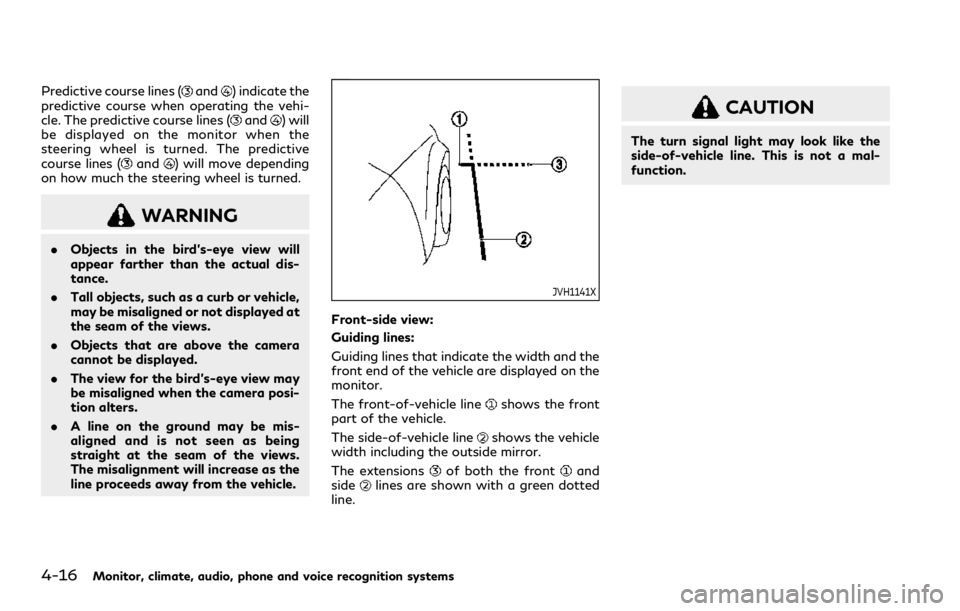
Front-side view:
Guiding lines:
Guiding lines that indicate the width and the
front end of the vehicle are displayed on the
monitor.
The front-of-vehicle line
shows the front
part of the vehicle.
The side-of-vehicle line
shows the vehicle
width including the outside mirror.
The extensions
of both the frontand
sidelines are shown with a green dotted
line.
CAUTION
The turn signal light may look like the
side-of-vehicle line. This is not a mal-
function.
Page 234 of 494

5-6Starting and driving
Please note that the TPMS is not a sub-
stitute for proper tire maintenance, and it is
the driver’s responsibility to maintain correct
tire pressure, even if under-inflation has not
reached the level to trigger illumination of
the TPMS low tire pressure telltale.
Your vehicle has also been equipped with a
TPMS malfunction indicator to indicate
when the system is not operating properly.
The TPMS malfunction indicator is com-
bined with the low tire pressure telltale.
When the system detects a malfunction, the
telltale will flash for approximately one
minute and then remain continuously illumi-
nated. This sequence will continue upon
subsequent vehicle start-ups as long as the
malfunction exists. When the malfunction
indicator is illuminated, the system may not
be able to detect or signal low tire pressure
as intended. TPMS malfunctions may occur
for a variety of reasons, including the
installation of replacement or alternate tires
or wheels on the vehicle that prevent the
TPMS from functioning properly. Always
check the TPMS malfunction telltale after
replacing one or more tires or wheels on your
vehicle to ensure that the replacement or
alternate tires and wheels allow the TPMS
to continue to function properly.Additional information
.Since the spare tire (if so equipped) is not
equipped with the TPMS, the TPMS
does not monitor the tire pressure of
the spare tire.
. The TPMS will activate only when the
vehicle is driven at speeds above 16
MPH (25 km/h). Also, this system may
not detect a sudden drop in tire pressure
(for example a flat tire while driving).
. The low tire pressure warning light does
not automatically turn off when the tire
pressure is adjusted. After the tire is
inflated to the recommended pressure,
the vehicle must be driven at speeds
above 16 MPH (25 km/h) to activate the
TPMS and turn off the low tire pressure
warning light. Use a tire pressure gauge
to check the tire pressure.
. The “Tire Pressure Low - Add Air”
warning appears in the vehicle informa-
tion display when the low tire pressure
warning light is illuminated and low tire
pressure is detected. The “Tire Pressure
Low - Add Air” warning turns off when
the low tire pressure warning light turns
off.
The “Tire Pressure Low - Add Air”
warning does not appear if the low tire
pressure warning light illuminates to
indicate a TPMS malfunction. .
The “Flat Tire - Visit dealer” warning (if
so equipped) appears in the vehicle
information display when the low tire
pressure warning light is illuminated and
one or more flat tires are detected.
. Tire pressure rises and falls depending on
the heat caused by the vehicle’s opera-
tion and the outside temperature. Do not
reduce the tire pressure after driving
because the tire pressure rises after
driving. Low outside temperature can
lower the temperature of the air inside
the tire which can cause a lower tire
inflation pressure. This may cause the
low tire pressure warning light to illumi-
nate. If the warning light illuminates in
low ambient temperature, check the tire
pressure for all four tires.
. You can also check the pressure of all
tires (except the spare tire) in the vehicle
information display. (See “Vehicle infor-
mation display” (P.2-19).)
. After the ignition switch is placed in the
ON position, it may take a period of time
for the tire pressure to be displayed while
the vehicle is driven. Depending on the
radio wave circumstance, tire pressure
may not correctly be displayed.
For additional information, see “Low tire
pressure warning light” (P.2-14) and “Tire
Pressure Monitoring System (TPMS)” (P.6-
3).
Page 235 of 494

WARNING
.Radio waves could adversely affect
electric medical equipment. Those
who use a pacemaker should contact
the electric medical equipment man-
ufacturer for the possible influences
before use.
. If the low tire pressure warning light
illuminates while driving, avoid sud-
den steering maneuvers or abrupt
braking, reduce vehicle speed, pull
off the road to a safe location and
stop the vehicle as soon as possible.
Driving with under-inflated tires may
permanently damage the tires and
increase the likelihood of tire failure.
Serious vehicle damage could occur
and may lead to an accident and
could result in serious personal injury.
Check the tire pressure for all four
tires. Adjust the tire pressure to the
recommended COLD tire pressure
shown on the Tire and Loading
Information label to turn the low tire
pressure warning light OFF. If the
light still illuminates while driving
after adjusting the tire pressure, a
tire may be flat or the TPMS may be
malfunctioning. If you have a flat tire,
replace it with a spare tire (if so equipped) as soon as possible. If no
tire is flat and all tires are properly
inflated, it is recommended you con-
sult an INFINITI retailer.
. For models with run-flat tires,
although you can continue driving
with a punctured run-flat tire, re-
member that vehicle handling stabi-
lity is reduced, which could lead to an
accident and personal injury. Also,
driving a long distance at high speeds
may damage the tires.
— Do not drive at speeds above 50 MPH (80 km/h) and do not drive
more than approximately 93 miles
(150 km) with a punctured run-
flat tire. The actual distance the
vehicle can be driven on a flat tire
depends on outside temperature,
vehicle load, road conditions and
other factors.
— If you detect any unusual sounds or vibrations while driving with a
punctured run-flat tire, pull off
the road to a safe location and
stop the vehicle as soon as possi-
ble. The tire may be seriously
damaged and need to be replaced.
. Since the spare tire is not equipped
with the TPMS, when a spare tire is
mounted or a wheel is replaced, the TPMS will not function and the low
tire pressure warning light will flash
for approximately 1 minute. The light
will remain on after 1 minute. Have
your tires replaced and/or TPMS
system reset as soon as possible. It
is recommended you visit an INFINITI
retailer for these services.
. Replacing tires with those not origin-
ally specified by INFINITI could affect
the proper operation of the TPMS.
. Do not inject any tire liquid or aerosol
tire sealant into the tires, as this may
cause a malfunction of the tire pres-
sure sensors.
CAUTION
.The TPMS may not function properly
when the wheels are equipped with
tire chains or the wheels are buried in
snow.
. Do not place metalized film or any
metal parts (antenna, etc.) on the
windows. This may cause poor recep-
tion of the signals from the tire
pressure sensors, and the TPMS will
not function properly.
Starting and driving5-7
Page 261 of 494

.Do not strike or damage the areas around
the camera unit. Do not touch the
camera lens or remove the screw located
on the camera unit. It is recommended
you contact an INFINITI retailer if the
camera unit is damaged due to an
accident.
WARNING
Failure to follow the warnings and
instructions for proper use of the LDW
and LDP systems could result in serious
personal injury or death.
. The LDW and LDP systems will not
prevent loss of control. It is the
driver’s responsibility to stay alert,
drive safely, keep the vehicle in the
traveling lane, and be in control of
the vehicle at all times.
. The LDP system may activate if you
change lanes without first activating
your turn signal or, for example, if a
construction zone directs traffic to
cross an existing lane marker. If this
occurs, you may need to apply cor-
rective steering to complete your lane
change.
. Because the LDP system may not
activate under the road, weather,
and lane marker conditions described
in this section, it may not activate
every time your vehicle begins to
leave its lane and you will need to
apply corrective steering. .
Lane Departure Warning (LDW) system
— warns the driver with an indicator in the vehicle information display and
vibrations of the steering wheel that
the vehicle is beginning to leave the
driving lane.
. Lane Departure Prevention (LDP) system
(if so equipped)
— warns the driver with an indicator in the vehicle information display and
vibrations of the steering wheel, and
helps the driver to return the vehicle
to the center of the traveling lane.
Starting and driving5-33
LANE DEPARTURE WARNING
(LDW)/LANE DEPARTURE
PREVENTION (LDP) (if so equipped)
Page 263 of 494

LDW SYSTEM OPERATION
The LDW system operates above approxi-
mately 45 MPH (70 km/h) and when the
lane markings are clear.
If the vehicle approaches either the left or
the right side of the traveling lane, the driver
assist system lane indicator (orange) in the
vehicle information display will blink and the
steering wheel will vibrate.
NOTE:
The LDW system is not designed to warn
when you operate the lane change signal
and change traveling lanes in the direction
of the signal. (The LDW system will become
operable again approximately 2 seconds
after the lane change signal is turned off.)
JVS0246X
HOW TO ENABLE/DISABLE THE
LDW SYSTEM
Perform the following steps to enable or
disable the LDW system.
1. Push the MENU button
and touch
[Driver Assistance] on the lower display.
2. Touch [Lane Assist].
3. Touch [Lane Departure Warning] to enable or disable the system.
The displayed keys on the lower display may
vary depending on models, specifications
and software versions.
LDP SYSTEM OPERATION (if so
equipped)
The LDP system operates above approxi-
mately 45 MPH (70 km/h) and when the
lane markings are clear.
If the vehicle approaches either the left or
right side of the traveling lane, the driver
assist system lane indicator (orange) in the
vehicle information display will blink and the
steering wheel will vibrate. Then, the LDP
system will automatically assist the driver to
return the vehicle to the center of the
traveling lane.
NOTE:
. The LDP system is not designed to work
when you operate the lane change signal
and change traveling lanes in the direc-
tion of the signal. (The LDP system will
become operable again approximately 2
seconds after the lane change signal is
turned off.)
. The LDP will not operate or will stop
operating and only the steering wheel
will vibrate under the following condi-
tions.
— When the steering wheel is turned as
far as necessary for the vehicle to
change lanes.
— When the accelerator pedal is de-
pressed.
Starting and driving5-35
Page 270 of 494

5-42Starting and driving
JVS0827X
Side indicator light
Driver assist system blind spot indica-
tor (on the vehicle information display)
Lower display
BSW SYSTEM OPERATION
The BSW system operates above approxi-
mately 20 MPH (32 km/h).
If the radar sensors detect a vehicle in the
detection zone, the side indicator light
illuminates.If the turn signal is then activated, the
system chimes (twice) and the side indicator
light flashes. The side indicator light con-
tinues to flash until the detected vehicle
leaves the detection zone.
NOTE:
.
The side indicator lights illuminate for a
few seconds when the ignition switch is
placed in the ON position.
. The brightness of the side indicator
lights is adjusted automatically depend-
ing on the brightness of the ambient
light.
. If a vehicle comes into the detection zone
after the driver activates the turn
signal, then only the side indicator light
flashes and no chime sounds. (See “BSW
driving situations” (P.5-44).)
Page 273 of 494

JVS0738X
Illustration 2 – Approaching from behind
Illustration 2: If the driver activates the turn
signal, then the system chimes (twice) and
the side indicator light flashes.
NOTE:
. The radar sensors may not detect vehi-
cles which are approaching rapidly from
behind.
. If the driver activates the turn signal
before a vehicle enters the detection
zone, the side indicator light will flash
but no chime will sound when the other
vehicle is detected.
JVS0739X
Illustration 3 – Overtaking another vehicle
Overtaking another vehicle
Illustration 3: The side indicator light illumi-
nates if you overtake a vehicle and that
vehicle stays in the detection zone for
approximately 3 seconds.
The radar sensors may not detect slower
moving vehicles if they are passed quickly.
JVS0740X
Illustration 4 – Overtaking another vehicle
Illustration 4: If the driver activates the turn
signal while another vehicle is in the detec-
tion zone, then the system chimes (twice)
and the side indicator light flashes.
NOTE:
. When overtaking several vehicles in a
row, the vehicles after the first vehicle
may not be detected if they are travel-
ing close together.
. The radar sensors may not detect slower
moving vehicles if they are passed
quickly.
. If the driver activates the turn signal
before a vehicle enters the detection
zone, the side indicator light will flash
Starting and driving5-45
Page 274 of 494

5-46Starting and driving
but no chime will sound when the other
vehicle is detected.
JVS0741X
Illustration 5 – Entering from the side
Entering from the side
Illustration 5: The side indicator light illumi-
nates if a vehicle enters the detection zone
from either side.
WAF0555X
Illustration 6 – Entering from the side
Illustration 6: If the driver activates the turn
signal, then the system chimes (twice) and
the side indicator light flashes.
NOTE:
. The radar sensors may not detect a
vehicle which is traveling at about the
same speed as your vehicle when it
enters the detection zone.
. If the driver activates the turn signal
before a vehicle enters the detection
zone, the side indicator light will flash
but no chime will sound when the other
vehicle is detected.