wheel INFINITI Q50 2023 Service Manual
[x] Cancel search | Manufacturer: INFINITI, Model Year: 2023, Model line: Q50, Model: INFINITI Q50 2023Pages: 494, PDF Size: 2.19 MB
Page 239 of 494

belted or radial), and tread pattern
on all four wheels. Install tire chains
on the rear wheels when driving on
slippery roads and drive carefully.
. This vehicle is not designed for off-
road (rough road) use. Do not drive
on sandy or muddy roads that tires
may get stuck in.
. For AWD equipped vehicles, do not
attempt to raise two wheels off the
ground and shift the transmission to
any D (Drive) or R (Reverse) position
with the engine running. Doing so
may result in drivetrain damage or
unexpected vehicle movement which
could result in serious vehicle damage
or personal injury.
. Do not attempt to test an AWD
equipped vehicle on a 2-wheel dy-
namometer (such as the dynam-
ometers used by some states for
emissions testing), or similar equip-
ment even if the other two wheels are
raised off the ground. Make sure you
inform test facility personnel that
your vehicle is equipped with AWD
before it is placed on a dynamometer.
Using the wrong test equipment may
result in drivetrain damage or unex-
pected vehicle movement which could
result in serious vehicle damage or personal injury.
. When a wheel is off the ground due
to an unlevel surface, do not spin the
wheel excessively.WARNING
Do not operate the push-button ignition
switch while driving the vehicle except in
an emergency. (The engine will stop
when the ignition switch is pushed 3
consecutive times or the ignition switch
is pushed and held for more than 2
seconds.) If the engine stops while the
vehicle is being driven, this could lead to
a crash and serious injury.
Before operating the push-button ignition
switch, be sure to move the shift lever to the
P (Park) position.
Starting and driving5-11
PUSH-BUTTON IGNITION SWITCH
Page 247 of 494

4M(4th), 3M(3rd) and 2M(2nd):
Use these positions for hill climbing or engine
braking on downhill grades.
1
M(1st):
Use this position when climbing steep hills
slowly or driving slowly through deep snow,
or for maximum engine braking on steep
downhill grades.
. Remember not to drive at high speeds for
extended periods of time in lower than
7th gear. This reduces fuel economy.
. Moving the shift lever rapidly to the same
side twice will shift the ranges in succes-
sion.
. In the manual shift mode, the transmis-
sion may not shift to the selected gear
or may automatically shift to the other
gear. This helps maintain driving per-
formance and reduces the chance of
vehicle damage or loss of control.
. When the transmission does not shift to
the selected gear, the Automatic Trans-
mission (AT) position indicator (in the
vehicle information display) will blink
and the buzzer will sound.
. In the manual shift mode, the transmis-
sion automatically shifts down to 1st
gear before the vehicle comes to a stop.
When accelerating again, it is necessary
to shift up to the desired range.
Accelerator downshift — In D (Drive)
position —
For passing or hill climbing, fully depress the
accelerator pedal to the floor. This shifts the
transmission down into the lower gear,
depending on the vehicle speed.
Fail-safe
When the fail-safe operation occurs, note
that the transmission will be locked in any of
the forward gears according to the condi-
tion.
If the vehicle is driven under extreme
conditions, such as excessive wheel spinning
and subsequent hard braking, the fail-safe
system may be activated. This will occur
even if all electrical circuits are functioning
properly. In this case, push the ignition
switch to the OFF position and wait for 3
seconds. Then push the ignition switch back
to the ON position. The vehicle should
return to its normal operating condition. If
it does not return to its normal operating
condition, have the transmission checked
and repaired, if necessary. It is recom-
mended you visit an INFINITI retailer for
this service.
JVS0188X
Shift lock release
If the battery charge is low or discharged,
the shift lever may not be moved from the P
(Park) position even with the brake pedal
depressed and the shift lever button pushed.
To move the shift lever, perform the follow-
ing procedure:
1. Push the ignition switch to the OFF or
LOCK position.
2. Apply the parking brake.
3. Remove the shift lock cover
using a
suitable tool.
4. Push down the shift lock
using
mechanical key as illustrated.
Starting and driving5-19
Page 255 of 494

JVS0251X
ACTIVE LANE CONTROL OP-
ERATION
Active Lane Control slightly corrects front
tire angles and steering wheel torque to help
reduce the difference between the vehicle’s
direction and the lane direction
which is
detected by using the camera unitlocated
above the inside mirror.
Active Lane Control operates under the
following conditions:
. When the vehicle is driven at speeds of
approximately 45 MPH (70 km/h) and
above.
. When the Lane Departure Prevention
(LDP) system is enabled in the settings menu on the lower display. To turn on
the LDP system, see “Lane Departure
Warning (LDW)/Lane Departure Pre-
vention (LDP)” (P.5-33).
. When Active Lane Control is enabled in
the settings menu on the display.
Starting and driving5-27
Page 256 of 494

5-28Starting and driving
WAF0324X
/OKswitch
Vehicle information display
Dynamic driver assistance switch
Upper display
Lower display
TURNING ACTIVE LANE CON-
TROL ON/OFF
To turn on Active Lane Control, push the
dynamic driver assistance switch on the
steering wheel after starting the engine.
Push the dynamic driver assistance switch again to turn off Active Lane Control.
The dynamic driver assistance switch is used
for the LDP, Blind Spot Intervention
®(BSI)
and Distance Control Assist (DCA) systems.
When the dynamic driver assistance switch
is pushed, the LDP, BSI and DCA systems
will also turn on or off simultaneously. These
systems can be individually set to on or off
on the lower display.
Page 257 of 494

JVS0248X
The status of Active Lane Control can be
checked in the chassis control display in the
vehicle information display
.
. When Active Lane Control is turned on,
the chassis control
is displayed.
. When Active Lane Control is operating,
the chassis control
is displayed.
For setting of the chassis control display, see
the INFINITI InTouch
TMOwner’s Manual.
HOW TO ENABLE/DISABLE AC-
TIVE LANE CONTROL
Perform the following steps to enable or
disable Active Lane Control. If Type A
setting is not available, perform Type B
setting.
Type A (if so equipped):
1. Push the
/OK switch on the steering
wheel.
2. Touch [TURN ALC ON] or [TURN ALC OFF] on the upper display to enable or
disable Active Lane Control.
Type B (if so equipped):
1. Push the MENU button and touch [Driver Assistance] on the lower display.
2. Touch [Lane Assist].
3. Touch [Active Lane Control] to enable or disable Active Lane Control.
The displayed keys on the display may vary
depending on models, specifications and
software version.
NOTE:
If the Lane Departure Prevention (LDP)
system setting is OFF, Active Lane Control
cannot be operated. To use Active Lane
Control, set the LDP system to ON. See
“How to enable/disable the LDP system”
(P.5-37).
Starting and driving5-29
Page 258 of 494
![INFINITI Q50 2023 Service Manual 5-30Starting and driving
Active Lane Control settings
Perform the following steps to set Active
Lane Control.
Type A (if so equipped):
1. Push the MENU button and touch[INFINITI Drive Mode Selector] o](/img/42/58896/w960_58896-257.png "INFINITI Q50 2023 Service Manual 5-30Starting and driving
Active Lane Control settings
Perform the following steps to set Active
Lane Control.
Type A (if so equipped):
1. Push the MENU button and touch[INFINITI Drive Mode Selector] o")
5-30Starting and driving
Active Lane Control settings
Perform the following steps to set Active
Lane Control.
Type A (if so equipped):
1. Push the MENU button and touch[INFINITI Drive Mode Selector] on the
lower display.
2. Touch [Active Lane Control] and select [Low] or [High] to change the setting of
Active Lane Control.
Type B (if so equipped):
1. Push the MENU button and touch [Driver Assistance] on the lower display.
2. Touch [Lane Assist].
3. Enable [Active Lane Control].
4. Touch [Active Lane Control Setting] and select [Low] or [High] to change the
setting of Active Lane Control.
The displayed keys on the lower display may
vary depending on models, specifications
and software versions.
ACTIVE LANE CONTROL LIM-
ITATIONS
WARNING
Listed below are the limitations for
Active Lane Control. Failure to operate
the vehicle in accordance with these
limitations could result in serious injury
or death.
. Active Lane Control is primarily in-
tended for use on well-developed
freeways or highways. It may not
detect the lane markers for certain
roads, weather or driving conditions.
. Using Active Lane Control under
some conditions of road, lane marker
or weather, or if you attempt to
change lanes without using the lane
change signal could lead to an un-
expected system operation. In such
conditions, you need to correct the
vehicle’s direction with your steering
operation to avoid accidents.
. Active Lane Control will not operate
at speeds below approximately 45
MPH (70 km/h) or if it cannot detect
lane markers.
. Active Lane Control may not operate properly and should not be used
under the following conditions:
— During bad weather (rain, fog, snow, etc.).
— When driving on slippery roads, such as on ice or snow, etc.
— When driving on winding or un- even roads.
— When there is a lane closure due to road repairs.
— When driving in a makeshift lane.
— When driving on roads where the lane width is too narrow.
— When driving with a tire that is not within normal tire conditions
(for example, tire wear, low tire
pressure, installation of spare tire,
tire chains, non-standard wheels).
— When the vehicle is equipped with non-original steering parts or sus-
pension parts.
. Active Lane Control may or may not
operate properly under the following
conditions:
— On roads where there are multi- ple parallel lane markers; lane
markers that are faded or not
painted clearly; yellow painted
Page 259 of 494
lane markers; non-standard lane
markers; or lane markers covered
with water, dirt, snow, etc.
— On roads where discontinued lane markers are still detectable.
— On roads where there are sharp curves.
— On roads where there are sharply contrasting objects, such as sha-
dows, snow, water, wheel ruts,
seams or lines remaining after
road repairs. (Active Lane Control
could detect these items as lane
markers.)
— On roads where the traveling lane merges or separates.
— When the vehicle’s traveling di- rection does not align with the
lane marker.
— When traveling close to the ve- hicle in front of you, which ob-
structs the lane camera unit
detection range.
— When rain, snow, dirt or object adheres to the windshield in front
of the lane camera unit.
— When the headlights are not bright due to dirt on the lens or
if the aiming is not adjusted properly.
— When strong light enters the lane camera unit. (For example, the
light directly shines on the front
of the vehicle at sunrise or sun-
set.)
— When a sudden change in bright- ness occurs. (For example, when
the vehicle enters or exits a tunnel
or under a bridge.)
— When entering or exiting toll- gates.
— When driving on roads with a widening or narrowing lane width.
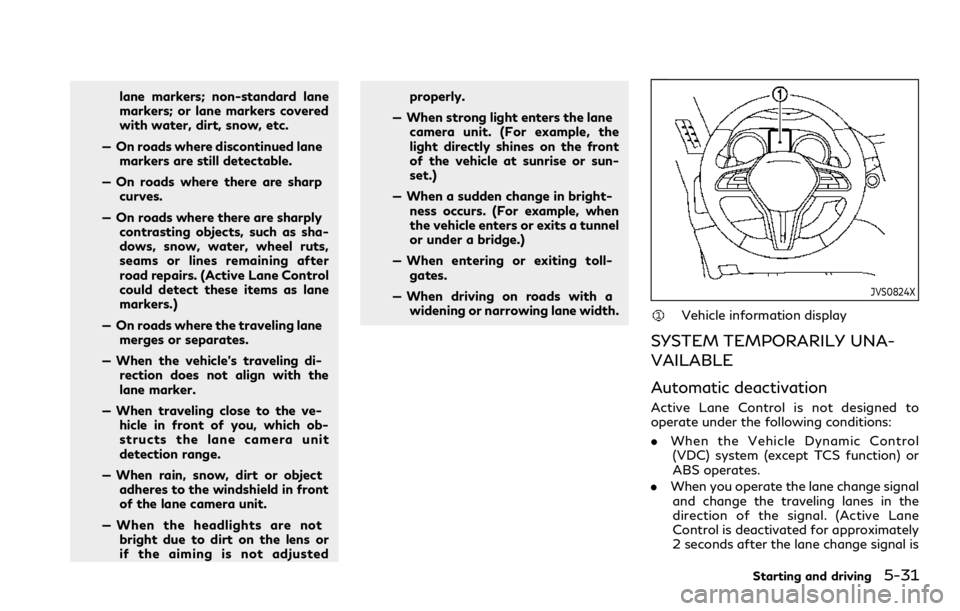
JVS0824X
Vehicle information display
SYSTEM TEMPORARILY UNA-
VAILABLE
Automatic deactivation
Active Lane Control is not designed to
operate under the following conditions:
. When the Vehicle Dynamic Control
(VDC) system (except TCS function) or
ABS operates.
. When you operate the lane change signal
and change the traveling lanes in the
direction of the signal. (Active Lane
Control is deactivated for approximately
2 seconds after the lane change signal is
Starting and driving5-31
Page 261 of 494

.Do not strike or damage the areas around
the camera unit. Do not touch the
camera lens or remove the screw located
on the camera unit. It is recommended
you contact an INFINITI retailer if the
camera unit is damaged due to an
accident.
WARNING
Failure to follow the warnings and
instructions for proper use of the LDW
and LDP systems could result in serious
personal injury or death.
. The LDW and LDP systems will not
prevent loss of control. It is the
driver’s responsibility to stay alert,
drive safely, keep the vehicle in the
traveling lane, and be in control of
the vehicle at all times.
. The LDP system may activate if you
change lanes without first activating
your turn signal or, for example, if a
construction zone directs traffic to
cross an existing lane marker. If this
occurs, you may need to apply cor-
rective steering to complete your lane
change.
. Because the LDP system may not
activate under the road, weather,
and lane marker conditions described
in this section, it may not activate
every time your vehicle begins to
leave its lane and you will need to
apply corrective steering. .
Lane Departure Warning (LDW) system
— warns the driver with an indicator in the vehicle information display and
vibrations of the steering wheel that
the vehicle is beginning to leave the
driving lane.
. Lane Departure Prevention (LDP) system
(if so equipped)
— warns the driver with an indicator in the vehicle information display and
vibrations of the steering wheel, and
helps the driver to return the vehicle
to the center of the traveling lane.
Starting and driving5-33
LANE DEPARTURE WARNING
(LDW)/LANE DEPARTURE
PREVENTION (LDP) (if so equipped)
Page 263 of 494

LDW SYSTEM OPERATION
The LDW system operates above approxi-
mately 45 MPH (70 km/h) and when the
lane markings are clear.
If the vehicle approaches either the left or
the right side of the traveling lane, the driver
assist system lane indicator (orange) in the
vehicle information display will blink and the
steering wheel will vibrate.
NOTE:
The LDW system is not designed to warn
when you operate the lane change signal
and change traveling lanes in the direction
of the signal. (The LDW system will become
operable again approximately 2 seconds
after the lane change signal is turned off.)
JVS0246X
HOW TO ENABLE/DISABLE THE
LDW SYSTEM
Perform the following steps to enable or
disable the LDW system.
1. Push the MENU button
and touch
[Driver Assistance] on the lower display.
2. Touch [Lane Assist].
3. Touch [Lane Departure Warning] to enable or disable the system.
The displayed keys on the lower display may
vary depending on models, specifications
and software versions.
LDP SYSTEM OPERATION (if so
equipped)
The LDP system operates above approxi-
mately 45 MPH (70 km/h) and when the
lane markings are clear.
If the vehicle approaches either the left or
right side of the traveling lane, the driver
assist system lane indicator (orange) in the
vehicle information display will blink and the
steering wheel will vibrate. Then, the LDP
system will automatically assist the driver to
return the vehicle to the center of the
traveling lane.
NOTE:
. The LDP system is not designed to work
when you operate the lane change signal
and change traveling lanes in the direc-
tion of the signal. (The LDP system will
become operable again approximately 2
seconds after the lane change signal is
turned off.)
. The LDP will not operate or will stop
operating and only the steering wheel
will vibrate under the following condi-
tions.
— When the steering wheel is turned as
far as necessary for the vehicle to
change lanes.
— When the accelerator pedal is de-
pressed.
Starting and driving5-35
Page 264 of 494

5-36Starting and driving
—When the Intelligent Cruise Control
(ICC), Distance Control Assist (DCA),
Blind Spot Intervention (BSI), Blind
Spot Warning (BSW), Predictive For-
ward Collision Warning (PFCW) or
Forward Emergency Braking (FEB)
approach warning occurs.
— When the BSI system activates.
— When the hazard warning flashers
are operated.
— When driving on a curve at a high
speed.
JVS0825X
Dynamic driver assistance switch
Driver assist system lane indicator
(green) (on the vehicle information dis-
play)
Lower display
TURNING THE LDP SYSTEM ON/
OFF (if so equipped)
To turn on the LDP system, push the
dynamic driver assistance switchon the
steering wheel after starting the engine. The
driver assist system lane indicator (green)
in the vehicle information display will illumi-