lock INFINITI Q50 2023 Manual PDF
[x] Cancel search | Manufacturer: INFINITI, Model Year: 2023, Model line: Q50, Model: INFINITI Q50 2023Pages: 494, PDF Size: 2.19 MB
Page 177 of 494

SPA2471
1. To block glare from the front, swingdown the sun visor. 2. To block glare from the side, remove the
sun visor from the center mount and
swing the visor to the side
.
3. Slide the sun visor
in or out as needed.
SPA2447
INSIDE MIRROR
Adjust the height and the angle of the inside
mirror to the desired position.
Pre-driving checks and adjustments3-29
SUN VISORS MIRRORS
Page 181 of 494

The memory seat system has two features:
.Entry/exit function
. Memory storage
ENTRY/EXIT FUNCTION
This system is designed so that the driver’s
seat and steering column will automatically
move when the shift lever is in the P (Park)
position. This allows the driver to get into
and out of the driver’s seat more easily.
The driver’s seat will slide backward and the
steering wheel will move up when the
driver’s door is opened with the ignition
switch in the LOCK position.
The driver’s seat and steering wheel will
return to the previous positions when the
ignition switch is pushed to the ACC posi-
tion.
The driver’s seat will not return to the
previous positions if the seat or steering
adjusting switch is operated when the seat is
at the exit position.
Cancel or activate entry/exit func-
tion
All the following conditions must be met
before cancelling or activating the entry/exit
function.
.The ignition switch is placed in the LOCK
position. .
The entry/exit function is not in opera-
tion.
. The following switches are not operated.
— Seat memory switches
— Power seat switches
— Electric tilting/telescopic steering wheel switch
The entry/exit function can be activated or
canceled by pushing and holding the SET
switch for more than 10 seconds.
The entry/exit function can also be acti-
vated or canceled if the [Lift Steering Wheel
on Exit] or [Slide Driver Seat Back on Exit]
key is turned to ON or OFF in the [Settings]
menu on the lower display. (See the INFINITI
InTouch
TMOwner’s Manual. The displayed
keys on the lower display may vary depend-
ing on models, specifications and software
versions.)
Initialize entry/exit function
If the battery cable is disconnected, or if the
fuse opens, the entry/exit function will not
work though this function was set on before.
In such a case, after connecting the battery
or replacing with a new fuse, open and close
the driver’s door more than two times after
the ignition switch is switched from the ON
position to the LOCK position. The entry/
exit function will be activated.
JVP0240X
MEMORY STORAGE
Two positions for the driver’s seat, steering
column and outside mirrors can be stored in
the memory switch. Follow these procedures
to use the memory system.
1. Adjust the driver’s seat, steering column and outside mirrors to the desired posi-
tions by manually operating each adjust-
ing switch. For additional information,
see “Seats” (P.1-2), “Tilt/telescopic
steering” (P.3-27) and “Outside mirrors”
(P.3-30).
2. Push the SET switch and, within 5 seconds, push the memory switch (1 or
2) fully for at least 1 second.
Pre-driving checks and adjustments3-33
MEMORY SEAT (if so equipped)
Page 189 of 494
the object projects over the actual backing
up course.
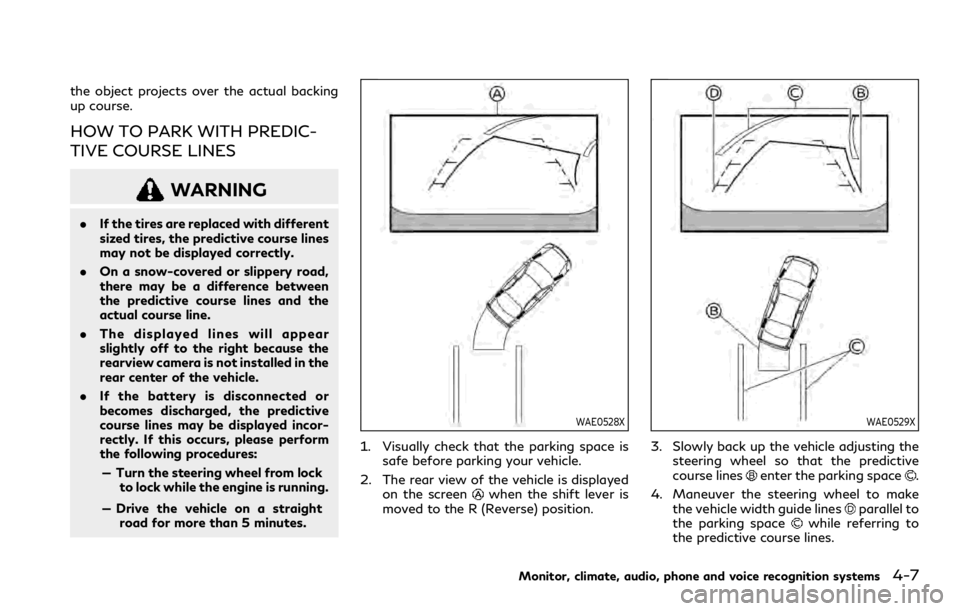
HOW TO PARK WITH PREDIC-
TIVE COURSE LINES
WARNING
.If the tires are replaced with different
sized tires, the predictive course lines
may not be displayed correctly.
. On a snow-covered or slippery road,
there may be a difference between
the predictive course lines and the
actual course line.
. The displayed lines will appear
slightly off to the right because the
rearview camera is not installed in the
rear center of the vehicle.
. If the battery is disconnected or
becomes discharged, the predictive
course lines may be displayed incor-
rectly. If this occurs, please perform
the following procedures:
— Turn the steering wheel from lock to lock while the engine is running.
— Drive the vehicle on a straight road for more than 5 minutes.
WAE0528X
1. Visually check that the parking space is safe before parking your vehicle.
2. The rear view of the vehicle is displayed on the screen
when the shift lever is
moved to the R (Reverse) position.
WAE0529X
3. Slowly back up the vehicle adjusting the steering wheel so that the predictive
course lines
enter the parking space.
4. Maneuver the steering wheel to make the vehicle width guide lines
parallel to
the parking spacewhile referring to
the predictive course lines.
Monitor, climate, audio, phone and voice recognition systems4-7
Page 201 of 494

SAA2244
Backing up behind a projecting object:
The position
is shown farther than the
positionin the display. However, the
positionis actually at the same distance
as the position. The vehicle may hit the
object when backing up to the positionif
the object projects over the actual backing up course.
How to park with predictive course
lines
WARNING
.
If the tires are replaced with different
sized tires, the predictive course lines
may not be displayed correctly.
. On a snow-covered or slippery road,
there may be a difference between
the predictive course lines and the
actual course line.
. The displayed lines will appear
slightly off to the right because the
rearview camera is not installed in the
rear center of the vehicle.
. If the battery is disconnected or
becomes discharged, the predictive
course lines may be displayed incor-
rectly. If this occurs, please perform
the following procedures:
— Turn the steering wheel from lock to lock while the engine is running.
— Drive the vehicle on a straight road for more than 5 minutes.
WAE0528X
1. Visually check that the parking space is safe before parking your vehicle.
2. The rear view of the vehicle is displayed on the screen
when the shift lever is
moved to the R (Reverse) position.
Monitor, climate, audio, phone and voice recognition systems4-19
Page 226 of 494

4-44Monitor, climate, audio, phone and voice recognition systems
WINDOW ANTENNA
The antenna pattern is printed inside the
rear window.
CAUTION
.Do not place metalized film near the
rear window glass or attach any
metal parts to it. This may cause poor
reception or noise.
. When cleaning the inside of the rear
window, be careful not to scratch or
damage the rear window antenna.
Lightly wipe along the antenna with
a dampened soft cloth.
JVH0641X
SATELLITE RADIO ANTENNA
There is a satellite radio antenna on the rear
part of the vehicle roof.
CAUTION
.A buildup of ice on the satellite radio
antenna can affect satellite radio
performance. Remove the ice to re-
store satellite radio reception.
. When removing snow from the roof,
do not apply strong force to the
satellite radio antenna. That may
cause broken satellite radio antenna
and roof panel dent. .
When using a high pressure car wash,
keep the high pressure nozzle away
from the satellite radio antenna. The
seal may be deformed or damaged.
. The radio performance may be af-
fected if cargo carried on the roof
blocks the radio signal. If possible, do
not put cargo near the satellite radio
antenna.
ANTENNA
Page 231 of 494

System malfunction ................................................ 5-121
System maintenance .............................................. 5-121
Break-in schedule ......................................................... 5-122
Fuel Efficient Driving Tips .......................................... 5-122
Increasing fuel economy ............................................. 5-123
Intelligent All-Wheel Drive (AWD) (if
so equipped) ................................................................... 5-123
Parking/parking on hills .............................................. 5-125
Power steering .............................................................. 5-126 Electric power steering type ................................ 5-126
Direct Adaptive Steering type ............................. 5-126
Brake system ................................................................. 5-128 Braking precautions ............................................... 5-128
Parking brake break-in .......................................... 5-129
Brake assist .................................................................... 5-129 Brake assist ............................................................... 5-129
Anti-lock Braking System (ABS) ......................... 5-129
Vehicle Dynamic Control (VDC) system ................. 5-131
Brake force distribution ......................................... 5-131
Active trace control ...................................................... 5-132
Hill Start Assist system .............................................. 5-134 Chassis control ............................................................. 5-134
Front and rear sonar system (if so equipped) ...... 5-135
System operation ................................................. 5-136
Sonar system settings ........................................ 5-136
Sonar indicator ....................................................... 5-137
Sonar limitations ................................................... 5-137
System temporarily unavailable ....................... 5-138
System maintenance ........................................... 5-138
Cold weather driving .................................................. 5-139 Freeing a frozen door lock ................................ 5-139
Antifreeze ............................................................... 5-139
Battery .................................................................... 5-139
Draining of coolant water ................................. 5-139
Tire equipment ...................................................... 5-139
Special winter equipment .................................. 5-140
Driving on snow or ice ........................................ 5-140
Engine block heater (if so equipped) .............. 5-140
Active noise cancellation/Active
sound enhancement .................................................... 5-141 Active noise cancellation .................................... 5-142
Active sound enhancement ............................... 5-142
Page 232 of 494

5-4Starting and driving
WARNING
.Do not leave children or adults who
would normally require the support
of others alone in your vehicle. Pets
should not be left alone either. They
could accidentally injure themselves
or others through inadvertent opera-
tion of the vehicle. Also, on hot,
sunny days, temperatures in a closed
vehicle could quickly become high
enough to cause severe or possibly
fatal injuries to people or animals.
. Closely supervise children when they
are around cars to prevent them from
playing and becoming locked in the
trunk where they could be seriously
injured. Keep the car locked, with the
rear seatback and trunk lid securely
latched when not in use, and prevent
children’s access to car keys.
EXHAUST GAS (carbon monoxide)
WARNING
.Do not breathe exhaust gases; they
contain colorless and odorless carbon
monoxide. Carbon monoxide is dan-
gerous. It can cause unconsciousness
or death.
. If you suspect that exhaust fumes are
entering the vehicle, drive with all
windows fully open, and have the
vehicle inspected immediately.
. Do not run the engine in closed spaces
such as a garage.
. Do not park the vehicle with the
engine running for any extended
length of time.
. Keep the trunk lid closed while driv-
ing, otherwise exhaust gases could be
drawn into the passenger compart-
ment. If you must drive with the
trunk lid open, follow these precau-
tions:
1) Open all the windows.
2) Set the air recirculation to off and the fan control to high to circulate
the air. .
If electrical wiring or other cable
connections must pass to a trailer
through the seal on the trunk lid or
the body, follow the manufacturer’s
recommendation to prevent carbon
monoxide entry into the vehicle.
. The exhaust system and body should
be inspected by a qualified mechanic
whenever:
— The vehicle is raised for service.
— You suspect that exhaust fumes are entering into the passenger
compartment.
— You notice a change in the sound of the exhaust system.
— You have had an accident invol- ving damage to the exhaust sys-
tem, underbody, or rear of the
vehicle.
PRECAUTIONS WHEN STARTING
AND DRIVING
Page 240 of 494

5-12Starting and driving
SSD0659
OPERATING RANGE FOR EN-
GINE START FUNCTION
The Intelligent Key can only be used for
starting the engine when the Intelligent Key
is within the specified operating range.
When the Intelligent Key battery is almost
discharged or strong radio waves are pre-
sent near the operating location, the Intelli-
gent Key system’s operating range becomes
narrower and may not function properly.
If the Intelligent Key is within the operating
range, it is possible for anyone, even some-
one who does not carry the Intelligent Key,
to push the ignition switch to start the
engine..
The trunk area is not included in the
operating range but the Intelligent Key
may function.
. If the Intelligent Key is placed on the
instrument panel, rear parcel shelf, inside
the glove box or door pocket, the
Intelligent Key may not function.
. If the Intelligent Key is placed near the
door or window outside the vehicle, the
Intelligent Key may function.
JVS0241X
PUSH-BUTTON IGNITION
SWITCH OPERATION
When the ignition switch is pushed without
depressing the brake pedal, the ignition
switch position will change as follows:
. Push center once to change to ACC.
. Push center two times to change to ON.
. Push center three times to change to
OFF. (No position illuminates.)
. Push center four times to return to ACC.
. Open or close any door to return to
LOCK during the OFF position.
If the battery of the vehicle is discharged,
the push-button ignition switch cannot be
turned from the LOCK position.
Page 241 of 494

Some indicators and warnings for operation
are displayed in the vehicle information
display between the speedometer and tach-
ometer. (See “Vehicle information display”
(P.2-19).)
The ignition lock is designed so that the
ignition switch position cannot be switched
to LOCK until the shift lever is moved to the
P (Park) position.
When the ignition switch cannot be pushed
toward the LOCK position, proceed as
follows:
1. Move the shift lever into the P (Park)position.
2. Push the ignition switch to the OFF position. The ignition switch position
indicator will not illuminate.
3. Open the door. The ignition switch will change to the LOCK position.
The shift lever can be moved from the P
(Park) position if the ignition switch is in the
ON position and the brake pedal is de-
pressed.PUSH-BUTTON IGNITION
SWITCH POSITIONS
LOCK (Normal parking position)
The ignition switch can only be locked in this
position.
The ignition switch will be unlocked when it
is pushed to the ACC position while carrying
the Intelligent Key.
ACC (Accessories)
This position activates electrical accessories
such as the radio, when the engine is not
running.
ON (Normal operating position)
This position turns on the ignition system
and electrical accessories.
OFF
The engine can be turned off in this position.
The ignition lock is designed so that the
ignition switch cannot be switched to the
LOCK position until the shift lever is moved
to the P (Park) position.
CAUTION
Do not leave the vehicle with the push-
button ignition switch in ACC or ON
positions when the engine is not running
for an extended period. This can dis-
charge the battery.
EMERGENCY ENGINE SHUT OFF
To shut off the engine in an emergency
situation while driving, perform the follow-
ing procedure:
. Rapidly push the push-button ignition
switch 3 consecutive times in less than
1.5 seconds, or
. Push and hold the push-button ignition
switch for more than 2 seconds.
Starting and driving5-13
Page 242 of 494

5-14Starting and driving
WAF0237X
INTELLIGENT KEY BATTERY DIS-
CHARGE
If the battery of the Intelligent Key is
discharged, or environmental conditions in-
terfere with the Intelligent Key operation,
start the engine according to the following
procedure:
1. Move the shift lever to the P (Park)position.
2. Firmly apply the foot brake.
3. Touch the ignition switch with the Intelligent Key as illustrated. (A chime
will sound.)
4. Push the ignition switch while depressing the brake pedal within 10 seconds after
the chime sounds. The engine will start.
After step 3 is performed, when the ignition
switch is pushed without depressing the
brake pedal, the ignition switch position will
change to ACC.
NOTE:
. When the ignition switch is pushed to
the ACC or ON position or the engine is
started by the above procedures, the
Intelligent Key battery discharge indi-
cator appears in the vehicle information
display even if the Intelligent Key is
inside the vehicle. This is not a malfunc-
tion. To turn off the Intelligent Key
battery discharge indicator, touch the
ignition switch with the Intelligent Key
again.
. If the Intelligent Key battery discharge
indicator appears, replace the battery as
soon as possible. (See “Intelligent Key
battery replacement” (P.8-19).)
. Make sure the area around the vehicle is
clear.
. Check fluid levels such as engine oil,
coolant, brake fluid and window washer
fluid as frequently as possible, or at least
whenever you refuel.
. Check that all windows and lights are
clean.
. Visually inspect tires for their appearance
and condition. Also check tires for proper
inflation.
. Lock all doors.
. Position seat and adjust head restraints.
. Adjust inside and outside mirrors.
. Fasten seat belts and ask all passengers
to do likewise.
. Check the operation of warning lights
when the ignition switch is pushed to the
ON position. (See “Warning lights, in-
dicator lights and audible reminders”
(P.2-10).)
BEFORE STARTING THE ENGINE