phone INFINITI Q60 2014 Owners Manual
[x] Cancel search | Manufacturer: INFINITI, Model Year: 2014, Model line: Q60, Model: INFINITI Q60 2014Pages: 466, PDF Size: 3.2 MB
Page 293 of 466
4-124Monitor, climate, audio, phone and voice recognition systems
.When the air conditioner is in the AUTO
mode, the fan speed decreases auto-
matically for easy recognition.
. Wait until a tone sounds before speak-
ing a command.
. Speak in a natural voice without paus-
ing between words.
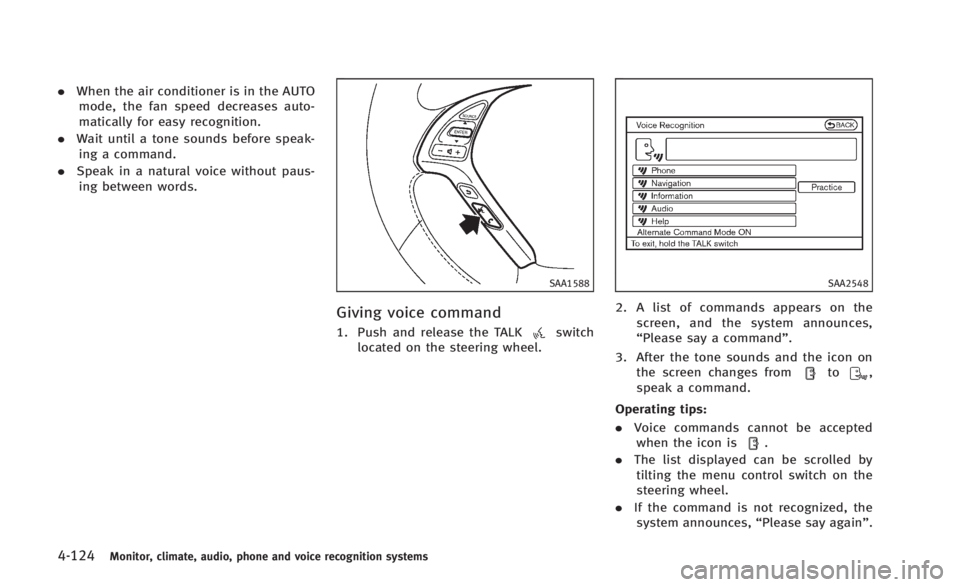
SAA1588
Giving voice command
1. Push and release the TALKswitch
located on the steering wheel.
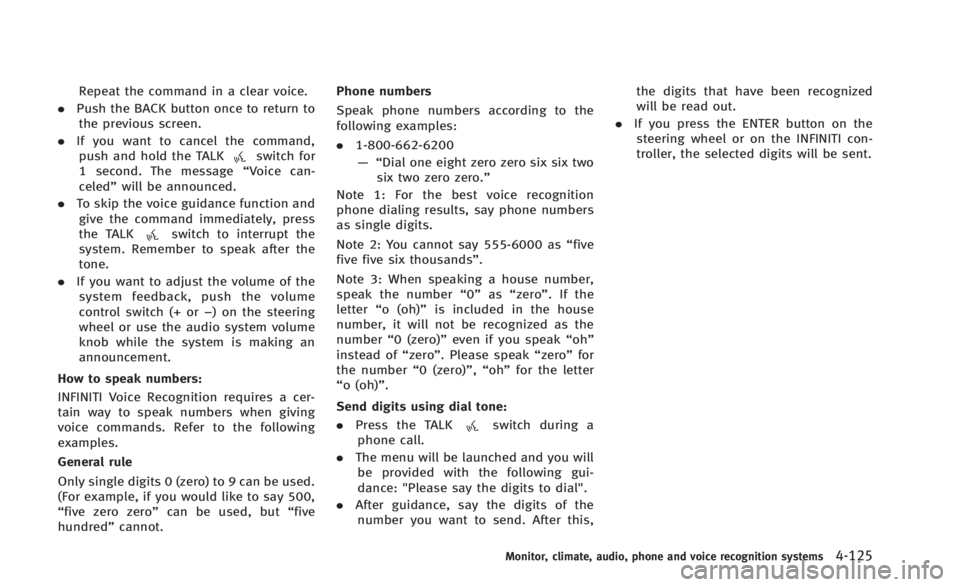
SAA2548
2. A list of commands appears on the
screen, and the system announces,
“Please say a command”.
3. After the tone sounds and the icon on the screen changes from
to,
speak a command.
Operating tips:
. Voice commands cannot be accepted
when the icon is
.
. The list displayed can be scrolled by
tilting the menu control switch on the
steering wheel.
. If the command is not recognized, the
system announces, “Please say again”.
Page 294 of 466
Repeat the command in a clear voice.
. Push the BACK button once to return to
the previous screen.
. If you want to cancel the command,
push and hold the TALK
switch for
1 second. The message “Voice can-
celed” will be announced.
. To skip the voice guidance function and
give the command immediately, press
the TALK
switch to interrupt the
system. Remember to speak after the
tone.
. If you want to adjust the volume of the
system feedback, push the volume
control switch (+ or −) on the steering
wheel or use the audio system volume
knob while the system is making an
announcement.
How to speak numbers:
INFINITI Voice Recognition requires a cer-
tain way to speak numbers when giving
voice commands. Refer to the following
examples.
General rule
Only single digits 0 (zero) to 9 can be used.
(For example, if you would like to say 500,
“five zero zero” can be used, but “five
hundred” cannot. Phone numbers
Speak phone numbers according to the
following examples:
.
1-800-662-6200
—“ Dial one eight zero zero six six two
six two zero zero.”
Note 1: For the best voice recognition
phone dialing results, say phone numbers
as single digits.
Note 2: You cannot say 555-6000 as “five
five five six thousands” .
Note 3: When speaking a house number,
speak the number “0”as“zero”. If the
letter “o (oh)” is included in the house
number, it will not be recognized as the
number “0 (zero)” even if you speak “oh”
instead of “zero”. Please speak “zero”for
the number “0 (zero)”,“oh”for the letter
“o (oh)”.
Send digits using dial tone:
. Press the TALK
switch during a
phone call.
. The menu will be launched and you will
be provided with the following gui-
dance: "Please say the digits to dial".
. After guidance, say the digits of the
number you want to send. After this, the digits that have been recognized
will be read out.
. If you press the ENTER button on the
steering wheel or on the INFINITI con-
troller, the selected digits will be sent.
Monitor, climate, audio, phone and voice recognition systems4-125
Page 295 of 466
4-126Monitor, climate, audio, phone and voice recognition systems
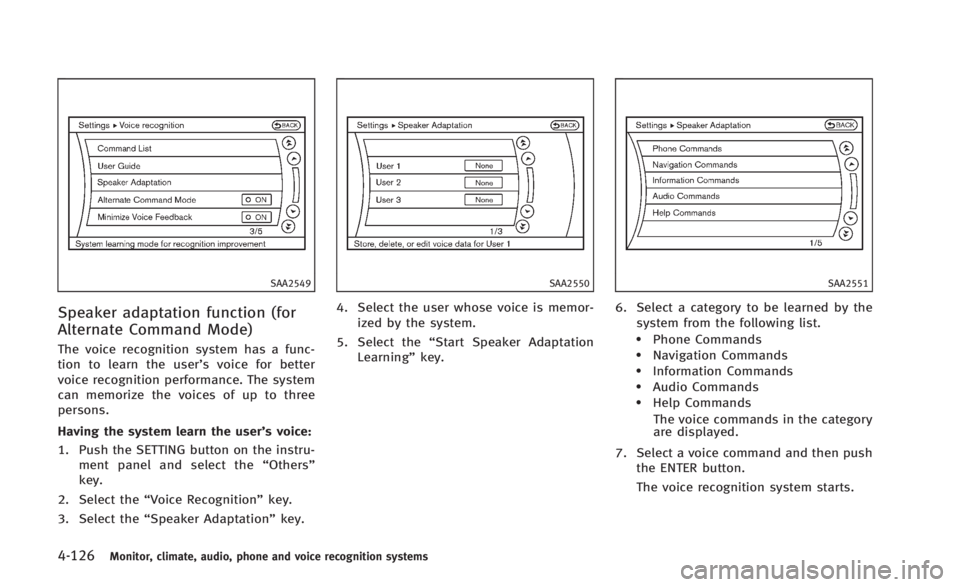
SAA2549
Speaker adaptation function (for
Alternate Command Mode)
The voice recognition system has a func-
tion to learn the user’s voice for better
voice recognition performance. The system
can memorize the voices of up to three
persons.
Having the system learn the user’s voice:
1. Push the SETTING button on the instru-ment panel and select the “Others”
key.
2. Select the “Voice Recognition” key.
3. Select the “Speaker Adaptation” key.
SAA2550
4. Select the user whose voice is memor-
ized by the system.
5. Select the “Start Speaker Adaptation
Learning” key.
SAA2551
6. Select a category to be learned by the
system from the following list.
.Phone Commands.Navigation Commands.Information Commands.Audio Commands.Help Commands
The voice commands in the category
are displayed.
7. Select a voice command and then push the ENTER button.
The voice recognition system starts.
Page 296 of 466
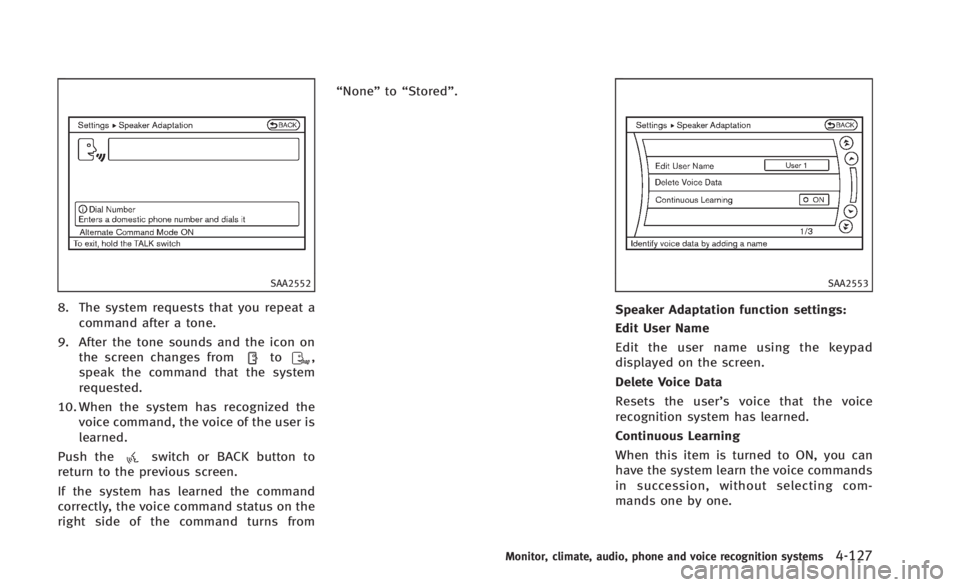
SAA2552
8. The system requests that you repeat acommand after a tone.
9. After the tone sounds and the icon on the screen changes from
to,
speak the command that the system
requested.
10. When the system has recognized the voice command, the voice of the user is
learned.
Push the
switch or BACK button to
return to the previous screen.
If the system has learned the command
correctly, the voice command status on the
right side of the command turns from “None”
to“Stored”.
SAA2553
Speaker Adaptation function settings:
Edit User Name
Edit the user name using the keypad
displayed on the screen.
Delete Voice Data
Resets the user’ s voice that the voice
recognition system has learned.
Continuous Learning
When this item is turned to ON, you can
have the system learn the voice commands
in succession, without selecting com-
mands one by one.
Monitor, climate, audio, phone and voice recognition systems4-127
Page 297 of 466

4-128Monitor, climate, audio, phone and voice recognition systems
Minimize voice feedback (for Alter-
nate Command Mode)
To minimize the voice feedback from the
system, perform the following steps.
1. Push the SETTING button on the instru-ment panel.
2. Select the “Others”key.
3. Select the “Voice Recognition” key.
4. Select the “Minimize Voice Feedback”
key.
5. The setting is turned to ON and the voice guidance will now be reduced
when using the Voice Recognition
system.
Page 298 of 466
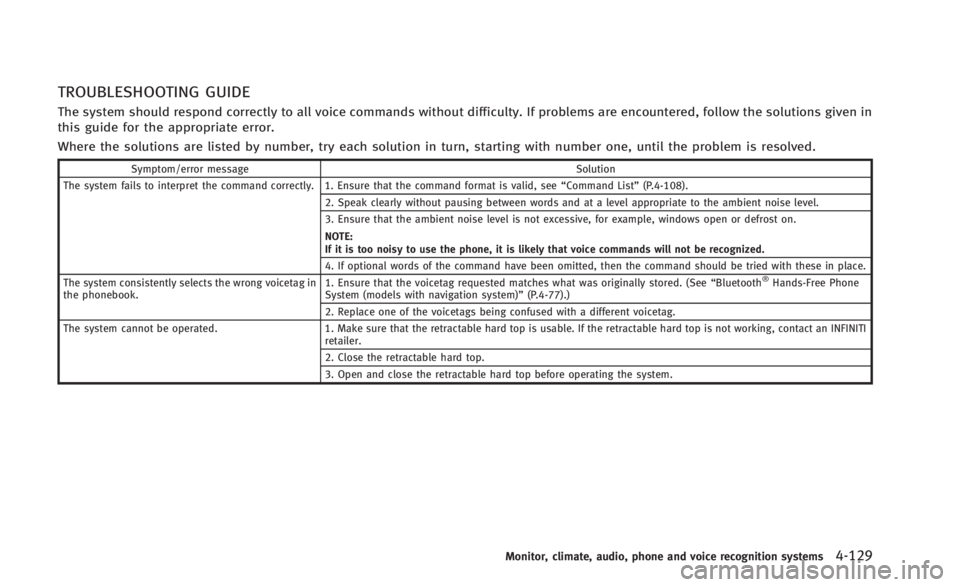
TROUBLESHOOTING GUIDE
The system should respond correctly to all voice commands without difficulty. If problems are encountered, follow the solutions given in
this guide for the appropriate error.
Where the solutions are listed by number, try each solution in turn, starting with number one, until the problem is resolved.
Symptom/error messageSolution
The system fails to interpret the command correctly. 1. Ensure that the command format is valid, see “Command List”(P.4-108).
2. Speak clearly without pausing between words and at a level appropriate to the ambient noise level.
3. Ensure that the ambient noise level is not excessive, for example, windows open or defrost on.
NOTE:
If it is too noisy to use the phone, it is likely that voice commands will not be recognized.
4. If optional words of the command have been omitted, then the command should be tried with these in place.
The system consistently selects the wrong voicetag in
the phonebook. 1. Ensure that the voicetag requested matches what was originally stored. (See
“Bluetooth
®Hands-Free Phone
System (models with navigation system)” (P.4-77).)
2. Replace one of the voicetags being confused with a different voicetag.
The system cannot be operated. 1. Make sure that the retractable hard top is usable. If the retractable hard top is not working, contact an INFINITI
retailer.
2. Close the retractable hard top.
3. Open and close the retractable hard top before operating the system.
Monitor, climate, audio, phone and voice recognition systems4-129
Page 299 of 466

4-130Monitor, climate, audio, phone and voice recognition systems
MEMO
Page 312 of 466

otherwise the starter could be damaged.
4.Warm-up
Allow the engine to idle for at least 30
seconds after starting. Do not race the
engine while warming it up. Drive at
moderate speed for a short distance
first, especially in cold weather. In cold
weather, keep the engine running for a
minimum of 2 - 3 minutes before
shutting it off. Starting and stopping
the engine over a short period of time
may make the vehicle more difficult to
start.
When racing the engine up to 4,000
rpm or more under no load condition,
the engine will enter the fuel cut mode.
5. To stop the engine, shift the shift lever to the P (Park) position (AT model) or
move the shift lever to the N (Neutral)
position (MT model), and push the
ignition switch to the OFF position.
NOTE:
Care should be taken to avoid situations
that can lead to potential battery dis-
charge and potential no-start conditions
such as: 1.
Installation or extended use of electro-
nic accessories that consume battery
power when the engine is not running
(Phone chargers, GPS, DVD players,
etc.)
2. Vehicle is not driven regularly and/or
only driven short distances.
In these cases, the battery may need to be
charged to maintain battery health.
AUTOMATIC TRANSMISSION
7 speed automatic transmission
The automatic transmission in your vehicle
is electronically controlled by a transmis-
sion control module to produce maximum
efficiency and smooth operation.
Shown on the following pages are the
recommended operating procedures for
this transmission. Follow these procedures
for maximum vehicle performance and
driving enjoyment.
Starting the vehicle
After starting the engine, fully depress the
foot brake pedal and push the shift lever
button before shifting the shift lever to the
R (Reverse), N (Neutral), D (Drive), DS (Drive
Sport) or Manual shift mode position. Be
sure the vehicle is fully stopped before
attempting to shift the shift lever.
This automatic transmission model is
designed so that the foot brake pedal
must be depressed before shifting from P
(Park) to any drive position while the
ignition switch position is ON.
Starting and driving5-13
DRIVING THE VEHICLE
Page 393 of 466
8-4Maintenance and do-it-yourself
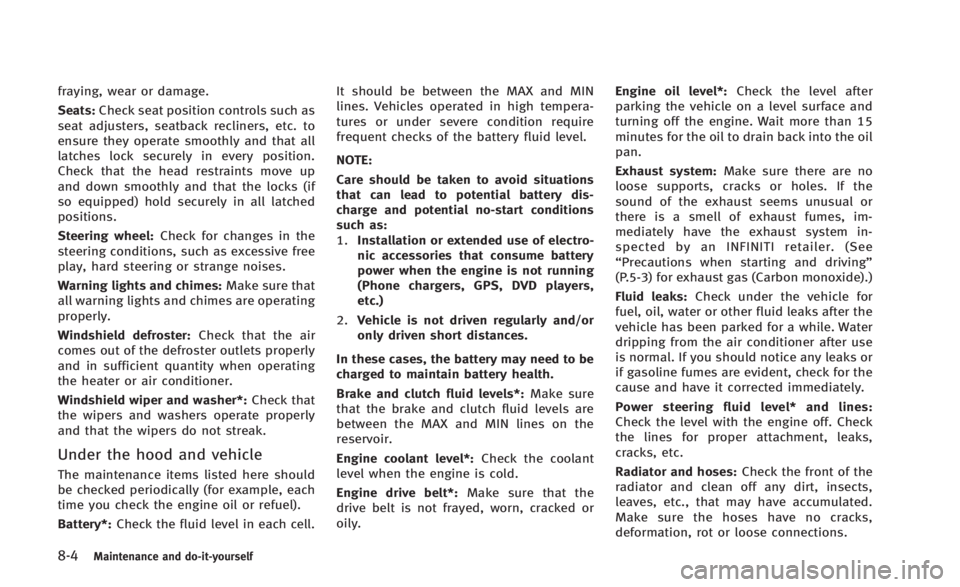
fraying, wear or damage.
Seats:Check seat position controls such as
seat adjusters, seatback recliners, etc. to
ensure they operate smoothly and that all
latches lock securely in every position.
Check that the head restraints move up
and down smoothly and that the locks (if
so equipped) hold securely in all latched
positions.
Steering wheel: Check for changes in the
steering conditions, such as excessive free
play, hard steering or strange noises.
Warning lights and chimes: Make sure that
all warning lights and chimes are operating
properly.
Windshield defroster: Check that the air
comes out of the defroster outlets properly
and in sufficient quantity when operating
the heater or air conditioner.
Windshield wiper and washer*: Check that
the wipers and washers operate properly
and that the wipers do not streak.
Under the hood and vehicle
The maintenance items listed here should
be checked periodically (for example, each
time you check the engine oil or refuel).
Battery*: Check the fluid level in each cell. It should be between the MAX and MIN
lines. Vehicles operated in high tempera-
tures or under severe condition require
frequent checks of the battery fluid level.
NOTE:
Care should be taken to avoid situations
that can lead to potential battery dis-
charge and potential no-start conditions
such as:
1.
Installation or extended use of electro-
nic accessories that consume battery
power when the engine is not running
(Phone chargers, GPS, DVD players,
etc.)
2. Vehicle is not driven regularly and/or
only driven short distances.
In these cases, the battery may need to be
charged to maintain battery health.
Brake and clutch fluid levels*: Make sure
that the brake and clutch fluid levels are
between the MAX and MIN lines on the
reservoir.
Engine coolant level*: Check the coolant
level when the engine is cold.
Engine drive belt*: Make sure that the
drive belt is not frayed, worn, cracked or
oily. Engine oil level*:
Check the level after
parking the vehicle on a level surface and
turning off the engine. Wait more than 15
minutes for the oil to drain back into the oil
pan.
Exhaust system: Make sure there are no
loose supports, cracks or holes. If the
sound of the exhaust seems unusual or
there is a smell of exhaust fumes, im-
mediately have the exhaust system in-
spected by an INFINITI retailer. (See
“Precautions when starting and driving”
(P.5-3) for exhaust gas (Carbon monoxide).)
Fluid leaks: Check under the vehicle for
fuel, oil, water or other fluid leaks after the
vehicle has been parked for a while. Water
dripping from the air conditioner after use
is normal. If you should notice any leaks or
if gasoline fumes are evident, check for the
cause and have it corrected immediately.
Power steering fluid level* and lines:
Check the level with the engine off. Check
the lines for proper attachment, leaks,
cracks, etc.
Radiator and hoses: Check the front of the
radiator and clean off any dirt, insects,
leaves, etc., that may have accumulated.
Make sure the hoses have no cracks,
deformation, rot or loose connections.
Page 404 of 466
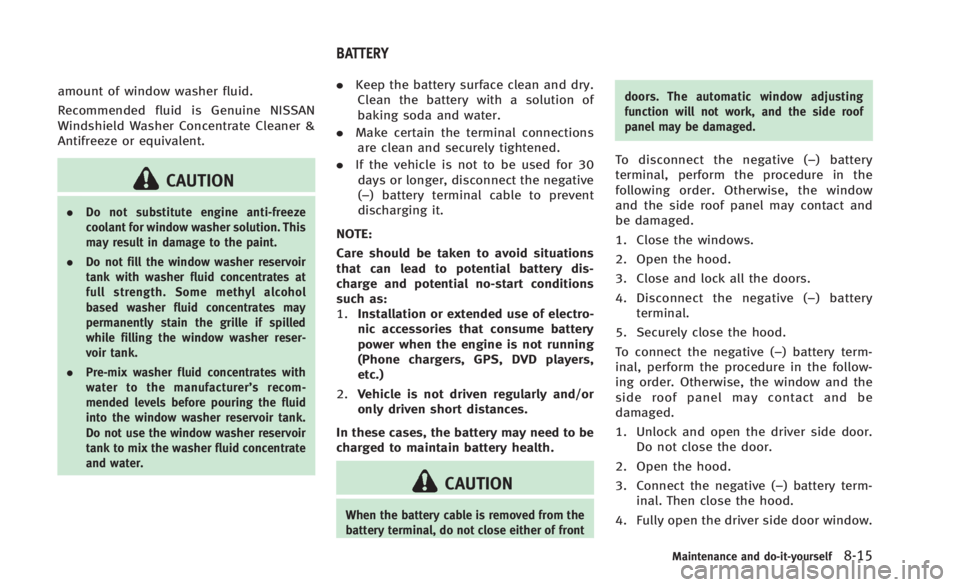
amount of window washer fluid.
Recommended fluid is Genuine NISSAN
Windshield Washer Concentrate Cleaner &
Antifreeze or equivalent.
CAUTION
.Do not substitute engine anti-freeze
coolant for window washer solution. This
may result in damage to the paint.
. Do not fill the window washer reservoir
tank with washer fluid concentrates at
full strength. Some methyl alcohol
based washer fluid concentrates may
permanently stain the grille if spilled
while filling the window washer reser-
voir tank.
. Pre-mix washer fluid concentrates with
water to the manufacturer’ s recom-
mended levels before pouring the fluid
into the window washer reservoir tank.
Do not use the window washer reservoir
tank to mix the washer fluid concentrate
and water.
. Keep the battery surface clean and dry.
Clean the battery with a solution of
baking soda and water.
. Make certain the terminal connections
are clean and securely tightened.
. If the vehicle is not to be used for 30
days or longer, disconnect the negative
(−) battery terminal cable to prevent
discharging it.
NOTE:
Care should be taken to avoid situations
that can lead to potential battery dis-
charge and potential no-start conditions
such as:
1. Installation or extended use of electro-
nic accessories that consume battery
power when the engine is not running
(Phone chargers, GPS, DVD players,
etc.)
2. Vehicle is not driven regularly and/or
only driven short distances.
In these cases, the battery may need to be
charged to maintain battery health.
CAUTION
When the battery cable is removed from the
battery terminal, do not close either of front doors. The automatic window adjusting
function will not work, and the side roof
panel may be damaged.
To disconnect the negative (−
) battery
terminal, perform the procedure in the
following order. Otherwise, the window
and the side roof panel may contact and
be damaged.
1. Close the windows.
2. Open the hood.
3. Close and lock all the doors.
4. Disconnect the negative (− ) battery
terminal.
5. Securely close the hood.
To connect the negative (−) battery term-
inal, perform the procedure in the follow-
ing order. Otherwise, the window and the
side roof panel may contact and be
damaged.
1. Unlock and open the driver side door. Do not close the door.
2. Open the hood.
3. Connect the negative (−) battery term- inal. Then close the hood.
4. Fully open the driver side door window.
Maintenance and do-it-yourself8-15
BATTERY