battery INFINITI Q60 2014 Owner's Manual
[x] Cancel search | Manufacturer: INFINITI, Model Year: 2014, Model line: Q60, Model: INFINITI Q60 2014Pages: 466, PDF Size: 3.2 MB
Page 147 of 466

3-20Pre-driving checks and adjustments
.Do not sit or place excessive weight on
the top, rear parcel shelf, side flaps and
trunk lid, especially when the retractable
hard top is being operated. The retract-
able hard top may be damaged.
. Do not drive the vehicle with the
retractable hard top partially opened.
Always make sure the retractable hard
top is either fully opened or closed
before driving.
. Secure items so that they cannot be
blown from the vehicle while driving
with the retractable hard top open.
. Do not install a roof rack or a roof carrier
on the retractable hard top. The retract-
able hard top or the roof rack or both
may be damaged when the retractable
hard top is operated.
WHEN OPERATING THE RETRACT-
ABLE HARD TOP
WARNING
Keep hands and other parts of the body
away from moving parts such as the
retractable hard top, rear parcel shelf, side flaps, trunk lid and power windows.
CAUTION
Do not place any items in the storage space
for the retractable hard top. A caution label
is attached on the floor in the retractable
hard top storage space. Cargo that contacts
the retractable hard top may damage the
retractable hard top or cargo.
NOTE:
In case of low battery or low temperature,
the retractable hard top may temporarily
stop moving during the operation. This
functions to protect the retractable hard
top control mechanism, and it is not a
malfunction.
If the retractable hard top is opened and
closed repeatedly in a short period of time,
it may stop moving to protect the retract-
able hard top motor. Wait for approxi-
mately 20 minutes before operating the
retractable hard top again.
SPA2629
Separator
The retractable hard top can be operated
only when the trunk room is separated.
1. Pull the strap
*Aand open the
separator.
Page 152 of 466
SPA2585
OPERATING THE RETRACTABLE
HARD TOP USING THE INTELLIGENT
KEY (if so equipped)
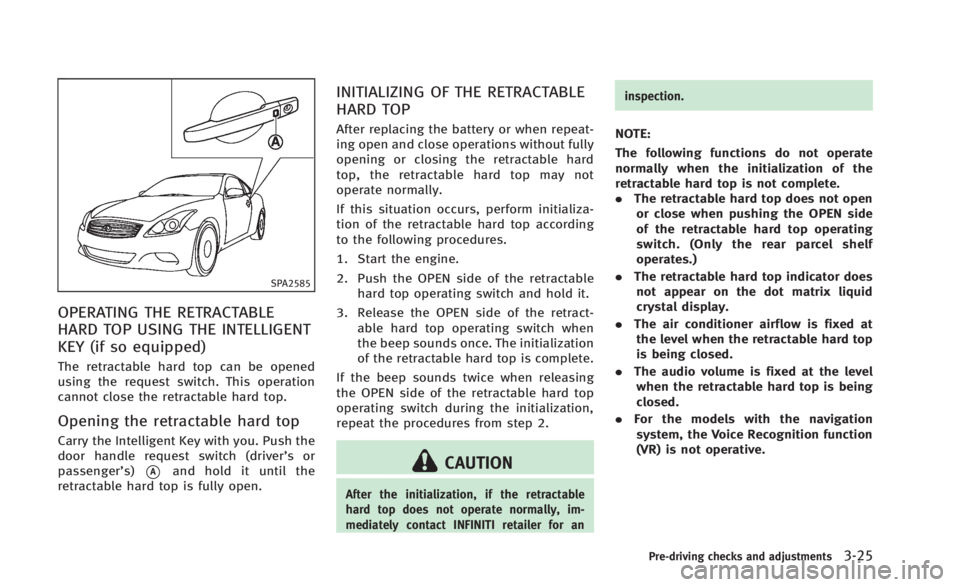
The retractable hard top can be opened
using the request switch. This operation
cannot close the retractable hard top.
Opening the retractable hard top
Carry the Intelligent Key with you. Push the
door handle request switch (driver’sor
passenger’s)
*Aand hold it until the
retractable hard top is fully open.
INITIALIZING OF THE RETRACTABLE
HARD TOP
After replacing the battery or when repeat-
ing open and close operations without fully
opening or closing the retractable hard
top, the retractable hard top may not
operate normally.
If this situation occurs, perform initializa-
tion of the retractable hard top according
to the following procedures.
1. Start the engine.
2. Push the OPEN side of the retractable hard top operating switch and hold it.
3. Release the OPEN side of the retract- able hard top operating switch when
the beep sounds once. The initialization
of the retractable hard top is complete.
If the beep sounds twice when releasing
the OPEN side of the retractable hard top
operating switch during the initialization,
repeat the procedures from step 2.
CAUTION
After the initialization, if the retractable
hard top does not operate normally, im-
mediately contact INFINITI retailer for an inspection.
NOTE:
The following functions do not operate
normally when the initialization of the
retractable hard top is not complete.
.
The retractable hard top does not open
or close when pushing the OPEN side
of the retractable hard top operating
switch. (Only the rear parcel shelf
operates.)
. The retractable hard top indicator does
not appear on the dot matrix liquid
crystal display.
. The air conditioner airflow is fixed at
the level when the retractable hard top
is being closed.
. The audio volume is fixed at the level
when the retractable hard top is being
closed.
. For the models with the navigation
system, the Voice Recognition function
(VR) is not operative.
Pre-driving checks and adjustments3-25
Page 153 of 466

3-26Pre-driving checks and adjustments
TROUBLESHOOTING GUIDE
If the retractable hard top stops halfway during operation or does not operate normally, follow the procedures shown in the following
table. If the procedures in the following table do not solve the symptom, immediately contact INFINITI retailer for the inspection.
SymptomBeepPossible cause Possible solution
The OPEN side of the retractable hard top
operating switch is pushed, but the
retractable hard top does not operate. Sounds twice
The OPEN side of the retractable hard top operating
switch is pushed while the retractable hard top is
fully open, or the CLOSE side of the retractable
hard top operating switch is pushed while the
retractable hard top is fully closed. Push the CLOSE side of the retractable hard top
operating switch when the retractable hard top is
fully open. Push the OPEN side of the retractable
hard top operating switch when the retractable hard
top is fully closed.
Sounds twice The shift lever (automatic transmission models
only) or the shift lever (manual transmission
models only) is in the R (Reverse) position. Shift the shift lever (automatic transmission models
only) to the P (Park) or N (Neutral) position, or shift
the shift lever (manual transmission model only) to
the N (Neutral) position, and then operate the
retractable hard top.
Sounds twice The trunk lid is opened. Fully close the trunk lid.
Does not sound The battery voltage is low. Start the engine again and operate the retractable
hard top.
Sounds twice The separator in the trunk room is not correctly set. Set the separator correctly. For details, refer to
“Separator”
(P.3-20).
Does not sound The retractable hard top is in the deactivation
mode in order to avoid motor overheating by the
continuous operation of the retractable hard top. Wait for approximately 20 minutes without operating
the retractable hard top and then operate the
retractable hard top.
The retractable hard top stops halfway
during operation. Sounds twice
Objects are trapped in the moving structure of the
retractable hard top. Check that an object is not trapped inside the rear
parcel shelf, side flap and retractable hard top. After
the check, turn the ignition switch to the OFF
position, start the engine again and then operate the
retractable hard top.
Does not sound The battery voltage is low. Start the engine again and operate the retractable
hard top.
Page 154 of 466

SymptomBeepPossible cause Possible solution
Only the rear parcel shelf operates when
the OPEN side of the retractable hard top
operating switch is pushed. Sounds twice
every 10 seconds for 15 minutes. The retractable hard top control does not recognize
the rear parcel shelf position because of battery
replacement or the contentious operation of the
retractable hard top. Perform the initialization of the retractable hard top
and operate the retractable hard top again. For the
initialization details, please refer to
“Initializing of
the retractable hard top” (P.3-25).
When the vehicle is being driven, the beep
sounds. Sounds continu-
ously The retractable hard top is partially opened. Immediately park the vehicle in a safe location and
fully open or fully close the retractable hard top.
When the engine is stopped, the beep
sounds. Sounds twice The retractable hard top is partially opened.
Fully open or fully close the retractable hard top.
Pre-driving checks and adjustments3-27
Page 157 of 466
3-30Pre-driving checks and adjustments
SPA2634
INTERIOR TRUNK LID RELEASE
WARNING
Closely supervise children when they are
around cars to prevent them from playing
and becoming locked in the trunk where
they could be seriously injured. Keep the car
locked, with the trunk lid securely latched,
when not in use, and prevent children’s
access to Intelligent Keys.
The interior trunk lid release mechanism
allows opening of the trunk lid in the eventthat people become locked inside the trunk
or in the event of the loss of electrical
power such as a discharged battery.
Releasing inside the trunk
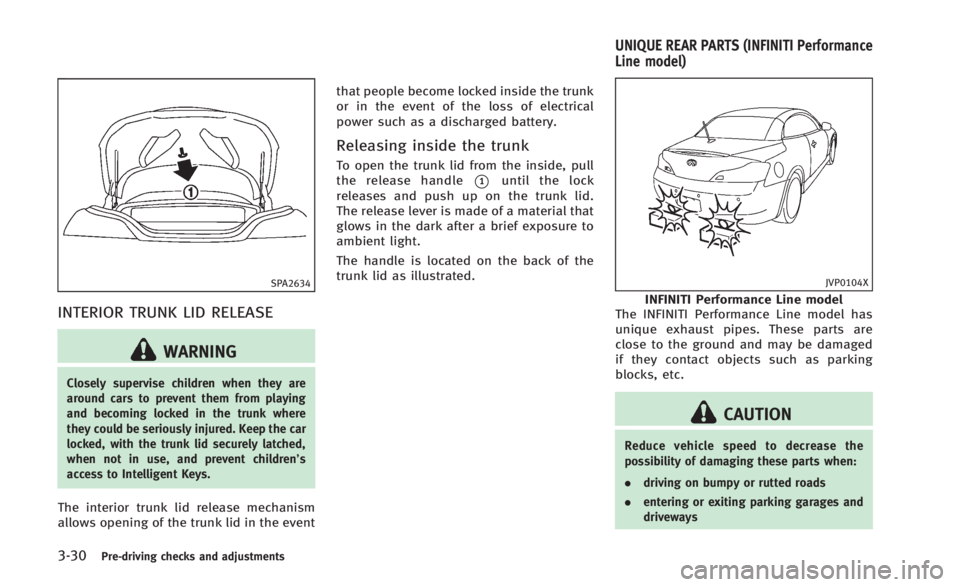
To open the trunk lid from the inside, pull
the release handle
*1until the lock
releases and push up on the trunk lid.
The release lever is made of a material that
glows in the dark after a brief exposure to
ambient light.
The handle is located on the back of the
trunk lid as illustrated.
JVP0104X
INFINITI Performance Line model
The INFINITI Performance Line model has
unique exhaust pipes. These parts are
close to the ground and may be damaged
if they contact objects such as parking
blocks, etc.
CAUTION
Reduce vehicle speed to decrease the
possibility of damaging these parts when:
. driving on bumpy or rutted roads
. entering or exiting parking garages and
driveways
UNIQUE REAR PARTS (INFINITI Performance
Line model)
Page 167 of 466

3-40Pre-driving checks and adjustments
approximately 0.5 second. When the
memory has stored in position, the
indicator light will stay on for approxi-
mately 5 seconds.
. If the battery cable is disconnected, or if
the fuse opens, the memory will be
canceled. In this case, reset the desired
position using the previous procedure.
. If optional Intelligent Keys are added to
your vehicle, the memory storage pro-
cedure to switch 1 or 2 and linking
Intelligent Key procedure to a stored
memory position should be performed
again for each Intelligent Key. For
additional Intelligent Key information,
see “Keys” (P.3-3).
Selecting the memorized position
1.Automatic transmission models:
Move the shift lever to the P (Park)
position.
Manual transmission models:
Apply the parking brake.
2. Raise the seatback.
3. Use one of the following methods to move the driver’ s seat, the outside
mirrors and the steering wheel.
.Push the ignition switch to the ON position and push the memory
switch (1 or 2) fully for at least 1
second.
.Within 45 seconds of opening the
driver’ s door, push the memory
switch (1 or 2) fully for at least 1
second.
The driver’s seat, steering column
and outside mirrors will move to the
memorized position with the indica-
tor light flashing, and then the light
will stay on for approximately 5
seconds.
For manual transmission models, the
memory positions can be selected even
when the engine is running. In this case,
move the shift lever to the N (Neutral)
position and apply the parking brake.
Then, perform step 2.
SYSTEM OPERATION
The automatic drive positioner system will
not work or will stop operating under the
following conditions:
. When the vehicle speed is above 4 MPH
(7 km/h).
. When the adjusting switch for the
driver’s seat and steering column is
turned on while the automatic drive positioner is operating.
. When the memory switch 1 or 2 is not
pushed for at least 1 second.
. When the seat, steering column and
outside mirrors have already been
moved to the memorized position.
. When no position is stored in the
memory switch.
. When the parking brake is released (MT
models).
. When the speed is above 4 MPH (7
km/h) while the parking brake is
applied (MT models).
. To restart the drive positioner system,
move the parking brake to off and on.
. When the engine is started while
moving the automatic drive positioner.
. When the driver’s door remains open
for more than 45 seconds and the
ignition switch is not in the ON posi-
tion.
. When the seatback is folded.
. While the walk-in function operates.
. The seat synchronization function is
automatically disabled if the outside
mirrors or steering wheel reaches its
maximum adjustment.
Page 173 of 466

4-4Monitor, climate, audio, phone and voice recognition systems
SAA1524
Models without navigation system
1. “AUX” button (P.4-39)
2. “RADIO AM·FM” band selector button
(P.4-39)
3. INFINITI controller (P.4-5)
4. “
OFF” brightness control and
display ON/OFF button (P.4-9)
5. “INFO” vehicle information button
(P.4-9)
6. “DISC” selector button (P.4-39)
7. “STATUS” status display button
(P.4-9)
8. “SETTING” button (P.4-13)
When you use this system, make sure the
engine is running. If you use the system with the engine not
running (ignition ON or ACC) for a long
time, it will use up all the battery power,
and the engine will not start.
SAA1541
Models with navigation system
SAA1508
Models without navigation system
Page 193 of 466

4-24Monitor, climate, audio, phone and voice recognition systems
up.
Predictive course lines
*6:
Indicate the predictive course when back-
ing up. The predictive course lines will be
displayed on the monitor when the shift
lever is in the R (Reverse) position and the
steering wheel is turned. The predictive
course lines will move depending on how
much the steering wheel is turned and will
not be displayed while the steering wheel
is in the neutral position.
HOW TO PARK WITH PREDICTIVE
COURSE LINES
WARNING
. Always turn and check that it is safe to
park your car before backing up. Always
back up slowly.
. Use the displayed lines as a reference.
The lines are highly affected by the
number of occupants, fuel level, vehicle
position, road condition and road grade.
. If the tires are replaced with different
sized tires, the predictive course line
may not be displayed correctly. .
On a snow-covered or slippery road,
there may be a difference between the
predictive course line and the actual
course line.
. If the battery is disconnected or be-
comes discharged, the predictive course
lines may be displayed incorrectly. If this
occurs, drive the vehicle on a straight
road for more than 5 minutes.
. The displayed lines will appear slightly
off to the right because the rearview
camera is not installed in the rear center
of the vehicle.
. The distance guide line and the vehicle
width guide line should be used as a
reference only when the vehicle is on a
level paved surface. The distance viewed
on the monitor is for reference only and
may be different than the actual distance
between the vehicle and displayed ob-
jects.
. When backing up the vehicle up a hill,
objects viewed in the monitor are further
than they appear. When backing up the
vehicle down a hill, objects viewed in the
monitor are closer than they appear. Use
the inside mirror or glance over your
shoulder to properly judge distances to other objects.
The vehicle width and predictive course
lines are wider than the actual width and
course.
Page 209 of 466

4-40Monitor, climate, audio, phone and voice recognition systems
from a station transmitter, the signals will
tend to fade and/or drift.
Static and flutter: During signal interfer-
ence from buildings, large hills or due to
antenna position, usually in conjunction
with increased distance from the station
transmitter, static or flutter can be heard.
This can be reduced by lowering the treble
setting to reduce the treble response.
Multipath reception: Because of the reflec-
tive characteristics of FM signals, direct
and reflected signals reach the receiver at
the same time. The signals may cancel
each other, resulting in momentary flutter
or loss of sound.
AM radio reception:
AM signals, because of their low frequency,
can bend around objects and skip along
the ground. In addition, the signals can be
bounced off the ionosphere and bent back
to earth. Because of these characteristics,
AM signals are also subject to interference
as they travel from transmitter to receiver.
Fading: Occurs while the vehicle is passing
through freeway underpasses or in areas
with many tall buildings. It can also occur
for several seconds during ionospheric
turbulence even in areas where no obsta-cles exist.
Static: Caused by thunderstorms, electrical
power lines, electric signs and even traffic
lights.
Satellite radio reception:
When the satellite radio is used for the first
time or the battery has been replaced, the
satellite radio may not work properly. This
is not a malfunction. Wait more than 10
minutes with the satellite radio ON and the
vehicle outside of any metal or large
building for the satellite radio to receive
all of the necessary data.
The satellite radio mode requires an active
SiriusXM Satellite Radio subscription. The
satellite radio is not available in Alaska,
Hawaii and Guam.
The satellite radio performance may be
affected if cargo carried on the roof blocks
the satellite radio signal.
If possible, do not put cargo near the
satellite antenna.
A build up of ice on the satellite radio
antenna can affect satellite radio perfor-
mance. Remove the ice to restore satellite
radio reception.
SAA0480
Compact Disc (CD) player
.
Do not force a compact disc into the CD
insert slot. This could damage the CD
and/or CD player.
. Trying to load a CD with the CD door
closed could damage the CD and/or CD
Page 220 of 466

dation and wireless connection disrup-
tion.
. While an audio device is connected
through a Bluetooth
®wireless connec-
tion, the battery power of the device
may discharge quicker than usual.
. This system supports the Bluetooth
®
Audio Distribution Profile (A2DP,
AVRCP).
. Wireless LAN (Wi-Fi) and the Bluetooth
®
functions share the same frequency
band (2.4 GHz). Using the Bluetooth®
and the wireless LAN functions at the
same time may slow down or discon-
nect the communication and cause
undesired noise. It is recommended
that you turn off the wireless LAN (Wi-
Fi) when using the Bluetooth
®func-
tions.
Monitor, climate, audio, phone and voice recognition systems4-51