warning INFINITI Q60 2014 Repair Manual
[x] Cancel search | Manufacturer: INFINITI, Model Year: 2014, Model line: Q60, Model: INFINITI Q60 2014Pages: 466, PDF Size: 3.2 MB
Page 103 of 466

2-34Instruments and controls
SIC3239
To defog/defrost the rear window glass
and outside mirrors, start the engine and
push the switch
*1on. The indicator light
*2will come on. Push the switch again to
turn the defroster off.
It will automatically turn off in approxi-
mately 15 minutes.
CAUTION
When cleaning the inner side of the rear
window, be careful not to scratch or damage
the rear window defroster.
XENON HEADLIGHTS
WARNING
HIGH VOLTAGE
. When xenon headlights are on, they
produce a high voltage. To prevent an
electric shock, never attempt to modify
or disassemble. Always have your xenon
headlights replaced at an INFINITI retai-
ler.
. Xenon headlights provide considerably
more light than conventional headlights.
If they are not correctly aimed, they
might temporarily blind an oncoming
driver or the driver ahead of you and
cause a serious accident. If headlights
are not aimed correctly, immediately
take your vehicle to an INFINITI retailer
and have the headlights adjusted cor-
rectly.
When the xenon headlight is initially
turned on, its brightness or color varies
slightly. However, the color and brightness
will soon stabilize.
.The life of xenon headlights will be
shortened by frequent on-off operation. It is generally desirable not to turn off
the headlights for short intervals (for
example, when the vehicle stops at a
traffic signal). Even when the daytime
running lights are active (Canada only),
the xenon headlights do not turn on.
This way the life of the xenon head-
lights is not reduced.
. If the xenon headlight bulb is close to
burning out, the brightness will dras-
tically decrease, the light will start
blinking, or the color of the light will
become reddish. If one or more of the
above signs appear, contact an INFINITI
retailer.
REAR WINDOW AND OUTSIDE MIRROR
DEFROSTER SWITCH HEADLIGHT AND TURN SIGNAL SWITCH
Page 108 of 466
SIC3272
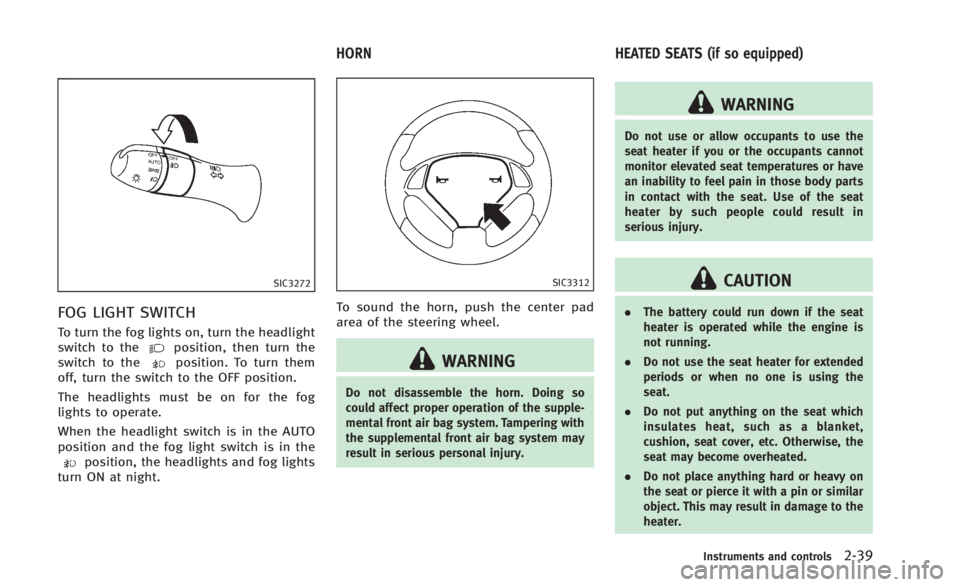
FOG LIGHT SWITCH
To turn the fog lights on, turn the headlight
switch to theposition, then turn the
switch to theposition. To turn them
off, turn the switch to the OFF position.
The headlights must be on for the fog
lights to operate.
When the headlight switch is in the AUTO
position and the fog light switch is in the
position, the headlights and fog lights
turn ON at night.
SIC3312
To sound the horn, push the center pad
area of the steering wheel.
WARNING
Do not disassemble the horn. Doing so
could affect proper operation of the supple-
mental front air bag system. Tampering with
the supplemental front air bag system may
result in serious personal injury.
WARNING
Do not use or allow occupants to use the
seat heater if you or the occupants cannot
monitor elevated seat temperatures or have
an inability to feel pain in those body parts
in contact with the seat. Use of the seat
heater by such people could result in
serious injury.
CAUTION
. The battery could run down if the seat
heater is operated while the engine is
not running.
. Do not use the seat heater for extended
periods or when no one is using the
seat.
. Do not put anything on the seat which
insulates heat, such as a blanket,
cushion, seat cover, etc. Otherwise, the
seat may become overheated.
. Do not place anything hard or heavy on
the seat or pierce it with a pin or similar
object. This may result in damage to the
heater.
Instruments and controls2-39
HORN HEATED SEATS (if so equipped)
Page 110 of 466

SIC4040
The climate controlled seat warms up or
cools down the front seats by blowing
warm or cool air from the surface of the
seat. The switches located on the center
console can be operated independently of
each other.
The surface temperature of the climate
controlled seats is automatically controlled
at an optimum temperature. However,
adjust the temperature using the control
knob if the seats are too hot or cold.
1. Start the engine.
2. Turn the control knob
*Ato the heat
side
*1or to the cool side*2. The
indicator light
*Bon the control knob will illuminate.
3. Adjust the desired amount of the air using the control knob
*A.
4. When the vehicle’s interior is warmed or cooled, and/or before you leave the
vehicle, be sure to turn the control
knob to the OFF position (center). The
indicator light
*Bon the control knob
goes off at the OFF position.
To check the air filter for the climate
controlled seat, contact an INFINITI
retailer.
WARNING
Do not use or allow occupants to use the
climate controlled seats if you or the
occupants cannot monitor seat tempera-
tures or have an inability to feel pain in
those body parts in contact with the seat.
Use of the climate controlled seats by such
people could result in serious injury.
CAUTION
. Do not place objects in front of the
intake inlet located behind the front seat. Doing so could cause improper
operation or interruption of the opera-
tion.
. The battery could run down if the climate
controlled seat is operated while the
engine is not running.
. Do not use the climate controlled seat
for extended periods or when no one is
using the seat.
. Do not put anything on the seat which
insulates heat, such as a blanket,
cushion, seat cover, etc. Otherwise, the
seat may become overheated.
. Do not place anything hard or heavy on
the seat or pierce it with a pin or similar
object. This may result in damage to the
climate controlled seat.
. Any liquid spilled on the seat should be
removed immediately with a dry cloth.
. The climate controlled seat has air
filters. Do not operate the climate con-
trolled seat without the air filters. This
may result in damage to the system.
. When cleaning the seat, never use
gasoline, thinner, or any similar materi-
als.
Instruments and controls2-41
CLIMATE CONTROLLED SEATS (if so
equipped)
Page 116 of 466

SIC3469
GLOVE BOX
WARNING
Keep glove box lid closed while driving to
help prevent injury in an accident or a
sudden stop.
To open the glove box, pull the handle*1.
To close, push the lid in until the lock
latches.
To lock
*2/unlock*3the glove box, use
the mechanical key. For the mechanical key
usage, see “Keys”(P.3-3).
SIC4363
Automatic transmission models
SIC4174
Manual transmission models
CONSOLE BOX
To open the console boxes, push the knob
*Aand pull up the lid.
To close, push the lid down until latched.
The inner tray (if so equipped) can be
moved to the front or rear position.
Instruments and controls2-47
Page 118 of 466

POWER WINDOWS
WARNING
.Make sure that all passengers have their
hands, etc. inside the vehicle while it is
in motion and before closing the win-
dows. Use the window lock switch to
prevent unexpected use of the power
windows.
. Do not leave children unattended inside
the vehicle. They could unknowingly
activate switches or controls and be-
come trapped in the window. Unat-
tended children could become involved
in serious accidents.
The power windows operate when the
ignition switch is in the ON position or for
about 45 seconds after the ignition switch
is pushed to the OFF position. If the
driver’ s or front passenger’ s door is
opened during this period of about 45
seconds, power to the windows is can-
celed.
SIC3279
1. Driver side window
2. Front passenger side window
3. Rear left passenger side window
4. Rear right passenger side window
5. Window lock button
Main power window switch (driver’s
side)
To open or close the window, push down
*Aor pull up*Bthe switch and hold it.
The main switch (driver side switches) will
open or close all the windows.
Locking passengers’ windows
When the lock button*Cis pushed in, only
the driver side window can be opened or
closed. Push it in again to cancel.
Instruments and controls2-49
WINDOWS
Page 119 of 466

2-50Instruments and controls
SIC3241
Passenger side power window
switch
The passenger side switch will open or
close only the corresponding window. To
open or close the window, push down or
pull up the switch and hold it.
SIC3289
Automatic operation (for front door
windows)
To fully open or close the window, com-
pletely push down or pull up the switch
and release it; it need not be held. The
window will automatically open or close all
the way. To stop the window, just push or
lift the switch in the opposite direction.
A light push or pull on the switch will cause
the window to open or close until the
switch is released.
The rear window automatic operation is for
the opening function only.
Simultaneous operation of all four
windows
WARNING
Make sure that all passengers have their
hands, etc. inside the vehicle before closing
the windows.
When the driver’s and passenger’s door
window switches are pushed down or
pulled up simultaneously, all four windows
are opened or closed.
Auto reverse function
WARNING
There are some small distances immediately
before the closed position which cannot be
detected. Make sure that all passengers
have their hands, etc., inside the vehicle
before closing the window.
If the control unit detects something
caught in the window as it is closing, the
window will be immediately lowered.
The auto reverse function can be activated
Page 123 of 466

2-54Instruments and controls
The HomeLink®Universal Transceiver pro-
vides a convenient way to consolidate the
functions of up to three individual hand-
held transmitters into one built-in device.
HomeLink
®Universal Transceiver:
. Will operate most Radio Frequency (RF)
devices such as garage doors, gates,
home and office lighting, entry door
locks and security systems.
. Is powered by your vehicle’s battery. No
separate batteries are required. If the
vehicle’s battery is discharged or is
disconnected, HomeLink
®will retain all
programming.
When the HomeLink
®Universal Transcei-
ver is programmed, retain the original
transmitter for future programming proce-
dures (Example: new vehicle purchases).
Upon sale of the vehicle, the programmed
HomeLink
®Universal Transceiver buttons
should be erased for security purposes.
For additional information, refer to “Pro-
gramming HomeLink
®” (P.2-54).
WARNING
. Do not use the HomeLink®Universal
Transceiver with any garage door opener
that lacks safety stop and reverse features as required by federal safety
standards. (These standards became
effective for opener models manufac-
tured after April 1, 1982). A garage door
opener which cannot detect an object in
the path of a closing garage door and
then automatically stop and reverse,
does not meet current federal safety
standards. Using a garage door opener
without these features increases the risk
of serious injury or death.
. During the programming procedure your
garage door or security gate will open
and close (if the transmitter is within
range). Make sure that people or objects
are clear of the garage door, gate, etc.
that you are programming.
. Your vehicle’s engine should be turned
off while programming the HomeLink
®
Universal Transceiver. Do not breathe
exhaust gases; they contain colorless
and odorless carbon monoxide. Carbon
monoxide is dangerous. It can cause
unconsciousness or death.
PROGRAMMING HomeLink®
If you have any questions or are having
difficulty programming your HomeLink®
buttons, refer to the HomeLink®web site
at: www.homelink.com or call 1-800-355-
3515.
NOTE:
It is also recommended that a new battery
be placed in the hand-held transmitter of
the device being programmed to
HomeLink
®for quicker programming and
accurate transmission of the radio-fre-
quency.
1. Position the end of your hand-held transmitter 1 - 3 in (26 - 76 mm) away
from the HomeLink
®surface, keeping
the HomeLink®indicator light*1in
view.
HomeLink®UNIVERSAL TRANSCEIVER (if so
equipped)
Page 128 of 466
3 Pre-driving checks and adjustments
Keys.................................................................... 3-3
Intelligent Key ................................................. 3-3
Valet hand-off.................................................. 3-4
Doors .................................................................. 3-5 Locking with mechanical key ........................... 3-5
Opening and closing windows with the
mechanical key................................................ 3-5
Locking with inside lock knob ......................... 3-6
Locking with power door lock switch ............... 3-6
Automatic door locks....................................... 3-6
Intelligent Key system ......................................... 3-7 Intelligent Key operating range ........................ 3-9
Door locks/unlocks precaution ........................ 3-9
Intelligent Key operation ............................... 3-10
Battery saver system ..................................... 3-12
Warning signals............................................. 3-12
Troubleshooting guide ................................... 3-13
Remote keyless entry system............................. 3-14 How to use remote keyless entry system....... 3-14
Hood ................................................................. 3-17
Retractable hard top .......................................... 3-18 Before operating the retractable hard top ...... 3-18
When operating the retractable hard top ....... 3-20
Indicators for the retractable hard top ........... 3-22
Opening the retractable hard top .................. 3-23 Closing the retractable hard top .................. 3-24
If the retractable hard top does not open or
close electrically .......................................... 3-24
Operating the retractable hard top using the
Intelligent Key (if so equipped) .................... 3-25
Initializing of the retractable hard top.......... 3-25
Troubleshooting guide ................................. 3-26
Trunk lid ........................................................... 3-28 Trunk lid release switch ............................... 3-28
Trunk open request switch ........................... 3-28
Auto closure ................................................ 3-29
Trunk release power cancel switch ............... 3-29
Interior trunk lid release .............................. 3-30
Unique rear parts (INFINITI Performance
Line model) ....................................................... 3-30
Fuel-filler door................................................... 3-31 Opening the fuel-filler door.......................... 3-31
Fuel-filler cap............................................... 3-32
Tilt/telescopic steering ...................................... 3-34 Manual operation (if so equipped) ............... 3-34
Electric operation (if so equipped) ............... 3-34
Sun visors......................................................... 3-35
Mirrors .............................................................. 3-35
Inside mirror................................................ 3-35
Outside mirrors............................................ 3-36
Page 132 of 466
WARNING
.Always have the doors locked while
driving. Along with the use of seat belts,
this provides greater safety in the event
of an accident by helping to prevent
persons from being thrown from the
vehicle. This also helps keep children
and others from unintentionally opening
the doors, and will help keep out
intruders.
. Before opening any door, always look for
and avoid oncoming traffic.
. Do not leave children unattended inside
the vehicle. They could unknowingly
activate switches or controls. Unat-
tended children could become involved
in serious accidents.
SPA2626
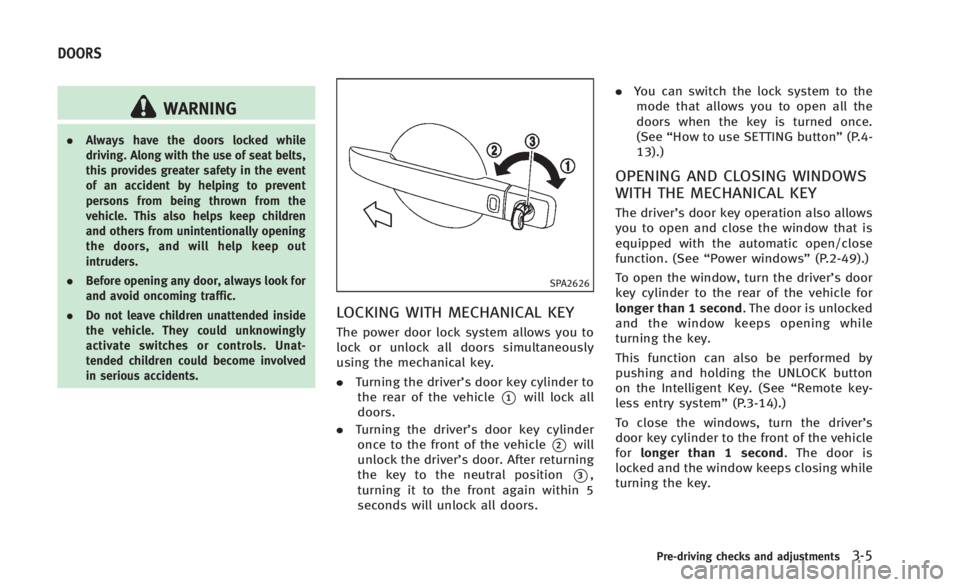
LOCKING WITH MECHANICAL KEY
The power door lock system allows you to
lock or unlock all doors simultaneously
using the mechanical key.
.Turning the driver’s door key cylinder to
the rear of the vehicle
*1will lock all
doors.
. Turning the driver’s door key cylinder
once to the front of the vehicle
*2will
unlock the driver’s door. After returning
the key to the neutral position
*3,
turning it to the front again within 5
seconds will unlock all doors. .
You can switch the lock system to the
mode that allows you to open all the
doors when the key is turned once.
(See “How to use SETTING button” (P.4-
13).)
OPENING AND CLOSING WINDOWS
WITH THE MECHANICAL KEY
The driver’s door key operation also allows
you to open and close the window that is
equipped with the automatic open/close
function. (See “Power windows” (P.2-49).)
To open the window, turn the driver’s door
key cylinder to the rear of the vehicle for
longer than 1 second. The door is unlocked
and the window keeps opening while
turning the key.
This function can also be performed by
pushing and holding the UNLOCK button
on the Intelligent Key. (See “Remote key-
less entry system” (P.3-14).)
To close the windows, turn the driver’s
door key cylinder to the front of the vehicle
for longer than 1 second. The door is
locked and the window keeps closing while
turning the key.
Pre-driving checks and adjustments3-5
DOORS
Page 134 of 466
1. Close all doors.
2. Place the ignition switch in the ONposition.
3. Within 20 seconds of performing Step 2, push and hold the power door lock
switch to the
position (UNLOCK) for
more than 5 seconds.
4. When activated, the hazard indicator will flash twice. When deactivated, the
hazard indicator will flash once.
5. The ignition switch must be placed in the OFF and ON position again between
each setting change.
When the automatic door unlock system is
deactivated, the doors do not unlock when
the ignition switch is placed in the OFF
position. To unlock the door manually, use
the inside lock knob or the power door lock
switch (driver’s or front passenger’s side).
WARNING
. Radio waves could adversely affect
electric medical equipment. Those who
use a pacemaker should contact the
electric medical equipment manufacturer
for the possible influences before use.
. The Intelligent Key transmits radio
waves when the buttons are pushed.
The FAA advises that the radio waves
may affect aircraft navigation and com-
munication systems. Do not operate the
Intelligent Key while on an airplane.
Make sure the buttons are not operated
unintentionally when the unit is stored
during a flight.
The Intelligent Key system can operate all
the door and the trunk lid lock using the
remote controller function or pushing the
request switch on the vehicle without
taking the key out from a pocket or purse.
The operating environment and/or condi-
tions may affect the Intelligent Key system
operation.
Be sure to read the following before using
the Intelligent Key system.
CAUTION
.Be sure to carry the Intelligent Key with
you when operating the vehicle.
. Never leave the Intelligent Key in the
vehicle when you leave the vehicle.
The Intelligent Key is always communicat-
ing with the vehicle as it receives radio
waves. The Intelligent Key system trans-
mits weak radio waves. Environmental
conditions may interfere with the operation
of the Intelligent Key system under the
following operating conditions.
.When operating near a location where
strong radio waves are transmitted,
such as a TV tower, power station and
broadcasting station.
. When in possession of wireless equip-
ment, such as a cellular telephone,
transceiver, and CB radio.
. When the Intelligent Key is in contact
with or covered by metallic materials.
. When any type of radio wave remote
control is used nearby.
. When the Intelligent Key is placed near
an electric appliance such as a perso-
Pre-driving checks and adjustments3-7
INTELLIGENT KEY SYSTEM