warning INFINITI Q60 2018 Owners Manual
[x] Cancel search | Manufacturer: INFINITI, Model Year: 2018, Model line: Q60, Model: INFINITI Q60 2018Pages: 466, PDF Size: 2.47 MB
Page 167 of 466
3-26Pre-driving checks and adjustments
malfunction and possible injury. It
could also cause the Malfunction
Indicator Light (MIL) to come on.
.Never pour fuel into the throttle body
to attempt to start your vehicle.
.Do not fill a portable fuel container in
the vehicle or trailer. Static electricity
can cause an explosion of flammable
liquid, vapor or gas in any vehicle or
trailer. To reduce the risk of serious
injury or death when filling portable
fuel containers:
— Always place the container on the
ground when filling.
— Do not use electronic devices
when filling.
— Keep the pump nozzle in contact
with the container while you are
filling it.
— Use only approved portable fuel
containers for flammable liquid.
CAUTION
.If fuel is spilled on the vehicle body,
flush it away with water to avoid
paint damage..Insert the cap straight into the fuel-
filler tube, then tighten the fuel-filler
cap until a single click is heard. Failure
to tighten the fuel-filler cap properly
may cause the
Malfunction In-
dicator Light (MIL) to illuminate. If
the
light illuminates because the
fuel-filler cap is loose or missing,
tighten or install the cap and con-
tinue to drive the vehicle. The
light should turn off after a few
driving trips. If thelight does
not turn off after a few driving trips,
have the vehicle inspected. It is
recommended you visit an INFINITI
retailer for this service.
.The Loose Fuel Cap warning will
appear if the fuel-filler cap is not
properly tightened. It may take a few
driving trips for the warning to be
displayed. Failure to tighten the fuel-
filler cap properly after the Loose
Fuel Cap warning appears may cause
the
Malfunction Indicator Light
(MIL) to illuminate.
.For additional information, see “Mal-
function Indicator Light (MIL)” (P.2-
19).
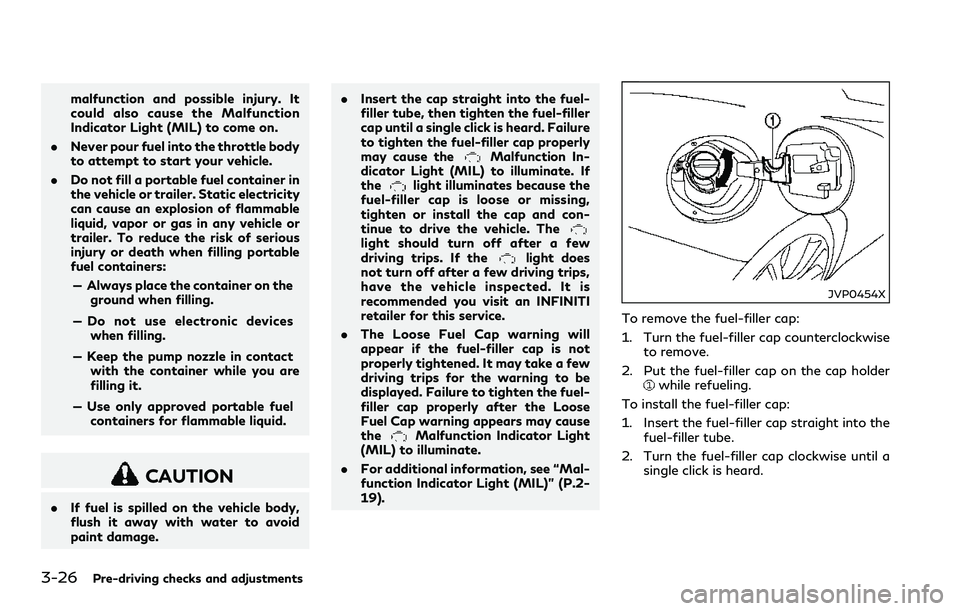
JVP0454X
To remove the fuel-filler cap:
1. Turn the fuel-filler cap counterclockwise
to remove.
2. Put the fuel-filler cap on the cap holder
while refueling.
To install the fuel-filler cap:
1. Insert the fuel-filler cap straight into the
fuel-filler tube.
2. Turn the fuel-filler cap clockwise until a
single click is heard.
Page 168 of 466
JVP0455X
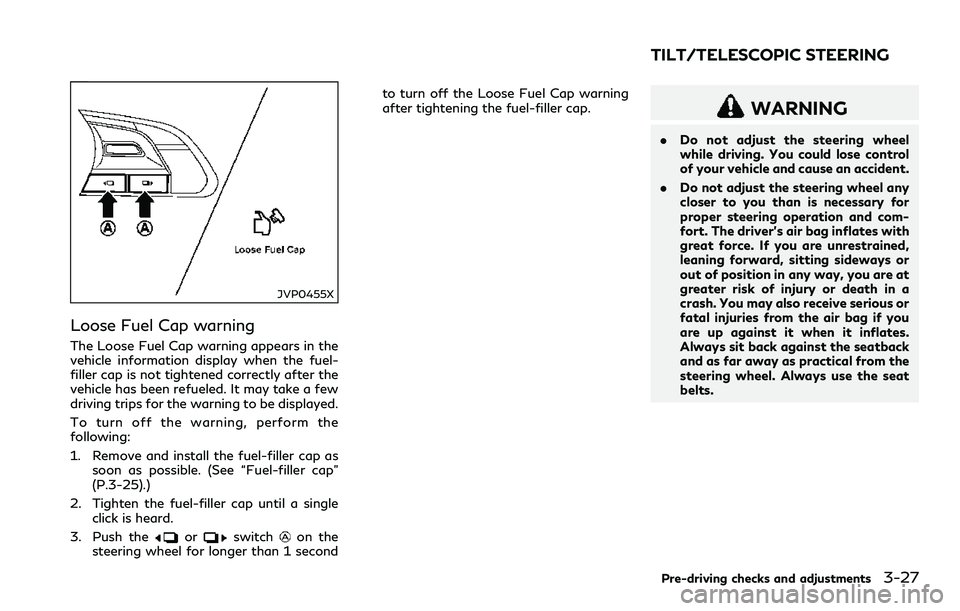
Loose Fuel Cap warning
The Loose Fuel Cap warning appears in the
vehicle information display when the fuel-
filler cap is not tightened correctly after the
vehicle has been refueled. It may take a few
driving trips for the warning to be displayed.
To turn off the warning, perform the
following:
1. Remove and install the fuel-filler cap as
soon as possible. (See “Fuel-filler cap”
(P.3-25).)
2. Tighten the fuel-filler cap until a single
click is heard.
3. Push the
orswitchon the
steering wheel for longer than 1 secondto turn off the Loose Fuel Cap warning
after tightening the fuel-filler cap.
WARNING
.Do not adjust the steering wheel
while driving. You could lose control
of your vehicle and cause an accident.
.Do not adjust the steering wheel any
closer to you than is necessary for
proper steering operation and com-
fort. The driver’s air bag inflates with
great force. If you are unrestrained,
leaning forward, sitting sideways or
out of position in any way, you are at
greater risk of injury or death in a
crash. You may also receive serious or
fatal injuries from the air bag if you
are up against it when it inflates.
Always sit back against the seatback
and as far away as practical from the
steering wheel. Always use the seat
belts.
Pre-driving checks and adjustments3-27
TILT/TELESCOPIC STEERING
Page 170 of 466
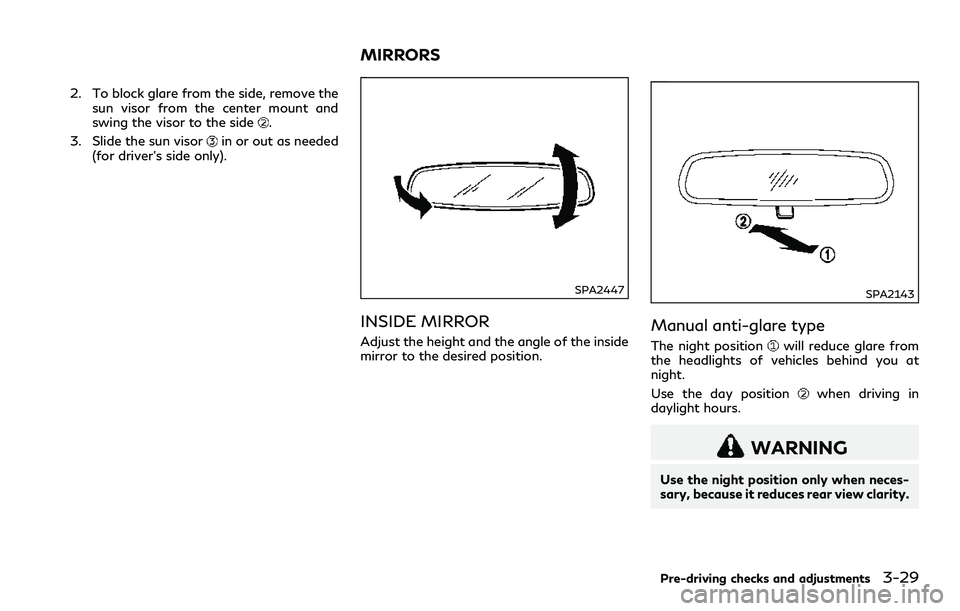
2. To block glare from the side, remove the
sun visor from the center mount and
swing the visor to the side
.
3. Slide the sun visor
in or out as needed
(for driver’s side only).
SPA2447
INSIDE MIRROR
Adjust the height and the angle of the inside
mirror to the desired position.
SPA2143
Manual anti-glare type
The night positionwill reduce glare from
the headlights of vehicles behind you at
night.
Use the day position
when driving in
daylight hours.
WARNING
Use the night position only when neces-
sary, because it reduces rear view clarity.
Pre-driving checks and adjustments3-29
MIRRORS
Page 171 of 466
3-30Pre-driving checks and adjustments
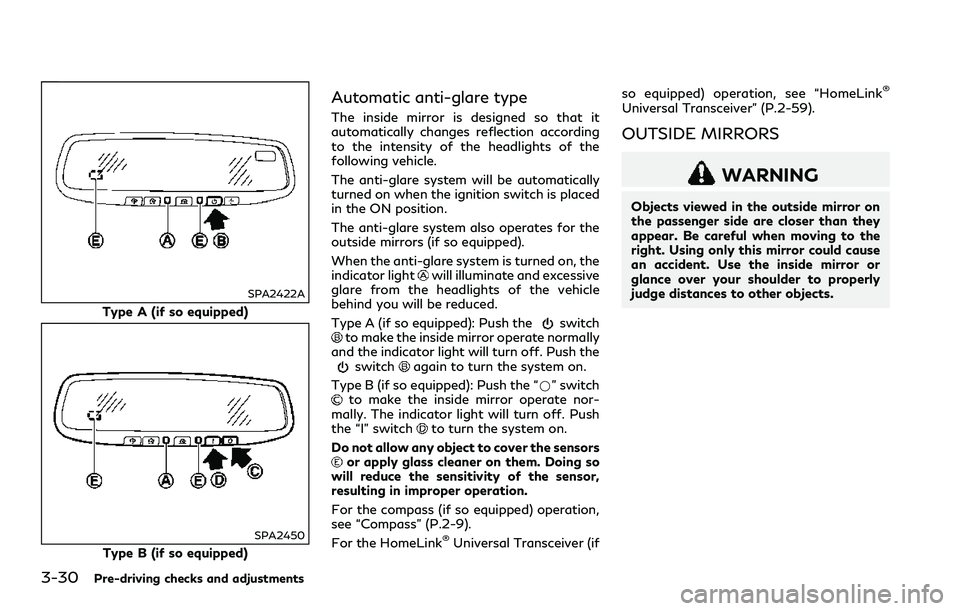
SPA2422A
Type A (if so equipped)
SPA2450
Type B (if so equipped)
Automatic anti-glare type
The inside mirror is designed so that it
automatically changes reflection according
to the intensity of the headlights of the
following vehicle.
The anti-glare system will be automatically
turned on when the ignition switch is placed
in the ON position.
The anti-glare system also operates for the
outside mirrors (if so equipped).
When the anti-glare system is turned on, the
indicator light
will illuminate and excessive
glare from the headlights of the vehicle
behind you will be reduced.
Type A (if so equipped): Push the
switchto make the inside mirror operate normally
and the indicator light will turn off. Push the
switchagain to turn the system on.
Type B (if so equipped): Push the “*” switch
to make the inside mirror operate nor-
mally. The indicator light will turn off. Push
the “I” switch
to turn the system on.
Do not allow any object to cover the sensors
or apply glass cleaner on them. Doing so
will reduce the sensitivity of the sensor,
resulting in improper operation.
For the compass (if so equipped) operation,
see “Compass” (P.2-9).
For the HomeLink
®Universal Transceiver (ifso equipped) operation, see “HomeLink
®
Universal Transceiver” (P.2-59).
OUTSIDE MIRRORS
WARNING
Objects viewed in the outside mirror on
the passenger side are closer than they
appear. Be careful when moving to the
right. Using only this mirror could cause
an accident. Use the inside mirror or
glance over your shoulder to properly
judge distances to other objects.
Page 178 of 466
WINDOW ANTENNA
The antenna pattern is printed inside the
rear window.
CAUTION
.Do not place metalized film near the
rear window glass or attach any
metal parts to it. This may cause poor
reception or noise.
.When cleaning the inside of the rear
window, be careful not to scratch or
damage the rear window antenna.
Lightly wipe along the antenna with
a dampened soft cloth.
JVH0641X
SATELLITE ANTENNA
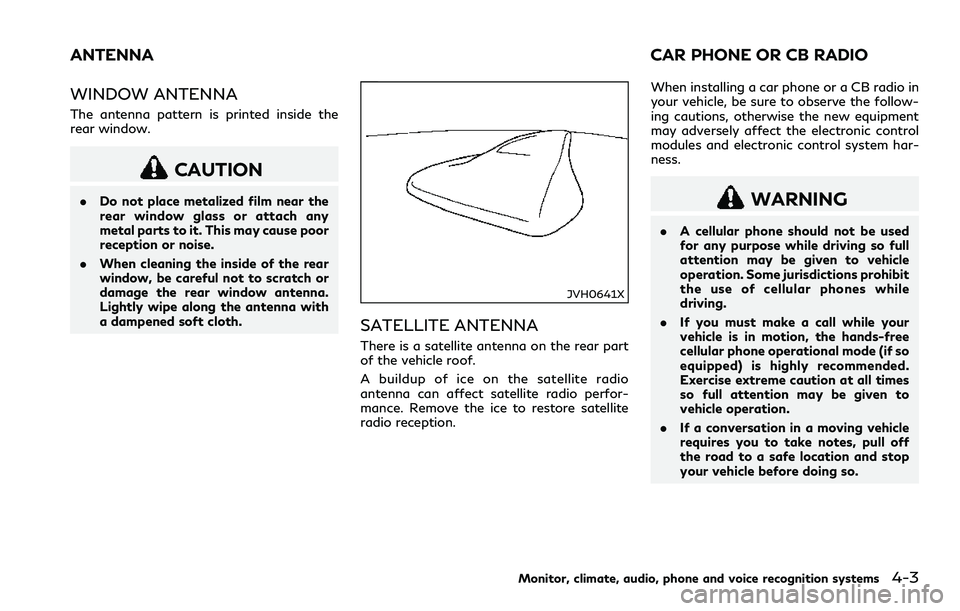
There is a satellite antenna on the rear part
of the vehicle roof.
A buildup of ice on the satellite radio
antenna can affect satellite radio perfor-
mance. Remove the ice to restore satellite
radio reception.When installing a car phone or a CB radio in
your vehicle, be sure to observe the follow-
ing cautions, otherwise the new equipment
may adversely affect the electronic control
modules and electronic control system har-
ness.
WARNING
.A cellular phone should not be used
for any purpose while driving so full
attention may be given to vehicle
operation. Some jurisdictions prohibit
the use of cellular phones while
driving.
.If you must make a call while your
vehicle is in motion, the hands-free
cellular phone operational mode (if so
equipped) is highly recommended.
Exercise extreme caution at all times
so full attention may be given to
vehicle operation.
.If a conversation in a moving vehicle
requires you to take notes, pull off
the road to a safe location and stop
your vehicle before doing so.
Monitor, climate, audio, phone and voice recognition systems4-3
ANTENNA CAR PHONE OR CB RADIO
Page 180 of 466
5 Starting and driving
Precautions when starting and driving........................ 5-4
Exhaust gas (carbon monoxide)............................... 5-4
Three-way catalyst...................................................... 5-5
Tire Pressure Monitoring System (TPMS) ............ 5-5
Avoiding collision and rollover.................................. 5-9
Off-road recovery ........................................................ 5-9
Rapid air pressure loss.............................................. 5-10
Drinking alcohol/drugs and driving....................... 5-10
Intelligent All-Wheel Drive (AWD) driving
safety precautions (AWD models)......................... 5-11
Push-button ignition switch ......................................... 5-11
Operating range for engine start function.......... 5-12
Push-button ignition switch operation................ 5-12
Push-button ignition switch positions ................. 5-13
Emergency engine shut off...................................... 5-13
Intelligent Key battery discharge........................... 5-14
Before starting the engine ............................................ 5-14
Starting the engine.......................................................... 5-15
Remote start (if so equipped) ................................. 5-15
Driving the vehicle ........................................................... 5-16
Automatic Transmission (AT).................................. 5-16
Parking brake.................................................................... 5-21
INFINITI Drive Mode Selector ..................................... 5-22
STANDARD mode...................................................... 5-22
SPORT+ mode (if so equipped) .............................. 5-23SPORT mode............................................................. 5-23
SNOW mode.............................................................. 5-23
ECO mode (if so equipped) ................................... 5-23
PERSONAL mode.................................................... 5-25
Active Lane Control (if so equipped)......................... 5-26
Active Lane Control operation............................. 5-28
Turning Active Lane Control ON/OFF.............. 5-29
How to enable/disable Active Lane Control.... 5-30
Active Lane Control limitations............................ 5-31
System temporarily unavailable ........................... 5-32
System malfunction................................................. 5-32
System maintenance ............................................... 5-33
Lane Departure Warning (LDW) system/Lane
Departure Prevention (LDP) (if so equipped).......... 5-34
LDW system operation........................................... 5-35
How to enable/disable the LDW system.......... 5-36
LDP system operation ............................................ 5-36
Turning the LDP system ON/OFF ..................... 5-37
How to enable/disable the LDP system ........... 5-38
LDW/LDP system limitations .............................. 5-38
System temporarily unavailable ........................... 5-39
System malfunction................................................ 5-40
System maintenance .............................................. 5-40
Blind Spot Warning (BSW) (if so equipped) ............ 5-41
BSW system operation........................................... 5-43
Page 181 of 466
How to enable/disable the BSW system............ 5-43
BSW system limitations............................................ 5-43
BSW driving situations ............................................ 5-44
System temporarily unavailable ............................. 5-47
System malfunction ................................................... 5-47
System maintenance................................................. 5-48
Blind Spot Intervention
®(BSI) (if so equipped)....... 5-49
BSI system operation ............................................... 5-50
Turning the BSI system ON/OFF ......................... 5-52
How to enable/disable the BSI system ............... 5-52
BSI system limitations............................................... 5-52
BSI driving situations................................................. 5-54
System temporarily unavailable ............................. 5-59
System malfunction ................................................... 5-59
System maintenance................................................. 5-60
Back-up Collision Intervention (BCI) (if
so equipped) ...................................................................... 5-61
BCI system operation................................................ 5-63
Turning the BCI system ON/OFF......................... 5-66
How to enable/disable the BCI system............... 5-67
BCI system limitations .............................................. 5-68
System temporarily unavailable ............................. 5-69
System malfunction ................................................... 5-70
System maintenance.................................................. 5-70
Cruise control (if so equipped) ..................................... 5-71
Precautions on cruise control ................................. 5-71
Cruise control operations......................................... 5-72Intelligent Cruise Control (ICC) (if so equipped)..... 5-73
How to select the cruise control mode.............. 5-75
Vehicle-to-vehicle distance control mode......... 5-75
Conventional (fixed speed) cruise
control mode............................................................. 5-90
Distance Control Assist (DCA) (if so equipped)...... 5-94
DCA system operation............................................ 5-96
Turning the DCA system ON/OFF..................... 5-99
How to enable/disable the DCA system........ 5-100
DCA system display and indicators.................. 5-100
DCA system limitations ....................................... 5-101
System temporarily unavailable ........................ 5-103
System malfunction.............................................. 5-104
System maintenance ............................................ 5-104
Forward Emergency Braking (FEB) with
pedestrian detection system (if so equipped) ...... 5-105
FEB with pedestrian detection
system operation................................................... 5-106
Turning the FEB with pedestrian detection
system ON/OFF.................................................... 5-108
FEB with pedestrian detection
system limitations.................................................. 5-109
System temporarily unavailable ......................... 5-112
System malfunction............................................... 5-113
System maintenance ............................................. 5-114
Predictive Forward Collision Warning (PFCW)
(if so equipped)............................................................... 5-115
PFCW system operation...................................... 5-117
Page 183 of 466
5-4Starting and driving
WARNING
.Do not leave children or adults who
would normally require the support
of others alone in your vehicle. Pets
should not be left alone either. They
could accidentally injure themselves
or others through inadvertent opera-
tion of the vehicle. Also, on hot,
sunny days, temperatures in a closed
vehicle could quickly become high
enough to cause severe or possibly
fatal injuries to people or animals.
.Closely supervise children when they
are around cars to prevent them from
playing and becoming locked in the
trunk where they could be seriously
injured. Keep the car locked, with the
rear seatback and trunk lid securely
latched when not in use, and prevent
children’s access to car keys.
EXHAUST GAS (carbon monoxide)
WARNING
.Do not breathe exhaust gases; they
contain colorless and odorless carbon
monoxide. Carbon monoxide is dan-
gerous. It can cause unconsciousness
or death.
.If you suspect that exhaust fumes are
entering the vehicle, drive with all
windows fully open, and have the
vehicle inspected immediately.
.Do not run the engine in closed spaces
such as a garage.
.Do not park the vehicle with the
engine running for any extended
length of time.
.Keep the trunk lid closed while driv-
ing, otherwise exhaust gases could be
drawn into the passenger compart-
ment. If you must drive with the
trunk lid open, follow these precau-
tions:
1) Open all the windows.
2) Set the air recirculation to off and
the fan control to high to circulate
the air..If electrical wiring or other cable
connections must pass to a trailer
through the seal on the trunk lid or
the body, follow the manufacturer’s
recommendation to prevent carbon
monoxide entry into the vehicle.
.The exhaust system and body should
be inspected by a qualified mechanic
whenever:
— The vehicle is raised for service.
— You suspect that exhaust fumes
are entering into the passenger
compartment.
— You notice a change in the sound
of the exhaust system.
— You have had an accident invol-
ving damage to the exhaust sys-
tem, underbody, or rear of the
vehicle.
PRECAUTIONS WHEN STARTING
AND DRIVING
Page 184 of 466

THREE-WAY CATALYST
The three-way catalyst is an emission con-
trol device installed in the exhaust system.
Exhaust gases in the three-way catalyst are
burned at high temperatures to help reduce
pollutants.
WARNING
.The exhaust gas and the exhaust
system are very hot. Keep people,
animals or flammable materials away
from the exhaust system compo-
nents.
.Do not stop or park the vehicle over
flammable materials such as dry
grass, waste paper or rags. They
may ignite and cause a fire.
CAUTION
.Do not use leaded gasoline. Deposits
from leaded gasoline seriously reduce
the three-way catalyst’s ability to
help reduce exhaust pollutants.
.Keep your engine tuned up. Malfunc-
tions in the ignition, fuel injection, or
electrical systems can cause overrichfuel flow into the three-way catalyst,
causing it to overheat. Do not keep
driving if the engine misfires, or if
noticeable loss of performance or
other unusual operating conditions
are detected. Have the vehicle in-
spected promptly. It is recommended
you visit an INFINITI retailer for this
service.
.Avoid driving with an extremely low
fuel level. Running out of fuel could
cause the engine to misfire, damaging
the three-way catalyst.
.Do not race the engine while warming
it up.
.Do not push or tow your vehicle to
start the engine.
TIRE PRESSURE MONITORING
SYSTEM (TPMS)
Each tire, including the spare (if provided),
should be checked monthly when cold and
inflated to the inflation pressure recom-
mended by the vehicle manufacturer on the
vehicle placard or tire inflation pressure
label. (If your vehicle has tires of a different
size than the size indicated on the vehicle
placard or tire inflation pressure label, you
should determine the proper tire inflation
pressure for those tires.)As an added safety feature, your vehicle has
been equipped with a Tire Pressure Mon-
itoring System (TPMS) that illuminates a low
tire pressure telltale when one or more of
your tires is significantly under-inflated.
Accordingly, when the low tire pressure
telltale illuminates, you should stop and
check your tires as soon as possible, and
inflate them to the proper pressure. Driving
on a significantly under-inflated tire causes
the tire to overheat and can lead to tire
failure. Under-inflation also reduces fuel
efficiency and tire tread life, and may affect
the vehicle’s handling and stopping ability.
For models with run-flat tires, if the vehicle
is being driven with one or more flat tires,
the low tire pressure warning light will
illuminate continuously and a chime will
sound for 10 seconds. The flat tire warning
will also appear in the vehicle information
display. The chime will only sound at the first
indication of a flat tire, and the warning light
will illuminate continuously. When the flat
tire warning is activated, it is recommended
you have the system reset and the tire
checked and replaced if necessary by an
INFINITI retailer. Even if the tire is inflated
to the specified COLD tire pressure, the
warning light will continue to illuminate until
the system is reset by an INFINITI retailer.
Your vehicle can be driven for a limited time
on a flat tire. See “Run-flat tires” (P.8-39).
Starting and driving5-5
Page 185 of 466
5-6Starting and driving
Please note that the TPMS is not a sub-
stitute for proper tire maintenance, and it is
the driver’s responsibility to maintain correct
tire pressure, even if under-inflation has not
reached the level to trigger illumination of
the TPMS low tire pressure telltale.
Your vehicle has also been equipped with a
TPMS malfunction indicator to indicate
when the system is not operating properly.
The TPMS malfunction indicator is com-
bined with the low tire pressure telltale.
When the system detects a malfunction, the
telltale will flash for approximately one
minute and then remain continuously illumi-
nated. This sequence will continue upon
subsequent vehicle start-ups as long as the
malfunction exists. When the malfunction
indicator is illuminated, the system may not
be able to detect or signal low tire pressure
as intended. TPMS malfunctions may occur
for a variety of reasons, including the
installation of replacement or alternate tires
or wheels on the vehicle that prevent the
TPMS from functioning properly. Always
check the TPMS malfunction telltale after
replacing one or more tires or wheels on your
vehicle to ensure that the replacement or
alternate tires and wheels allow the TPMS
to continue to function properly.Additional information
.Since the spare tire (if so equipped) is not
equipped with the TPMS, the TPMS
does not monitor the tire pressure of
the spare tire.
.The TPMS will activate only when the
vehicle is driven at speeds above 16
MPH (25 km/h). Also, this system may
not detect a sudden drop in tire pressure
(for example a flat tire while driving).
.The low tire pressure warning light does
not automatically turn off when the tire
pressure is adjusted. After the tire is
inflated to the recommended pressure,
the vehicle must be driven at speeds
above 16 MPH (25 km/h) to activate the
TPMS and turn off the low tire pressure
warning light. Use a tire pressure gauge
to check the tire pressure.
.The “Tire Pressure Low - Add Air”
warning appears in the vehicle informa-
tion display when the low tire pressure
warning light is illuminated and low tire
pressure is detected. The “Tire Pressure
Low - Add Air” warning turns off when
the low tire pressure warning light turns
off.
The “Tire Pressure Low - Add Air”
warning does not appear if the low tire
pressure warning light illuminates to
indicate a TPMS malfunction..The “Flat Tire - Visit dealer” warning (if
so equipped) appears in the vehicle
information display when the low tire
pressure warning light is illuminated and
one or more flat tires are detected.
.Tire pressure rises and falls depending on
the heat caused by the vehicle’s opera-
tion and the outside temperature. Do not
reduce the tire pressure after driving
because the tire pressure rises after
driving. Low outside temperature can
lower the temperature of the air inside
the tire which can cause a lower tire
inflation pressure. This may cause the
low tire pressure warning light to illumi-
nate. If the warning light illuminates in
low ambient temperature, check the tire
pressure for all four tires.
.You can also check the pressure of all
tires (except the spare tire) in the vehicle
information display. (See “Vehicle infor-
mation display” (P.2-21).)
.After the ignition switch is placed in the
ON position, it may take a period of time
for the tire pressure to be displayed while
the vehicle is driven. Depending on the
radio wave circumstance, tire pressure
may not correctly be displayed.
For additional information, see “Low tire
pressure warning light” (P.2-14) and “Tire
Pressure Monitoring System (TPMS)” (P.6-
3).