FEB INFINITI Q60 2019 User Guide
[x] Cancel search | Manufacturer: INFINITI, Model Year: 2019, Model line: Q60, Model: INFINITI Q60 2019Pages: 468, PDF Size: 2.18 MB
Page 184 of 468
Blind Spot Warning (BSW) (if so equipped) ............ 5-41BSW system operation ............................................ 5-43
How to enable/disable the BSW system ........... 5-43
BSW system limitations .......................................... 5-43
BSW driving situations ........................................... 5-44
System temporarily unavailable ............................ 5-47
System malfunction .................................................. 5-47
System maintenance ............................................... 5-48
Blind Spot Intervention
®(BSI) (if so equipped) ...... 5-49
BSI system operation .............................................. 5-50
Turning the BSI system ON/OFF ........................ 5-52
How to enable/disable the BSI system .............. 5-53
BSI system limitations ............................................. 5-53
BSI driving situations ............................................... 5-55
System temporarily unavailable ............................ 5-59
System malfunction ................................................. 5-60
System maintenance ............................................... 5-60
Back-up Collision Intervention (BCI) (if
so equipped) ..................................................................... 5-61 BCI system operation .............................................. 5-63
Turning the BCI system ON/OFF ........................ 5-67
How to enable/disable the BCI system ............. 5-67
BCI system limitations ............................................. 5-68
System temporarily unavailable ............................ 5-69
System malfunction .................................................. 5-70
System maintenance ................................................ 5-70
Cruise control (if so equipped) .................................... 5-71
Precautions on cruise control ................................ 5-71 Cruise control operations ..................................... 5-72
Intelligent Cruise Control (ICC) (if so equipped) .... 5-73 How to select the cruise control mode ............. 5-75
Vehicle-to-vehicle distance control mode ....... 5-75
Conventional (fixed speed) cruise
control mode ........................................................... 5-90
Distance Control Assist (DCA) (if so equipped) ..... 5-94 DCA system operation .......................................... 5-96
Turning the DCA system ON/OFF .................... 5-99
How to enable/disable the DCA system ...... 5-100
DCA system display and indicators ................ 5-100
DCA system limitations ...................................... 5-101
System temporarily unavailable ....................... 5-103
System malfunction ............................................. 5-104
System maintenance ........................................... 5-104
Forward Emergency Braking (FEB) with
pedestrian detection system (if so equipped) ..... 5-105 FEB with pedestrian detection
system operation .................................................. 5-106
Turning the FEB with pedestrian detection
system ON/OFF .................................................. 5-108
FEB with pedestrian detection
system limitations ................................................ 5-109
System temporarily unavailable ........................ 5-112
System malfunction .............................................. 5-113
System maintenance ............................................ 5-114
Predictive Forward Collision Warning (PFCW)
(if so equipped) ............................................................. 5-115 PFCW system operation ..................................... 5-117
Page 218 of 468
![INFINITI Q60 2019 User Guide 5-36Starting and driving
JVS0246X
HOW TO ENABLE/DISABLE THE
LDW SYSTEM
Perform the following steps to enable or
disable the LDW system.
1. Push the MENU button
and touch
[Driver Assistance] on the low](/img/42/41096/w960_41096-217.png "INFINITI Q60 2019 User Guide 5-36Starting and driving
JVS0246X
HOW TO ENABLE/DISABLE THE
LDW SYSTEM
Perform the following steps to enable or
disable the LDW system.
1. Push the MENU button
and touch
[Driver Assistance] on the low")
5-36Starting and driving
JVS0246X
HOW TO ENABLE/DISABLE THE
LDW SYSTEM
Perform the following steps to enable or
disable the LDW system.
1. Push the MENU button
and touch
[Driver Assistance] on the lower display.
2. Touch [Lane Assist].
3. Touch [Lane Departure Warning] to enable or disable the system.
LDP SYSTEM OPERATION
The LDP system operates above approxi-
mately 45 MPH (70 km/h) and when the
lane markings are clear.
If the vehicle approaches either the left or
right side of the traveling lane, the driver
assist system lane indicator (orange) in the
vehicle information display will blink and the
steering wheel will vibrate. Then, the LDP
system will automatically assist the driver to
return the vehicle to the center of the
traveling lane.
NOTE:
.The LDP system is not designed to work
when you operate the lane change signal
and change traveling lanes in the direc-
tion of the signal. (The LDP system will
become operable again approximately 2
seconds after the lane change signal is
turned off.)
. The LDP will not operate or will stop
operating and only a warning chime will
sound under the following conditions.
— When the steering wheel is turned as
far as necessary for the vehicle to
change lanes.
— When the accelerator pedal is de-
pressed.
— When the Intelligent Cruise Control
(ICC), Distance Control Assist (DCA), Blind Spot Intervention (BSI), Blind
Spot Warning (BSW), Predictive For-
ward Collision Warning (PFCW) or
Forward Emergency Braking (FEB)
approach warning occurs.
— When the BSI system activates.
— When the hazard warning flashers
are operated.
— When driving on a curve at a high
speed.
— When the brake pedal is depressed.
(models without Direct Adaptive
Steering)
. While the LDP system is operating, you
may hear a sound of brake operation.
This is normal and indicates that the
LDP system is operating properly.
(models without Direct Adaptive Steer-
ing)
Page 241 of 468
JVS0742X
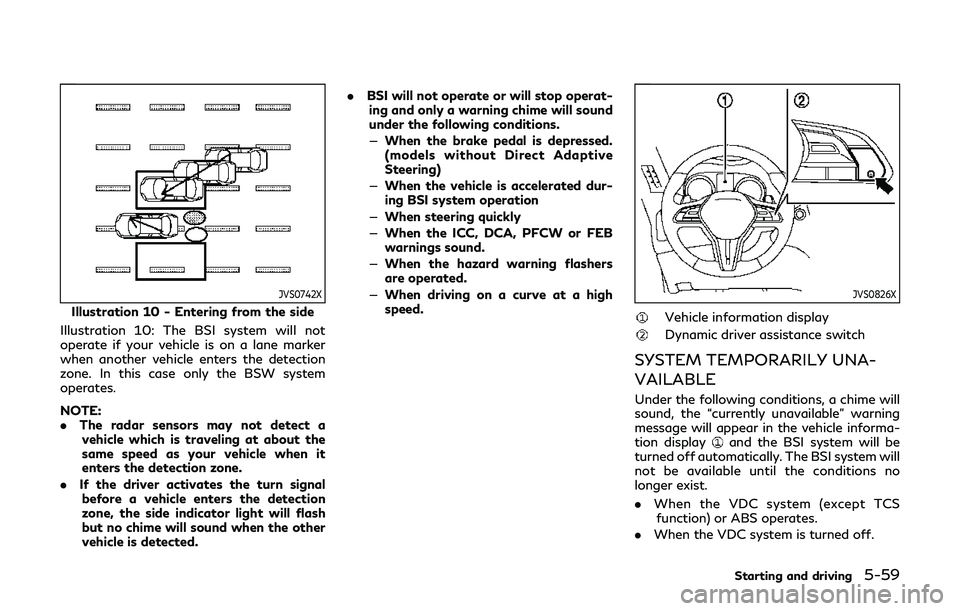
Illustration 10 - Entering from the side
Illustration 10: The BSI system will not
operate if your vehicle is on a lane marker
when another vehicle enters the detection
zone. In this case only the BSW system
operates.
NOTE:
. The radar sensors may not detect a
vehicle which is traveling at about the
same speed as your vehicle when it
enters the detection zone.
. If the driver activates the turn signal
before a vehicle enters the detection
zone, the side indicator light will flash
but no chime will sound when the other
vehicle is detected. .
BSI will not operate or will stop operat-
ing and only a warning chime will sound
under the following conditions.
— When the brake pedal is depressed.
(models without Direct Adaptive
Steering)
— When the vehicle is accelerated dur-
ing BSI system operation
— When steering quickly
— When the ICC, DCA, PFCW or FEB
warnings sound.
— When the hazard warning flashers
are operated.
— When driving on a curve at a high
speed.
JVS0826X
Vehicle information display
Dynamic driver assistance switch
SYSTEM TEMPORARILY UNA-
VAILABLE
Under the following conditions, a chime will
sound, the “currently unavailable” warning
message will appear in the vehicle informa-
tion display
and the BSI system will be
turned off automatically. The BSI system will
not be available until the conditions no
longer exist.
. When the VDC system (except TCS
function) or ABS operates.
. When the VDC system is turned off.
Starting and driving5-59
Page 287 of 468
2.This device must accept any interfer-
ence received, including interference
that may cause undesired operation.
FCC Warning
Changes or modification not expressly ap-
proved by the party responsible for com-
pliance could void the user’s authority to
operate the equipment.
For Canada:
This device complies with Industry Canada
licence-exempt RSS standard(s). Operation
is subject to the following two conditions:
1. This device may not cause interference,
and
2. This device must accept any interfer-
ence, including interference that may
cause undesired operation of the device.
WARNING
Failure to follow the warnings and
instructions for proper use of the FEB
with pedestrian detection system could
result in serious personal injury or death.
.The FEB with pedestrian detection
system is a supplemental aid to the
driver. It is not a replacement for the
driver’s attention to traffic condi-
tions or responsibility to drive safely.
It cannot prevent accidents due to
carelessness or dangerous driving
techniques.
. The FEB with pedestrian detection
system does not function in all driv-
ing, traffic, weather and road condi-
tions.
The FEB with pedestrian detection system
can assist the driver when there is a risk of a
forward collision with the vehicle ahead in
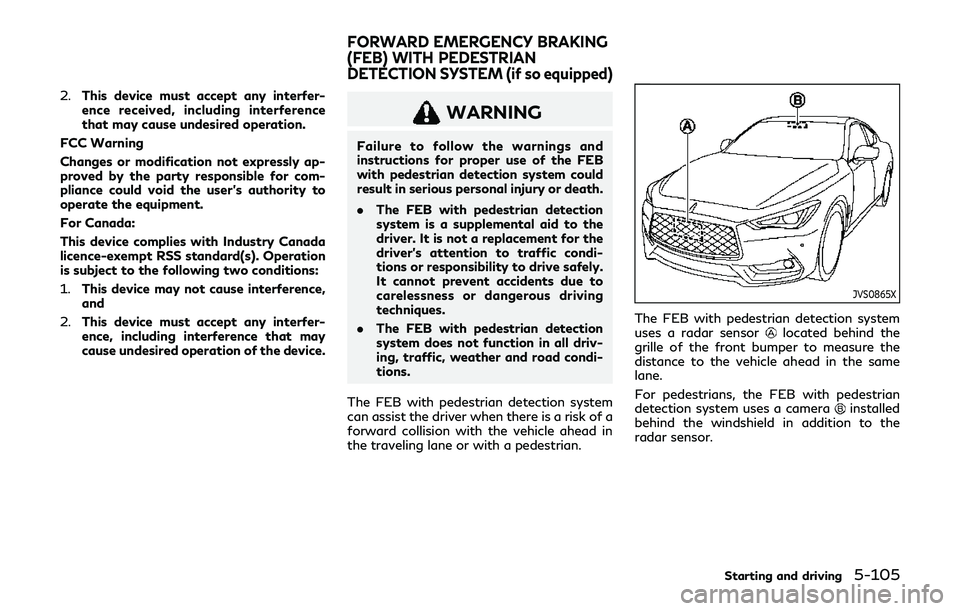
the traveling lane or with a pedestrian.
JVS0865X
The FEB with pedestrian detection system
uses a radar sensorlocated behind the
grille of the front bumper to measure the
distance to the vehicle ahead in the same
lane.
For pedestrians, the FEB with pedestrian
detection system uses a camera
installed
behind the windshield in addition to the
radar sensor.
Starting and driving5-105
FORWARD EMERGENCY BRAKING
(FEB) WITH PEDESTRIAN
DETECTION SYSTEM (if so equipped)
Page 288 of 468
5-106Starting and driving
JVS0846X
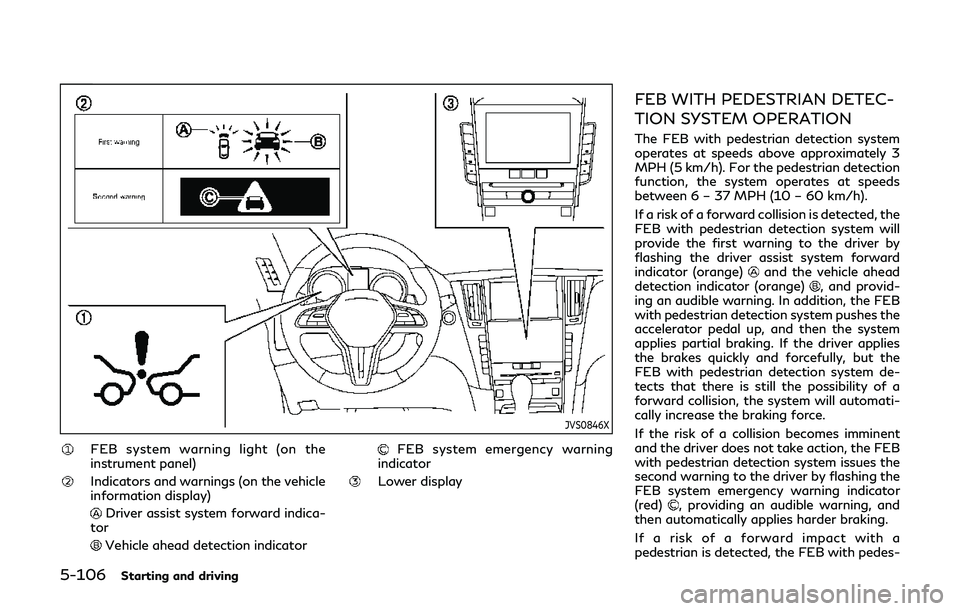
FEB system warning light (on the
instrument panel)
Indicators and warnings (on the vehicle
information display)
Driver assist system forward indica-
tor
Vehicle ahead detection indicator
FEB system emergency warning
indicator
Lower display
FEB WITH PEDESTRIAN DETEC-
TION SYSTEM OPERATION
The FEB with pedestrian detection system
operates at speeds above approximately 3
MPH (5 km/h). For the pedestrian detection
function, the system operates at speeds
between 6 – 37 MPH (10 – 60 km/h).
If a risk of a forward collision is detected, the
FEB with pedestrian detection system will
provide the first warning to the driver by
flashing the driver assist system forward
indicator (orange)
and the vehicle ahead
detection indicator (orange), and provid-
ing an audible warning. In addition, the FEB
with pedestrian detection system pushes the
accelerator pedal up, and then the system
applies partial braking. If the driver applies
the brakes quickly and forcefully, but the
FEB with pedestrian detection system de-
tects that there is still the possibility of a
forward collision, the system will automati-
cally increase the braking force.
If the risk of a collision becomes imminent
and the driver does not take action, the FEB
with pedestrian detection system issues the
second warning to the driver by flashing the
FEB system emergency warning indicator
(red)
, providing an audible warning, and
then automatically applies harder braking.
If a risk of a forward impact with a
pedestrian is detected, the FEB with pedes-
Page 289 of 468

trian detection system will provide a warning
to the driver by flashing the FEB system
emergency warning indicator (red)
, pro-
vides an audible alert and the system will
apply partial braking. If the driver applies the
brakes quickly and forcefully but the FEB
with pedestrian detection system detects
that there is still the possibility of a forward
impact with a pedestrian, the system will
automatically increase the braking force. If
the risk of collision becomes imminent and
the driver does not take action, the FEB with
pedestrian detection system automatically
applies harder braking.
NOTE:
The vehicle’s stop lights come on when any
braking is performed by the FEB with
pedestrian detection system.
Depending on vehicle speed and distance to
the vehicle or pedestrian ahead, as well as
driving and roadway conditions, the system
may help the driver avoid a forward collision
or may help mitigate the consequences of a
collision should one be unavoidable. If the
driver is handling the steering wheel, accel-
erating or braking, the FEB with pedestrian
detection system will function later or will
not function. The automatic braking will cease under the
following conditions:
.
When the steering wheel is turned to
avoid a collision.
. When the accelerator pedal is depressed.
. When there is no longer a vehicle or a
pedestrian detected ahead.
If the FEB with pedestrian detection system
has stopped the vehicle, the vehicle will
remain at a standstill for approximately 2
seconds before the brakes are released.
Starting and driving5-107
Page 290 of 468
5-108Starting and driving
JVS0847X
FEB system warning light (on the
instrument panel)
Lower display
MENU button
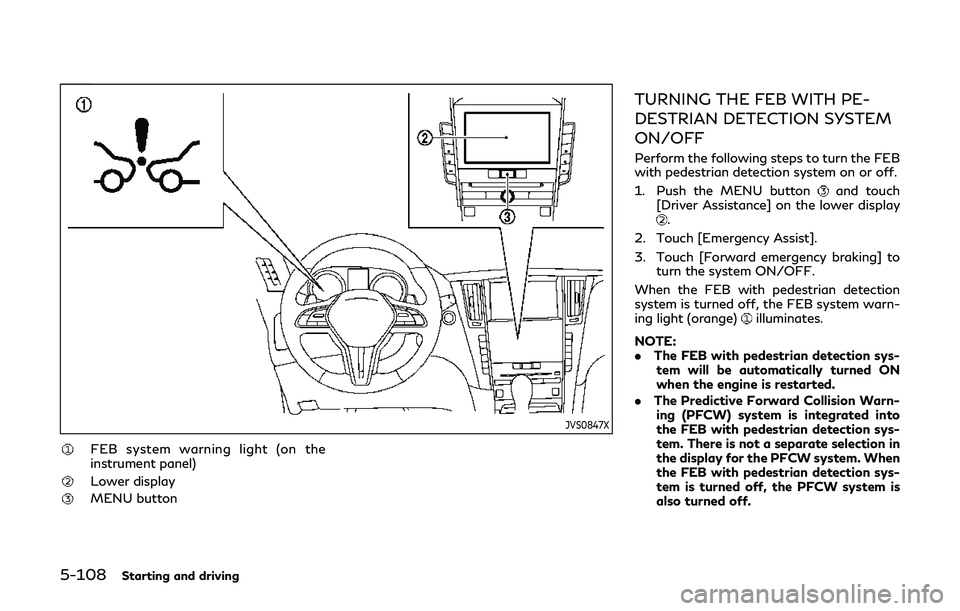
TURNING THE FEB WITH PE-
DESTRIAN DETECTION SYSTEM
ON/OFF
Perform the following steps to turn the FEB
with pedestrian detection system on or off.
1. Push the MENU button
and touch
[Driver Assistance] on the lower display
.
2. Touch [Emergency Assist].
3. Touch [Forward emergency braking] to turn the system ON/OFF.
When the FEB with pedestrian detection
system is turned off, the FEB system warn-
ing light (orange)
illuminates.
NOTE:
. The FEB with pedestrian detection sys-
tem will be automatically turned ON
when the engine is restarted.
. The Predictive Forward Collision Warn-
ing (PFCW) system is integrated into
the FEB with pedestrian detection sys-
tem. There is not a separate selection in
the display for the PFCW system. When
the FEB with pedestrian detection sys-
tem is turned off, the PFCW system is
also turned off.
Page 291 of 468
FEB WITH PEDESTRIAN DETEC-
TION SYSTEM LIMITATIONS
WARNING
Listed below are the system limitations
for the FEB with pedestrian detection
system. Failure to operate the vehicle in
accordance with these system limita-
tions could result in serious injury or
death.
.The FEB with pedestrian detection
system cannot detect all vehicles or
pedestrian under all conditions.
. The radar sensor FEB with pedes-
trian detection system does not de-
tect the following objects:
— Small pedestrians (including small children), animals and cyclists.
— Pedestrians in wheelchairs or using mobile transport such as
scooters, child-operated toys, or
skateboards.
— Pedestrians who are seated or otherwise not in a full upright
standing or walking position.
— Oncoming vehicles — Crossing vehicles
— Obstacles on the roadside
. The FEB with pedestrian detection
system has some performance limita-
tions.
— If a stationary vehicle is in the vehicle’s path, the FEB with pe-
destrian detection system will not
function when the vehicle is driven
at speeds over approximately 50
MPH (80 km/h).
— For pedestrian detection, the FEB with pedestrian detection
system will not function when
the vehicle is driven at speeds
over approximately 37 MPH (60
km/h) or below approximately 6
MPH (10km/h).
. The FEB with pedestrian detection
system will not function for pedes-
trians in darkness or in tunnels, even
if there is street lighting in the area.
. For pedestrians, the FEB with pedes-
trian detection system will not issue
the first warning and will not push
the accelerator pedal up.
. The FEB with pedestrian detection
system may not function if the vehi-
cle ahead is narrow (for example a motorcycle).
. The FEB with pedestrian detection
system may not function if speed
difference between the two vehicles
is too small.
. The radar sensor FEB with pedes-
trian detection system may not func-
tion properly or detect a vehicle
ahead in the following conditions:
— Poor visibility (conditions such as rain, snow, fog, dust storms,
sandstorms, and road spray from
other vehicles)
— Driving on a steep downhill slope or roads with sharp curves.
— Driving on a bumpy road surface, such as an uneven dirt road.
— If dirt, ice, snow or other material is covering the radar sensor area.
— Interference by other radar sources.
— The camera area of windshield is fogged up, or covered with dirt,
water drops, ice, snow, etc.
— Strong light (for example, sun- light or high beams from oncom-
ing vehicles) enters the front
camera. Strong light causes the
area around the pedestrian to be
Starting and driving5-109
Page 292 of 468

5-110Starting and driving
cast in a shadow, making it diffi-
cult to see.
— A sudden change in brightness occurs. (For example, when the
vehicle enters or exits a tunnel or a
shaded area or lightning flashes.)
— The poor contrast of a person to the background, such as having
clothing color or pattern which is
similar to the background.
— The pedestrian’s profile is par- tially obscured or unidentifiable
due to the pedestrian transport-
ing luggage, wearing bulky or very
loose-fitting clothing or acces-
sories.
. The system performance may de-
grade in the following conditions:
— The vehicle is driven on a slippery road.
— The vehicle is driven on a slope.
— Excessively heavy baggage is loaded in the rear seat or the
trunk of your vehicle.
. The system is designed to automati-
cally check the sensor (radar and
camera)’s functionality, within cer-
tain limitations. The system may not
detect blockage of sensor areas cov- ered by ice, snow or stickers, for
example. In these cases, the system
may not be able to warn the driver
properly. Be sure that you check,
clean and clear sensor areas regularly.
. In some road and traffic conditions,
the FEB with pedestrian detection
system may unexpectedly apply par-
tial braking. When acceleration is
necessary, depress the accelerator
pedal to override the system.
. Excessive noise will interfere with the
warning chime sound, and the chime
may not be heard.
Page 293 of 468

SSD0253
When driving on some roads, such as wind-
ing, hilly, curved, narrow roads, or roads
which are under construction, the radar
sensor may detect vehicles in a different
lane, or may temporarily not detect a vehicle
traveling ahead. This may cause the FEB
with pedestrian detection system to work
inappropriately.
The detection of vehicles may also be
affected by vehicle operation (steering man-
euver or traveling position in the lane, etc.) or
vehicle condition.If this occurs, the system
may warn you by blinking the system
indicator and sounding the chime unexpect-
edly. You will have to manually control the
proper distance away from the vehicle traveling ahead.
Starting and driving5-111