wheel INFINITI Q60 2019 User Guide
[x] Cancel search | Manufacturer: INFINITI, Model Year: 2019, Model line: Q60, Model: INFINITI Q60 2019Pages: 468, PDF Size: 2.18 MB
Page 93 of 468

illuminates to indicate a TPMS malfunction.
For additional information, see “Tire Pres-
sure Monitoring System (TPMS)” (P.5-5).
WARNING
.Radio waves could adversely affect
electric medical equipment. Those
who use a pacemaker should contact
the electric medical equipment man-
ufacturer for the possible influences
before use.
. If the light does not illuminate with
the ignition switch pushed ON, have
the vehicle checked as soon as possi-
ble. It is recommended you visit an
INFINITI retailer for this service.
. If the light illuminates while driving,
avoid sudden steering maneuvers or
abrupt braking, reduce vehicle speed,
pull off the road to a safe location
and stop the vehicle as soon as
possible. Driving with under-inflated
tires may permanently damage the
tires and increase the likelihood of
tire failure. Serious vehicle damage
could occur and may lead to an
accident and could result in serious
personal injury. Check the tire pres-
sure for all four tires. Adjust the tire
pressure to the recommended COLD tire pressure shown on the Tire and
Loading Information label to turn the
low tire pressure warning light OFF.
If the light still illuminates while
driving after adjusting the tire pres-
sure, a tire may be flat or the TPMS
may be malfunctioning. If you have a
flat tire, replace it with a spare tire (if
so equipped) or repair it with the
emergency tire puncture repair kit (if
so equipped) as soon as possible. If no
tire is flat and all tires are properly
inflated, it is recommended you con-
sult an INFINITI retailer.
. For models with run-flat tires,
although you can continue driving
with a punctured run-flat tire, re-
member that vehicle handling stabi-
lity is reduced, which could lead to an
accident and personal injury. Also,
driving a long distance at high speeds
may damage the tires.
— Do not drive at speeds above 50 MPH (80 km/h) and do not drive
more than approximately 93 miles
(150 km) with a punctured run-
flat tire. The actual distance the
vehicle can be driven on a flat tire
depends on outside temperature,
vehicle load, road conditions and
other factors. — If you detect any unusual sounds
or vibrations while driving with a
punctured run-flat tire, pull off
the road to a safe location and
stop the vehicle as soon as possi-
ble. The tire may be seriously
damaged and need to be replaced.
. Since the spare tire is not equipped
with the TPMS, when a spare tire is
mounted or a wheel is replaced, the
TPMS will not function and the low
tire pressure warning light will flash
for approximately 1 minute. The light
will remain on after the 1 minute.
Have your tires replaced and/or
TPMS system reset as soon as pos-
sible. It is recommended you visit an
INFINITI retailer for these services.
. Replacing tires with those not origin-
ally specified by INFINITI could affect
the proper operation of the TPMS.
CAUTION
.The TPMS is not a substitute for the
regular tire pressure check. Be sure to
check the tire pressure regularly.
. If the vehicle is being driven at speeds
of less than 16 MPH (25 km/h), the
Instruments and controls2-15
Page 94 of 468
2-16Instruments and controls
TPMS may not operate correctly.
. Be sure to install the specified size of
tires to the four wheels correctly.
Master warning light
When the ignition switch is in the ON
position, the master warning light illumi-
nates if any of the following warnings
appear in the vehicle information display:
.No key warning
. PUSH warning
. Key ID Incorrect warning
. Low washer fluid warning
. Door/trunk open warning
. Loose fuel cap warning
. Tire Pressure Low - Add Air warning
. Flat Tire - Visit dealer warning (if so
equipped)
. All-Wheel Drive (AWD) warning (if so
equipped)
. Adaptive Front lighting System (AFS)
warning (if so equipped)
. Intelligent Key system warning
. Chassis control warning
. Parking brake release warning
. SHIFT “P” warning
. Low oil pressure warning See “Vehicle information display” (P.2-20).
If the driver assist system warnings appear
in the vehicle information display, the master
warning light also illuminates. See “Lane
Departure Warning (LDW) system/Lane
Departure Prevention (LDP)” (P.5-34),
“Blind Spot Warning (BSW)” (P.5-41), “Blind
Spot Intervention®(BSI)” (P.5-49), “Back-up
Collision Intervention (BCI)” (P.5-61), “Dis-
tance Control Assist (DCA)” (P.5-94), “For-
ward Emergency Braking (FEB) with
pedestrian detection system” (P.5-105) and
“Predictive Forward Collision Warning
(PFCW)” (P.5-115).
Power steering warning light
Models with Direct Adaptive Steering :
When the ignition switch is in the ON
position, the power steering warning light
illuminates. After starting the engine, the
power steering warning light stays on for a
few seconds and turns off. This indicates
that Direct Adaptive Steering is operational.
Drive the vehicle after the power steering
warning light turns off.
If the power steering warning light illumi-
nates while driving, pull off the road to a
safe location and stop the vehicle. If the
power steering warning light turns off, you
can drive again. If the power steering
warning light continues to illuminate, it is recommended you have Direct Adaptive
Steering checked by an INFINITI retailer.
(See “Direct Adaptive Steering type” (P.5-
130).)
Models with hydraulic pump electric power
steering :
When the ignition switch is in the ON
position, the power steering warning light
illuminates. After starting the engine, the
power steering warning light turns off. This
indicates that or hydraulic pump electric
power steering is operational.
If the power steering warning light illumi-
nates while the engine is running, it may
indicate hydraulic pump electric power
steering is not functioning properly and
may need servicing. It is recommended you
have the hydraulic pump electric power
steering checked by an INFINITI retailer.
(See “Hydraulic pump electric power steering
type” (P.5-129).)
Models with electric power steering :
When the ignition switch is in the ON
position, the power steering warning light
illuminates. After starting the engine, the
power steering warning light turns off. This
indicates the electric power steering is
operational.
If the power steering warning light illumi-
nates while the engine is running, it may
Page 95 of 468

indicate the electric power steering is not
functioning properly and may need servicing.
It is recommended you have the electric
power steering checked by an INFINITI
retailer.
When the power steering warning light
illuminates with the engine running, the
power assist to the steering will cease
operation but you will still have control of
the vehicle. At this time, greater steering
efforts are required to operate the steering
wheel, especially in sharp turns and at low
speeds.
See “Electric power steering type” (P.5-129).
Seat belt warning light and
chime
The light and chime remind you to fasten
seat belts. The light illuminates whenever
the ignition switch is pushed to the ON
position, and will remain illuminated until the
driver’s seat belt is fastened. At the same
time, the chime will sound for about 6
seconds unless the driver’s seat belt is
securely fastened.
The seat belt warning light for the front
passenger will illuminate if the seat belt is
not fastened when the front passenger’s
seat is occupied.
See “Seat belts” (P.1-11) for precautions on seat belt usage.
Supplemental air bag warning
light
After pushing the ignition switch to the ON
position, the supplemental air bag warning
light will illuminate. The supplemental air bag
warning light will turn off after about 7
seconds if the supplemental front air bag
and supplemental side air bag, curtain side-
impact air bag systems and/or pretensioner
seat belt are operational.
If any of the following conditions occur, the
supplemental front air bag, supplemental
side air bag, supplemental curtain side-
impact air bag and pretensioner seat belt
needs servicing.
. The supplemental air bag warning light
remains on after approximately 7 sec-
onds.
. The supplemental air bag warning light
flashes intermittently.
. The supplemental air bag warning light
does not come on at all.
It is recommended you visit an INFINITI
retailer for these services.
Unless checked and repaired, the Supple-
mental Restraint Systems and/or the pre-
tensioner seat belt may not function
properly. For additional information, see “Supplemen-
tal restraint system” (P.1-38).
WARNING
If the supplemental air bag warning light
is on, it could mean that the supple-
mental front air bag, supplemental side
air bag, curtain side-impact air bag
systems and/or pretensioner seat belt
will not operate in an accident. To help
avoid injury to yourself or others, have
your vehicle checked. It is recommended
you visit an INFINITI retailer for this
service.
Vehicle Dynamic Control
(VDC) warning light
When the ignition switch is in the ON
position, the Vehicle Dynamic Control
(VDC) warning light illuminates and then
turns off.
The light will blink when the VDC system or
the traction control system is operating, thus
alerting the driver that the vehicle is nearing
its traction limits. The road surface may be
slippery.
When the VDC warning light illuminates
when the VDC system is turned on, this light
Instruments and controls2-17
Page 98 of 468
2-20Instruments and controls
The light flashes when the turn signal switch
lever or hazard switch is turned on.
Vehicle Dynamic Control
(VDC) off indicator light
When the ignition switch is placed in the ON
position, the light will come on and then turn
off.
The light comes on when the VDC off switch
is pushed to OFF. This indicates that the
VDC system and traction control system are
not operating.
AUDIBLE REMINDERS
Key reminder chime
A chime will sound if the driver side door is
opened while the ignition switch is pushed to
the ACC position. Make sure the ignition
switch is pushed to the OFF position, and
take the Intelligent Key with you when
leaving the vehicle.
Light reminder chime
A chime will sound when the driver side door
is opened with the light switch in theorposition and the ignition switch in the
ACC, OFF or LOCK position.
Turn the light switch off when you leave the
vehicle.
Parking brake reminder chime
The parking brake reminder chime will sound
if the vehicle is driven at more than 4 MPH (7
km/h) with the parking brake applied. Stop
the vehicle and release the parking brake.
Brake pad wear warning
The disc brake pads have audible wear
warnings. When a brake pad requires repla-
cement, it will make a high pitched scraping
sound when the vehicle is in motion. This
scraping sound will first occur only when the
brake pedal is depressed. After more wear of
the brake pad, the sound will always be
heard even if the brake pedal is not
depressed. Have the brakes checked as soon
as possible if the warning sound is heard.
Idling Stop System reminder buzzer
(if so equipped)
The Idling Stop System reminder buzzer will
sound if the engine hood is opened while the
Idling Stop System is activated.
NOTE:
Be sure to close the engine hood. When the
engine hood is open, the engine will be in the
normal stopped state. In this case, restart
the engine with the ignition switch.
JVI0641X
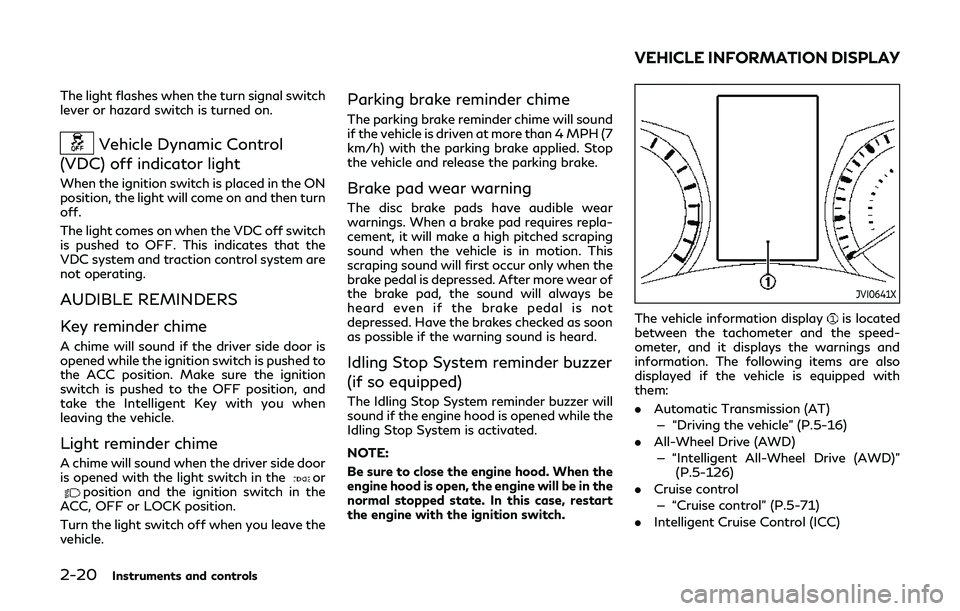
The vehicle information displayis located
between the tachometer and the speed-
ometer, and it displays the warnings and
information. The following items are also
displayed if the vehicle is equipped with
them:
. Automatic Transmission (AT)
— “Driving the vehicle” (P.5-16)
. All-Wheel Drive (AWD)
— “Intelligent All-Wheel Drive (AWD)” (P.5-126)
. Cruise control
— “Cruise control” (P.5-71)
. Intelligent Cruise Control (ICC)
VEHICLE INFORMATION DISPLAY
Page 103 of 468

19. All-Wheel Drive (AWD) warning
(if so equipped)
This warning appears when the Intelligent
All-Wheel Drive (AWD) system is not func-
tioning properly while the engine is running.
The displayed message will vary depending
on the condition of the AWD system mal-
function. (See “Intelligent All-Wheel Drive
(AWD)” (P.5-126).)
20. Extended storage fuse warning
This warning may appear if the extended
storage fuse switch is not pushed in
(switched on). When this warning appears,
push in (switch on) the extended storage
fuse switch to turn off the warning. For
more information, see “Extended storage
fuse switch” (P.8-26).
21. Adaptive Front lighting System
(AFS) warning (if so equipped)
This warning appears when the Adaptive
Front lighting System (AFS) is not function-
ing properly. It is recommended you have the
system checked by an INFINITI retailer.
(See “Adaptive Front lighting System (AFS)”
(P.2-42).)
22. Power will turn off to save the
battery warning
This warning appears after a period of time
if the shift lever has not moved from the “P”
(Park) position with the ignition switch in the
ACC or ON position.
23. Power turned off to save the
battery warning
This warning appears after the ignition
switch is automatically turned OFF to save
the battery.
24. Light reminder warning
This warning appears when the driver side
door is opened with the headlight switch is
left ON and the ignition switch is placed in
the ACC, OFF or LOCK position. Place the
headlight switch to “OFF” or “AUTO” posi-
tion. For additional information, see “Head-
light and turn signal switch” (P.2-38).
25. “TIMER” indicator
This indicator appears when the set “TIMER”
indicator activates. You can set the time for
up to 6 hours. (See the INFINITI InTouch
TM
Owner’s Manual.)
26. Low outside temperature
warning
This warning appears if the outside tem-
perature is below 37°F (3°C). The warning
can be set not to be displayed. (See the
INFINITI InTouch
TMOwner’s Manual.)
27. Chassis control warning
This warning appears if Active Lane Control
(if so equipped), the active trace control
system and/or chassis control are not
functioning properly. It is recommended
you have the system checked by an INFINITI
retailer. (See “Active Lane Control” (P.5-26),
“Active trace control” (P.5-136) and “Chassis
control” (P.5-138).)
28. Cruise indicator
Models without Intelligent Cruise Control
(ICC) system:
This indicator shows the cruise control
system status. The status is shown by the
color.
See “Cruise control” (P.5-71) for details.
Models with Intelligent Cruise Control (ICC)
system:
This indicator shows the conventional (fixed
speed) cruise control mode status. The
status is shown by the color.
Instruments and controls2-25
Page 105 of 468
JVI0681M
INDICATORS FOR MAINTE-
NANCE
For setting the indicators for maintenance,
see the INFINITI InTouchTMOwner’s Man-
ual.
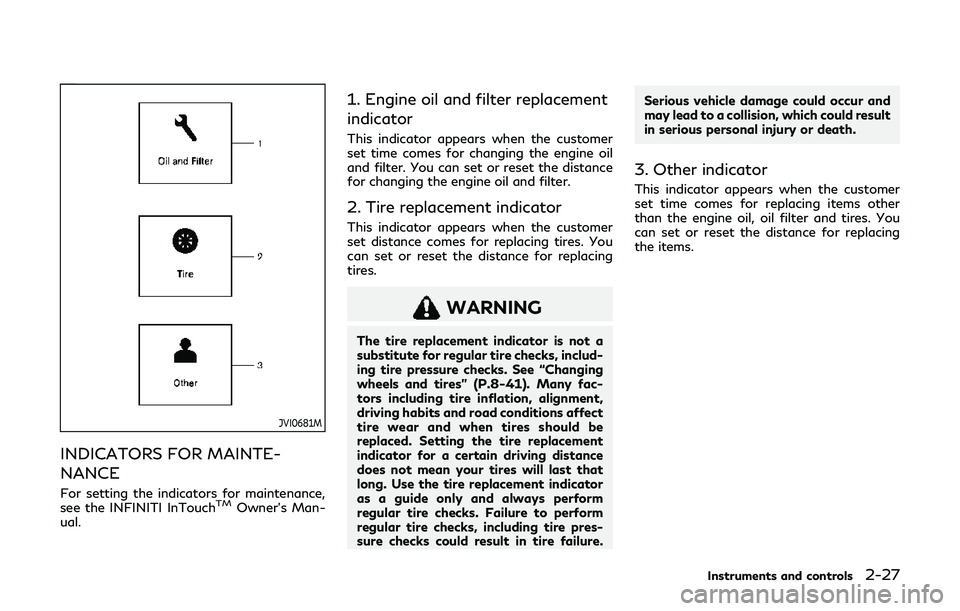
1. Engine oil and filter replacement
indicator
This indicator appears when the customer
set time comes for changing the engine oil
and filter. You can set or reset the distance
for changing the engine oil and filter.
2. Tire replacement indicator
This indicator appears when the customer
set distance comes for replacing tires. You
can set or reset the distance for replacing
tires.
WARNING
The tire replacement indicator is not a
substitute for regular tire checks, includ-
ing tire pressure checks. See “Changing
wheels and tires” (P.8-41). Many fac-
tors including tire inflation, alignment,
driving habits and road conditions affect
tire wear and when tires should be
replaced. Setting the tire replacement
indicator for a certain driving distance
does not mean your tires will last that
long. Use the tire replacement indicator
as a guide only and always perform
regular tire checks. Failure to perform
regular tire checks, including tire pres-
sure checks could result in tire failure. Serious vehicle damage could occur and
may lead to a collision, which could result
in serious personal injury or death.
3. Other indicator
This indicator appears when the customer
set time comes for replacing items other
than the engine oil, oil filter and tires. You
can set or reset the distance for replacing
the items.
Instruments and controls2-27
Page 107 of 468
JVI1484X
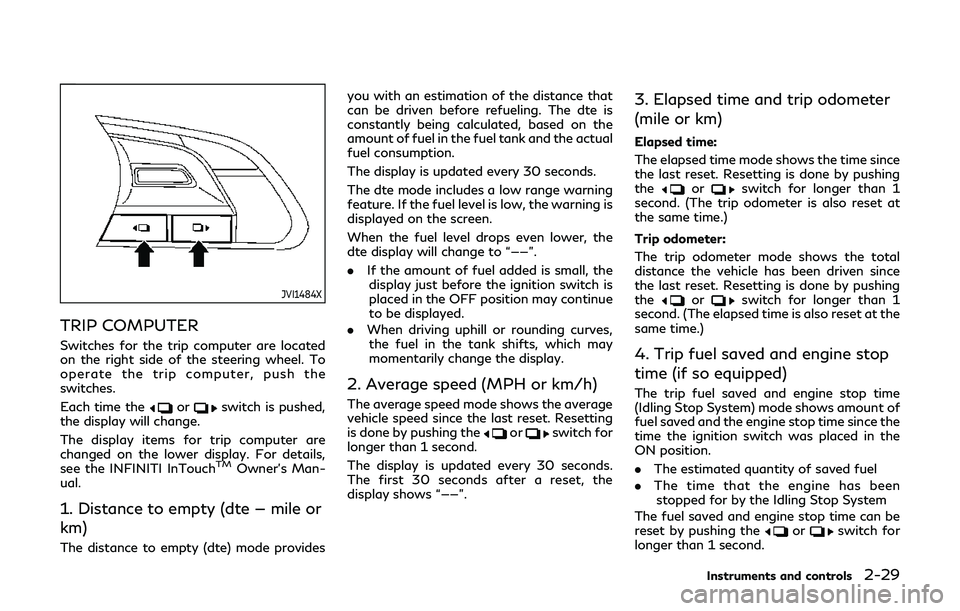
TRIP COMPUTER
Switches for the trip computer are located
on the right side of the steering wheel. To
operate the trip computer, push the
switches.
Each time the
orswitch is pushed,
the display will change.
The display items for trip computer are
changed on the lower display. For details,
see the INFINITI InTouch
TMOwner’s Man-
ual.
1. Distance to empty (dte — mile or
km)
The distance to empty (dte) mode provides you with an estimation of the distance that
can be driven before refueling. The dte is
constantly being calculated, based on the
amount of fuel in the fuel tank and the actual
fuel consumption.
The display is updated every 30 seconds.
The dte mode includes a low range warning
feature. If the fuel level is low, the warning is
displayed on the screen.
When the fuel level drops even lower, the
dte display will change to “——”.
.
If the amount of fuel added is small, the
display just before the ignition switch is
placed in the OFF position may continue
to be displayed.
. When driving uphill or rounding curves,
the fuel in the tank shifts, which may
momentarily change the display.
2. Average speed (MPH or km/h)
The average speed mode shows the average
vehicle speed since the last reset. Resetting
is done by pushing the
orswitch for
longer than 1 second.
The display is updated every 30 seconds.
The first 30 seconds after a reset, the
display shows “——”.
3. Elapsed time and trip odometer
(mile or km)
Elapsed time:
The elapsed time mode shows the time since
the last reset. Resetting is done by pushing
the
orswitch for longer than 1
second. (The trip odometer is also reset at
the same time.)
Trip odometer:
The trip odometer mode shows the total
distance the vehicle has been driven since
the last reset. Resetting is done by pushing
the
orswitch for longer than 1
second. (The elapsed time is also reset at the
same time.)
4. Trip fuel saved and engine stop
time (if so equipped)
The trip fuel saved and engine stop time
(Idling Stop System) mode shows amount of
fuel saved and the engine stop time since the
time the ignition switch was placed in the
ON position.
. The estimated quantity of saved fuel
. The time that the engine has been
stopped for by the Idling Stop System
The fuel saved and engine stop time can be
reset by pushing the
orswitch for
longer than 1 second.
Instruments and controls2-29
Page 118 of 468
2-40Instruments and controls
High beam assist (if so equipped)
The high beam assist system will operate
when the vehicle is driven at speeds of
approximately 19 MPH (30 km/h) and
above. If an oncoming vehicle or leading
vehicle appears in front of your vehicle when
the headlight high beam is on, the headlight
will be switched to the low beam automa-
tically.
Precautions on high beam assist:
WARNING
.The high beam assist system is a
convenience but it is not a substitute
for safe driving operation. The driver
should remain alert at all times,
ensure safe driving practices and
switch the high beams and low beam
manually when necessary.
. The high beam or low beam may not
switch automatically under the fol-
lowing conditions. Switch the high
beam and low beam manually.
— During bad weather (rain, fog, snow, wind, etc.).
— When a light source similar to a headlight or tail light is in the
vicinity of the vehicle. — When the headlights of the on-
coming vehicle or the leading
vehicle are turned off, when the
color of the light is affected due to
foreign materials on the lights, or
when the light beam is out of
position.
— When there is a sudden, contin- uous change in brightness.
— When driving on a road that passes over rolling hills, or a road
that has level differences.
— When driving on a road with many curves.
— When a sign or mirror-like sur- face is reflecting intense light
towards the front of the vehicle.
— When the container, etc. being towed by a leading vehicle is
reflecting intense light.
— When a headlight on your vehicle is damaged or dirty.
— When the vehicle is leaning at an angle due to a punctured tire,
being towed, etc.
. The timing of switching the low beam
and high beam may change under the
following situations. — The brightness of the headlights
of the oncoming vehicle or leading
vehicle.
— The movement and direction of the oncoming vehicle and the
leading vehicle.
— When only one light on the on- coming vehicle or the leading
vehicle is illuminated.
— When the oncoming vehicle or the leading vehicle is a two-wheeled
vehicle.
— Road conditions (incline, curve, the road surface, etc.).
— The number of passengers and the amount of luggage.
Page 120 of 468
2-42Instruments and controls
Battery saver system
A chime will sound and the light reminder
warning will appear in the vehicle informa-
tion display when the driver side door is
opened with the light switch in the
orposition and the ignition switch in the
ACC, OFF or LOCK position.
When the headlight switch is in the
orposition while the ignition switch is in
the ON position, the lights will automatically
turn off after a period of time when the
ignition switch has been pushed to the OFF
position.
When the headlight switch remains in the
orposition after the lights auto-
matically turn off, the lights will turn on
when the ignition switch is pushed to the ON
position.
CAUTION
. When you turn on the headlight
switch again after the lights auto-
matically turn off, the lights will not
turn off automatically. Be sure to
turn the light switch to the OFF
position when you leave the vehicle
for extended periods of time, other-
wise the battery will be discharged. .
Never leave the light switch on when
the engine is not running for a period
of time even if the headlights turn off
automatically.
Daytime running light system
The daytime running lights automatically
illuminate when the engine is started with
the parking brake released. The daytime
running lights operate with the headlight
switch in the OFF, AUTO or
position.
Turn the headlight switch to theposition
for full illumination when driving at night.
If the parking brake is applied before the
engine is started, the daytime running lights
do not illuminate. The daytime running lights
illuminate once the parking brake is released.
The daytime running lights will remain on
until the ignition switch is pushed to the OFF
position.
WARNING
When the daytime running light system
is active, tail lights on your vehicle are
not on. It is necessary at dusk to turn on
your headlights. Failure to do so could
cause an accident injuring yourself and
others.
Adaptive Front lighting System
(AFS) (if so equipped)
The Adaptive Front lighting System (AFS)
will automatically adjust the headlights (low
beam) toward the turning direction to
improve the driver’s view. When the head-
light switch is ON and the driver operates
the steering wheel in a turn, the AFS system
will be activated.
The AFS will operate:
. when the headlight switch is ON.
. when the shift lever is in any position
other than P (Park) or R (Reverse).
. when the vehicle is driven at above 3
MPH (5 km/h) for the left-side head-
light. Note that the right-side low beam
headlight will swivel but the left-side
headlight will not swivel when the vehicle
is below 3 MPH (5 km/h) and the
steering wheel is turned.
AFS will also adjust the headlight to a proper
axis automatically, depending on the number
of occupants in the vehicle, the load the
vehicle is carrying and the road conditions.
If the AFS warning appears in the vehicle
information display after the ignition switch
has been pushed to the ON position, this
may indicate that the AFS is not functioning
properly. Have the system checked. It is
recommended you visit an INFINITI retailer
Page 123 of 468
JVI1491X
To sound the horn, push the center pad area
of the steering wheel.
WARNING
Do not disassemble the horn. Doing so
could affect proper operation of the
supplemental front air bag system. Tam-
pering with the supplemental front air
bag system may result in serious perso-
nal injury.
SIC4336
The vehicle should be driven with the Vehicle
Dynamic Control (VDC) system on for most
driving conditions.
If the vehicle is stuck in mud or snow, the
VDC system reduces the engine output to
reduce wheel spin. The engine speed will be
reduced even if the accelerator is depressed
to the floor. If maximum engine power is
needed to free a stuck vehicle, turn the VDC
system off.
To turn off the VDC system, push the VDC
OFF switch. The
indicator light will
illuminate.
Push the VDC OFF switch again or restart
the engine to turn on the system. (See
“Vehicle Dynamic Control (VDC) system” (P.5-134).)
Instruments and controls2-45
HORN
VEHICLE DYNAMIC CONTROL
(VDC) OFF SWITCH