display INFINITI Q60 2019 Owner's Manual
[x] Cancel search | Manufacturer: INFINITI, Model Year: 2019, Model line: Q60, Model: INFINITI Q60 2019Pages: 468, PDF Size: 2.18 MB
Page 120 of 468
2-42Instruments and controls
Battery saver system
A chime will sound and the light reminder
warning will appear in the vehicle informa-
tion display when the driver side door is
opened with the light switch in the
orposition and the ignition switch in the
ACC, OFF or LOCK position.
When the headlight switch is in the
orposition while the ignition switch is in
the ON position, the lights will automatically
turn off after a period of time when the
ignition switch has been pushed to the OFF
position.
When the headlight switch remains in the
orposition after the lights auto-
matically turn off, the lights will turn on
when the ignition switch is pushed to the ON
position.
CAUTION
. When you turn on the headlight
switch again after the lights auto-
matically turn off, the lights will not
turn off automatically. Be sure to
turn the light switch to the OFF
position when you leave the vehicle
for extended periods of time, other-
wise the battery will be discharged. .
Never leave the light switch on when
the engine is not running for a period
of time even if the headlights turn off
automatically.
Daytime running light system
The daytime running lights automatically
illuminate when the engine is started with
the parking brake released. The daytime
running lights operate with the headlight
switch in the OFF, AUTO or
position.
Turn the headlight switch to theposition
for full illumination when driving at night.
If the parking brake is applied before the
engine is started, the daytime running lights
do not illuminate. The daytime running lights
illuminate once the parking brake is released.
The daytime running lights will remain on
until the ignition switch is pushed to the OFF
position.
WARNING
When the daytime running light system
is active, tail lights on your vehicle are
not on. It is necessary at dusk to turn on
your headlights. Failure to do so could
cause an accident injuring yourself and
others.
Adaptive Front lighting System
(AFS) (if so equipped)
The Adaptive Front lighting System (AFS)
will automatically adjust the headlights (low
beam) toward the turning direction to
improve the driver’s view. When the head-
light switch is ON and the driver operates
the steering wheel in a turn, the AFS system
will be activated.
The AFS will operate:
. when the headlight switch is ON.
. when the shift lever is in any position
other than P (Park) or R (Reverse).
. when the vehicle is driven at above 3
MPH (5 km/h) for the left-side head-
light. Note that the right-side low beam
headlight will swivel but the left-side
headlight will not swivel when the vehicle
is below 3 MPH (5 km/h) and the
steering wheel is turned.
AFS will also adjust the headlight to a proper
axis automatically, depending on the number
of occupants in the vehicle, the load the
vehicle is carrying and the road conditions.
If the AFS warning appears in the vehicle
information display after the ignition switch
has been pushed to the ON position, this
may indicate that the AFS is not functioning
properly. Have the system checked. It is
recommended you visit an INFINITI retailer
Page 121 of 468

for this service. When the engine is started,
the headlights will vibrate to check the
system condition. This is not a malfunction.
JVI0644X
JVI0937X
Instrument brightness control
The instrument brightness control switch
can be operated when the ignition switch is
in the ON position. When the switch is
operated, the vehicle information display
switches to the brightness adjustment
mode.
Push the + side of the switch
to brighten
the instrument panel lights. The barmoves
to the + side.
Push the - side of the switch
to dim the
instrument panel lights. The barmoves to
the − side. When the brightness level reaches
the minimum, the instrument panel lights will
turn off during the nighttime.
When the brightness level reaches the max-
imum or minimum, a beep will sound.
The vehicle information display returns to
the normal display when the instrument
brightness control switch is not operated
for more than 5 seconds.
Instruments and controls2-43
Page 125 of 468
![INFINITI Q60 2019 Owners Manual off the seat heater.
OPERATION WITH TOUCH
SCREEN
Push the CLIMATE button and touch []
or [] on the lower display. Select an item
from [AUTO], [High], [Mid], [Low] or [OFF].
AUTO MODE SETTING
When in t](/img/42/41096/w960_41096-124.png "INFINITI Q60 2019 Owners Manual off the seat heater.
OPERATION WITH TOUCH
SCREEN
Push the CLIMATE button and touch []
or [] on the lower display. Select an item
from [AUTO], [High], [Mid], [Low] or [OFF].
AUTO MODE SETTING
When in t")
off the seat heater.
OPERATION WITH TOUCH
SCREEN
Push the CLIMATE button and touch []
or [] on the lower display. Select an item
from [AUTO], [High], [Mid], [Low] or [OFF].
AUTO MODE SETTING
When in the AUTO mode, the heater will
turn on or off automatically according to the
conditions such as the temperature inside
the vehicle compartment. Depending on the
conditions, the heater will not turn on even if
AUTO is selected. The settings for the AUTO
mode can be changed. For details, see the
INFINITI InTouch
TMOwner’s Manual.
WARNING
Do not use or allow occupants to come
into contact with the heated steering
wheel if you or the occupants cannot
monitor elevated steering wheel tem-
peratures or have an inability to feel pain
in those body parts in contact. Use of the
heated steering wheel by such people
could result in serious injuries.
CAUTION
. The battery could run down if the
steering wheel heater is operated
while the engine is not running.
. Do not use the steering wheel heater
for extended periods of time as it may
cause burns and overheating.
. Any liquid spilled on the steering
wheel should be removed immedi-
ately with a dry cloth.
. When cleaning the steering wheel,
never use gasoline, thinner, or any
similar materials.
. If any malfunctions are found or the
steering wheel heater does not oper-
ate, turn the heater off and have the system checked. It is recommended
that you visit an INFINITI retailer for
this service.
Push the CLIMATE button and touch
[Steering Heater] on the lower display to
turn on or off the steering wheel heating
manually. The steering wheel heating will
turn off automatically 30 minutes after it
has been turned on. When the steering
wheel heating is turned on, the indicator
above [Steering Heater] will turn on.
If the surface temperature of the steering
wheel is above the temperature within which
the system is designed to operate, the
system will not heat the steering wheel. This
is not a malfunction.
Automatic steering wheel heating can be
turned on or off from the climate control
settings screen. For details, see the INFINITI
InTouch
TMOwner’s Manual.
Instruments and controls2-47
HEATED STEERING WHEEL (if so
equipped)
Page 148 of 468
3-6Pre-driving checks and adjustments
switch to the unlock position.
Lockout protection
When the power door lock switch is moved
to the lock position and any door open, all
doors will lock and unlock automatically.
With the Intelligent Key left in the vehicle
and any door open, all doors will unlock
automatically and a chime will sound after
the door is closed.
These functions help to prevent the Intelli-
gent Key from being accidentally locked
inside the vehicle.
AUTOMATIC DOOR LOCKS
.All doors and trunk lid lock automatically
when the vehicle speed reaches 15 MPH
(24 km/h).
. All doors and trunk lid unlock automati-
cally when the ignition switch is placed in
the OFF position or when the shift lever
is moved to the P (Park) position, if
selected.
The automatic unlock function can be
deactivated or activated. To deactivate or
activate the automatic door unlock system,
perform the following procedure:
1. Close all doors.
2. Place the ignition switch in the ON position. 3. Within 20 seconds of performing Step 2,
push and hold the power door lock
switch to the
position (UNLOCK)
for more than 5 seconds.
4. When activated, the hazard indicator will flash twice. When deactivated, the ha-
zard indicator will flash once.
5. The ignition switch must be placed in the OFF and ON position again between
each setting change.
When the automatic door unlock system is
deactivated, the doors do not unlock when
the ignition switch is placed in the OFF
position. To unlock the door manually, use
the inside lock knob or the power door lock
switch (driver’s or front passenger’s side).
The automatic door unlock function can be
changed on the lower display. (See the
INFINITI InTouch
TMOwner’s Manual.)
WARNING
. Radio waves could adversely affect
electric medical equipment. Those
who use a pacemaker should contact
the electric medical equipment man-
ufacturer for the possible influences
before use.
. The Intelligent Key transmits radio
waves when the buttons are pushed.
The FAA advises that the radio
waves may affect aircraft navigation
and communication systems. Do not
operate the Intelligent Key while on
an airplane. Make sure the buttons
are not operated unintentionally
when the unit is stored during a
flight.
The Intelligent Key system can operate all
the doors and the trunk lid using the remote
controller function, using one touch unlock
function or pushing the request switch on
the vehicle without taking the key out from a
pocket or purse. The operating environment
and/or conditions may affect the Intelligent
Key system operation.
Be sure to read the following before using
the Intelligent Key system.
INTELLIGENT KEY SYSTEM
Page 155 of 468
JVP0450X
JVP0451X
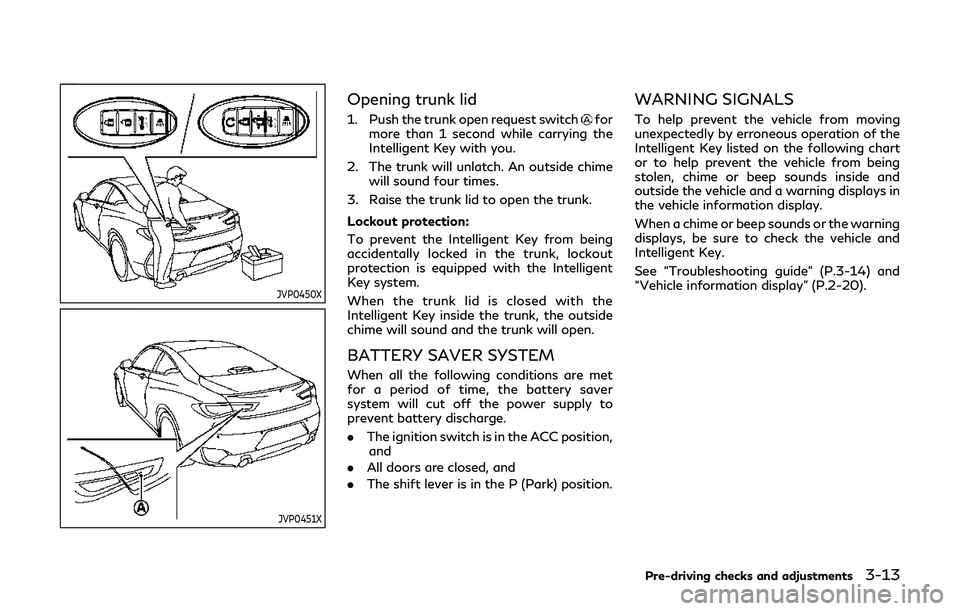
Opening trunk lid
1. Push the trunk open request switchfor
more than 1 second while carrying the
Intelligent Key with you.
2. The trunk will unlatch. An outside chime will sound four times.
3. Raise the trunk lid to open the trunk.
Lockout protection:
To prevent the Intelligent Key from being
accidentally locked in the trunk, lockout
protection is equipped with the Intelligent
Key system.
When the trunk lid is closed with the
Intelligent Key inside the trunk, the outside
chime will sound and the trunk will open.
BATTERY SAVER SYSTEM
When all the following conditions are met
for a period of time, the battery saver
system will cut off the power supply to
prevent battery discharge.
. The ignition switch is in the ACC position,
and
. All doors are closed, and
. The shift lever is in the P (Park) position.
WARNING SIGNALS
To help prevent the vehicle from moving
unexpectedly by erroneous operation of the
Intelligent Key listed on the following chart
or to help prevent the vehicle from being
stolen, chime or beep sounds inside and
outside the vehicle and a warning displays in
the vehicle information display.
When a chime or beep sounds or the warning
displays, be sure to check the vehicle and
Intelligent Key.
See “Troubleshooting guide” (P.3-14) and
“Vehicle information display” (P.2-20).
Pre-driving checks and adjustments3-13
Page 156 of 468

3-14Pre-driving checks and adjustments
TROUBLESHOOTING GUIDE
SymptomPossible causeAction to take
When pushing the ignition
switch to stop the engine The SHIFT P warning appears on the
display and the inside warning chime
sounds continuously.
The shift lever is not in the P (Park)
position.
Shift the shift lever to the P (Park)
position.
When shifting the shift lever to
the P (Park) position. The inside warning chime sounds continu-
ously. The ignition switch is in the ACC or
ON position.Push the ignition switch to the OFF
position.
When opening the driver’s door
to get out of the vehicle The inside warning chime sounds continu-
ously. The ignition switch is in the ACC
position.Push the ignition switch to the OFF
position.
When closing the door after
getting out of the vehicle The NO KEY warning appears on the
display, the outside chime sounds 3 times
and the inside warning chime sounds for a
few seconds.
The ignition switch is in the ACC or
ON position.
Push the ignition switch to the OFF
position.
The SHIFT P warning appears on the
display and the outside chime sounds
continuously. The ignition switch is in the ACC or
OFF position and the shift lever is not
in the P (Park) position.Move the shift lever to the P (Park)
position and push the ignition switch to
the OFF position.
When closing the door with the
inside lock knob turned to
LOCK The outside chime sounds for a few
seconds and all the doors unlock.
The Intelligent Key is inside the
vehicle or trunk.
Carry the Intelligent Key with you.
When pushing the request
switch or LOCK button on the
Intelligent Key to lock the door The outside chime sounds for a few
seconds. The Intelligent Key is inside the
vehicle or trunk.
Carry the Intelligent Key with you.
A door is not closed securely. Close the door securely.
When closing the trunk lid The outside chime sounds for approxi-
mately 10 seconds and the trunk lid opens. The Intelligent Key is inside the trunk. Carry the Intelligent Key with you.
Page 157 of 468
LOG-IN FUNCTION
After setting up the user information, the
system will automatically recognize the user
upon turning on the vehicle.
There will be a personalized welcome greet-
ing and screen prompt to log-in.
This feature allows 4 drivers to use their
own registration, drive mode, driving posi-
tion, air conditioner, and auto settings and
memorizes these custom settings.
The log-in user can be changed on the
welcome greeting screen or the User List
screen. For more details, see the INFINITI
InTouch
TMOwner’s Manual.
The log-in function is linked to the following
items:
. Meter
. Audio
. Navigation system display (if so
equipped)
. Navigation settings (if so equipped)
. Air conditioner
. Automatic drive positioner (if so
equipped)
. Engine/Transmission
. Steering
. Suspension (if so equipped) .
Active trace control system
. Driver assistance* (if so equipped)
. Body Control Module (BCM)
*: except for the Forward Emergency Brak-
ing (FEB) with pedestrian detection system
WARNING
The Intelligent Key transmits radio
waves when the buttons are pushed.
The FAA advises that the radio waves
may affect aircraft navigation and com-
munication systems. Do not operate the
Intelligent Key while on an airplane.
Make sure the buttons are not operated
unintentionally when the unit is stored
during a flight.
It is possible to lock/unlock all doors and
fuel-filler door, open the trunk lid, activate
the panic alarm and open the windows by
pushing the buttons on the Intelligent Key
from outside the vehicle.
Before locking the doors, make sure the
Intelligent Key is not left in the vehicle.
The remote keyless entry function can
operate at a distance of approximately 33
ft (10 m) from the vehicle. (The effective
distance depends upon the conditions
around the vehicle.)
As many as 4 Intelligent Keys can be used
with one vehicle. For information concerning
the purchase and use of additional Intelli-
gent Keys, contact an INFINITI retailer.
The buttons on the Intelligent Key will not
Pre-driving checks and adjustments3-15
REMOTE KEYLESS ENTRY SYSTEM
Page 164 of 468
3-22Pre-driving checks and adjustments
CONDITIONS THE REMOTE EN-
GINE START WILL NOT WORK
The remote engine start will not operate if
any of the following conditions are present:
.The ignition switch is placed in the ON
position.
. The hood is not securely closed.
. The hazard warning lights are on.
. The engine is still running. The engine
must be completely stopped. Wait at
least 6 seconds if the engine goes from
running to off. This is not applicable
when extending engine run time.
. The remote engine start
button is
not pushed and held for at least 2
seconds.
. The remote engine start
button is
not pushed and held within 5 seconds of
pushing LOCK
button.
. The brake pedal is depressed.
. The doors are not closed and locked.
. The trunk is open.
. The Intelligent Key warning message is
displayed in the vehicle information dis-
play.
. The alarm sounds due to illegal entry into
the vehicle.
. Two remote engine starts, or a single
remote engine start with an extension,
have already been used. .
The vehicle is not in P (Park).
. The remote engine start function has
been switched to OFF in the settings
menu on the lower display. For additional
information, see the INFINITI InTouch
TM
Owner’s Manual.
The remote engine start may display a
warning or indicator in the vehicle informa-
tion display. For an explanation of the
warning or indicator, see “Indicators for
operation” (P.2-23).
Page 169 of 468

malfunction and possible injury. It
could also cause the Malfunction
Indicator Light (MIL) to come on.
. Never pour fuel into the throttle body
to attempt to start your vehicle.
. Do not fill a portable fuel container in
the vehicle or trailer. Static electricity
can cause an explosion of flammable
liquid, vapor or gas in any vehicle or
trailer. To reduce the risk of serious
injury or death when filling portable
fuel containers:
— Always place the container on the ground when filling.
— Do not use electronic devices when filling.
— Keep the pump nozzle in contact with the container while you are
filling it.
— Use only approved portable fuel containers for flammable liquid.
CAUTION
. If fuel is spilled on the vehicle body,
flush it away with water to avoid
paint damage. .
Insert the cap straight into the fuel-
filler tube, then tighten the fuel-filler
cap until a single click is heard. Failure
to tighten the fuel-filler cap properly
may cause the
Malfunction In-
dicator Light (MIL) to illuminate. If
the
light illuminates because the
fuel-filler cap is loose or missing,
tighten or install the cap and con-
tinue to drive the vehicle. The
light should turn off after a few
driving trips. If thelight does
not turn off after a few driving trips,
have the vehicle inspected. It is
recommended you visit an INFINITI
retailer for this service.
. The Loose Fuel Cap warning will
appear if the fuel-filler cap is not
properly tightened. It may take a few
driving trips for the warning to be
displayed. Failure to tighten the fuel-
filler cap properly after the Loose
Fuel Cap warning appears may cause
the
Malfunction Indicator Light
(MIL) to illuminate.
. For additional information, see “Mal-
function Indicator Light (MIL)” (P.2-
19).
JVP0454X
To remove the fuel-filler cap:
1. Turn the fuel-filler cap counterclockwise
to remove.
2. Put the fuel-filler cap on the cap holder
while refueling.
To install the fuel-filler cap:
1. Insert the fuel-filler cap straight into the fuel-filler tube.
2. Turn the fuel-filler cap clockwise until a single click is heard.
Pre-driving checks and adjustments3-27
Page 170 of 468
3-28Pre-driving checks and adjustments
JVP0455X
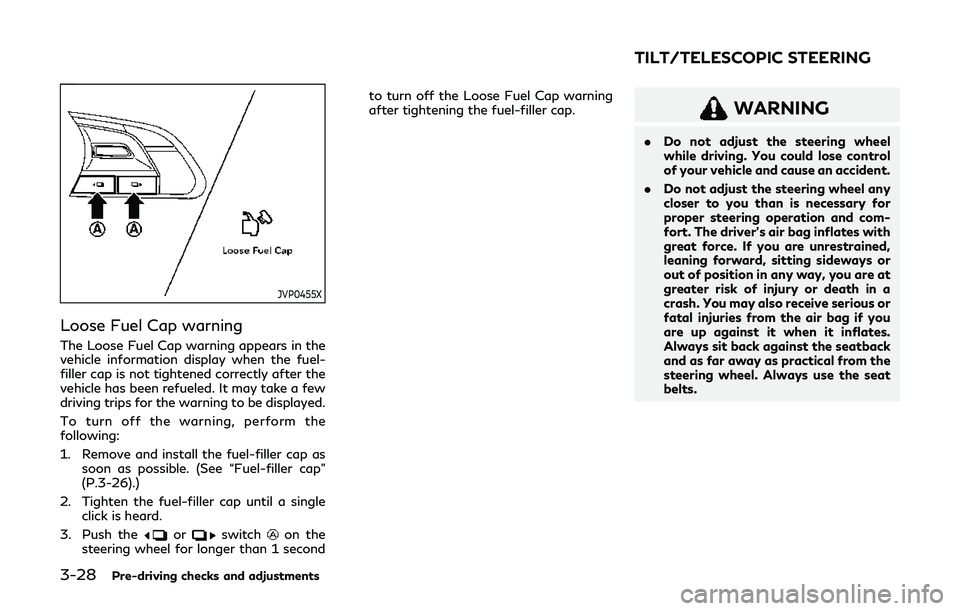
Loose Fuel Cap warning
The Loose Fuel Cap warning appears in the
vehicle information display when the fuel-
filler cap is not tightened correctly after the
vehicle has been refueled. It may take a few
driving trips for the warning to be displayed.
To turn off the warning, perform the
following:
1. Remove and install the fuel-filler cap assoon as possible. (See “Fuel-filler cap”
(P.3-26).)
2. Tighten the fuel-filler cap until a single click is heard.
3. Push the
orswitchon the
steering wheel for longer than 1 second to turn off the Loose Fuel Cap warning
after tightening the fuel-filler cap.
WARNING
.
Do not adjust the steering wheel
while driving. You could lose control
of your vehicle and cause an accident.
. Do not adjust the steering wheel any
closer to you than is necessary for
proper steering operation and com-
fort. The driver’s air bag inflates with
great force. If you are unrestrained,
leaning forward, sitting sideways or
out of position in any way, you are at
greater risk of injury or death in a
crash. You may also receive serious or
fatal injuries from the air bag if you
are up against it when it inflates.
Always sit back against the seatback
and as far away as practical from the
steering wheel. Always use the seat
belts.
TILT/TELESCOPIC STEERING