ignition INFINITI Q60 2019 Workshop Manual
[x] Cancel search | Manufacturer: INFINITI, Model Year: 2019, Model line: Q60, Model: INFINITI Q60 2019Pages: 468, PDF Size: 2.18 MB
Page 163 of 468
lights illuminate. If the vehicle is not
within view, push and hold the remote
engine start
button for at least 2
seconds.
The following events will occur when the
engine starts:
. The front parking lights will turn on and
remain on as long as the engine is
running.
. The doors will be locked and the air
conditioner system may turn on.
. The engine will continue to run for about
10 minutes. Repeat the steps to extend
the time for an additional 10 minutes.
See “Extending engine run time” (P.3-
21).
. The rear window glass and outside mirror
defroster may turn on automatically
when the outside air temperature, the
interior temperature and the engine
coolant temperature are low.
Depress and hold the brake pedal, then place
the ignition switch in the ON position before
driving. For further instructions, see “Driving
the vehicle” (P.5-16).
EXTENDING ENGINE RUN TIME
The remote engine start function can be
extended one time by performing the steps
listed in “Remote starting the engine” (P.3-
20). Run time will be calculated as follows:
. The first 10 minute run time will start
when the remote engine start function is
performed.
. The second 10 minutes will start imme-
diately when the remote engine start
function is performed. For example, if
the engine has been running for 5
minutes, and 10 minutes are added, the
engine will run for a total of 15 minutes.
. Extending engine run time will count
towards the two remote engine start
limit.
A maximum of two remote engine starts, or
a single start with an extension, are allowed
between ignition cycles.
The ignition switch must be cycled to the ON
position and then back to the OFF position
before the remote engine start procedure
can be used again.
CANCELING A REMOTE ENGINE
START
To cancel a remote engine start, perform one
of the following:
. Aim the Intelligent Key at the vehicle and
push and hold the remote engine start
button until the parking lights turn
off.
. Turn on the hazard warning flashers.
. Cycle the ignition switch ON and then
OFF.
. The extended engine run time has ex-
pired.
. The first 10 minute timer has expired.
. The engine hood has been opened.
. The shift lever is moved out of P (Park).
. The alarm sounds due to illegal entry into
the vehicle.
. The ignition switch is pushed without an
Intelligent Key in the vehicle.
. The ignition switch is pushed with an
Intelligent Key in the vehicle but the
brake pedal is not depressed.
Pre-driving checks and adjustments3-21
Page 164 of 468
3-22Pre-driving checks and adjustments
CONDITIONS THE REMOTE EN-
GINE START WILL NOT WORK
The remote engine start will not operate if
any of the following conditions are present:
.The ignition switch is placed in the ON
position.
. The hood is not securely closed.
. The hazard warning lights are on.
. The engine is still running. The engine
must be completely stopped. Wait at
least 6 seconds if the engine goes from
running to off. This is not applicable
when extending engine run time.
. The remote engine start
button is
not pushed and held for at least 2
seconds.
. The remote engine start
button is
not pushed and held within 5 seconds of
pushing LOCK
button.
. The brake pedal is depressed.
. The doors are not closed and locked.
. The trunk is open.
. The Intelligent Key warning message is
displayed in the vehicle information dis-
play.
. The alarm sounds due to illegal entry into
the vehicle.
. Two remote engine starts, or a single
remote engine start with an extension,
have already been used. .
The vehicle is not in P (Park).
. The remote engine start function has
been switched to OFF in the settings
menu on the lower display. For additional
information, see the INFINITI InTouch
TM
Owner’s Manual.
The remote engine start may display a
warning or indicator in the vehicle informa-
tion display. For an explanation of the
warning or indicator, see “Indicators for
operation” (P.2-23).
Page 173 of 468

SPA2422A
Type A (if so equipped)
SPA2450
Type B (if so equipped)
Automatic anti-glare type
The inside mirror is designed so that it
automatically changes reflection according
to the intensity of the headlights of the
following vehicle.
The anti-glare system will be automatically
turned on when the ignition switch is placed
in the ON position.
The anti-glare system also operates for the
outside mirrors (if so equipped).
When the anti-glare system is turned on, the
indicator light
will illuminate and excessive
glare from the headlights of the vehicle
behind you will be reduced.
Type A (if so equipped): Push the
switchto make the inside mirror operate normally
and the indicator light will turn off. Push the
switchagain to turn the system on.
Type B (if so equipped): Push the “*” switch
to make the inside mirror operate nor-
mally. The indicator light will turn off. Push
the “I” switch
to turn the system on.
Do not allow any object to cover the sensors
or apply glass cleaner on them. Doing so
will reduce the sensitivity of the sensor,
resulting in improper operation.
For the compass (if so equipped) operation,
see “Compass” (P.2-9).
For the HomeLink
®Universal Transceiver (if so equipped) operation, see “HomeLink
®
Universal Transceiver” (P.2-59).
OUTSIDE MIRRORS
WARNING
Objects viewed in the outside mirror on
the passenger side are closer than they
appear. Be careful when moving to the
right. Using only this mirror could cause
an accident. Use the inside mirror or
glance over your shoulder to properly
judge distances to other objects.
Pre-driving checks and adjustments3-31
Page 174 of 468
3-32Pre-driving checks and adjustments
JVP0246X
Adjusting outside mirrors
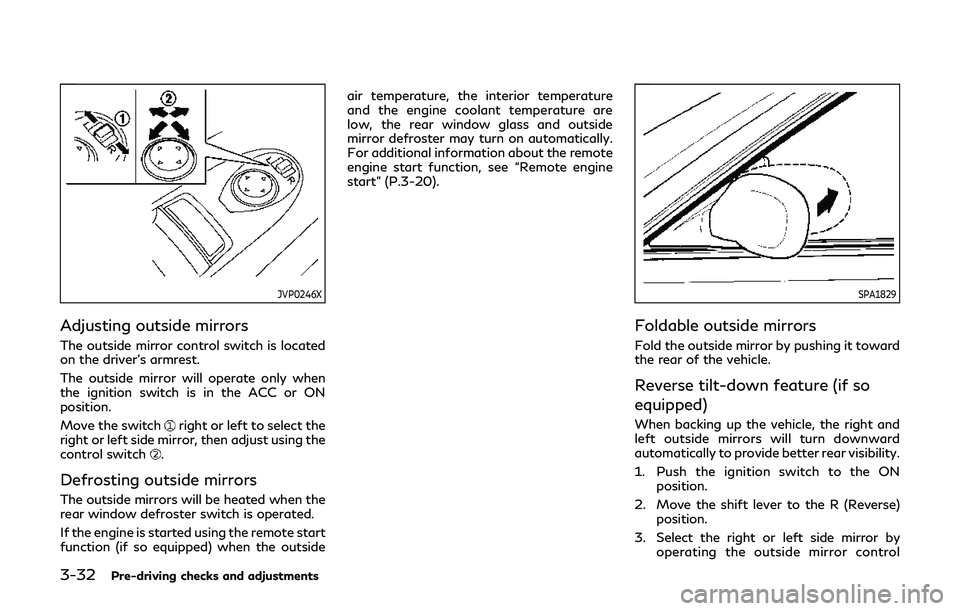
The outside mirror control switch is located
on the driver’s armrest.
The outside mirror will operate only when
the ignition switch is in the ACC or ON
position.
Move the switch
right or left to select the
right or left side mirror, then adjust using the
control switch
.
Defrosting outside mirrors
The outside mirrors will be heated when the
rear window defroster switch is operated.
If the engine is started using the remote start
function (if so equipped) when the outside air temperature, the interior temperature
and the engine coolant temperature are
low, the rear window glass and outside
mirror defroster may turn on automatically.
For additional information about the remote
engine start function, see “Remote engine
start” (P.3-20).
SPA1829
Foldable outside mirrors
Fold the outside mirror by pushing it toward
the rear of the vehicle.
Reverse tilt-down feature (if so
equipped)
When backing up the vehicle, the right and
left outside mirrors will turn downward
automatically to provide better rear visibility.
1. Push the ignition switch to the ON
position.
2. Move the shift lever to the R (Reverse) position.
3. Select the right or left side mirror by operating the outside mirror control
Page 175 of 468
switch.
4. The outside mirror surface moves down- ward.
When one of the following conditions has
occurred, the outside mirror surface will
return to its original position.
. The shift lever is moved to any position
other than R (Reverse).
. The outside mirror control switch is set to
the center position.
. The ignition switch is pushed to the OFF
position.
Automatic anti-glare (if so
equipped)
The outside mirrors are designed so that
they automatically change reflection ac-
cording to the intensity of the headlights of
the vehicle following you.
The anti-glare system will be automatically
turned on when the ignition switch is placed
in the ON position.
SIC3869
VANITY MIRROR
To use the front vanity mirror, pull down the
sun visor and pull up the cover. The automatic drive positioner system has a
memory storage function.
Pre-driving checks and adjustments3-33
AUTOMATIC DRIVE POSITIONER
(if so equipped)
Page 176 of 468
3-34Pre-driving checks and adjustments
JVP0462X
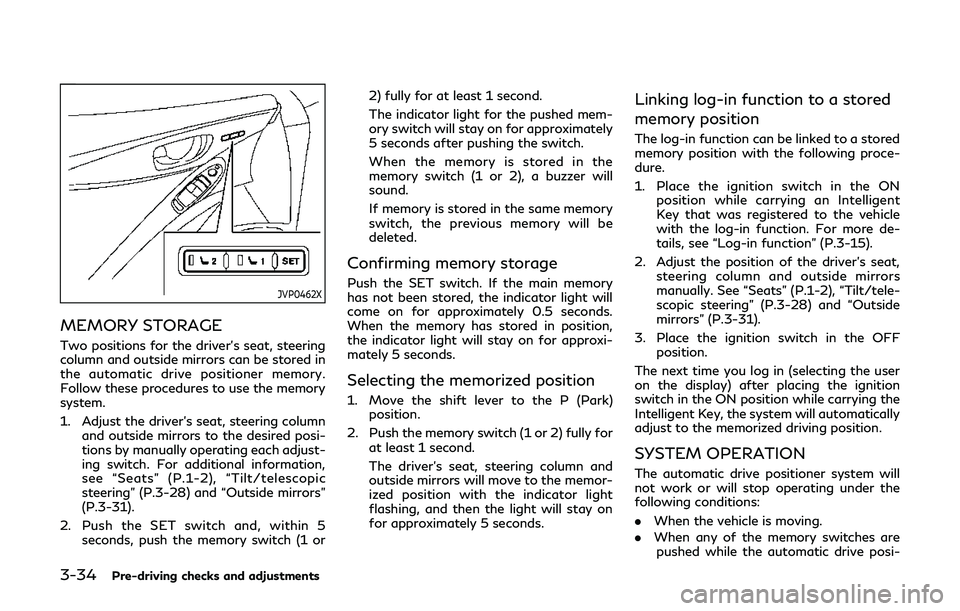
MEMORY STORAGE
Two positions for the driver’s seat, steering
column and outside mirrors can be stored in
the automatic drive positioner memory.
Follow these procedures to use the memory
system.
1. Adjust the driver’s seat, steering columnand outside mirrors to the desired posi-
tions by manually operating each adjust-
ing switch. For additional information,
see “Seats” (P.1-2), “Tilt/telescopic
steering” (P.3-28) and “Outside mirrors”
(P.3-31).
2. Push the SET switch and, within 5 seconds, push the memory switch (1 or 2) fully for at least 1 second.
The indicator light for the pushed mem-
ory switch will stay on for approximately
5 seconds after pushing the switch.
When the memory is stored in the
memory switch (1 or 2), a buzzer will
sound.
If memory is stored in the same memory
switch, the previous memory will be
deleted.
Confirming memory storage
Push the SET switch. If the main memory
has not been stored, the indicator light will
come on for approximately 0.5 seconds.
When the memory has stored in position,
the indicator light will stay on for approxi-
mately 5 seconds.
Selecting the memorized position
1. Move the shift lever to the P (Park)
position.
2. Push the memory switch (1 or 2) fully for at least 1 second.
The driver’s seat, steering column and
outside mirrors will move to the memor-
ized position with the indicator light
flashing, and then the light will stay on
for approximately 5 seconds.
Linking log-in function to a stored
memory position
The log-in function can be linked to a stored
memory position with the following proce-
dure.
1. Place the ignition switch in the ONposition while carrying an Intelligent
Key that was registered to the vehicle
with the log-in function. For more de-
tails, see “Log-in function” (P.3-15).
2. Adjust the position of the driver’s seat, steering column and outside mirrors
manually. See “Seats” (P.1-2), “Tilt/tele-
scopic steering” (P.3-28) and “Outside
mirrors” (P.3-31).
3. Place the ignition switch in the OFF position.
The next time you log in (selecting the user
on the display) after placing the ignition
switch in the ON position while carrying the
Intelligent Key, the system will automatically
adjust to the memorized driving position.
SYSTEM OPERATION
The automatic drive positioner system will
not work or will stop operating under the
following conditions:
. When the vehicle is moving.
. When any of the memory switches are
pushed while the automatic drive posi-
Page 183 of 468
5 Starting and driving
Precautions when starting and driving ...................... 5-4Exhaust gas (carbon monoxide) .............................. 5-4
Three-way catalyst ..................................................... 5-5
Tire Pressure Monitoring System (TPMS) ........... 5-5
Avoiding collision and rollover ................................. 5-9
Off-road recovery ....................................................... 5-9
Rapid air pressure loss ............................................. 5-10
Drinking alcohol/drugs and driving ..................... 5-10
Intelligent All-Wheel Drive (AWD) driving
safety precautions (AWD models) ....................... 5-11
Push-button ignition switch ........................................ 5-11 Operating range for engine start function ........ 5-12
Push-button ignition switch operation ............... 5-12
Push-button ignition switch positions ................ 5-13
Emergency engine shut off .................................... 5-13
Intelligent Key battery discharge .......................... 5-14
Before starting the engine ........................................... 5-14
Starting the engine ......................................................... 5-15 Remote engine start (if so equipped) .................. 5-15
Driving the vehicle .......................................................... 5-16
Automatic Transmission (AT) ................................ 5-16
Parking brake ................................................................... 5-21
INFINITI Drive Mode Selector .................................... 5-22
STANDARD mode .................................................... 5-22
SPORT+ mode (if so equipped) ............................. 5-23 SPORT mode ............................................................ 5-23
SNOW mode ............................................................ 5-23
ECO mode (if so equipped) .................................. 5-23
PERSONAL mode ................................................... 5-25
Active Lane Control (if so equipped) ........................ 5-26 Active Lane Control operation ............................ 5-28
Turning Active Lane Control ON/OFF ............ 5-29
How to enable/disable Active
Lane Control ............................................................ 5-30
Active Lane Control limitations .......................... 5-31
System temporarily unavailable .......................... 5-32
System malfunction ................................................ 5-32
System maintenance .............................................. 5-33
Lane Departure Warning (LDW) system/Lane
Departure Prevention (LDP) (if so equipped) ........ 5-34 LDW system operation ......................................... 5-35
How to enable/disable the LDW system ........ 5-36
LDP system operation ........................................... 5-36
Turning the LDP system ON/OFF .................... 5-37
How to enable/disable the LDP system .......... 5-38
LDW/LDP system limitations ............................. 5-38
System temporarily unavailable .......................... 5-39
System malfunction ............................................... 5-40
System maintenance ............................................. 5-40
Page 187 of 468

THREE-WAY CATALYST
The three-way catalyst is an emission con-
trol device installed in the exhaust system.
Exhaust gases in the three-way catalyst are
burned at high temperatures to help reduce
pollutants.
WARNING
.The exhaust gas and the exhaust
system are very hot. Keep people,
animals or flammable materials away
from the exhaust system compo-
nents.
. Do not stop or park the vehicle over
flammable materials such as dry
grass, waste paper or rags. They
may ignite and cause a fire.
CAUTION
.Do not use leaded gasoline. Deposits
from leaded gasoline seriously reduce
the three-way catalyst’s ability to
help reduce exhaust pollutants.
. Keep your engine tuned up. Malfunc-
tions in the ignition, fuel injection, or
electrical systems can cause overrich fuel flow into the three-way catalyst,
causing it to overheat. Do not keep
driving if the engine misfires, or if
noticeable loss of performance or
other unusual operating conditions
are detected. Have the vehicle in-
spected promptly. It is recommended
you visit an INFINITI retailer for this
service.
. Avoid driving with an extremely low
fuel level. Running out of fuel could
cause the engine to misfire, damaging
the three-way catalyst.
. Do not race the engine while warming
it up.
. Do not push or tow your vehicle to
start the engine.
TIRE PRESSURE MONITORING
SYSTEM (TPMS)
Each tire, including the spare (if provided),
should be checked monthly when cold and
inflated to the inflation pressure recom-
mended by the vehicle manufacturer on the
vehicle placard or tire inflation pressure
label. (If your vehicle has tires of a different
size than the size indicated on the vehicle
placard or tire inflation pressure label, you
should determine the proper tire inflation
pressure for those tires.) As an added safety feature, your vehicle has
been equipped with a Tire Pressure Mon-
itoring System (TPMS) that illuminates a low
tire pressure telltale when one or more of
your tires is significantly under-inflated.
Accordingly, when the low tire pressure
telltale illuminates, you should stop and
check your tires as soon as possible, and
inflate them to the proper pressure. Driving
on a significantly under-inflated tire causes
the tire to overheat and can lead to tire
failure. Under-inflation also reduces fuel
efficiency and tire tread life, and may affect
the vehicle’s handling and stopping ability.
For models with run-flat tires, if the vehicle
is being driven with one or more flat tires,
the low tire pressure warning light will
illuminate continuously and a chime will
sound for 10 seconds. The flat tire warning
will also appear in the vehicle information
display. The chime will only sound at the first
indication of a flat tire, and the warning light
will illuminate continuously. When the flat
tire warning is activated, it is recommended
you have the system reset and the tire
checked and replaced if necessary by an
INFINITI retailer. Even if the tire is inflated
to the specified COLD tire pressure, the
warning light will continue to illuminate until
the system is reset by an INFINITI retailer.
Your vehicle can be driven for a limited time
on a flat tire. See “Run-flat tires” (P.8-39).
Starting and driving5-5
Page 188 of 468
5-6Starting and driving
Please note that the TPMS is not a sub-
stitute for proper tire maintenance, and it is
the driver’s responsibility to maintain correct
tire pressure, even if under-inflation has not
reached the level to trigger illumination of
the TPMS low tire pressure telltale.
Your vehicle has also been equipped with a
TPMS malfunction indicator to indicate
when the system is not operating properly.
The TPMS malfunction indicator is com-
bined with the low tire pressure telltale.
When the system detects a malfunction, the
telltale will flash for approximately one
minute and then remain continuously illumi-
nated. This sequence will continue upon
subsequent vehicle start-ups as long as the
malfunction exists. When the malfunction
indicator is illuminated, the system may not
be able to detect or signal low tire pressure
as intended. TPMS malfunctions may occur
for a variety of reasons, including the
installation of replacement or alternate tires
or wheels on the vehicle that prevent the
TPMS from functioning properly. Always
check the TPMS malfunction telltale after
replacing one or more tires or wheels on your
vehicle to ensure that the replacement or
alternate tires and wheels allow the TPMS
to continue to function properly.Additional information
.Since the spare tire (if so equipped) is not
equipped with the TPMS, the TPMS
does not monitor the tire pressure of
the spare tire.
. The TPMS will activate only when the
vehicle is driven at speeds above 16
MPH (25 km/h). Also, this system may
not detect a sudden drop in tire pressure
(for example a flat tire while driving).
. The low tire pressure warning light does
not automatically turn off when the tire
pressure is adjusted. After the tire is
inflated to the recommended pressure,
the vehicle must be driven at speeds
above 16 MPH (25 km/h) to activate the
TPMS and turn off the low tire pressure
warning light. Use a tire pressure gauge
to check the tire pressure.
. The “Tire Pressure Low - Add Air”
warning appears in the vehicle informa-
tion display when the low tire pressure
warning light is illuminated and low tire
pressure is detected. The “Tire Pressure
Low - Add Air” warning turns off when
the low tire pressure warning light turns
off.
The “Tire Pressure Low - Add Air”
warning does not appear if the low tire
pressure warning light illuminates to
indicate a TPMS malfunction. .
The “Flat Tire - Visit dealer” warning (if
so equipped) appears in the vehicle
information display when the low tire
pressure warning light is illuminated and
one or more flat tires are detected.
. Tire pressure rises and falls depending on
the heat caused by the vehicle’s opera-
tion and the outside temperature. Do not
reduce the tire pressure after driving
because the tire pressure rises after
driving. Low outside temperature can
lower the temperature of the air inside
the tire which can cause a lower tire
inflation pressure. This may cause the
low tire pressure warning light to illumi-
nate. If the warning light illuminates in
low ambient temperature, check the tire
pressure for all four tires.
. You can also check the pressure of all
tires (except the spare tire) in the vehicle
information display. (See “Vehicle infor-
mation display” (P.2-20).)
. After the ignition switch is placed in the
ON position, it may take a period of time
for the tire pressure to be displayed while
the vehicle is driven. Depending on the
radio wave circumstance, tire pressure
may not correctly be displayed.
For additional information, see “Low tire
pressure warning light” (P.2-14) and “Tire
Pressure Monitoring System (TPMS)” (P.6-
3).
Page 190 of 468
5-8Starting and driving
CAUTION
.The TPMS may not function properly
when the wheels are equipped with
tire chains or the wheels are buried in
snow.
. Do not place metalized film or any
metal parts (antenna, etc.) on the
windows. This may cause poor recep-
tion of the signals from the tire
pressure sensors, and the TPMS will
not function properly.
Some devices and transmitters may tem-
porarily interfere with the operation of the
TPMS and cause the low tire pressure
warning light to illuminate. Some examples
are:
. Facilities or electric devices using similar
radio frequencies are near the vehicle.
. If a transmitter set to similar frequencies
is being used in or near the vehicle.
. If a computer (or similar equipment) or a
DC/AC converter is being used in or near
the vehicle.
Low tire pressure warning light may illumi-
nate in the following cases.
. If the vehicle is equipped with a wheel
and tire without TPMS. .
If the TPMS has been replaced and the ID
has not been registered.
. If the wheel is not originally specified by
INFINITI.
FCC Notice:
For USA:
This device complies with Part 15 of the
FCC Rules. Operation is subject to the
following two conditions: (1) This device
may not cause harmful interference, and (2)
this device must accept any interference
received, including interference that may
cause undesired operation.
NOTE:
Changes or modifications not expressly
approved by the party responsible for
compliance could void the user’s authority
to operate the equipment.
For Canada:
This device complies with Industry Canada
licence-exempt RSS standard(s). Operation
is subject to the following two conditions:
1. This device may not cause interference,
and
2. This device must accept any interfer-
ence, include interference that may
cause undesired operation of the device.
TPMS with Tire Inflation Indicator
When adding air to an under-inflated tire,
the TPMS with Tire Inflation Indicator
provides visual and audible signals outside
the vehicle to help you inflate the tires to the
recommended COLD tire pressure.
Vehicle set-up:
1. Park the vehicle in a safe and level place.
2. Apply the parking brake and place the
shift lever in the P (Park) position.
3. Place the ignition switch in the ON position. Do not start the engine.
Operation:
1. Add air to the tire.
2. After a few seconds, the hazard indica- tors will start flashing.
3. When the designated pressure is reached, the horn beeps once and the
hazard indicators stop flashing.
4. Perform the above steps for each tire.
. If the tire is over-inflated more than
approximately 4 psi (30 kPa), the horn
beeps and the hazard indicators flash 3
times. To correct the pressure, push the
core of the valve stem on the tire briefly
to release pressure. When the pressure
reaches the designated pressure, the
horn beeps once.