light INFINITI Q60 2019 Manual PDF
[x] Cancel search | Manufacturer: INFINITI, Model Year: 2019, Model line: Q60, Model: INFINITI Q60 2019Pages: 468, PDF Size: 2.18 MB
Page 162 of 468
3-20Pre-driving checks and adjustments
WARNING
To avoid risk of injury or death, do not
use the remote engine start function
when the vehicle is in an enclosed area
such as a garage.
JVP0437X
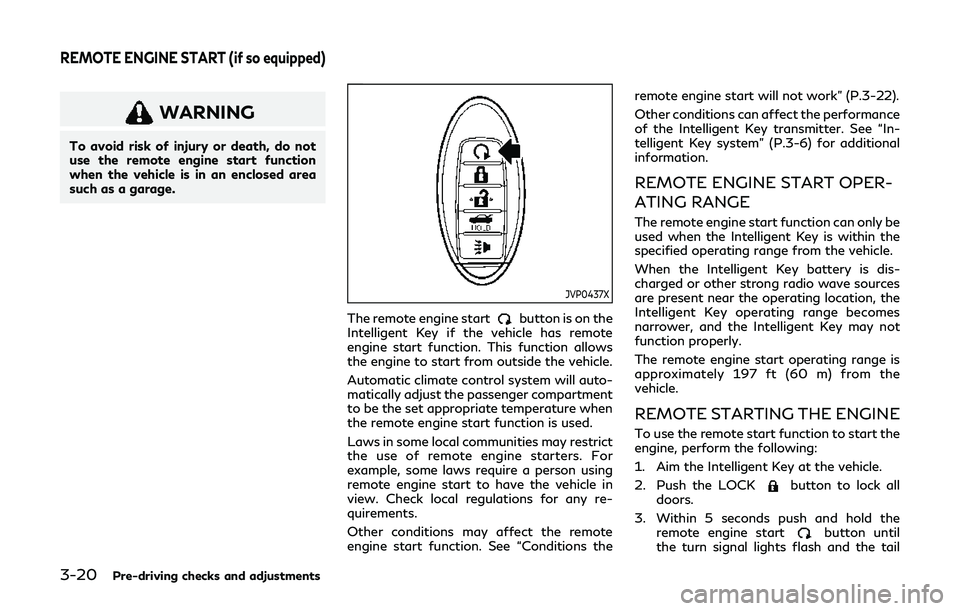
The remote engine startbutton is on the
Intelligent Key if the vehicle has remote
engine start function. This function allows
the engine to start from outside the vehicle.
Automatic climate control system will auto-
matically adjust the passenger compartment
to be the set appropriate temperature when
the remote engine start function is used.
Laws in some local communities may restrict
the use of remote engine starters. For
example, some laws require a person using
remote engine start to have the vehicle in
view. Check local regulations for any re-
quirements.
Other conditions may affect the remote
engine start function. See “Conditions the remote engine start will not work” (P.3-22).
Other conditions can affect the performance
of the Intelligent Key transmitter. See “In-
telligent Key system” (P.3-6) for additional
information.
REMOTE ENGINE START OPER-
ATING RANGE
The remote engine start function can only be
used when the Intelligent Key is within the
specified operating range from the vehicle.
When the Intelligent Key battery is dis-
charged or other strong radio wave sources
are present near the operating location, the
Intelligent Key operating range becomes
narrower, and the Intelligent Key may not
function properly.
The remote engine start operating range is
approximately 197 ft (60 m) from the
vehicle.
REMOTE STARTING THE ENGINE
To use the remote start function to start the
engine, perform the following:
1. Aim the Intelligent Key at the vehicle.
2. Push the LOCK
button to lock all
doors.
3. Within 5 seconds push and hold the remote engine start
button until
the turn signal lights flash and the tail
REMOTE ENGINE START (if so equipped)
Page 163 of 468
lights illuminate. If the vehicle is not
within view, push and hold the remote
engine start
button for at least 2
seconds.
The following events will occur when the
engine starts:
. The front parking lights will turn on and
remain on as long as the engine is
running.
. The doors will be locked and the air
conditioner system may turn on.
. The engine will continue to run for about
10 minutes. Repeat the steps to extend
the time for an additional 10 minutes.
See “Extending engine run time” (P.3-
21).
. The rear window glass and outside mirror
defroster may turn on automatically
when the outside air temperature, the
interior temperature and the engine
coolant temperature are low.
Depress and hold the brake pedal, then place
the ignition switch in the ON position before
driving. For further instructions, see “Driving
the vehicle” (P.5-16).
EXTENDING ENGINE RUN TIME
The remote engine start function can be
extended one time by performing the steps
listed in “Remote starting the engine” (P.3-
20). Run time will be calculated as follows:
. The first 10 minute run time will start
when the remote engine start function is
performed.
. The second 10 minutes will start imme-
diately when the remote engine start
function is performed. For example, if
the engine has been running for 5
minutes, and 10 minutes are added, the
engine will run for a total of 15 minutes.
. Extending engine run time will count
towards the two remote engine start
limit.
A maximum of two remote engine starts, or
a single start with an extension, are allowed
between ignition cycles.
The ignition switch must be cycled to the ON
position and then back to the OFF position
before the remote engine start procedure
can be used again.
CANCELING A REMOTE ENGINE
START
To cancel a remote engine start, perform one
of the following:
. Aim the Intelligent Key at the vehicle and
push and hold the remote engine start
button until the parking lights turn
off.
. Turn on the hazard warning flashers.
. Cycle the ignition switch ON and then
OFF.
. The extended engine run time has ex-
pired.
. The first 10 minute timer has expired.
. The engine hood has been opened.
. The shift lever is moved out of P (Park).
. The alarm sounds due to illegal entry into
the vehicle.
. The ignition switch is pushed without an
Intelligent Key in the vehicle.
. The ignition switch is pushed with an
Intelligent Key in the vehicle but the
brake pedal is not depressed.
Pre-driving checks and adjustments3-21
Page 164 of 468
3-22Pre-driving checks and adjustments
CONDITIONS THE REMOTE EN-
GINE START WILL NOT WORK
The remote engine start will not operate if
any of the following conditions are present:
.The ignition switch is placed in the ON
position.
. The hood is not securely closed.
. The hazard warning lights are on.
. The engine is still running. The engine
must be completely stopped. Wait at
least 6 seconds if the engine goes from
running to off. This is not applicable
when extending engine run time.
. The remote engine start
button is
not pushed and held for at least 2
seconds.
. The remote engine start
button is
not pushed and held within 5 seconds of
pushing LOCK
button.
. The brake pedal is depressed.
. The doors are not closed and locked.
. The trunk is open.
. The Intelligent Key warning message is
displayed in the vehicle information dis-
play.
. The alarm sounds due to illegal entry into
the vehicle.
. Two remote engine starts, or a single
remote engine start with an extension,
have already been used. .
The vehicle is not in P (Park).
. The remote engine start function has
been switched to OFF in the settings
menu on the lower display. For additional
information, see the INFINITI InTouch
TM
Owner’s Manual.
The remote engine start may display a
warning or indicator in the vehicle informa-
tion display. For an explanation of the
warning or indicator, see “Indicators for
operation” (P.2-23).
Page 165 of 468
JVP0452X
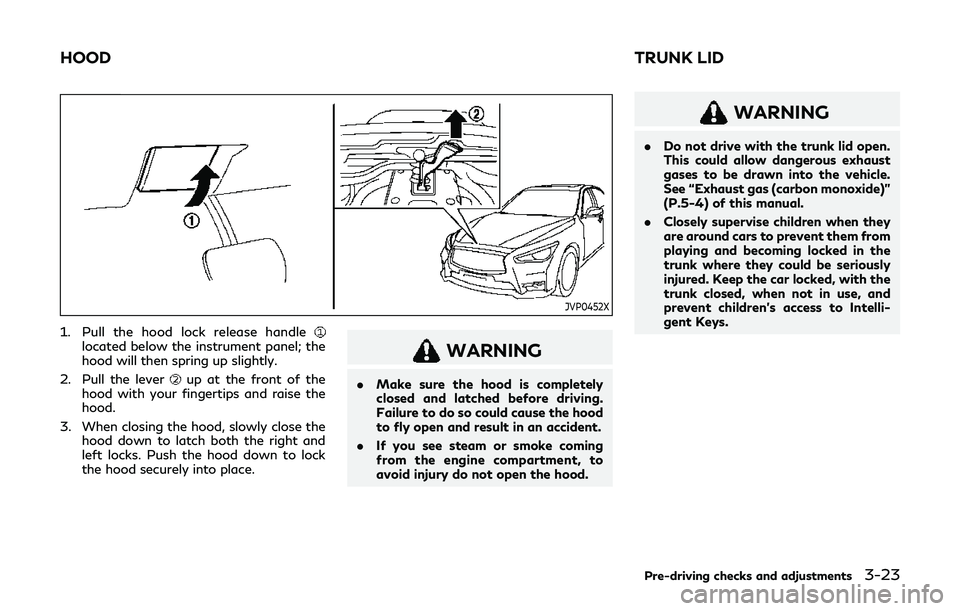
1. Pull the hood lock release handlelocated below the instrument panel; the
hood will then spring up slightly.
2. Pull the lever
up at the front of the
hood with your fingertips and raise the
hood.
3. When closing the hood, slowly close the hood down to latch both the right and
left locks. Push the hood down to lock
the hood securely into place.
WARNING
.Make sure the hood is completely
closed and latched before driving.
Failure to do so could cause the hood
to fly open and result in an accident.
. If you see steam or smoke coming
from the engine compartment, to
avoid injury do not open the hood.
WARNING
.Do not drive with the trunk lid open.
This could allow dangerous exhaust
gases to be drawn into the vehicle.
See “Exhaust gas (carbon monoxide)”
(P.5-4) of this manual.
. Closely supervise children when they
are around cars to prevent them from
playing and becoming locked in the
trunk where they could be seriously
injured. Keep the car locked, with the
trunk closed, when not in use, and
prevent children’s access to Intelli-
gent Keys.
Pre-driving checks and adjustments3-23
HOOD TRUNK LID
Page 168 of 468

3-26Pre-driving checks and adjustments
that people become locked inside the trunk.
Releasing inside the trunk
To open the trunk lid from the inside, pull the
release handleuntil the lock releases and
push up on the trunk lid. The release lever is
made of a material that glows in the dark
after a brief exposure to ambient light.
The handle is located on the back of the
trunk lid as illustrated.
JVP0461X
OPENING THE FUEL-FILLER
DOOR
To open the fuel-filler door, unlock the fuel-
filler door by using one of the following
operations, then push the upper left side of
the door
.
. Touch the one touch unlock sensor on
one of the door handles and then push
the door handle request switch while
carrying the Intelligent Key.
. Push the UNLOCK button on the Intel-
ligent Key twice.
. Insert the mechanical key into the door
lock cylinder and turn it to the rear of the
vehicle twice. .
Push the power door lock switch to the
UNLOCK position.
To lock, close the fuel-filler door securely
and lock all doors by operating the door
handle request switch, the LOCK button on
the Intelligent Key, the mechanical key or the
power door lock switch.
FUEL-FILLER CAP
WARNING
. Gasoline is extremely flammable and
highly explosive under certain condi-
tions. You could be burned or ser-
iously injured if it is misused or
mishandled. Always stop engine and
do not smoke or allow open flames or
sparks near the vehicle when refuel-
ing.
. Do not attempt to top off the fuel
tank after the fuel pump nozzle shuts
off automatically. Continued refuel-
ing may cause fuel overflow, resulting
in fuel spray and possibly a fire.
. Use only an original equipment type
fuel-filler cap as a replacement. It has
a built-in safety valve needed for
proper operation of the fuel system
and emission control system. An in-
correct cap can result in a serious
FUEL-FILLER DOOR
Page 169 of 468

malfunction and possible injury. It
could also cause the Malfunction
Indicator Light (MIL) to come on.
. Never pour fuel into the throttle body
to attempt to start your vehicle.
. Do not fill a portable fuel container in
the vehicle or trailer. Static electricity
can cause an explosion of flammable
liquid, vapor or gas in any vehicle or
trailer. To reduce the risk of serious
injury or death when filling portable
fuel containers:
— Always place the container on the ground when filling.
— Do not use electronic devices when filling.
— Keep the pump nozzle in contact with the container while you are
filling it.
— Use only approved portable fuel containers for flammable liquid.
CAUTION
. If fuel is spilled on the vehicle body,
flush it away with water to avoid
paint damage. .
Insert the cap straight into the fuel-
filler tube, then tighten the fuel-filler
cap until a single click is heard. Failure
to tighten the fuel-filler cap properly
may cause the
Malfunction In-
dicator Light (MIL) to illuminate. If
the
light illuminates because the
fuel-filler cap is loose or missing,
tighten or install the cap and con-
tinue to drive the vehicle. The
light should turn off after a few
driving trips. If thelight does
not turn off after a few driving trips,
have the vehicle inspected. It is
recommended you visit an INFINITI
retailer for this service.
. The Loose Fuel Cap warning will
appear if the fuel-filler cap is not
properly tightened. It may take a few
driving trips for the warning to be
displayed. Failure to tighten the fuel-
filler cap properly after the Loose
Fuel Cap warning appears may cause
the
Malfunction Indicator Light
(MIL) to illuminate.
. For additional information, see “Mal-
function Indicator Light (MIL)” (P.2-
19).
JVP0454X
To remove the fuel-filler cap:
1. Turn the fuel-filler cap counterclockwise
to remove.
2. Put the fuel-filler cap on the cap holder
while refueling.
To install the fuel-filler cap:
1. Insert the fuel-filler cap straight into the fuel-filler tube.
2. Turn the fuel-filler cap clockwise until a single click is heard.
Pre-driving checks and adjustments3-27
Page 172 of 468
3-30Pre-driving checks and adjustments
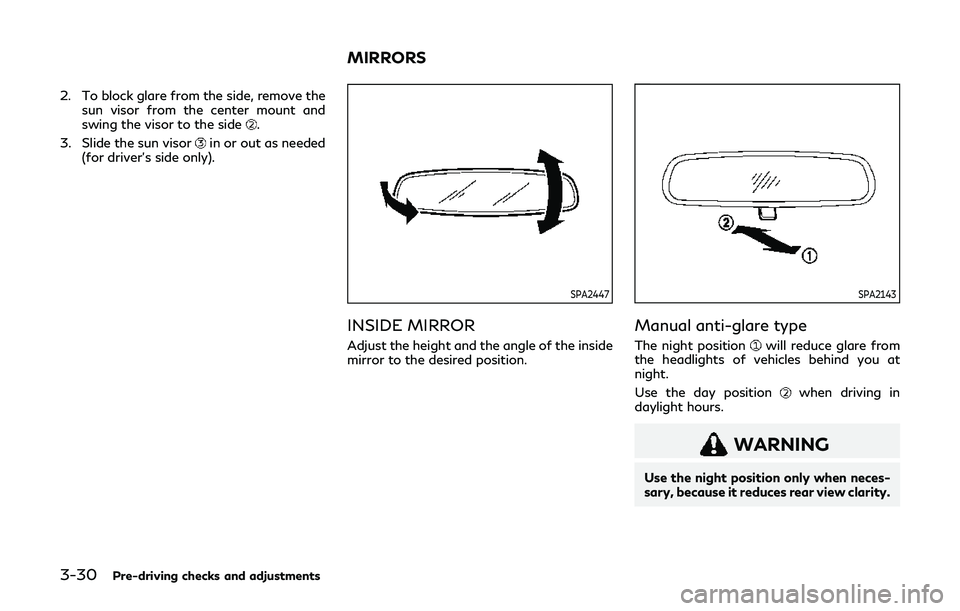
2. To block glare from the side, remove thesun visor from the center mount and
swing the visor to the side
.
3. Slide the sun visor
in or out as needed
(for driver’s side only).
SPA2447
INSIDE MIRROR
Adjust the height and the angle of the inside
mirror to the desired position.
SPA2143
Manual anti-glare type
The night positionwill reduce glare from
the headlights of vehicles behind you at
night.
Use the day position
when driving in
daylight hours.
WARNING
Use the night position only when neces-
sary, because it reduces rear view clarity.
MIRRORS
Page 173 of 468

SPA2422A
Type A (if so equipped)
SPA2450
Type B (if so equipped)
Automatic anti-glare type
The inside mirror is designed so that it
automatically changes reflection according
to the intensity of the headlights of the
following vehicle.
The anti-glare system will be automatically
turned on when the ignition switch is placed
in the ON position.
The anti-glare system also operates for the
outside mirrors (if so equipped).
When the anti-glare system is turned on, the
indicator light
will illuminate and excessive
glare from the headlights of the vehicle
behind you will be reduced.
Type A (if so equipped): Push the
switchto make the inside mirror operate normally
and the indicator light will turn off. Push the
switchagain to turn the system on.
Type B (if so equipped): Push the “*” switch
to make the inside mirror operate nor-
mally. The indicator light will turn off. Push
the “I” switch
to turn the system on.
Do not allow any object to cover the sensors
or apply glass cleaner on them. Doing so
will reduce the sensitivity of the sensor,
resulting in improper operation.
For the compass (if so equipped) operation,
see “Compass” (P.2-9).
For the HomeLink
®Universal Transceiver (if so equipped) operation, see “HomeLink
®
Universal Transceiver” (P.2-59).
OUTSIDE MIRRORS
WARNING
Objects viewed in the outside mirror on
the passenger side are closer than they
appear. Be careful when moving to the
right. Using only this mirror could cause
an accident. Use the inside mirror or
glance over your shoulder to properly
judge distances to other objects.
Pre-driving checks and adjustments3-31
Page 175 of 468
switch.
4. The outside mirror surface moves down- ward.
When one of the following conditions has
occurred, the outside mirror surface will
return to its original position.
. The shift lever is moved to any position
other than R (Reverse).
. The outside mirror control switch is set to
the center position.
. The ignition switch is pushed to the OFF
position.
Automatic anti-glare (if so
equipped)
The outside mirrors are designed so that
they automatically change reflection ac-
cording to the intensity of the headlights of
the vehicle following you.
The anti-glare system will be automatically
turned on when the ignition switch is placed
in the ON position.
SIC3869
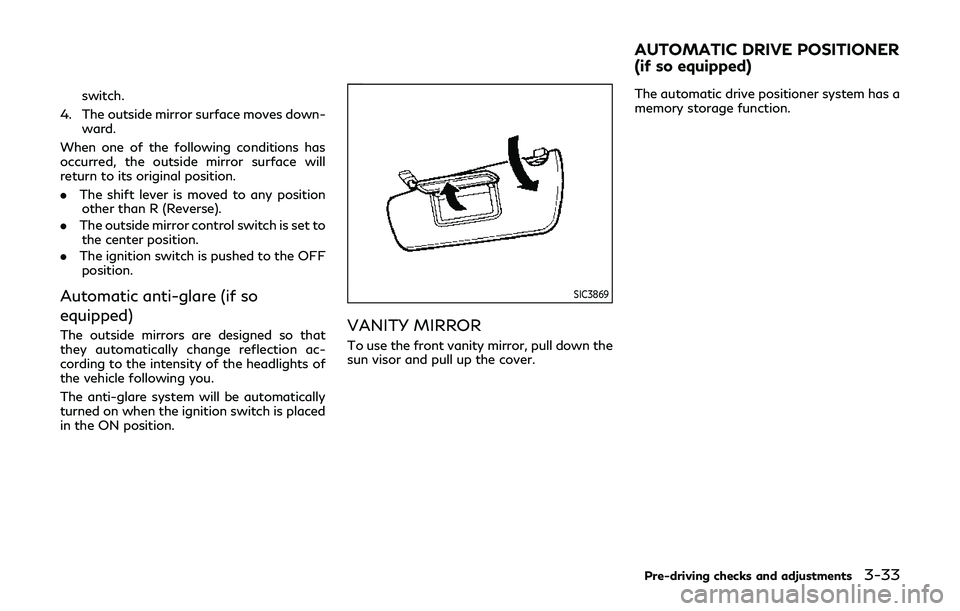
VANITY MIRROR
To use the front vanity mirror, pull down the
sun visor and pull up the cover. The automatic drive positioner system has a
memory storage function.
Pre-driving checks and adjustments3-33
AUTOMATIC DRIVE POSITIONER
(if so equipped)
Page 176 of 468
3-34Pre-driving checks and adjustments
JVP0462X
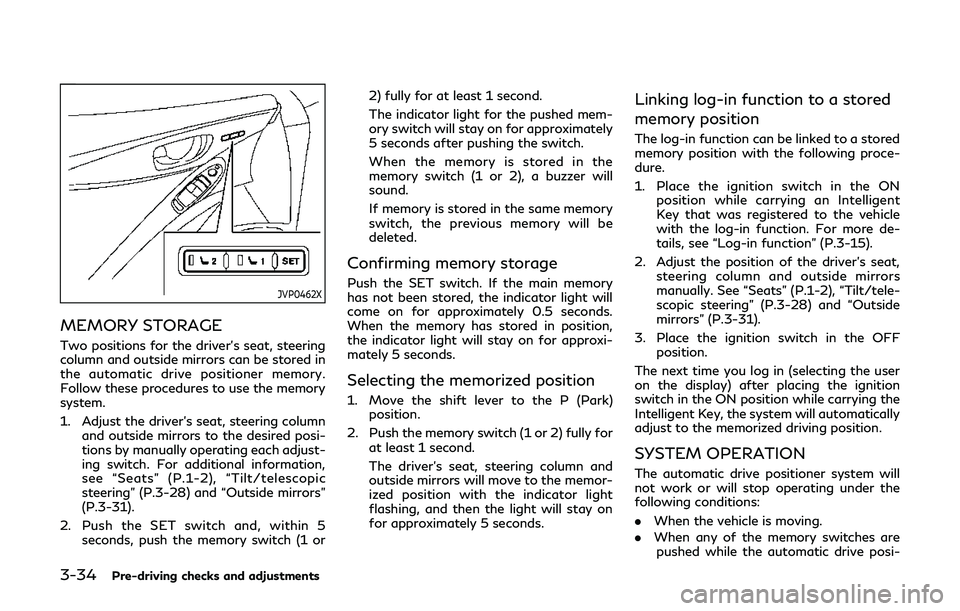
MEMORY STORAGE
Two positions for the driver’s seat, steering
column and outside mirrors can be stored in
the automatic drive positioner memory.
Follow these procedures to use the memory
system.
1. Adjust the driver’s seat, steering columnand outside mirrors to the desired posi-
tions by manually operating each adjust-
ing switch. For additional information,
see “Seats” (P.1-2), “Tilt/telescopic
steering” (P.3-28) and “Outside mirrors”
(P.3-31).
2. Push the SET switch and, within 5 seconds, push the memory switch (1 or 2) fully for at least 1 second.
The indicator light for the pushed mem-
ory switch will stay on for approximately
5 seconds after pushing the switch.
When the memory is stored in the
memory switch (1 or 2), a buzzer will
sound.
If memory is stored in the same memory
switch, the previous memory will be
deleted.
Confirming memory storage
Push the SET switch. If the main memory
has not been stored, the indicator light will
come on for approximately 0.5 seconds.
When the memory has stored in position,
the indicator light will stay on for approxi-
mately 5 seconds.
Selecting the memorized position
1. Move the shift lever to the P (Park)
position.
2. Push the memory switch (1 or 2) fully for at least 1 second.
The driver’s seat, steering column and
outside mirrors will move to the memor-
ized position with the indicator light
flashing, and then the light will stay on
for approximately 5 seconds.
Linking log-in function to a stored
memory position
The log-in function can be linked to a stored
memory position with the following proce-
dure.
1. Place the ignition switch in the ONposition while carrying an Intelligent
Key that was registered to the vehicle
with the log-in function. For more de-
tails, see “Log-in function” (P.3-15).
2. Adjust the position of the driver’s seat, steering column and outside mirrors
manually. See “Seats” (P.1-2), “Tilt/tele-
scopic steering” (P.3-28) and “Outside
mirrors” (P.3-31).
3. Place the ignition switch in the OFF position.
The next time you log in (selecting the user
on the display) after placing the ignition
switch in the ON position while carrying the
Intelligent Key, the system will automatically
adjust to the memorized driving position.
SYSTEM OPERATION
The automatic drive positioner system will
not work or will stop operating under the
following conditions:
. When the vehicle is moving.
. When any of the memory switches are
pushed while the automatic drive posi-