warning light INFINITI Q60 2019 Manual Online
[x] Cancel search | Manufacturer: INFINITI, Model Year: 2019, Model line: Q60, Model: INFINITI Q60 2019Pages: 468, PDF Size: 2.18 MB
Page 292 of 468

5-110Starting and driving
cast in a shadow, making it diffi-
cult to see.
— A sudden change in brightness occurs. (For example, when the
vehicle enters or exits a tunnel or a
shaded area or lightning flashes.)
— The poor contrast of a person to the background, such as having
clothing color or pattern which is
similar to the background.
— The pedestrian’s profile is par- tially obscured or unidentifiable
due to the pedestrian transport-
ing luggage, wearing bulky or very
loose-fitting clothing or acces-
sories.
. The system performance may de-
grade in the following conditions:
— The vehicle is driven on a slippery road.
— The vehicle is driven on a slope.
— Excessively heavy baggage is loaded in the rear seat or the
trunk of your vehicle.
. The system is designed to automati-
cally check the sensor (radar and
camera)’s functionality, within cer-
tain limitations. The system may not
detect blockage of sensor areas cov- ered by ice, snow or stickers, for
example. In these cases, the system
may not be able to warn the driver
properly. Be sure that you check,
clean and clear sensor areas regularly.
. In some road and traffic conditions,
the FEB with pedestrian detection
system may unexpectedly apply par-
tial braking. When acceleration is
necessary, depress the accelerator
pedal to override the system.
. Excessive noise will interfere with the
warning chime sound, and the chime
may not be heard.
Page 294 of 468

5-112Starting and driving
JVS0848X
FEB system warning light (on the
instrument panel)
Driver assist system forward indicator
(on the vehicle information display)
SYSTEM TEMPORARILY UNA-
VAILABLE
Condition A
In the following conditions, the FEB system
warning light (orange)and the driver
assist system forward indicator (orange)
blinks and the system will be turned off
automatically.
. The radar sensor picks up interference
from another radar source.
. The camera area of windshield is misted
or frozen.
. Strong light is shining from the front.
. The cabin temperature is over approxi-
mately 104°F (40°C) in direct sunlight.
. The camera area of windshield glass is
continuously covered with dirt, etc.
Action to take:
When the above conditions no longer exist,
the FEB with pedestrian detection system
will resume automatically.
NOTE:
When the inside of the windshield on
camera area is misted or frozen, it will take
a period of time to remove it after air
conditioner turns on. If dirt appears on this
area, it is recommended you visit an
INFINITI retailer.
Page 295 of 468

Condition B
Under the following conditions, making it
impossible to detect a vehicle ahead, the
FEB with pedestrian detection system is
automatically turned off.
The FEB system warning light (orange)
and the driver assist system forward indi-
cator (orange)will illuminate and the
“front radar obstruction” warning message
will appear in the vehicle information display.
. When the sensor area of the front
bumper is covered with dirt or is ob-
structed
Action to take:
If the FEB system warning light (orange)
comes on, stop the vehicle in a safe place,
place the shift lever in the P (Park) position
and turn the engine off. Clean the radar
cover on the front grille with a soft cloth, and
restart the engine. If the FEB system warn-
ing light continues to illuminate, have the
FEB with pedestrian detection system
checked. It is recommended you visit an
INFINITI retailer for this service.
. When driving on roads with limited road
structures or buildings (for example, long
bridges, deserts, snow fields, driving next
to long walls) Action to take:
When the above conditions no longer exist,
the FEB with pedestrian detection system
will resume automatically.
Condition C
When the accelerator pedal actuator detects
that the internal motor temperature is high,
the FEB with pedestrian detection system is
automatically turned off. The FEB system
warning light (orange)
and the driver
assist system forward indicator (orange)
will illuminate and the “Unavailable High
Accelerator Temperature” warning message
will appear in the vehicle information display.
Action to take:
When the above conditions no longer exist,
the FEB with pedestrian detection system
will resume automatically.
SYSTEM MALFUNCTION
If the FEB with pedestrian detection system
malfunctions, it will be turned off automa-
tically, a chime will sound, the FEB system
warning light (orange)
and the driver
assist system forward indicator (orange)
will illuminate and the system “malfunction”
warning message will appear in the vehicle
information display. Action to take:
If the FEB system warning light (orange)
comes on, stop the vehicle in a safe location
and place the shift lever in the P (Park)
position. Turn the engine off and restart the
engine. If the warning light continues to
illuminate, have the FEB with pedestrian
detection system checked. It is recom-
mended you visit an INFINITI retailer for
this service.
NOTE:
If the FEB with pedestrian detection system
stops working, the PFCW system will also
stop working.
Starting and driving5-113
Page 296 of 468

5-114Starting and driving
JVS0865X
SYSTEM MAINTENANCE
The radar sensoris located behind the
grille of the front bumper. The camerais
located on the upper side of the windshield.
To keep the FEB with pedestrian detection
system operating properly, be sure to ob-
serve the following:
. Always keep the sensor area of the front
grille and windshield clean.
. Do not strike or damage the areas around
the sensors (ex. grille, windshield).
. Do not cover or attach stickers, or install
any accessory near the sensors. This
could block sensor signals, and/or cause
failure or malfunction. .
Do not attach metallic objects near the
radar sensor area (brush guard, etc.).
This could cause failure or malfunction.
. Do not place reflective materials, such as
white paper or a mirror, on the instru-
ment panel. The reflection of sunlight
may adversely affect the camera unit’s
detection capability.
. Do not alter, remove or paint the front
bumper. It is recommended you contact
an INFINITI retailer before customizing
or restoring the front grille.
FCC Notice:
For USA:
This device complies with Part 15 of the
FCC Rules. Operation is subject to the
following two conditions:
1. This device may not cause harmful
interference, and
2. This device must accept any interfer-
ence received, including interference
that may cause undesired operation.
FCC Warning
Changes or modification not expressly ap-
proved by the party responsible for com-
pliance could void the user’s authority to
operate the equipment. For Canada:
This device complies with Industry Canada
licence-exempt RSS standard(s). Operation
is subject to the following two conditions:
1.
This device may not cause interference,
and
2. This device must accept any interfer-
ence, including interference that may
cause undesired operation of the device.
Page 298 of 468
5-116Starting and driving
JVS0849X
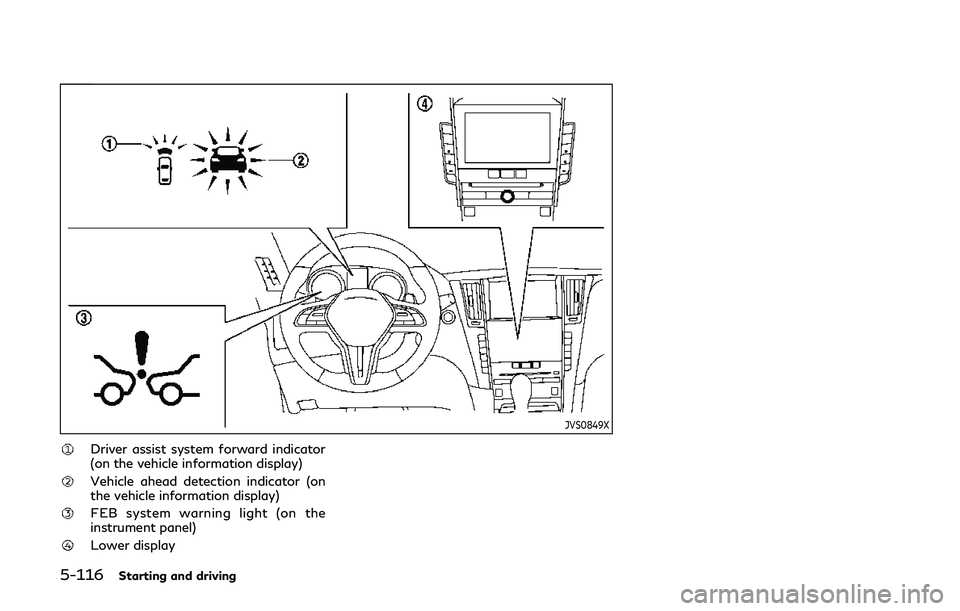
Driver assist system forward indicator
(on the vehicle information display)
Vehicle ahead detection indicator (on
the vehicle information display)
FEB system warning light (on the
instrument panel)
Lower display
Page 300 of 468
5-118Starting and driving
JVS0847X
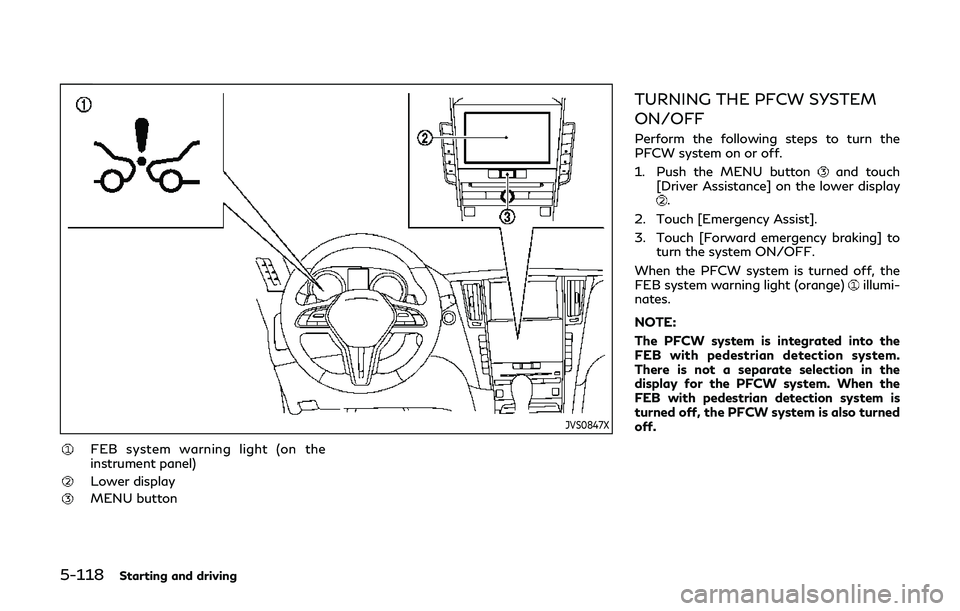
FEB system warning light (on the
instrument panel)
Lower display
MENU button
TURNING THE PFCW SYSTEM
ON/OFF
Perform the following steps to turn the
PFCW system on or off.
1. Push the MENU button
and touch
[Driver Assistance] on the lower display
.
2. Touch [Emergency Assist].
3. Touch [Forward emergency braking] to turn the system ON/OFF.
When the PFCW system is turned off, the
FEB system warning light (orange)
illumi-
nates.
NOTE:
The PFCW system is integrated into the
FEB with pedestrian detection system.
There is not a separate selection in the
display for the PFCW system. When the
FEB with pedestrian detection system is
turned off, the PFCW system is also turned
off.
Page 304 of 468

5-122Starting and driving
JVS0848X
FEB system warning light (on the
instrument panel)
Driver assist system forward indicator
(on the vehicle information display)
SYSTEM TEMPORARILY UNA-
VAILABLE
Condition A
When the radar sensor picks up interference
from another radar source, making it im-
possible to detect a vehicle ahead, the
PFCW system is automatically turned off.
The FEB system warning light (orange)
and the driver assist system forward indi-
cator (orange)will illuminate.
Action to take:
When the above conditions no longer exist,
the PFCW system will resume automatically.
Condition B
Under the following conditions, making it
impossible to detect a vehicle ahead, the
PFCW system is automatically turned off.
The FEB system warning light (orange)
and the driver assist system forward indi-
cator (orange)will illuminate and the
“front radar obstruction” warning message
will appear in the vehicle information display.
. When the sensor area of the front
bumper is covered with dirt or is ob-
structed
Page 305 of 468

Action to take:
If the FEB system warning light (orange)
comes on, stop the vehicle in a safe place,
place the shift lever in the P (Park) position
and turn the engine off. Clean the radar
cover on the front grille with a soft cloth, and
restart the engine. If the FEB system warn-
ing light (orange)
continues to illuminate,
have the PFCW system checked. It is
recommended you visit an INFINITI retailer
for this service.
. When driving on roads with limited road
structures or buildings (for example, long
bridges, deserts, snow fields, driving next
to long walls)
Action to take:
When the above conditions no longer exist,
the PFCW system will resume automatically.
NOTE:
If the FEB with pedestrian detection system
stops working, the PFCW system will also
stop working.
SYSTEM MALFUNCTION
If the PFCW malfunctions, it will be turned
off automatically, a chime will sound, the
FEB system warning light (orange)
and
the driver assist system forward indicator
(orange)
will illuminate, and the system
“malfunction” message will appear in the
vehicle information display.
Action to take:
If the FEB system warning light (orange)
comes on, stop the vehicle in a safe location,
turn the engine off and restart the engine. If
the warning light continues to illuminate,
have the PFCW system checked. It is
recommended you visit an INFINITI retailer
for this service.
JVS0869X
SYSTEM MAINTENANCE
The sensoris located behind the grille of
the front bumper.
To keep the system operating properly, be
sure to observe the following:
. Always keep the sensor area of the front
grille clean.
. Do not strike or damage the areas around
the sensor.
. Do not cover or attach stickers or similar
objects on the front bumper near the
sensor area. This could cause failure or
malfunction.
. Do not attach metallic objects near the
sensor area (brush guard, etc.). This
Starting and driving5-123
Page 306 of 468
5-124Starting and driving
could cause failure or malfunction.
. Do not alter, remove or paint the front
bumper. It is recommended you contact
an INFINITI retailer before customizing
or restoring the front bumper.
FCC Notice:
For USA:
This device complies with Part 15 of the
FCC Rules. Operation is subject to the
following two conditions:
1. This device may not cause harmful
interference, and
2. This device must accept any interfer-
ence received, including interference
that may cause undesired operation.
FCC Warning
Changes or modification not expressly ap-
proved by the party responsible for com-
pliance could void the user’s authority to
operate the equipment.
For Canada:
This device complies with Industry Canada
licence-exempt RSS standard(s). Operation
is subject to the following two conditions:
1. This device may not cause interference,
and
2. This device must accept any interfer-
ence, including interference that may
cause undesired operation of the device.
CAUTION
During the first 1,200 miles (2,000 km),
follow these recommendations to obtain
maximum engine performance and en-
sure the future reliability and economy
of your new vehicle.
Failure to follow these recommendations
may result in shortened engine life and
reduced engine performance.
. Avoid driving for long periods at constant
speed, either fast or slow. Do not run the
engine over 4,000 rpm.
. Do not accelerate at full throttle in any
gear.
. Avoid quick starts.
. Avoid hard braking as much as possible. Follow these easy-to-use Fuel Efficient
Driving Tips to help you achieve the most
fuel economy from your vehicle.
1. Use smooth accelerator and brake pedal
application.
.Avoid rapid starts and stops..Use smooth, gentle accelerator andbrake application whenever possible.
.Maintain constant speed while com-muting and coast whenever possible.
2. Maintain constant speed.
.Look ahead to try and anticipate and minimize stops.
.Synchronizing your speed with traffic
lights allows you to reduce your
number of stops.
.Maintaining a steady speed can mini-mize red light stops and improve fuel
efficiency.
3. Use air conditioning (A/C) at higher vehicle speeds.
.Below 40 MPH (64 km/h), it is moreefficient to open windows to cool the
vehicle due to reduced engine load.
.Above 40 MPH (64 km/h), it is moreefficient to use A/C to cool the
vehicle due to increased aerodynamic
drag.
.Recirculating the cool air in the cabinwhen the A/C is on reduces cooling
load.
BREAK-IN SCHEDULE FUEL EFFICIENT DRIVING TIPS
Page 311 of 468

moves.
4. Push the ignition switch to the OFF position.ELECTRIC POWER STEERING
TYPE
WARNING
.If the engine is not running or is
turned off while driving, the power
assist for the steering will not work.
Steering will be harder to operate.
. When the power steering warning
light illuminates with the engine run-
ning, the power assist for the steer-
ing will cease operation. You will still
have control of the vehicle but the
steering will be harder to operate.
The electric power steering is designed to
provide power assist while driving to oper-
ate the steering wheel with light force.
When the steering wheel is operated re-
peatedly or continuously while parking or
driving at a very low speed, the power assist
for the steering wheel will be reduced. This is
to prevent overheating of the electric power
steering and protect it from getting da-
maged. While the power assist is reduced,
steering wheel operation will become heavy.
When the temperature of the electric power
steering goes down, the power assist level
will return to normal. Avoid repeating such steering wheel operations that could cause
the electric power steering to overheat.
You may hear a sound when the steering
wheel is operated quickly. However, this is
not a malfunction.
If the power steering warning light illumi-
nates while the engine is running, it may
indicate the electric power steering is not
functioning properly and may need servicing.
It is recommended you have the electric
power steering checked by an INFINITI
retailer. (See “Power steering warning light”
(P.2-16).)
When the power steering warning light
illuminates with the engine running, the
power assist for the steering will cease
operation. You will still have control of the
vehicle. However, greater steering effort is
needed, especially in sharp turns and at low
speeds.
HYDRAULIC PUMP ELECTRIC
POWER STEERING TYPE
WARNING
When the power steering warning light
illuminates with the engine running, the
power assist for the steering will cease
operation. You will still have control of
Starting and driving5-129
POWER STEERING